light Lexus GS350 2017 Repair Manual
[x] Cancel search | Manufacturer: LEXUS, Model Year: 2017, Model line: GS350, Model: Lexus GS350 2017Pages: 676, PDF Size: 67.73 MB
Page 256 of 676
2564-2. Driving procedures
GS350_200t_GS F_OM_OM30F83E_(EE)
Parking brake
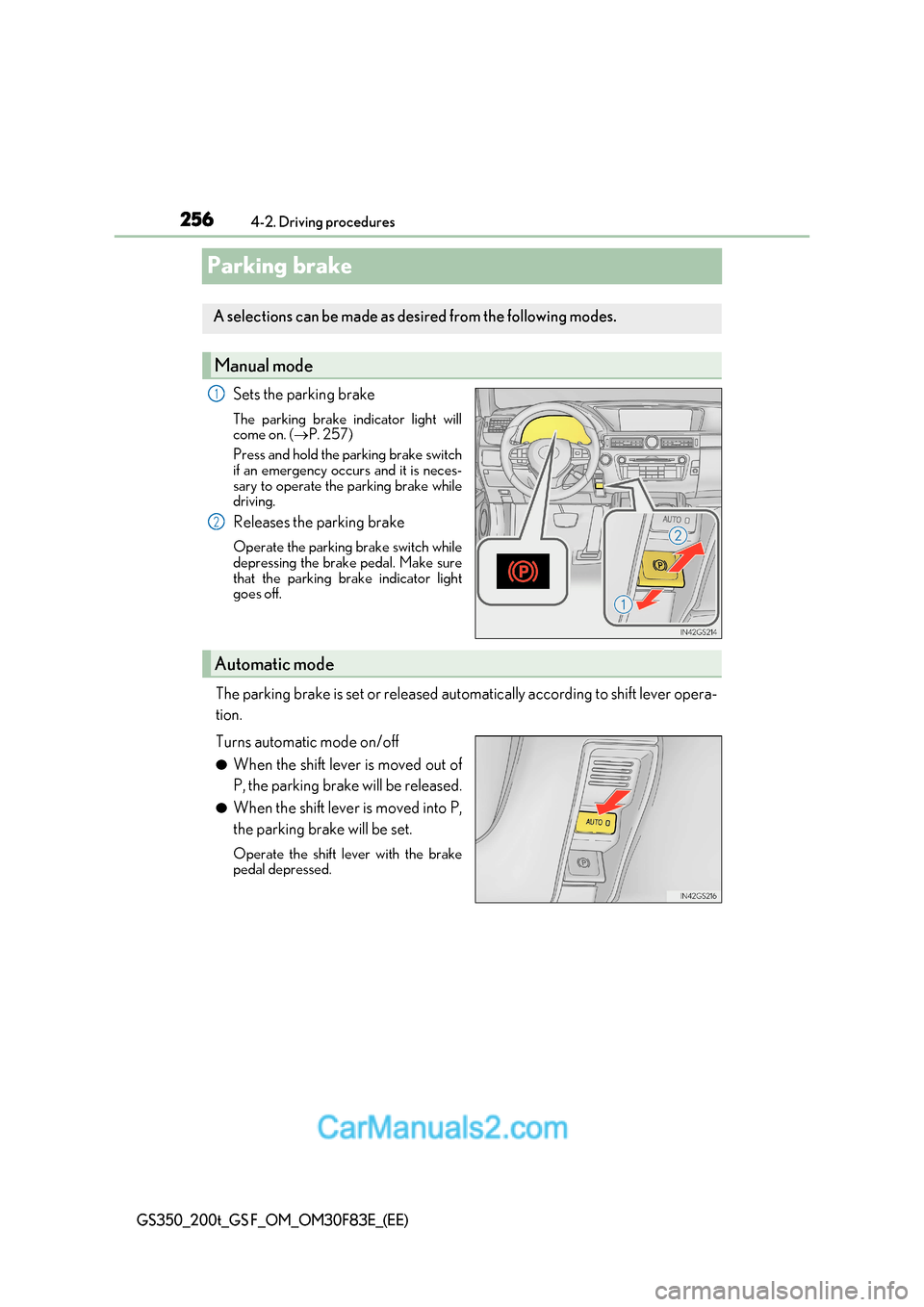
Sets the parking brake
The parking brake indicator light will
come on. (P. 257)
Press and hold the parking brake switch
if an emergency occurs and it is neces-
sary to operate the parking brake while
driving.
Releases the parking brake
Operate the parking brake switch while
depressing the brake pedal. Make sure
that the parking brake indicator light
goes off.
The parking brake is set or released automatically according to shift lever oper a-
tion.
Turns automatic mode on/off ● When the shift lever is moved out of
P, the parking brake will be released.
● When the shift lever is moved into P,
the parking brake will be set.
Operate the shift lever with the brake
pedal depressed.
A selections can be made as desired from the following modes.
Manual mode
1
2
Automatic mode
Page 257 of 676
257
4-2. Driving procedures
4
Driving
GS350_200t_GS F_OM_OM30F83E_(EE)
■Parking brake operation
●When the engine switch is not in IGNI TION ON mode, the parking brake cannot be
released using the parking brake switch.
●When the engine switch is not in IGNITION ON mode, automatic mode (automatic
brake setting and releasing) is not available.
●If the parking brake is operated repeatedly over a short period of time, the system may
restrict operation to prevent overheating. If this happens, refrain from operating the
parking brake. Normal operation wi ll return after about 1 minute.
●Vehicles with towing package: In situations such as when parking while towing a trailer,
the maximum amount of braking force can be used by pressing the parking brake
switch with the parking brake already set.
●Vehicles without towing package: In situations such as when parking on a steep slope *,
the maximum amount of braking force can be used by pressing the parking brake
switch with the parking brake already set.
* : Use wheel chocks when parking on a steep slope.
■Parking brake operation sound
When the parking brake operates, a motor sound (whirring sound) may be heard. This
does not indicate a malfunction.
■Parking brake indicator light
●Depending on the engine switch mode, the parking brake indicator light will come on
and stay on as described below:
IGNITION ON mode: Comes on until the parking brake is released.
Not in IGNITION ON mode: Stays on for approximately 15 seconds.
●When the engine switch is turned off with the parking brake set, the parking brake indi-
cator light will stay on for about 15 seco nds. This does not indicate a malfunction.
■When there is a malfunction in the system
Warning lights and/or warning message will turn on or flash. ( P. 520, 524)
Depending on the condition, the park ing brake indicator light may flash.
■Parking the vehicle P. 222
■Parking brake engaged warning buzzer P. 528
■Usage in winter time P. 383
Page 259 of 676
259
4
4-2. Driving procedures
Driving
GS350_200t_GS F_OM_OM30F83E_(EE)
Brake Hold (GS350/GS200t)
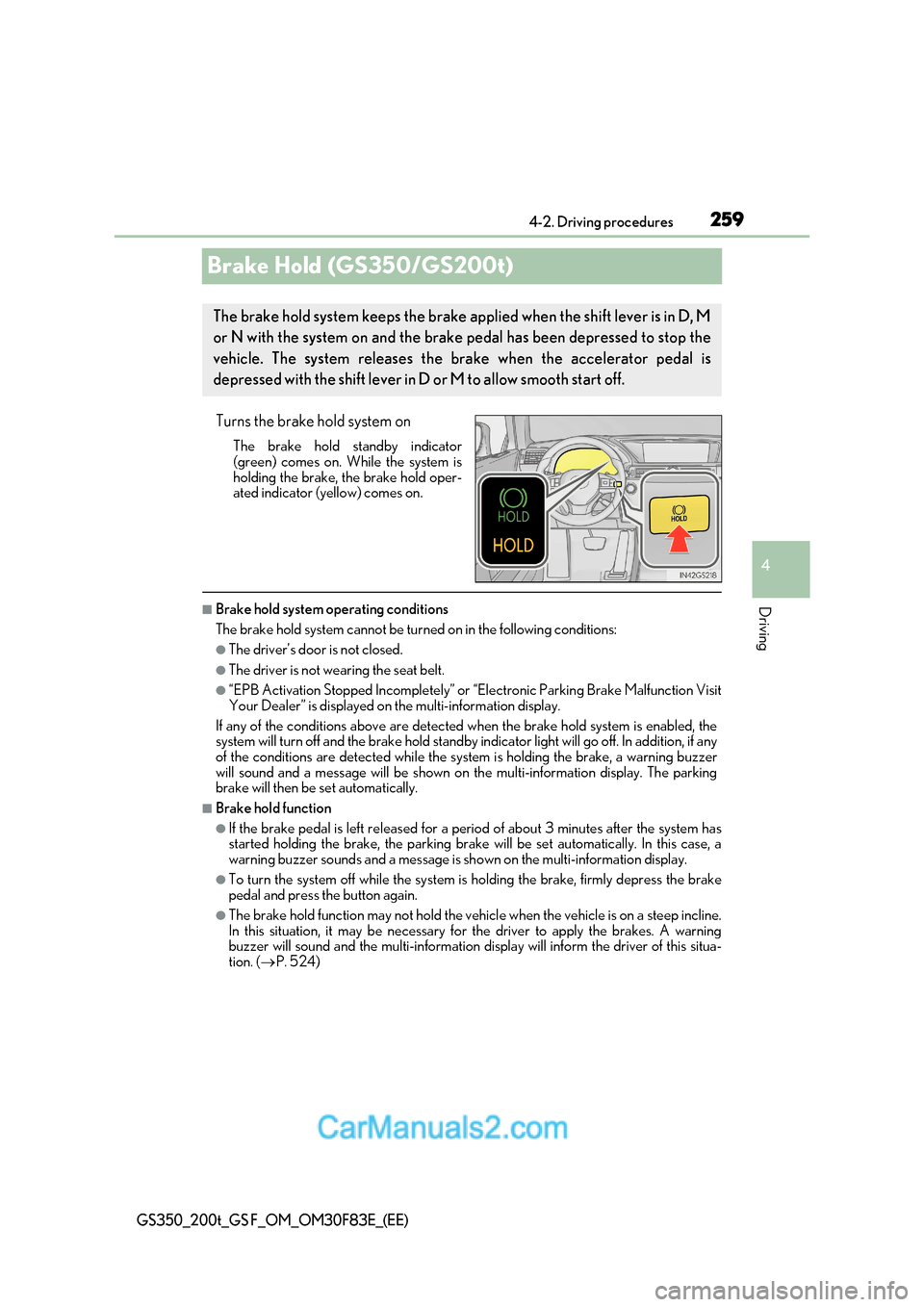
Turns the brake hold system onThe brake hold standby indicator
(green) comes on. While the system is
holding the brake, the brake hold oper-
ated indicator (yellow) comes on.
■Brake hold system operating conditions
The brake hold system cannot be turn ed on in the following conditions:
●The driver’s door is not closed.
●The driver is not wearing the seat belt.
●“EPB Activation Stopped Incompletely” or “Electronic Parking Brake Malfunction Visit
Your Dealer” is displayed on the multi-information display.
If any of the conditions above are detected when the brake hold system is enabled, the
system will turn off and the brake hold standby indicator light will go off. In addition, if any
of the conditions are detected while the sy stem is holding the brake, a warning buzzer
will sound and a message will be shown on th e multi-information display. The parking
brake will then be set automatically.
■Brake hold function
●If the brake pedal is left released for a pe riod of about 3 minutes after the system has
started holding the brake, th e parking brake will be set automatically. In this case, a
warning buzzer sounds and a message is shown on the multi-information display.
●To turn the system off while the system is holding the brake, firmly depress the brake
pedal and press the button again.
●The brake hold function may not hold the vehicle when the vehicle is on a steep incline.
In this situation, it may be necessary for the driver to apply the brakes. A warning
buzzer will sound and the multi-information disp lay will inform the driver of this situa-
tion. ( P. 524)
The brake hold system keeps the brake a pplied when the shift lever is in D, M
or N with the system on and the brake pedal has been depressed to stop the
vehicle. The system releases the brake when the accelerator pedal is
depressed with the shift lever in D or M to allow smooth start off.
Page 260 of 676
2604-2. Driving procedures
GS350_200t_GS F_OM_OM30F83E_(EE)
■When the parking brake is set automatically while the system is holding the brakes
The parking brake will not be released auto matically. Perform one of the following proce-
dures to release the parking brake and conf irm that the parking brake indicator light
turns off. ( P. 256)
●With the brake pedal depressed, operate the parking brake switch.
●Fasten your seat belt, check that the shift leve r is in either D or R and slowly depress the
accelerator pedal.
■Warning message and buzzers
Warning messages and buzzers are used to indicate a system malfunction or to inform
the driver of the need for caution. ( P. 524)
WARNING
■When the vehicle is on a steep incline
When using the brake hold system on a steep incline exercise caution. The brake hold
function may not hold the vehicle in such a situation.
■When stopped on a slippery road
The system cannot stop the vehicle when the gripping ability of the tires has been
exceeded. Do not use the system when stopped on a slippery road.
NOTICE
■When parking the vehicle
The brake hold system is not designed fo r use when parking the vehicle for a long
period of time. Turning the en gine switch off while the system is holding the brake may
release the brake, which would cause the ve hicle to move. When operating the engine
switch, depress the brake pedal, set the pa rking brake and shift the shift lever to P.
Page 262 of 676
2624-3. Operating the lights and wipers
GS350_200t_GS F_OM_OM30F83E_(EE)
Headlight switch
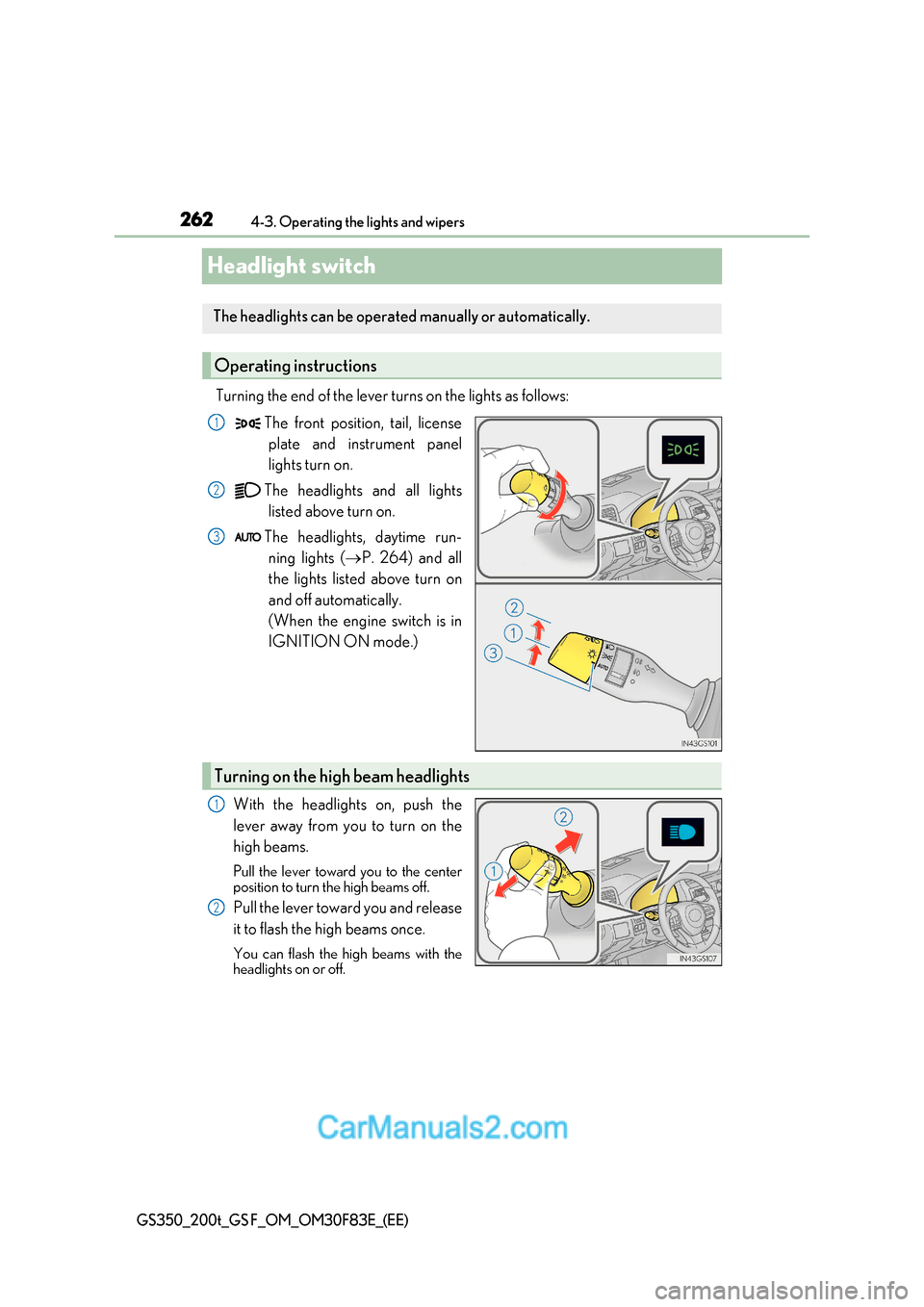
Turning the end of the lever turns on the lights as follows:The front position, tail, licenseplate and instrument panel
lights turn on.
The headlights and all lights listed above turn on.
The headlights, daytime run- ning lights ( P. 264) and all
the lights listed above turn on
and off automatically.
(When the engine switch is in
IGNITION ON mode.)
With the headlights on, push the
lever away from you to turn on the
high beams.
Pull the lever toward you to the center
position to turn the high beams off.
Pull the lever toward you and release
it to flash the high beams once.
You can flash the high beams with the
headlights on or off.
The headlights can be operated manually or automatically.
Operating instructions
1
2
3
Turning on the high beam headlights
1
2
Page 263 of 676
263
4-3. Operating the lights and wipers
4
Driving
GS350_200t_GS F_OM_OM30F83E_(EE)
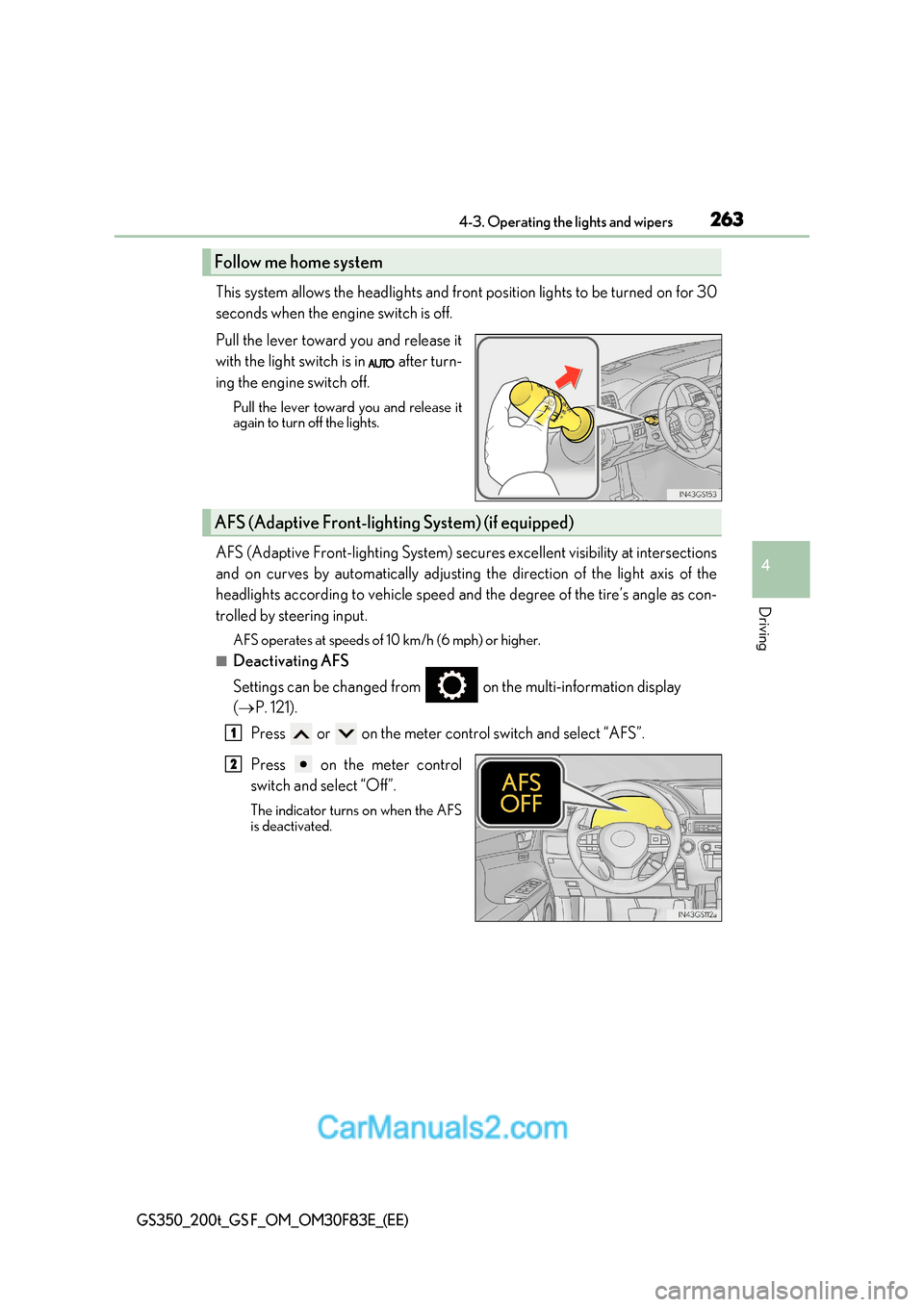
This system allows the headlights and front position lights to be turned on for 30
seconds when the engine switch is off.
Pull the lever toward you and release it
with the light switch is in after turn-
ing the engine switch off.
Pull the lever toward you and release it
again to turn off the lights.
AFS (Adaptive Front-lighting System) secures excellent visibility at intersections
and on curves by automatically adjusting the direction of the light axis of th e
headlights according to vehicle speed and the degree of the tire’s angle as con-
trolled by steering input.
AFS operates at speeds of 10 km/h (6 mph) or higher.
■Deactivating AFS
Settings can be changed from on the multi-information display ( P. 121).
Press or on the meter control switch and select “AFS”.
Press on the meter control
switch and select “Off”.
The indicator turns on when the AFS
is deactivated.
Follow me home system
AFS (Adaptive Front-lighti ng System) (if equipped)
1
2
Page 264 of 676
2644-3. Operating the lights and wipers
GS350_200t_GS F_OM_OM30F83E_(EE)
■Daytime running light system
To make your vehicle more visible to other drivers during daytime driving, the daytime
running lights turn on automatically whenever the engine is started and the parking
brake is released with the head light switch is in the “AUTO” position. (Illuminate brighter
than the front position lights.)
Daytime running lights are not designed for use at night.
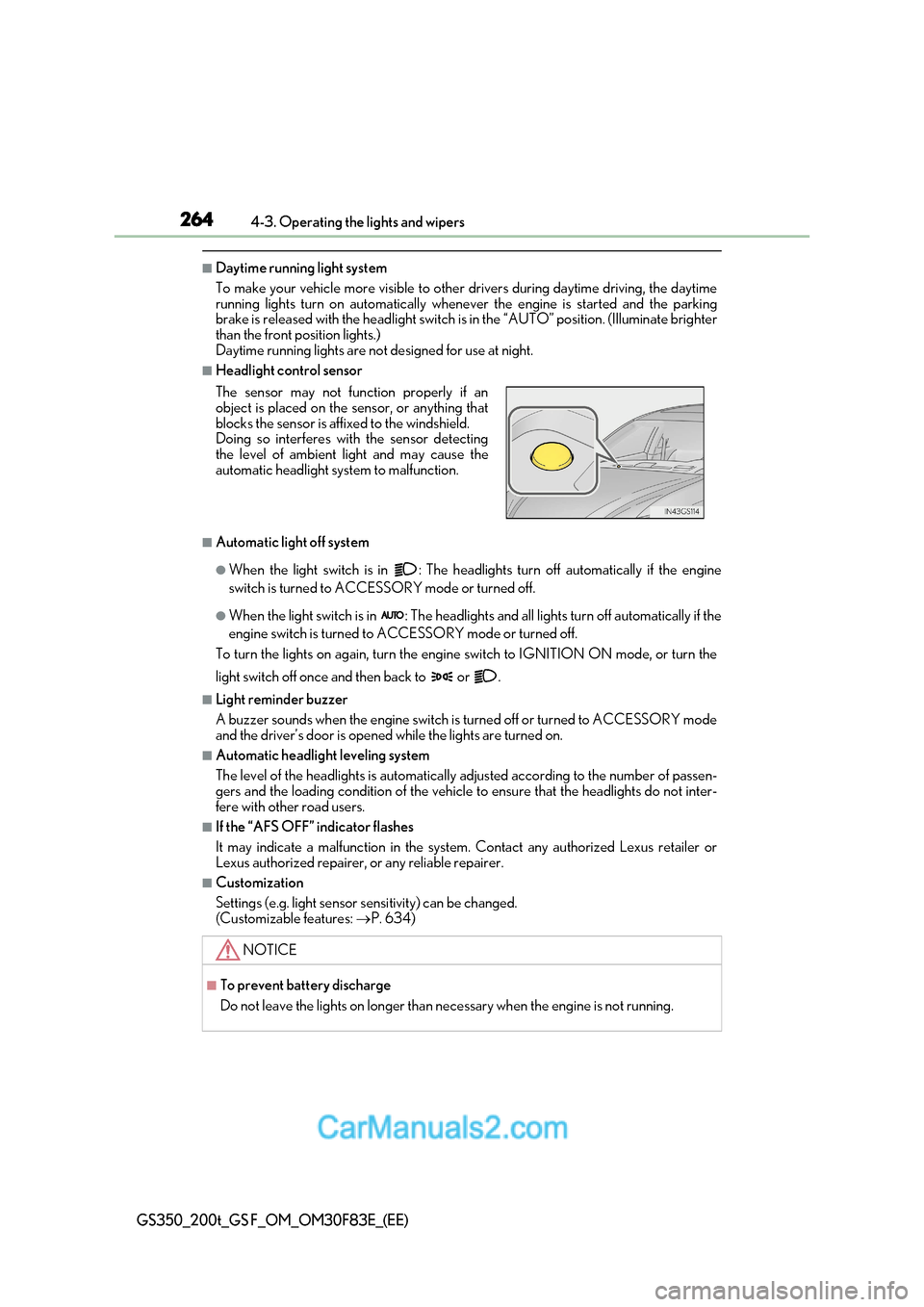
■Headlight control sensor
■Automatic light off system
●When the light switch is in : The headlights turn off automatically if the engine
switch is turned to ACCESSORY mode or turned off.
●When the light switch is in : The headlights and all lights turn off automatically if the
engine switch is turned to ACCESSORY mode or turned off.
To turn the lights on again, turn the engine switch to IGNITI ON ON mode, or turn the
light switch off once and then back to or .
■Light reminder buzzer
A buzzer sounds when the engine switch is turned off or turned to ACCESSORY mode
and the driver’s door is opened while the lights are turned on.
■Automatic headlight leveling system
The level of the headlights is automatically adjusted according to the number of passen-
gers and the loading condition of the vehicle to ensure that the headlights do not inter-
fere with other road users.
■If the “AFS OFF” indicator flashes
It may indicate a malfunction in the system. Contact any authorized Lexus retailer or
Lexus authorized repairer, or any reliable repairer.
■Customization
Settings (e.g. light sensor se nsitivity) can be changed.
(Customizable features: P. 634)
The sensor may not function properly if an
object is placed on the sensor, or anything that
blocks the sensor is affixed to the windshield.
Doing so interferes with the sensor detecting
the level of ambient light and may cause the
automatic headlight system to malfunction.
NOTICE
■To prevent battery discharge
Do not leave the lights on longer than necessary when the engine is not running.
Page 265 of 676
265
4
4-3. Operating the lights and wipers
Driving
GS350_200t_GS F_OM_OM30F83E_(EE)
AHS (Adaptive High-beam System)
●
Adjusts the brightness and illuminated area of the high beams according to
the vehicle speed.
● Adjusts the intensity of the high beams, while driving on a curve, so t hat the
area in the direction that the vehicle is turning will be illuminated more brightly
than other areas.
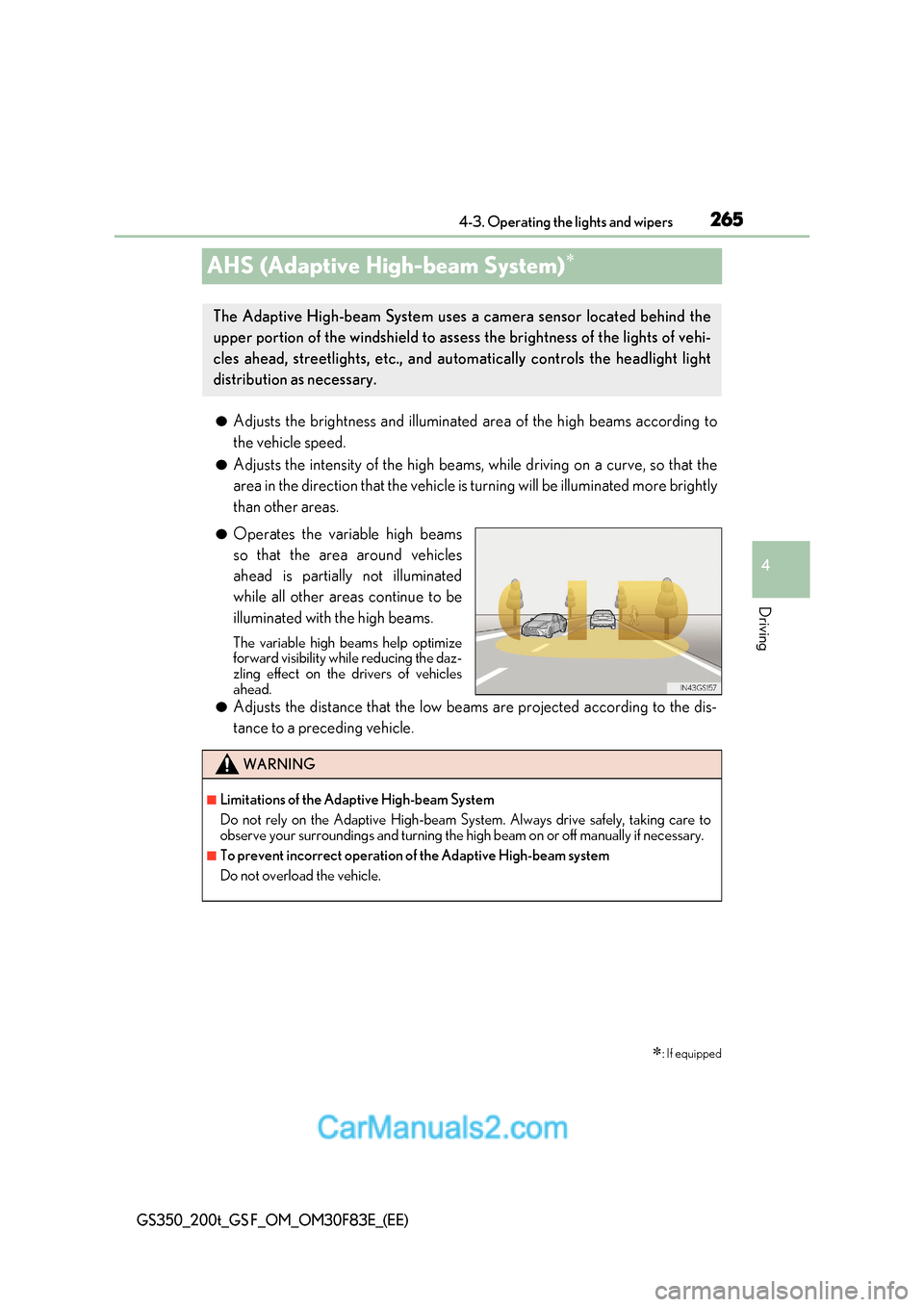
● Operates the variable high beams
so that the area around vehicles
ahead is partially not illuminated
while all other areas continue to be
illuminated with the high beams.
The variable high beams help optimize
forward visibility while reducing the daz-
zling effect on the drivers of vehicles
ahead.
● Adjusts the distance that the low beams are projected according to the dis-
tance to a preceding vehicle.
: If equipped
The Adaptive High-beam System uses a camera sensor located behind the
upper portion of the windshield to assess the brightness of the lights of vehi-
cles ahead, streetlights, etc., and au tomatically controls the headlight light
distribution as necessary.
WARNING
■Limitations of the Adaptive High-beam System
Do not rely on the Adaptive High-beam System. Always drive safely, taking care to
observe your surroundings and turning the high beam on or off manually if necessary.
■To prevent incorrect operation of the Adaptive High-beam system
Do not overload the vehicle.
Page 266 of 676
2664-3. Operating the lights and wipers
GS350_200t_GS F_OM_OM30F83E_(EE)
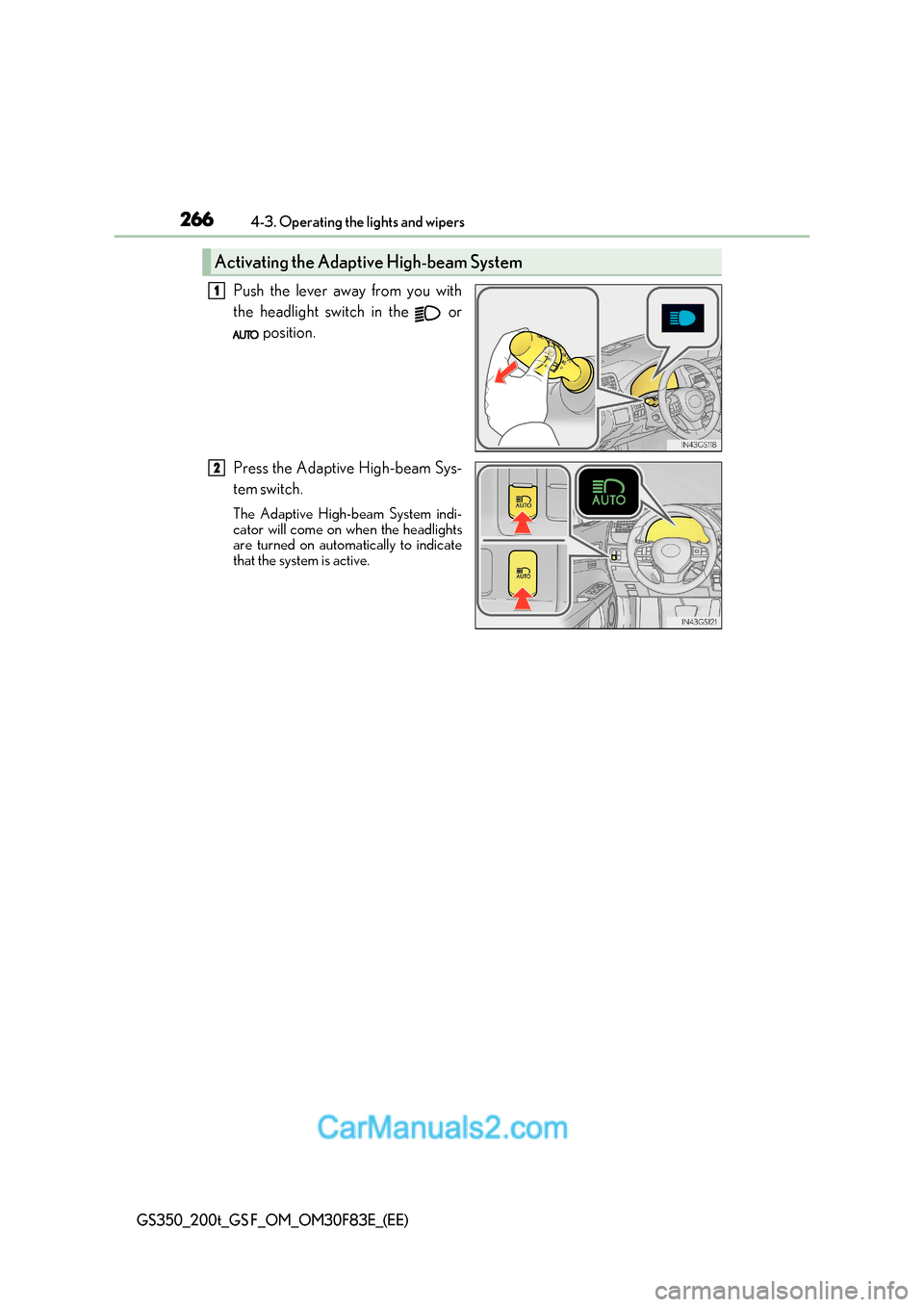
Push the lever away from you with
the headlight switch in the or
position.
Press the Adaptive High-beam Sys-
tem switch.
The Adaptive High-beam System indi-
cator will come on when the headlights
are turned on automatically to indicate
that the system is active.
Activating the Adaptive High-beam System
1
2
Page 267 of 676
267
4-3. Operating the lights and wipers
4
Driving
GS350_200t_GS F_OM_OM30F83E_(EE)
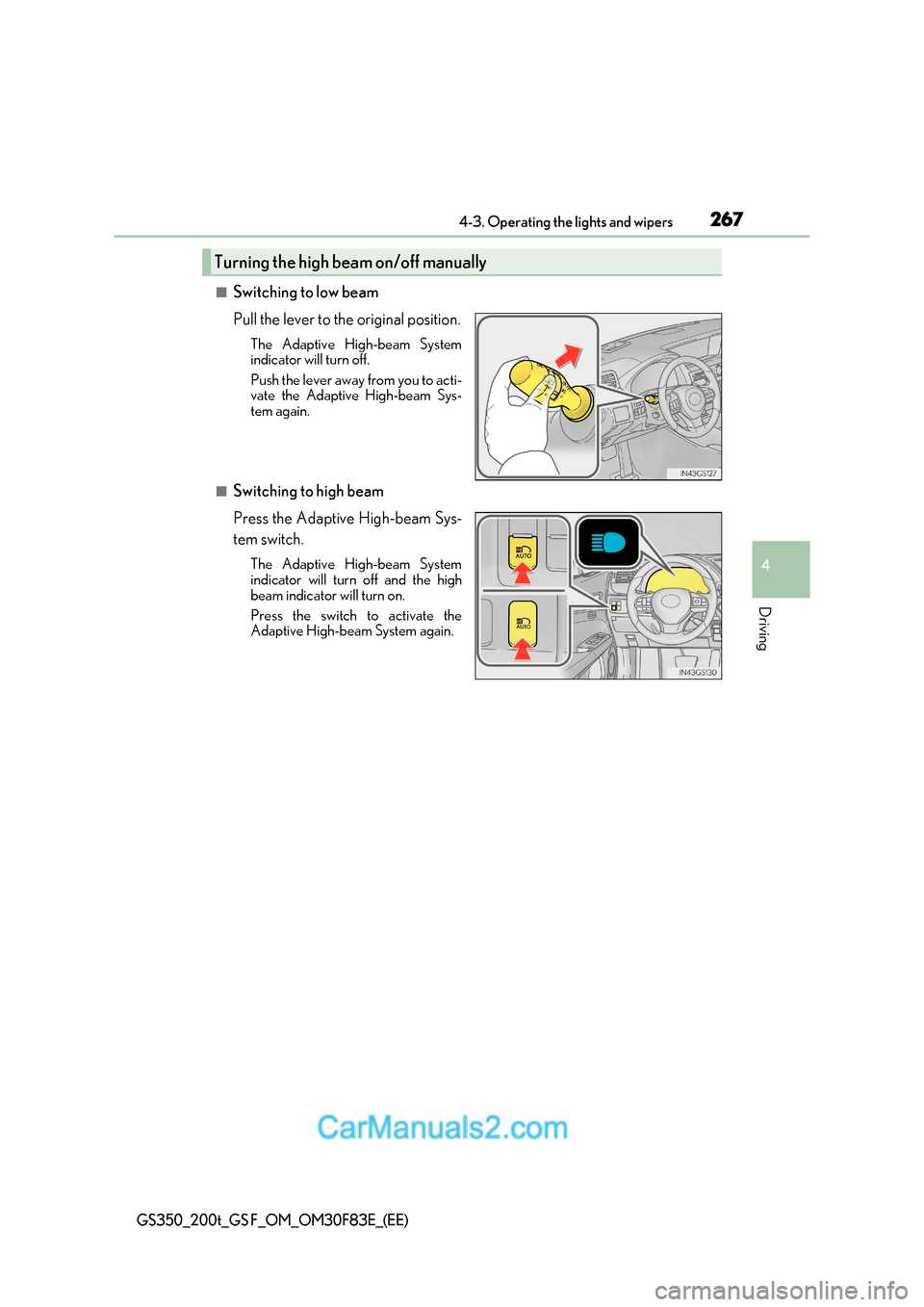
■Switching to low beam
Pull the lever to the original position.
The Adaptive High-beam System
indicator will turn off.
Push the lever away from you to acti-
vate the Adaptive High-beam Sys-
tem again.
■Switching to high beam
Press the Adaptive High-beam Sys-
tem switch.The Adaptive High-beam System
indicator will turn off and the high
beam indicator will turn on.
Press the switch to activate the
Adaptive High-beam System again.
Turning the high beam on/off manually