lights Lexus GS350 2017 User Guide
[x] Cancel search | Manufacturer: LEXUS, Model Year: 2017, Model line: GS350, Model: Lexus GS350 2017Pages: 676, PDF Size: 67.73 MB
Page 39 of 676
39
Pictorial index
GS350_200t_GS F_OM_OM30F83E_(EE)
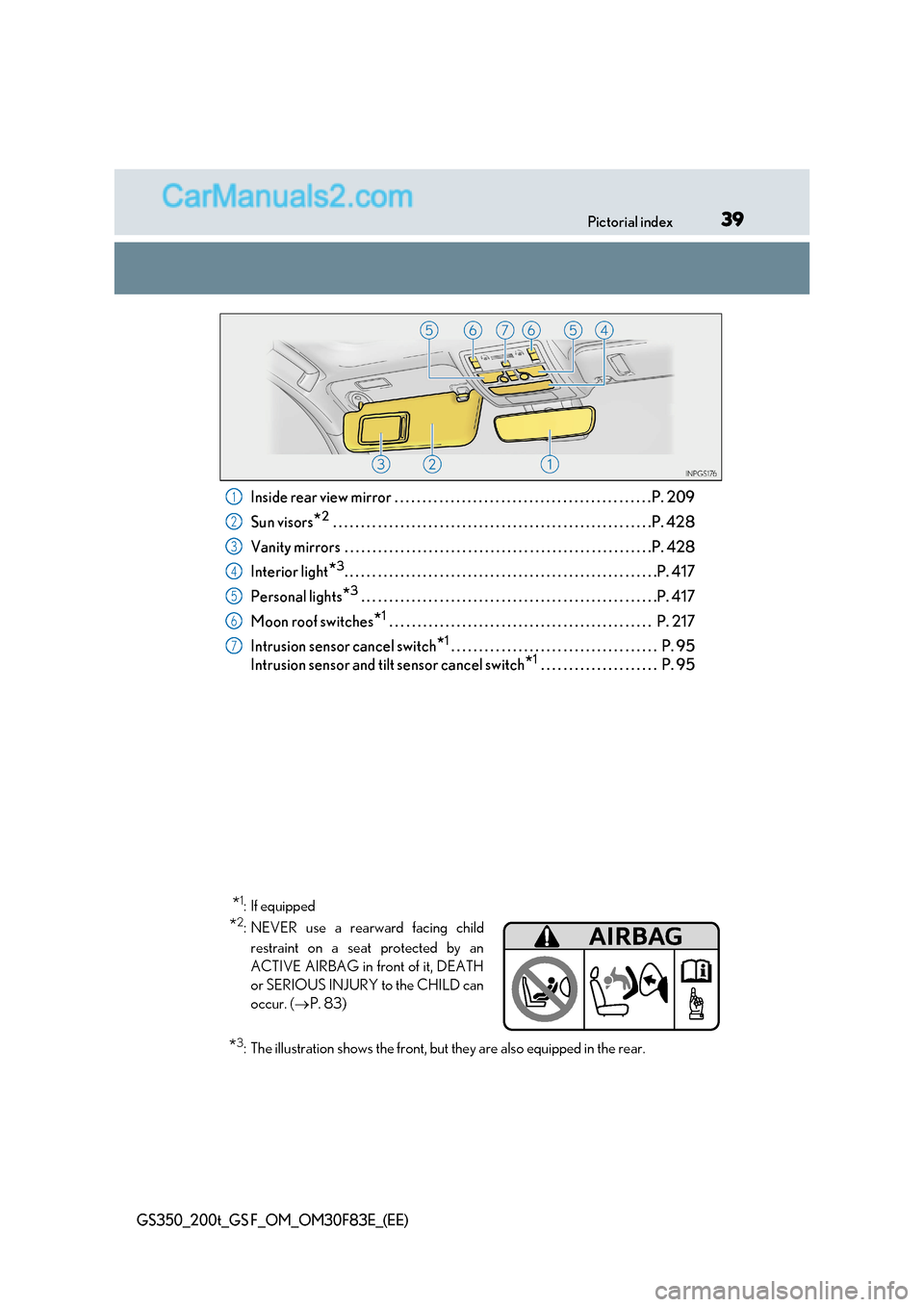
Inside rear view mirror . . . . . . . . . . . . . . . . . . . . . . . . . . . . . . . . . . . . . . . . . . . . . .P. 209
Sun visors *2
. . . . . . . . . . . . . . . . . . . . . . . . . . . . . . . . . . . . . . . . . . . . . . . . . . . . . . . . .P. 428
Vanity mirrors . . . . . . . . . . . . . . . . . . . . . . . . . . . . . . . . . . . . . . . . . . . . . . . . . . . . . . .P. 428
Interior light *3
. . . . . . . . . . . . . . . . . . . . . . . . . . . . . . . . . . . . . . . . . . . . . . . . . . . . . . . .P. 417
Personal lights *3
. . . . . . . . . . . . . . . . . . . . . . . . . . . . . . . . . . . . . . . . . . . . . . . . . . . . .P. 417
Moon roof switches *1
. . . . . . . . . . . . . . . . . . . . . . . . . . . . . . . . . . . . . . . . . . . . . . . P. 217
Intrusion sensor cancel switch *1
. . . . . . . . . . . . . . . . . . . . . . . . . . . . . . . . . . . . . P. 95
Intrusion sensor and tilt sensor cancel switch *1
. . . . . . . . . . . . . . . . . . . . . P. 951
2
3
4
5
6
7
* 1
:If equipped
* 2
: NEVER use a rearward facing child
restraint on a seat protected by an
ACTIVE AIRBAG in front of it, DEATH
or SERIOUS INJURY to the CHILD can
occur. ( P. 83)
* 3
: The illustration shows the front, but they are also equipped in the rear.
Page 52 of 676
521-1. For safe use
GS350_200t_GS F_OM_OM30F83E_(EE)
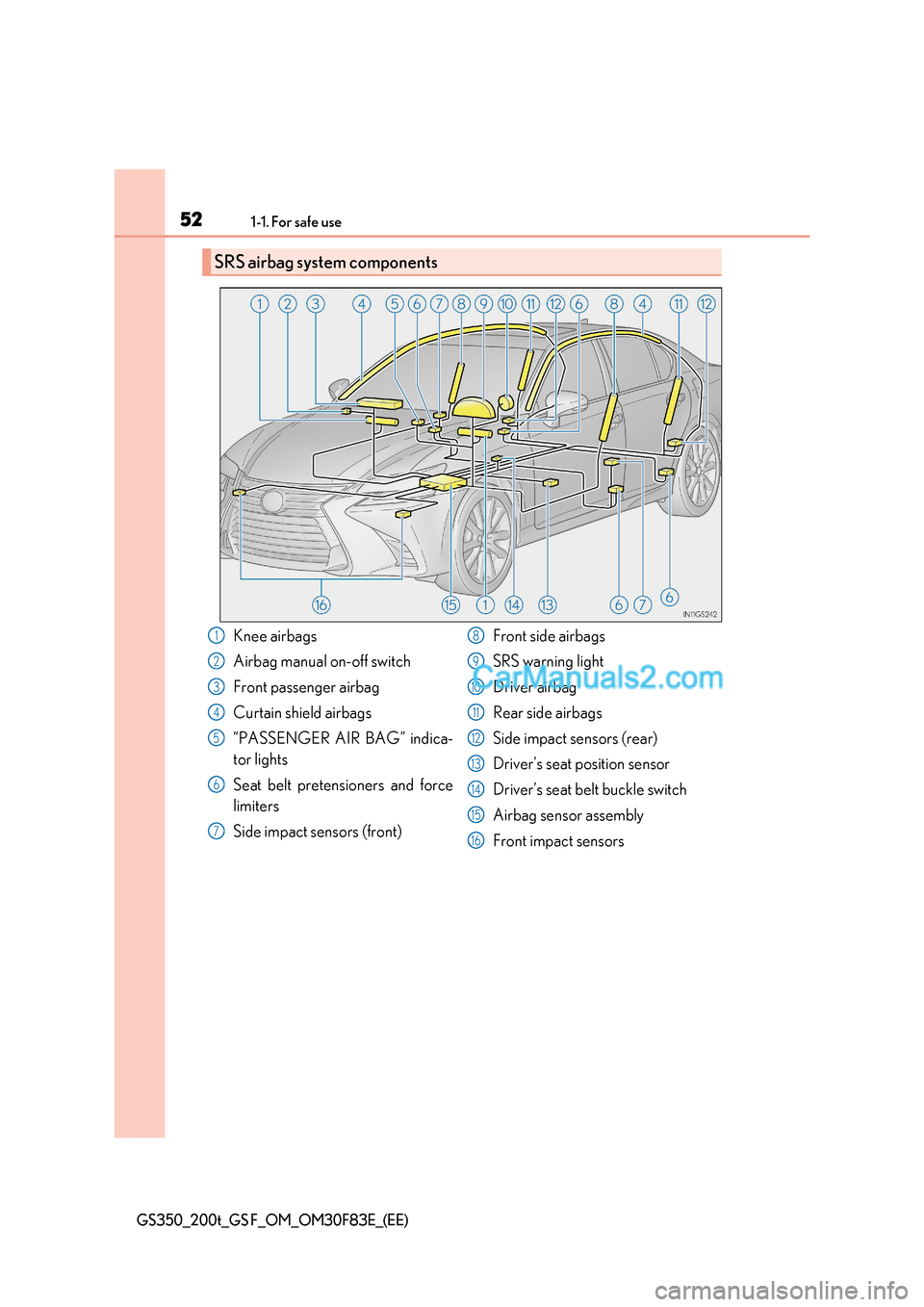
SRS airbag system components
Knee airbags
Airbag manual on-off switch
Front passenger airbag
Curtain shield airbags
“PASSENGER AIR BAG” indica-
tor lights
Seat belt pretensioners and force
limiters
Side impact sensors (front) Front side airbags
SRS warning light
Driver airbag
Rear side airbags
Side impact sensors (rear)
Driver’s seat position sensor
Driver’s seat belt buckle switch
Airbag sensor assembly
Front impact sensors1
2
3
4
5
6
7
8
9
10
11
12
13
14
15
16
Page 99 of 676
99
2Instrument cluster
GS350_200t_GS F_OM_OM30F83E_(EE)
2. Instrument clusterWarning lights and indicators ............................ 100
Gauges and meters (GS350/GS200t) ................ 108
Gauges and meters (GS F) ............................................. 113
Multi-information display (GS350/GS200t) .................. 121
Multi-information display (GS F) ............................................129
Head-up display ............................ 141
Fuel consumption information ................................. 148
Page 100 of 676
1002. Instrument cluster
GS350_200t_GS F_OM_OM30F83E_(EE)
Warning lights and indicators
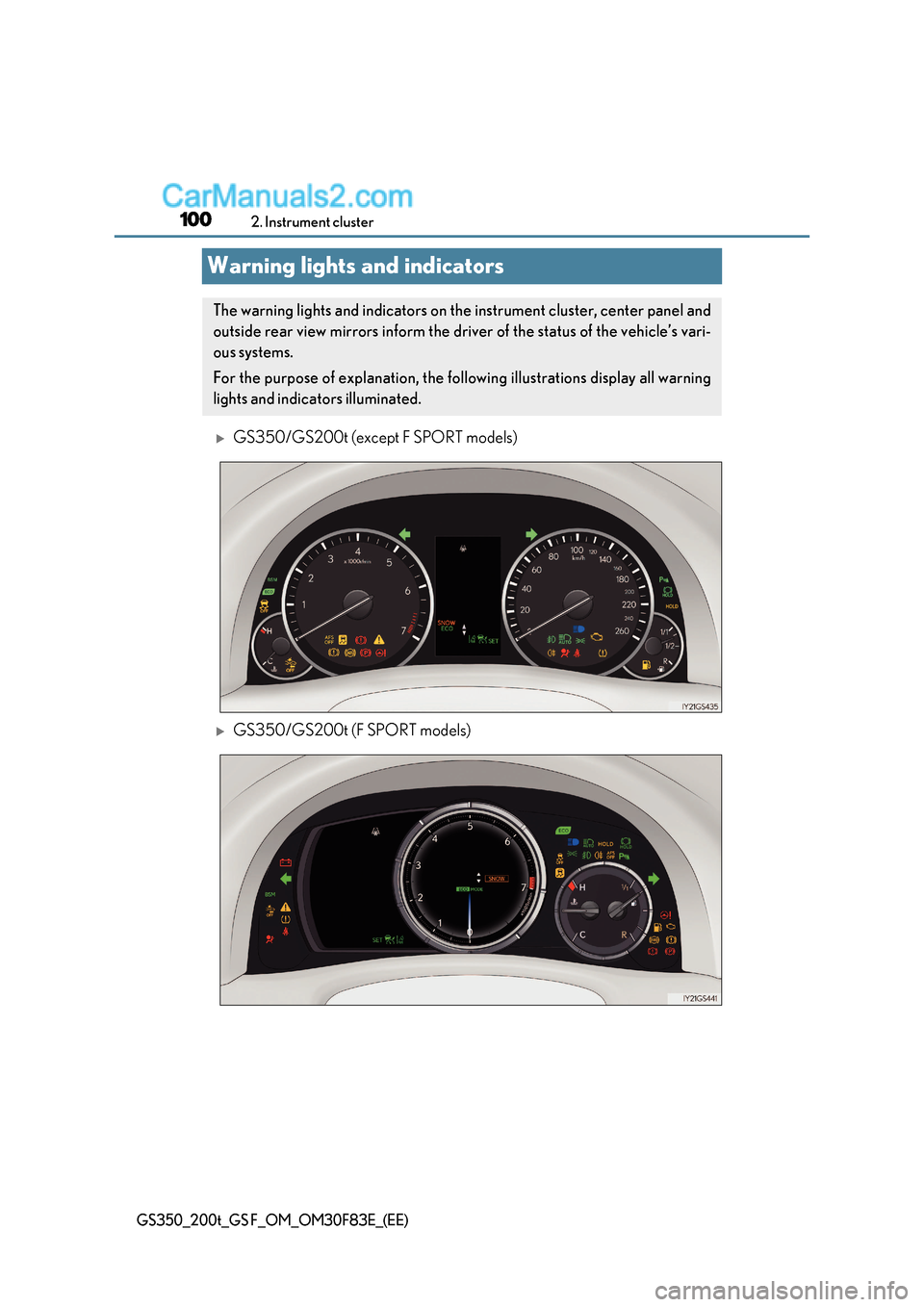
GS350/GS200t (except F SPORT models)
GS350/GS200t (F SPORT models)
The warning lights and indicators on the instrument cluster, center panel and
outside rear view mirrors inform the driv er of the status of the vehicle’s vari-
ous systems.
For the purpose of explanation, the fo llowing illustrations display all warning
lights and indicators illuminated.
Page 102 of 676
1022. Instrument cluster
GS350_200t_GS F_OM_OM30F83E_(EE)
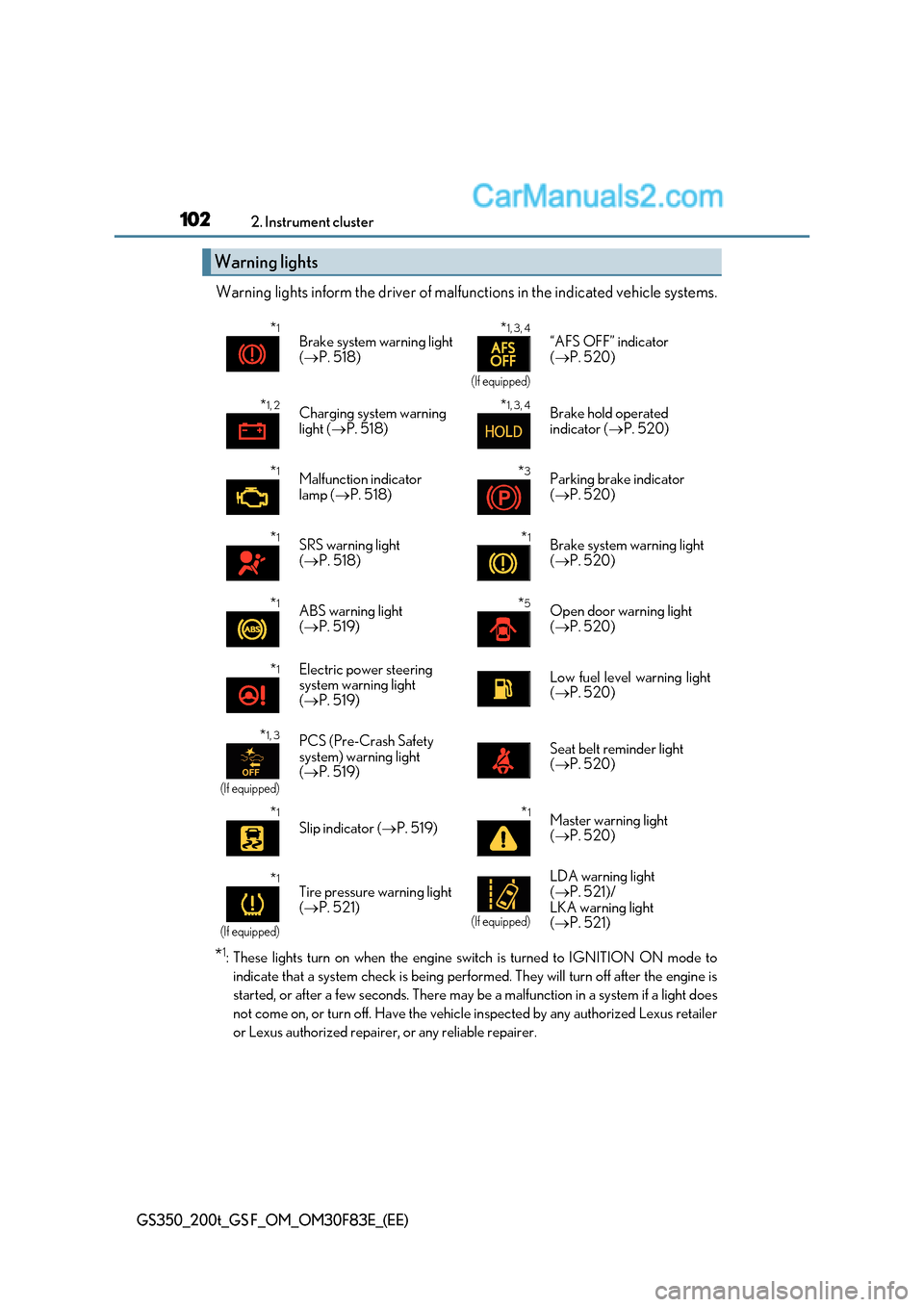
Warning lights inform the driver of malfunctions in the indicated vehicle s ystems.
* 1
: These lights turn on when the engine switch is turned to IG NITION ON mode to
indicate that a system check is being performed. They will turn off after the engine is
started, or after a few seconds. There may be a malfunction in a system if a light does
not come on, or turn off. Have the vehicle inspected by any authorized Lexus retailer
or Lexus authorized repairer, or any reliable repairer.
Warning lights
* 1
Brake system warning light ( P. 518) *
1, 3, 4
(If equipped)
“AFS OFF” indicator (
P. 520)
* 1, 2
Charging system warning
light (P. 518) *
1, 3, 4
Brake hold operated
indicator (
P. 520)
* 1
Malfunction indicator
lamp ( P. 518) *
3
Parking brake indicator (
P. 520)
* 1
SRS warning light ( P. 518) *
1
Brake system warning light (
P. 520)
* 1
ABS warning light ( P. 519) *
5
Open door warning light (
P. 520)
* 1
Electric power steering
system warning light (
P. 519)Low fuel level warning light ( P. 520)
* 1, 3
(If equipped)
PCS (Pre-Crash Safety
system) warning light (
P. 519)Seat belt reminder light ( P. 520)
* 1
Slip indicator (
P. 519) *
1
Master warning light ( P. 520)
* 1
(If equipped)
Tire pressure warning light (
P. 521)
(If equipped)
LDA warning light ( P. 521)/
LKA warning light ( P. 521)
Page 105 of 676
105
2. Instrument cluster
2
Instrument cluster
GS350_200t_GS F_OM_OM30F83E_(EE)
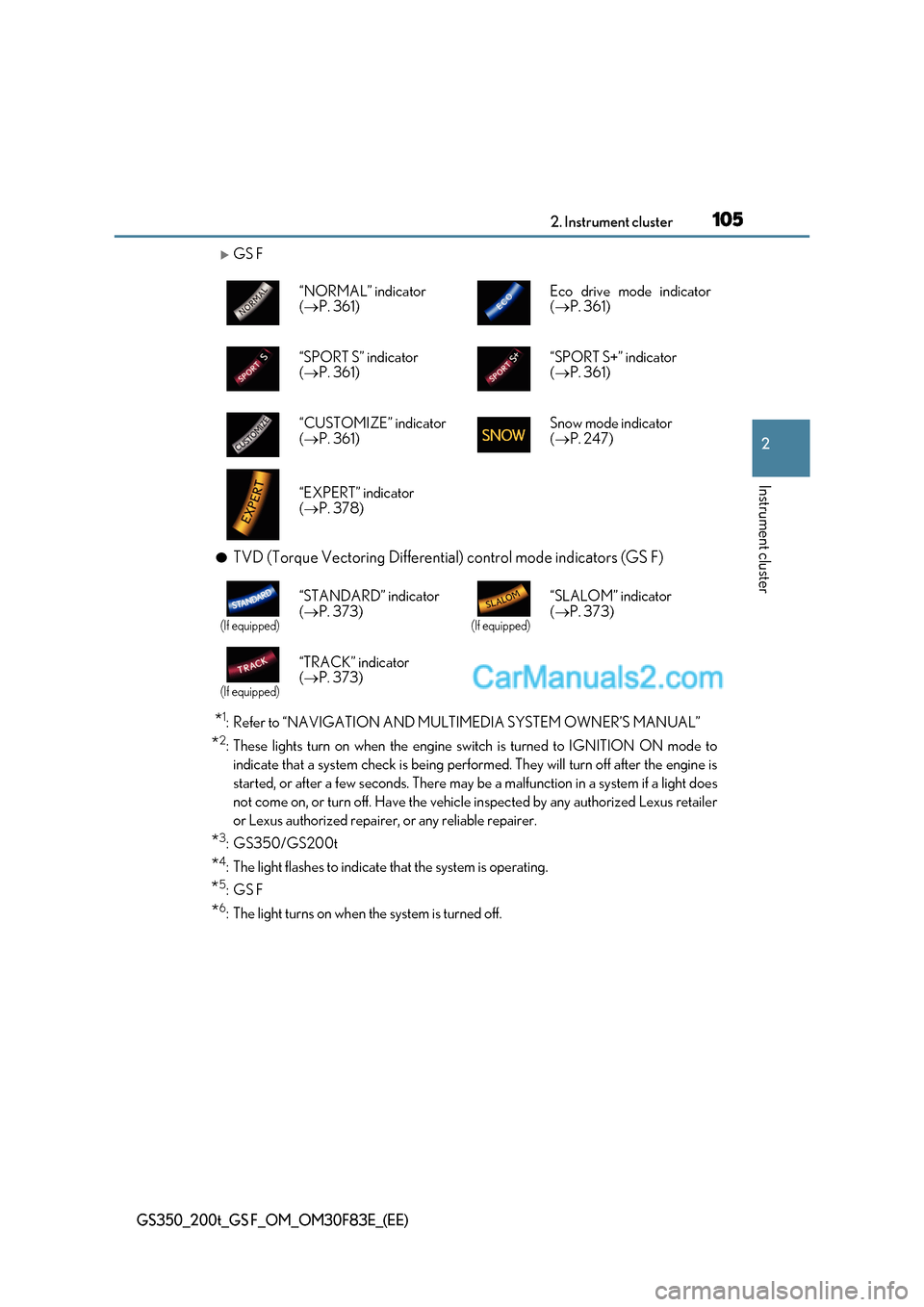
GS F
● TVD (Torque Vectoring Differential) control mode indicators (GS F)
* 1
: Refer to “NAVIGATION AND MULTIMEDIA SYSTEM OWNER’S MANUAL”
* 2
: These lights turn on when the engine switch is turned to IG NITION ON mode to
indicate that a system check is being performed. They will turn off after the engine is
started, or after a few seconds. There may be a malfunction in a system if a light does
not come on, or turn off. Have the vehicle inspected by any authorized Lexus retailer
or Lexus authorized repairer, or any reliable repairer.
* 3
:GS350/GS200t
* 4
: The light flashes to indicate that the system is operating.
* 5
:GS F
* 6
: The light turns on when the system is turned off. “NORMAL” indicator (
P. 361) Eco drive mode indicator(
P. 361)
“SPORT S” indicator ( P. 361) “SPORT S+” indicator (
P. 361)
“CUSTOMIZE” indicator ( P. 361) Snow mode indicator (
P. 247)
“EXPERT” indicator ( P. 378)
(If equipped)
“STANDARD” indicator ( P. 373)
(If equipped)
“SLALOM” indicator ( P. 373)
(If equipped)
“TRACK” indicator ( P. 373)
Page 111 of 676
111
2. Instrument cluster
2
Instrument cluster
GS350_200t_GS F_OM_OM30F83E_(EE)
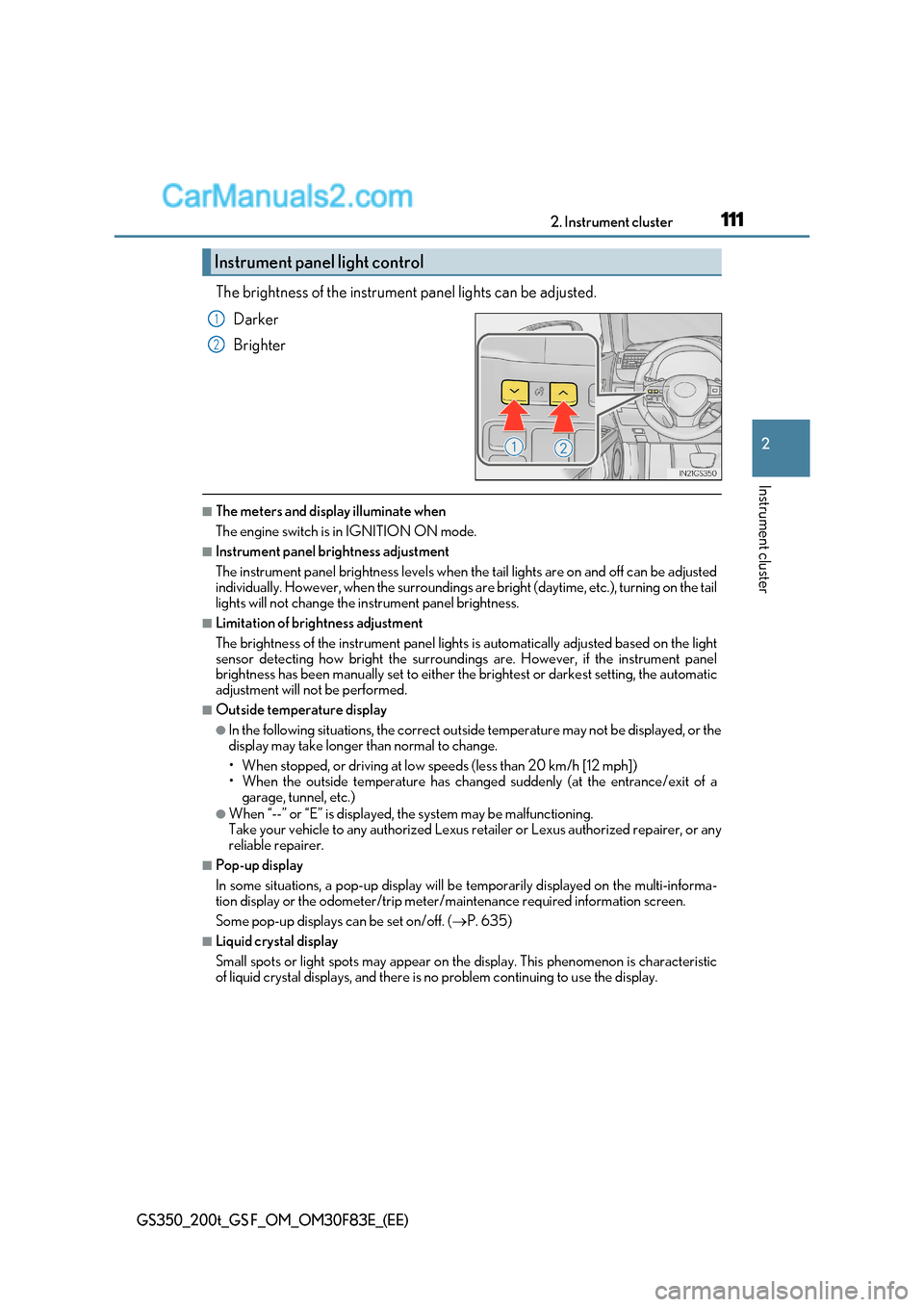
The brightness of the instrument panel lights can be adjusted.
Darker
Brighter
■The meters and display illuminate when
The engine switch is in IGNITION ON mode.
■Instrument panel brightness adjustment
The instrument panel brightness levels when th e tail lights are on and off can be adjusted
individually. However, when the surroundings ar e bright (daytime, etc.), turning on the tail
lights will not change the in strument panel brightness.
■Limitation of brightness adjustment
The brightness of the instrument panel lights is automatically adjusted based on the light
sensor detecting how bright the surroundings are. However, if the instrument panel
brightness has been manually set to either the brightest or darkest setting, the automatic
adjustment will not be performed.
■Outside temperature display
●In the following situations, the correct outside temperature may not be displayed, or the
display may take longer than normal to change.
Page 118 of 676
1182. Instrument cluster
GS350_200t_GS F_OM_OM30F83E_(EE)
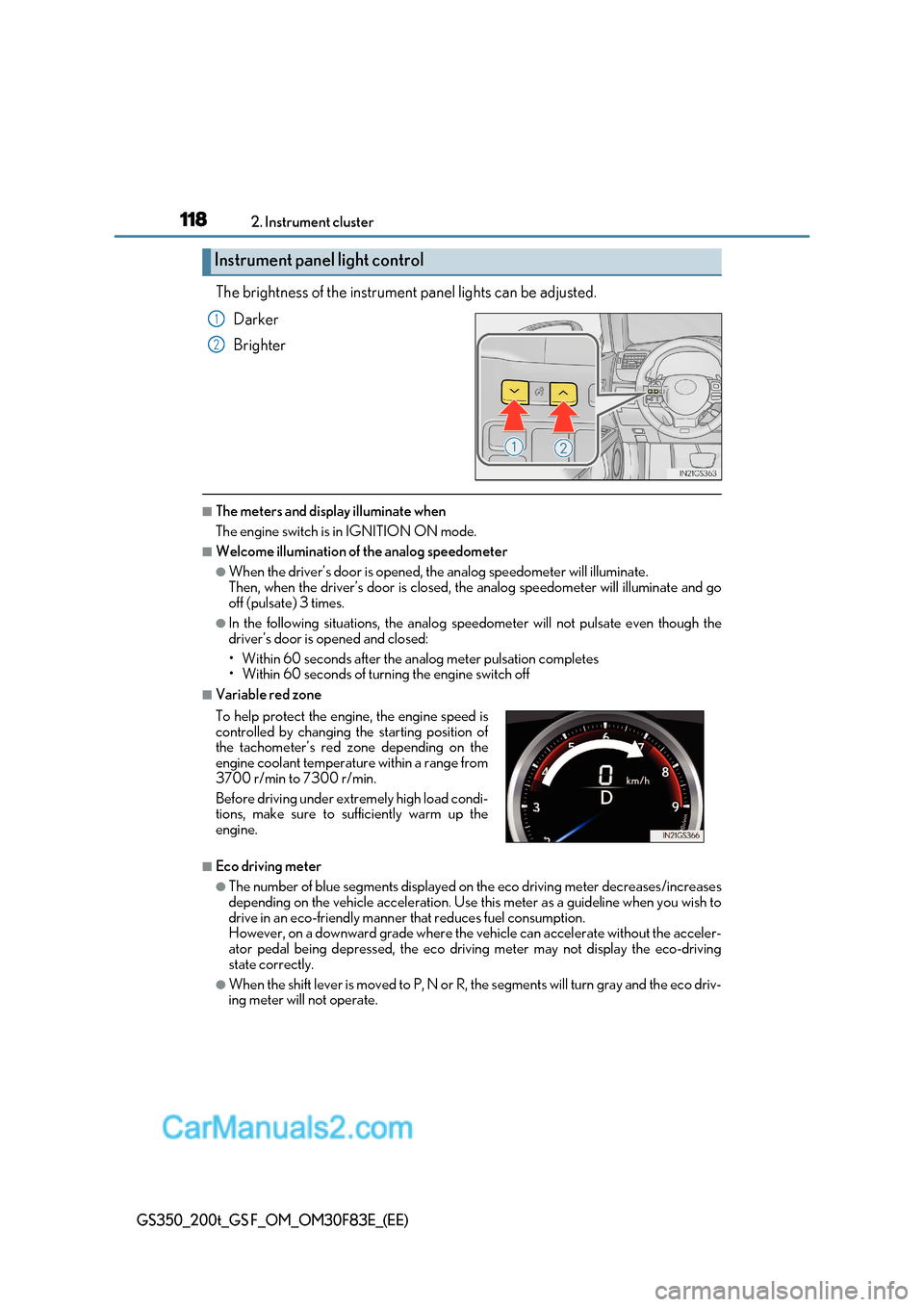
The brightness of the instrument panel lights can be adjusted.
Darker
Brighter
■The meters and display illuminate when
The engine switch is in IGNITION ON mode.
■Welcome illumination of the analog speedometer
●When the driver’s door is opened, the analog speedometer will illuminate.
Then, when the driver’s door is closed, the analog speedometer will illuminate and go
off (pulsate) 3 times.
●In the following situations, the analog speedometer will not pulsate even though the
driver’s door is opened and closed:
Page 119 of 676
119
2. Instrument cluster
2
Instrument cluster
GS350_200t_GS F_OM_OM30F83E_(EE)
■Instrument panel brightness adjustment
The instrument panel brightness levels when th e tail lights are on and off can be adjusted
individually. However, when the surroundings ar e bright (daytime, etc.), turning on the tail
lights will not change the in strument panel brightness.
■Dimming the analog speedometer lighting
The analog speedometer lighting will be dimme d when the ambient light is bright, such
as during the daytime, and SPORT S or SPORT S+ mode screen is selected.
■Outside temperature display
●In the following situations, the correct outside temperature may not be displayed, or the
display may take longer than normal to change.
Page 160 of 676
1603-2. Opening, closing and locking the doors and trunk
GS350_200t_GS F_OM_OM30F83E_(EE)
■Operation signals
The emergency flashers flash to indicate that the doors have been locked/unlocked.
(Locked: once; Unlocked: twice)
■Security feature
If a door is not opened within approximately 30 seconds after the vehicle is unlocked, the
security feature automatically locks the vehicle again.
■Welcome light illumination control
The front position, tail and license plate lights automatically turn on at night when the
doors are unlocked using the entry function or wireless remote control if the light switch
is in the “AUTO” position.
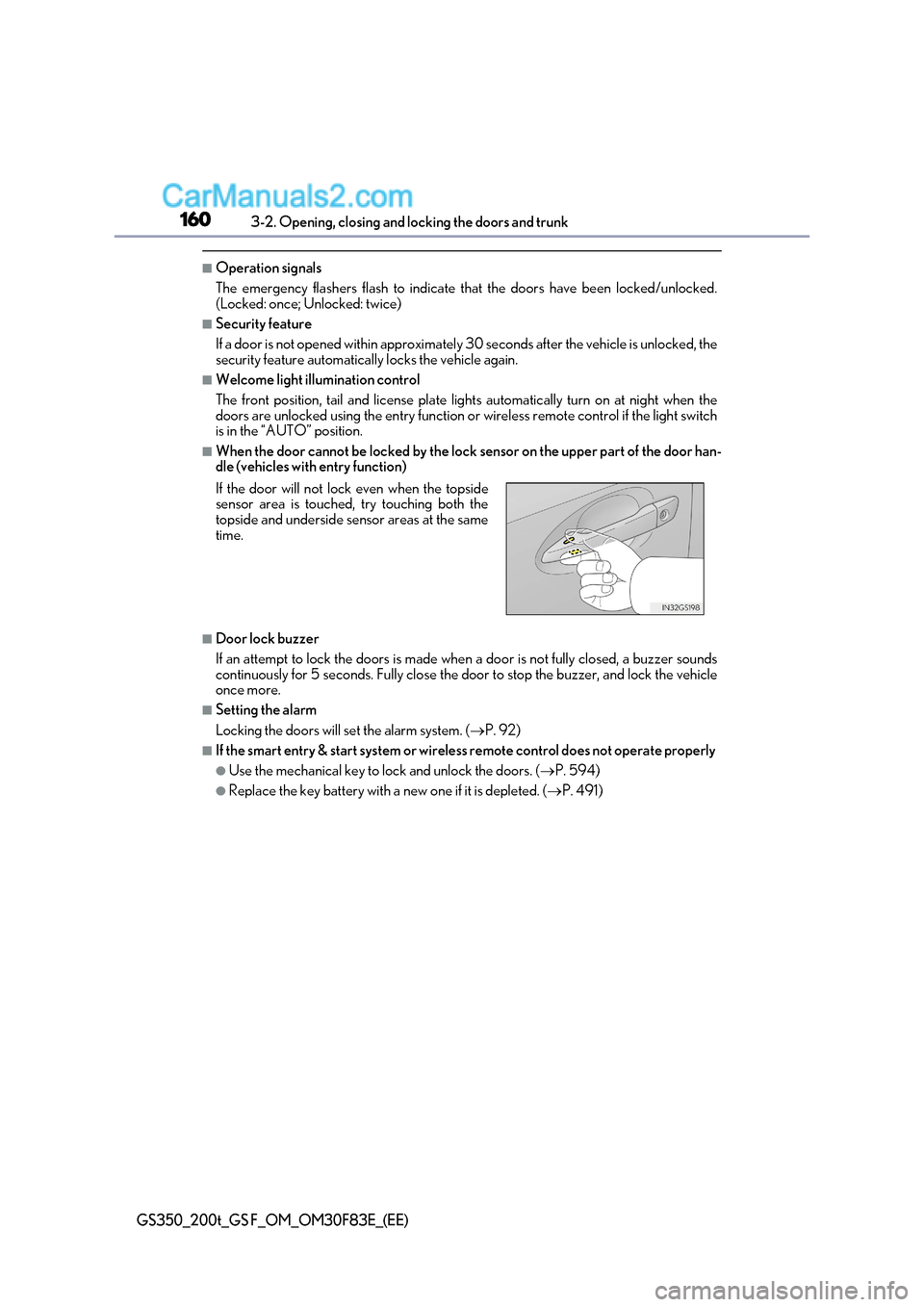
■When the door cannot be locked by the lock sensor on the upper part of the door han-
dle (vehicles with entry function)
■Door lock buzzer
If an attempt to lock the doors is made when a door is not fully closed, a buzzer sounds
continuously for 5 seconds. Fully close the door to stop the buzzer, and lock the vehicle once more.
■Setting the alarm
Locking the doors will set the alarm system. ( P. 92)
■If the smart entry & start system or wireless remote control does not operate properly
●Use the mechanical key to lock and unlock the doors. ( P. 594)
●Replace the key battery with a new one if it is depleted. (P. 491)
If the door will not lock even when the topside
sensor area is touched, try touching both the
topside and underside sensor areas at the same
time.