lights Lexus GS350 2017 Owner's Guide
[x] Cancel search | Manufacturer: LEXUS, Model Year: 2017, Model line: GS350, Model: Lexus GS350 2017Pages: 676, PDF Size: 67.73 MB
Page 209 of 676
209
3
3-4. Adjusting the steering wheel and mirrors
Operation of each component
GS350_200t_GS F_OM_OM30F83E_(EE)
Inside rear view mirror
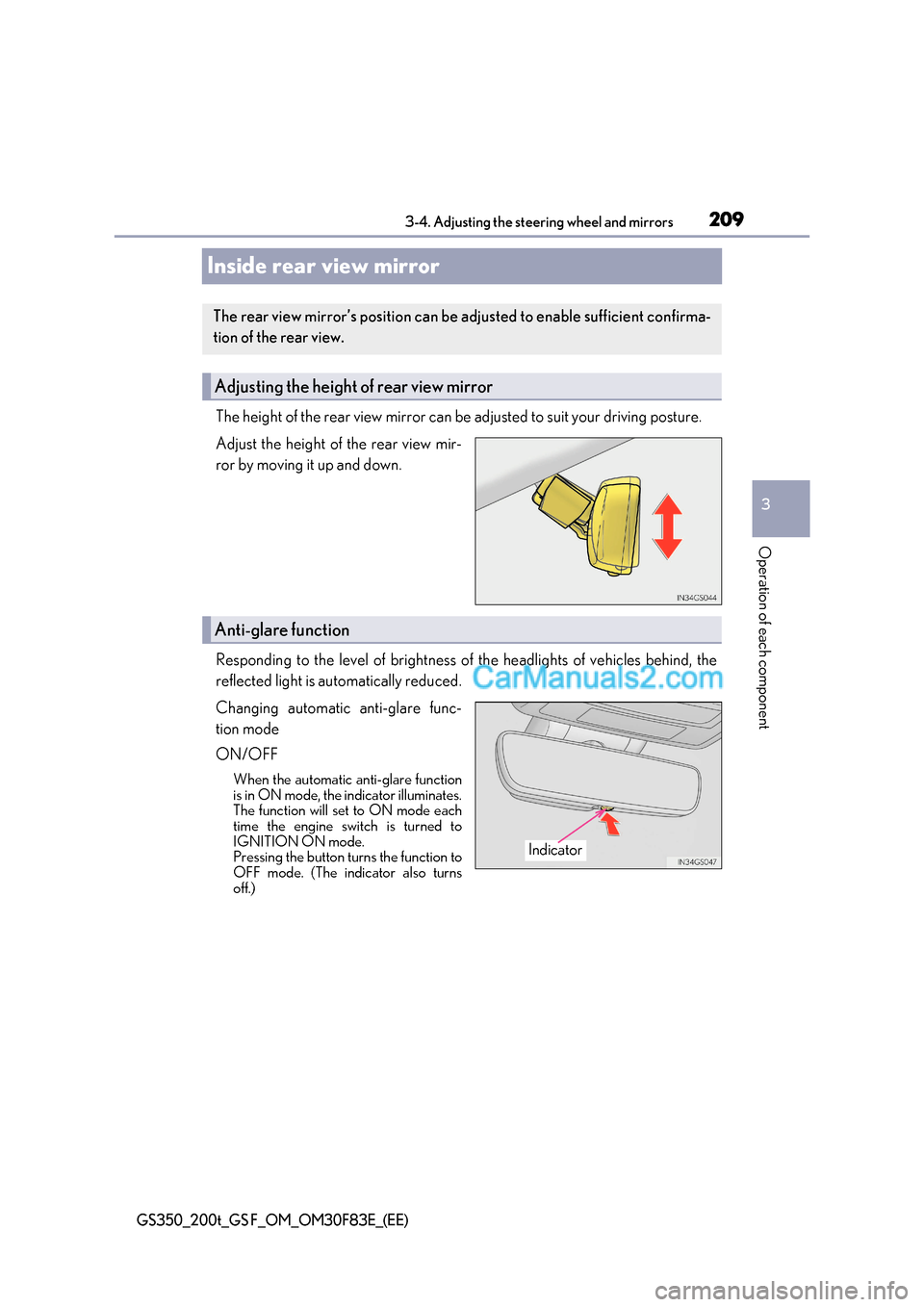
The height of the rear view mirror can be adjusted to suit your driving posture.
Adjust the height of the rear view mir-
ror by moving it up and down.
Responding to the level of brightness of the headlights of vehicles behind, the
reflected light is automatically reduced.
Changing automatic anti-glare func-
tion mode
ON/OFF
When the automatic anti-glare function
is in ON mode, the indicator illuminates.
The function will set to ON mode each
time the engine switch is turned to
IGNITION ON mode.
Pressing the button turns the function to
OFF mode. (The indicator also turns
off.)
The rear view mirror’s position can be adjusted to enable sufficient confirma-
tion of the rear view.
Adjusting the height of rear view mirror
Anti-glare function
Indicator
Page 221 of 676
221
4Driving
GS350_200t_GS F_OM_OM30F83E_(EE)
4-1. Before drivingDriving the vehicle..................... 222
Cargo and luggage .................... 231
Trailer towing (vehicles without towing package) ..... 232
Trailer towing (vehicles with towing package)......................233
4-2. Driving procedures Engine (ignition) switch ...........240
Automatic transmission........... 246
Turn signal lever .........................255
Parking brake ..............................256
Brake Hold (GS350/GS200t) ...............259
ASC (Active Sound Control) (GS F) ........................ 261
4-3. Operating the lights and wipers
Headlight switch ......................... 262
AHS (Adaptive High-beam System)........................................265
Automatic High Beam .............270
Fog light switch ........................... 275
Windshield wipers and washer................................. 276
4-4. Refueling Opening the fuel tank cap......282 4-5. Using the driving support
systems
Lexus Safety System+ ..............286
PCS (Pre-Crash Safety system) ........................................ 295
LKA (Lane-Keeping Assist) .......................................... 307
LDA (Lane Departure Alert with steering control) ..............317
RSA (Road Sign Assist) .......... 326
Dynamic radar cruise control with full-speed range.............. 331
Dynamic radar cruise control ......................................... 343
Cruise control .............................355
Driving mode select switch ...........................................358
BSM (Blind Spot Monitor) ..... 363
Page 236 of 676
2364-1. Before driving
GS350_200t_GS F_OM_OM30F83E_(EE)
■Tire information
●Increase the tire inflation pressure to 20.0 kPa (0.2 kgf/cm 2
or bar, 3 psi) greater than
the recommended value when towing. ( P. 629)
●Increase the air pressure of the trailer tires in accordance with the total trailer weight
and according to the values recommended by the manufacturer of your trailer.
■Trailer lights
●Please consult any authorized Lexus retailer or Lexus authorized repairer, or any reli-
able repairer when installing trailer lights, as incorrect installation may cause damage to
the vehicle’s lights. Please take care to comply with your state’s laws when installing
trailer lights.
●Check that the turn signal lights and stoplights are operating correctly every time you
hitch up the trailer. Directly wiring up to your vehicle may damage the electrical systemand stop the lights from functioning correctly.
■Break-in schedule
Lexus recommends that vehicles fitted with new power train components should not be
used for towing trailers for the first 800 km (500 miles).
■Safety checks before towing
●Check that the maximum load limit for the towing hitch/bracket and hitch ball is not
exceeded. Bear in mind that the coupling weight of the trailer will add to the load
exerted on the vehicle. Also make sure that the total load exerted on the vehicle is
within the range of the weight limits. ( P. 234)
●Ensure that the trailer load is secure.
●Supplementary outside rear view mirrors should be added to the vehicle if the traffic
behind cannot be clearly seen with standard mirrors. Adjust the extending arms of
these mirrors on both sides of the vehicle so that they always provide maximum visibility
of the road behind.
■Maintenance
●Maintenance must be performed more frequently when using the vehicle for towing
due to the greater weight burden placed on the vehicle compared to normal driving.
●Retighten all bolts securing the hitching ball and bracket after towing for approximately
1000 km (600 miles).
NOTICE
■When the rear bumper strengthening material is aluminum
Ensure the steel bracket part does not come directly in contact with that area.
When steel and aluminum come into contact, there is a reaction similar to corrosion,
which will weaken the section concerned and may result in damage. Apply a rust inhib-
itor to parts that will come in co ntact when attaching a steel bracket.
Page 237 of 676
237
4-1. Before driving
4
Driving
GS350_200t_GS F_OM_OM30F83E_(EE)
Your vehicle will handle differently when towing a trailer . In order to avoid acci-
dent, death or serious injury, keep the following in mind when towing:
■Checking connections between trailer and lights
Stop the vehicle and check the operation of the connection between the
trailer and lights after driving for a brief period as well as before starting off.
■Practicing driving with a coupled trailer ●Get the feel for turning, stopping an d reversing with the trailer coupled by
practicing in an area with no or light traffic.
● When reversing with a coupled trailer, hold the section of the steering
wheel nearest to you and rotate clockwise to turn the trailer left or counter-
clockwise to turn it right. Always rotate a little at a time to prevent steerin g
error. Have someone guide you when reversing to lessen the risk of an
accident.
■Increasing vehicle-to-vehicle distance
At a speed of 10 km/h (6 mph), the distance to the vehicle runni ng ahead of
you should be equivalent to or greater than the combined length of your v ehi-
cle and trailer. Avoid sudden braking that may cause skidding. Otherwise, the
vehicle may spin out of control. This is especially true when driving on wet or
slippery road surfaces.
■Sudden acceleration/steering input/cornering
Executing sharp turns when towing may result in the trailer colliding with your
vehicle. Decelerate well in advance when approaching turns and take them
slowly and carefully to avoid sudden braking.
■Important points regarding turning
The wheels of the trailer will travel closer to the inside of the curve than the
wheels of the vehicle. To make allowance for this, take the turns wider than you
would normally do.
■Important points regarding stability
Vehicle movement resulting from uneven road surfaces and strong cross-
winds will affect handling. The vehicle may also be rocked by passing buses or
large trucks. Frequently check behind when moving alongside such vehicles.
As soon as such vehicle movement occurs, immediately start to decelerate
smoothly by slowly applying the brakes. Always steer the vehicle straight
ahead while braking.
Guidance
Page 255 of 676
255
4
4-2. Driving procedures
Driving
GS350_200t_GS F_OM_OM30F83E_(EE)
Turn signal lever
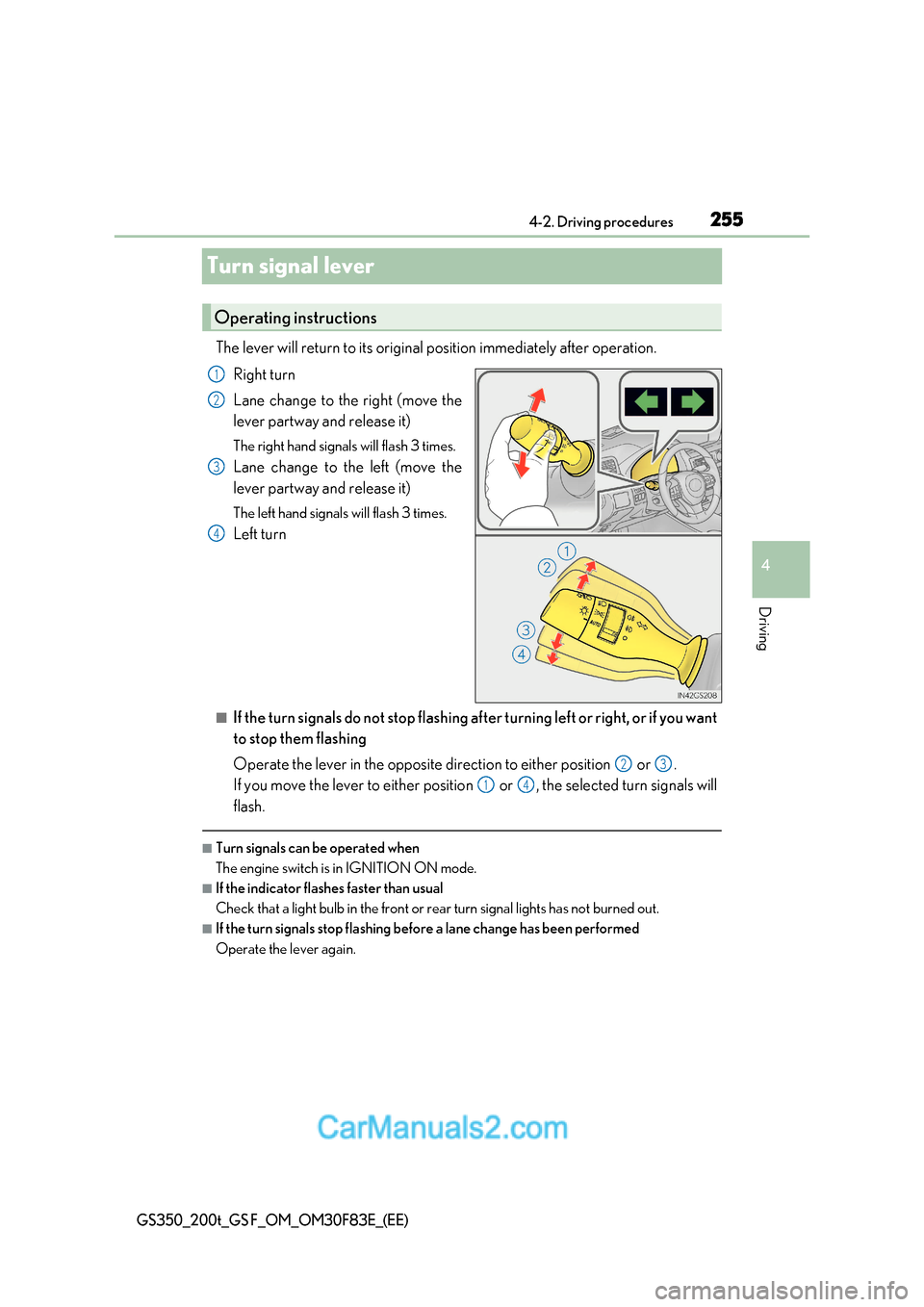
The lever will return to its original position immediately after operation.
Right turn
Lane change to the right (move the
lever partway and release it)
The right hand signals will flash 3 times.
Lane change to the left (move the
lever partway and release it)
The left hand signals will flash 3 times.
Left turn
■If the turn signals do not stop flashing af ter turning left or right, or if you want
to stop them flashing
Operate the lever in the opposite direction to either position or .
If you move the lever to either position or , the selected turn signals will
flash.
■Turn signals can be operated when
The engine switch is in IGNITION ON mode.
■If the indicator flashes faster than usual
Check that a light bulb in the front or rear turn signal lights has not burned out.
■If the turn signals stop flashing before a lane change has been performed
Operate the lever again.
Operating instructions
1
2
3
4
23
14
Page 257 of 676
257
4-2. Driving procedures
4
Driving
GS350_200t_GS F_OM_OM30F83E_(EE)
■Parking brake operation
●When the engine switch is not in IGNI TION ON mode, the parking brake cannot be
released using the parking brake switch.
●When the engine switch is not in IGNITION ON mode, automatic mode (automatic
brake setting and releasing) is not available.
●If the parking brake is operated repeatedly over a short period of time, the system may
restrict operation to prevent overheating. If this happens, refrain from operating the
parking brake. Normal operation wi ll return after about 1 minute.
●Vehicles with towing package: In situations such as when parking while towing a trailer,
the maximum amount of braking force can be used by pressing the parking brake
switch with the parking brake already set.
●Vehicles without towing package: In situations such as when parking on a steep slope *,
the maximum amount of braking force can be used by pressing the parking brake
switch with the parking brake already set.
* : Use wheel chocks when parking on a steep slope.
■Parking brake operation sound
When the parking brake operates, a motor sound (whirring sound) may be heard. This
does not indicate a malfunction.
■Parking brake indicator light
●Depending on the engine switch mode, the parking brake indicator light will come on
and stay on as described below:
IGNITION ON mode: Comes on until the parking brake is released.
Not in IGNITION ON mode: Stays on for approximately 15 seconds.
●When the engine switch is turned off with the parking brake set, the parking brake indi-
cator light will stay on for about 15 seco nds. This does not indicate a malfunction.
■When there is a malfunction in the system
Warning lights and/or warning message will turn on or flash. ( P. 520, 524)
Depending on the condition, the park ing brake indicator light may flash.
■Parking the vehicle P. 222
■Parking brake engaged warning buzzer P. 528
■Usage in winter time P. 383
Page 262 of 676
2624-3. Operating the lights and wipers
GS350_200t_GS F_OM_OM30F83E_(EE)
Headlight switch
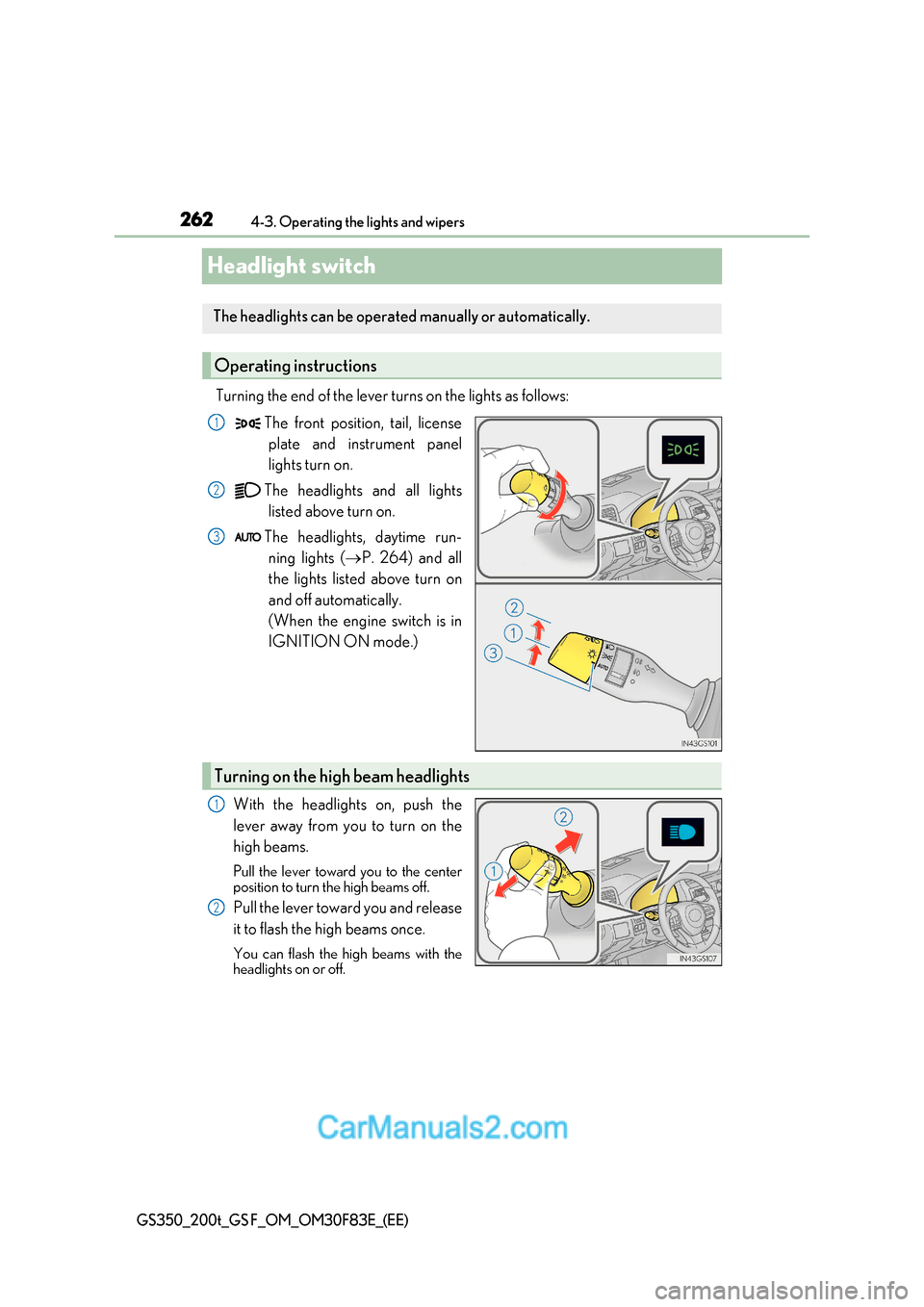
Turning the end of the lever turns on the lights as follows:The front position, tail, licenseplate and instrument panel
lights turn on.
The headlights and all lights listed above turn on.
The headlights, daytime run- ning lights ( P. 264) and all
the lights listed above turn on
and off automatically.
(When the engine switch is in
IGNITION ON mode.)
With the headlights on, push the
lever away from you to turn on the
high beams.
Pull the lever toward you to the center
position to turn the high beams off.
Pull the lever toward you and release
it to flash the high beams once.
You can flash the high beams with the
headlights on or off.
The headlights can be operated manually or automatically.
Operating instructions
1
2
3
Turning on the high beam headlights
1
2
Page 263 of 676
263
4-3. Operating the lights and wipers
4
Driving
GS350_200t_GS F_OM_OM30F83E_(EE)
This system allows the headlights and front position lights to be turned on for 30
seconds when the engine switch is off.
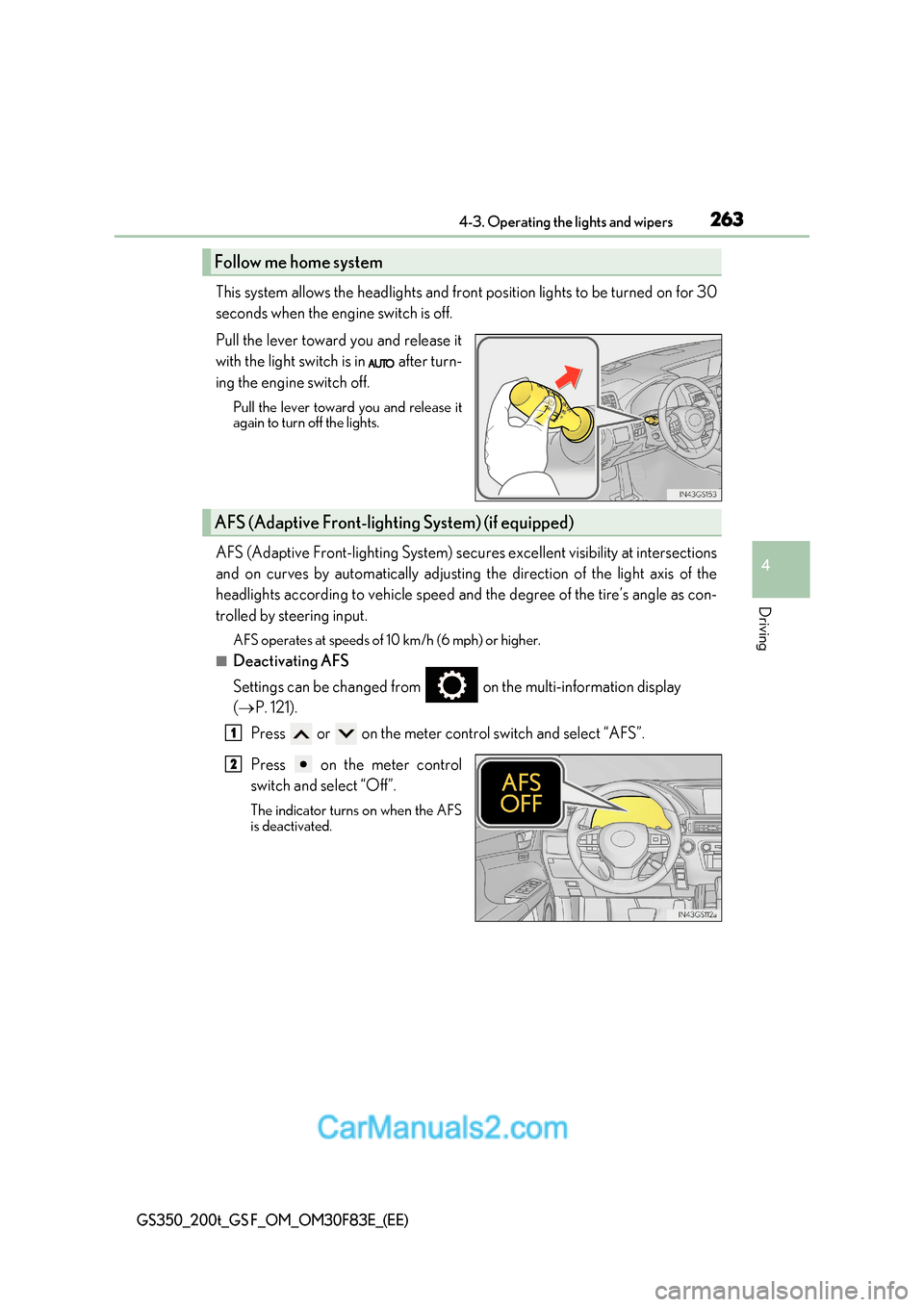
Pull the lever toward you and release it
with the light switch is in after turn-
ing the engine switch off.
Pull the lever toward you and release it
again to turn off the lights.
AFS (Adaptive Front-lighting System) secures excellent visibility at intersections
and on curves by automatically adjusting the direction of the light axis of th e
headlights according to vehicle speed and the degree of the tire’s angle as con-
trolled by steering input.
AFS operates at speeds of 10 km/h (6 mph) or higher.
■Deactivating AFS
Settings can be changed from on the multi-information display ( P. 121).
Press or on the meter control switch and select “AFS”.
Press on the meter control
switch and select “Off”.
The indicator turns on when the AFS
is deactivated.
Follow me home system
AFS (Adaptive Front-lighti ng System) (if equipped)
1
2
Page 264 of 676
2644-3. Operating the lights and wipers
GS350_200t_GS F_OM_OM30F83E_(EE)
■Daytime running light system
To make your vehicle more visible to other drivers during daytime driving, the daytime
running lights turn on automatically whenever the engine is started and the parking
brake is released with the head light switch is in the “AUTO” position. (Illuminate brighter
than the front position lights.)
Daytime running lights are not designed for use at night.
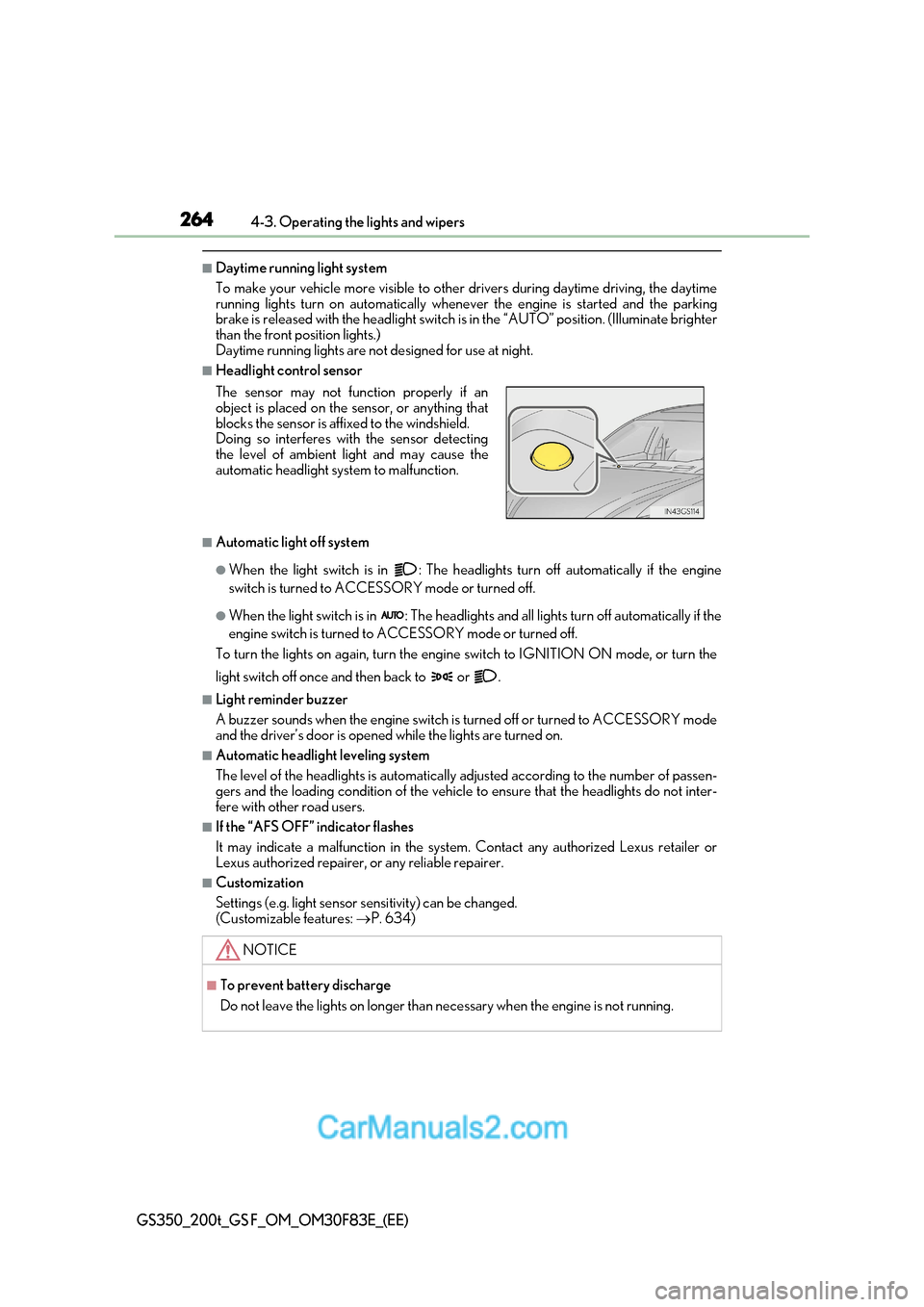
■Headlight control sensor
■Automatic light off system
●When the light switch is in : The headlights turn off automatically if the engine
switch is turned to ACCESSORY mode or turned off.
●When the light switch is in : The headlights and all lights turn off automatically if the
engine switch is turned to ACCESSORY mode or turned off.
To turn the lights on again, turn the engine switch to IGNITI ON ON mode, or turn the
light switch off once and then back to or .
■Light reminder buzzer
A buzzer sounds when the engine switch is turned off or turned to ACCESSORY mode
and the driver’s door is opened while the lights are turned on.
■Automatic headlight leveling system
The level of the headlights is automatically adjusted according to the number of passen-
gers and the loading condition of the vehicle to ensure that the headlights do not inter-
fere with other road users.
■If the “AFS OFF” indicator flashes
It may indicate a malfunction in the system. Contact any authorized Lexus retailer or
Lexus authorized repairer, or any reliable repairer.
■Customization
Settings (e.g. light sensor se nsitivity) can be changed.
(Customizable features: P. 634)
The sensor may not function properly if an
object is placed on the sensor, or anything that
blocks the sensor is affixed to the windshield.
Doing so interferes with the sensor detecting
the level of ambient light and may cause the
automatic headlight system to malfunction.
NOTICE
■To prevent battery discharge
Do not leave the lights on longer than necessary when the engine is not running.
Page 265 of 676
265
4
4-3. Operating the lights and wipers
Driving
GS350_200t_GS F_OM_OM30F83E_(EE)
AHS (Adaptive High-beam System)
●
Adjusts the brightness and illuminated area of the high beams according to
the vehicle speed.
● Adjusts the intensity of the high beams, while driving on a curve, so t hat the
area in the direction that the vehicle is turning will be illuminated more brightly
than other areas.
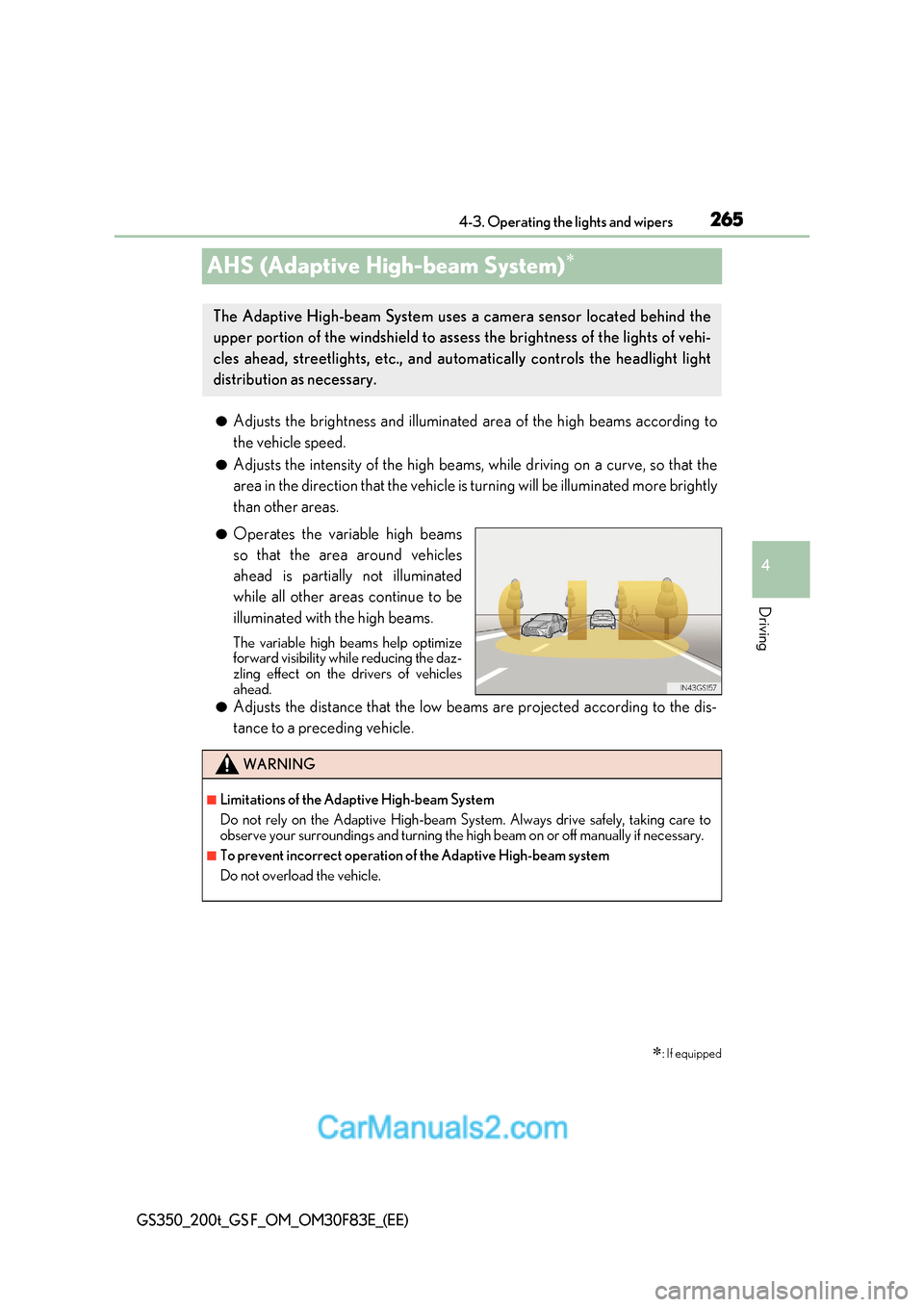
● Operates the variable high beams
so that the area around vehicles
ahead is partially not illuminated
while all other areas continue to be
illuminated with the high beams.
The variable high beams help optimize
forward visibility while reducing the daz-
zling effect on the drivers of vehicles
ahead.
● Adjusts the distance that the low beams are projected according to the dis-
tance to a preceding vehicle.
: If equipped
The Adaptive High-beam System uses a camera sensor located behind the
upper portion of the windshield to assess the brightness of the lights of vehi-
cles ahead, streetlights, etc., and au tomatically controls the headlight light
distribution as necessary.
WARNING
■Limitations of the Adaptive High-beam System
Do not rely on the Adaptive High-beam System. Always drive safely, taking care to
observe your surroundings and turning the high beam on or off manually if necessary.
■To prevent incorrect operation of the Adaptive High-beam system
Do not overload the vehicle.