sport mode Lexus GS350 2017 Owner's Guide
[x] Cancel search | Manufacturer: LEXUS, Model Year: 2017, Model line: GS350, Model: Lexus GS350 2017Pages: 676, PDF Size: 67.73 MB
Page 362 of 676
3624-5. Using the driving support systems
GS350_200t_GS F_OM_OM30F83E_(EE)
Sport mode
Page 373 of 676
373
4
4-5. Using the driving support systems
Driving
GS350_200t_GS F_OM_OM30F83E_(EE)
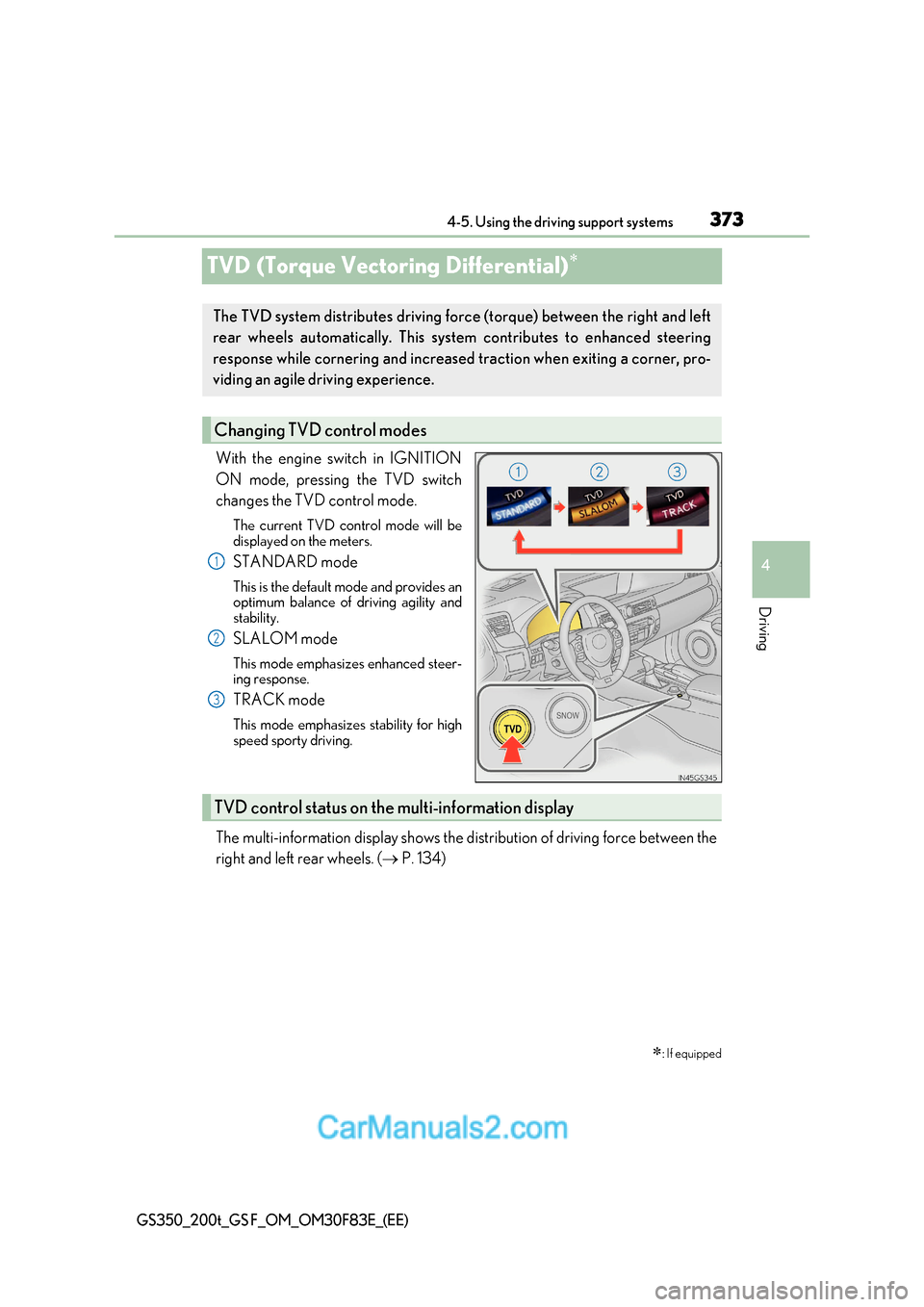
TVD (Torque Vectoring Differential)
With the engine switch in IGNITION
ON mode, pressing the TVD switch
changes the TVD control mode.
The current TVD control mode will be
displayed on the meters.
STANDARD mode
This is the default mode and provides an
optimum balance of driving agility and
stability.
SLALOM mode
This mode emphasizes enhanced steer-
ing response.
TRACK mode
This mode emphasizes stability for high
speed sporty driving.
The multi-information display shows the distribution of driving force b etween the
right and left rear wheels. ( P. 134)
: If equipped
The TVD system distributes driving fo rce (torque) between the right and left
rear wheels automatically. This system contributes to enhanced steering
response while cornering and increased traction when exiting a corner, pro-
viding an agile driving experience.
Changing TVD control modes
1
2
3
TVD control status on the multi-information display
Page 376 of 676
3764-5. Using the driving support systems
GS350_200t_GS F_OM_OM30F83E_(EE)
◆Hill-start assist control
Helps to prevent the vehicle from rolling backward when starting on an
incline.
◆EPS (Electric Power Steering)
Employs an electric motor to reduce the amount of effort needed to turn the
steering wheel
◆AVS (Adaptive Variable Susp ension system) (if equipped)
By independently controlling the damp ing force of the shock absorbers for
each of the 4 wheels according to the road and driving conditions, this system
helps riding comfort with superior a high level of stability, and helps good vehi-
cle posture
When SPORT S+ mode is selected by the driving mode select switch, the
damping force is suitable for sporty driving ( P. 359)
◆VDIM (Vehicle Dynamics Integrated Management)
Provides integrated control of the ABS, brake assist, TRC, VSC, hill-start
assist control and EPS systems
Helps to maintain vehicle stability when swerving on slippery road surfaces by
controlling the brakes, engine output, steering assist, and steering ratio
◆Emergency brake signal
When the brakes are applie d suddenly, the stop lights automatically flash to
alert the vehicle behind
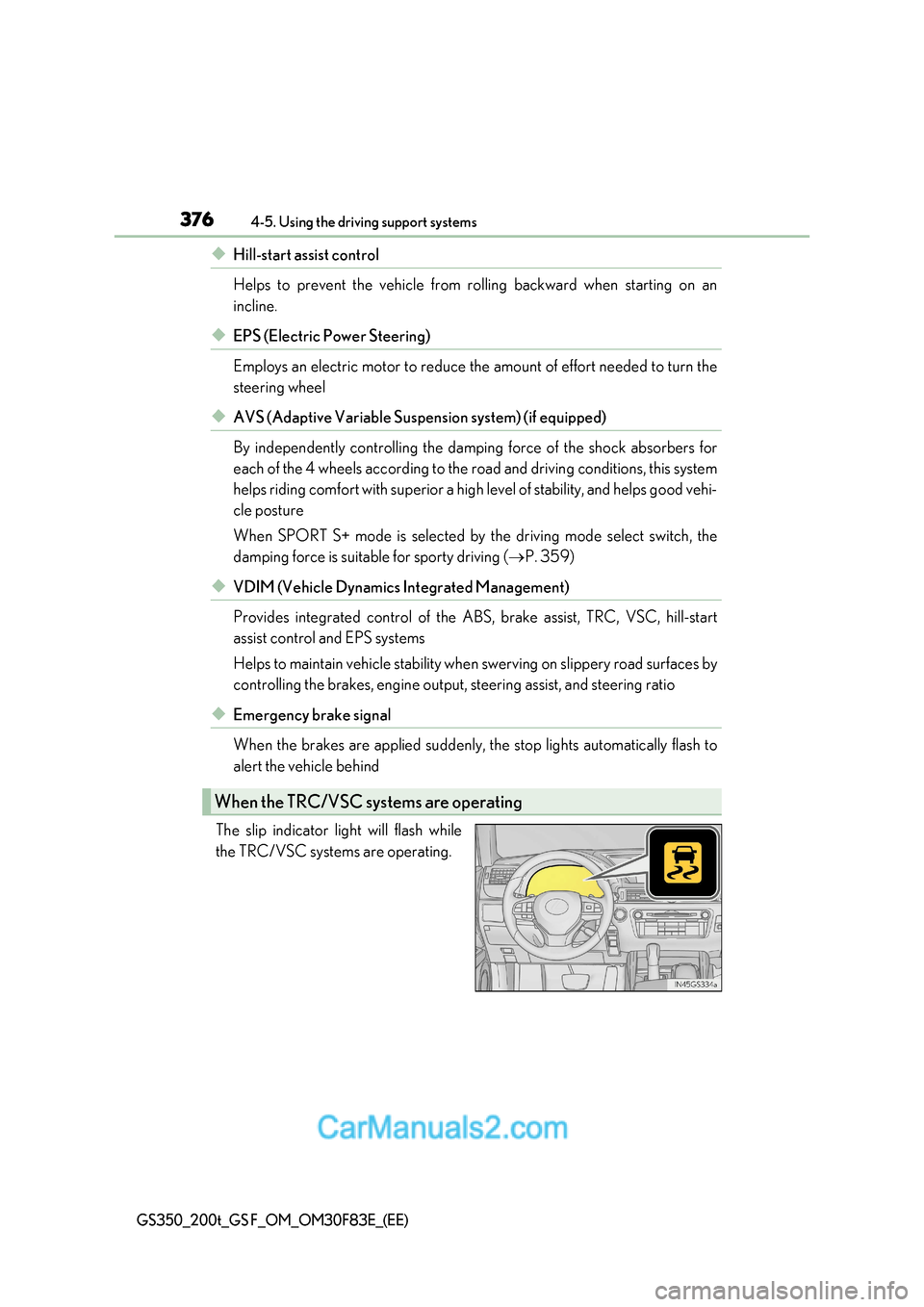
The slip indicator light will flash while
the TRC/VSC systems are operating.
When the TRC/VSC sys tems are operating
Page 378 of 676
3784-5. Using the driving support systems
GS350_200t_GS F_OM_OM30F83E_(EE)
■Turning off both TRC and VSC systems
GS350/GS200t
To turn the TRC and VSC systems off, press and hold for more than 3 seconds while
the vehicle is stopped.
The VSC OFF indicator light will come on an d the “Traction Control Turned Off” will be
shown on the multi-information display. *
Press again to turn the systems back on.
GS F
To turn the TRC and VSC systems off, press and hold for more than 3 seconds.
The “TRC OFF” indicator light and the VSC OFF indi cator light will come on.*
Press again to turn the systems back on.
* : On vehicles with PCS (Pre-Crash Safety system), pre-crash brake assist and pre-
crash braking will also be disabled. The PCS (Pre-Crash Safety system) warning light
will come on and a message will be disp layed on the multi-information display.
( P. 524)
■Expert mode (GS F)
When expert mode is selected, it is possible to drive in a more sporty manner than other
drive modes. Expert mode disables the TRC and VSC systems but the engine and
brakes may be controlled depending on the vehicle behavior.
■When the message is displayed on the mult i-information display showing that TRC has
been disabled even if has not been pressed (GS350/GS200t)
TRC and hill-start assist control cannot be operated. Contact any authorized Lexus
retailer or Lexus authorized repa irer, or any reliable repairer.
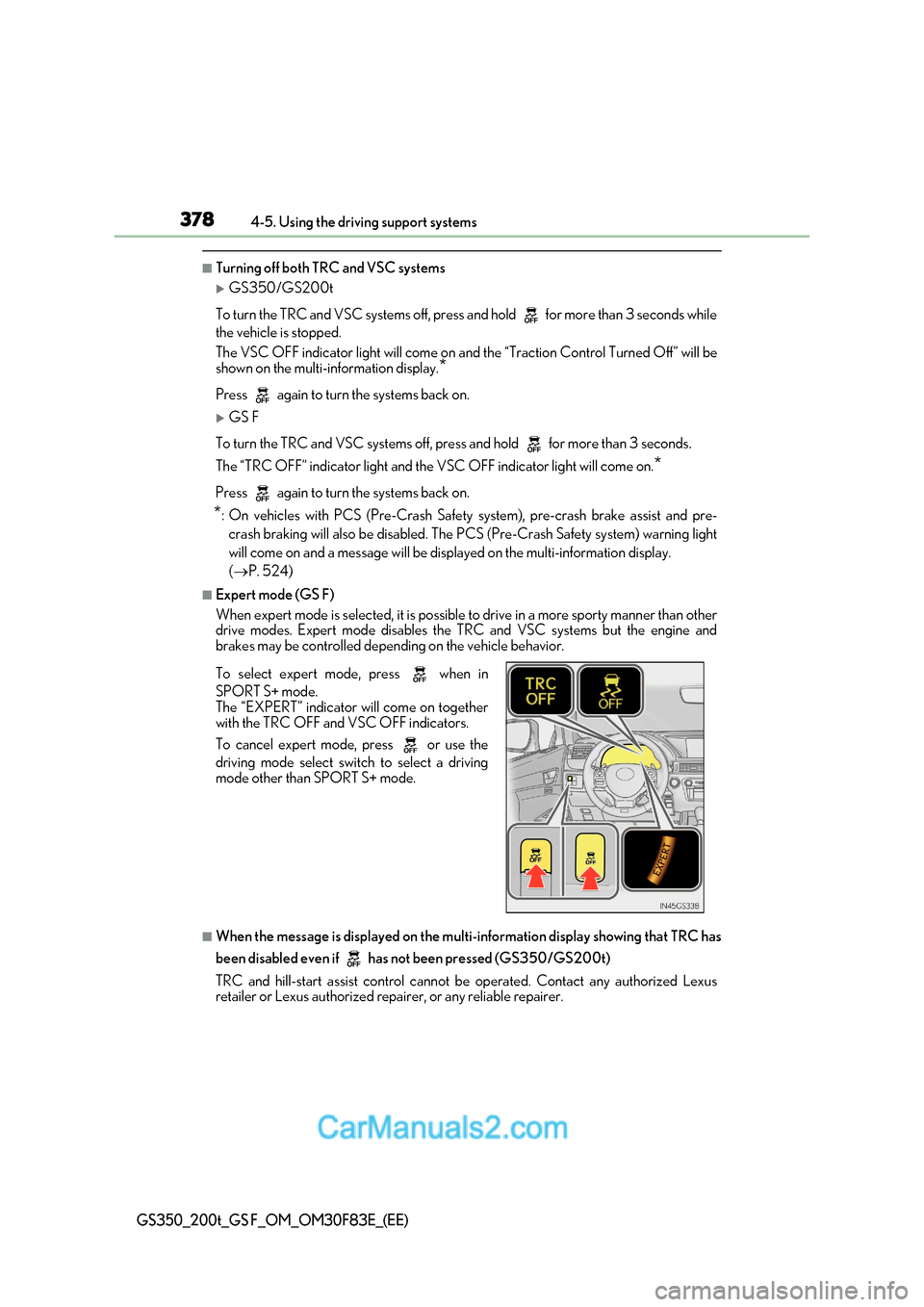
To select expert mode, press when in
SPORT S+ mode.
The “EXPERT” indicator will come on together
with the TRC OFF and VSC OFF indicators.
To cancel expert mode, press or use the
driving mode select swit
ch to select a driving
mode other than SPORT S+ mode.
Page 441 of 676
441
6-1. Maintenance and care
6
Maintenance and care
GS350_200t_GS F_OM_OM30F83E_(EE)
■Automatic car washes
●Fold the mirrors before washing the vehicle. Start washing from the front of the vehicle.
Make sure to extend th e mirrors before driving.
●Brushes used in automatic car washes may scratch the vehicle surface and harm your
vehicle’s paint.
●Rear spoiler (if equipped) may not be wash able in some automatic car washes. There
may also be an increased risk of damage to vehicle.
■High-pressure car washes
●Do not allow the nozzles of the car wash to come within close proximity of the windows.
●Before using the car wash, check that the fuel filler door on your vehicle is closed prop- erly.
■Notes for a smart entry & start system
If the door handle becomes wet while the electronic key is within the effective range, the
door may lock and unlock repeatedly. In that case, follow the following correction proce-
dures to wash the vehicle:
●Place the key in a position 2 m (6 ft.) or more separate from the vehicle while the vehi-
cle is being washed. (Take care to ensure that the key is not stolen.)
●Set the electronic key to battery-saving mode to disable the smart entry & start system. ( P. 175)
■Aluminum wheels
●Remove any dirt immediately by using a neutral detergent. Do not use hard brushes or
abrasive cleaners. Do not use strong or harsh chemical cleaners.
Use the same mild detergent and wax as used on the paint.
●Do not use detergent on the wheels when they are hot, for example after driving for
long distance in the hot weather.
●Wash detergent from the wheels immediately after use.
■Brake caliper coating (GS200t with orange brake calipers for F SPORT models, and
GS F)
●When using detergent, use neutral detergent.
Do not use hard brushes or abrasive clea ners, as they will damage the coating.
●Do not use detergent on the brake calipers when they are hot.
●Wash detergent off immediately after use.
■Bumpers
Do not scrub with abrasive cleaners.
■Front side windows water-repellent coating
●The following precautions can extend the effectiveness of the water-repellent coating.
Page 513 of 676
513
7-2. Steps to take in an emergency
7
When trouble arises
GS350_200t_GS F_OM_OM30F83E_(EE)
If a tow truck is not available in an emergency, your vehicle may be temporarily
towed using cables or chains secured to the emergency towing eyelets. This
should only be attempted on hard surfaced roads for at most 80 km (50 miles)
at under 30 km/h (18 mph).
A driver must be in the vehicle to steer and operate the brakes. The vehicle’s
wheels, drive train, axles, steering and brakes must be in good condition.
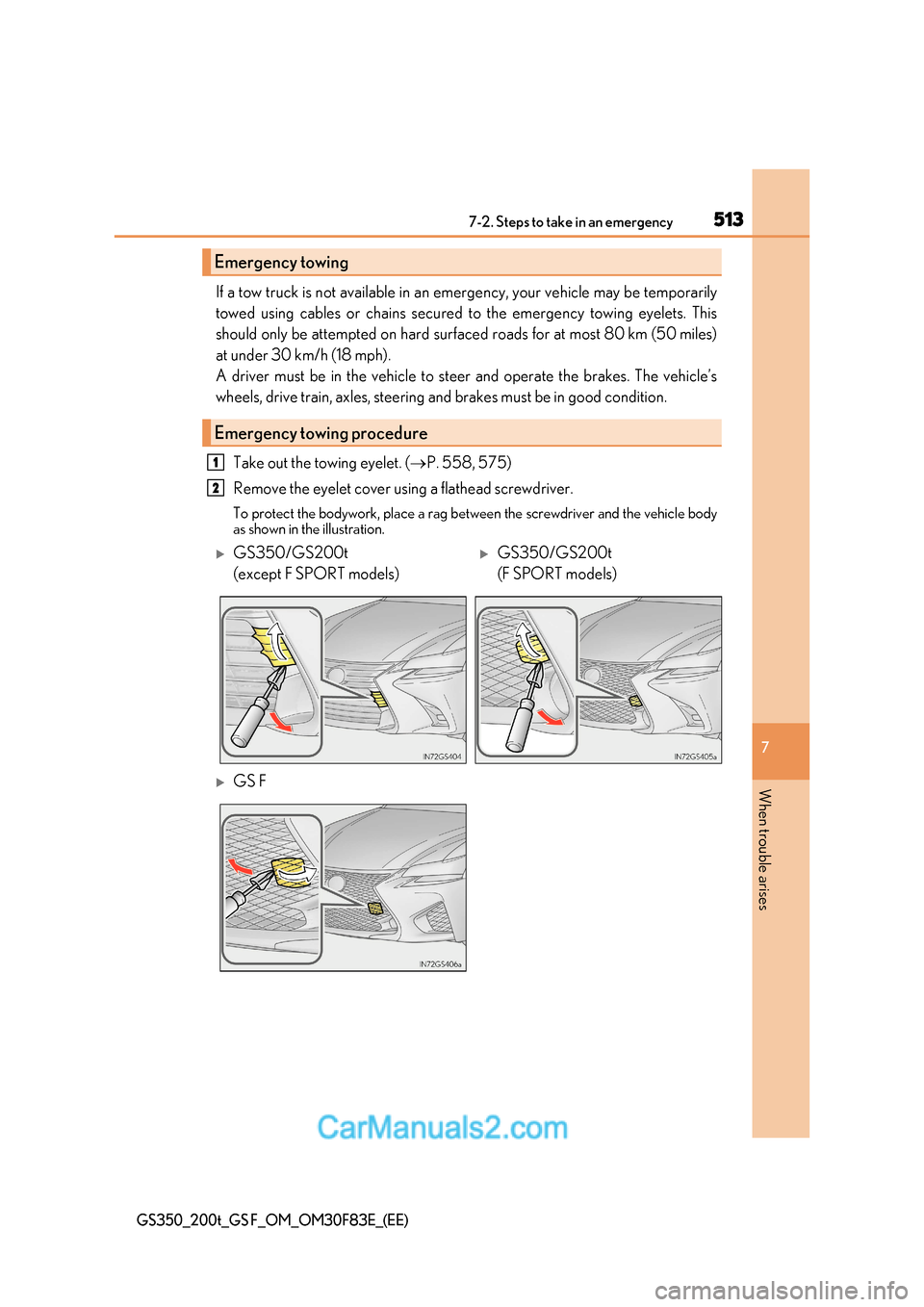
Take out the towing eyelet. ( P. 558, 575)
Remove the eyelet cover using a flathead screwdriver.
To protect the bodywork, place a rag between the screwdriver and the vehicle body
as shown in the illustration.
Emergency towing
Emergency towing procedure
1
2
GS350/GS200t
(except F SPORT models)GS350/GS200t
(F SPORT models)
GS F
Page 515 of 676
515
7-2. Steps to take in an emergency
7
When trouble arises
GS350_200t_GS F_OM_OM30F83E_(EE)
WARNING
Observe the following precautions.
Failure to do so may result in death or serious injury.
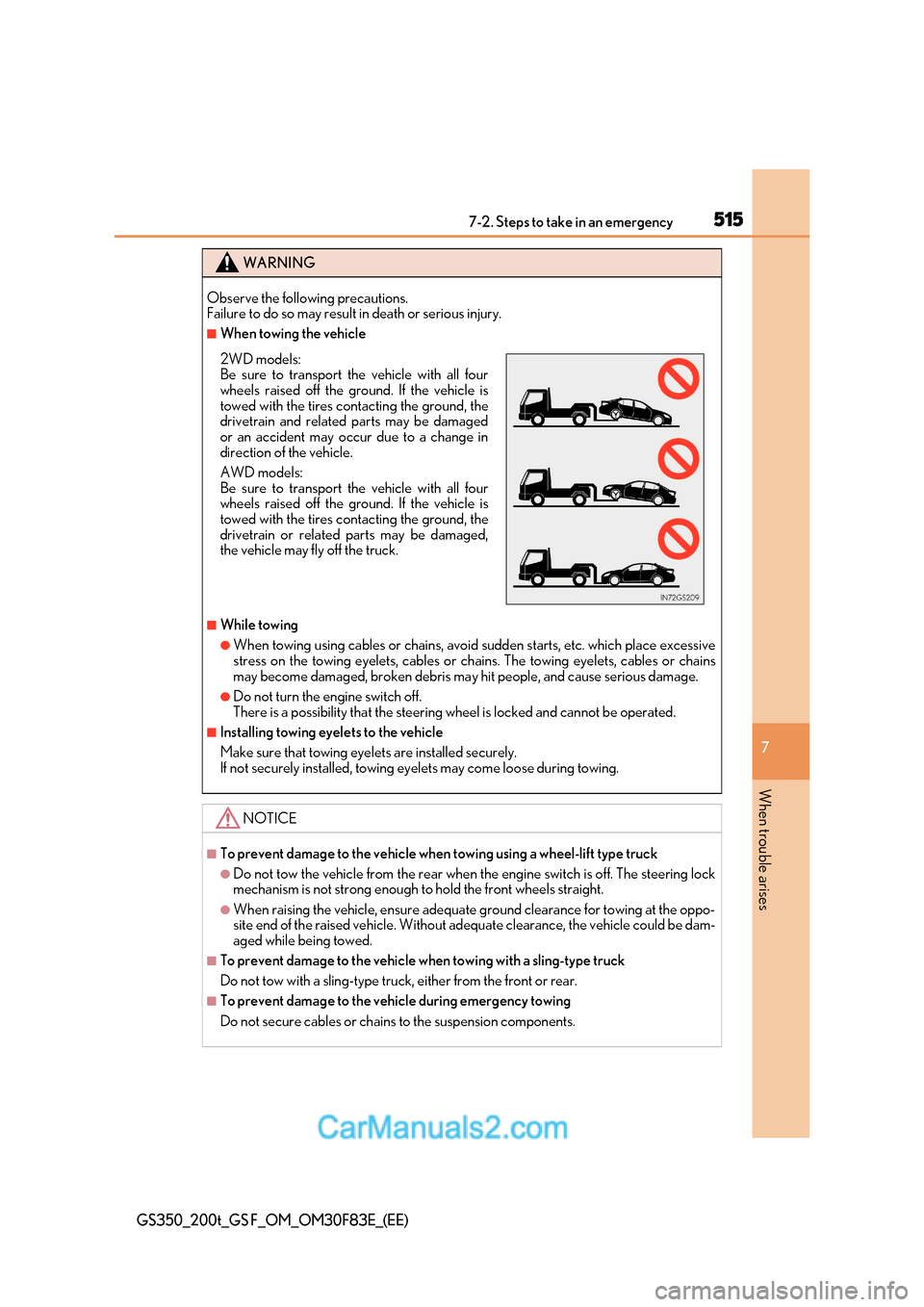
■When towing the vehicle
■While towing
●When towing using cables or chains, avoid sudden starts, etc. which place excessive
stress on the towing eyelets, cables or chains. The towing eyelets, cables or chains
may become damaged, broken debris ma y hit people, and cause serious damage.
●Do not turn the engine switch off.
There is a possibility that the steering wheel is locked and cannot be operated.
■Installing towing eyelets to the vehicle
Make sure that towing eyelets are installed securely.
If not securely installed, towing ey elets may come loose during towing.
NOTICE
■To prevent damage to the vehicle when towing using a wheel-lift type truck
●Do not tow the vehicle from the rear when the engine switch is off. The steering lock
mechanism is not strong enough to hold the front wheels straight.
●When raising the vehicle, ensure adequate ground clearance for towing at the oppo-
site end of the raised vehicle. Without adequate clearance, the vehicle cou ld be dam-
aged while being towed.
■To prevent damage to the vehicle when towing with a sling-type truck
Do not tow with a sling-type truck, either from the front or rear.
■To prevent damage to the vehicle during emergency towing
Do not secure cables or chains to the suspension components.
2WD models:
Be sure to transport the vehicle with all four
wheels raised off the ground. If the vehicle is
towed with the tires contacting the ground, the
drivetrain and related parts may be damaged
or an accident may occur due to a change in
direction of the vehicle.
AWD models:
Be sure to transport the vehicle with all four
wheels raised off the ground. If the vehicle is
towed with the tires contacting the ground, the
drivetrain or related parts may be damaged,
the vehicle may fly off the truck.
Page 524 of 676
5247-2. Steps to take in an emergency
GS350_200t_GS F_OM_OM30F83E_(EE)
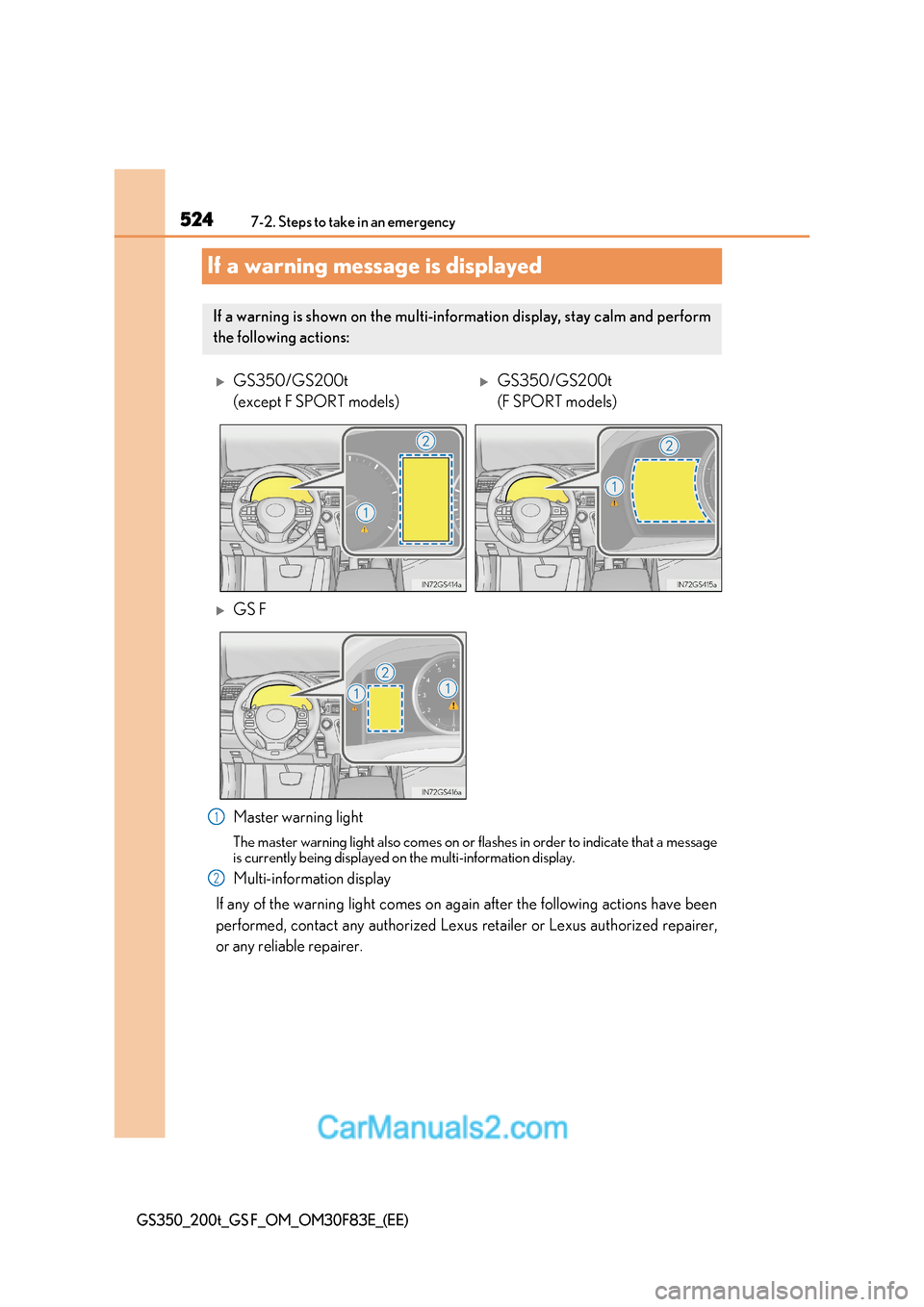
If a warning message is displayed
Master warning light
The master warning light also comes on or flashes in order to indicate that a message
is currently being displayed on the multi-information display.
Multi-information display
If any of the warning light comes on again after the following actions have been
performed, contact any authorized Lexus retailer or Lexus authorized repairer,
or any reliable repairer.
If a warning is shown on the multi-information display, stay calm and perform
the following actions:
GS350/GS200t
(except F SPORT models)GS350/GS200t
(F SPORT models)
GS F
1
2
Page 636 of 676
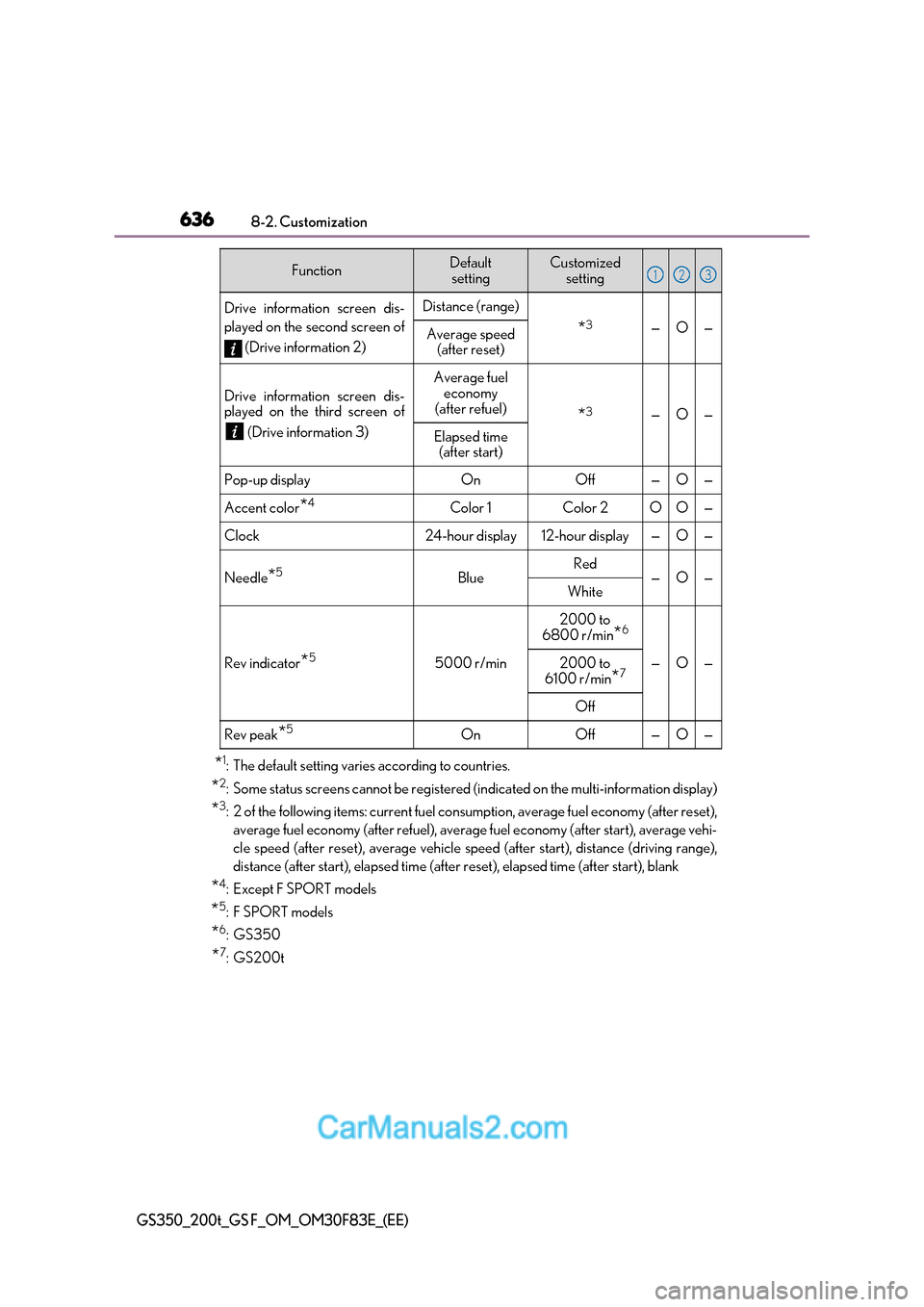
6368-2. Customization
GS350_200t_GS F_OM_OM30F83E_(EE)
*1
: The default setting varies according to countries.
* 2
: Some status screens cannot be registered (indicated on the multi-information display)
* 3
: 2 of the following items: current fuel cons umption, average fuel economy (after reset),
average fuel economy (after refuel), average fuel economy (after start), average vehi-
cle speed (after reset), average vehicle speed (after start), distance (driving range),
distance (after start), elapsed time (after reset), elapsed time (after start), blank
* 4
:Except F SPORT models
* 5
:F SPORT models
* 6
:GS350
* 7
:GS200t
Drive information screen dis-
played on the second screen of
(Drive information 2)Distance (range)
*3—O—Average speed
(after reset)
Drive information screen dis-
played on the third screen of
(Drive information 3)
Average fuel economy
(after refuel)
* 3—O—
Elapsed time
(after start)
Pop-up displayOnOff—O—
Accent color *4Color 1Color 2OO—
Clock24-hour display12-hour display—O—
Needle
*5BlueRed—O—White
Rev indicator
*55000 r/min
2000 to
6800 r/min *6
—O—2000 to
6100 r/min *7
Off
Rev peak
*5OnOff—O—
FunctionDefault
settingCustomized setting123
Page 638 of 676
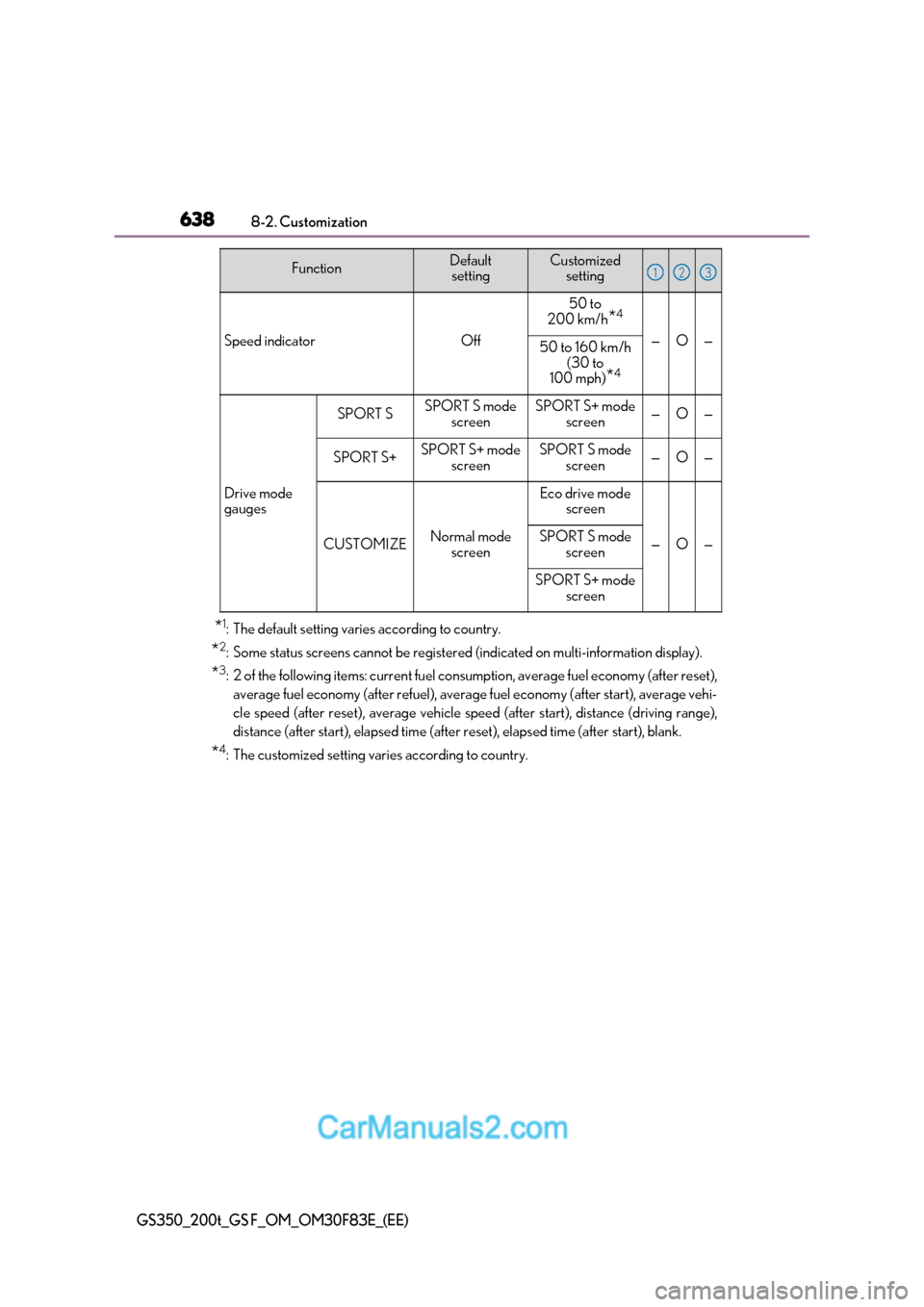
6388-2. Customization
GS350_200t_GS F_OM_OM30F83E_(EE)
*1
: The default setting varies according to country.
* 2
: Some status screens cannot be registered (indicated on multi-information display).
* 3
: 2 of the following items: current fuel cons umption, average fuel economy (after reset),
average fuel economy (after refuel), average fuel economy (after start), average vehi-
cle speed (after reset), average vehicle speed (after start), distance (driving range),
distance (after start), elapsed time (after reset), elapsed time (after start), blank.
* 4
: The customized setting varies according to country.
Speed indicatorOff
50 to
200 km/h *4
—O—50 to 160 km/h
(30 to
100 mph) *4
Drive mode
gauges
SPORT SSPORT S mode
screenSPORT S+ mode screen—O—
SPORT S+SPORT S+ mode screenSPORT S mode screen—O—
CUSTOMIZENormal mode
screen
Eco drive mode screen
—O—SPORT S mode
screen
SPORT S+ mode screen
FunctionDefault settingCustomized setting123