sport mode Lexus GS350 2017 User Guide
[x] Cancel search | Manufacturer: LEXUS, Model Year: 2017, Model line: GS350, Model: Lexus GS350 2017Pages: 676, PDF Size: 67.73 MB
Page 143 of 676
143
2. Instrument cluster
2
Instrument cluster
GS350_200t_GS F_OM_OM30F83E_(EE)
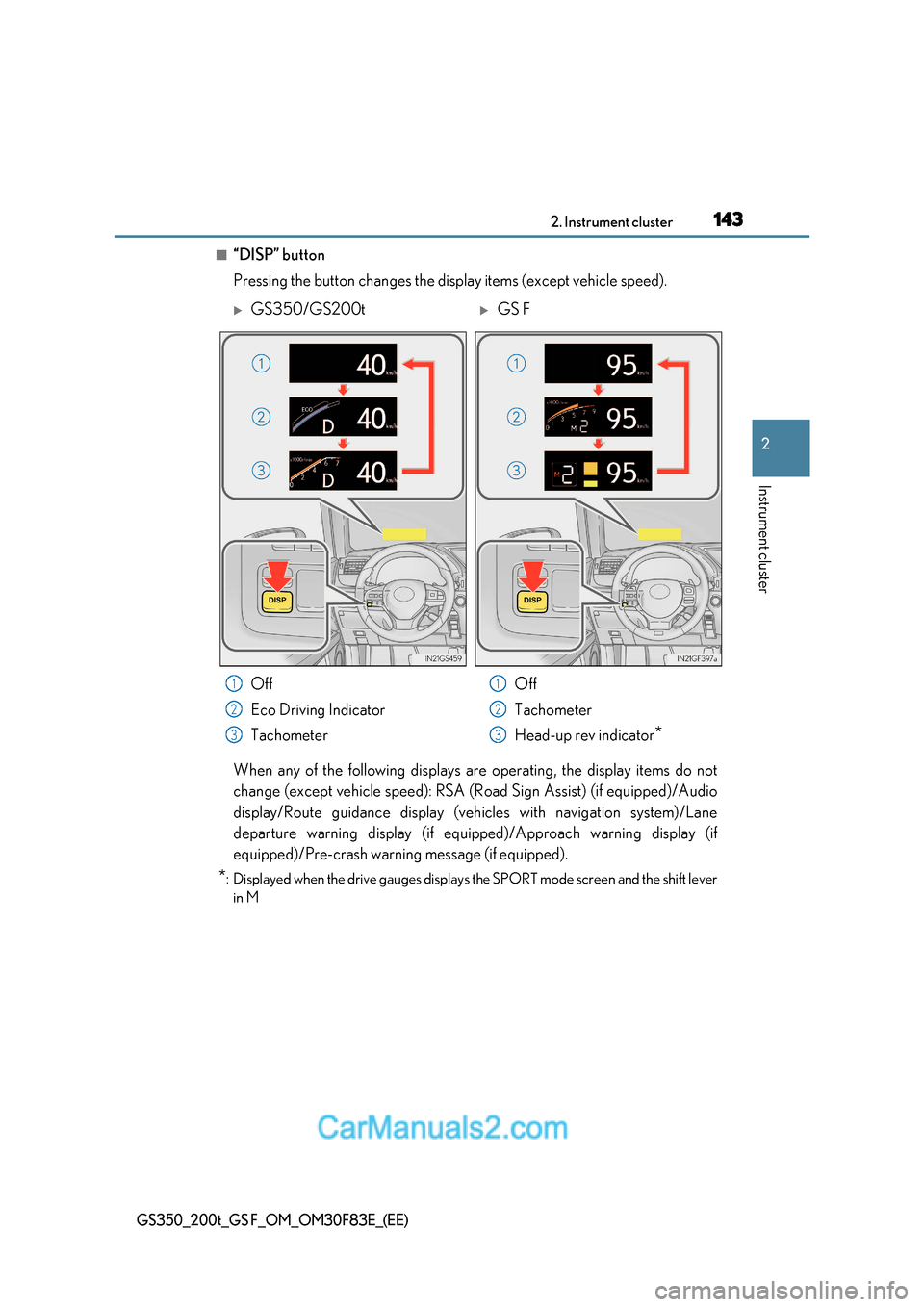
■“DISP” button
Pressing the button changes the display items (except vehicle speed).
When any of the following displays are operating, the display items do not
change (except vehicle speed): RSA (Road Sign Assist) (if equipped)/Audio
display/Route guidance display (vehicles with navigation system)/Lane
departure warning display (if equipp ed)/Approach warning display (if
equipped)/Pre-crash warning message (if equipped).
* : Displayed when the drive gauges displays the SPORT mode screen and the shift lever
in M
GS350/GS200tGS F
Off
Eco Driving Indicator
Tachometer Off
Tachometer
Head-up rev indicator
*
1
2
3
1
2
3
Page 145 of 676
145
2. Instrument cluster
2
Instrument cluster
GS350_200t_GS F_OM_OM30F83E_(EE)
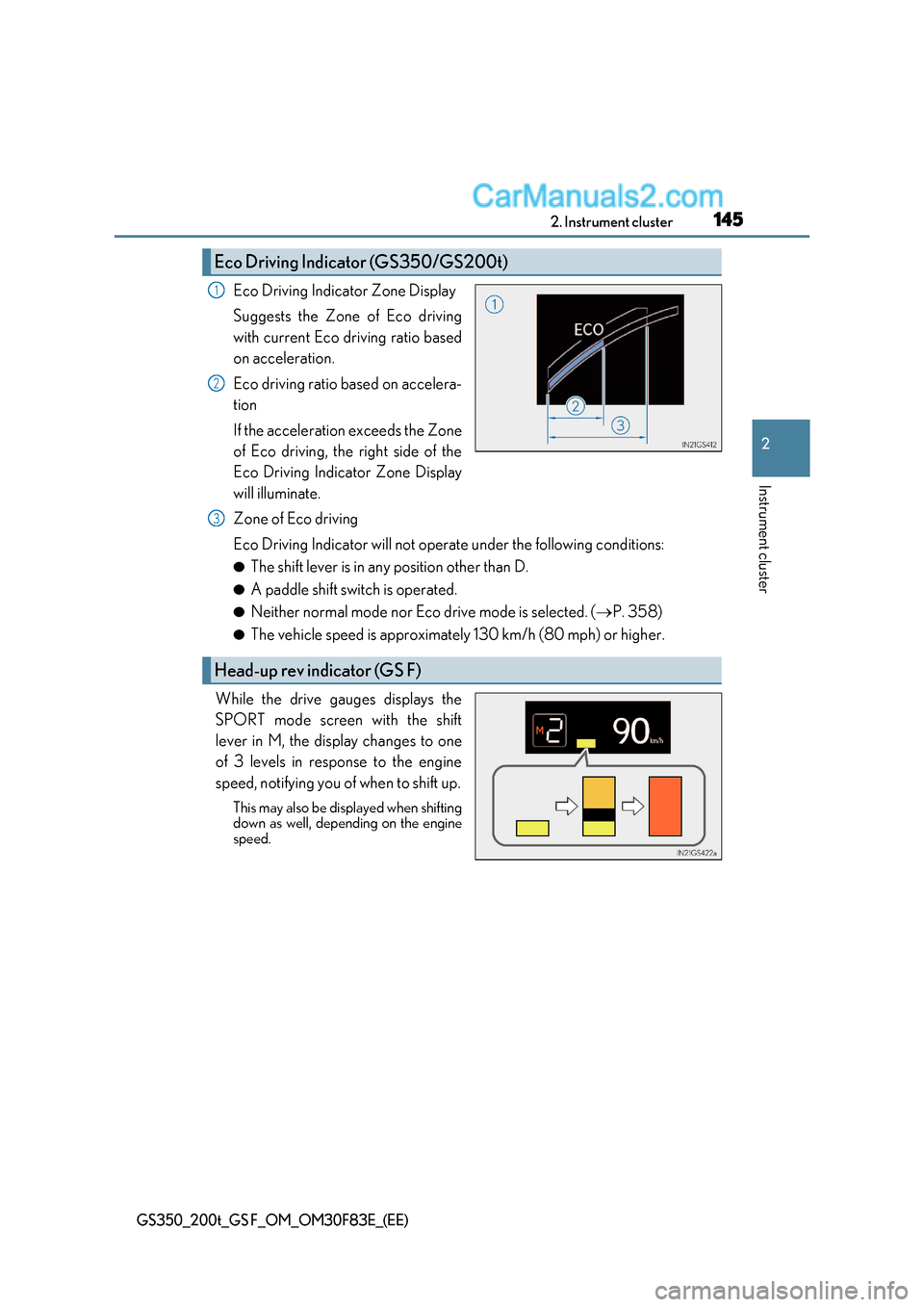
Eco Driving Indicator Zone Display
Suggests the Zone of Eco driving
with current Eco driving ratio based
on acceleration.
Eco driving ratio based on accelera-
tion
If the acceleration exceeds the Zone
of Eco driving, the right side of the
Eco Driving Indicator Zone Display
will illuminate.
Zone of Eco driving
Eco Driving Indicator will not operate under the following conditions: ● The shift lever is in any position other than D.
● A paddle shift switch is operated.
● Neither normal mode nor Eco drive mode is selected. ( P. 358)
● The vehicle speed is approximately 130 km/h (80 mph) or higher.
While the drive gauges displays the
SPORT mode screen with the shift
lever in M, the display changes to one
of 3 levels in response to the engine
speed, notifying you of when to shift up. This may also be displayed when shifting
down as well, depending on the engine
speed.
Eco Driving Indicator (GS350/GS200t)
1
2
Head-up rev indicator (GS F)
3
Page 223 of 676
223
4-1. Before driving
4
Driving
GS350_200t_GS F_OM_OM30F83E_(EE)
■When starting off on a uphill
The hill-start assist control is available. ( P. 376)
■Driving in the rain
●Drive carefully when it is ra ining, because visibility will be reduced, the windows may
become fogged-up, and the road will be slippery.
●Drive carefully when it starts to rain, because the road surface will be especially slip-
pery.
●Refrain from high speeds when driving on an expressway in the rain, because there may
be a layer of water between the tires and the road surface, preventing the steering and
brakes from operating properly.
■Engine speed while driving
In the following conditions, the engine speed may become high while driving. This is due
to automatic up-shifting control or down-shifting implementation to meet driving condi-
tions. It does not indicate sudden acceleration.
●The vehicle is judged to be driving uphill or downhill
●When the accelerator pedal is released
●When the brake pedal is depressed while sport mode is selected ( P. 358)
■Restraining engine output (Brake Override System)
●When the accelerator and brake pedals are depressed at the same time, the engine
output may be restrained.
●A warning message is displayed on the mult i-information display while the system is
operating. ( P. 546)
■Restraining sudden start (Drive-Start Control)
●When the following unusual operation is performed, the engine output may be
restrained.
Page 247 of 676
247
4-2. Driving procedures
4
Driving
GS350_200t_GS F_OM_OM30F83E_(EE)
■Sport mode/Eco drive mode P. 358
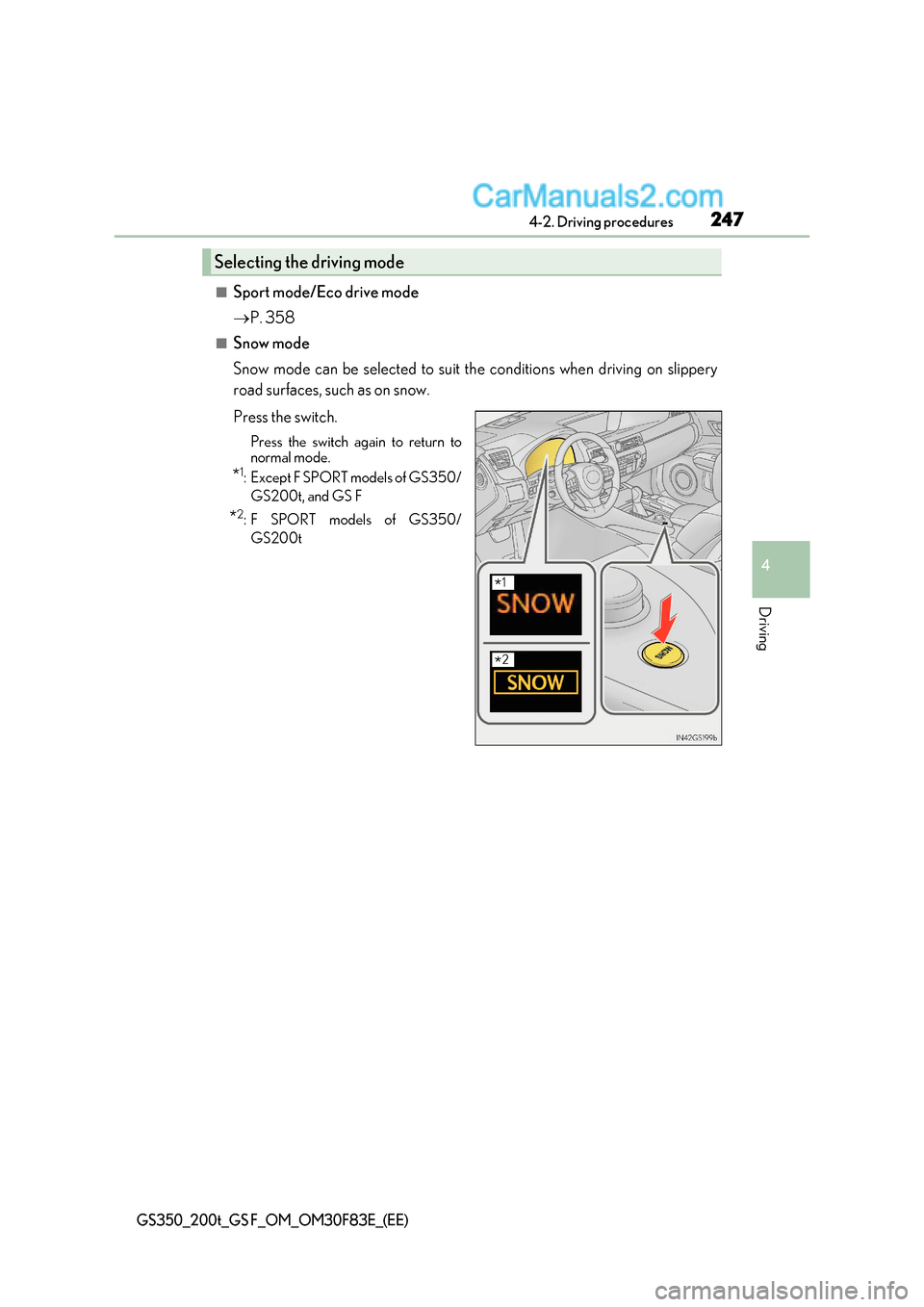
■Snow mode
Snow mode can be selected to suit the conditions when driving on slippery
road surfaces, such as on snow.
Press the switch.
Press the switch again to return to
normal mode.
* 1
:Except F SPORT models of GS350/
GS200t, and GS F
* 2
: F SPORT models of GS350/
GS200t
Selecting the driving mode
* 1
*2
Page 254 of 676
2544-2. Driving procedures
GS350_200t_GS F_OM_OM30F83E_(EE)
■AI-SHIFT
●The AI-SHIFT automatically selects the suitable gear according to driver performance
and driving conditions.
The AI-SHIFT automatically operates when th e shift lever is in D. (Shifting the shift
lever to the M position cancels the function.)
●8-speed models: G AI-SHIFT automatically selects a suitable gear for sporty driving
according to driver’s input and driving co nditions. G AI-SHIFT operates automatically
when the shift lever is in D and sport mode is selected for the driving mode. (Selecting
normal mode with the driving mode select sw itch or shifting the shift lever to the M
position cancels this function.)
WARNING
■When driving on slippery road surfaces
Be careful of downshifting and sudden acceler ation, as this could result in the vehicle
skidding to the side or spinning.
■To prevent an accident when releasing the shift lock
Before pressing the shift lock override butt on, make sure to set the parking brake and
depress the brake pedal.
If the accelerator pedal is accidentally depress instead of the brake pedal when the shift
lock override button is pressed and the shift lever is shifted out of P, the vehicle may
suddenly start, possibly leading to an accident resulting in death or serious injury.
■Gear Shift Indicator display (if equipped)
For safety, the driver should not look only at the display. Refer to the display when it is
safe to do so while considering actual traffic and road conditions.
Failure to do so may lead to an accident.
Page 261 of 676
261
4
4-2. Driving procedures
Driving
GS350_200t_GS F_OM_OM30F83E_(EE)
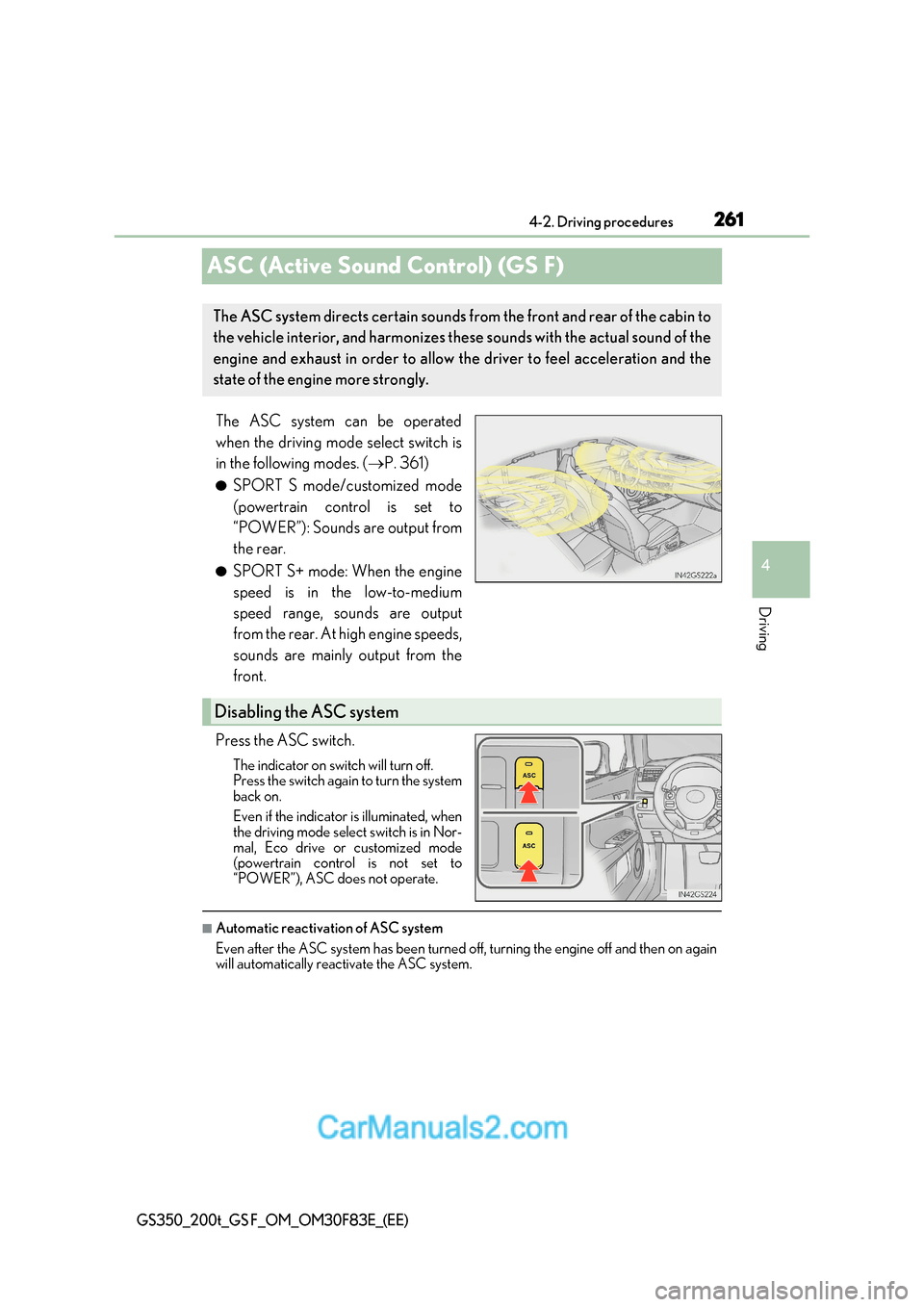
ASC (Active Sound Control) (GS F)
The ASC system can be operated
when the driving mode select switch is
in the following modes. (P. 361)
● SPORT S mode/customized mode
(powertrain control is set to
“POWER”): Sounds are output from
the rear.
● SPORT S+ mode: When the engine
speed is in the low-to-medium
speed range, sounds are output
from the rear. At high engine speeds,
sounds are mainly output from the
front.
Press the ASC switch. The indicator on switch will turn off.
Press the switch again to turn the system
back on.
Even if the indicator is illuminated, when
the driving mode select switch is in Nor-
mal, Eco drive or customized mode
(powertrain control is not set to
“POWER”), ASC does not operate.
■Automatic reactivation of ASC system
Even after the ASC system has been turned off, turning the engine off and then on again
will automatically react ivate the ASC system.
The ASC system directs certain sounds from the front and rear of the cabin to
the vehicle interior, and harmonizes these sounds with the actual sound of the
engine and exhaust in order to allow the driver to feel acceleration and the
state of the engine more strongly.
Disabling the ASC system
Page 358 of 676
3584-5. Using the driving support systems
GS350_200t_GS F_OM_OM30F83E_(EE)
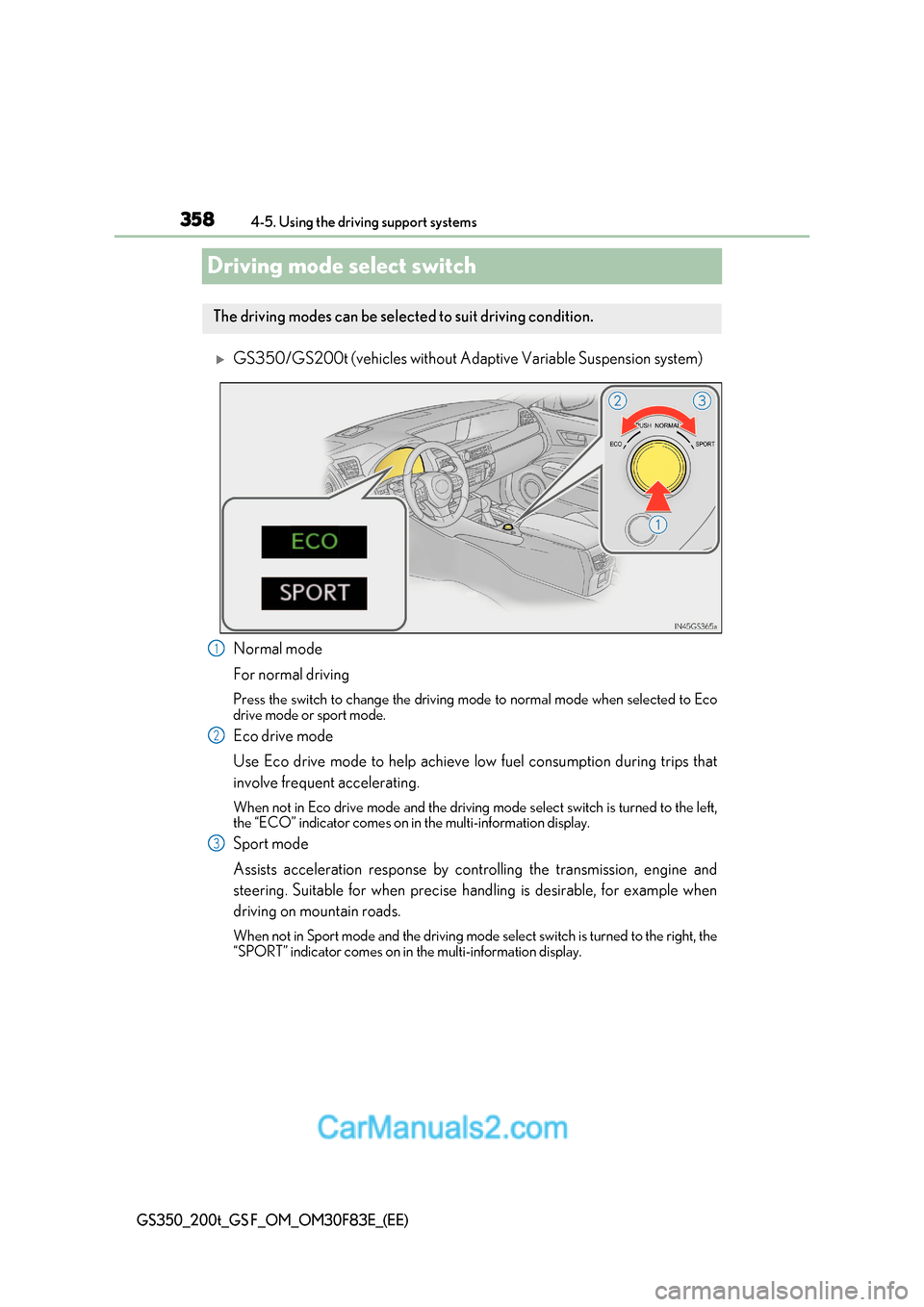
Driving mode select switch
GS350/GS200t (vehicles without Adaptive Variable Suspension system)
Normal mode
For normal driving
Press the switch to change the driving mode to normal mode when selected to Eco
drive mode or sport mode.
Eco drive mode
Use Eco drive mode to help achieve low fuel consumption during trips that
involve frequent accelerating.
When not in Eco drive mode and the driving mode select switch is turned to the left,
the “ECO” indicator comes on in the multi-information display.
Sport mode
Assists acceleration response by controlling the transmission, engine and
steering. Suitable for when precise handling is desirable, for exampl e when
driving on mountain roads.
When not in Sport mode and the driving mode select switch is turned to the right, the
“SPORT” indicator comes on in the multi-information display.
The driving modes can be select ed to suit driving condition.
1
2
3
Page 359 of 676
359
4-5. Using the driving support systems
4
Driving
GS350_200t_GS F_OM_OM30F83E_(EE)
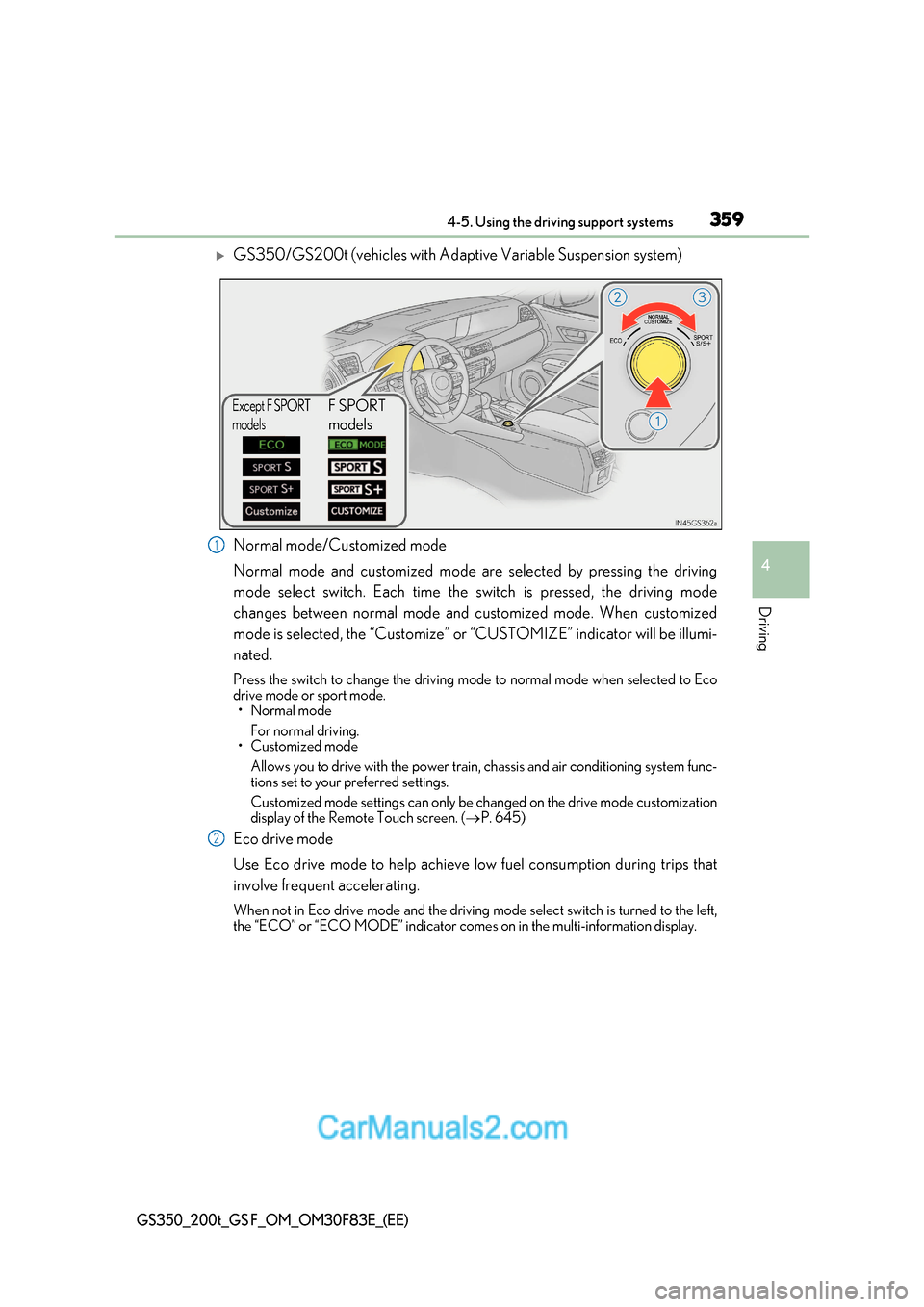
GS350/GS200t (vehicles with Adaptive Variable Suspension system)
Normal mode/Customized mode
Normal mode and customized mode are selected by pressing the driving
mode select switch. Each time the switch is pressed, the driving mode
changes between normal mode and customized mode. When customized
mode is selected, the “Customize” or “CUSTOMIZE” indicator will be illumi-
nated.
Press the switch to change the driving mode to normal mode when selected to Eco
drive mode or sport mode.
Page 360 of 676
3604-5. Using the driving support systems
GS350_200t_GS F_OM_OM30F83E_(EE)
Sport mode
Page 361 of 676
361
4-5. Using the driving support systems
4
Driving
GS350_200t_GS F_OM_OM30F83E_(EE)
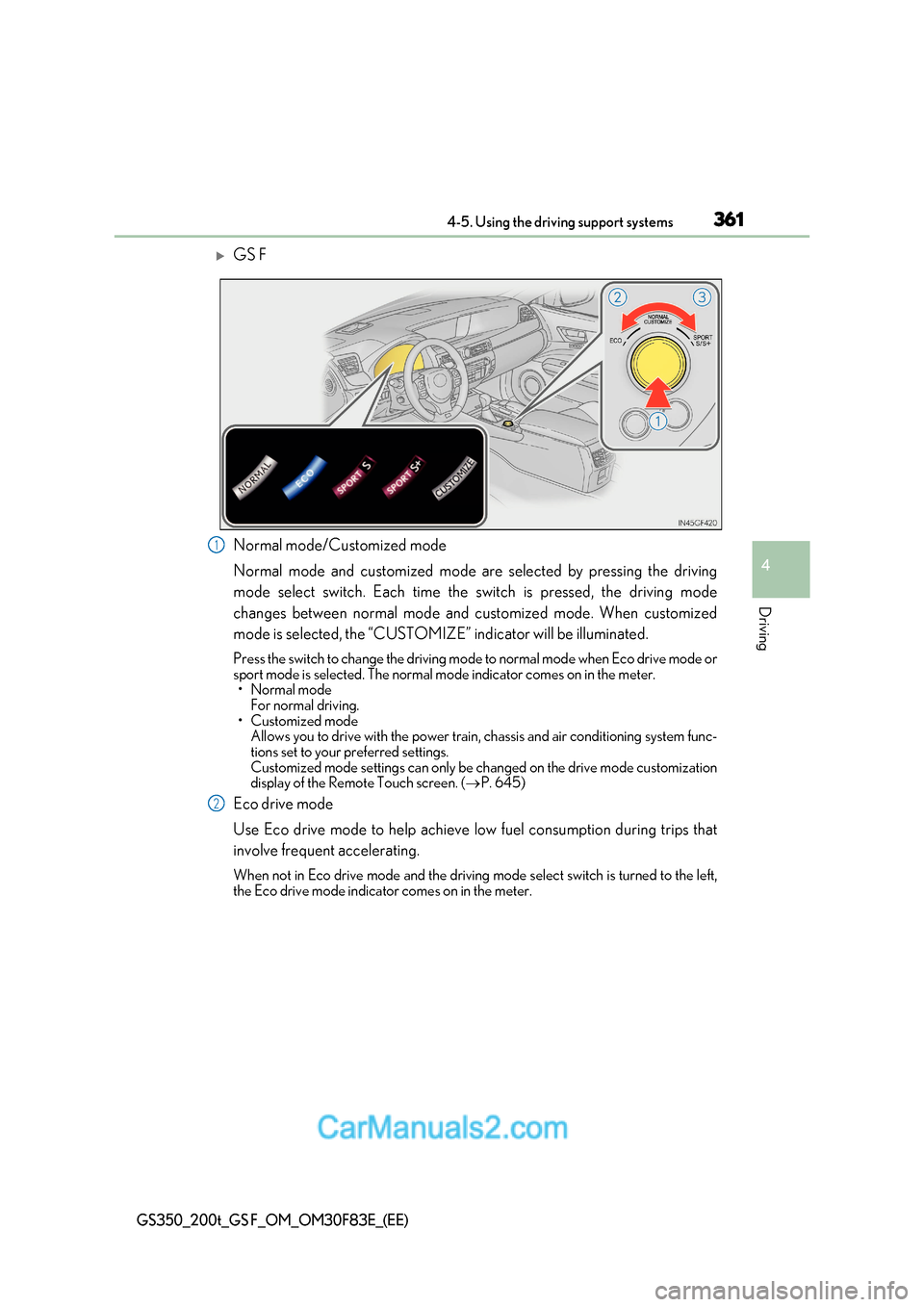
GS F
Normal mode/Customized mode
Normal mode and customized mode are selected by pressing the driving
mode select switch. Each time the switch is pressed, the driving mode
changes between normal mode and customized mode. When customized
mode is selected, the “CUSTOMIZE” indicator will be illuminated.
Press the switch to change the driving mode to normal mode when Eco drive mode or
sport mode is selected. The normal mo de indicator comes on in the meter.