change Lexus GS350 2020 Repair Manual
[x] Cancel search | Manufacturer: LEXUS, Model Year: 2020, Model line: GS350, Model: Lexus GS350 2020Pages: 600, PDF Size: 13.38 MB
Page 272 of 600
272
GS350_GS F_OM_OM30J07U_(U)4-5. Using the driving support systems
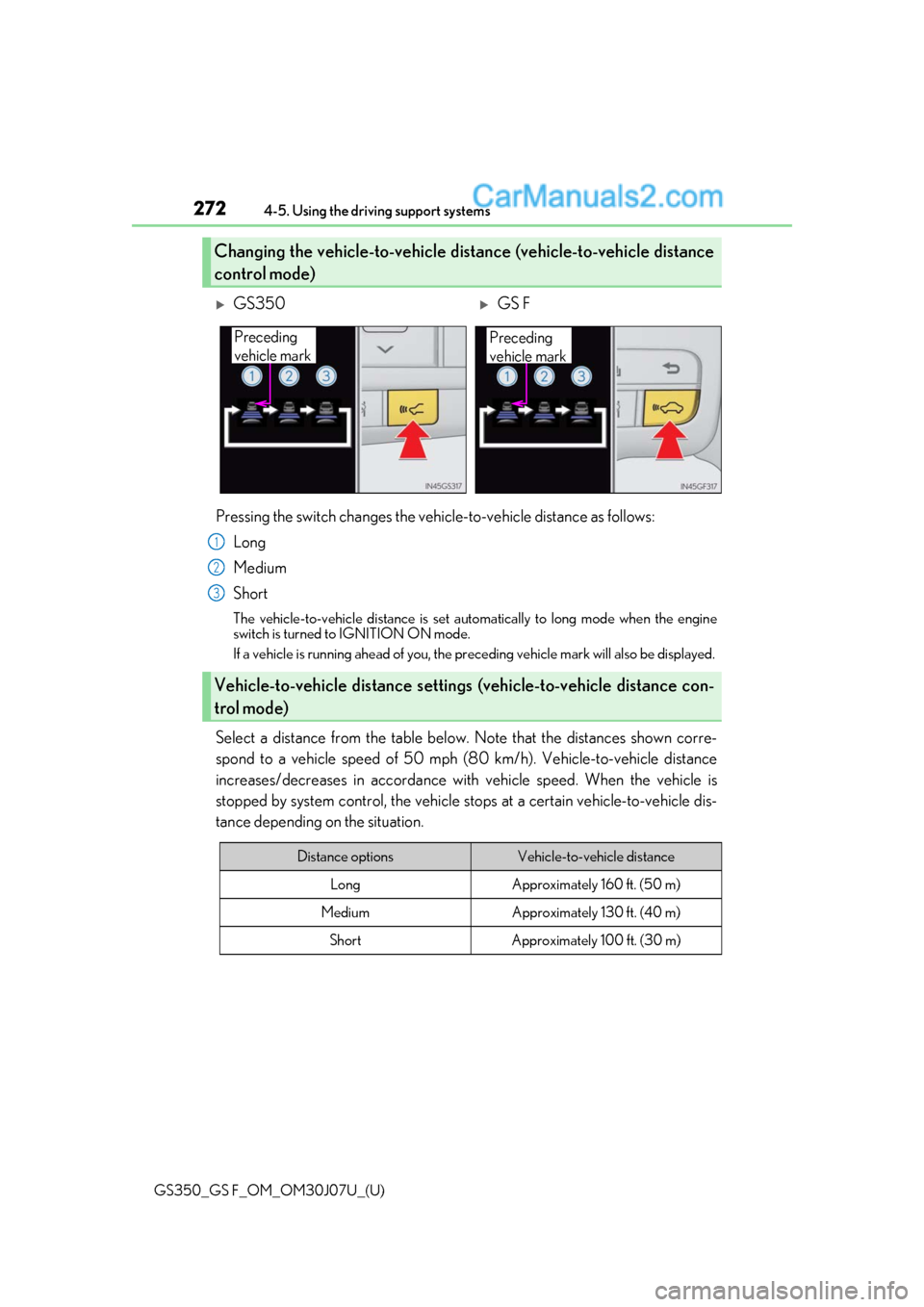
Pressing the switch changes the vehicle-to-vehicle distance as follows:
Long
Medium
Short
The vehicle-to-vehicle distance is set automatically to long mode when the engine
switch is turned to IGNITION ON mode.
If a vehicle is running ahead of you, the pr eceding vehicle mark will also be displayed.
Select a distance from the table below. Note that the distances shown corre-
spond to a vehicle speed of 50 mph (8 0 km/h). Vehicle-to-vehicle distance
increases/decreases in accordance with vehicle speed. When the vehicle is
stopped by system control, the vehicle stops at a certain vehicle-to-vehicle dis-
tance depending on the situation.
Changing the vehicle-to-vehicle distance (vehicle-to-vehicle distance
control mode)
GS350GS F
Preceding
vehicle mark
Preceding
vehicle mark
Vehicle-to-vehicle distance settings (vehicle-to-vehicle distance con-
trol mode)
1
2
3
Distance optionsVehicle-to-vehicle distance
LongApproximately 160 ft. (50 m)
MediumApproximately 130 ft. (40 m)
ShortApproximately 100 ft. (30 m)
Page 279 of 600
GS350_GS F_OM_OM30J07U_(U)
2794-5. Using the driving support systems
4
Driving
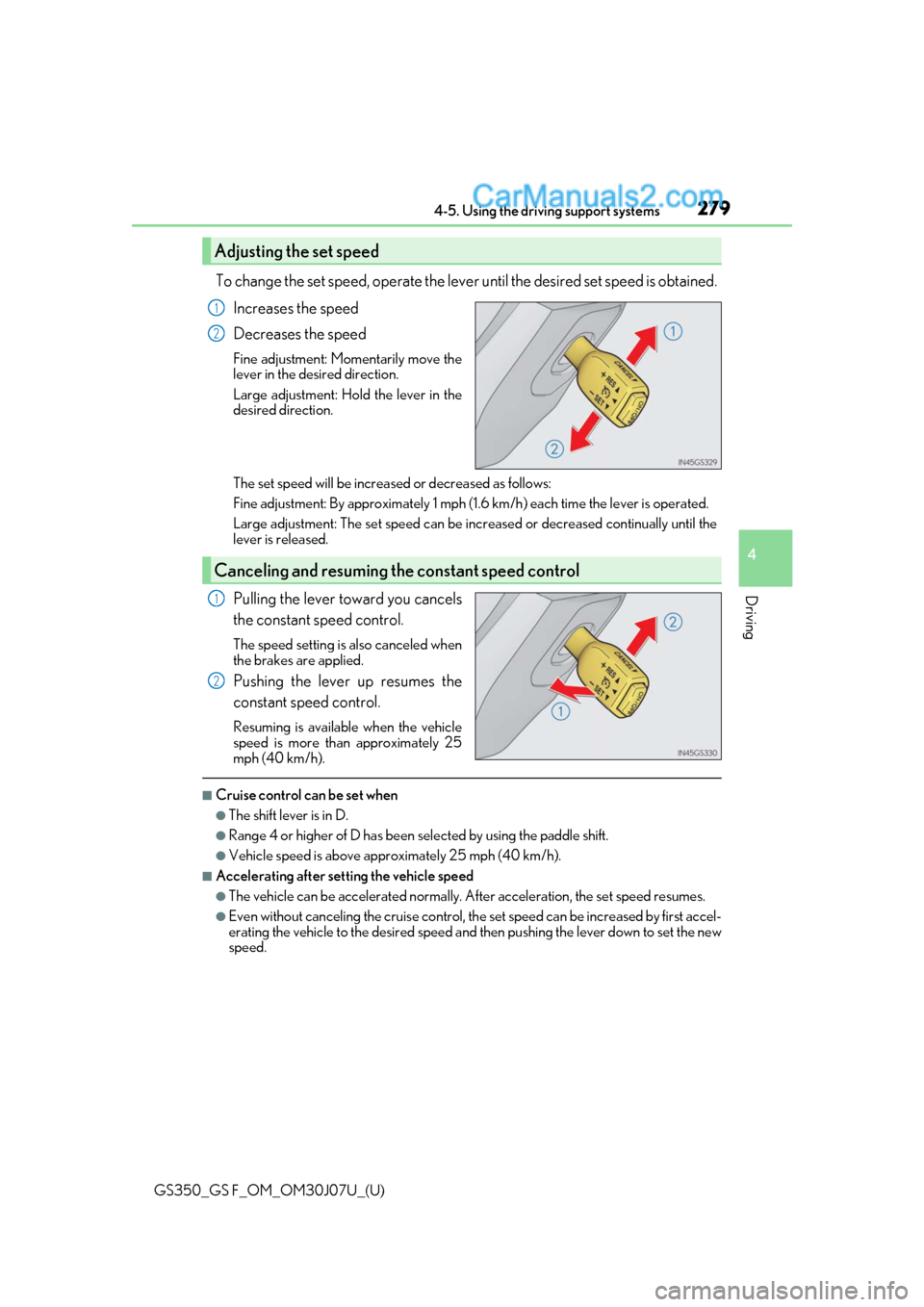
To change the set speed, operate the lever until the desired set speed is obtained.
Increases the speed
Decreases the speed
Fine adjustment: Momentarily move the
lever in the desired direction.
Large adjustment: Hold the lever in the
desired direction.
The set speed will be increased or decreased as follows:
Fine adjustment: By approximately 1 mph (1. 6 km/h) each time the lever is operated.
Large adjustment: The set speed can be increased or decreased continually until the
lever is released.
Pulling the lever toward you cancels
the constant speed control.
The speed setting is also canceled when
the brakes are applied.
Pushing the lever up resumes the
constant speed control.
Resuming is available when the vehicle
speed is more than approximately 25
mph (40 km/h).
■Cruise control can be set when
●The shift lever is in D.
●Range 4 or higher of D has been selected by using the paddle shift.
●Vehicle speed is above approximately 25 mph (40 km/h).
■Accelerating after setting the vehicle speed
●The vehicle can be accelerated normally. After acceleration, the set speed resumes.
●Even without canceling the cruise control, th e set speed can be increased by first accel-
erating the vehicle to the desired speed and then pushing the lever down to set the new
speed.
Adjusting the set speed
1
2
Canceling and resuming the constant speed control
1
2
Page 281 of 600
281
GS350_GS F_OM_OM30J07U_(U)4-5. Using the driving support systems
4
Driving
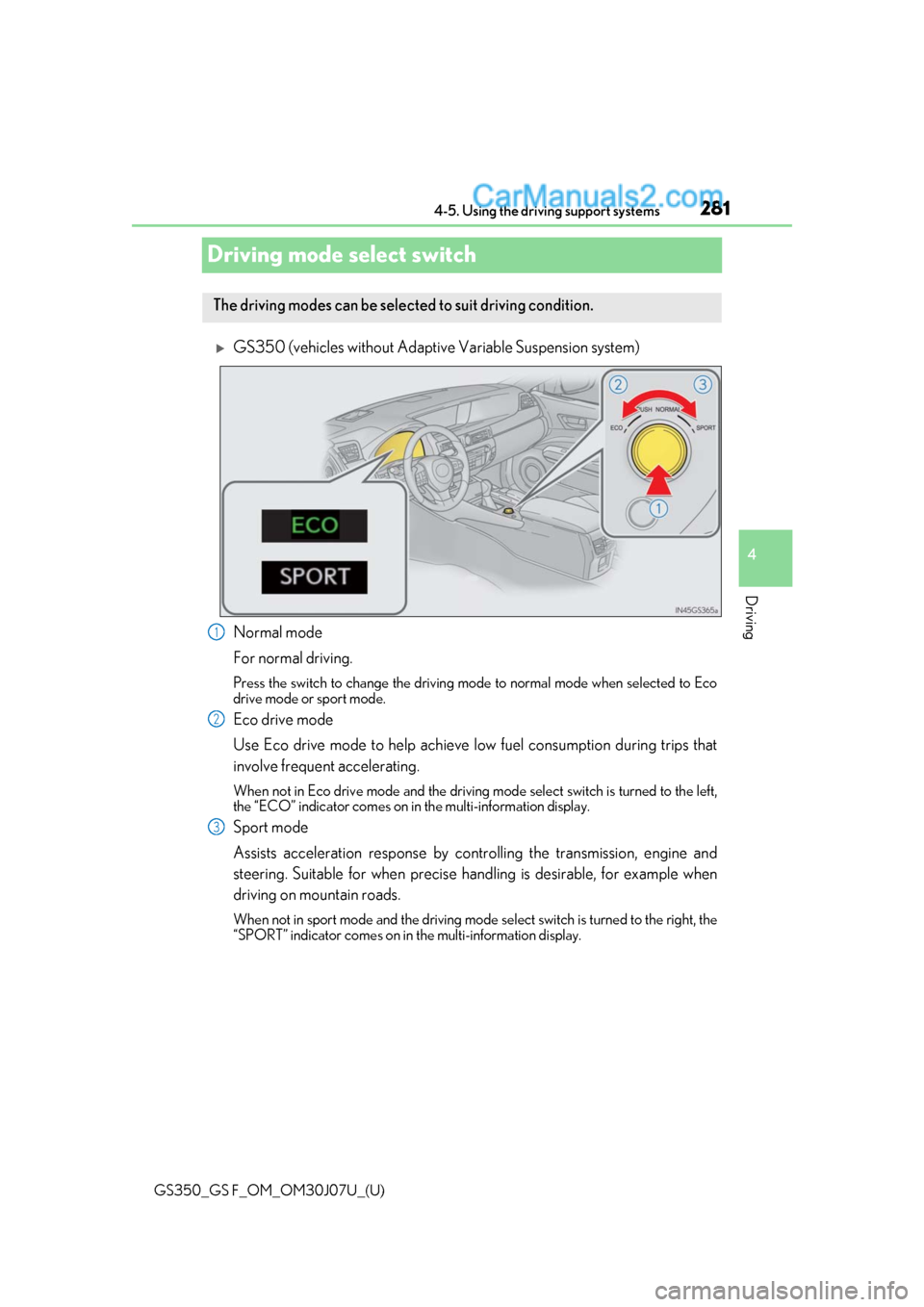
Driving mode select switch
GS350 (vehicles without Adaptive
Variable Suspension system)
Normal mode
For normal driving.
Press the switch to change the driving mode to normal mode when selected to Eco
drive mode or sport mode.
Eco drive mode
Use Eco drive mode to help achieve low fuel consumption during trips that
involve frequent accelerating.
When not in Eco drive mode and the driving mode select switch is turned to the left,
the “ECO” indicator comes on in the multi-information display.
Sport mode
Assists acceleration response by cont rolling the transmission, engine and
steering. Suitable for when precise ha ndling is desirable, for example when
driving on mountain roads.
When not in sport mode and the driving mode select switch is turned to the right, the
“SPORT” indicator comes on in the multi-information display.
The driving modes can be selected to suit driving condition.
1
2
3
Page 282 of 600
282
GS350_GS F_OM_OM30J07U_(U)4-5. Using the driving support systems
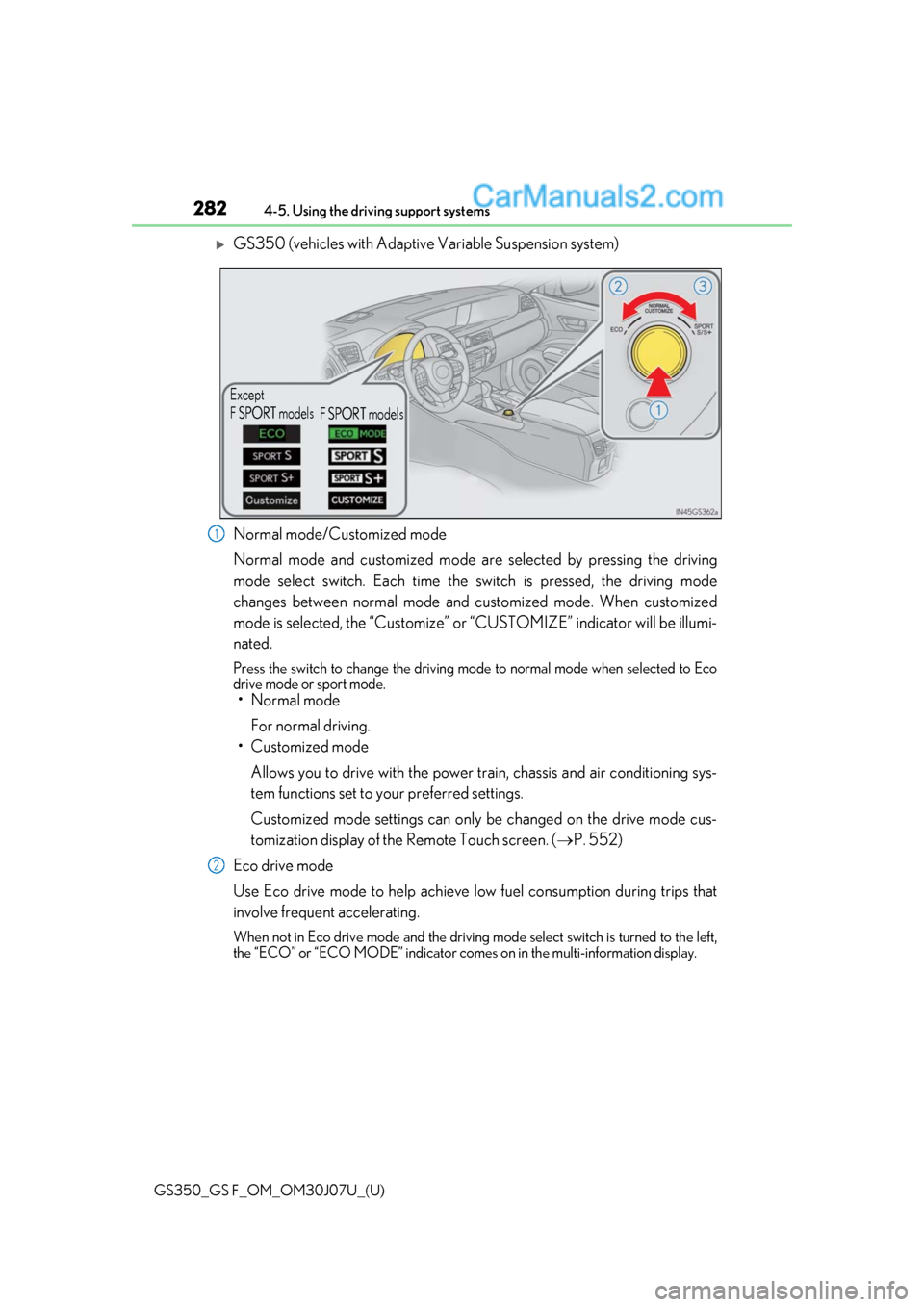
GS350 (vehicles with Adaptive Variable Suspension system)
Normal mode/Customized mode
Normal mode and customized mode ar
e selected by pressing the driving
mode select switch. Each time the switch is pressed, the driving mode
changes between normal mode and customized mode. When customized
mode is selected, the “Customize” or “CUSTOMIZE” indicator will be illumi-
nated.
Press the switch to change the driving mode to normal mode when selected to Eco
drive mode or sport mode.
• Normal mode
For normal driving.
• Customized mode
Allows you to drive with the power train, chassis and air conditioning sys-
tem functions set to your preferred settings.
Customized mode settings can only be changed on the drive mode cus-
tomization display of the Remote Touch screen. ( P. 552)
Eco drive mode
Use Eco drive mode to help achieve low fuel consumption during trips that
involve frequent accelerating.
When not in Eco drive mode and the driving mode select switch is turned to the left,
the “ECO” or “ECO MODE” indicator come s on in the multi-information display.
Except
F SPORT models
F SPORT models
1
2
Page 284 of 600
284
GS350_GS F_OM_OM30J07U_(U)4-5. Using the driving support systems
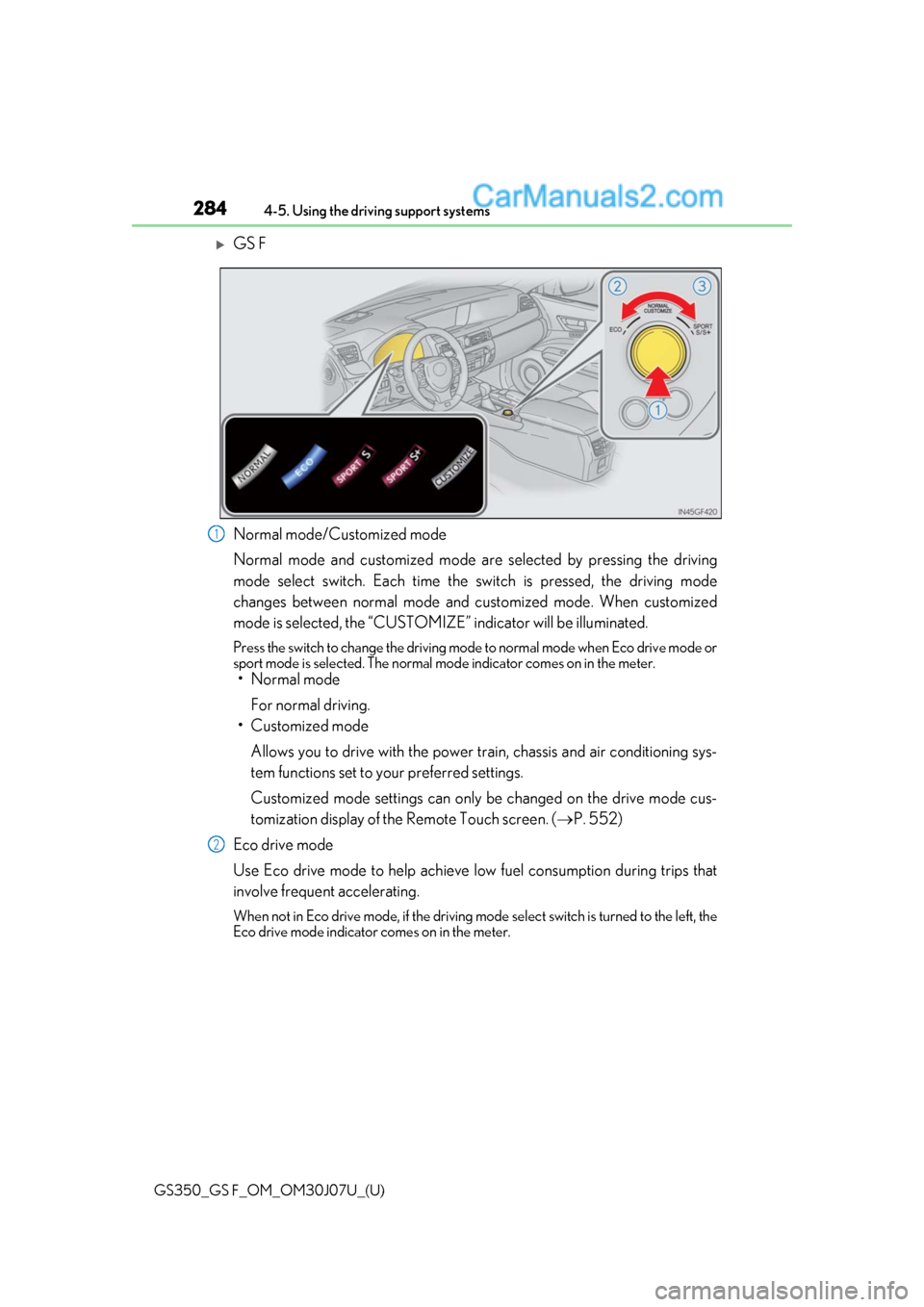
GS F
Normal mode/Customized mode
Normal mode and customized mode ar
e selected by pressing the driving
mode select switch. Each time the switch is pressed, the driving mode
changes between normal mode and customized mode. When customized
mode is selected, the “CUSTOMIZE” indicator will be illuminated.
Press the switch to change the driving mode to normal mode when Eco drive mode or
sport mode is selected. The normal mo de indicator comes on in the meter.
• Normal mode
For normal driving.
• Customized mode
Allows you to drive with the power train, chassis and air conditioning sys-
tem functions set to your preferred settings.
Customized mode settings can only be changed on the drive mode cus-
tomization display of the Remote Touch screen. ( P. 552)
Eco drive mode
Use Eco drive mode to help achieve low fuel consumption during trips that
involve frequent accelerating.
When not in Eco drive mode, if the driving mode select switch is turned to the left, the
Eco drive mode indicator comes on in the meter.
1
2
Page 285 of 600

GS350_GS F_OM_OM30J07U_(U)
2854-5. Using the driving support systems
4
Driving
Sport mode•SPORT S mode
Assists acceleration response by co ntrolling the transmission and engine.
When not in SPORT S mode, if the driving mode select switch is turned to the
right, the “SPORT S” indicator comes on in the meter.
•SPORT S+ mode
Provides earlier downshift timing than SPORT S mode in order to maintain
a high engine speed and provides faster gear changes. This mode also
changes the steering feel, suspension control and VDIM control, making it
suitable for powerful sporty driving.
When in SPORT S mode, if the driving mode select switch is turned to the right,
the “SPORT S+” indicator comes on in the meter.
■Operation of the air conditioning system in Eco drive mode
Eco drive mode controls the heating/cooling operations and fan speed of the air condi-
tioning system to enhance fuel efficiency. To improve air conditioning performance, per-
form the following operations:
●Turn off eco air conditioning mode ( P. 320)
●Adjust the fan speed ( P. 319)
●Turn off Eco drive mode
■Automatic operation of the seat heater during Eco drive mode
Eco drive mode controls the heating operatio n and fan speed of the air conditioning sys-
tem to enhance fuel efficiency. If the driving mode select switch is switched to Eco drive
mode in cold temperatures, the seat heater will be automatically operated to assist heat-
ing performance.
■Automatic deactivation of sport mode and customized mode
If the engine switch is turned off after dr iving in sport mode or customized mode, the
drive mode will be changed to normal mode.
■Driving mode pop-up display (12.3-inch display only)
When the driving mode is changed, the sele cted driving mode will be temporarily dis-
played on the side display. ( P. 316)
3
Page 287 of 600

GS350_GS F_OM_OM30J07U_(U)
2874-5. Using the driving support systems
4
Driving
■The outside rear view mirror indicators visibility
When under strong sunlight, the outside rear view mirror indicator may be difficult to
see.
■Rear Cross Traffic Alert buzzer hearing
Rear Cross Traffic Alert function may be diffic ult to hear over loud noises such as high
audio volume.
■When there is a malfunction in the Blind Spot Monitor
If a system malfunctio n is detected due to any of th e following reasons, warning mes-
sages will be displayed: ( P. 442)
●There is a malfunction with the sensors
●The sensors have become dirty
●The outside temperature is extremely high or low
●The sensor voltage has become abnormal
■Switching the Blind Spot Monitor function and Rear Cross Traffic Alert function on and
off
Settings can be changed from on the multi-information display (P. 106, 114).
Press or on the meter control switch and select “BSM”.
Each time on the meter control switch is pressed, the function switches between
“On” and “Off”.
■Certification for the Blind Spot Monitor
For vehicles sold in the U.S.A., Hawaii, Guam and Puerto Rico
1
2
Page 290 of 600

290
GS350_GS F_OM_OM30J07U_(U)4-5. Using the driving support systems
The Blind Spot Monitor function uses radar sensors to detect vehicles that are
traveling in an adjacent lane in the area that is not reflected in the outside rear
view mirror (the blind spot), and advises the driver of the vehicle’s existence via
the outside rear view mirror indicator.
The areas that vehicles can be detected in are outlined below.
The range of the detection area
extends to:
Approximately 11.5 ft. (3.5 m) from
the side of the vehicle
The first 1.6 ft. (0.5 m) from the side of
the vehicle is not in the detection area
Approximately 9.8 ft. (3 m) from the
rear bumper
Approximately 3.3 ft. (1 m) forward
of the rear bumper
The Blind Spot Monitor function
The Blind Spot Monitor function detection areas
1
2
3
WARNING
■Cautions regarding the use of the system
The driver is solely responsible for safe driving. Always drive safely, taking care to
observe your surroundings.
The Blind Spot Monitor function is a supp lementary function which alerts the driver
that a vehicle is present in the blind spot. Do not overly rely on the Blind Spot Monitor
function. The function cannot judg e if it is safe to change lanes, therefore over reliance
could cause an accident resultin g in death or serious injury.
According to conditio ns, the system may not function correctly. Therefore the driver’s
own visual confirmation of safety is necessary.
Page 291 of 600
GS350_GS F_OM_OM30J07U_(U)
2914-5. Using the driving support systems
4
Driving
■The Blind Spot Monitor function is operational when
●The BSM function is turned on.
●Vehicle speed is greater than approximately 10 mph (16 km/h).
■The Blind Spot Monitor function will detect a vehicle when
●A vehicle in an adjacent lane overtakes your vehicle.
●Another vehicle enters the detection area when it changes lanes.
■Conditions under which the Blind Spot Monitor function will not detect a vehicle
The Blind Spot Monitor function is not design ed to detect the following types of vehicles
and/or objects:
●Small motorcycles, bicycles, pedestrians etc.*
●Vehicles traveling in the opposite direction
●Guardrails, walls, signs, parked vehi cles and similar stationary objects*
●Following vehicles that are in the same lane*
●Vehicles driving 2 lanes across from your vehicle*
*
: Depending on conditions, detection of a vehicle and/or object may occur.
■Conditions under which the Blind Spot Monitor function may not function correctly
●The Blind Spot Monitor function may not dete ct vehicles correctly in the following con-
ditions:
• During bad weather such as heavy rain, fog, snow etc.
• When ice or mud etc. is attached to the rear bumper
• When driving on a road surface that is wet due to rain, standing water etc.
• When there is a significant difference in speed between your vehicle and the vehicle that enters the detection area
• When a vehicle is in the detection area from a stop and remains in the detection
area as your vehicle accelerates
• When driving up or down consecutive steep inclines, such as hills, a dip in the road
etc.
• When multiple vehicles approach with only a small gap between each vehicle
• When vehicle lanes are wide, and the vehicle in the next lane is too far away from
your vehicle
• When the vehicle that enters the detection area is traveling at about the same speed
as your vehicle
• When there is a significant difference in height between your vehicle and the vehicle that enters the detection area
• Directly after the BSM function is turned on
●Instances of the Blind Spot Monitor functi on unnecessarily detecting a vehicle and/or
object may increase under the following conditions:
• When there is only a short distance betw een your vehicle and a guardrail, wall etc.
• When there is only a short distance betw een your vehicle and a following vehicle
• When vehicle lanes are narrow and a vehicle driving 2 lanes across from your vehi-
cle enters the detection area
• When items such as a bicycle carrier are installed on the rear of the vehicle
Page 295 of 600
295
GS350_GS F_OM_OM30J07U_(U)4-5. Using the driving support systems
4
Driving
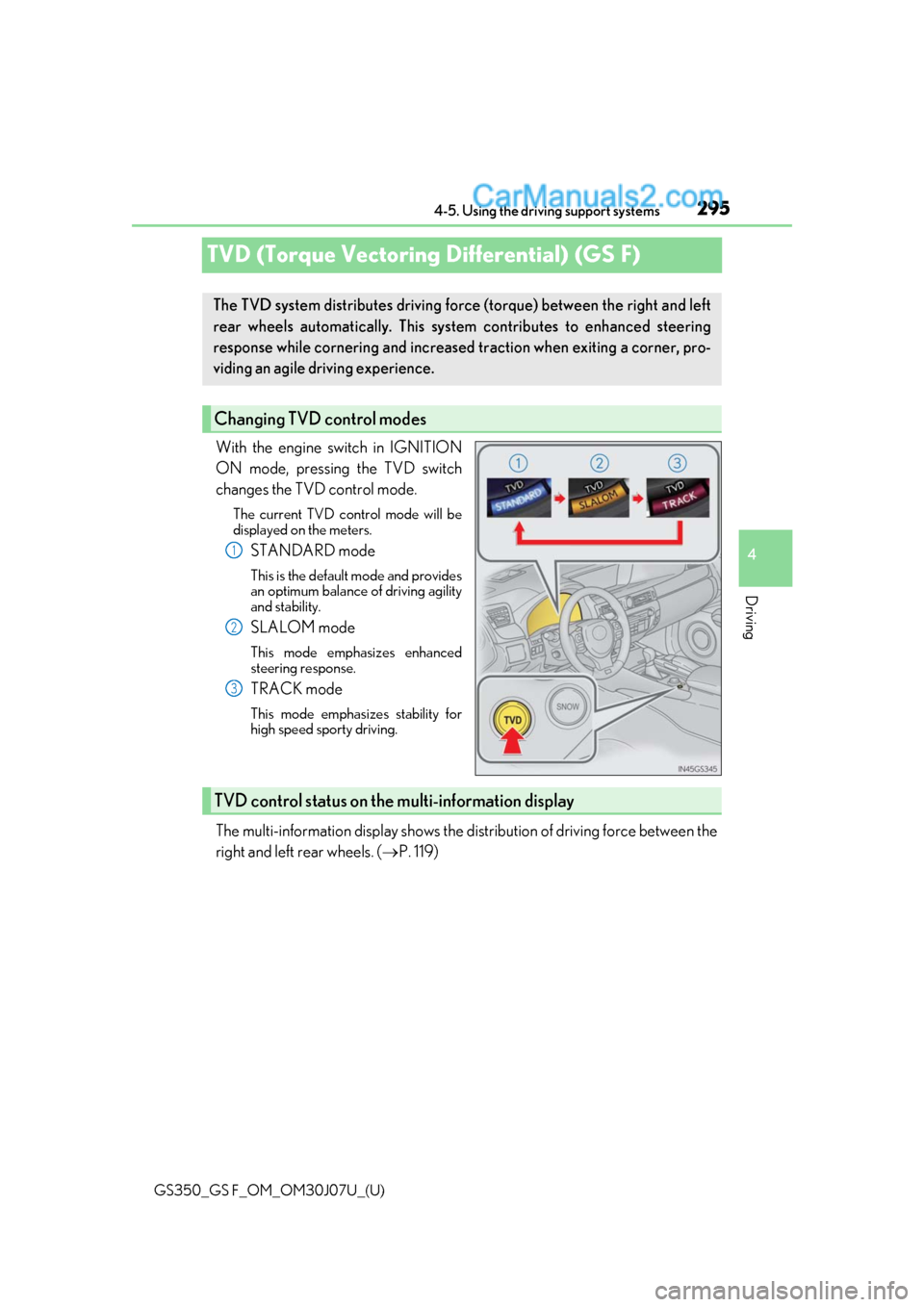
TVD (Torque Vectoring Differential) (GS F)
With the engine switch in IGNITION
ON mode, pressing the TVD switch
changes the TVD control mode.
The current TVD control mode will be
displayed on the meters.
STANDARD mode
This is the default mode and provides
an optimum balance of driving agility
and stability.
SLALOM mode
This mode emphasizes enhanced
steering response.
TRACK mode
This mode emphasiz
es stability for
high speed sporty driving.
The multi-information display shows the di stribution of driving force between the
right and left rear wheels. ( P. 119)
The TVD system distributes driving force (torque) between the right an\
d left
rear wheels automatically. This syst em contributes to enhanced steering
response while cornering and increased traction when exiting a corner, pro-
viding an agile driving experience.
Changing TVD control modes
1
2
3
TVD control status on the multi-information display