change Lexus GS450h 2013 Owner's Manual
[x] Cancel search | Manufacturer: LEXUS, Model Year: 2013, Model line: GS450h, Model: Lexus GS450h 2013Pages: 862, PDF Size: 19.06 MB
Page 457 of 862
456
GS450h_U (OM30D01U)
5-3. Using the audio system
■DVD video disc information
●DVD video discs
A DVD video disc is a Digital Versatile Disc that holds video. DVD video discs have
adopted “MPEG2”, one of the world standards of digital compression technolo-
gies. The picture data is compressed by 1 /40 on average and stored. Variable rate
encoded technology in which the volume of data assigned to the picture is changed
depending on the picture format has also been adopted. Audio data is stored using
PCM and Dolby Digital, which enables higher quality of sound. Furthermore, multi-
angle and multi-language features will also help you enjoy the more advanced
technology of DVD video.
●Viewer restrictions
This feature limits what can be viewed in conformity with the level of restrictions of
the country. The level of restrictions varies depending on the DVD video disc.
Some DVD video discs cannot be played at all, or violent scenes are skipped or
replaced with other scenes.
Level 1: DVD video discs for children can be played.
Level 2-7: DVD video discs for children and G-rated movies can be played.
Level 8: All types of DVD video discs can be played.
●Multi-angle option
You can enjoy the same scene from different angles.
●Multi-language option
You can select the subtitle and audio languages.
●Region codes
The region codes are provided on DVD players and DVD discs. If the DVD video
disc does not have the same region code as the DVD player, you cannot play the
disc on the DVD player. ( →P. 4 5 4 )
●Audio
This DVD player can play linear PCM, Dolby Digital and MPEG audio format
DVDs. Other decoded types cannot be played.
●Title and chapter
Video and audio programs stored in DVD video discs are divided into parts by title
and chapter.
Title: The largest unit of the video and audio programs stored on DVD video discs.
Usually, one movie, one album, or one audio program is assigned as a title.
Chapter: A title is comprised of one or more chapters.
GS450h_U.book Page 456 Monday, January 23, 2012 10:20 AM
Page 462 of 862
GS450h_U (OM30D01U)
4615-3. Using the audio system
5
Interior features
You agree that your non-exclusive license to use the Gracenote Data, the
Gracenote Software, and Gracenote Servers will terminate if you violate these
restrictions. If your license terminates, you agree to cease any and all use of the
Gracenote Data, the Gracenote Software, and Gracenote Servers. Gracenote
reserves all rights in Gracenote Data, the Gracenote Software, and the Gracenote
Servers, including all ownership rights. Under no circumstances will Gracenote
become liable for any payment to you for any information that you provide. You
agree that Gracenote, Inc. may enforce its rights under this Agreement against you
directly in its own name.
The Gracenote service uses a unique identifier to track queries for statistical pur-
poses. The purpose of a randomly assigned numeric identifier is to allow the
Gracenote service to count queries without knowing anything about who you are.
For more information, see the web page for the Gracenote Privacy Policy for the
Gracenote service.
The Gracenote Software and each item of Gracenote Data are licensed to you “AS
IS.” Gracenote makes no representations or warranties, express or implied, regard-
ing the accuracy of any Gracenote Data from in the Gracenote Servers. Gracenote
reserves the right to delete data from the Gracenote Servers or to change data cat-
egories for any cause that Gracenote deems sufficient. No warranty is made that the
Gracenote Software or Gracenote Servers are error-free or that functioning of
Gracenote Software or Gracenote Servers will be uninterrupted. Gracenote is not
obligated to provide you with new enhanced or additional data types or categories
that Gracenote may provide in the future and is free to discontinue its services at any
time.
GRACENOTE DISCLAIMS ALL WARRANTIES EXPRESS OR IMPLIED,
INCLUDING, BUT NOT LIMITED TO, IMPLIED WARRANTIES OF MER-
CHANTABILITY, FITNESS FOR A PARTICULAR PURPOSE, TITLE, AND NON-
INFRINGEMENT. GRACENOTE DOES NOT WARRANT THE RESULTS THAT
WILL BE OBTAINED BY YOUR USE OF THE GRACENOTE SOFTWARE OR
ANY GRACENOTE SERVER. IN NO CASE WILL GRACENOTE BE LIABLE
FOR ANY CONSEQUENTIAL OR INCIDENTAL DAMAGES OR FOR ANY
LOST PROFITS OR LOST REVENUES.
copyright © 2000 to present Gracenote
GS450h_U.book Page 461 Monday, January 23, 2012 10:20 AM
Page 463 of 862
462
GS450h_U (OM30D01U)
5-3. Using the audio system
CAUTION
■DVD video precaution
Conversational speech on some DVDs is recorded at a low volume to emphasize
the impact of sound effects. If you adjust the volume assuming that the conversa-
tions represent the maximum volume level that the DVD will play, you may be star-
tled by louder sound effects or startled when you change to a different audio
source.
Loud sounds may have a significant impact on the human body or pose a driving
hazard. Keep this in mind when you adjust the volume.
GS450h_U.book Page 462 Monday, January 23, 2012 10:20 AM
Page 473 of 862
472
GS450h_U (OM30D01U)
5-3. Using the audio system
■Playing the tracks on the album in random order
Select “RAND” on the screen.
Each time “RAND” is selected, the mode changes as follows:
album random → all track random → off
■Playing tracks from all th e albums in random order
Select “RAND” repeatedly until “ALB.RAND” appears on the screen.
To cancel, select “RAND” again.
■Repeating a track
Select “RPT” on the screen.
Each time “RPT” is selected, the mode changes as follows:
track repeat → album repeat → off
■Repeating an album
Select “RPT” repeatedly until “ALB.RPT” appears on the screen.
To cancel, select “RPT” again.
■If you select
The display returns to the previous screen.
■Connecting Bluetooth® audio player
●Selecting “Connect Portable Player” on the “Bluetooth*” screen also connects a
Bluetooth® audio player. ( →P. 566)
●When none of the selectable portable players have been registered, a screen con-
firming registration is displayed. The registration method is the same as phone reg-
istration. ( →P. 559)
●When the currently connected portable player is selected, a screen confirming the
selected player’s disconnection is displayed. ( →P. 559)
●If connection fails once, a changing connection method confirmation screen is dis-
played. If connection fails 2 or more times, a message will be displayed. When this
message is displayed, try again.
*: Bluetooth is a registered trademark of Bluetooth SIG. Inc.
Random playback
Repeat play
GS450h_U.book Page 472 Monday, January 23, 2012 10:20 AM
Page 481 of 862
480
GS450h_U (OM30D01U)
5-3. Using the audio system
■Playing files/tracks from a particular folder in random order
Select “RAND” on the screen.
Each time “RAND” is selected, the mode changes as follows:
random (1 folder/album random) → folder/album random (all folders/
albums random) → off
■Playing the all folders/albums from a USB memory in random order
Select “RAND” repeatedly unt il “FLD.RAND”/“ALB.RAND” appears
on the screen.
To cancel, select “RAND” again.
■Repeating a file/track
Select “RPT” on the screen.
Each time “RPT” is selected, the mode changes as follows:
●When “RAND” is off
file/track repeat → folder/album repeat → off
●When “RAND” is on
file/track repeat → off
■Repeating a folder/album
Select “RPT” repeatedly until “FLD.RPT”/“ALB.RPT” appears on the
screen.
To cancel, select “RPT” again.
Available except when random playback is selected
Random playback
Repeat play
sec_05-03.fm Page 480 Monday, January 30, 2012 10:29 AM
Page 482 of 862
GS450h_U (OM30D01U)
4815-3. Using the audio system
5
Interior features
■If you select
The display returns to the previous screen.
■USB memory functions
●When the USB memory is connected and the audio source is changed to USB
memory mode, the USB memory will start playing the first file in the first folder. If
the same device is removed and reinserted (and the contents have not been
changed), the USB memory will resume playing from the same point it was last
used.
●Depending on the USB memory that is connected to the system, certain functions
may not be available. Disconnecting the device and reconnecting it once again
may resolve some malfunctions.
■ When using a USB memory
You may be unable to use the instrument panel power outlet if the USB memory is
connected to the USB port at the same time.
■Error messages for USB memory
“USB Error”: This indicates a problem in the USB memory or its connection.
“No music files found.”: This indicates that no MP3/WMA files are included in theUSB memory.
■USB memory
●Compatible devices
USB memory that can be used for MP3 and WMA playback.
●Compatible device formats
The following device formats can be used:
• USB communication formats: USB2.0 HS (480 Mbps) and FS (12 Mbps)
• File formats: FAT16/32 (Windows)
• Correspondence class: Mass storage class
MP3 and WMA files written in any format other than those listed above may not play
correctly, and their file names and folder names may not be displayed correctly.
Items related to standards and limitations are as follows:
• Maximum directory hierarchy: 8 levels
• Maximum number of folders in a device: 3000 (including the root)
• Maximum number of files in a device: 9999
• Maximum number of files per folder: 255
GS450h_U.book Page 481 Monday, January 23, 2012 10:20 AM
Page 484 of 862
GS450h_U (OM30D01U)
4835-3. Using the audio system
5
Interior features
●MP3 and WMA playback
• When a device containing MP3 or WMA files is connected, all files in the USBmemory device are checked. Once the file check is finished, the first MP3 or
WMA file is played. To make the file check finish more quickly, we recommend
that you do not include any files other than MP3 or WMA files or create any
unnecessary folders.
• When the USB device is connected and the audio source is changed to USB memory mode, the USB device will start playing the first file in the first folder. If
the same device is removed and reinserted (and the contents have not been
changed), the USB device will resume play from the same point in which it was
last used.
●Extensions
If the file extensions .mp3 and .wma are used for files other than MP3 and WMA
files, they will be skipped (not played).
●Playback
• To play MP3 files with steady sound quality, we recommend a fixed bit rate of atleast 128 kbps and a sampling frequency of 44.1 kHz.
• There is a wide variety of freeware and other encoding software for MP3 and WMA files on the market, and depending on the status of the encoding and the
file format, poor sound quality or noise at the start of playback may result. In
some cases, playback may not be possible at all.
• Microsoft, Windows, and Windows Media are registered trademarks of Microsoft Corporation in the U.S.A. and other countries.
GS450h_U.book Page 483 Monday, January 23, 2012 10:20 AM
Page 489 of 862
488
GS450h_U (OM30D01U)
5-3. Using the audio system
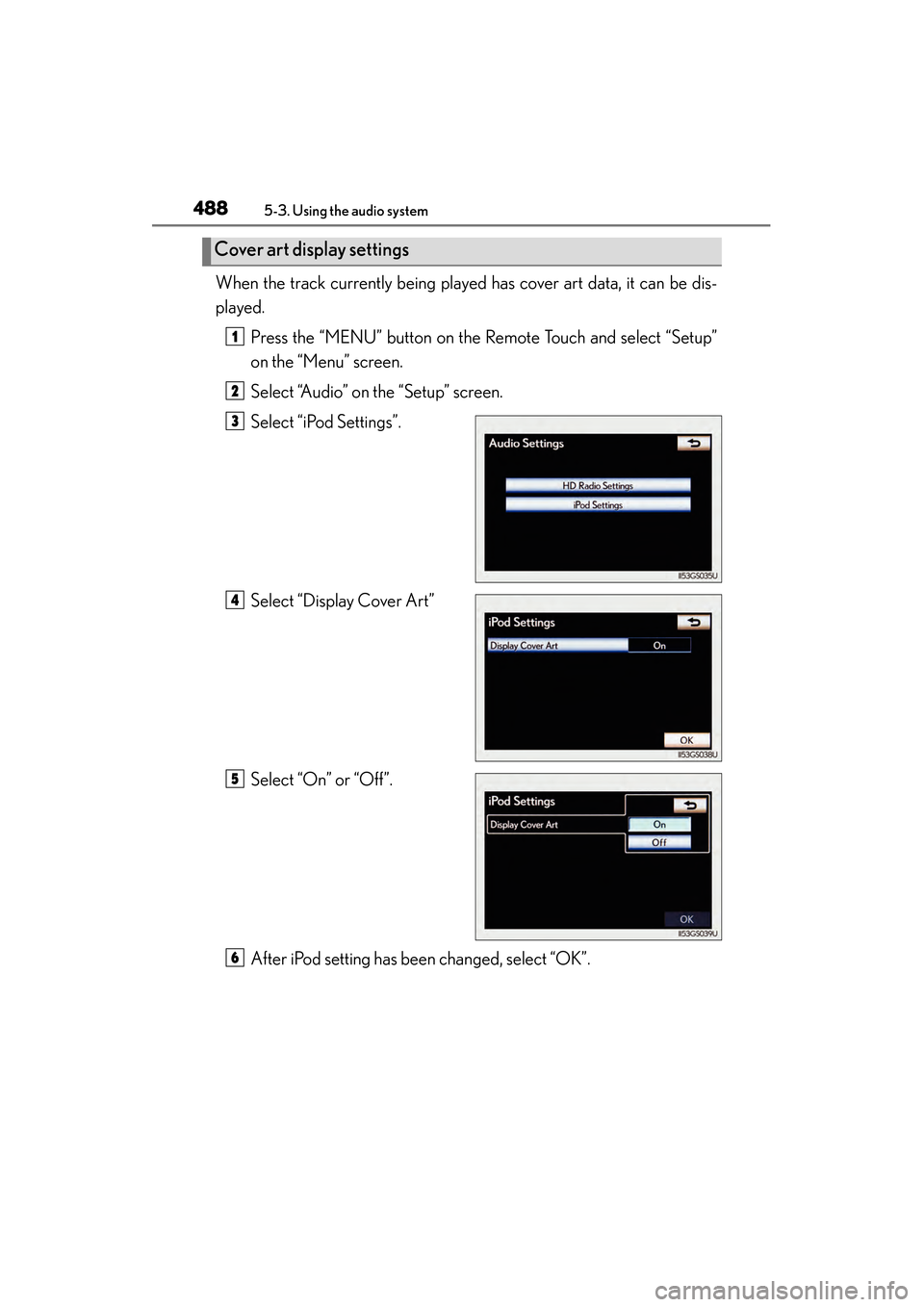
When the track currently being played has cover art data, it can be dis-
played.Press the “MENU” button on the Remote Touch and select “Setup”
on the “Menu” screen.
Select “Audio” on the “Setup” screen.
Select “iPod Settings”.
Select “Display Cover Art”
Select “On” or “Off”.
After iPod setting has been changed, select “OK”.
Cover art display settings
1
2
3
4
5
6
GS450h_U.book Page 488 Monday, January 23, 2012 10:20 AM
Page 492 of 862
GS450h_U (OM30D01U)
4915-3. Using the audio system
5
Interior features
■Playing tracks in random order
Select “RAND” on the screen.
Each time “RAND” is selected, the mode changes as follows:
track shuffle → album shuffle → off
■Playing the albums in random order
Select “RAND” repeatedly until “ALB.RAND” appears on the screen.
To cancel, select “RAND” again.
Select “RPT” on the screen.
“RPT” appears on the screen.
To cancel, select “RPT” again.
■If you select
The display returns to the previous screen.
■About iPod
●“Made for iPod” and “Made for iPhone” mean that an electronic accessory has
been designed to connect specifically to iPod, or iPhone, respectively, and has
been certified by the developer to meet Apple performance standards.
●Apple is not responsible for the operation of this device or its compliance with
safety and regulatory standards. Please note that the use of this accessory with
iPod or iPhone may affect wireless performance.
●iPhone, iPod, iPod classic, iPod nano and iPod touch are trademarks of Apple Inc.,
registered in the U.S. and other countries.
Random playback
Repeat play
GS450h_U.book Page 491 Monday, January 23, 2012 10:20 AM
Page 493 of 862
492
GS450h_U (OM30D01U)
5-3. Using the audio system
■iPod cover art
●Depending on the iPod and the songs in the iPod, iPod cover art may be displayed.
This function can be changed to “On” or “Off”. (→P. 4 8 8 )
●It may take time to display iPod cover art, and the iPod may not be operated while
the cover art display is in process.
●Only iPod cover art that is saved in JPEG format can be displayed.
■iPod functions
●When the iPod connected to the system includes iPod video, the system can only
output the sound by selecting “Video” on the “iPod” screen.
●Depending on the iPod, the video sound may not be able to be heard.
●When an iPod is connected and the audio source is changed to iPod mode, the
iPod will resume play from the same point in which it was last used.
●Depending on the iPod that is connected to the system, certain functions may not
be available. If a function is unavailable due to a malfunction (as opposed to a sys-
tem specification), disconnecting the device and reconnecting it once again may
resolve the problem.
■When using an iPod
You maybe unable to use the instrument panel power outlet if the iPod is connected
to the USB port at the same time.
■Battery charge
When an iPod is connected using a genuine iPod cable, the iPod starts charging its
battery.
■Error messages for iPod
“iPod Error”:
This indicates a problem in the iPod or its connection.
“No music files found.”:
This indicates that there is no music data in the iPod.
“Please check the iPod firmware version.”:
This indicates that the software version is not compatible. Perform the iPod firmware
updates and try again.
“iPod authorization failed.”:
This indicates that it failed to authorize the iPod. Please check your iPod.
sec_05-03.fm Page 492 Monday, January 30, 2012 10:30 AM