change Lexus GS450h 2013 Manual Online
[x] Cancel search | Manufacturer: LEXUS, Model Year: 2013, Model line: GS450h, Model: Lexus GS450h 2013Pages: 862, PDF Size: 19.06 MB
Page 385 of 862
384
GS450h_U (OM30D01U)
5-2. Using the air conditioning system and defogger
Rear window and outside rear view mirror
defoggers
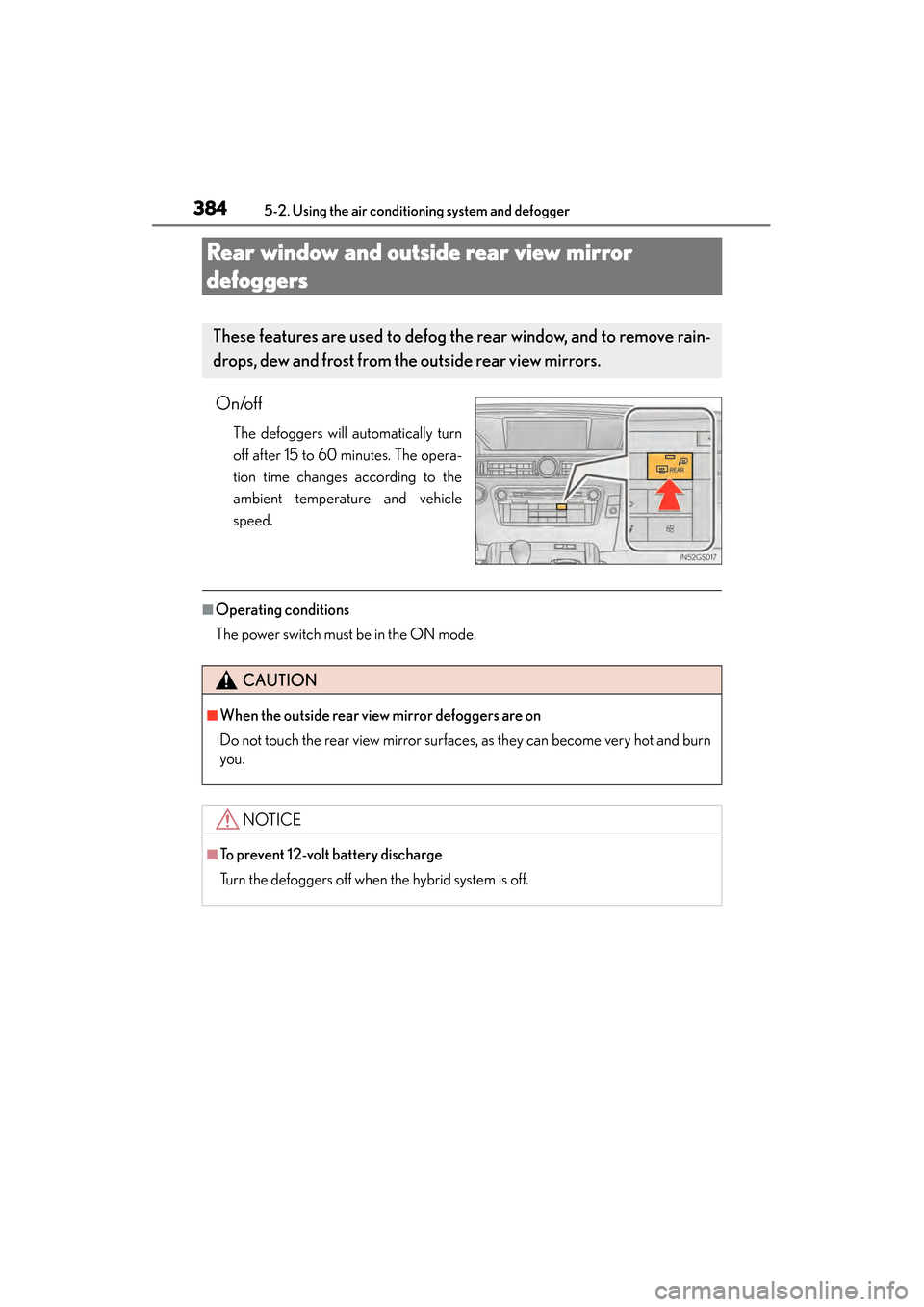
On/off
The defoggers will automatically turn
off after 15 to 60 minutes. The opera-
tion time changes according to the
ambient temperature and vehicle
speed.
■Operating conditions
The power switch must be in the ON mode.
These features are used to defog the rear window, and to remove rain-
drops, dew and frost from the outside rear view mirrors.
CAUTION
■When the outside rear view mirror defoggers are on
Do not touch the rear view mirror surfaces, as they can become very hot and burn
you.
NOTICE
■To prevent 12-volt battery discharge
Turn the defoggers off when the hybrid system is off.
GS450h_U.book Page 384 Monday, January 23, 2012 10:20 AM
Page 390 of 862
GS450h_U (OM30D01U)
3895-3. Using the audio system
5
Interior features
■Using cellular phones
Interference may be heard through the audio system’s speakers if a cellular phone is
being used inside or close to the vehicle while the audio system is operating.
■When using the Remote Touch screen
Dimmed screen buttons cannot be operated.
■Ta b
Select or , located either side of the screen tabs, to display tabs from the pre-
vious or next page.
■About Dolby
Manufactured under license from Dolby Laboratories. Dolby and the double-D sym-
bol are trademarks of Dolby Laboratories.
CAUTION
■For vehicles sold in the U.S.A. and Canada
●Part 15 of the FCC Rules
FCC Warning:
Changes or modifications not expressly approved by the party responsible for
compliance could void the user’s authority to operate the equipment.
●Laser products
• USE OF CONTROL OR ADJUSTMENT OR PERFORMANCE OF PRO- CEDURES OTHER THAN THOSE SPECIFIED HEREIN MAY RESULT IN
HAZARDOUS RADIATION EXPOSURE.
• THE USE OF OPTICAL INSTRUMENTS WITH THIS PRODUCT WILL INCREASE EYE HAZARD.
NOTICE
■To prevent 12-volt battery discharge
Do not leave the audio system on longer than necessary when the hybrid system is
off.
■To avoid damaging the audio system
Take care not to spill drinks or other fluids on the audio system.
GS450h_U.book Page 389 Monday, January 23, 2012 10:20 AM
Page 402 of 862
GS450h_U (OM30D01U)
4015-3. Using the audio system
5
Interior features
CARNEGIE MELLON ALLOWS FREE USE OF THIS SOFTWARE IN ITS ““AS
IS”” CONDITION. CARNEGIE MELLON DISCLAIMS ANY LIABILITY OF
ANY KIND FOR ANY DAMAGES WHATSOEVER RESULTING FROM THE
USE OF THIS SOFTWARE.
Carnegie Mellon requests users of this software to return to Software Distribution
Coordinator or [email protected]
School of Computer
Science Carnegie Mellon University Pittsburgh PA 15213-3890 any improvements
or extensions that they make and grant Carnegie the rights to redistribute these
changes.
●TCP/IP, Socket Library
This product includes software developed by the University of California, Berkeley
and its contributors.
Copyright © 1980, 1983, 1988, 1993 The Regents of the University of California.
All rights reserved.
Copyright © 1983, 1987, 1989 The Regents of the University of California. All
rights reserved.
Copyright © 1983, 1989, 1993 The Regents of the University of California. All
rights reserved.
Copyright © 1985, 1988, 1993 The Regents of the University of California. All
rights reserved.
Copyright © 1985, 1993 The Regents of the University of California. All rights
reserved.
Copyright © 1989, 1993, 1995 The Regents of the University of California. All
rights reserved.
Redistribution and use in source and binary forms, with or without modification, are
permitted provided that the following conditions are met:
1. Redistributions of source code must retain the above copyright notice, this list of conditions and the following disclaimer.
2. Redistributions in binary form must reproduce the above copyright notice, this list of conditions and the following disclaimer in the documentation and/or other
materials provided with the distribution.
3. All advertising materials mentioning features or use of this software must display the following acknowledgement: This product includes software developed by
the University of California, Berkeley and its contributors.
4. Neither the name of the University nor the names of its contributors may be used to endorse or promote products derived from this software without specific prior
written permission.
GS450h_U.book Page 401 Monday, January 23, 2012 10:20 AM
Page 409 of 862
408
GS450h_U (OM30D01U)
5-3. Using the audio system
Redistribution and use in source and binary forms, with or without modification, are
permitted provided that the following conditions are met:
1. Redistributions of source code must retain the copyright notice, this list ofconditions and the following disclaimer.
2. Redistributions in binary form must reproduce the above copyright notice, this list of conditions and the following disclaimer in the documentation and/or other
materials provided with the distribution.
3. All advertising materials mentioning features or use of this software must display the following acknowledgement: “This product includes cryptographic software
written by Eric Young ([email protected]
)” The word ‘cryptographic’ can be left
out if the rouines from the library being used are not cryptographic related :-).
4. If you include any Windows specific code (or a derivative thereof) from the apps directory (application code) you must include an acknowledgement: “This
product includes software written by Tim Hudson ([email protected]
)”
THIS SOFTWARE IS PROVIDED BY ERIC YOUNG “AS IS” AND ANY
EXPRESS OR IMPLIED WARRANTIES, INCLUDING, BUT NOT LIMITED TO,
THE IMPLIED WARRANTIES OF MERCHANTABILITY AND FITNESS FOR A
PARTICULAR PURPOSE ARE DISCLAIMED. IN NO EVENT SHALL THE
AUTHOR OR CONTRIBUTORS BE LIABLE FOR ANY DIRECT, INDIRECT,
INCIDENTAL, SPECIAL, EXEMPLARY, OR CONSEQUENTIAL DAMAGES
(INCLUDING, BUT NOT LIMITED TO, PROCUREMENT OF SUBSTITUTE
GOODS OR SERVICES; LOSS OF USE, DATA, OR PROFITS; OR BUSINESS
INTERRUPTION) HOWEVER CAUSED AND ON ANY THEORY OF
LIABILITY, WHETHER IN CONTRACT, STRICT LIABILITY, OR TORT
(INCLUDING NEGLIGENCE OR OTHERWISE) ARISING IN ANY WAY OUT
OF THE USE OF THIS SOFTWARE, EVEN IF ADVISED OF THE POSSIBILITY
OF SUCH DAMAGE.
The licence and distribution terms for any publically available version or derivative of
this code cannot be changed. i.e. this code cannot simply be copied and put under
another distribution licence [including the GNU Public Licence.
GS450h_U.book Page 408 Monday, January 23, 2012 10:20 AM
Page 412 of 862
GS450h_U (OM30D01U)
4115-3. Using the audio system
5
Interior features
■Seek tuning
Press and hold “<” or “>” on the “PRST•TRACK” button.
■Manual tuning
Turn the “TUNE/SCROLL” knob.
■Preset stations
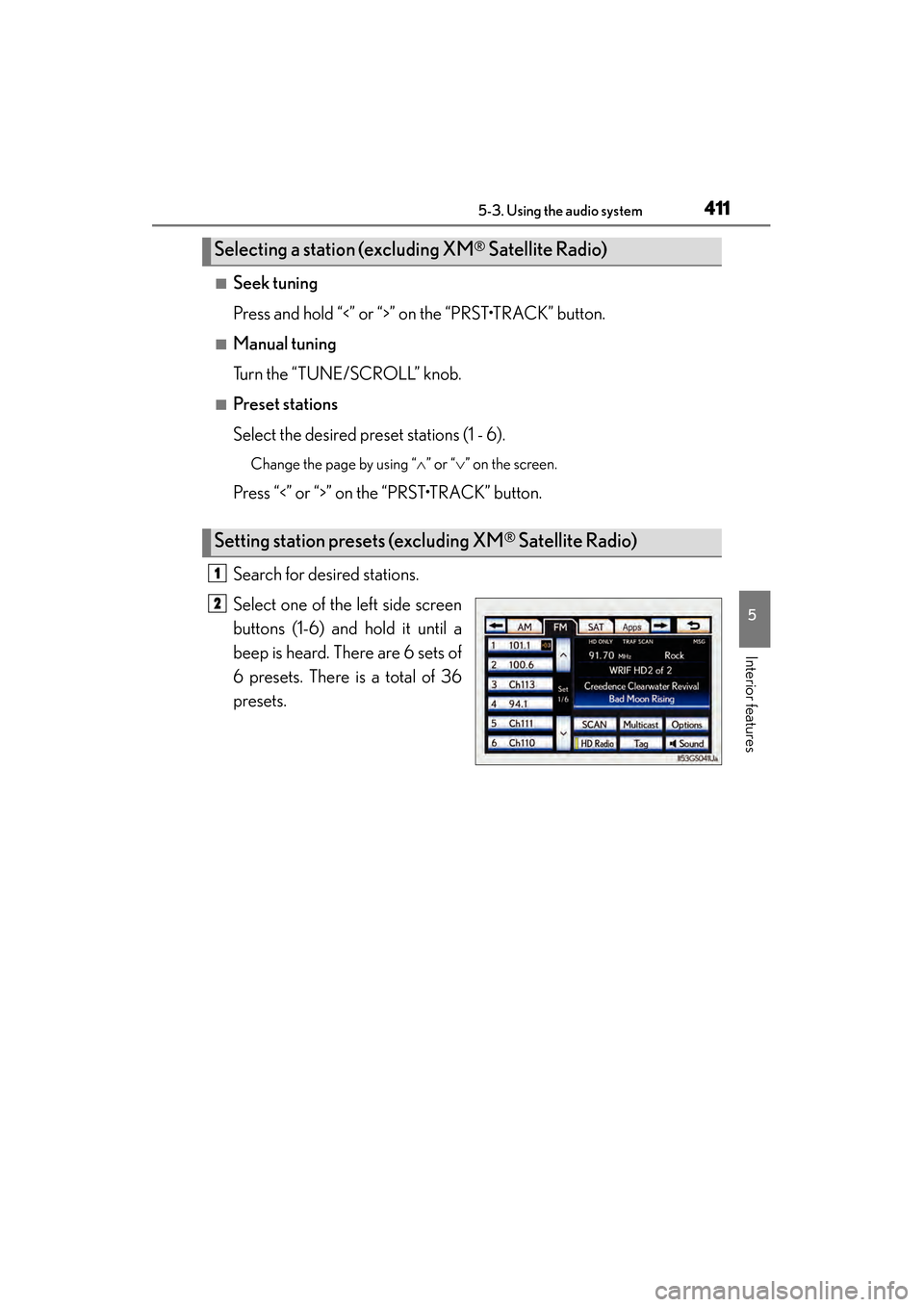
Select the desired preset stations (1 - 6).
Change the page by using “∧” or “∨ ” on the screen.
Press “<” or “>” on the “PRST•TRACK” button.
Search for desired stations.
Select one of the left side screen
buttons (1-6) and hold it until a
beep is heard. There are 6 sets of
6 presets. There is a total of 36
presets.
Selecting a station (excluding XM® Satellite Radio)
Setting station presets (excluding XM® Satellite Radio)
1
2
GS450h_U.book Page 411 Monday, January 23, 2012 10:20 AM
Page 414 of 862
GS450h_U (OM30D01U)
4135-3. Using the audio system
5
Interior features
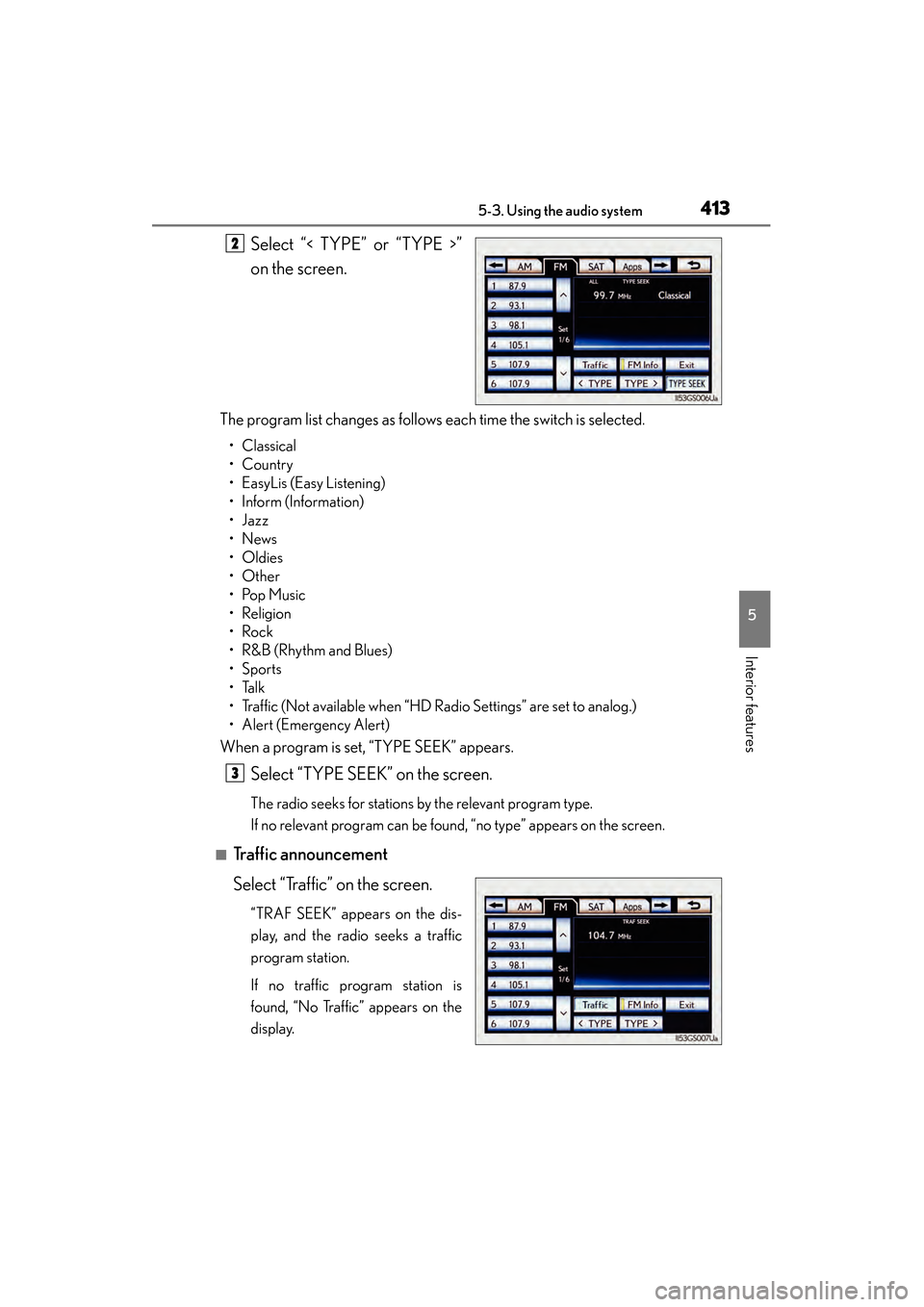
Select “< TYPE” or “TYPE >”
on the screen.
The program list changes as follows each time the switch is selected.
• Classical
•Country
• EasyLis (Easy Listening)
• Inform (Information)
•Jazz
•News
•Oldies
•Other
•Pop Music
•Religion
•Rock
•R&B (Rhythm and Blues)
•Sports
•Talk
• Traffic (Not available when “HD Radio Settings” are set to analog.)
• Alert (Emergency Alert)
When a program is set, “TYPE SEEK” appears.
Select “TYPE SEEK” on the screen.
The radio seeks for stations by the relevant program type.
If no relevant program can be found, “no type” appears on the screen.
■Traffic announcement
Select “Traffic” on the screen.
“TRAF SEEK” appears on the dis-
play, and the radio seeks a traffic
program station.
If no traffic program station is
found, “No Traffic” appears on the
display.
2
3
GS450h_U.book Page 413 Monday, January 23, 2012 10:20 AM
Page 419 of 862
418
GS450h_U (OM30D01U)
5-3. Using the audio system
On the FM radio frequency most digital stations have “multiple” or sup-
plemental programs on one FM station.
■Multicast
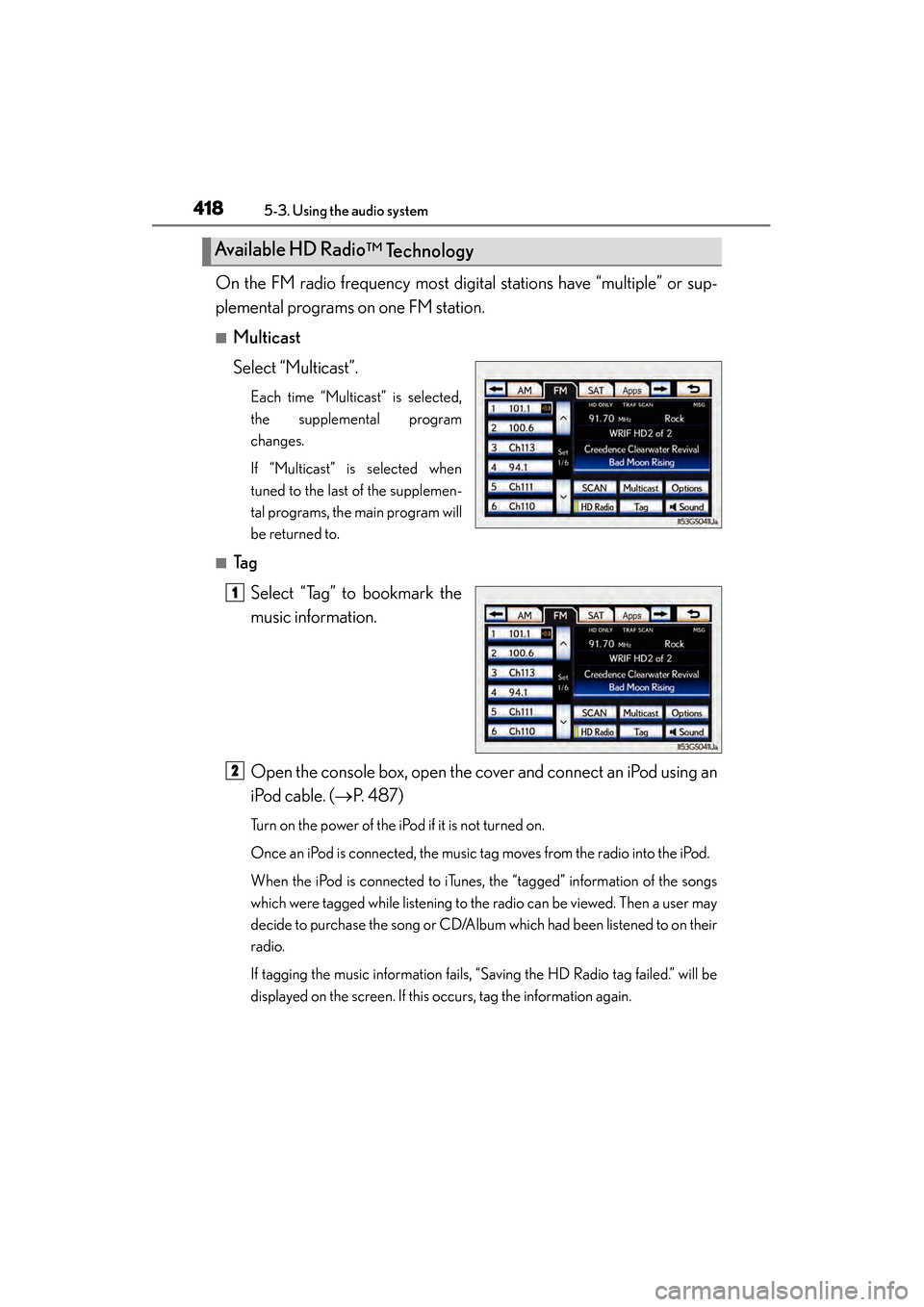
Select “Multicast”.
Each time “Multicast” is selected,
the supplemental program
changes.
If “Multicast” is selected when
tuned to the last of the supplemen-
tal programs, the main program will
be returned to.
■Ta gSelect “Tag” to bookmark the
music information.
Open the console box, open the cover and connect an iPod using an
iPod cable. ( →P. 4 8 7 )
Turn on the power of the iPod if it is not turned on.
Once an iPod is connected, the music tag moves from the radio into the iPod.
When the iPod is connected to iTunes, the “tagged” information of the songs
which were tagged while listening to the radio can be viewed. Then a user may
decide to purchase the song or CD/Album which had been listened to on their
radio.
If tagging the music information fails, “Saving the HD Radio tag failed.” will be
displayed on the screen. If this occurs, tag the information again.
Available HD Radio
™ Technology
11
2
GS450h_U.book Page 418 Monday, January 23, 2012 10:20 AM
Page 420 of 862
GS450h_U (OM30D01U)
4195-3. Using the audio system
5
Interior features
■Receiving XM® Satellite Radio
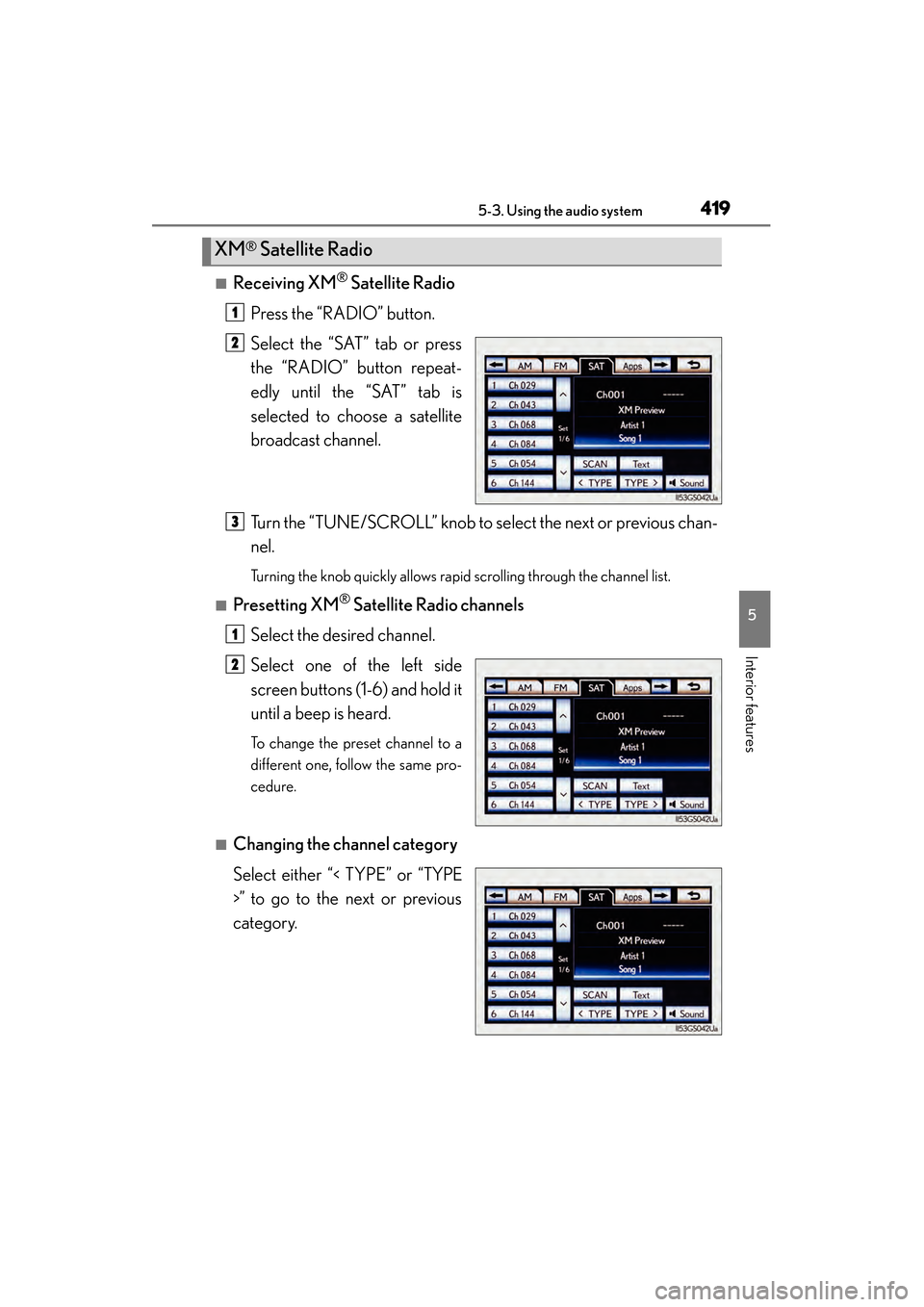
Press the “RADIO” button.
Select the “SAT” tab or press
the “RADIO” button repeat-
edly until the “SAT” tab is
selected to choose a satellite
broadcast channel.
Turn the “TUNE/SCROLL” knob to select the next or previous chan-
nel.
Turning the knob quickly allows rapid scrolling through the channel list.
■Presetting XM® Satellite Radio channels
Select the desired channel.
Select one of the left side
screen buttons (1-6) and hold it
until a beep is heard.
To change the preset channel to a
different one, follow the same pro-
cedure.
■Changing the channel category
Select either “< TYPE” or “TYPE
>” to go to the next or previous
category.
XM® Satellite Radio
1
2
3
1
2
GS450h_U.book Page 419 Monday, January 23, 2012 10:20 AM
Page 425 of 862
424
GS450h_U (OM30D01U)
5-3. Using the audio system
■XM Radio Services — Descriptions (vehicles without a navigation system for
U.S.A.)
●Radio and Entertainment
XM offers more than 170 satellite radio channels of commercial-free music and
premier sports, news, talk, and entertainment. XM is broadcast via satellites to mil-
lions of listeners across the continental United States. XM subscribers listen to
XM on satellite radio receivers for the car, home, and portable use. More informa-
tion about XM is available online at www.siriusxm.com.
●Satellite tuner
The tuner supports only Audio Services (Music and Talk) and the accompanying
Te x t I n f o r m a t i o n o f X M
® Satellite Radio.
■XM Radio Services — Subscription Instructions (vehicles without a navigation sys-
tem for U.S.A.)For XM Services requiring a subscription (such as XM Radio), the following para-
graph shall be included.
Required XM Radio monthly subscriptions sold separately after trial period. Sub-
scription fee is consumer only. All fees and programming subject to change. Sub-
scriptions are subject to the Customer Agreement available at www.siriusxm.com.
XM service only available in the 48 contiguous United States. © 2011 Sirius XM
Radio Inc. Sirius, XM and all related marks and logos are trademarks of Sirius XM
Radio Inc. All other marks, channel names and logos are the property of their
respective owners.
For more information, program schedules, and to subscribe or extend subscrip-
tion after complimentary trial period; more information is available at:
U.S.A. Customers:
Visit www.siriusxm.com
or call 1-877-515-3987
●Radio ID
You will need the radio ID when activating XM® service or reporting a problem. If
“CH 000” is selected using the “TUNE/SCROLL” knob, the ID code, which is 8
alphanumeric characters, will be displayed. If another channel is selected, the ID
code will no longer be displayed. The channel (000) alternates between displaying
the radio ID and the specific radio code.
GS450h_U.book Page 424 Monday, January 23, 2012 10:20 AM
Page 426 of 862
GS450h_U (OM30D01U)
4255-3. Using the audio system
5
Interior features
■XM Radio Services — Legal Disclaimers and Warnings (vehicles without a naviga-
tion system for U.S.A.)
●Fees and Taxes — Subscription fee, taxes, one time activation fee, and other fees may
apply. Subscription fee is consumer only. All fees and programming subject to change.
Subscriptions subject to Customer Agreement available at www.siriusxm.com.
XM
service only available in the 48 contiguous United States and Canada.
Explicit Language Notice — Channels with frequent explicit language are indi-
cated with an “XL” preceding the channel name. Channel blocking is available for
XM Satellite Radio receivers by notifying XM at;
U.S.A. Customers:
Visit www.siriusxm.com
or calling 1-877-515-3987
It is prohibited to copy, decompile, disassemble, reverse engineer, hack, manipulate,
or otherwise make available any technology or software incorporated in receivers
compatible with the XM Satellite Radio System or that support the XM website, the
Online Service or any of its content. Furthermore, the AMBE
® voice compression
software included in this product is protected by intellectual property rights includ-
ing patent rights, copyrights, and trade secrets of Digital Voice Systems, Inc.
Note: this applies to XM receivers only and not XM Ready devices.
GS450h_U.book Page 425 Monday, January 23, 2012 10:20 AM