steering wheel Lexus GS450h 2013 Workshop Manual
[x] Cancel search | Manufacturer: LEXUS, Model Year: 2013, Model line: GS450h, Model: Lexus GS450h 2013Pages: 862, PDF Size: 19.06 MB
Page 532 of 862
GS450h_U (OM30D01U)
5315-4. Using the hands-free phone system (for cellular phone)
5
Interior features
■Call waiting
When a connected call is interrupted by the third party, the incoming
call message will be displayed.
●To talk with the other party: Select or press on the steer-
ing wheel.
●To refuse the call: Select or press on the steering wheel.
Everytime you select or press on the steering wheel after a
call is interrupted, you will be switched to the other party.
If your cellular phone is not accepted in HFP Ver. 1.5, this function can-
not be used.
■Transferring calls
●It is not possible to transfer from hands-free to a cellular phone while driving.
●If you transfer from a cellular phone to hands-free, the hands-free screen will be
displayed, and you can operate the system using the screen.
●Transfer method and operation may vary according to the cellular phone used.
●For operation of the cellular phone in use, see the phone’s manual.
■Repeated tone symbols
When the “p” pause tone is used, after waiting 2 seconds the tone data up until the
next pause tone will be automatically sent. When the “w” pause tone is used, the tone
data up until the next pause tone will be automatically sent after user operation.
■While driving
Key input is unavailable.
■Voice recognition during a call
“Send Tones” can be operated by voice recognition. ( →P. 3 5 3 )
■Interrupt call operation
Interrupt call operation may differ from depending on your phone company and the
cellular phone.
GS450h_U.book Page 531 Monday, January 23, 2012 10:20 AM
Page 533 of 862
532
GS450h_U (OM30D01U)
5-4. Using the hands-free phone system (for cellular phone)
Received messages can be forwarded from the connected Bluetooth®
phone, enabling checking and replying (Quick reply).
■Checking a messageDisplay the “Phone” screen. ( →P. 515)
Select “Messages” on the “Phone” screen.
Depending on the type of Bluetooth® phone being connected, it may be nec-
essary to perform additional steps on the phone.
When “Message Transfer” is set to “Off”, a confirmation screen will be dis-
played. Select “Yes”.
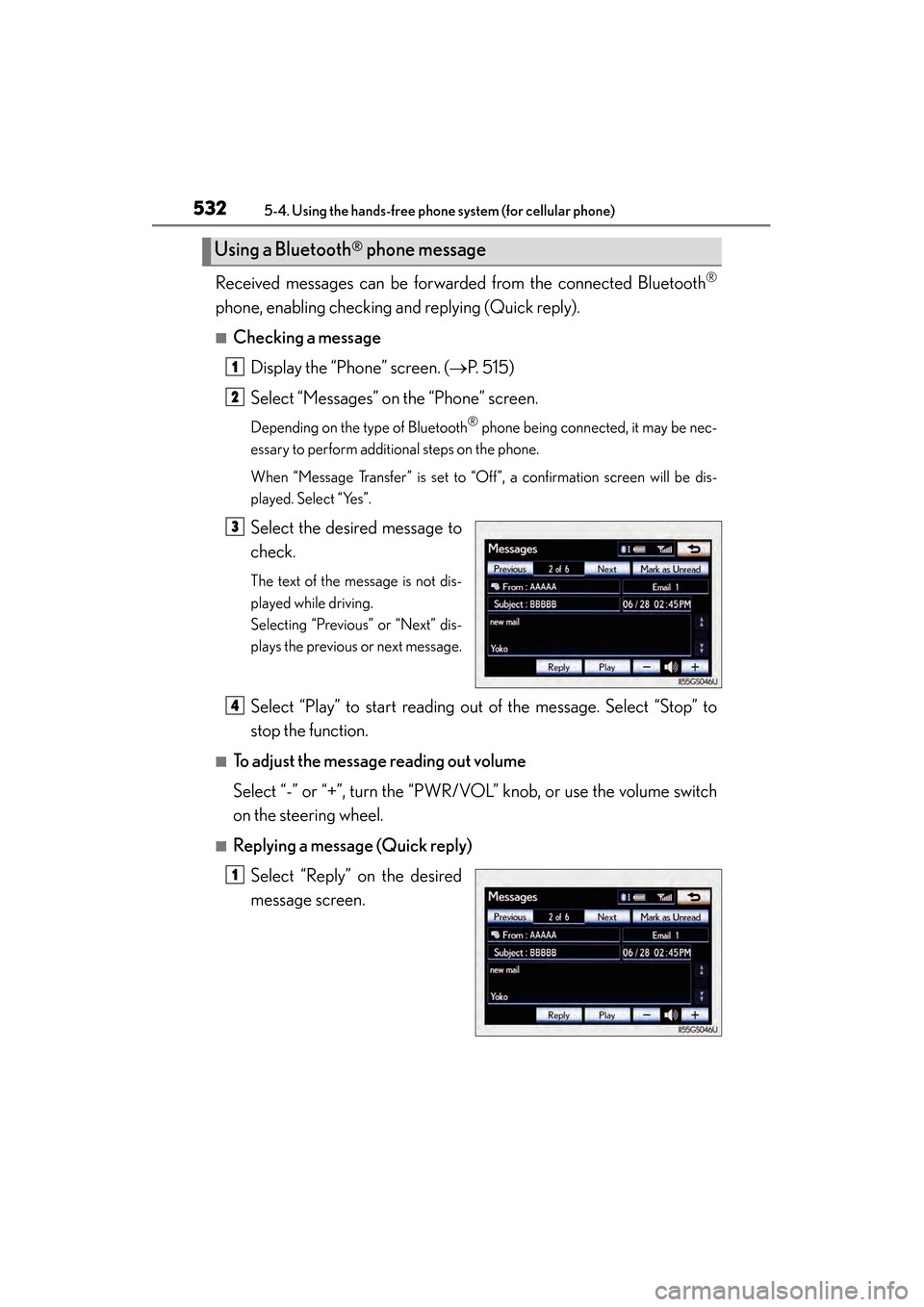
Select the desired message to
check.
The text of the message is not dis-
played while driving.
Selecting “Previous” or “Next” dis-
plays the previous or next message.
Select “Play” to start reading out of the message. Select “Stop” to
stop the function.
■To adjust the message reading out volume
Select “-” or “+”, turn the “PWR/VOL” knob, or use the volume switch
on the steering wheel.
■Replying a message (Quick reply)
Select “Reply” on the desired
message screen.
Using a Bluetooth® phone message
1
2
3
4
1
GS450h_U.book Page 532 Monday, January 23, 2012 10:20 AM
Page 589 of 862
588
GS450h_U (OM30D01U)
5-7. Other interior features
Heated steering wheel∗
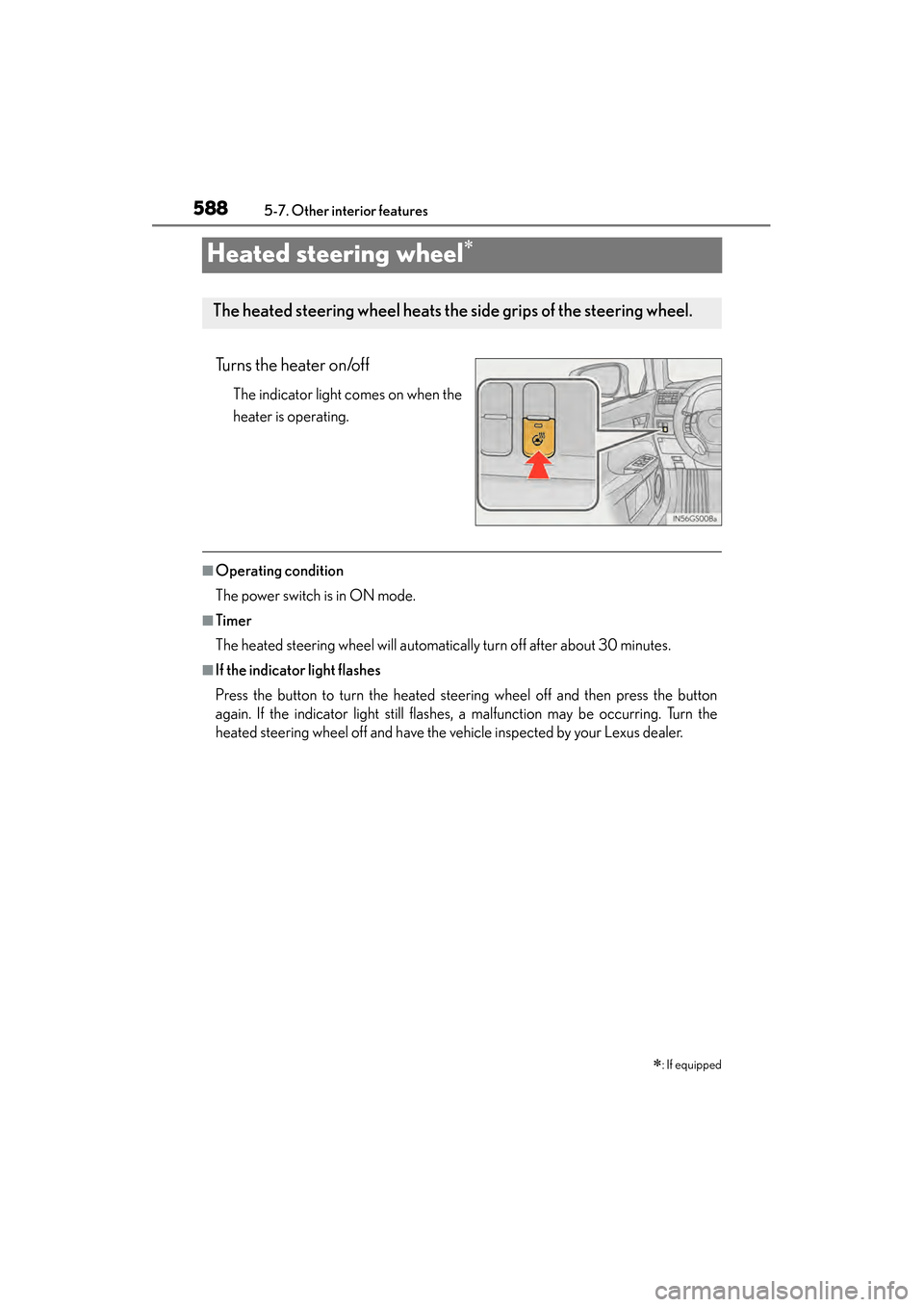
Turns the heater on/off
The indicator light comes on when the
heater is operating.
■Operating condition
The power switch is in ON mode.
■Timer
The heated steering wheel will automatically turn off after about 30 minutes.
■If the indicator light flashes
Press the button to turn the heated steering wheel off and then press the button
again. If the indicator light still flashes, a malfunction may be occurring. Turn the
heated steering wheel off and have the vehicle inspected by your Lexus dealer.
∗: If equipped
The heated steering wheel heats the side grips of the steering wheel.
GS450h_U.book Page 588 Monday, January 23, 2012 10:20 AM
Page 590 of 862
GS450h_U (OM30D01U)
5895-7. Other interior features
5
Interior features
CAUTION
■Burns
Care should be taken to prevent injury if anyone in the following categories comes
in contact with the steering wheel when the heated steering wheel is on:
●Babies, small children, the elderly, the sick and the physically challenged
●Persons with sensitive skin
●Persons who are fatigued
●Persons who have taken alcohol or drugs that induce sleep (sleeping drugs, cold
remedies, etc.)
NOTICE
■To prevent the 12-volt battery from being discharged
Turn the switch off when the hybrid system is off.
GS450h_U.book Page 589 Monday, January 23, 2012 10:20 AM
Page 629 of 862
628
GS450h_U (OM30D01U)
6-2. Maintenance
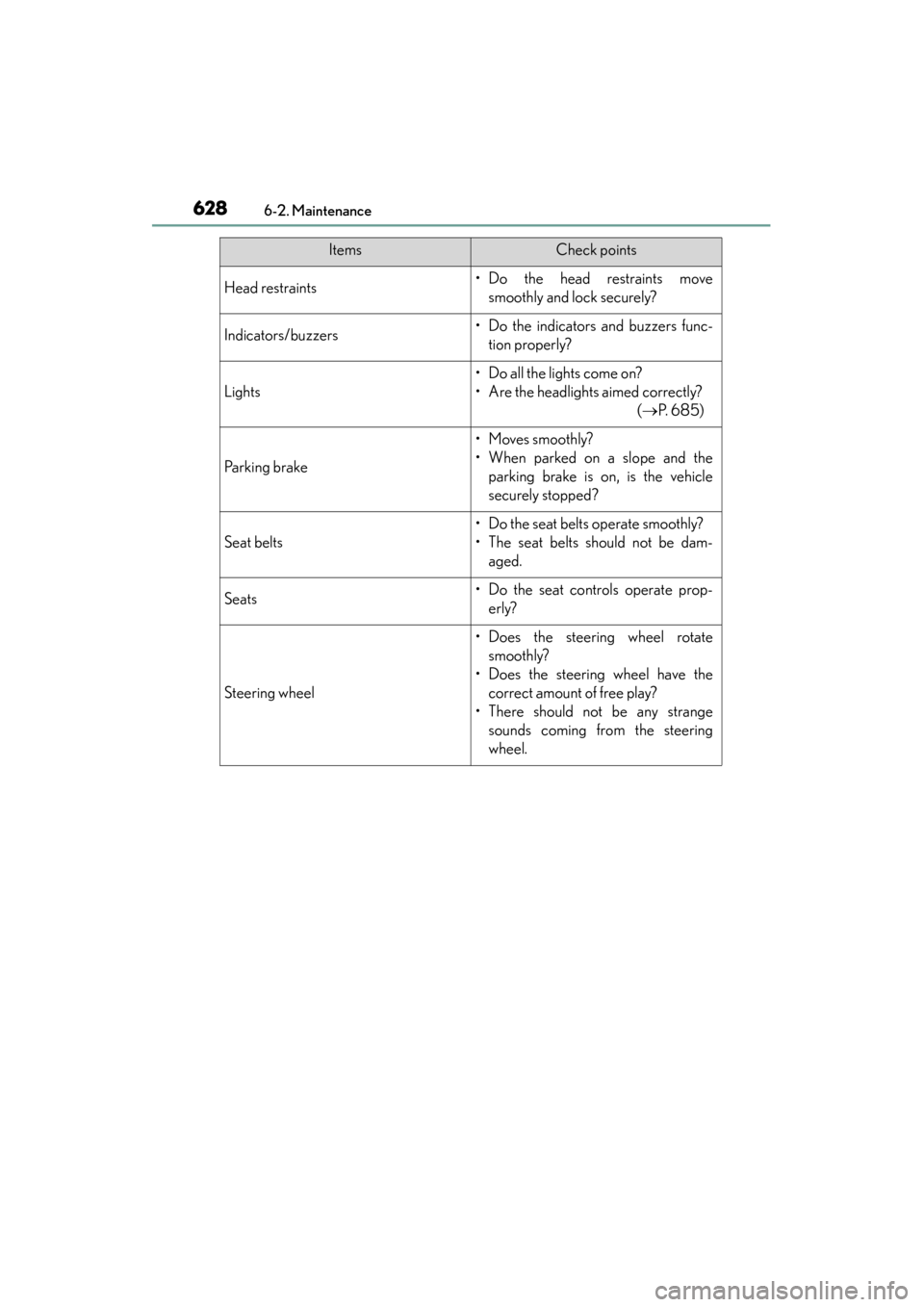
Head restraints• Do the head restraints movesmoothly and lock securely?
Indicators/buzzers• Do the indicators and buzzers func-tion properly?
Lights
• Do all the lights come on?
• Are the headlights aimed correctly? ( →P. 6 8 5 )
Parking brake
• Moves smoothly?
• When parked on a slope and the
parking brake is on, is the vehicle
securely stopped?
Seat belts
• Do the seat belts operate smoothly?
• The seat belts should not be dam-aged.
Seats• Do the seat controls operate prop-erly?
Steering wheel
• Does the steering wheel rotatesmoothly?
• Does the steering wheel have the correct amount of free play?
• There should not be any strange sounds coming from the steering
wheel.
ItemsCheck points
GS450h_U.book Page 628 Monday, January 23, 2012 10:20 AM
Page 679 of 862

678
GS450h_U (OM30D01U)
6-3. Do-it-yourself maintenance
■Driver’s side instrument panel
FuseAmpereCircuit
1STOP7. 5Stop lights, high mounted stoplight
2P/ W- B5Power window master switch
3P/ S E AT 1 F/ L30Po w e r s e a t s
4D/L NO.125Po w e r d o o r l o c k s y s t e m
5NV-IR10Lexus night view
6FL S/HTR10Seat heaters/ventilators
7WIPER30Windshield wipers
8WIPER-IG5Windshield wipers
9LH-IG10
Seat belts, body ECU, AFS, overhead mod-
ule, raindrop sensor, inside rear view mirror,
lane camera sensor (LKA), head-up display,
shift lock system, intuitive parking assist, front
left-hand door ECU, driver monitor system,
Remote Touch screen, electric tilt and tele-
scopic steering column, power seats, moon
roof, windshield wiper de-icer, intuitive park-
ing assist switch, PTC heater, headlight
cleaner
10LH ECU-IG10
VDIM, ECB, D-SW MODULE (Blind Spot
Monitor, heated steering wheel), driver sup-
port system, AFS, EPB, air conditioning sys-
tem
GS450h_U.book Page 678 Monday, January 23, 2012 10:20 AM
Page 681 of 862

680
GS450h_U (OM30D01U)
6-3. Do-it-yourself maintenance
■Passenger’s side instrument panel
FuseAmpereCircuit
1P/ S E AT 1 F/ R30Po w e r s e a t s
2FR P/OUTLET15Po w e r o u t l e t ( f r o n t )
3RR P/OUTLET15Po w e r o u t l e t ( r e a r )
4P/ S E AT 2 F/ R25Po w e r s e a t s
5AV S20AV S
6STRG HTR15Heated steering wheel
7WA S H20Windshield washer
8RH ECU-IG10
Navigation system, pre-collision seat belts,
air conditioning system, ECB, Lexus night
view, yaw rate and G sensor
9RH-IG10
Tension reducer, seat heater/ventilator
switches, front right-hand door ECU, CAN
gateway ECU, tire pressure warning system,
power seats
10DOOR FR30
Front right-hand door control system (out-
side rear view mirror defoggers, power win-
dow)
11DOOR RR30Power window (rear right-hand)
12RAD NO.230Audio system
13AM27. 5Po w e r m a n a g e m e n t s y s t e m
GS450h_U.book Page 680 Monday, January 23, 2012 10:20 AM
Page 690 of 862
GS450h_U (OM30D01U)
6896-3. Do-it-yourself maintenance
6
Maintenance and care
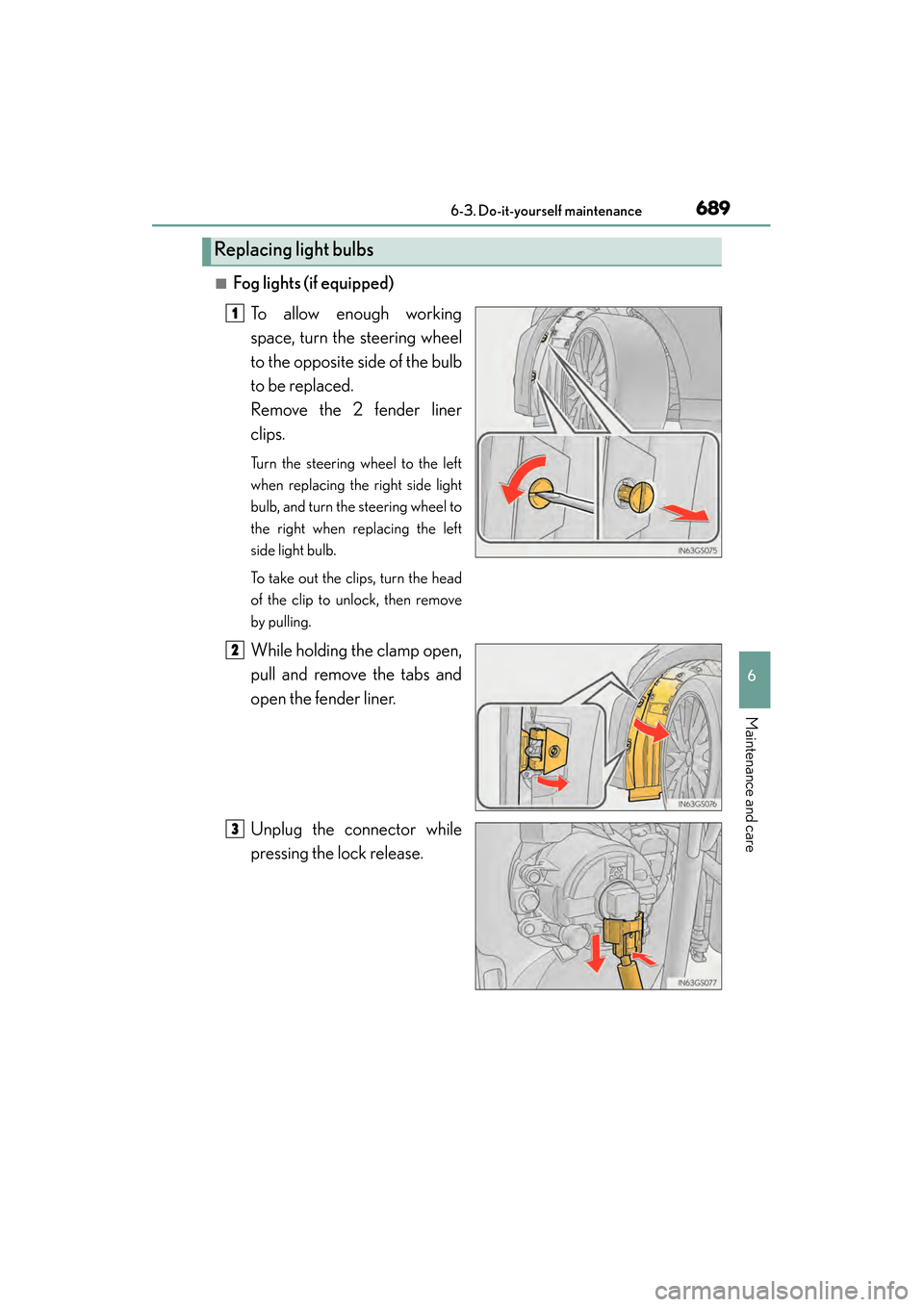
■Fog lights (if equipped)To allow enough working
space, turn the steering wheel
to the opposite side of the bulb
to be replaced.
Remove the 2 fender liner
clips.
Turn the steering wheel to the left
when replacing the right side light
bulb, and turn the steering wheel to
the right when replacing the left
side light bulb.
To take out the clips, turn the head
of the clip to unlock, then remove
by pulling.
While holding the clamp open,
pull and remove the tabs and
open the fender liner.
Unplug the connector while
pressing the lock release.
Replacing light bulbs
1
2
3
GS450h_U.book Page 689 Monday, January 23, 2012 10:20 AM
Page 692 of 862
GS450h_U (OM30D01U)
6916-3. Do-it-yourself maintenance
6
Maintenance and care
■Front turn signal lights (vehicles with discharge headlights)
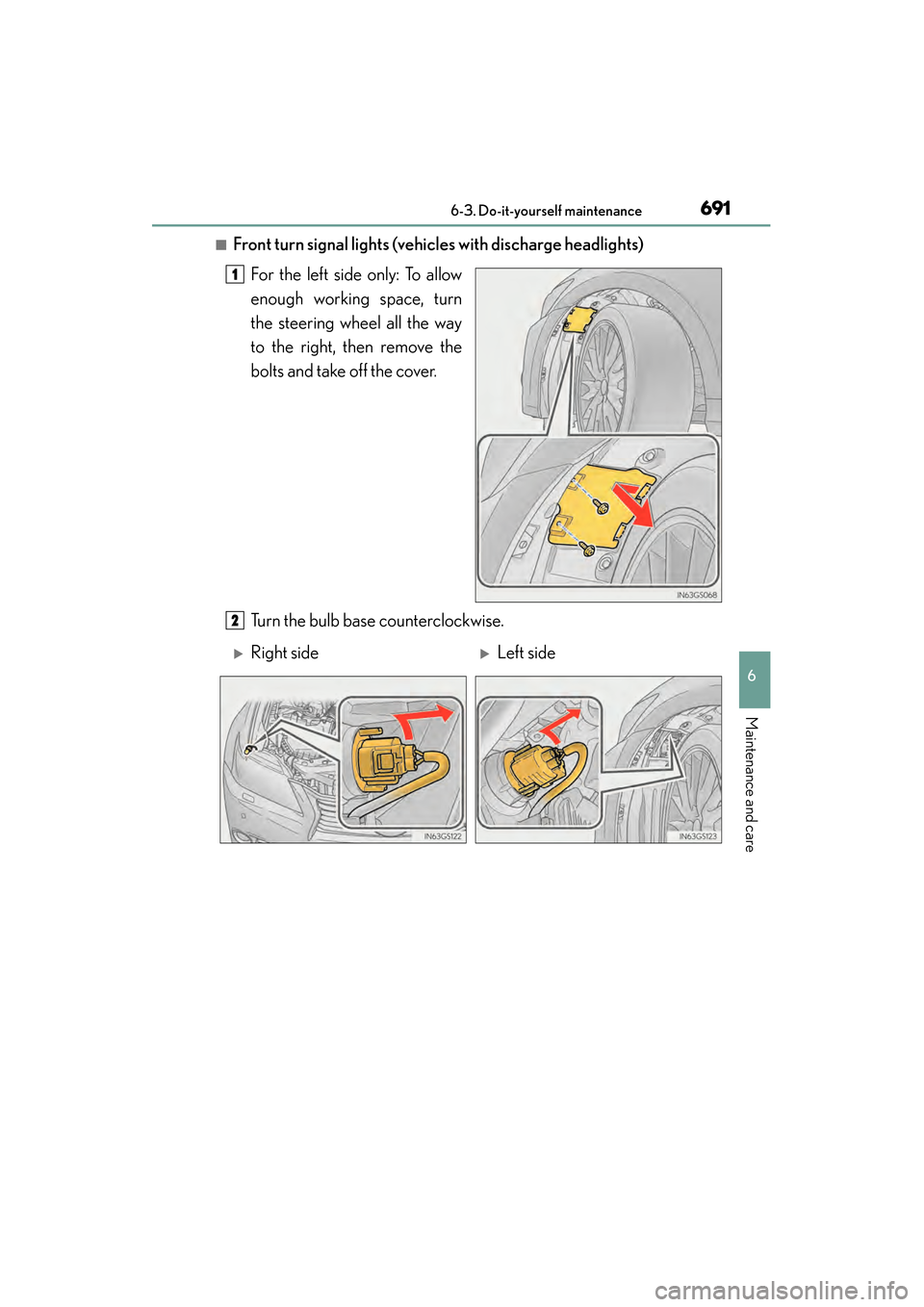
For the left side only: To allow
enough working space, turn
the steering wheel all the way
to the right, then remove the
bolts and take off the cover.
Turn the bulb base counterclockwise.
1
2
XRight sideXLeft side
GS450h_U.book Page 691 Monday, January 23, 2012 10:20 AM
Page 704 of 862
703
GS450h_U (OM30D01U)
7
When trouble arises
7-1. Essential information
If your vehicle has to be stopped in an emergency
Steadily step on the brake pedal with both feet and firmly depress it.
Do not pump the brake pedal repeatedly as this will increase the effort required to
slow the vehicle.
Shift the shift lever to N.
XIf the shift lever is shifted to N
After slowing down, stop the vehicle in a safe place by the road.
Stop the hybrid system.
XIf the shift lever cannot be shifted to N
Keep depressing the brake pedal with both feet to reduce vehicle
speed as much as possible.
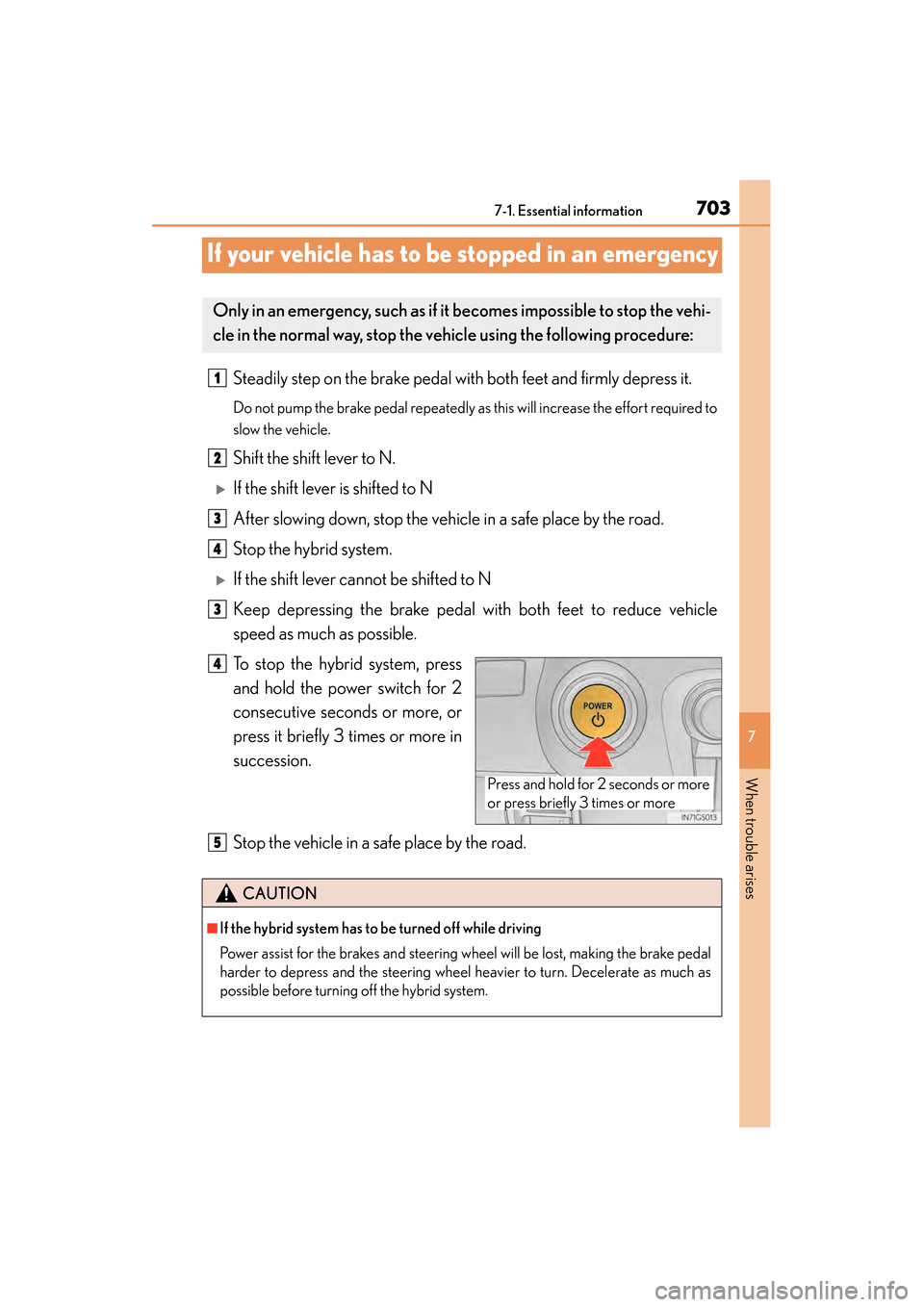
To stop the hybrid system, press
and hold the power switch for 2
consecutive seconds or more, or
press it briefly 3 times or more in
succession.
Stop the vehicle in a safe place by the road.
Only in an emergency, such as if it becomes impossible to stop the vehi-
cle in the normal way, stop the ve hicle using the following procedure:
1
2
3
4
3
Press and hold for 2 seconds or more
or press briefly 3 times or more
4
CAUTION
■If the hybrid system has to be turned off while driving
Power assist for the brakes and steering wheel will be lost, making the brake pedal
harder to depress and the steering wheel heavier to turn. Decelerate as much as
possible before turning off the hybrid system.
5
GS450h_U.book Page 703 Monday, January 23, 2012 10:20 AM