Eco Lexus GX460 2010 Manual Online
[x] Cancel search | Manufacturer: LEXUS, Model Year: 2010, Model line: GX460, Model: Lexus GX460 2010Pages: 830, PDF Size: 17.01 MB
Page 270 of 830
269
2-4. Using other driving systems
2
When driving
GX460_CANADA (OM60F29U)
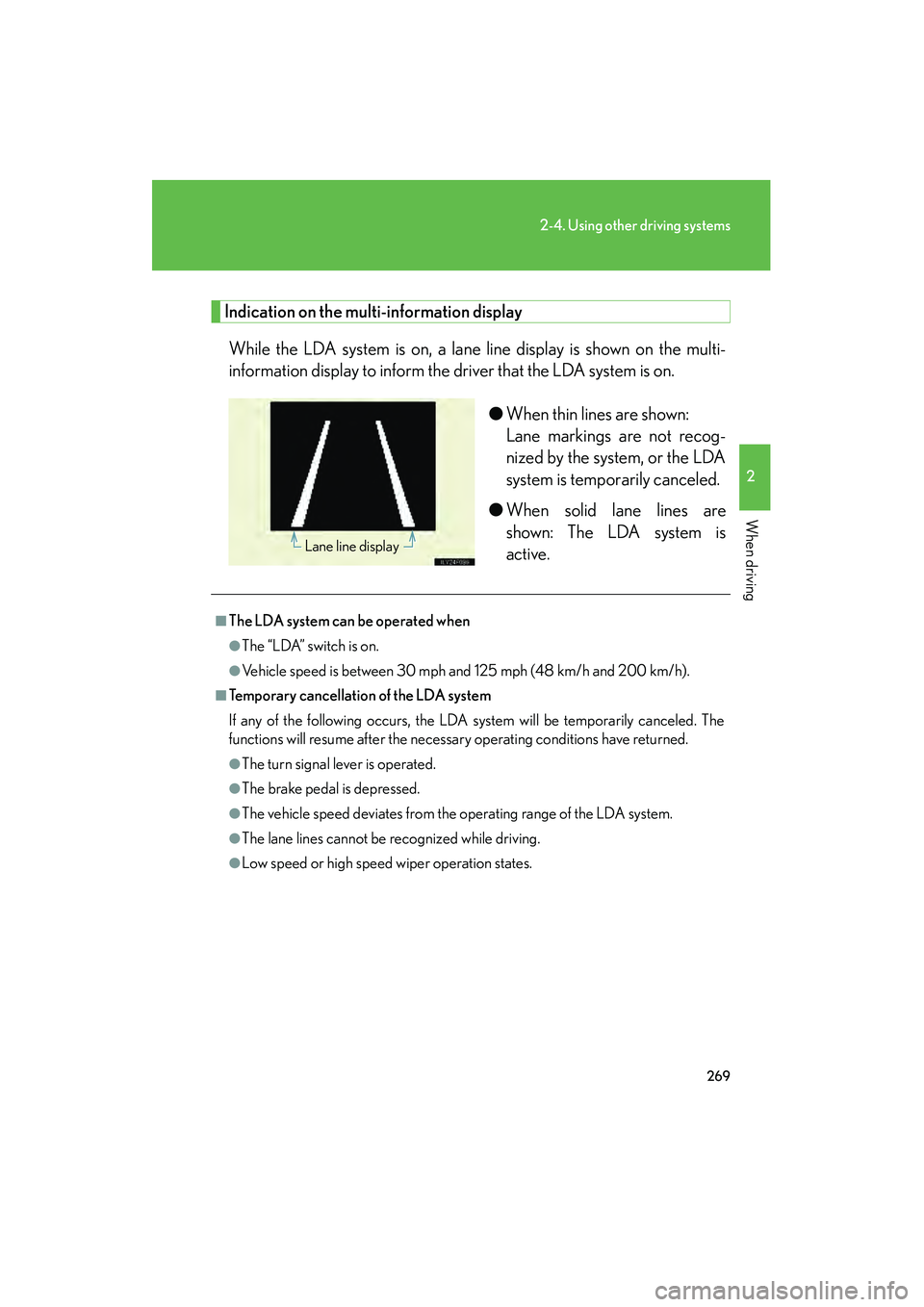
Indication on the multi-information displayWhile the LDA system is on, a lane line display is shown on the multi-
information display to inform the driver that the LDA system is on.
●When thin lines are shown:
Lane markings are not recog-
nized by the system, or the LDA
system is temporarily canceled.
● When solid lane lines are
shown: The LDA system is
active.
Lane line display
■The LDA system can be operated when
●The “LDA” switch is on.
●Vehicle speed is between 30 mph and 125 mph (48 km/h and 200 km/h).
■Temporary cancellation of the LDA system
If any of the following occurs, the LDA system will be temporarily canceled. The
functions will resume after the necessary operating conditions have returned.
●The turn signal lever is operated.
●The brake pedal is depressed.
●The vehicle speed deviates from the operating range of the LDA system.
●The lane lines cannot be recognized while driving.
●Low speed or high speed wiper operation states.
GX460_CANADA.book Page 269 Thursday, February 4, 2010 11:54 AM
Page 271 of 830
270
2-4. Using other driving systems
GX460_CANADA (OM60F29U)
■When the vehicle has been parked in the sun
The LDA system may not be available for a while after driving has started. In such
cases, turn the LDA system off and turn it on again after normal temperature
returns. When the temperature in the cabin decreases and the temperature around
the camera sensor becomes suitable for its operation, the functions will begin to
operate.
■Warning lights and messages for LDA
Warning lights and messages are used to indicate a system malfunction or to inform
the driver of the need for caution while driving. (→P. 6 9 8 )
CAUTION
■Before using the LDA system
This system provides information to the dr iver in accordance with the road geome-
try and the driving conditions. Be aware of your surroundings at all times, correct
the driving path while driving appropriately and be responsible for your own safety.
This system operates by using the camera to identify lane markers when the LDA
switch is on and the vehicle is being driven at the system operating speed.
Operation may be temporarily suspended if the camera cannot recognize the lane
markers or if the system cannot operate due to the road environment or driving
conditions. Also, since an alarm may sound unnecessarily if the lane markers cannot
be correctly identified, make sure to drive responsibly even while the system is
operating.
If a malfunction occurs in the system, the driver will be alerted by a buzzer and a dis-
play, and LDA operation will be temporarily suspended. However, this does not
present a problem to normal driving.
If the alert is displayed even after restarting the engine, have your vehicle inspected
by your Lexus dealer.
GX460_CANADA.book Page 270 Thursday, February 4, 2010 11:54 AM
Page 274 of 830
273
2-4. Using other driving systems
2
When driving
GX460_CANADA (OM60F29U)
NOTICE
■Camera sensor
●Keep the windshield clean at all times.
LDA performance may deteriorate due to the presence of raindrops, condensa-
tion, ice or snow on the windshield.
●Do not subject the camera sensor to strong impact or force, and do not disas-
semble the camera sensor.
●Do not change the installation position of the camera sensor or remove it. The
direction of the camera sensor is precisely adjusted.
●When it is cold, using the heater with air blowing to the feet may cause the upper
part of the windshield to fog up. This will have a negative effect on the images. In
such a case, use the windshield defogger to provide warm, dry air to the wind-
shield.
●Do not place anything on the dashboard.
The camera sensor may recognize the image reflected on the windshield as lane
markings by mistake.
●Do not scratch the camera lens, or let it get dirty.
●Do not attach stickers or other items to the windshield near the camera sensor.
●Adjust the inside rear view mirror correctly so that it does not interfere with the
camera sensor.
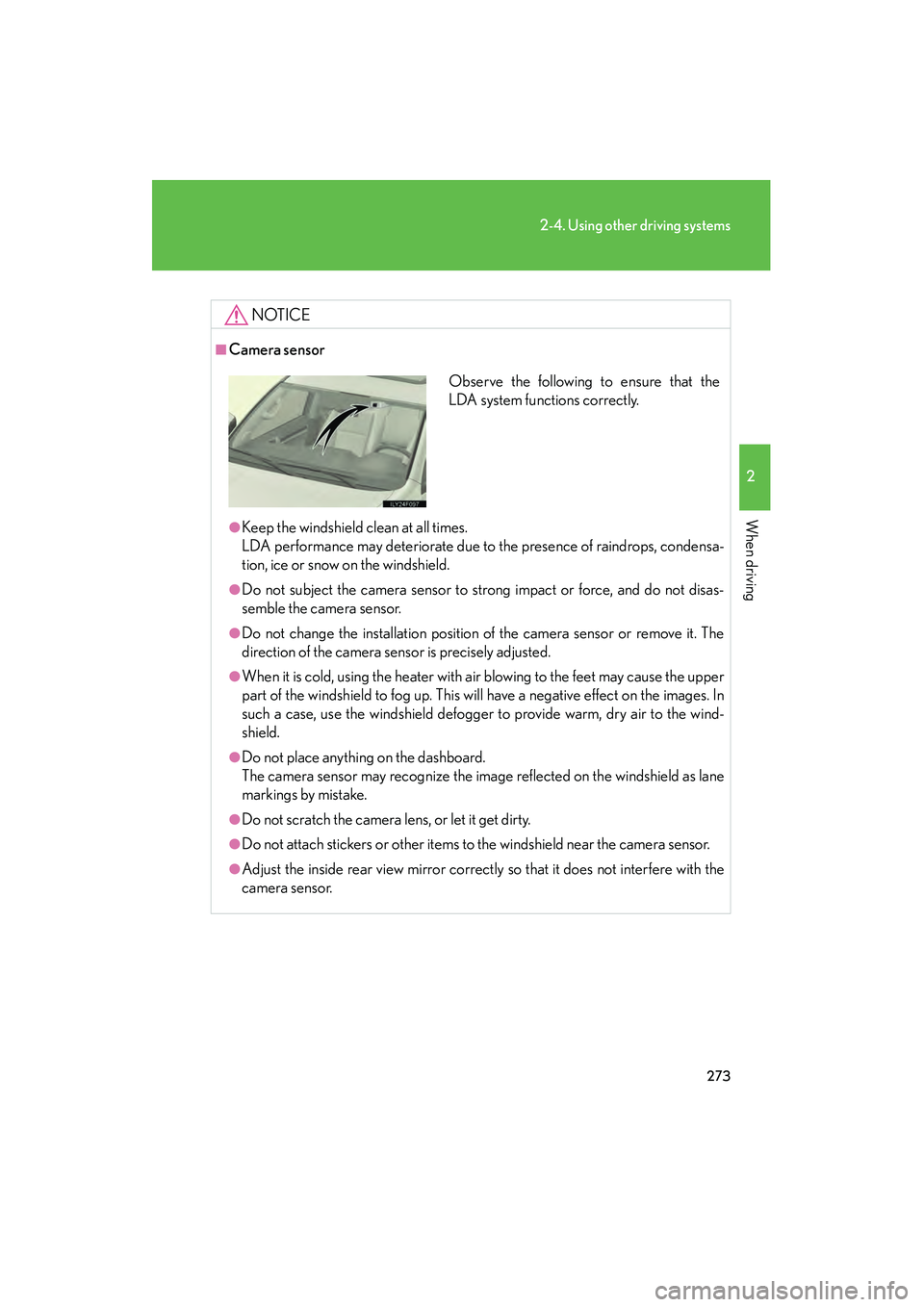
Observe the following to ensure that the
LDA system functions correctly.
GX460_CANADA.book Page 273 Thursday, February 4, 2010 11:54 AM
Page 297 of 830

296
2-4. Using other driving systems
GX460_CANADA (OM60F29U)
■The Multi-terrain Select can be operated when
●Vehicle speed is less than 7 mph (12 km/h)
●Crawl Control is off
■When using Multi-terrain Select
The following functions cannot be switched on or off.
●VSC
●Active TRAC
●Second start mode
A message will be shown on the multi-information display stating that these func-
tions cannot be switched using the VSC OFF switch or the menu and “ENTER”
switches.
■When selecting a terrain mode
If you are unsure which mode is appropriate, select MOGUL when the four-wheel
drive control switch is in L4 or select MUD & SAND when it is in H4.
■When it is difficult to generate traction
MUD & SAND mode provides the largest amount of tire slippage, followed by
LOOSE ROCK, MOGUL and ROCK mode.
Drivability can be improved by selecting a mode which provides a smaller amount
of tire slippage than the current mode when the amount of tire slippage is large, or
conversely selecting a mode which provides a larger amount of tire slippage than
the current mode when the amount of tire slippage is small.
■When the vehicle is stuck
Switching the transfer and differential
For the operation of the following functions, refer to the following pages.
●Four-wheel drive system ( →P. 3 1 7 )
●Center differential lock ( →P. 3 1 8 )
GX460_CANADA.book Page 296 Thursday, February 4, 2010 11:54 AM
Page 299 of 830
298
2-4. Using other driving systems
GX460_CANADA (OM60F29U)
Multi-terrain Monitor∗
∗: If equipped
The Multi-terrain Monitor displays the vehicle surroundings when driving
at low speeds, thus assisting off-ro ad driving and helping the driver to
check the vehicle surroundings.
The Multi-terrain Monitor displays the vehicle surroundings automati-
cally when a mode is being selected on the Multi-terrain Select.
● You can switch between 4 different images (front, side-front, side-
rear and rear) by operating the switch.
● By using the front and side monitors to identify objects in the vicinity
or path of the tires, you can help to prevent the vehicle from becom-
ing stuck unexpectedly while driving.
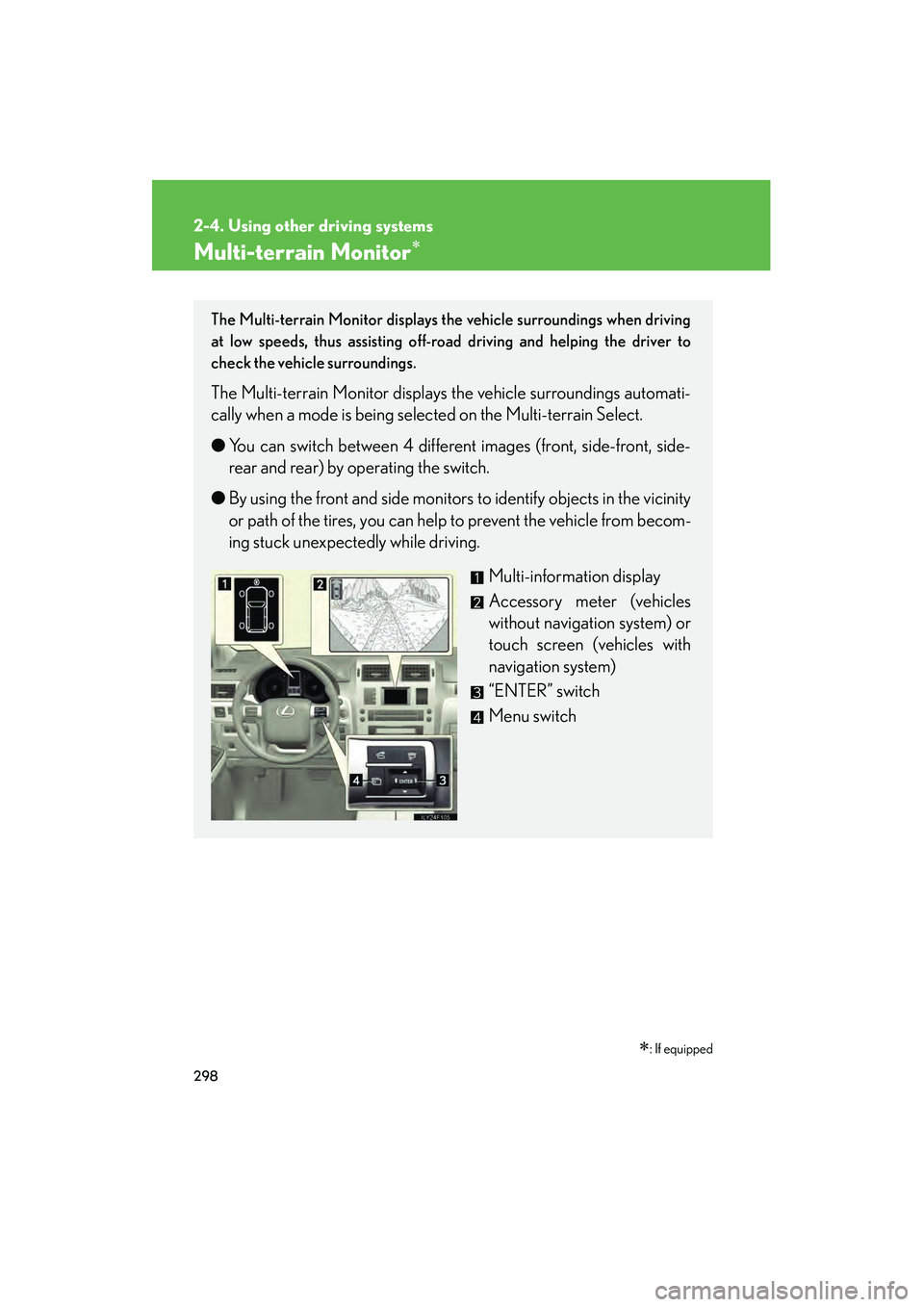
Multi-information display
Accessory meter (vehicles
without navigation system) or
touch screen (vehicles with
navigation system)
“ENTER” switch
Menu switch
GX460_CANADA.book Page 298 Thursday, February 4, 2010 11:54 AM
Page 326 of 830
325
2-4. Using other driving systems
2
When driving
GX460_CANADA (OM60F29U)
■Automatic system cancelation
In the following situations, the system is canceled automatically:
At that time, the buzzer will sound, the slip indicator turns off, and the Crawl Con-
trol indicator flashes.
A notification will be displayed on the multi-information display for several seconds.
(→ P. 6 9 8 )
●When the shift lever is moved to P or N.
●When the four-wheel drive control switch is in H4.
●When the driver’s door is opened.
When turning off Crawl Control while traveling, stop the vehicle before the Crawl
Control indicator turns off, or drive extremely carefully.
■Function limit
●In the following situations, you will be able to use brake control to drive downhill
at a fixed low speed, but you will be unable to use engine control to drive uphill
at a fixed low speed.
• When the driving mode is set to second start mode.
• When the vehicle speed is higher than 6 mph (10 km/h).
●In the following situation, engine control and brake control will stop temporarily:
At that time, the Crawl Control indicator flashes.
When the vehicle speed is higher than 15 mph (25 km/h).
■When the Crawl Control system is operated continuously
This may cause the brake actuator to overheat. In this case, the Crawl Control sys-
tem will stop operating, a buzzer will sound, the Crawl Control indicator will turn off
after flashing and the TRAC OFF will be shown on the multi-information display. In
this case, quickly stop the vehicle in a safe place and give the actuator adequate
time to cool off. Refrain from using the system until the message goes off. (The vehi-
cle can be driven normally during this time.)
GX460_CANADA.book Page 325 Thursday, February 4, 2010 11:54 AM
Page 329 of 830
328
2-4. Using other driving systems
GX460_CANADA (OM60F29U)
■Operating tips
The system will operate when the shift lever is in a position other than P, however to
make effective use of the system it is recommended that the shift lever be shifted to
2 or 1 range of S mode.
■If the four-wheel drive control switch is in H4
The system does not operate.
■When the downhill assist control system is operated continuously
This may cause the brake actuator to overheat. In this case, the downhill assist con-
trol system will stop operating, a buzzer will sound and the DAC indicator will start
flashing, and the TRAC OFF will be shown on the multi-information display. Refrain
from using the system until the DAC indicator stays on and the message goes off.
(The vehicle can be driven normally during this time.)
■Sounds and vibrations caused by the DAC
●A sound may be heard from the engine compartment when the engine is
started or just after the vehicle begins to move. This sound does not indicate that
a malfunction has occurred in DAC.
●Either of the following conditions may occur when the DAC is operating. None
of these are indicators that a malfunction has occurred.
• Vibrations may be felt through the vehicle body and steering.
• A motor sound may be heard after the vehicle comes to a stop.
■System malfunction
●The DAC indicator does not come on when the “ENGINE START STOP”
switch is turned to IGNITION ON mode.
●The “DAC” indicator does not come on when the “DAC” switch is pressed.
●The slip indicator comes on.
In the above cases, have your vehicle checked by your Lexus dealer.
GX460_CANADA.book Page 328 Thursday, February 4, 2010 11:54 AM
Page 334 of 830
333
2-4. Using other driving systems
2
When driving
GX460_CANADA (OM60F29U)
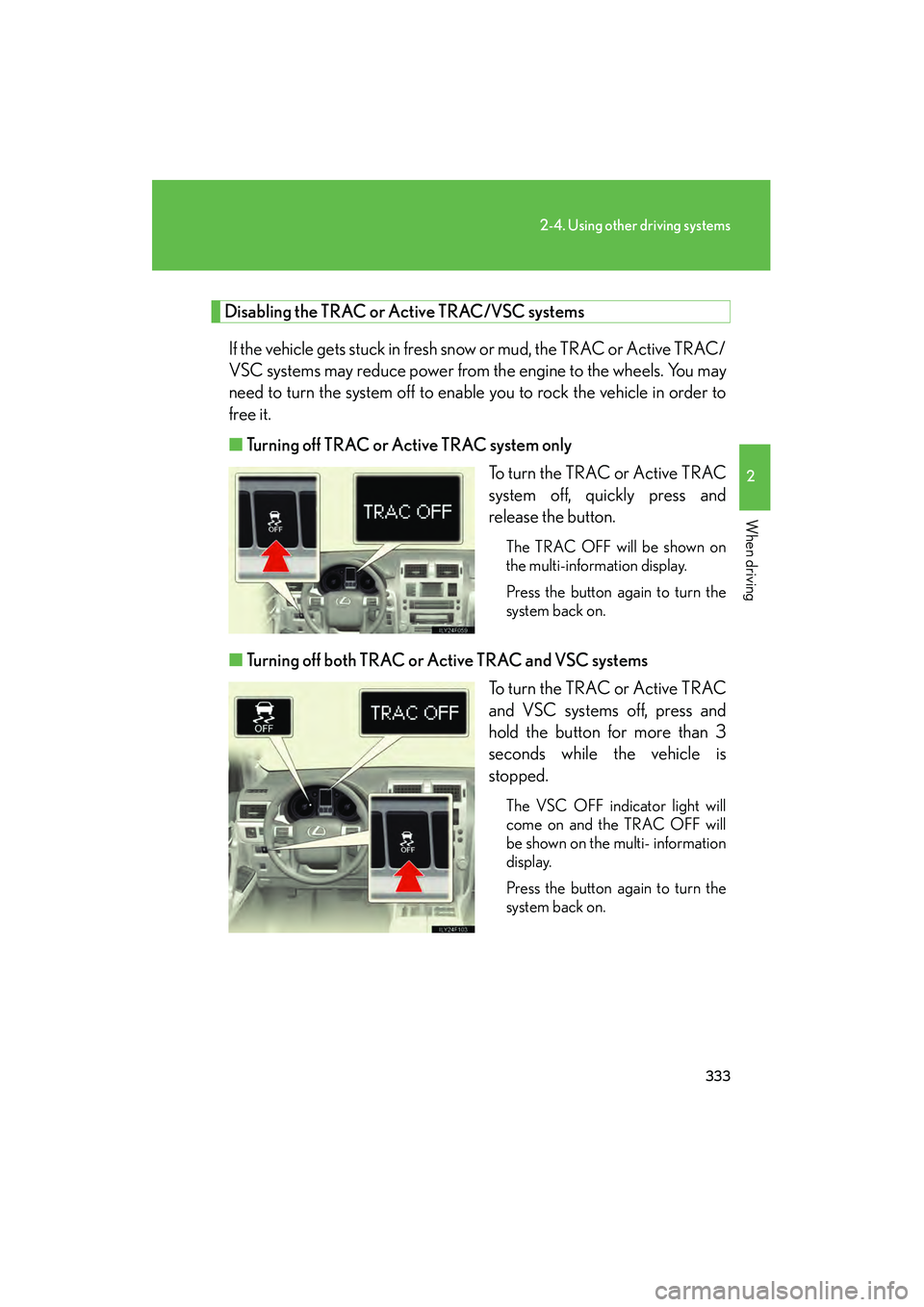
Disabling the TRAC or Active TRAC/VSC systemsIf the vehicle gets stuck in fresh snow or mud, the TRAC or Active TRAC/
VSC systems may reduce power from the engine to the wheels. You may
need to turn the system off to enable you to rock the vehicle in order to
free it.
■ Turning off TRAC or Active TRAC system only
To turn the TRAC or Active TRAC
system off, quickly press and
release the button.
The TRAC OFF will be shown on
the multi-information display.
Press the button again to turn the
system back on.
■Turning off both TRAC or Active TRAC and VSC systems
To turn the TRAC or Active TRAC
and VSC systems off, press and
hold the button for more than 3
seconds while the vehicle is
stopped.
The VSC OFF indicator light will
come on and the TRAC OFF will
be shown on the multi- information
display.
Press the button again to turn the
system back on.
GX460_CANADA.book Page 333 Thursday, February 4, 2010 11:54 AM
Page 337 of 830
336
2-4. Using other driving systems
GX460_CANADA (OM60F29U)
CAUTION
■TRAC/Active TRAC may not operate effectively when
Directional control and power may not be achievable while driving on slippery road
surfaces, even if the TRAC/Active TRAC is operating.
Do not drive the vehicle in conditions where stability and power may be lost.
■Hill- start assist control does not operate effectively when
Do not overly rely on the hill-start assist control. The hill-start assist control may not
operate effectively on steep inclines and roads covered with ice.
■When the VSC is activated
The slip indicator light flashes and a warning buzzer sounds. Always drive carefully.
Reckless driving may cause an accident. Exercise particular care when the indica-
tor light flashes and a buzzer sounds.
■When the TRAC or Active TRAC/VSC systems are turned off
Be especially careful and drive at a speed appropriate to the road conditions. As
these are the systems to ensure vehicle stability and driving force, do not turn the
TRAC or Active TRAC/VSC systems off unless necessary.
■Replacing tires
Make sure that all tires are of the same size, brand, tread pattern and total load
capacity. In addition, make sure that the tires are inflated to the recommended tire
inflation pressure level.
The ABS/Multi Terrain ABS and VSC systems will not function correctly if different
tires are installed on the vehicle.
Contact your Lexus dealer for further information when replacing tires or wheels.
GX460_CANADA.book Page 336 Thursday, February 4, 2010 11:54 AM
Page 354 of 830
353
2-5. Driving information
2
When driving
GX460_CANADA (OM60F29U)
Cargo and luggage
Take notice of the following information about storage precautions, cargo
capacity and load:
●Stow cargo and luggage in the luggage compartment whenever
possible.
● Be sure all items are secured in place.
● To maintain vehicle balance while driving, position luggage evenly
within the luggage compartment.
● For better fuel economy, do not carry unnecessary weight.
GX460_CANADA.book Page 353 Thursday, February 4, 2010 11:54 AM