Eco Lexus GX460 2010 Repair Manual
[x] Cancel search | Manufacturer: LEXUS, Model Year: 2010, Model line: GX460, Model: Lexus GX460 2010Pages: 830, PDF Size: 17.01 MB
Page 198 of 830
197
2-2. Instrument cluster
2
When driving
GX460_CANADA (OM60F29U)
■The meters and display illuminate when
The “ENGINE START STOP” switch is in IGNITION ON mode.
■Instrument cluster brightness adjustment
The instrument cluster brightness levels when the tail lights are on and off can be
adjusted.
■The brightness of the instrument cluster lights
When the tail lights are on, the brightness will change. However, when the sur-
roundings are bright (daytime, etc.) turning on the tail lights will not change the
instrument cluster brightness.
In addition, the brightness of the instrument cluster lights is automatically adjusted
based on the light sensor detecting how bright the surroundings are.
■When disconnecting and reconnecting battery terminals
The trip meter data will be reset.
If the trip meter was displayed last, the ODO screen will be displayed after reset-
ting.
■Customization
Setting of sensitivity of the ambient light sensor used for dimming the meter lights
can be changed. (Customizable features →P. 7 8 3 )
NOTICE
■To prevent damage to the engine and its components
●Do not let the indicator needle of the tachometer enter the red zone, which indi-
cates the maximum engine speed.
●The engine may be overheating if the engine coolant temperature gauge is in the
red zone (H). In this case, immediately stop the vehicle in a safe place, and check
the engine after it has cooled completely. ( →P. 74 4 )
GX460_CANADA.book Page 197 Thursday, February 4, 2010 11:54 AM
Page 201 of 830

200
2-2. Instrument cluster
GX460_CANADA (OM60F29U)
■Indicators
The indicators inform the driver of the operating state of the vehi-
cle’s various systems.
Turn signal indicator
(→ P. 1 9 2 )Cruise control indicator
(→ P. 242, 246)
Headlight high beam
indicator ( →P. 220)“SET” indicator
(→ P. 242, 246)
(U.S.A.)
Headlight indicator
(→ P. 220)
(if equipped)
Dynamic radar cruise
control indicator
(→ P. 2 4 6 )
(Canada)
Tail light indicator
(→ P. 220)
(if equipped)
“LDA” indicator
(→ P. 2 6 8 )
(if equipped)
Automatic High Beam
indicator ( →P. 2 2 6 )Slip indicator ( →P. 3 3 2 )
Fog light indicator
(→ P. 2 3 3 )VSC OFF indicator
(→ P. 333)
Eco Driving Indicator
Light ( →P. 2 1 0 )
(if equipped)
Multi-terrain Select
indicator ( →P. 2 9 0 )
*1*1, 2
*1
*1
GX460_CANADA.book Page 200 Thursday, February 4, 2010 11:54 AM
Page 202 of 830
201
2-2. Instrument cluster
2
When driving
GX460_CANADA (OM60F29U)
*1: These lights turn on when the “ENGINE START STOP” switch is turnedto IGNITION ON mode to indicate that a system check is being per-
formed. They will turn off after the engine is on, or after a few seconds.
There may be a malfunction in a system if the lights do not come on, or
turn off. Have the vehicle inspected by your Lexus dealer.
*2: The indicator flashes to indicate that the system is operating.
*3: The indicator flashes faster than usual to indicate that the system is oper-
ating.
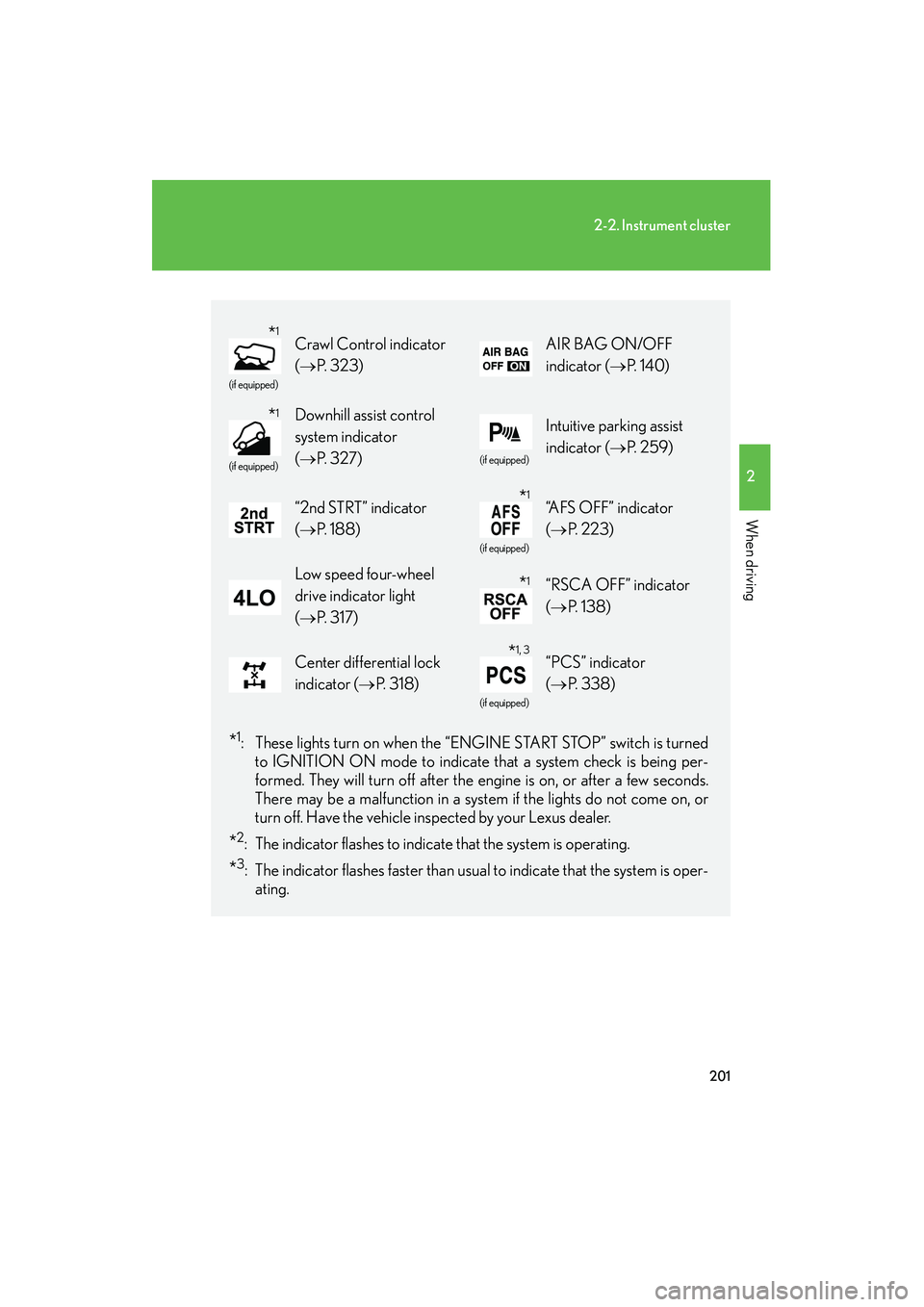
(if equipped)
Crawl Control indicator
( → P. 323)AIR BAG ON/OFF
indicator ( →P. 1 4 0 )
(if equipped)
Downhill assist control
system indicator
(→ P. 3 2 7 )
(if equipped)
Intuitive parking assist
indicator ( →P. 2 5 9 )
“2nd STRT” indicator
(→ P. 1 8 8 )
(if equipped)
“AFS OFF” indicator
(→ P. 223)
Low speed four-wheel
drive indicator light
(→ P. 3 1 7 )“RSCA OFF” indicator
(→ P. 1 3 8 )
Center differential lock
indicator ( →P. 3 1 8 )
(if equipped)
“PCS” indicator
(→ P. 3 3 8 )
*1
*1
*1
*1
*1, 3
GX460_CANADA.book Page 201 Thursday, February 4, 2010 11:54 AM
Page 203 of 830
202
2-2. Instrument cluster
GX460_CANADA (OM60F29U)
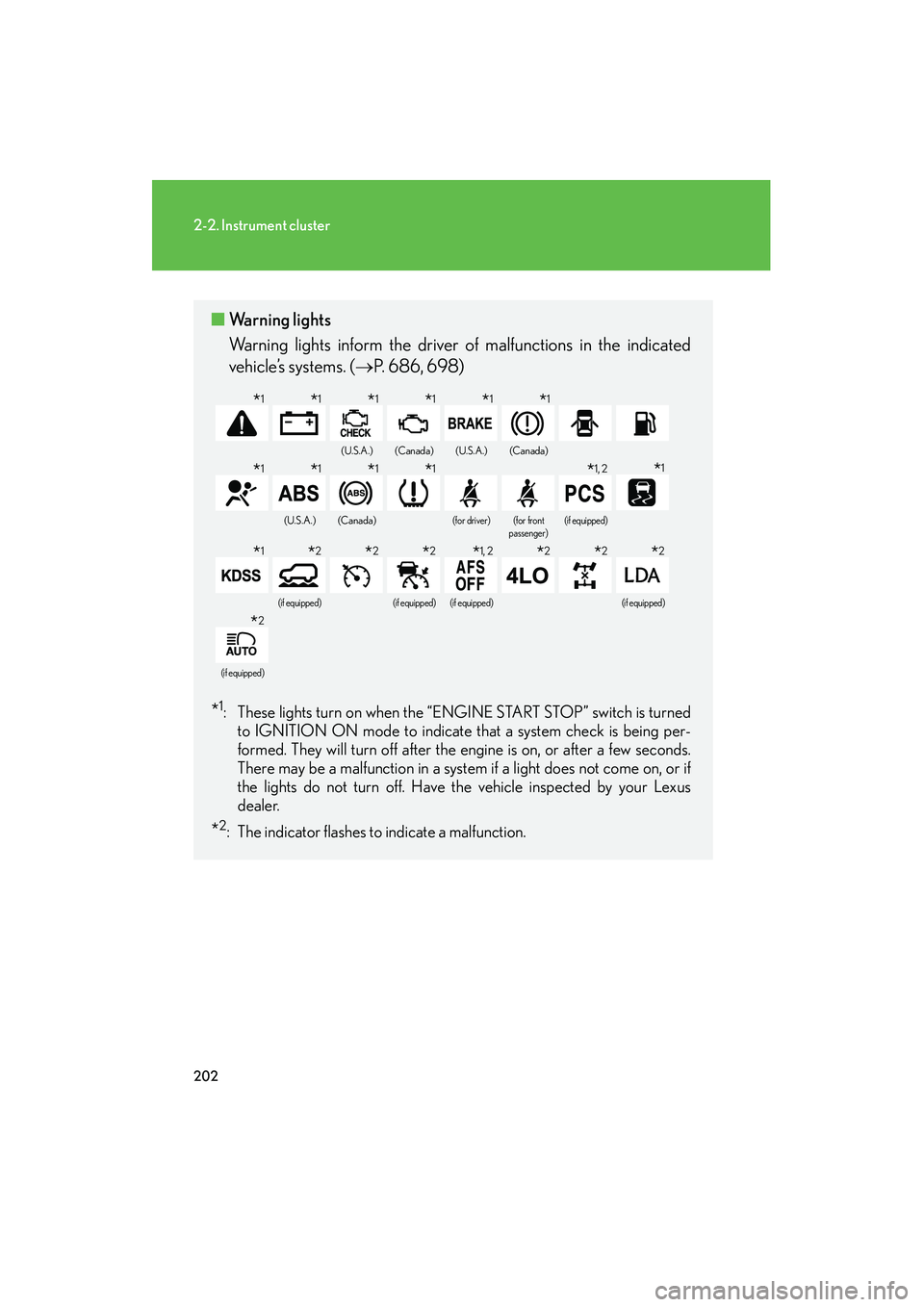
■Warning lights
Warning lights inform the driver of malfunctions in the indicated
vehicle’s systems. ( →P. 686, 698)
*1: These lights turn on when the “ENGINE START STOP” switch is turned
to IGNITION ON mode to indicate that a system check is being per-
formed. They will turn off after the engine is on, or after a few seconds.
There may be a malfunction in a system if a light does not come on, or if
the lights do not turn off. Have the vehicle inspected by your Lexus
dealer.
*2: The indicator flashes to indicate a malfunction.
(U.S.A.)(Canada)(U.S.A.)(Canada)
(U.S.A.)(Canada)(for driver)(for front
passenger)(if equipped)
(if equipped)(if equipped)(if equipped)(if equipped)
(if equipped)
*1*1*1*1*1*1
*1*1*1*1*1, 2*1
*1*2*2*2*1, 2*2*2*2
*2
GX460_CANADA.book Page 202 Thursday, February 4, 2010 11:54 AM
Page 208 of 830
207
2-2. Instrument cluster
2
When driving
GX460_CANADA (OM60F29U)●
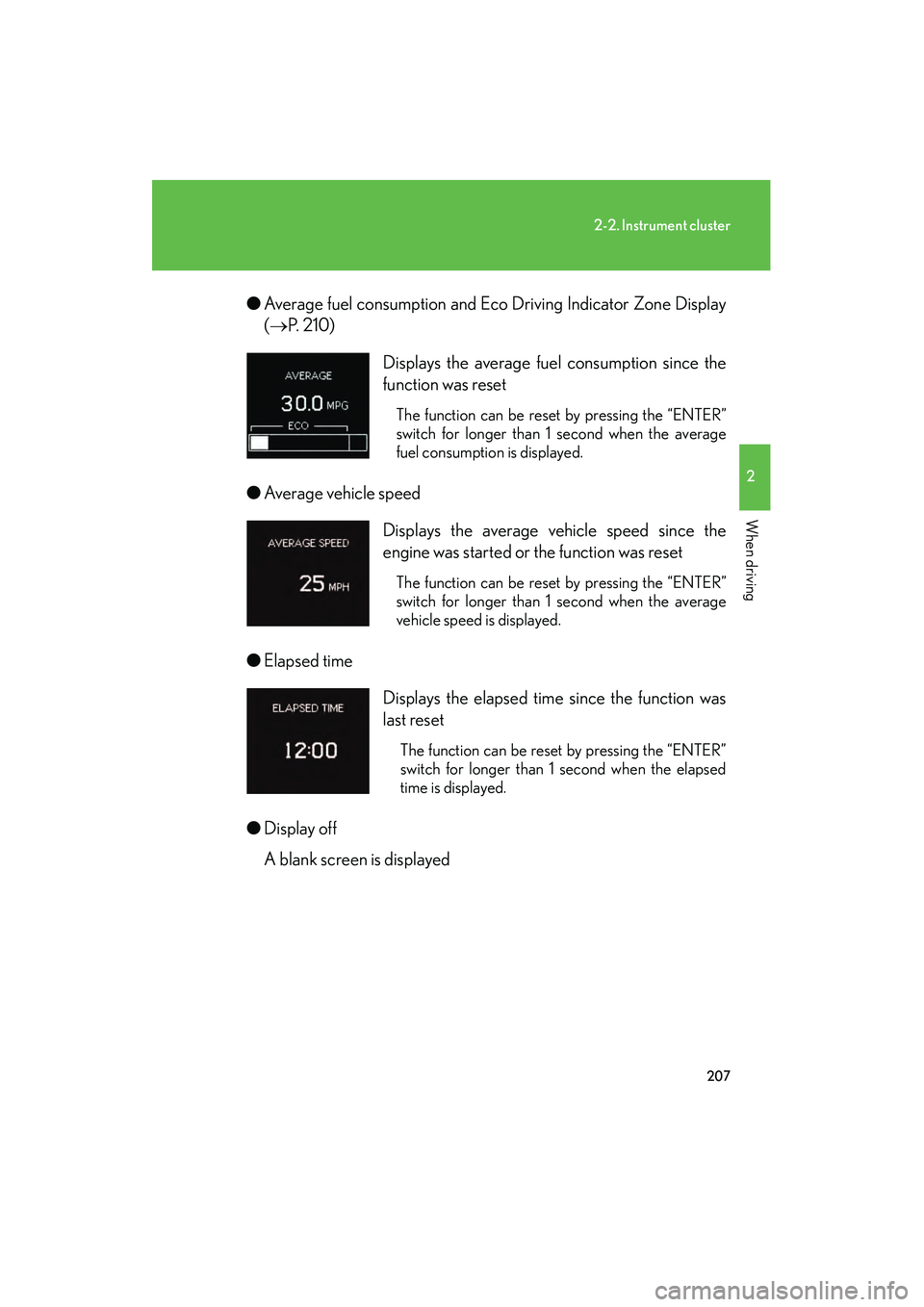
Average fuel consumption and Eco Driving Indicator Zone Display
(→ P. 2 1 0 )
● Average vehicle speed
● Elapsed time
● Display off
A blank screen is displayed Displays the average fuel consumption since the
function was reset
The function can be reset by pressing the “ENTER”
switch for longer than 1 second when the average
fuel consumption is displayed.
Displays the average vehicle speed since the
engine was started or the function was reset
The function can be reset by pressing the “ENTER”
switch for longer than 1 second when the average
vehicle speed is displayed.
Displays the elapsed time since the function was
last reset
The function can be reset by pressing the “ENTER”
switch for longer than 1 second when the elapsed
time is displayed.
GX460_CANADA.book Page 207 Thursday, February 4, 2010 11:54 AM
Page 209 of 830
208
2-2. Instrument cluster
GX460_CANADA (OM60F29U)■
Electronic features control contents
●Multi-terrain Select (if equipped) ( →P. 2 9 0 )
● Intuitive parking assist (if equipped) ( →P. 2 5 9 )
● AFS (Adaptive Front-lighting System) (if equipped) ( →P. 223)
● Second start mode ( →P. 188)
■ Other contents
●Multi-terrain Select display (if equipped) ( →P. 2 9 0 )
● Intuitive parking assist display
* (if equipped) ( →P. 2 5 9 )
● Crawl Control display
* (if equipped) ( →P. 323)
● Dynamic radar cruise control display
* (if equipped) (→ P. 2 4 6 )
● LDA (Lane Departure Alert) display
* (if equipped) (→ P. 2 6 8 )
● Warning messages ( →P. 6 9 8 )
Automatically displayed when a malfunction occurs in one of the
vehicles systems.
● Customization
Settings (e.g.available language) can be changed.
(Customizable features →P. 783)
*: Automatically displayed when the system is used
GX460_CANADA.book Page 208 Thursday, February 4, 2010 11:54 AM
Page 211 of 830
210
2-2. Instrument cluster
GX460_CANADA (OM60F29U)
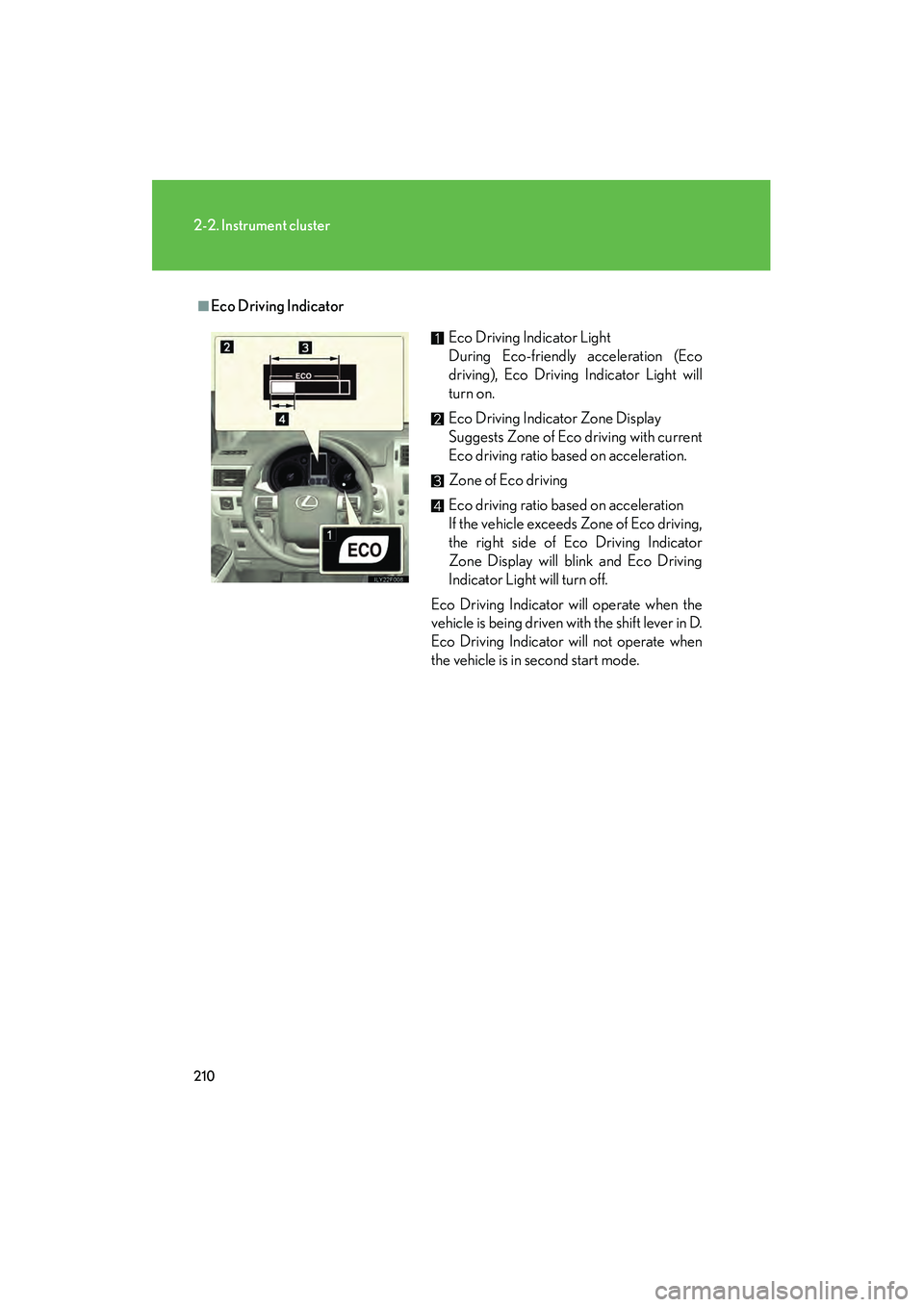
■Eco Driving IndicatorEco Driving Indicator Light
During Eco-friendly acceleration (Eco
driving), Eco Driving Indicator Light will
turn on.
Eco Driving Indicator Zone Display
Suggests Zone of Eco driving with current
Eco driving ratio based on acceleration.
Zone of Eco driving
Eco driving ratio based on acceleration
If the vehicle exceeds Zone of Eco driving,
the right side of Eco Driving Indicator
Zone Display will blink and Eco Driving
Indicator Light will turn off.
Eco Driving Indicator will operate when the
vehicle is being driven with the shift lever in D.
Eco Driving Indicator will not operate when
the vehicle is in second start mode.
GX460_CANADA.book Page 210 Thursday, February 4, 2010 11:54 AM
Page 212 of 830
211
2-2. Instrument cluster
2
When driving
GX460_CANADA (OM60F29U)
■When disconnecting and reconnecting battery terminals
The following information data will be reset:
●Average fuel consumption after refueling
●Average fuel consumption
●Average vehicle speed
●Elapsed time
CAUTION
■The multi-information display at low temperatures
Allow the interior of the vehicle to warm up before using the information display. At
extremely low temperatures, the information display monitor may respond slowly,
and display changes may be delayed.
For example, there is a lag between the driver’s shifting and the new gear number
appearing on the display. This lag could cause the driver to downshift again, causing
rapid and excessive engine braking and possibly an accident resulting in death or
serious injury.
GX460_CANADA.book Page 211 Thursday, February 4, 2010 11:54 AM
Page 217 of 830
216
2-2. Instrument cluster
GX460_CANADA (OM60F29U)
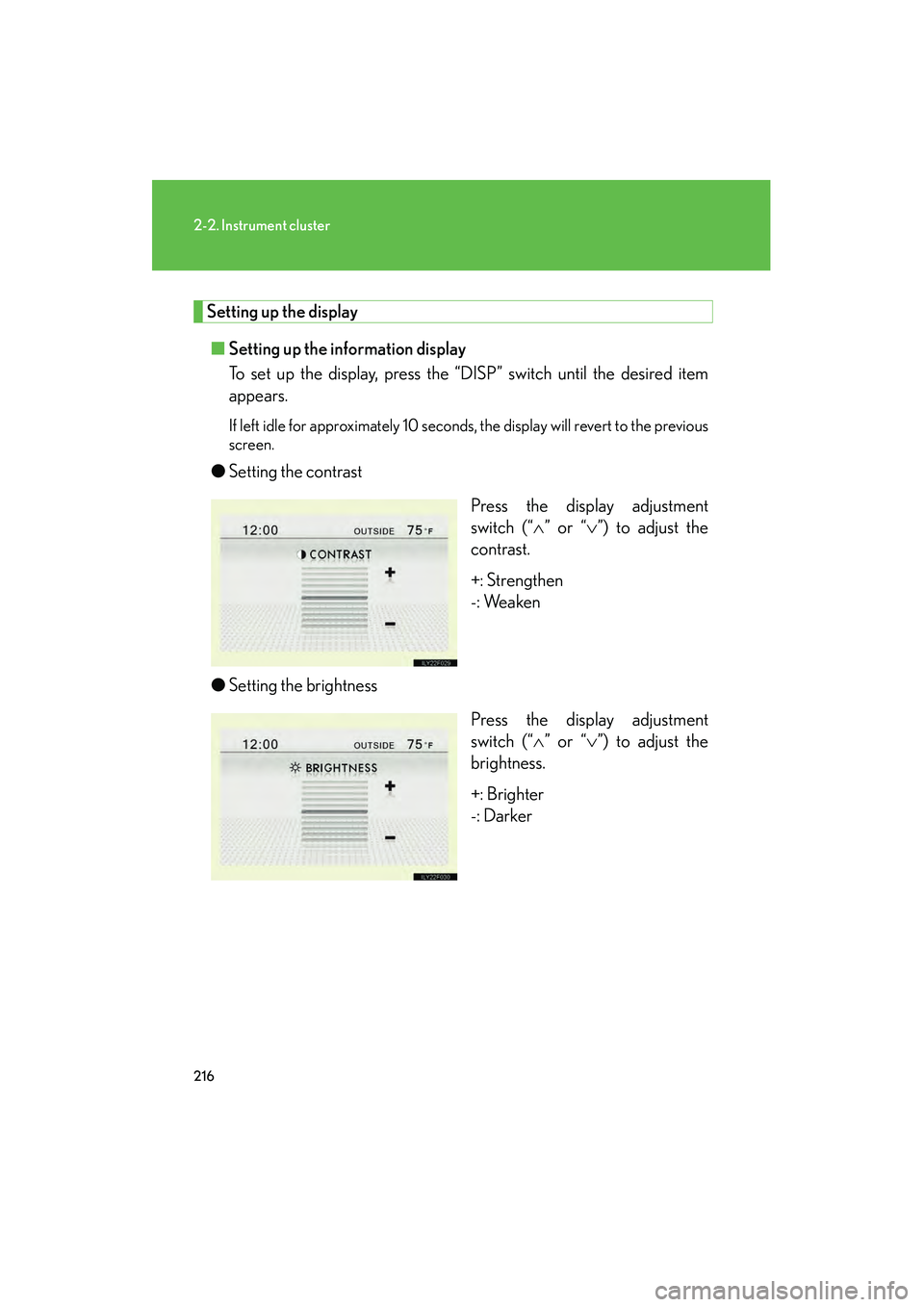
Setting up the display■ Setting up the information display
To set up the display, press the “DISP” switch until the desired item
appears.
If left idle for approximately 10 seconds, the display will revert to the previous
screen.
●Setting the contrast
Press the display adjustment
switch (“∧” or “ ∨”) to adjust the
contrast.
+: Strengthen
-: Weaken
● Setting the brightness
Press the display adjustment
switch (“∧” or “ ∨”) to adjust the
brightness.
+: Brighter
-: Darker
GX460_CANADA.book Page 216 Thursday, February 4, 2010 11:54 AM
Page 218 of 830

217
2-2. Instrument cluster
2
When driving
GX460_CANADA (OM60F29U)●
Setting the day mode
Press the display adjustment
switch (“∧” or “ ∨”) to select ON or
OFF.
■ Setting up the display of the monitors
To set up the display, press the “DISP” switch when the camera image
is being displayed until the desired item appears.
If left idle for approximately 10 seconds, the display will revert to the previous
screen.
●Setting the contrast
Press the display adjustment
switch (“∧” or “ ∨”) to adjust the
contrast.
+: Strengthen
-: Weaken
GX460_CANADA.book Page 217 Thursday, February 4, 2010 11:54 AM