key Lexus HS250h 2012 Workshop Manual
[x] Cancel search | Manufacturer: LEXUS, Model Year: 2012, Model line: HS250h, Model: Lexus HS250h 2012Pages: 630, PDF Size: 16.1 MB
Page 468 of 630
467
4-3. Do-it-yourself maintenance
4
Maintenance and care
HS250h_U_75050U
Electronic key battery
Replace the battery with a new one if it is depleted.
■You will need th e following items:
● Flathead screwdriver
● Small flathead screwdriver
● Lithium battery (CR1632)
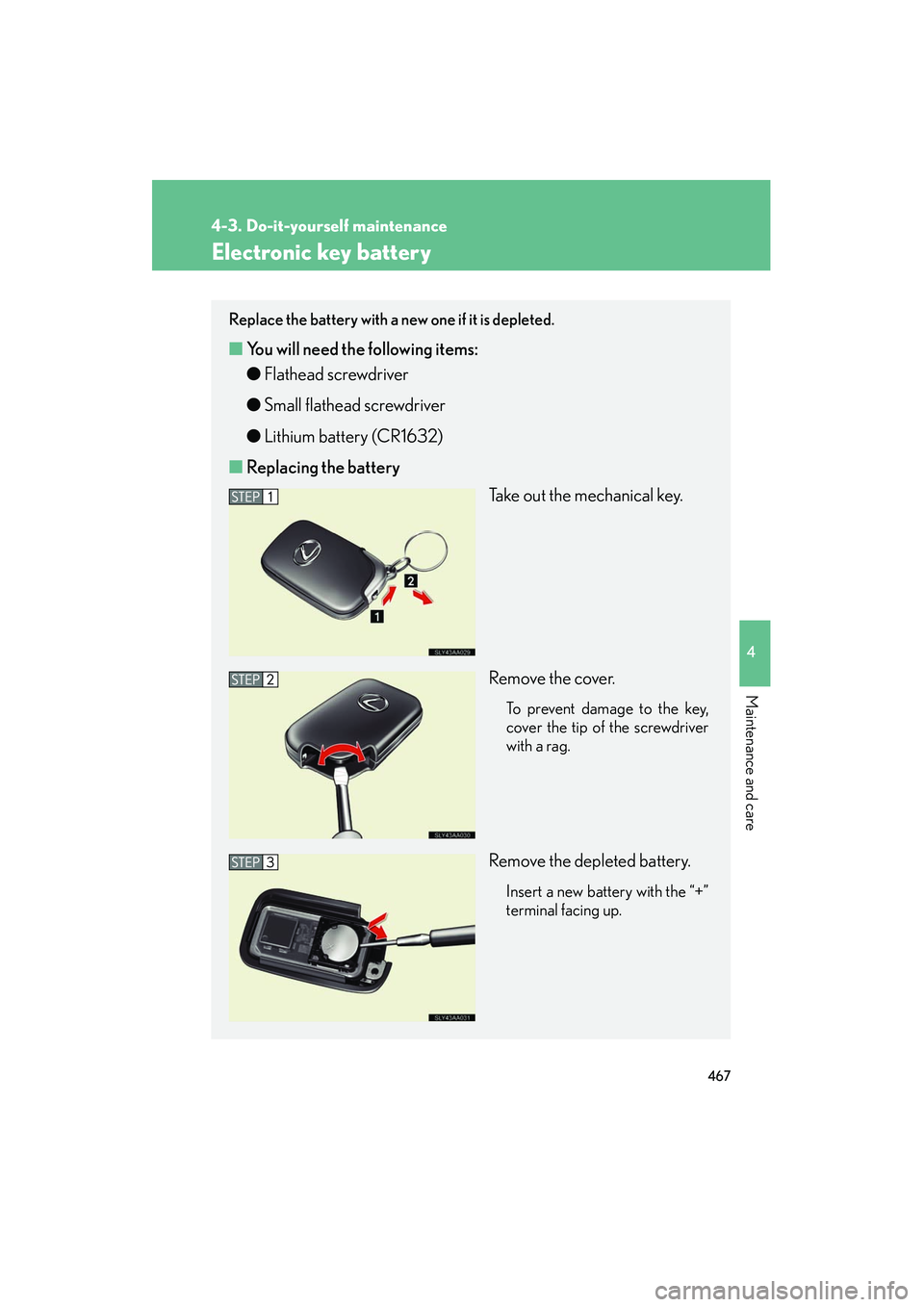
■ Replacing the battery
Take out the mechanical key.
Remove the cover.
To prevent damage to the key,
cover the tip of the screwdriver
with a rag.
Remove the depleted battery.
Insert a new battery with the “+”
terminal facing up.
Page 469 of 630
468
4-3. Do-it-yourself maintenance
HS250h_U_75050U
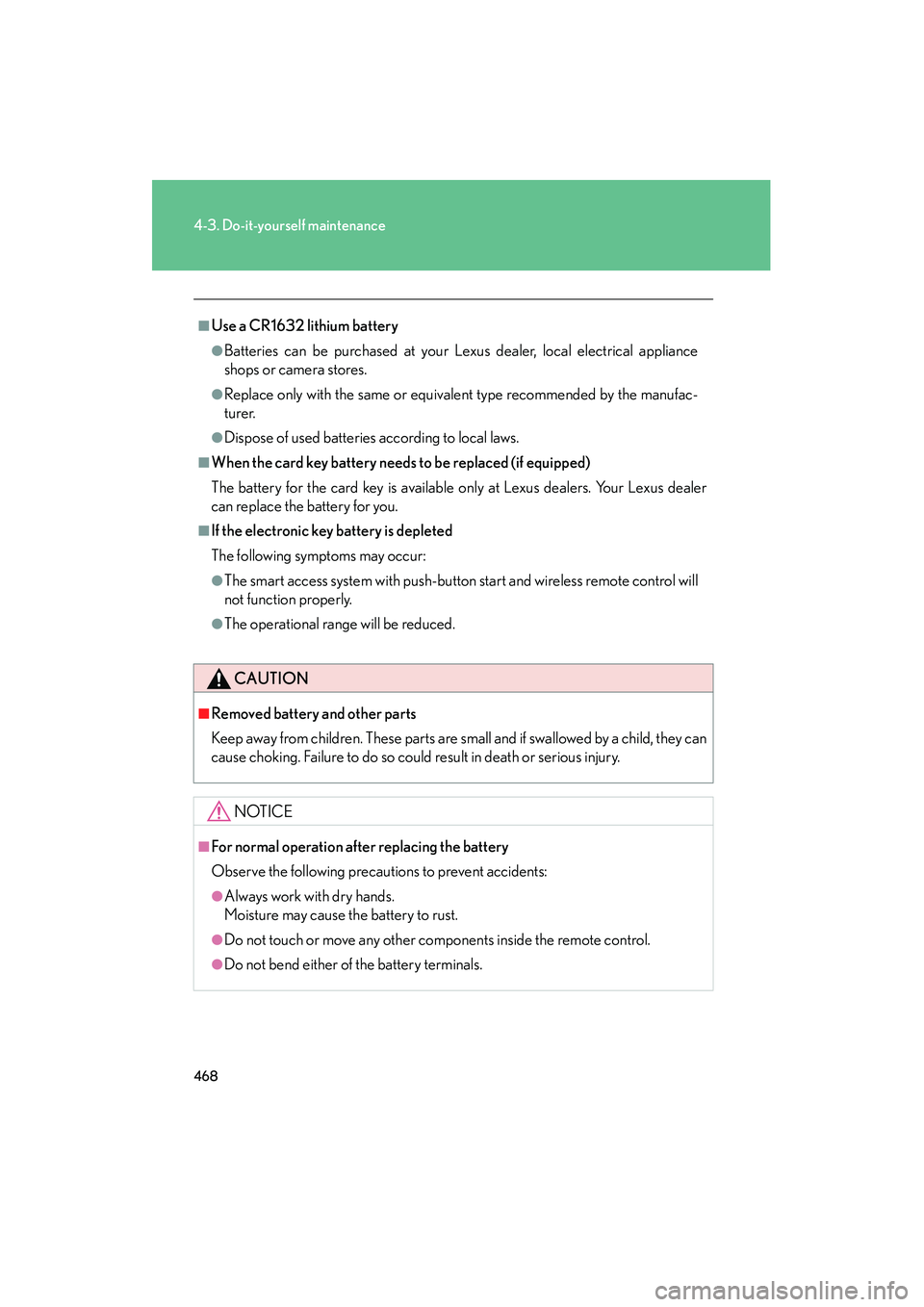
■Use a CR1632 lithium battery
●Batteries can be purchased at your Lexus dealer, local electrical appliance
shops or camera stores.
●Replace only with the same or equivalent type recommended by the manufac-
turer.
●Dispose of used batteries according to local laws.
■When the card key battery needs to be replaced (if equipped)
The battery for the card key is available only at Lexus dealers. Your Lexus dealer
can replace the battery for you.
■If the electronic key battery is depleted
The following symptoms may occur:
●The smart access system with push-button start and wireless remote control will
not function properly.
●The operational range will be reduced.
CAUTION
■Removed battery and other parts
Keep away from children. These parts are small and if swallowed by a child, they can
cause choking. Failure to do so could result in death or serious injury.
NOTICE
■For normal operation after replacing the battery
Observe the following precautions to prevent accidents:
●Always work with dry hands.
Moisture may cause the battery to rust.
●Do not touch or move any other components inside the remote control.
●Do not bend either of the battery terminals.
Page 494 of 630
When trouble arises5
493
HS250h_U_75050U
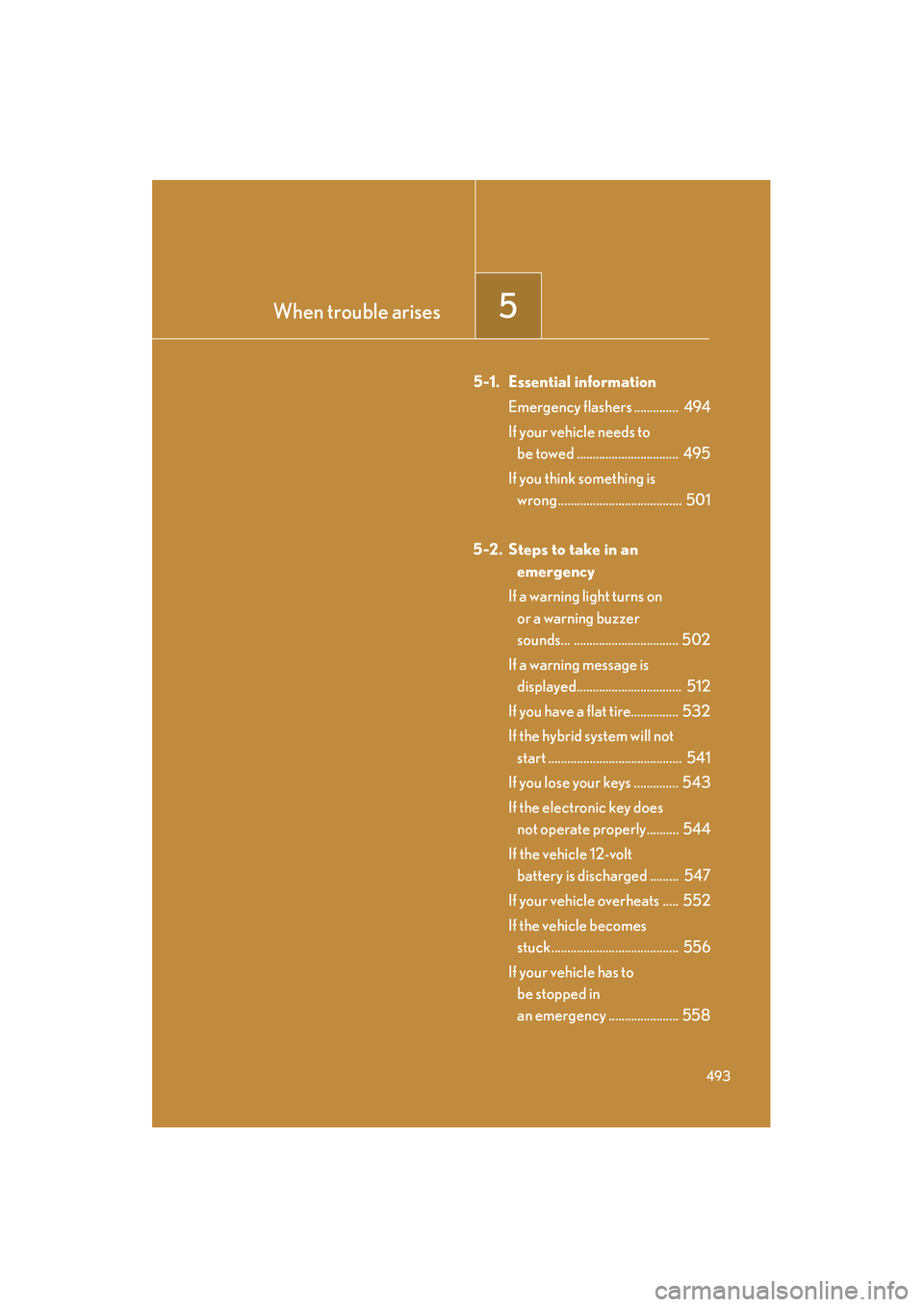
5-1. Essential informationEmergency flashers .............. 494
If your vehicle needs to be towed ................................ 495
If you think something is wrong ....................................... 501
5-2. Steps to take in an emergency
If a warning light turns on or a warning buzzer
sounds... ................................. 502
If a warning message is displayed................................. 512
If you have a flat tire............... 532
If the hybrid system will not start .......................................... 541
If you lose your keys .............. 543
If the electronic key does not operate properly.......... 544
If the vehicle 12-volt battery is discharged ......... 547
If your vehicle overheats ..... 552
If the vehicle becomes stuck........................................ 556
If your vehicle has to be stopped in
an emergency ...................... 558
Page 525 of 630
524
5-2. Steps to take in an emergency
HS250h_U_75050U
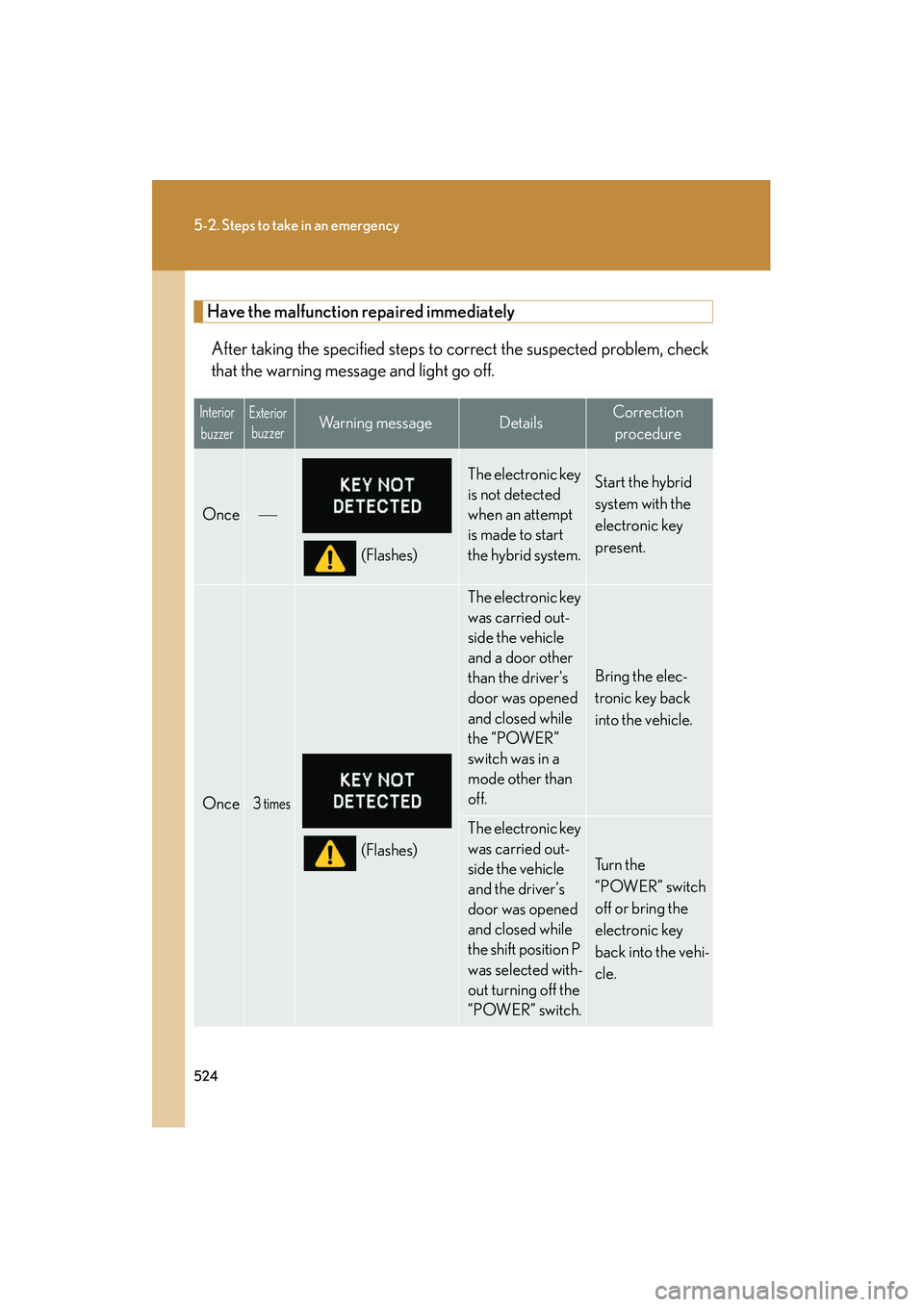
Have the malfunction repaired immediatelyAfter taking the specified steps to correct the suspected problem, check
that the warning message and light go off.
Interior buzzerExterior buzzerWarning messageDetailsCorrection
procedure
Once
(Flashes)
The electronic key
is not detected
when an attempt
is made to start
the hybrid system.Start the hybrid
system with the
electronic key
present.
Once3 times
(Flashes)
The electronic key
was carried out-
side the vehicle
and a door other
than the driver's
door was opened
and closed while
the “POWER”
switch was in a
mode other than
off.
Bring the elec-
tronic key back
into the vehicle.
The electronic key
was carried out-
side the vehicle
and the driver’s
door was opened
and closed while
the shift position P
was selected with-
out turning off the
“POWER” switch.
Tu r n t h e
“POWER” switch
off or bring the
electronic key
back into the vehi-
cle.
Page 526 of 630
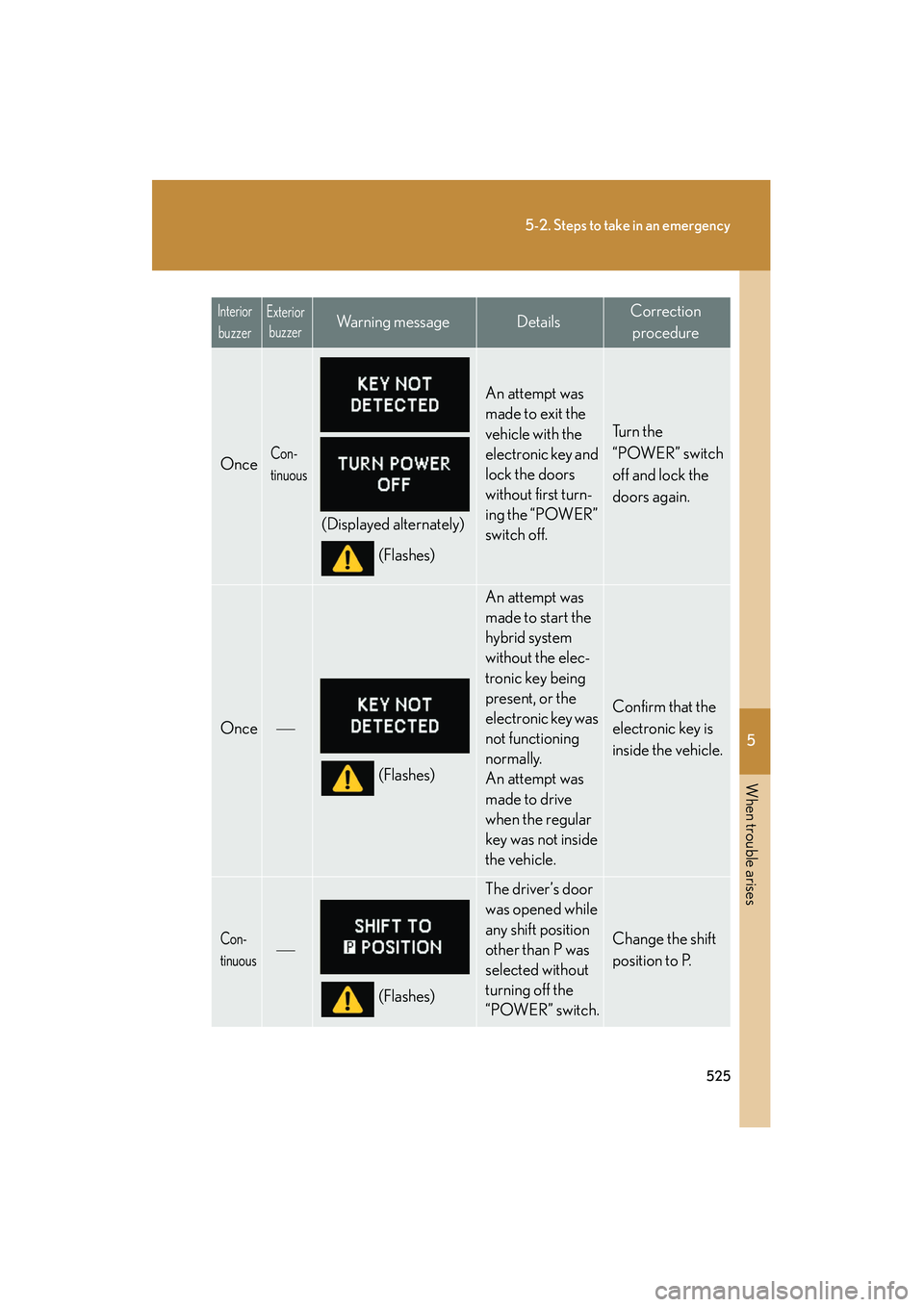
5
When trouble arises
525
5-2. Steps to take in an emergency
HS250h_U_75050U
OnceCon-
tinuous
(Displayed alternately)(Flashes)
An attempt was
made to exit the
vehicle with the
electronic key and
lock the doors
without first turn-
ing the “POWER”
switch off.
Tu r n t h e
“POWER” switch
off and lock the
doors again.
Once
(Flashes)
An attempt was
made to start the
hybrid system
without the elec-
tronic key being
present, or the
electronic key was
not functioning
normally.
An attempt was
made to drive
when the regular
key was not inside
the vehicle.
Confirm that the
electronic key is
inside the vehicle.
Con-
tinuous
(Flashes)
The driver’s door
was opened while
any shift position
other than P was
selected without
turning off the
“POWER” switch.
Change the shift
position to P.
Interior buzzerExterior buzzerWa r n i n g m e s s a g eDetailsCorrection
procedure
Page 527 of 630
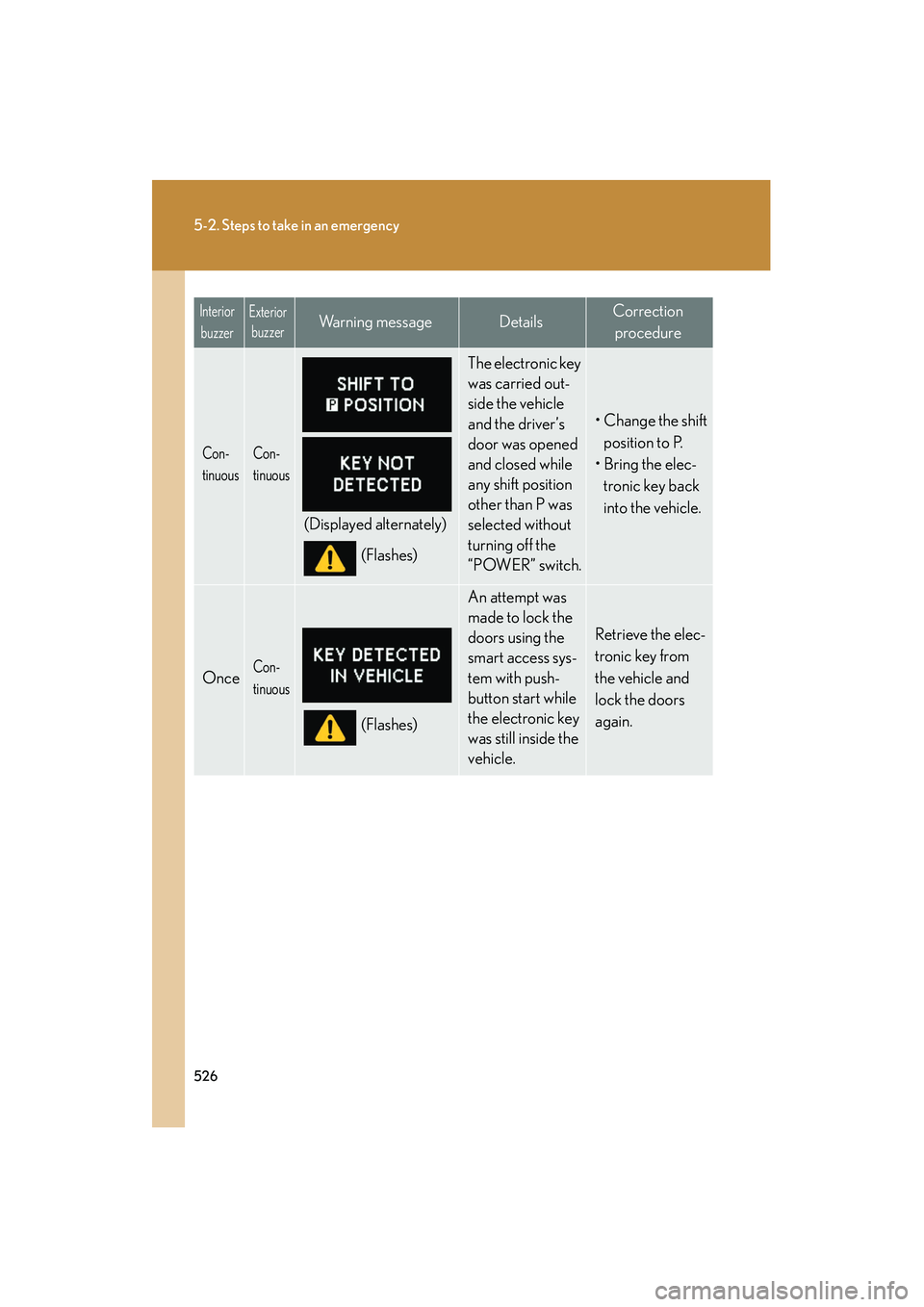
526
5-2. Steps to take in an emergency
HS250h_U_75050U
Con-
tinuousCon-
tinuous
(Displayed alternately)(Flashes)
The electronic key
was carried out-
side the vehicle
and the driver’s
door was opened
and closed while
any shift position
other than P was
selected without
turning off the
“POWER” switch.
• Change the shift position to P.
• Bring the elec-
tronic key back
into the vehicle.
OnceCon-
tinuous
(Flashes)
An attempt was
made to lock the
doors using the
smart access sys-
tem with push-
button start while
the electronic key
was still inside the
vehicle.
Retrieve the elec-
tronic key from
the vehicle and
lock the doors
again.
Interior buzzerExterior buzzerWarning messageDetailsCorrection
procedure
Page 528 of 630
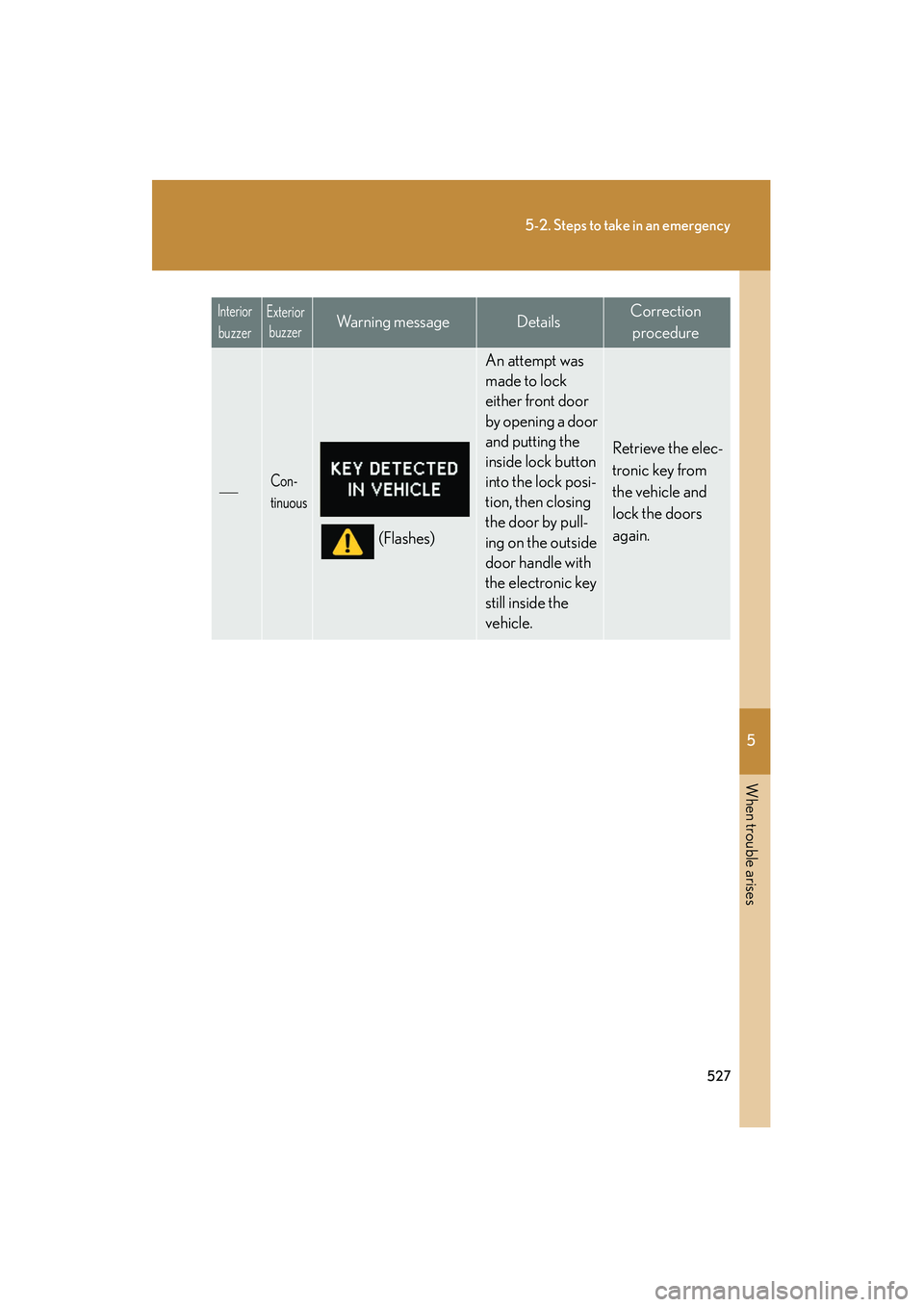
5
When trouble arises
527
5-2. Steps to take in an emergency
HS250h_U_75050U
Con-
tinuous
(Flashes)
An attempt was
made to lock
either front door
by opening a door
and putting the
inside lock button
into the lock posi-
tion, then closing
the door by pull-
ing on the outside
door handle with
the electronic key
still inside the
vehicle.
Retrieve the elec-
tronic key from
the vehicle and
lock the doors
again.
Interior buzzerExterior buzzerWa r n i n g m e s s a g eDetailsCorrection
procedure
Page 529 of 630
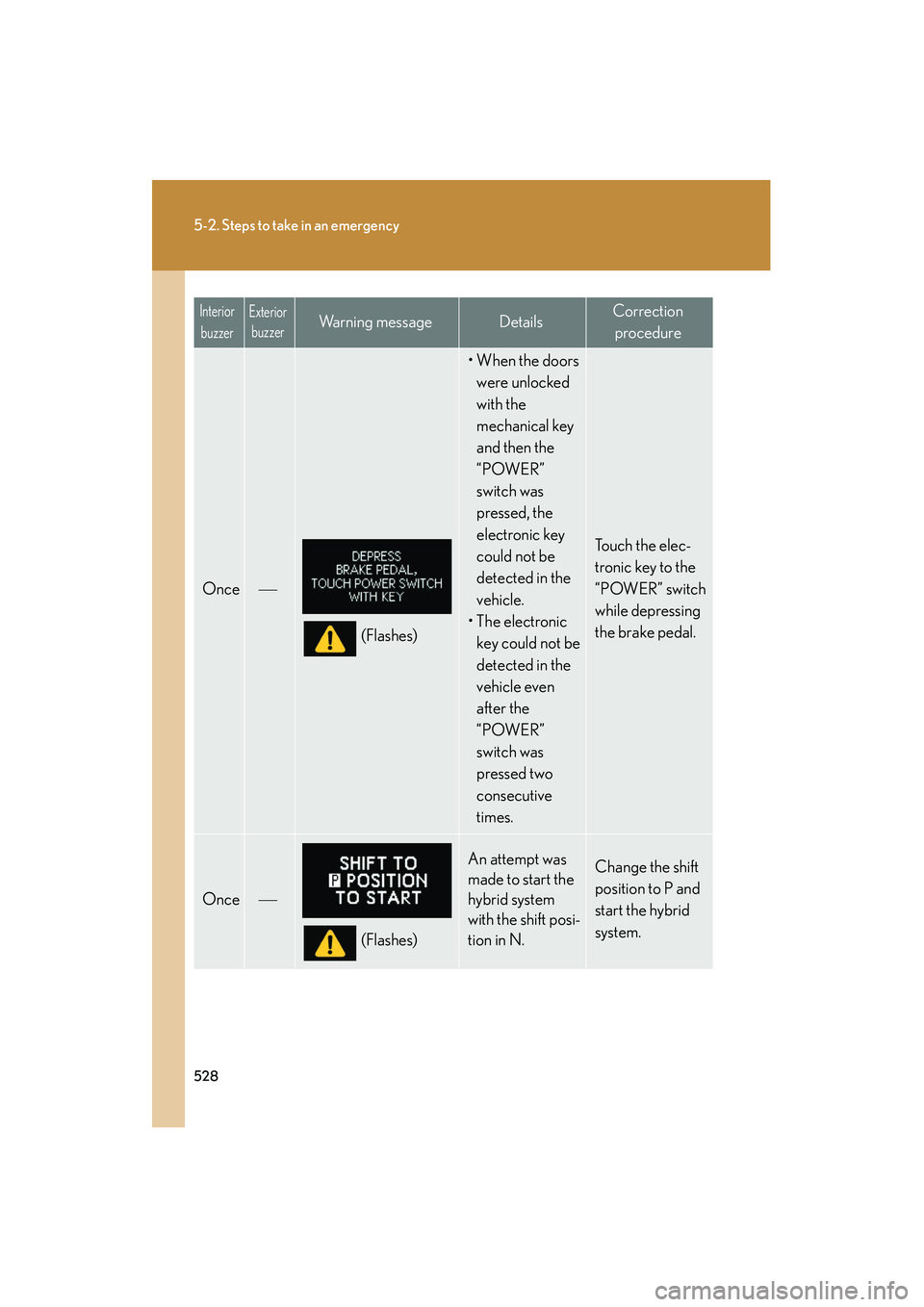
528
5-2. Steps to take in an emergency
HS250h_U_75050U
Once
(Flashes)
• When the doors were unlocked
with the
mechanical key
and then the
“POWER”
switch was
pressed, the
electronic key
could not be
detected in the
vehicle.
• The electronic key could not be
detected in the
vehicle even
after the
“POWER”
switch was
pressed two
consecutive
times.
Touch the elec-
tronic key to the
“POWER” switch
while depressing
the brake pedal.
Once
(Flashes)
An attempt was
made to start the
hybrid system
with the shift posi-
tion in N.Change the shift
position to P and
start the hybrid
system.
Interior buzzerExterior buzzerWarning messageDetailsCorrection
procedure
Page 530 of 630
5
When trouble arises
529
5-2. Steps to take in an emergency
HS250h_U_75050U
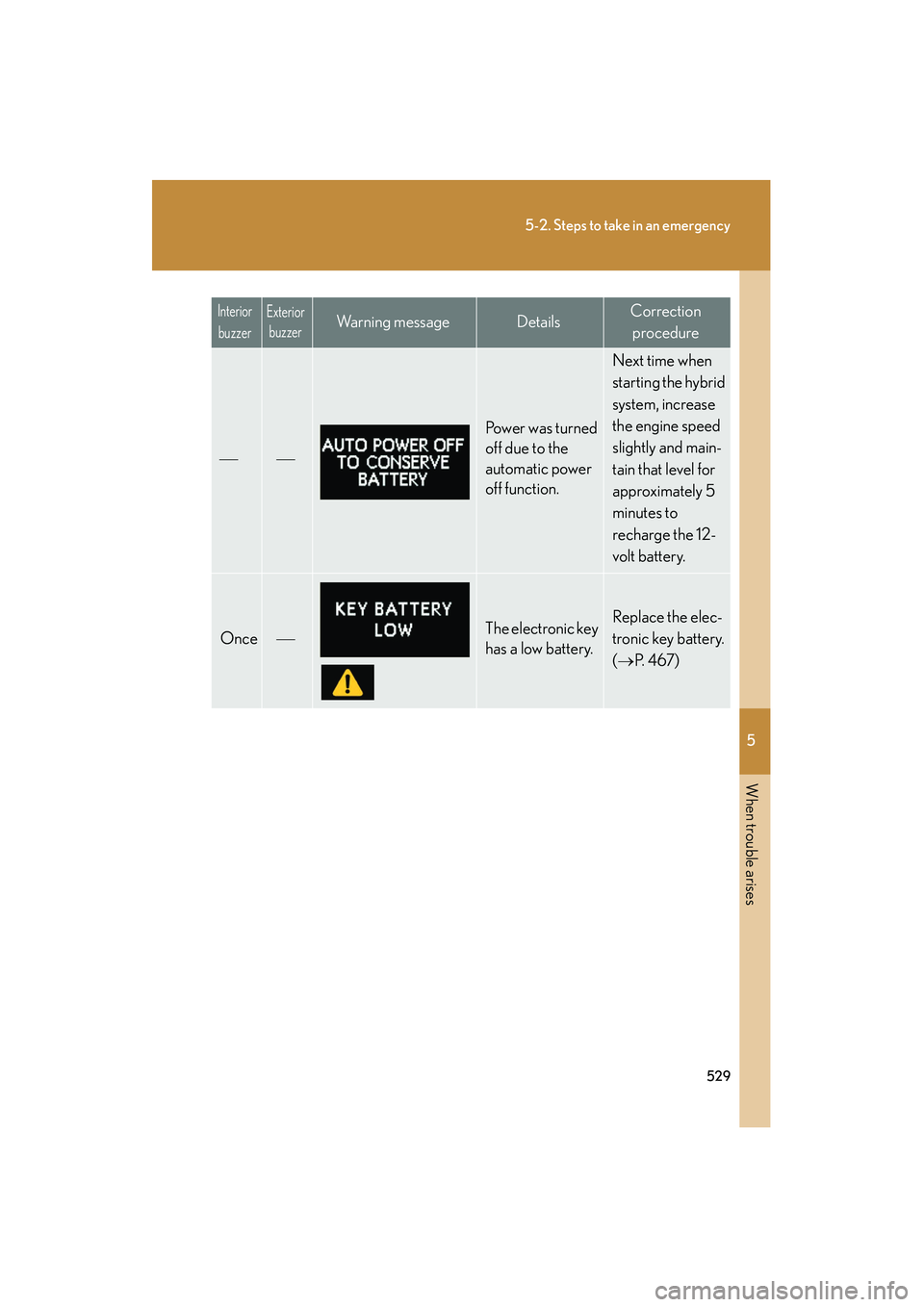
Po w e r w a s t u r n e d
off due to the
automatic power
off function.
Next time when
starting the hybrid
system, increase
the engine speed
slightly and main-
tain that level for
approximately 5
minutes to
recharge the 12-
volt battery.
OnceThe electronic key
has a low battery.Replace the elec-
tronic key battery.
(→ P. 4 6 7 )
Interior
buzzerExterior buzzerWa r n i n g m e s s a g eDetailsCorrection
procedure
Page 531 of 630
530
5-2. Steps to take in an emergency
HS250h_U_75050U
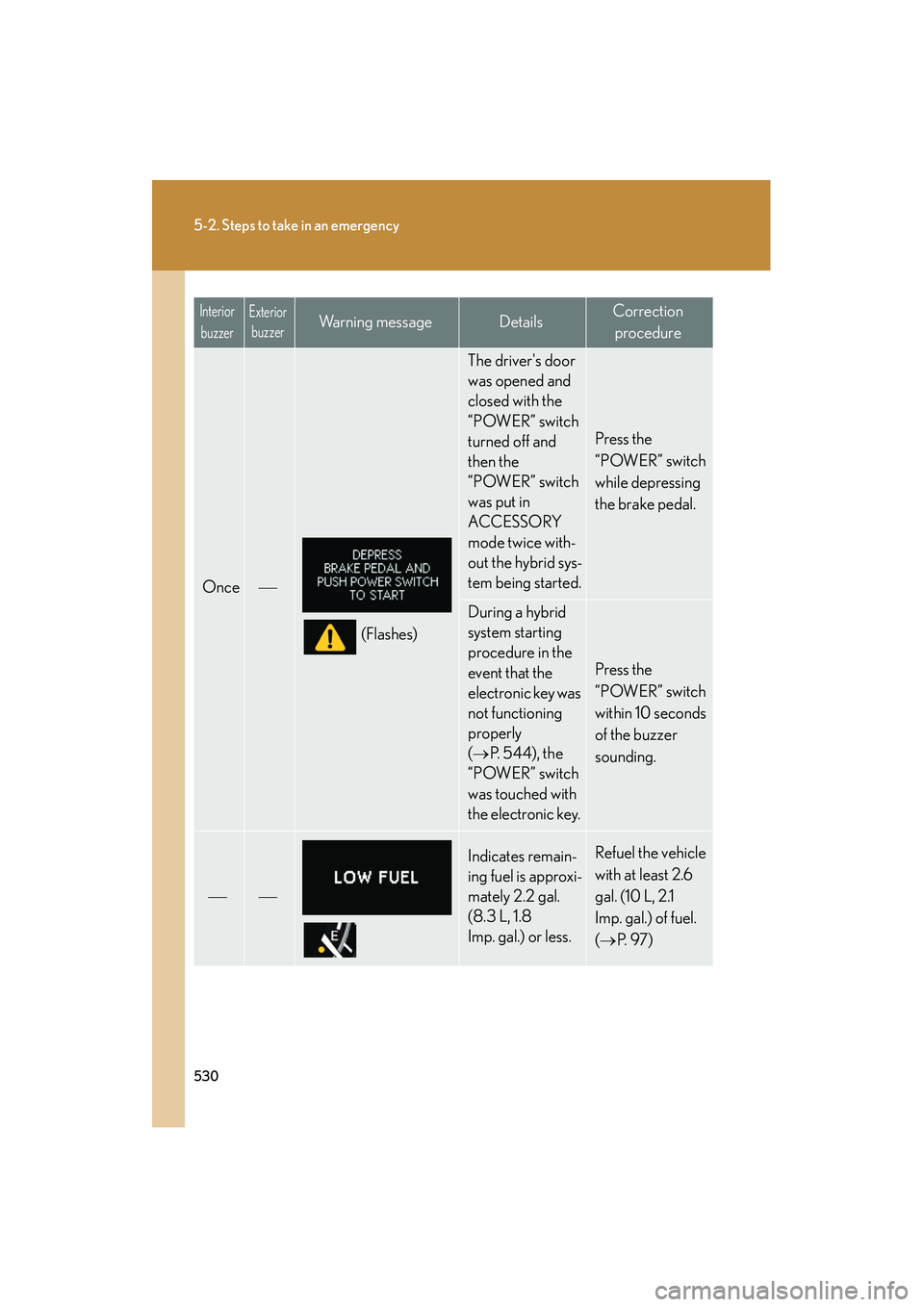
Once
(Flashes)
The driver's door
was opened and
closed with the
“POWER” switch
turned off and
then the
“POWER” switch
was put in
ACCESSORY
mode twice with-
out the hybrid sys-
tem being started.
Press the
“POWER” switch
while depressing
the brake pedal.
During a hybrid
system starting
procedure in the
event that the
electronic key was
not functioning
properly
(→ P. 544), the
“POWER” switch
was touched with
the electronic key.
Press the
“POWER” switch
within 10 seconds
of the buzzer
sounding.
Indicates remain-
ing fuel is approxi-
mately 2.2 gal.
(8.3 L, 1.8
Imp. gal.) or less.Refuel the vehicle
with at least 2.6
gal. (10 L, 2.1
Imp. gal.) of fuel.
( → P. 9 7 )
Interior
buzzerExterior buzzerWarning messageDetailsCorrection
procedure