steering Lexus IS200t 2015 Repair Manual
[x] Cancel search | Manufacturer: LEXUS, Model Year: 2015, Model line: IS200t, Model: Lexus IS200t 2015Pages: 612, PDF Size: 132.21 MB
Page 377 of 612
3775-9. Bluetooth® Phone
5
Lexus Display Audio system
IS200t_EE(OM53D19E)
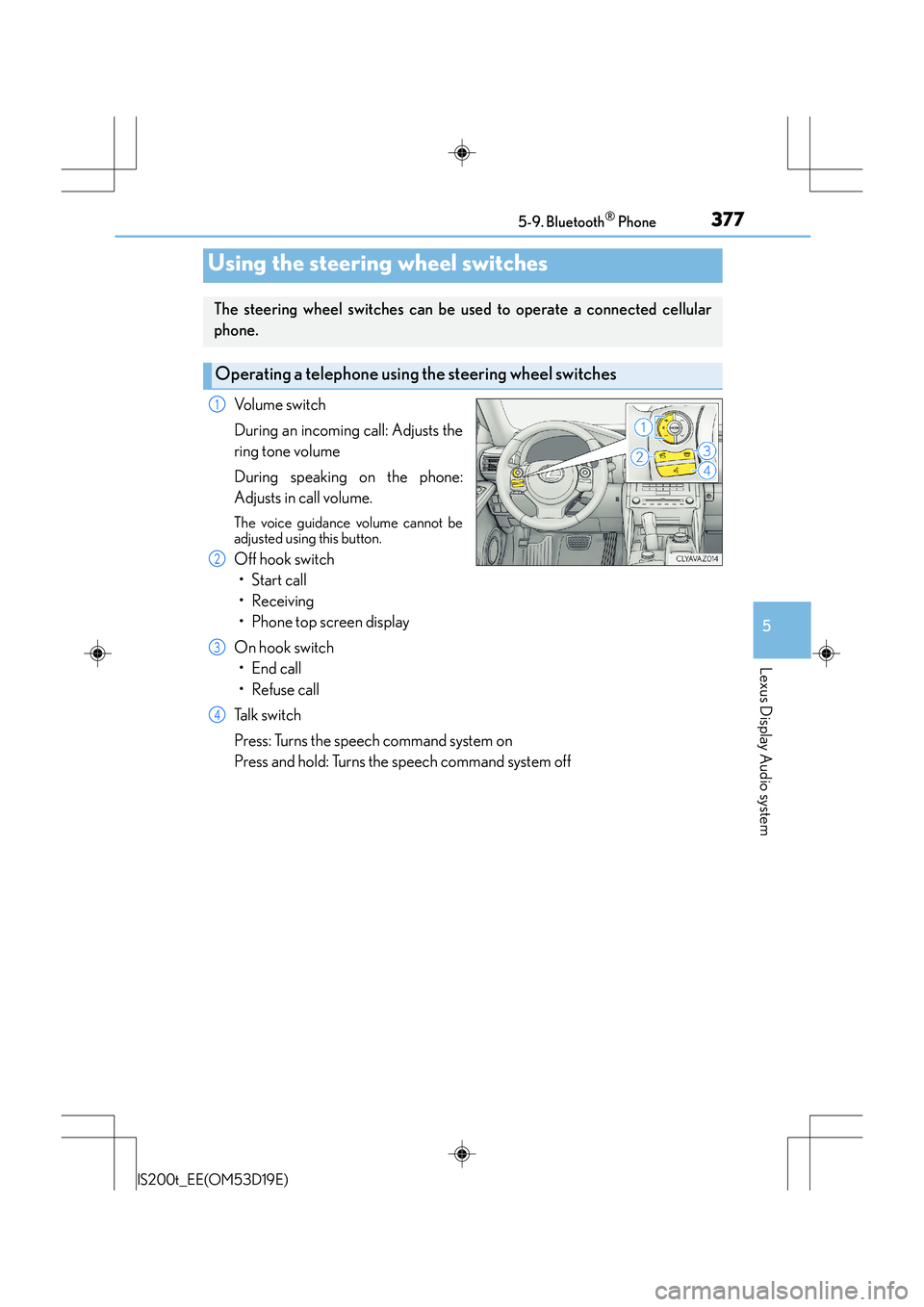
Volume switch
During an incoming call: Adjusts the
ring tone volume
During speaking on the phone:
Adjusts in call volume.
The voice guidance volume cannot be
adjusted using this button.
Off hook switch•Start call
• Receiving
• Phone top screen display
On hook switch •End call
• Refuse call
Talk switch
Press: Turns the speech command system on
Press and hold: Turns the speech command system off
Using the steering wheel switches
The steering wheel switches can be used to operate a connected cellular
phone.
Operating a telephone using the steering wheel switches
1
2
3
4
Page 394 of 612
3945-12. Other function
IS200t_EE(OM53D19E)
You can register desired contacts to enable the speech command system. Up to
50 contacts per phone can be registered.Go to “Voice tags”: → “Setup” → “Telephone” → “Contact/call history
settings” → “Voice tag” → “New” or “Edit”
Select the desired contact.
Move the controller to the left and then select “REC”.
Say the registered voice.
To play the registered voice, select “Play”.
■Deleting a voice tag Display the “Voice tags” screen.
Select “Delete” and then the desired contact.
Move the controller to the left and then select “Delete”.
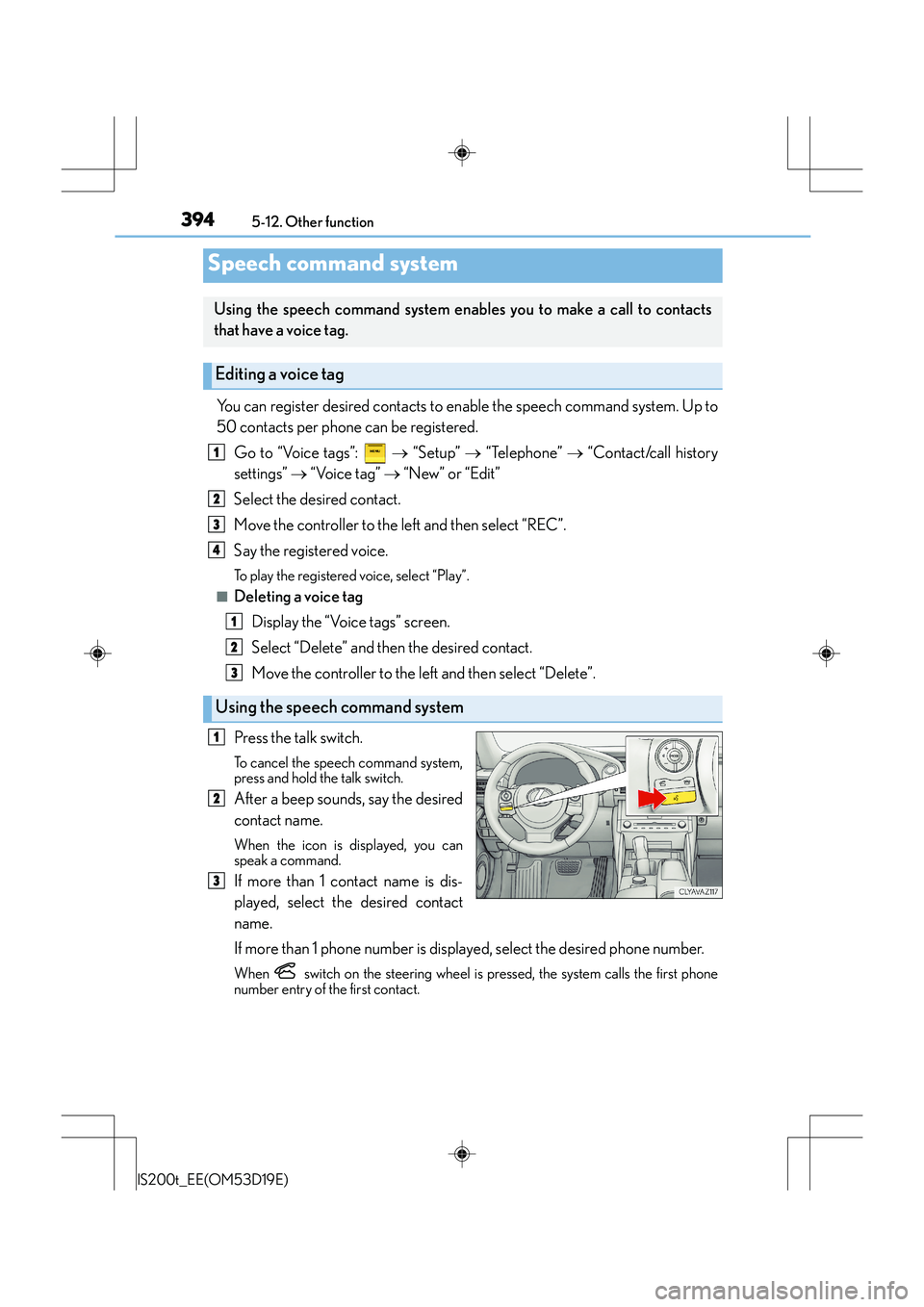
Press the talk switch.
To cancel the speech command system,
press and hold the talk switch.
After a beep sounds, say the desired
contact name.
When the icon is displayed, you can
speak a command.
If more than 1 contact name is dis-
played, select the desired contact
name.
If more than 1 phone number is displayed, select the desired phone number.
When switch on the steering wheel is pressed, the system calls the first phone
number entry of the first contact.
Speech command system
Using the speech command system enab les you to make a call to contacts
that have a voice tag.
Editing a voice tag
Using the speech command system
1
2
3
4
1
2
3
1
2
3
Page 397 of 612
397
6Interior features
IS200t_EE(OM53D19E)
6-1. Using the air conditioning system
Automatic air conditioning system ......................................... 398
Heated steering wheel/ seat heaters/
seat ventilators ........................ 409
6-2. Using the interior lights Interior lights list.............................411• Interior lights ........................... 412
• Personal lights......................... 412
6-3. Using the storage features
List of storage features.............. 414
• Glove box................................. 415
• Console box ............................ 415
•Cup holders/Bottle holders ......................... 416
Trunk features ............................... 418 6-4. Using the other interior
features
Other interior features ..............421 • Sun visors ..................................421
• Vanity mirrors ..........................421
• Clock ..........................................421
• Power outlet ........................... 422
• Armrest.................................... 423
• Rear sunshade....................... 423
• Assist grips.............................. 425
• Coat hooks ............................. 425
Page 409 of 612
4096-1. Using the air conditioning system
6
Interior features
IS200t_EE(OM53D19E)
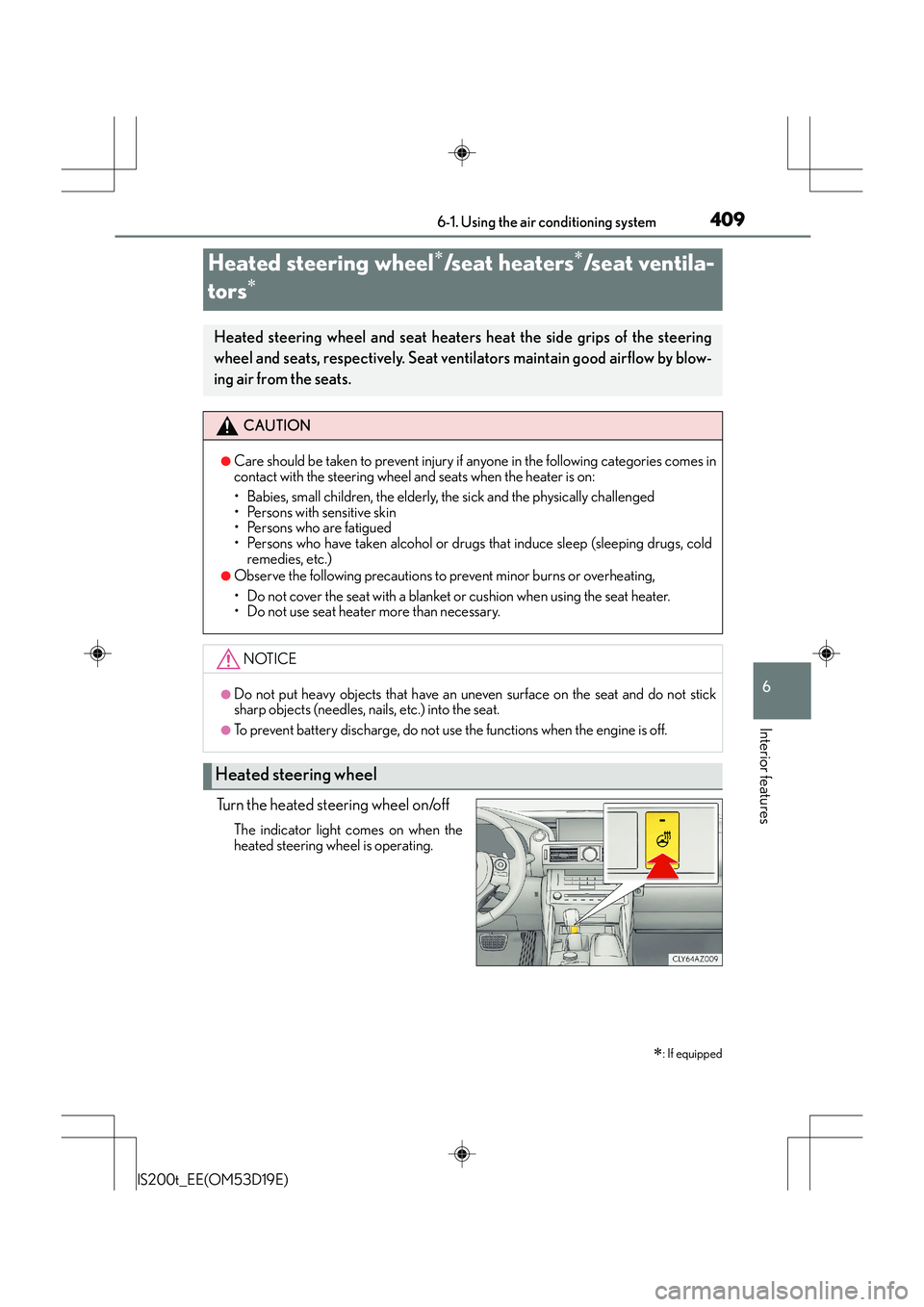
Turn the heated steering wheel on/off
The indicator light comes on when the
heated steering wheel is operating.
Heated steering wheel∗/seat heaters∗/seat ventila-
tors
∗
∗
: If equipped
Heated steering wheel and seat heaters heat the side grips of the steering
wheel and seats, respectively. Seat ventilators maintain good airflow by blow-
ing air from the seats.
CAUTION
●Care should be taken to prevent injury if anyone in the following categories comes in
contact with the steering wheel and seats when the heater is on:
• Babies, small children, the elderly, the sick and the physically challenged
• Persons with sensitive skin
• Persons who are fatigued
• Persons who have taken alcohol or drugs that induce sleep (sleeping drugs, cold
remedies, etc.)
●Observe the following precautions to prevent minor burns or overheating,
• Do not cover the seat with a blanket or cushion when using the seat heater.
• Do not use seat heater more than necessary.
NOTICE
●Do not put heavy objects that have an uneven surface on the seat and do not stick
sharp objects (needles, na ils, etc.) into the seat.
●To prevent battery discharge, do not use the functions when the engine is off.
Heated steering wheel
Page 410 of 612
4106-1. Using the air conditioning system
IS200t_EE(OM53D19E)
●The heated steering wheel can be used when the engine switch is in IGNITION ON
mode.
●The heated steering wheel will automatically turn off after about 30 minutes.
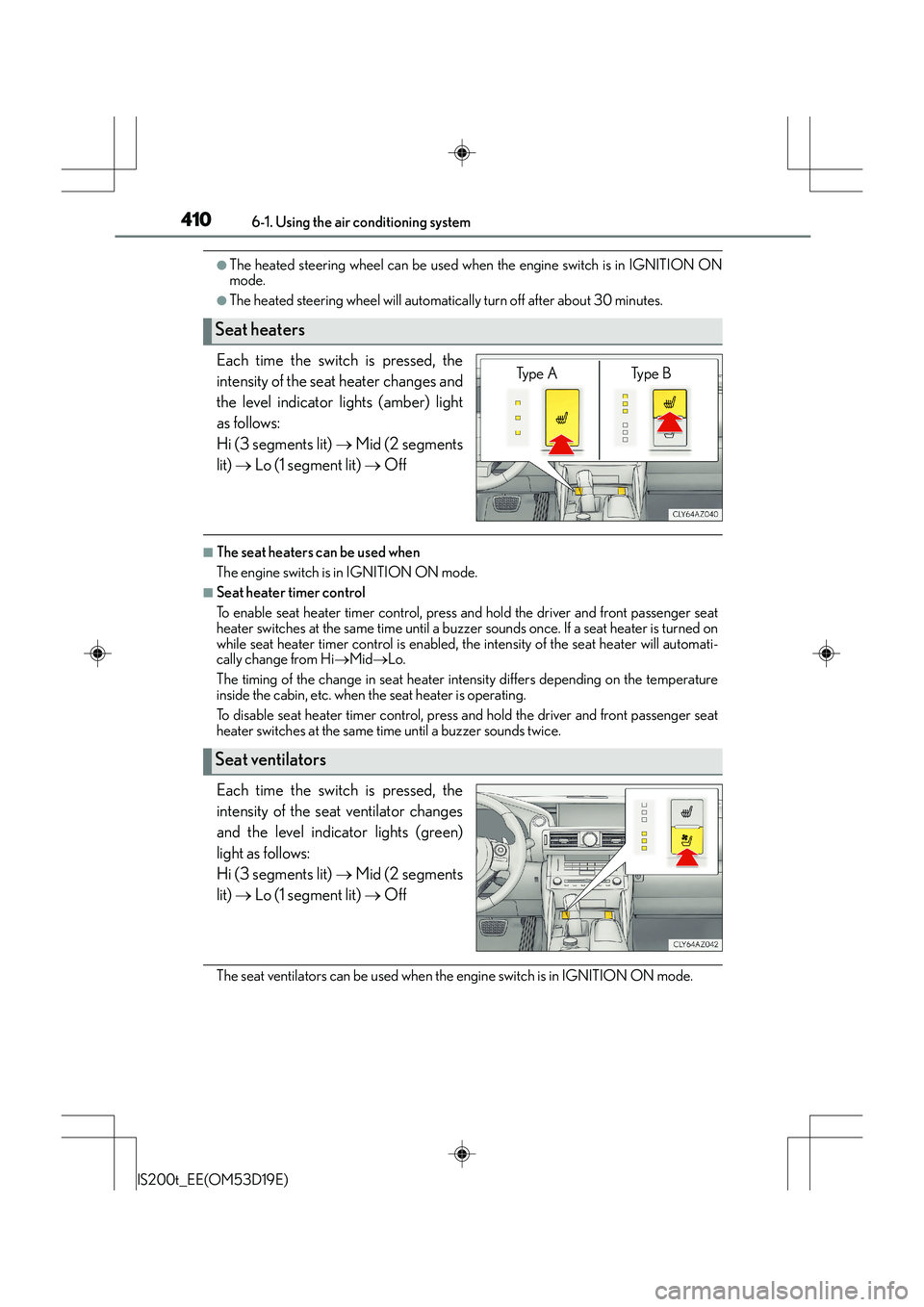
Each time the switch is pressed, the
intensity of the seat heater changes and
the level indicator lights (amber) light
as follows:
Hi (3 segments lit) → Mid (2 segments
lit) → Lo (1 segment lit) → Off
■The seat heaters can be used when
The engine switch is in IGNITION ON mode.
■Seat heater timer control
To enable seat heater timer control, press and hold the driver and front passenger seat
heater switches at the same time until a buzzer sounds once. If a seat heater is turned on
while seat heater timer control is enabled, th e intensity of the seat heater will automati-
cally change from Hi →Mid →Lo.
The timing of the change in seat heater intensity differs depending on the temperature
inside the cabin, etc. when the seat heater is operating.
To disable seat heater timer control, press and hold the driver and front passenger seat
heater switches at the same time until a buzzer sounds twice.
Each time the switch is pressed, the
intensity of the seat ventilator changes
and the level indicator lights (green)
light as follows:
Hi (3 segments lit) → Mid (2 segments
lit) → Lo (1 segment lit) → Off
The seat ventilators can be used when the engine switch is in IGNITION ON mode.
Seat heaters
Ty p e A Ty p e B
Seat ventilators
Page 431 of 612

4317-1. Maintenance and care
7
Maintenance and care
IS200t_EE(OM53D19E)
NOTICE
■To prevent paint deterioration and corrosion on the body and components (aluminum
wheels etc.)
●Wash the vehicle immediately in the following cases:
• After driving near the sea coast
• After driving on salted roads
• If coal tar or tree sap is present on the paint surface
• If dead insects, insect droppings or bird droppings are present on the paint surface
• After driving in an area contaminated with soot, oi ly smoke, mine dust, iron pow-
der or chemical substances
• If the vehicle becomes heavily soiled with dust or mud
• If liquids such as benzene and gaso line are spilled on the paint surface
●If the paint is chipped or scratched, have it repaired immediately.
●To prevent the wheels from corroding, remove any dirt and store in a place with low
humidity when storing the wheels.
■Cleaning the exterior lights
●Wash carefully. Do not use organic substances or scrub with a hard brush.
This may damage the surfaces of the lights.
●Do not apply wax to the surfaces of the lights.
Wax may cause damage to the lenses.
■When using an automatic car wash (vehicles with rain-sensing windshield wipers)
Set the wipers to the intermittent windshield wipers. ( →P. 222)
If AUTO mode is selected, the wipers may operate and the wiper blades may be dam-
aged.
■When using a high pressure car wash
Do not bring the nozzle tip close to boots (rubber or resin manufactured cover), con-
nectors or the following parts. The parts may be damaged if they come into contact
with high-pressure water
• Traction related parts
• Steering parts •Suspension parts
•Brake parts
Page 444 of 612
4447-3. Do-it-yourself maintenance
IS200t_EE(OM53D19E)
■After changing the engine oil
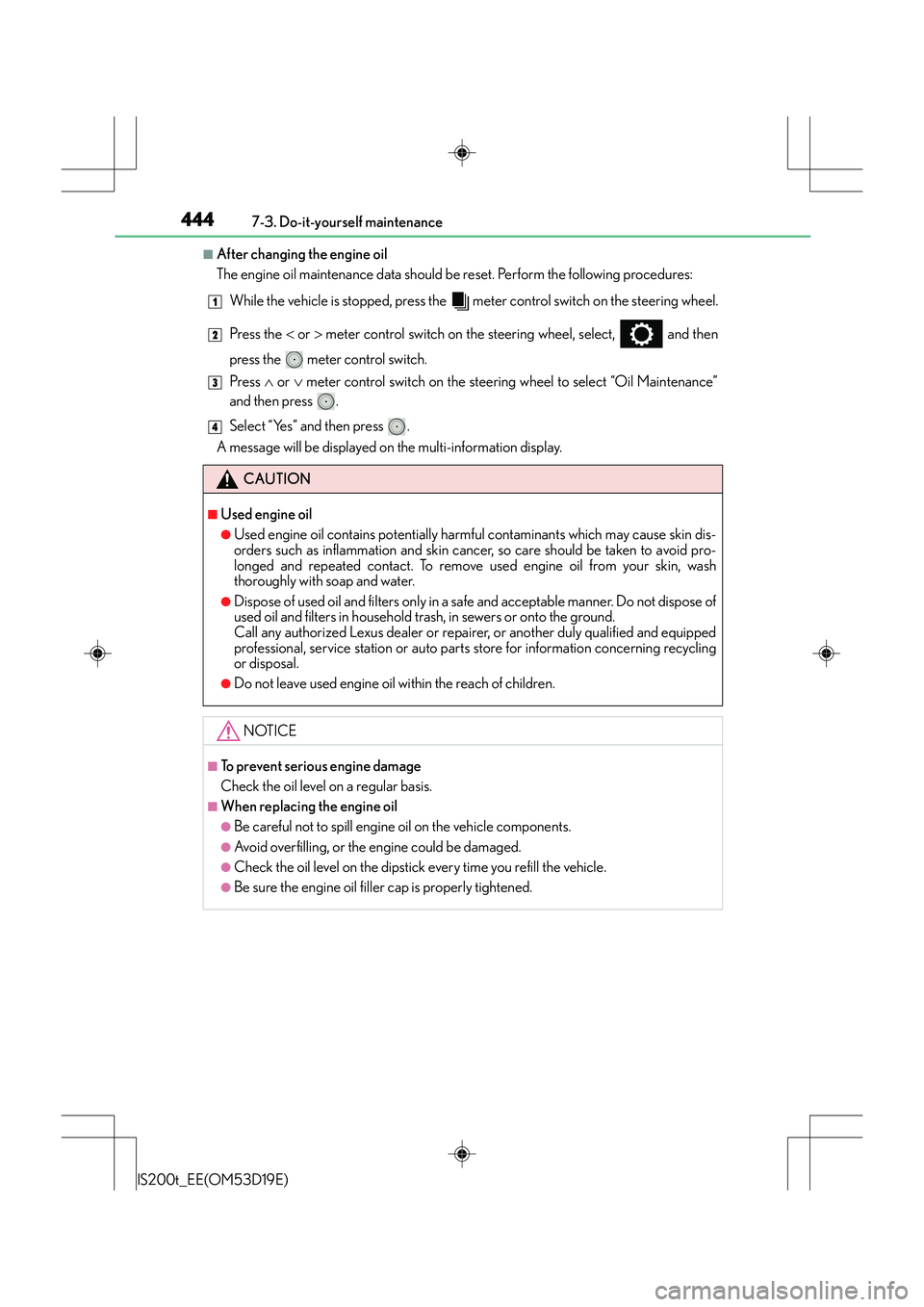
The engine oil maintenance data should be reset. Perform the following procedures:While the vehicle is stopped, press the meter control switch on the steering wheel.
Press the < or > meter control switch on the steering wheel, select, and then
press the meter control switch.
Press ∧ or ∨ meter control switch on the steering wheel to select “Oil Maintenance”
and then press .
Select “Yes” and then press .
A message will be displayed on the multi-information display.
CAUTION
■Used engine oil
●Used engine oil contains potentially harmful contaminants which may cause skin dis-
orders such as inflammation and skin cancer, so care should be taken to avoid pro-
longed and repeated contact. To remove used engine oil from your skin, wash
thoroughly with soap and water.
●Dispose of used oil and filters only in a safe and acceptable manner. Do not dispose of
used oil and filters in household trash, in sewers or onto the ground.
Call any authorized Lexus dealer or repairer, or another duly qualified and equipped
professional, service station or auto parts store for information concerning recycling
or disposal.
●Do not leave used engine oil within the reach of children.
NOTICE
■To prevent serious engine damage
Check the oil level on a regular basis.
■When replacing the engine oil
●Be careful not to spill engine oil on the vehicle components.
●Avoid overfilling, or the engine could be damaged.
●Check the oil level on the dipstick every time you refill the vehicle.
●Be sure the engine oil filler cap is properly tightened.
1
2
3
4
Page 475 of 612
4757-3. Do-it-yourself maintenance
7
Maintenance and care
IS200t_EE(OM53D19E)
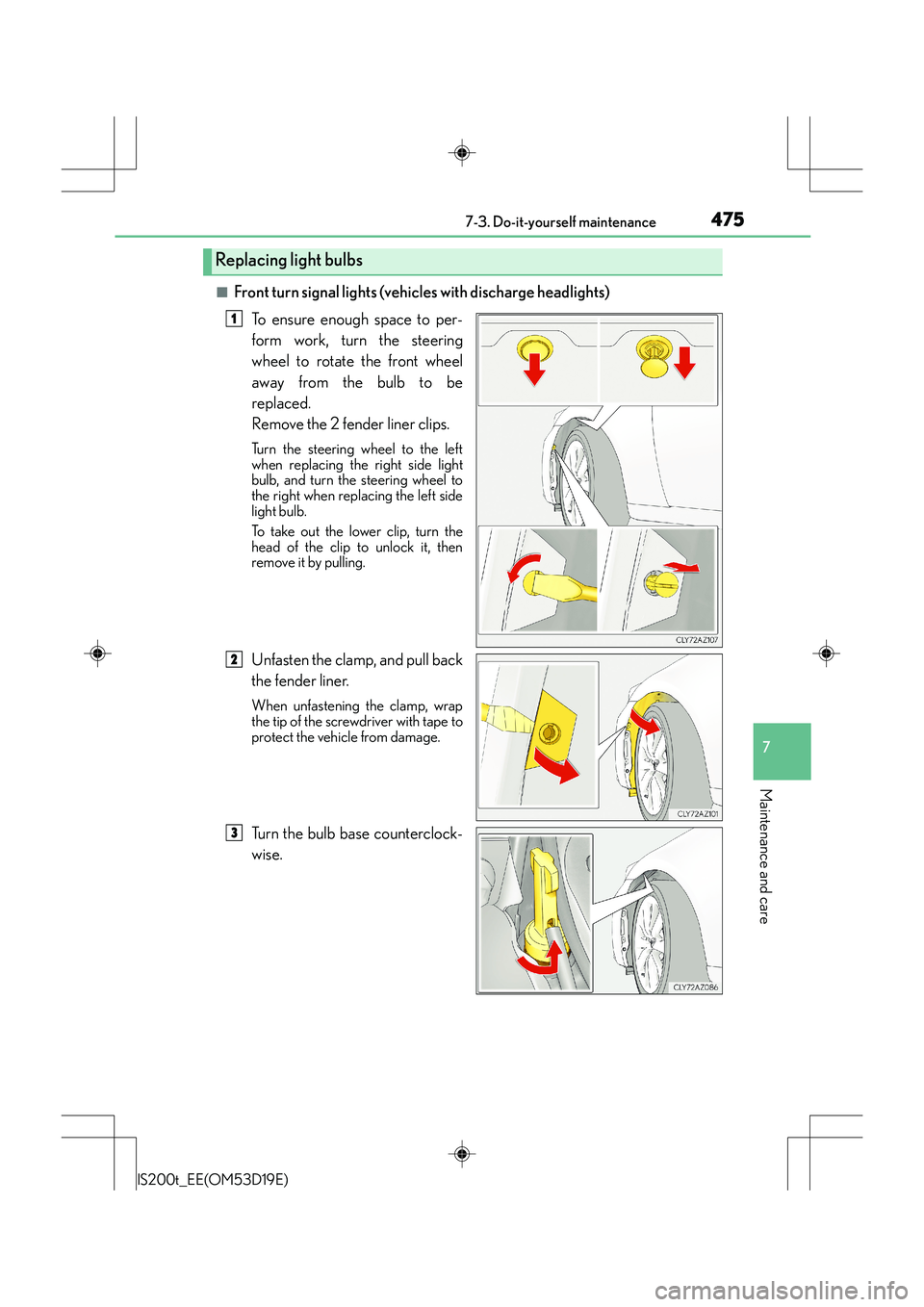
■Front turn signal lights (vehicles with discharge headlights)To ensure enough space to per-
form work, turn the steering
wheel to rotate the front wheel
away from the bulb to be
replaced.
Remove the 2 fender liner clips.
Turn the steering wheel to the left
when replacing the right side light
bulb, and turn the steering wheel to
the right when replacing the left side
light bulb.
To take out the lower clip, turn the
head of the clip to unlock it, then
remove it by pulling.
Unfasten the clamp, and pull back
the fender liner.
When unfastening the clamp, wrap
the tip of the screwdriver with tape to
protect the vehicle from damage.
Turn the bulb base counterclock-
wise.
Replacing light bulbs
1
2
3
Page 491 of 612
4918-1. Essential information
8
When trouble arises
IS200t_EE(OM53D19E)
Steadily step on the brake pedal with both feet and firmly depress it.
Do not pump the brake pedal repeatedly as this will increase the effort required to
slow the vehicle.
Shift the shift lever to N.
XIf the shift lever is shifted to N
After slowing down, stop the vehicle in a safe place by the road.
Stop the engine.
XIf the shift lever cannot be shifted to N
Keep depressing the brake pedal with both feet to reduce vehicle speed as
much as possible.
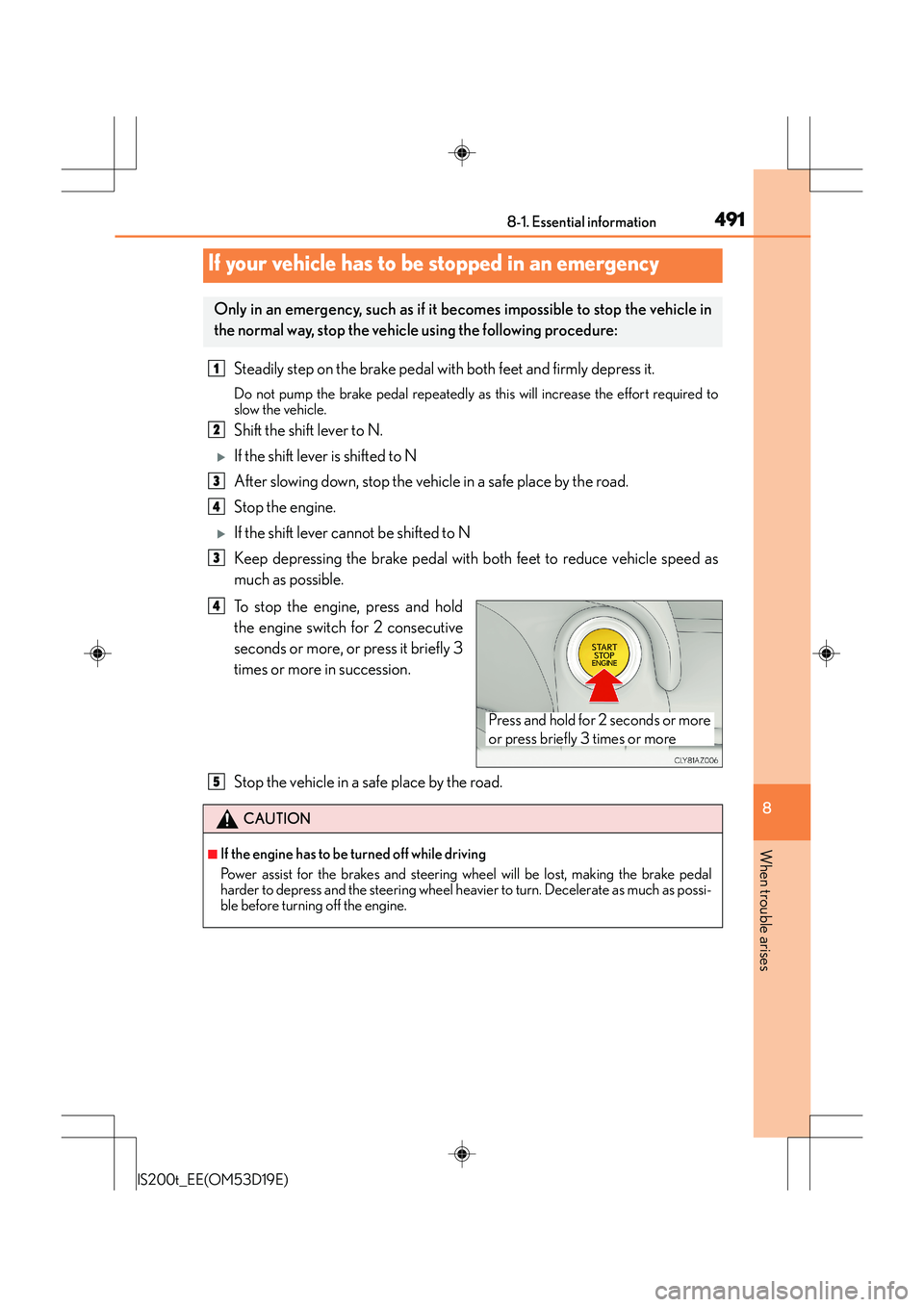
To stop the engine, press and hold
the engine switch for 2 consecutive
seconds or more, or press it briefly 3
times or more in succession.
Stop the vehicle in a safe place by the road.
If your vehicle has to be stopped in an emergency
Only in an emergency, such as if it becomes impossible to stop the vehicle in
the normal way, stop the vehicle using the following procedure:
1
2
3
4
3
Press and hold for 2 seconds or more
or press briefly 3 times or more
4
CAUTION
■If the engine has to be turned off while driving
Power assist for the brakes and steering wheel will be lost, making the brake pedal
harder to depress and the steering wheel heavier to turn. Decelerate as much as possi-
ble before turning off the engine.
5
Page 494 of 612
4948-2. Steps to take in an emergency
IS200t_EE(OM53D19E)
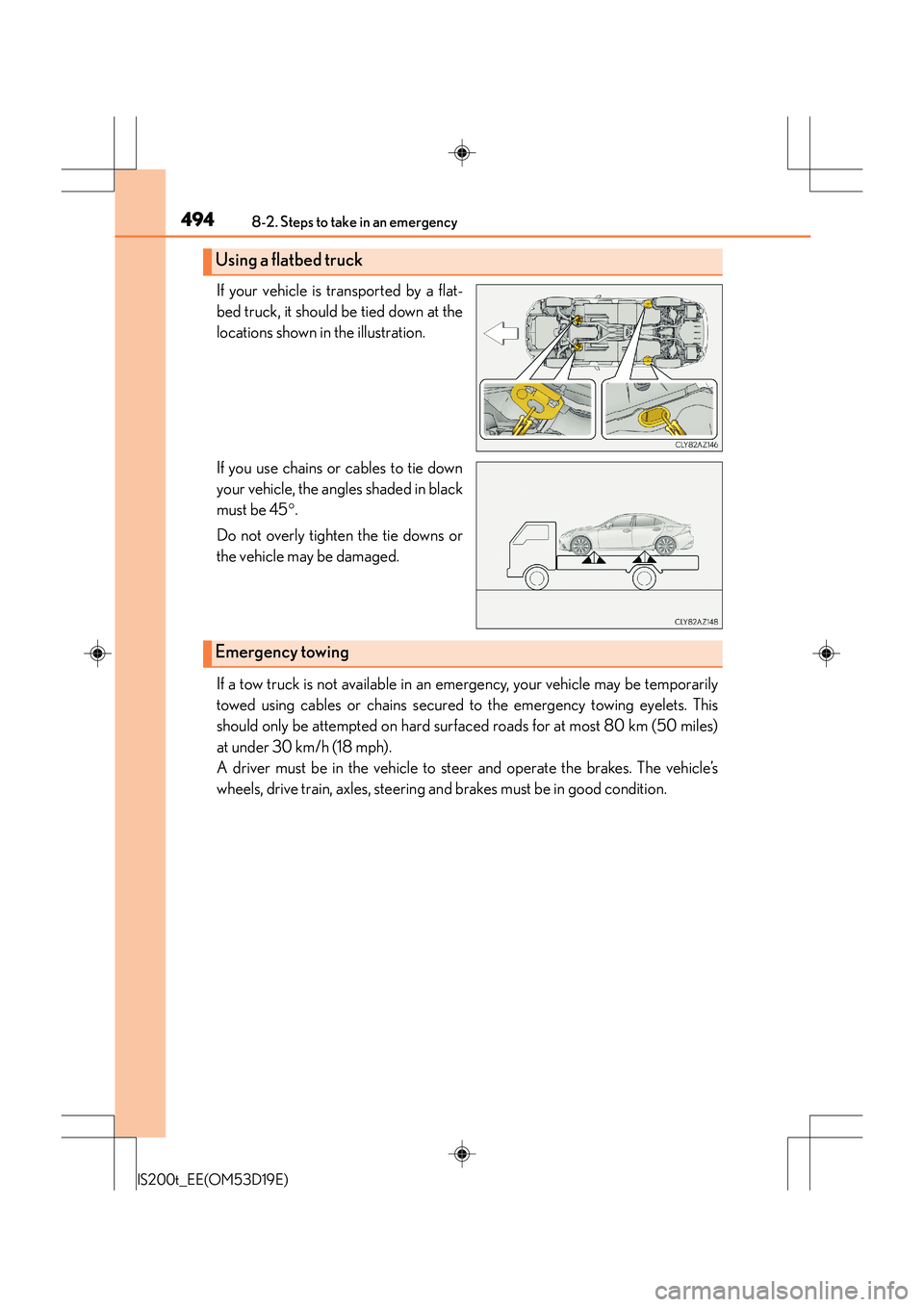
If your vehicle is transported by a flat-
bed truck, it should be tied down at the
locations shown in the illustration.
If you use chains or cables to tie down
your vehicle, the angles shaded in black
must be 45°.
Do not overly tighten the tie downs or
the vehicle may be damaged.
If a tow truck is not available in an emergency, your vehicle may be temporarily
towed using cables or chains secured to the emergency towing eyelets. This
should only be attempted on hard surfaced roads for at most 80 km (50 miles)
at under 30 km/h (18 mph).
A driver must be in the vehicle to steer and operate the brakes. The vehicle’s
wheels, drive train, axles, steering and brakes must be in good condition.
Using a flatbed truck
Emergency towing