audio Lexus IS200t 2017 Navigation Manual
[x] Cancel search | Manufacturer: LEXUS, Model Year: 2017, Model line: IS200t, Model: Lexus IS200t 2017Pages: 342, PDF Size: 20.48 MB
Page 72 of 342
72
3. OTHER SETTINGS
IS_NAVI_EE
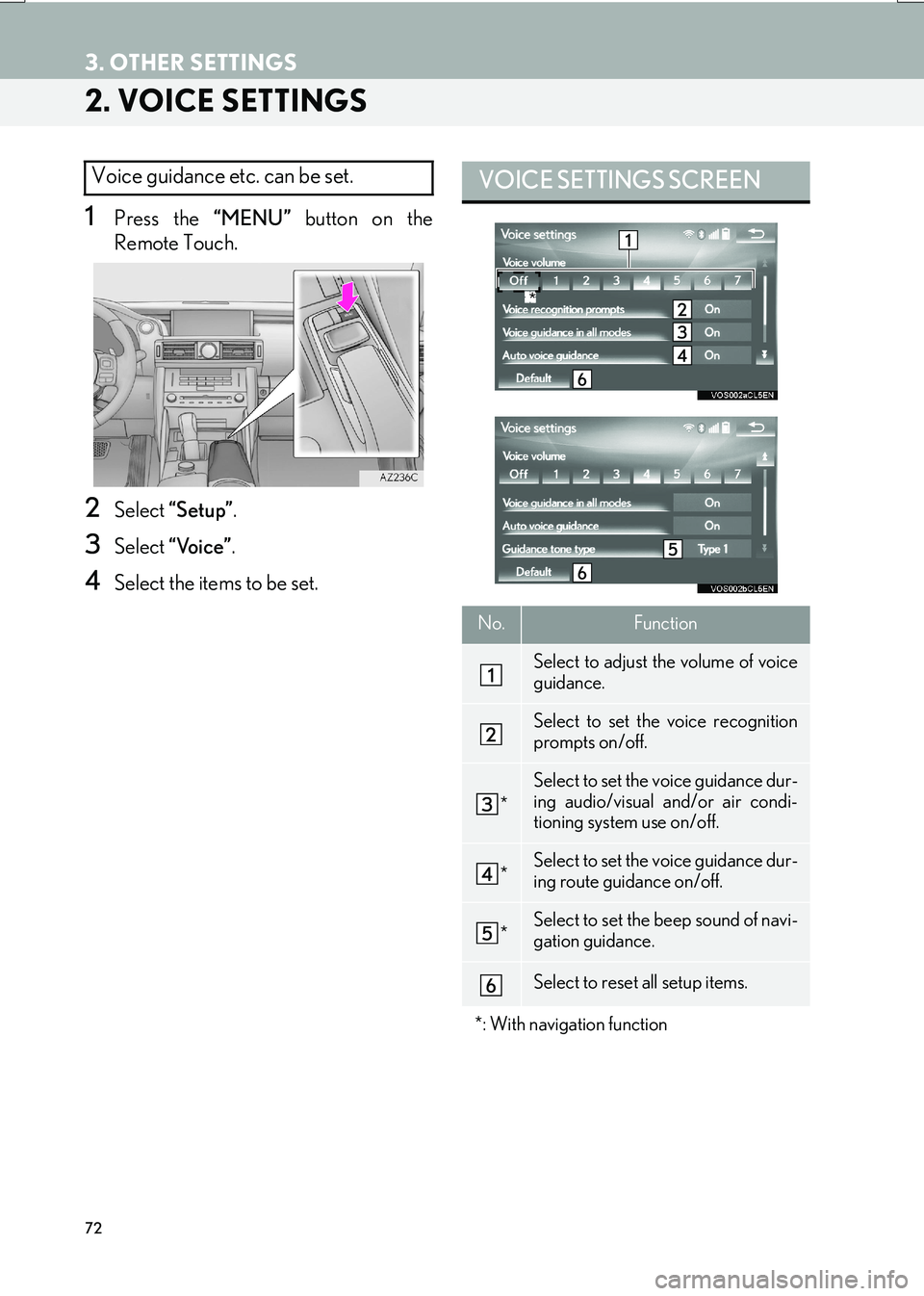
2. VOICE SETTINGS
1Press the “MENU” button on the
Remote Touch.
2Select “Setup” .
3Select “Voice” .
4Select the items to be set.
Voice guidance etc. can be set. VOICE SETTINGS SCREEN
No.Function
Select to adjust the volume of voice
guidance.
Select to set the voice recognition
prompts on/off.
*
Select to set the voice guidance dur-
ing audio/visual and/or air condi-
tioning system use on/off.
*Select to set the voice guidance dur-
ing route guidance on/off.
*Select to set the beep sound of navi-
gation guidance.
Select to reset all setup items.
*: With navigation function
*
Page 153 of 342

153
6. TIPS FOR THE NAVIGATION SYSTEM
IS_NAVI_EE
NAVIGATION SYSTEM
3
ABOUT THE MAP DATA
Map data for the navigation system is
contained in a microSD card that is in-
serted in the microSD card slot located
at the bottom of the audio control panel.
Do not eject the microSD card, as doing
so may deactivate the navigation sys-
tem.
NOTICE
●Do not edit or delete the map data on the
microSD card, as doing so may deacti-
vate the navigation system.
INFORMATION
●
microSDHC Logo is a trademark of SD-
3C,LLC.
Page 154 of 342
154
IS_NAVI_EE1. QUICK REFERENCE ............................. 156
2. SOME BASICS .......................................... 158
TURNING THE SYSTEM ON AND OFF... 158
SELECTING AN AUDIO SOURCE.............. 159
DISC SLOT................................................................. 160
USB/AUX PORT ...................................................... 161
“Sound settings” SCREEN .................................... 162
SPEECH COMMAND SYSTEM..................... 166
1. AM/FM/DAB RADIO............................ 167
OVERVIEW ................................................................ 167
PRESETTING A STATION.................................. 169
MANUAL TUNING ............................................... 169
RDS (RADIO DATA SYSTEM) ......................... 170
TIME SHIFT OPERATION (DAB) .................... 171
1BASIC OPERATION
2RADIO OPERATION
Page 155 of 342

4
155
IS_NAVI_EE
4 2
1
3
5
6
7
8
9
1. CD................................................................... 172
OVERVIEW................................................................. 172
2. DVD................................................................ 175
OVERVIEW................................................................ 175
DVD OPTIONS........................................................ 178
3. USB MEMORY ........................................ 180
OVERVIEW................................................................ 180
USB AUDIO ............................................................... 183
USB VIDEO ................................................................ 183
USB PHOTO ............................................................. 184
4. iPod ................................................................ 185
OVERVIEW................................................................ 185
iPod AUDIO ............................................................... 188
iPod VIDEO ................................................................ 188
5. Bluetooth® AUDIO ................................. 189
OVERVIEW................................................................ 189
CONNECTING A Bluetooth® DEVICE ..... 193
LISTENING TO Bluetooth® AUDIO............. 193
6. AUX .............................................................. 194
OVERVIEW................................................................ 194
1. STEERING SWITCHES .......................... 196
1. AUDIO SETTINGS.................................. 199
AUDIO SETTINGS SCREEN ............................ 199
1. OPERATING INFORMATION ........ 205
RADIO ........................................................................ 205
DVD PLAYER AND DISC ................................ 206
iPod ................................................................................... 211
FILE INFORMATION............................................ 212
TERMS........................................................................... 215
ERROR MESSAGES.............................................. 217
3MEDIA OPERATION4AUDIO/VISUAL REMOTE
CONTROLS
5SETUP
6TIPS FOR OPERATING
THE AUDIO/VISUAL SYSTEM
AUDIO/VISUAL SYSTEM
For vehicles sold outside Europe, some of the functions cannot be operated while driving.
Page 156 of 342

156
IS_NAVI_EE
1. BASIC OPERATION
1. QUICK REFERENCE
■CONTROL SCREEN
The audio control screen can be reached by the following methods:
X
Using the instrument panel
Press the “RADIO” or “MEDIA” button.
XFrom the “Menu” screen
Press the “MENU” button on the Remote Touch, then select “Radio” or “Media” .
The audio functions can also be displayed and operated on the “Side Display”.
( → P.326)
Page 157 of 342
157
1. BASIC OPERATION
AUDIO/VISUAL SYSTEM
IS_NAVI_EE
4
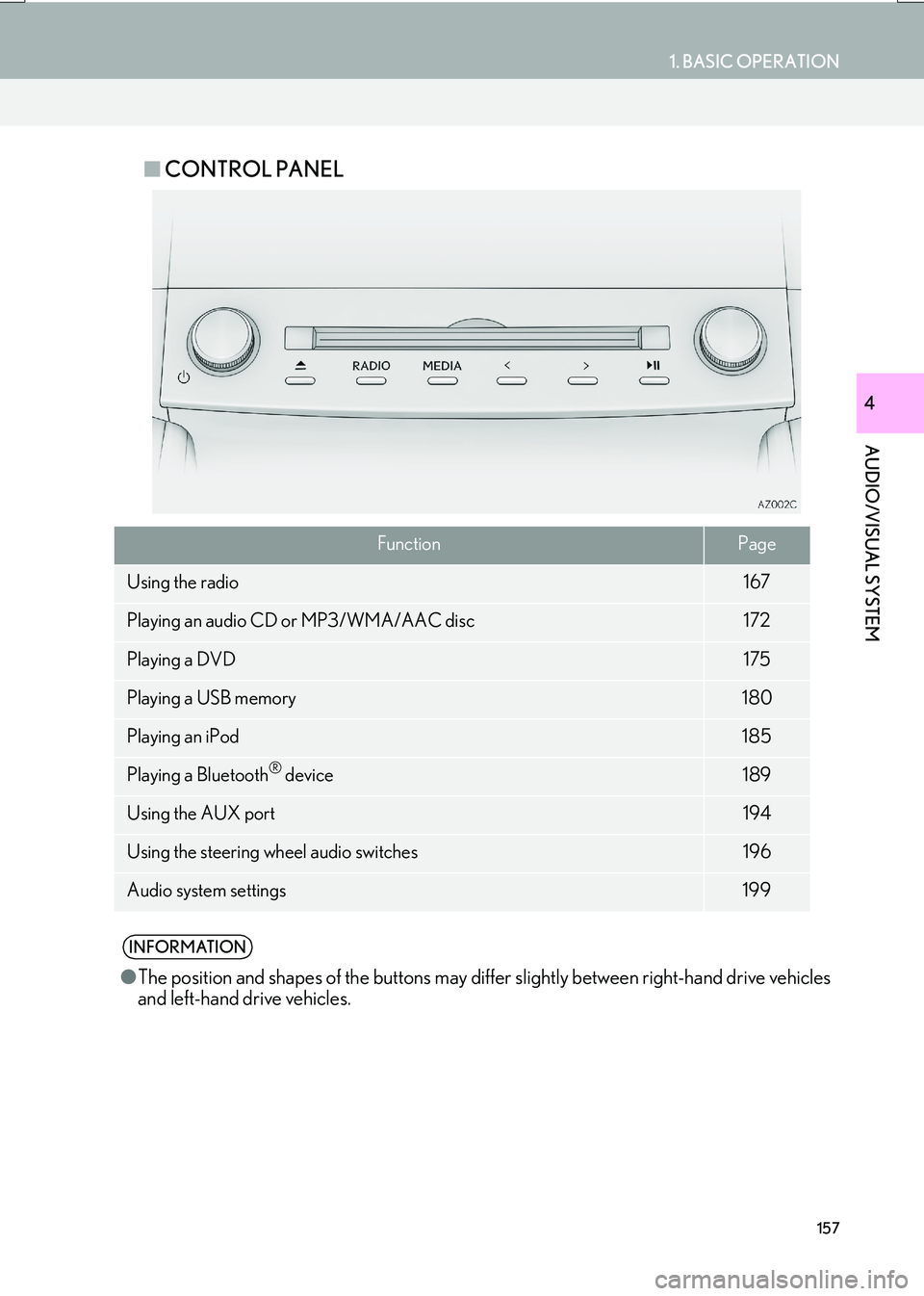
■CONTROL PANEL
FunctionPage
Using the radio167
Playing an audio CD or MP3/WMA/AAC disc172
Playing a DVD175
Playing a USB memory180
Playing an iPod185
Playing a Bluetooth® device189
Using the AUX port194
Using the steering wheel audio switches196
Audio system settings199
INFORMATION
●The position and shapes of the buttons may differ slightly between right-hand drive vehicles
and left-hand drive vehicles.
Page 158 of 342

158
1. BASIC OPERATION
IS_NAVI_EE
2. SOME BASICS
Power/Volume knob: Press to turn the au-
dio/visual system on and off. The system
turns on in the last mode used. Turn this
knob to adjust the volume.
“RADIO”, “MEDIA” button: Press to dis-
play screen buttons for the audio/visual sys-
tem.
This section describes some of the basic
features of the audio/visual system.
Some information may not pertain to
your system.
Your audio/visual system works when
the engine
SORY or IGNITION ON
NOTICE
● To prevent the 12-volt battery from being
discharged, do not leave the audio/visual
system on longer than necessary when
the engine is not running
CERTIFICATION
CAUTION:
z This product is a class 1 laser product
classified under the Safety of laser prod-
ucts, IEC 60825-1:2007, and contains a
class 1M laser module. To ensure contin-
ued safety, do not remove any covers or
attempt to gain access to the inside of the
product. Refer all servicing to qualified
personnel.
CLASS 1 LASER PRODUCT
CAUTION - CLASS 1M VISIBLE AND
INVISIBLE LASER RADIATION WHEN
OPEN, DO NOT VIEW DIRECTLY WITH
OPTICAL INSTRUMENTS.
TURNING THE SYSTEM ON
AND OFF
zA function that enables automatic return
to the previous screen from the audio/
visual screen can be selected. ( →P. 6 5 )
Page 159 of 342

159
1. BASIC OPERATION
AUDIO/VISUAL SYSTEM
IS_NAVI_EE
4
1Display the audio control screen.
(→ P.156)
X Using the instrument panel
2Each time the “RADIO” or “MEDIA”
button is pressed, the audio source
changes.
“RADIO” button: To change radio modes.
“MEDIA” button: To change media modes.
X From the audio source selection screen
2Select “Source” .
3Select the desired source.
1Display the audio control screen.
(→ P.156)
2Select “Source” .
3Select “Reorder” .
4Select the desired audio source then
“<<” or “>>” to reorder.
SELECTING AN AUDIO
SOURCE
INFORMATION
●Dimmed screen buttons cannot be oper-
ated.
REORDERING THE AUDIO
SOURCE
Page 161 of 342

161
1. BASIC OPERATION
AUDIO/VISUAL SYSTEM
IS_NAVI_EE
4
1Press the button to release the lock and
lift the armrest.
2Open the cover and connect a device.
zTurn on the power of the device if it is not
turned on.
3Close the console box.
USB/AUX PORT
There are 2 USB ports and an AUX port
in the console box.
NOTICE
● Depending on the size and shape of the
device that is connected to the system,
the console box may not close fully. In this
case, do not forcibly close the console
box as this may damage the device or the
terminal, etc.
INFORMATION
● Up to two portable players can be con-
nected to the USB port at the same time.
● Even if a USB hub is used to connect
more than two USB devices, only the first
two connected devices will be recog-
nized.
Page 162 of 342

162
1. BASIC OPERATION
IS_NAVI_EE
zWhen using an iPod video, a cable that has
a 4-pole AUX plug and a USB connector is
necessary. Connect the plug and connec-
tor to the AUX and USB ports.
1Display the audio control screen.
(→ P.156)
2Select .
3Select the desired tab to be set.
USING A 4-POLE AUX CABLE
To view a video on an iPod video or Ex-
ternal video, it is necessary to use a 4-
pole AUX cable to connect the portable
audio device.
When connecting a portable audio de-
vice to the AUX port, use a 4-pole AUX
cable with a plug that matches the exact
layout shown in the illustration.
INFORMATION
● If a 4-pole AUX cable with a different lay-
out is used, audio and/or video may not
be output properly.
Connected device
(portable audio
device, etc.)
Left
audio Right
audio
Ground
Video
“Sound settings” SCREEN
No.InformationPage
Select to set the tone and
balance.163
Select to set the DSP con-
trol.164
Select to set the audio set-
tings.164
INFORMATION
●
Depending on the audio source, some
functions may not be available.