audio Lexus IS200t 2017 Navigation Manual
[x] Cancel search | Manufacturer: LEXUS, Model Year: 2017, Model line: IS200t, Model: Lexus IS200t 2017Pages: 342, PDF Size: 20.48 MB
Page 188 of 342

188
3. MEDIA OPERATION
IS_NAVI_EE
1Select .
zEach time is selected, the mode
changes as follows:
•track repeat
→ off
1Select .
zEach time is selected, the mode
changes as follows:
• track shuffle
→ album shuffle → off
iPod AUDIO
REPEATING
The track currently being listened to can
be repeated.
RANDOM ORDER
Tracks or albums can be automatically
and randomly selected.
iPod VIDEO
To change to iPod video mode, select
“Browse” on the iPod audio screen, then
select the “Videos” tab and select the
desired video file.
Page 189 of 342

189
3. MEDIA OPERATION
IS_NAVI_EE
AUDIO/VISUAL SYSTEM
4
5. Bluetooth® AUDIO
■CONTROL SCREEN
The Bluetooth
® audio system enables users to enjoy listening to music that is played
on a portable player on the vehicle speakers via wireless communication.
This audio system supports Bluetooth
®, a wireless data system capable of playing por-
table audio music without cables. If your device does not support Bluetooth
®, the
Bluetooth® audio system will not function.
OVERVIEW
The Bluetooth® audio operation screen can be reached by the following methods:
→ P.159
Depending on the type of portable player connected, some functions may not be avail-
able and/or the screen may look differently than shown in this manual.
X Connecting a Bluetooth® audio device ( →P.193)
Page 191 of 342

191
3. MEDIA OPERATION
IS_NAVI_EE
AUDIO/VISUAL SYSTEM
4
No.Function
Displays Bluetooth® device condition
Select to select an album.
•Select to select a track.
• Select and hold to rewind.
Select to play/pause.
•Select to select a track.
• Select and hold to fast forward.
Select to set repeat playback. ( →P.193)
Select to set random playback. ( →P.193)
Select to display the playlist screen.
To return to the top screen, select “Now playing” on the list screen.
Select to display the portable device connection screen. ( →P.193)
•Displays cover art
• Select to display a track list.
To return to the top screen, select “Now playing” on the list screen.
•Press to select a track.
• Press and hold to fast forward/rewind.
Press to play/pause.
Tune/Scroll knob:
Turn to select a track.
Page 192 of 342

192
3. MEDIA OPERATION
IS_NAVI_EE
WA R N I N G
●Do not operate the player’s controls or connect to the Bluetooth® audio system while driv-
ing.
● Your audio unit is fitted with Bluetooth
® antennas. People with implantable cardiac pace-
makers, cardiac resynchronization therapy-pacemakers or implantable cardioverter
defibrillators should maintain a reasonab le distance between themselves and the
Bluetooth
® antennas. The radio waves may affect the operation of such devices.
● Before using Bluetooth
® devices, users of any electrical medical device other than implant-
able cardiac pacemakers, cardiac resynchronization therapy-pacemakers or implantable
cardioverter defibrillators should consult the manufacturer of the device for information
about its operation under the influence of ra dio waves. Radio waves could have unexpected
effects on the operation of such medical devices.
NOTICE
● Do not leave your portable player in the vehicl e. In particular, high temperatures inside the
vehicle may damage the portable player.
INFORMATION
● Depending on the Bluetooth® device that is connected to the system, the music may start
playing when selecting wh ile it is paused. Conversely, the music may pause when
selecting while it is playing.
● In the following conditions, the system may not function:
• The Bluetooth
® device is turned off.
• The Bluetooth
® device is not connected.
• The Bluetooth
® device has a low battery.
● It may take time to connect the telephone when Bluetooth
® audio is being played.
● For operating the portable player, see the instruction manual that comes with it.
● If the Bluetooth
® device is disconnected due to poor reception from the Bluetooth® net-
work when the engine
the system automatically reconnects the portable player.
● If the Bluetooth
® device is disconnected on purpose, such as it was turned off, this does not
happen. Reconnect the portable player manually.
● Bluetooth
® device information is registered when the Bluetooth® device is connected to
the Bluetooth® audio system. When selling or disposing of the vehicle, remove the
Bluetooth® audio information from the system. ( →P. 7 1 )
● In some situations, sound output via the Bluetooth® audio system may be out of sync with
the connected device or output intermittently.
Page 193 of 342

193
3. MEDIA OPERATION
IS_NAVI_EE
AUDIO/VISUAL SYSTEM
4
XRegistering an additional device
1Select “Connect” on the Bluetooth®
audio control screen.
2For more information: →P.47
X Selecting a registered device
1Select “Connect” on the Bluetooth®
audio control screen.
2For more information: →P.49
1Select .
zEach time is selected, the mode
changes as follows:
•track repeat
→ album repeat → off
1Select .
zEach time is selected, the mode
changes as follows:
•album random → all track random → off
CONNECTING A Bluetooth®
DEVICE
To use the Bluetooth® audio system, it is
necessary to register a Bluetooth
® de-
vice with the system.
LISTENING TO Bluetooth®
AUDIO
REPEATING
The track or album currently being lis-
tened to can be repeated.
RANDOM ORDER
Tracks or albums can be automatically
and randomly selected.
Page 195 of 342

195
3. MEDIA OPERATION
IS_NAVI_EE
AUDIO/VISUAL SYSTEM
4
No.Function
AUXExternal
Select to display the external operation
screen.
Select to display the aux operation screen.
Select to display full screen video.
Press to turn mute on/off.Press to turn mute on/off.
WA R N I N G
●Do not connect portable audio device or operate the controls while driving.
NOTICE
●Depending on the size and shape of the portable audio device that is connected to the sys-
tem, the console box may not close fully. In this case, do not forcibly close the console box as
this may damage the portable audio device or the terminal, etc.
● Do not leave portable audio device in the vehicle. The temperature inside the vehicle may
become high, resulting in damage to the player.
● Do not push down on or apply unnecessary pressure to the portable audio device while it is
connected as this may damage the portable audio device or its terminal.
● Do not insert foreign objects into the port as this may damage the portable audio device or
its terminal.
INFORMATION
● When connecting an external device that does not output an image, select “A U X ”. If
“External” is selected, an all-black (b lank) screen will be displayed.
● If the source is changed between AUX and External while the system is operating, sound
may not be output momentarily.
Page 196 of 342
196
IS_NAVI_EE
4. AUDIO/VISUAL REMOTE CONTROLS
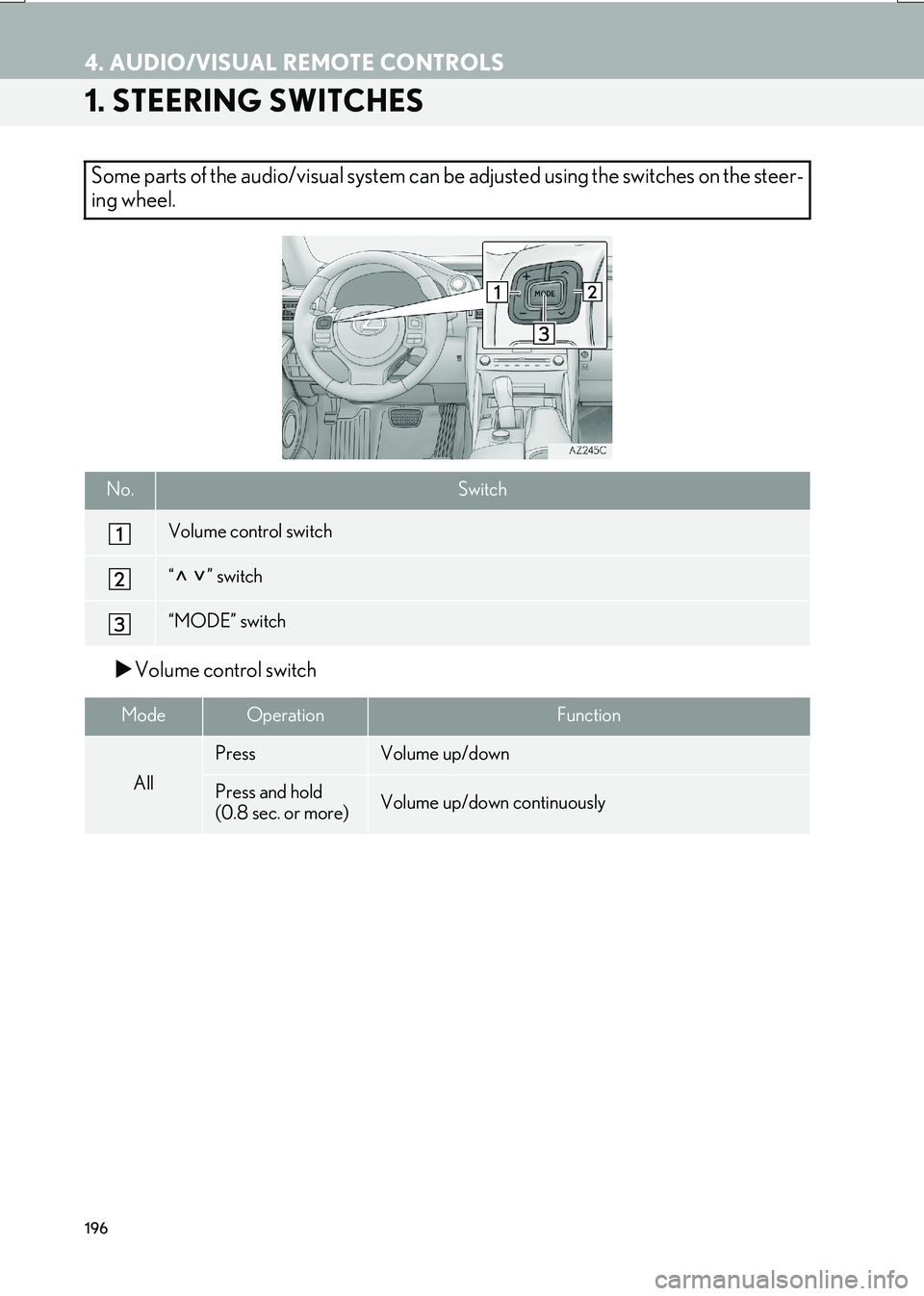
1. STEERING SWITCHES
XVolume control switch
Some parts of the audio/visual system can be adjusted using the switches on the steer-
ing wheel.
No.Switch
Volume control switch
“” switch
“MODE” switch
ModeOperationFunction
All
PressVolume up/down
Press and hold
(0.8 sec. or more)Volume up/down continuously
Page 197 of 342

197
4. AUDIO/VISUAL REMOTE CONTROLS
IS_NAVI_EE
AUDIO/VISUAL SYSTEM
4
X“” switch
ModeOperationFunction
AM, FM
PressPreset station up/down (“Presets” screen)
Station list up/down (“Stations” screen)
Seek up/down (Manual tuning screen)
Press and hold
(0.8 sec. or more)Seek up/down continuously while the switch is being
pressed (Manual tuning screen)
DAB
Press
Preset ensemble up/down (“Presets” screen)
Service list up/down (“Stations” screen)
Ensemble seek up/down (Manual tuning screen)
Press and hold
(0.8 sec. or more)Ensemble seek up/down continuously while the switch is
being pressed (Manual tuning screen)
CDPressTrack up/down
MP3/
WMA/AAC discPressFile up/down
Press and hold
(0.8 sec. or more)Folder up/down
DVDPressChapter up/down
USB
PressFile/Track up/down
Press and hold
(0.8 sec. or more)Album/Folder up/down
iPodPressTrack up/down
Bluetooth®
audio
PressTrack up/down
Press and hold
(0.8 sec. or more)Album up/down
Page 198 of 342

198
4. AUDIO/VISUAL REMOTE CONTROLS
IS_NAVI_EE
X“MODE” switch
ModeOperationFunction
AM, FM,
DAB, AUXPressChange audio modes
Press and hold
(0.8 sec. or more)Mute
CD, MP3/
WMA/AAC disc, DVD,
USB, iPod,
Bluetooth
®
audio
PressChange audio modes
Press and hold
(0.8 sec. or more)Pause
Page 199 of 342

199
IS_NAVI_EE
AUDIO/VISUAL SYSTEM
4
5. SETUP
1. AUDIO SETTINGS
1Press the “MENU” button on the
Remote Touch.
2Select “Setup” .
3Select “A u d i o ” .
4Select the desired item to be set.
Detailed audio settings can be pro-
grammed.AUDIO SETTINGS SCREEN
No.FunctionPage
Select to set detailed sound
settings.162
Select to set detailed FM
radio settings.200
Select to set detailed DAB
settings. 200
Select to set the iPod audio
signal input settings.201
Select to set the video sig-
nal format settings.201
Select to set detailed cover
art settings.201
*Select to set detailed DVD
settings.202
*: Only in DVD video mode