display Lexus IS200t 2017 s Owners Manual
[x] Cancel search | Manufacturer: LEXUS, Model Year: 2017, Model line: IS200t, Model: Lexus IS200t 2017Pages: 676, PDF Size: 149.78 MB
Page 313 of 676
3134-5. Using the driving support systems
4
Driving
IS200t_EE(OM53D77E)
Once the vehicle width guide lines and the parking space lines are parallel,
straighten the steering wheel and back up slowly until the vehicle has com-
pletely entered the parking space.
Stop the vehicle in an appropriate place, and finish parking.
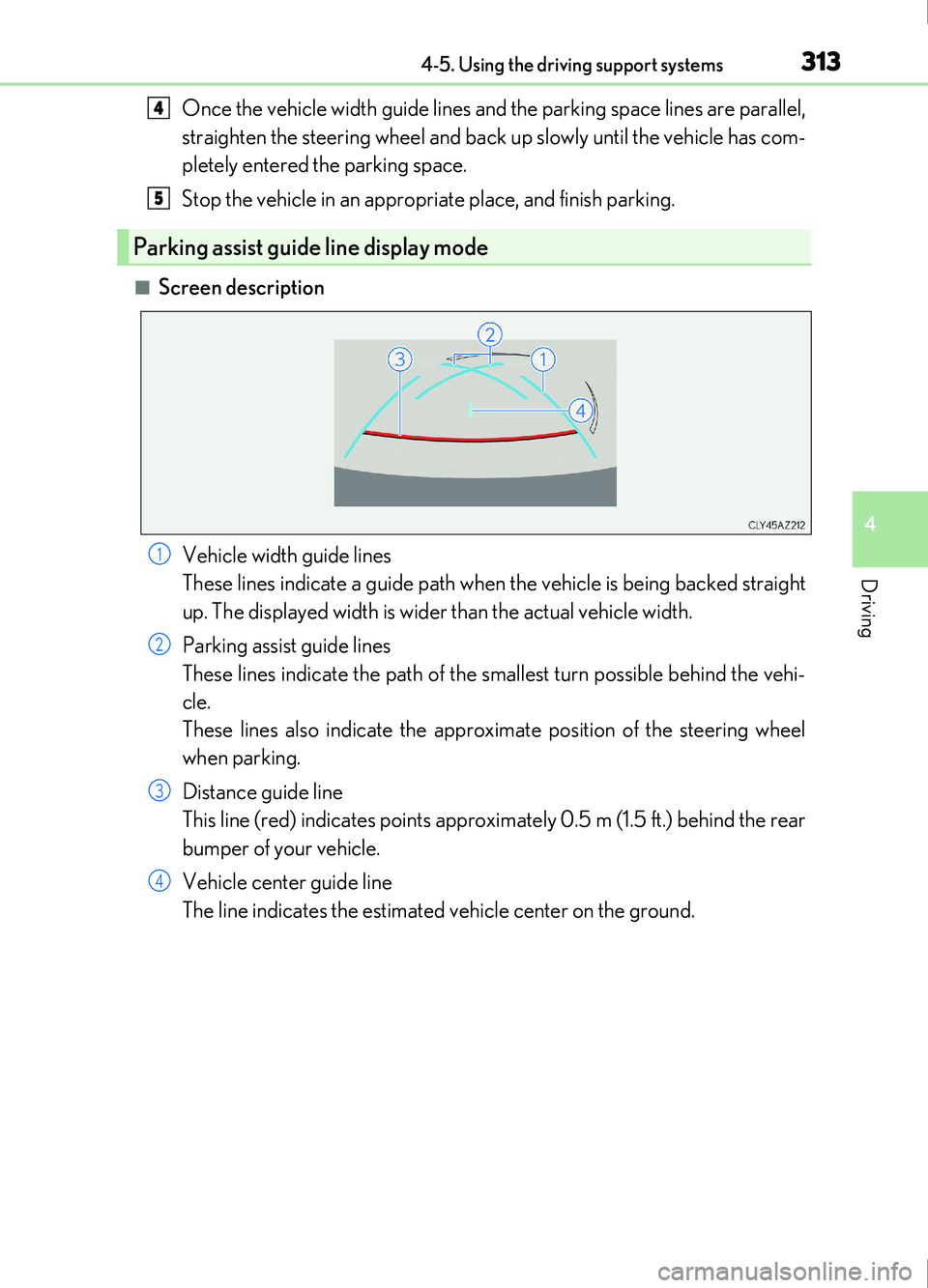
■Screen descriptionVehicle width guide lines
These lines indicate a guide path when the vehicle is being backed straight
up. The displayed width is wider than the actual vehicle width.
Parking assist guide lines
These lines indicate the path of the smallest turn possible behind the vehi-
cle.
These lines also indicate the approximate position of the steering wheel
when parking.
Distance guide line
This line (red) indicates points approximately 0.5 m (1.5 ft.) behind the rear
bumper of your vehicle.
Vehicle center guide line
The line indicates the estimated vehicle center on the ground.
Parking assist guide line display mode
4
5
1
2
3
4
Page 315 of 676
3154-5. Using the driving support systems
4
Driving
IS200t_EE(OM53D77E)
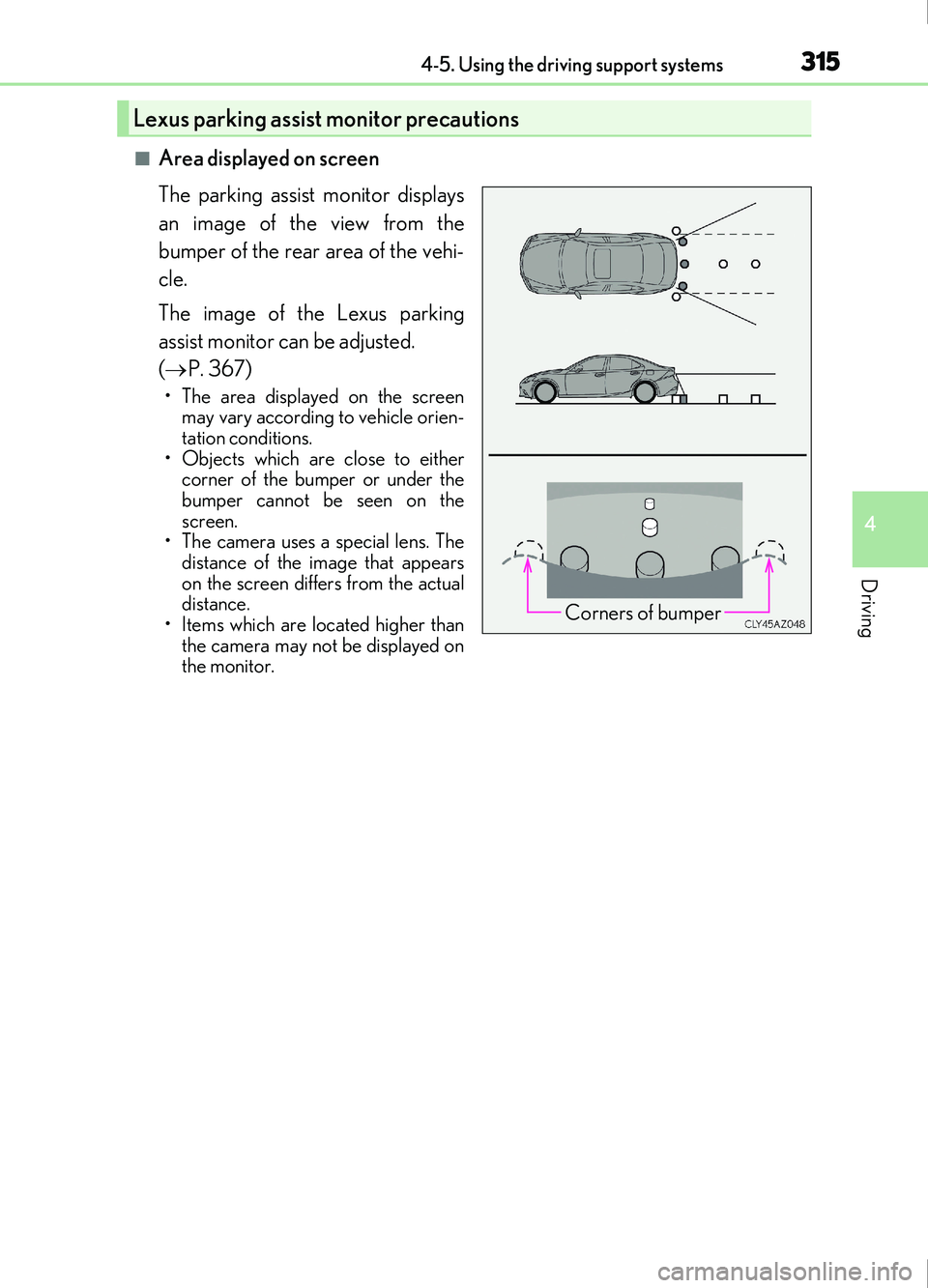
■Area displayed on screen
The parking assist monitor displays
an image of the view from the
bumper of the rear area of the vehi-
cle.
The image of the Lexus parking
assist monitor can be adjusted.
( P. 367)
• The area displayed on the screen
may vary according to vehicle orien-
tation conditions.
• Objects which are close to either corner of the bumper or under the
bumper cannot be seen on the
screen.
• The camera uses a special lens. The
distance of the image that appears
on the screen differs from the actual
distance.
• Items which are located higher than the camera may not be displayed on
the monitor.
Lexus parking assist monitor precautions
Corners of bumper
Page 321 of 676
3214-5. Using the driving support systems
4
Driving
IS200t_EE(OM53D77E)
The estimated course lines move even though the steering wheel is straight
There is a malfunction in the signals being
output by the steering sensor.Have the vehicle inspected by any autho-
rized Lexus retailer or Lexus authorized
repairer, or any reliable repairer.
Guide lines are not displayed
The trunk lid is open.
Close the trunk lid.
If this does not resolve the symptom, have
the vehicle inspected by any authorized
Lexus retailer or Lexus authorized
repairer, or any reliable repairer.
The estimated course lines are not displayed
• The steering wheel has been moved
while the battery was being reinstalled.
• Battery power is low.
• The steering sensor has been rein- stalled.
• There is a malfunct ion in the signals
being output by the steering sensor.Stop the vehicle, and turn the steering
wheel as far as it will go to the left and
right.
If this does not resolve the symptom, have
the vehicle inspected by any authorized
Lexus retailer or Lexus authorized
repairer, or any reliable repairer.
Likely causeSolution
Page 322 of 676
3224-5. Using the driving support systems
IS200t_EE(OM53D77E)
WARNING
■When using the Lexus parking assist monitor system
The parking assist monitor is a supplemental device intended to assist the driver when
backing up. When backing up, be sure to check visually behind and all around the vehi-
cle before proceeding.
Observe the following precautions to avoid an accident that could result in death or
serious injuries.
●Never depend on the parking assist monitor entirely when backing up. The image
and the position of the guide lines displayed on the screen may differ from the actual
state.
Use caution, just as you would when backing up any vehicle.
●Be sure to back up slowly, depressing the brake pedal to control vehicle speed.
●If you seem likely to hit nearby vehicles , obstacles, people or mount the shoulder,
depress the brake pedal to stop the vehicle.
●The instructions given are only guidelines.
When and how much to turn the steering wheel will vary according to traffic condi-
tions, road surface conditions, vehicle condition, etc. when parking. It is necessary to
be fully aware of this before using the parking assist system.
●When parking, be sure to check that th e parking space will accommodate your vehi-
cle before maneuvering into it.
●Do not use the parking assist monitor in the following cases:
• On icy or slick road surfaces, or in snow
• When using tire chains or emergency tires
• When the trunk lid is not closed completely
• On roads that are not flat or straight, such as curves or slopes.
●In low temperatures, the screen may darken or the image may become faint. The
image could distort when the vehicle is moving, or you may become unable to see the
image on the screen. Be sure to check direct visually and with the mirrors all around
the vehicle before proceeding.
●If the tire sizes are changed, the position of the guide lines displayed on the screen
may change.
●The camera uses a special lens. The distances between objects and pedestrians that
appear in the image displayed on the screen will differ from the actual distances.
( P. 316)
●Estimated course line display mode: If the steering wheel is straight and the vehicle
width guide lines and the estimated course lin es are not in alignment, have the vehicle
inspected by any authorized Lexus retailer or Lexus authorized repairer, or any reli-
able repairer.
Page 325 of 676
3254-5. Using the driving support systems
4
Driving
IS200t_EE(OM53D77E)
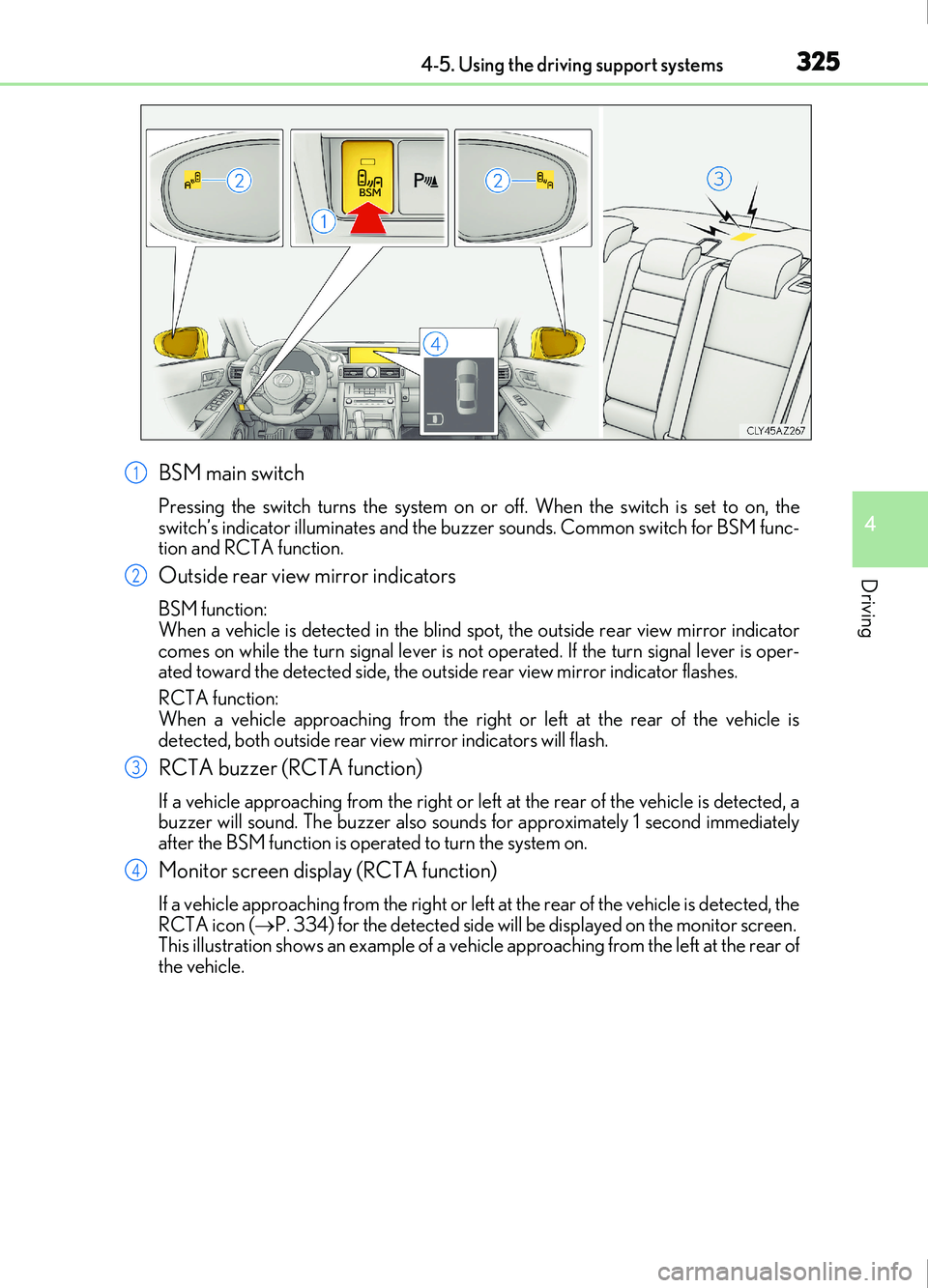
BSM main switch
Pressing the switch turns the system on or off. When the switch is set to on, the
switch’s indicator illuminates and the buzzer sounds. Common switch for BSM func-
tion and RCTA function.
Outside rear view mirror indicators
BSM function:
When a vehicle is detected in the blind spot, the outside rear view mirror indicator
comes on while the turn signal lever is not operated. If the turn signal lever is oper-
ated toward the detected side, the outside rear view mirror indicator flashes.
RCTA function:
When a vehicle approaching from the right or left at the rear of the vehicle is
detected, both outside rear vi ew mirror indicators will flash.
RCTA buzzer (RCTA function)
If a vehicle approaching from the right or left at the rear of the vehicle is detected, a
buzzer will sound. The buzzer also sounds for approximately 1 second immediately
after the BSM function is operated to turn the system on.
Monitor screen display (RCTA function)
If a vehicle approaching from the right or left at the rear of the vehicle is detected, the
RCTA icon (P. 334) for the detected side will be displayed on the monitor screen.
This illustration shows an example of a vehicl e approaching from the left at the rear of
the vehicle.
1
2
3
4
Page 326 of 676
3264-5. Using the driving support systems
IS200t_EE(OM53D77E)
■Outside rear view mirror indicator visibility
In strong sunlight, the outside rear view mirror indicator may be difficult to see.
■Hearing the RCTA buzzer
The RCTA buzzer may be difficult to hear ov er loud noises, such as if the audio system
volume is high.
■When there is a malfunction in the Blind Spot Monitor
If a system malfunction is de tected due to any of the follo wing, a warning message will be
displayed: ( P. 560)
●A sensor is malfunctioning
●A sensor is dirty or covered with snow or a sticker
●The outside temperature is extremely high or low
●Sensor voltage is abnormal
●A sensor is misaligned
■Certification for the Blind Spot Monitor
Page 334 of 676
3344-5. Using the driving support systems
IS200t_EE(OM53D77E)
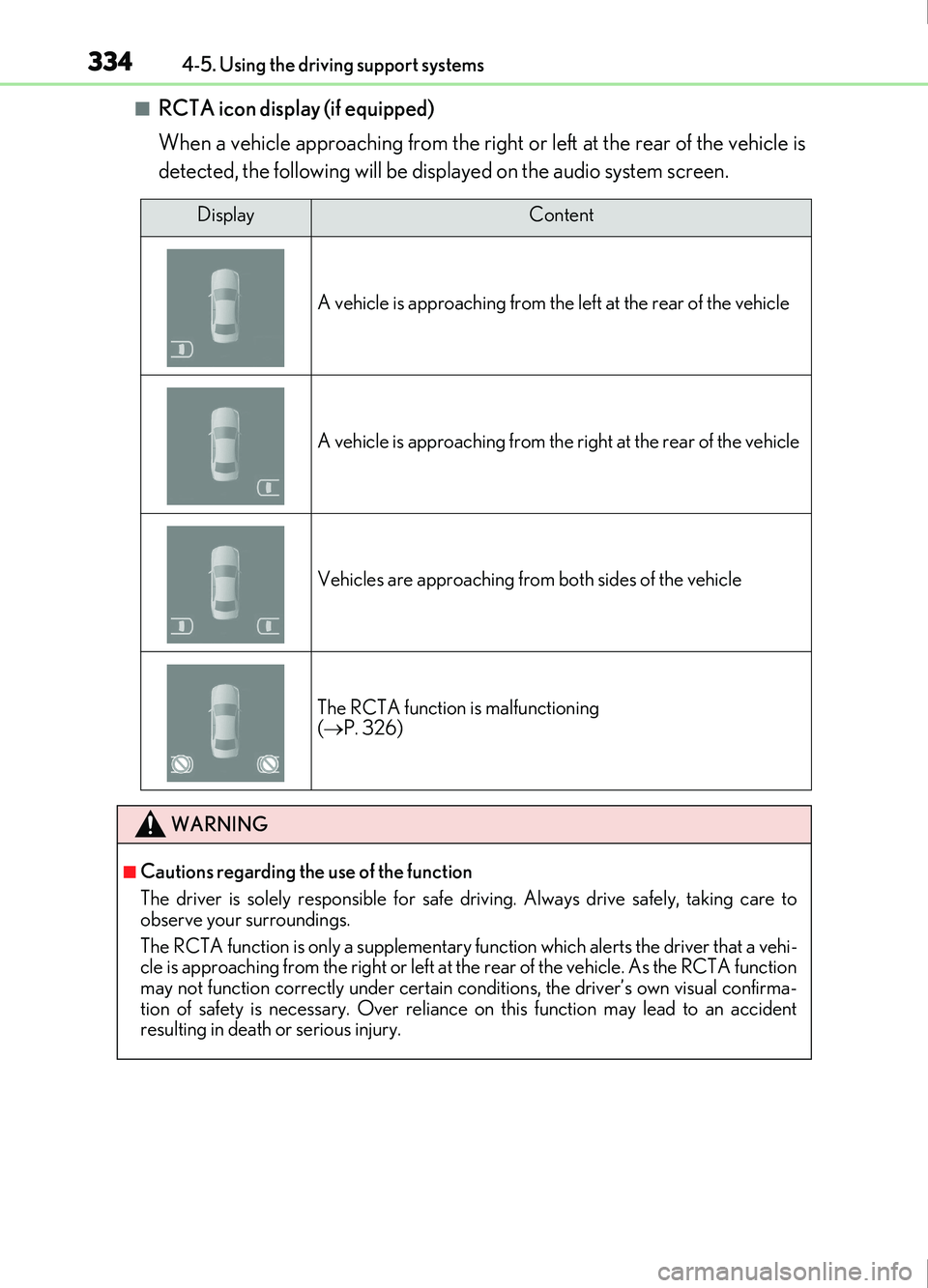
■RCTA icon display (if equipped)
When a vehicle approaching from the right or left at the rear of the vehicle is
detected, the following will be displayed on the audio system screen.
DisplayContent
A vehicle is approaching from the le ft at the rear of the vehicle
A vehicle is approaching from the right at the rear of the vehicle
Vehicles are approaching from both sides of the vehicle
The RCTA function is malfunctioning
( P. 326)
WARNING
■Cautions regarding the use of the function
The driver is solely responsible for safe driving. Always drive safely, taking care to
observe your surroundings.
The RCTA function is only a supplementary fu nction which alerts the driver that a vehi-
cle is approaching from the right or left at th e rear of the vehicle. As the RCTA function
may not function correctly under certain conditions, the driver’s own visual confirma-
tion of safety is necessary. Over reliance on this function may lead to an accident
resulting in death or serious injury.
Page 339 of 676
3394-5. Using the driving support systems
4
Driving
IS200t_EE(OM53D77E)
■Operation of the air conditioning system in Eco drive mode
Eco drive mode controls the heating/cooling operations and fan speed of the air condi-
tioning system to enhance fuel efficiency ( P. 450). To improve air conditioning perfor-
mance, adjust the fan speed or turn off Eco drive mode.
■Sport mode automatic deactivation
Sport mode is automatically deactivated if the engine switch is turned off after driving in
sport mode.
■Driving mode pop-up display (vehicles with a 10.3-inch display)
When the driving mode is changed, the selected dr iving mode will be temporarily dis-
played on the side display. ( P. 448)
Page 342 of 676

3424-5. Using the driving support systems
IS200t_EE(OM53D77E)
If the vehicle gets stuck in mud, dirt or snow, the TRC system may reduce power
from the engine to the wheels. Pressing or to turn the system off
may make it easier for you to rock the vehicle in order to free it.
To turn the TRC system off, quickly press and release or .
The “Traction Control Turned Off” will be shown on the multi-information display.
Press or again to turn the system back on.
Disabling the TRC system
Vehicles without Stop & Start systemVehicles with Stop & Start system
Page 343 of 676

3434-5. Using the driving support systems
4
Driving
IS200t_EE(OM53D77E)
■Turning off both TRC and VSC systems
To turn the TRC and VSC systems off, press and hold or for more than 3
seconds while the vehicle is stopped.
The VSC OFF indicator light will come on and the “Traction Control Turned Off” will be
shown on the multi-information display.
*
Press or again to turn the system back on.
*: On vehicles with pre-collision system, pre- collision brake assist and pre-collision brak-
ing will also be disabled. The pre-collision system warning light will come on and the
message will be shown on the multi-information display. ( P. 259)
■When the message is displayed on the mult i-information display showing that TRC has
been disabled even if the VSC OFF switch has not been pressed
TRC cannot be operated. Contact any authorized Lexus retailer or Lexus authorized
repairer, or any reliable repairer.
■Operating conditions of hill-start assist control
When the following four conditions are met, the hill-start assist control will operate:
●The shift lever is in a position other than P or N (when starting off forward/backward on
an upward incline)
●The vehicle is stopped
●The accelerator pedal is not depressed
●The parking brake is not engaged
■Automatic system cancelation of hill-start assist control
The hill-start assist control will turn off in any of the following situations:
●The shift lever is shifted to P or N
●The accelerator pedal is depressed
●The parking brake is engaged
●Approximately 2 seconds elapse after the brake pedal is released
■When the battery is disconnected
The steering wheel may move from its straight forward position, but this will be corrected
automatically when driving.
■Sounds and vibrations caused by the ABS, brake assist, VSC, TRC and hill-start assist
control systems
●A sound may be heard from the engine compartment when the brake pedal is
depressed repeatedly, when the engine is st arted or just after the vehicle begins to
move. This sound does not indicate that a malfunction has occurred in any of these sys-
tems.
●Any of the following conditions may occu r when the above systems are operating.
None of these indicates that a malfunction has occurred.
• Vibrations may be felt through the vehicle body and steering.
• A motor sound may be heard also after the vehicle comes to a stop.
• The brake pedal may pulsate slig htly after the ABS is activated.
• The brake pedal may move down slig htly after the ABS is activated.