display Lexus IS200t 2017 s Repair Manual
[x] Cancel search | Manufacturer: LEXUS, Model Year: 2017, Model line: IS200t, Model: Lexus IS200t 2017Pages: 676, PDF Size: 149.78 MB
Page 263 of 676
2634-5. Using the driving support systems
4
Driving
IS200t_EE(OM53D77E)
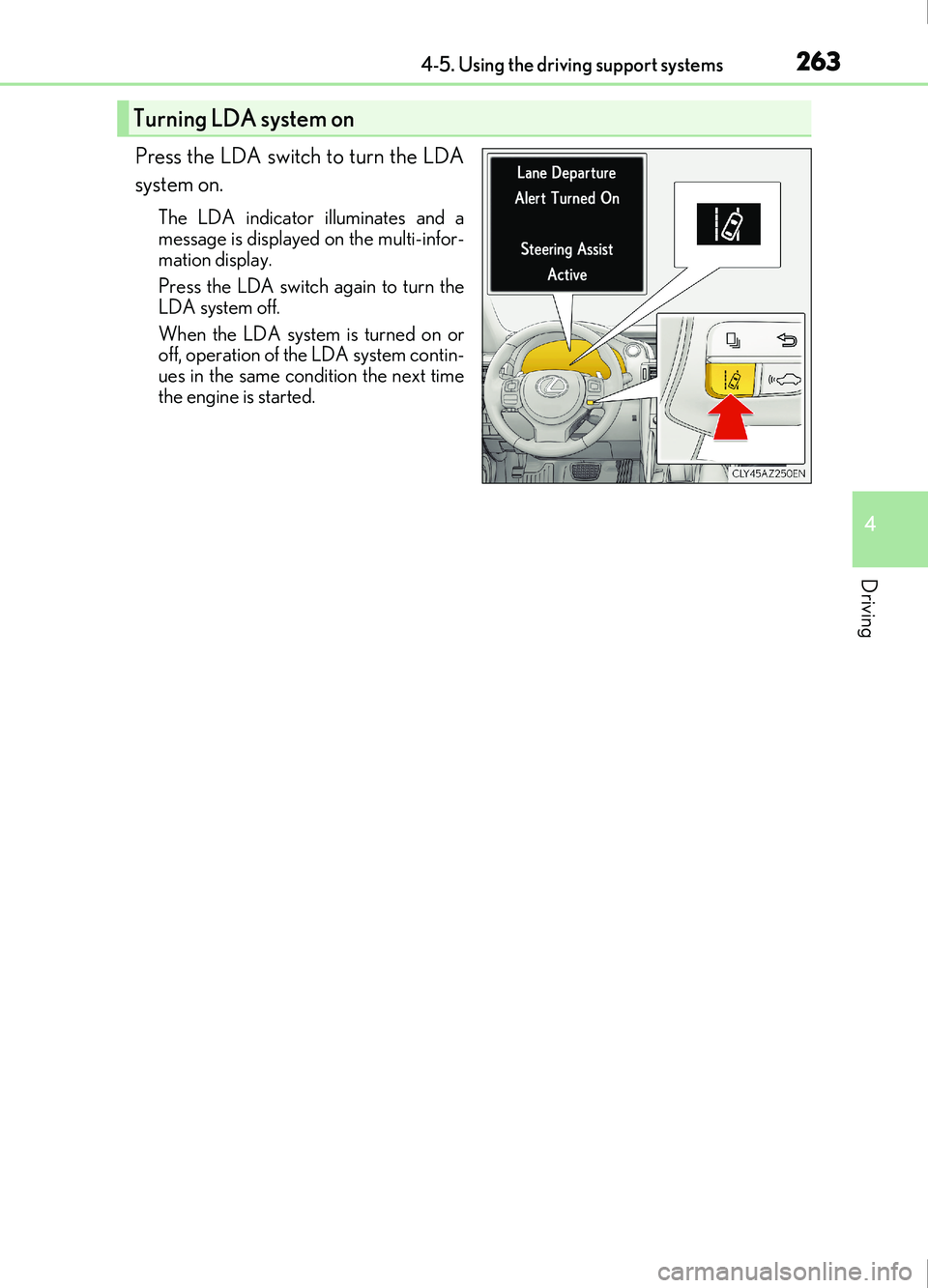
Press the LDA switch to turn the LDA
system on.
The LDA indicator illuminates and a
message is displayed on the multi-infor-
mation display.
Press the LDA switch again to turn the
LDA system off.
When the LDA system is turned on or
off, operation of the LDA system contin-
ues in the same condition the next time
the engine is started.
Turning LDA system on
Page 264 of 676
2644-5. Using the driving support systems
IS200t_EE(OM53D77E)
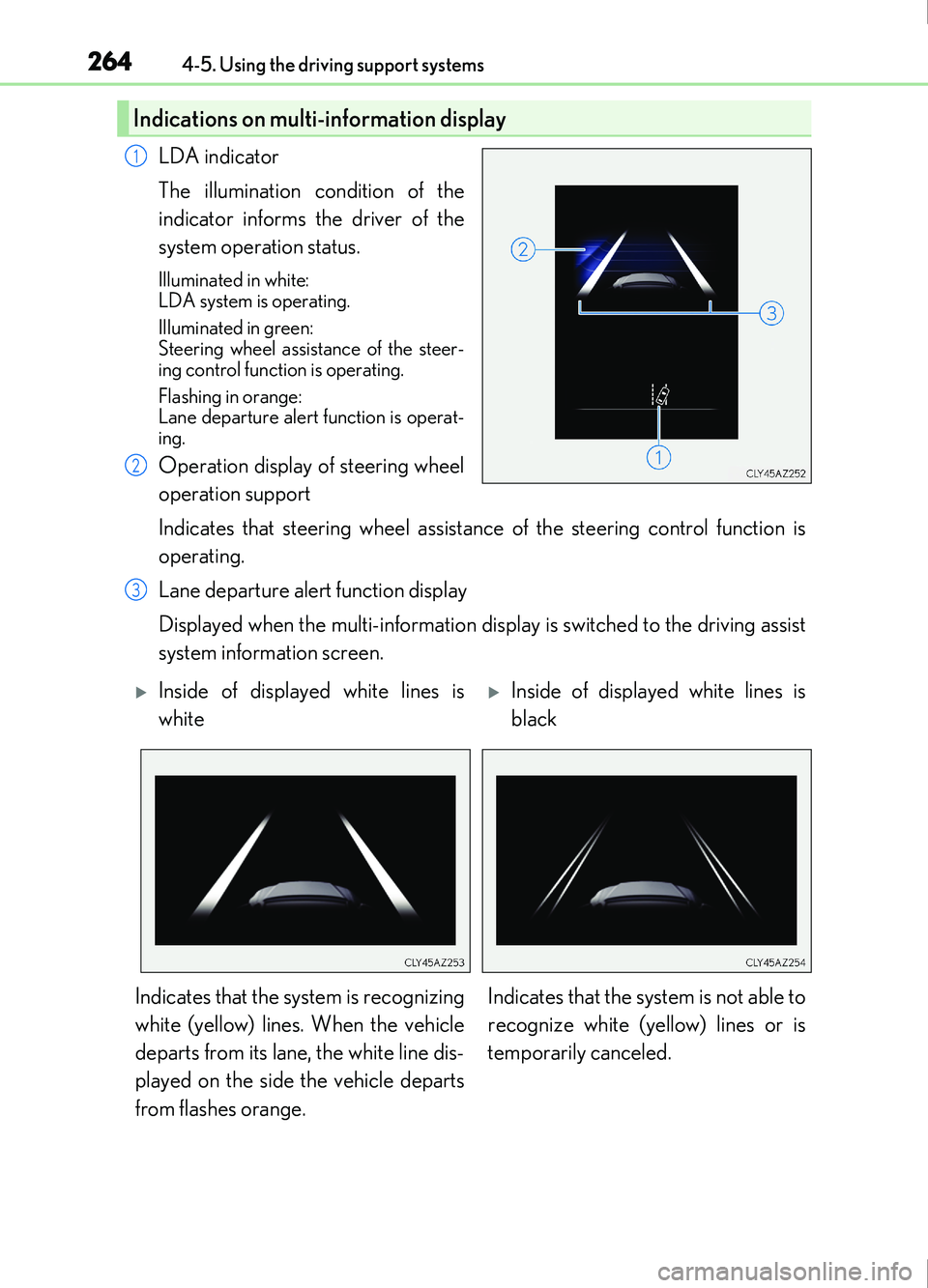
LDA indicator
The illumination condition of the
indicator informs the driver of the
system operation status.
Illuminated in white:
LDA system is operating.
Illuminated in green:
Steering wheel assistance of the steer-
ing control function is operating.
Flashing in orange:
Lane departure alert function is operat-
ing.
Operation display of steering wheel
operation support
Indicates that steering wheel assistance of the steering control function is
operating.
Lane departure alert function display
Displayed when the multi-information display is switched to the driving assist
system information screen.
Indications on multi-information display
1
2
3
Inside of displayed white lines is
whiteInside of displayed white lines is
black
Indicates that the system is recognizing
white (yellow) lines. When the vehicle
departs from its lane, the white line dis-
played on the side the vehicle departs
from flashes orange. Indicates that the system is not able to
recognize white (yellow) lines or is
temporarily canceled.
Page 265 of 676
2654-5. Using the driving support systems
4
Driving
IS200t_EE(OM53D77E)
■Operation conditions of each function
●Lane departure alert function
This function operates when all of the following conditions are met.
• LDA is turned on.
• Vehicle speed is approximately 50 km/h (32 mph) or more.
• System recognizes white (yellow) lines.
• Width of traffic lane is approx imately 3 m (9.8 ft.) or more.
• Turn signal lever is not operated.
• Vehicle is driven on a stra ight road or around a gentle curve with a radius of more
than approximately 150 m (492 ft.).
• No system malfunctions are detected. ( P. 554)
●Steering control function
This function operates when all of the follo wing conditions are met in addition to the
operation conditions for the lane departure alert function.
• Setting for Steering Assist in of the multi-information display is set to On. (P.
107)
• Vehicle is not accelerated or decelerated by a fixed amount or more.
• Steering wheel is not operat ed with a steering force level suitable for changing
lanes.
• ABS, VSC, TRC and PCS are not operating.
• TRC or VSC is not turned off.
• Except for Israel: Hands off steering wheel alert is not displayed. ( P. 266)
●Vehicle sway warning
This function operates when all of the following conditions are met.
• Setting for Sway Warning in of the multi-information display is set to On.
( P. 107)
• Vehicle speed is approximately 50 km/h (32 mph) or more.
• Width of traffic lane is approx imately 3 m (9.8 ft.) or more.
• No system malfunctions are detected. ( P. 554)
Page 266 of 676
2664-5. Using the driving support systems
IS200t_EE(OM53D77E)
■Temporary cancellation of functions
When operation conditions are no longer met, a function may be temporarily canceled.
However, when the operation conditions are met again, operation of the function is auto-
matically restored. (P. 265)
■Steering control function
Depending on the vehicle speed, lane departure situation, road conditions, etc., the
driver may not feel the function is operating or the function may not operate at all.
■Lane departure alert function
The warning buzzer may be difficult to hear due to external noise, audio playback, etc.
Also, it may be difficult to feel steering wh eel vibrations due to the road conditions, etc.
■Hands off steering wheel alert
Except for Israel: When the system determines that the driver has removed the hands
from the steering wheel while the steering cont rol function is operating, a warning mes-
sage is displayed on the multi-information display.
If the driver continues to keep the hands off of the steering wheel, the buzzer sounds, a
warning message is displayed and the function is temporarily canceled. This alert also
operates in the same way when the vehicle is driven with the steering wheel lightly
gripped. However, depending on the road conditions, etc., the function may not cancel.
For Israel: When the system determines that the driver has removed the hands from the
steering wheel while the steering control functi on is operating, a warning message is dis-
played on the multi-information display and the buzzer sounds.
■White (yellow) lines are only on one side of road
The LDA system will not operate for the side on which white (yellow) lines could not be
recognized.
Page 269 of 676
2694-5. Using the driving support systems
4
Driving
IS200t_EE(OM53D77E)
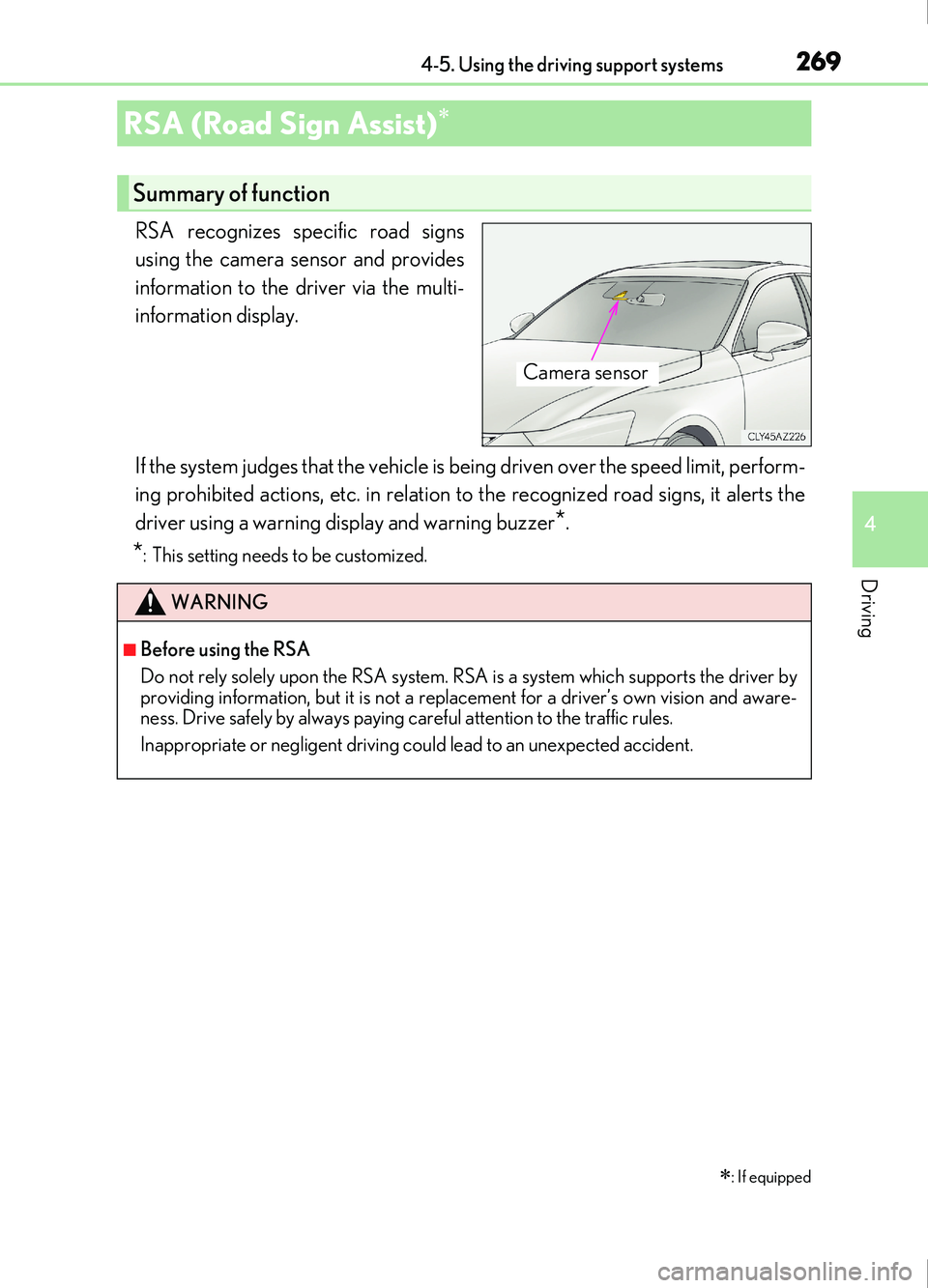
RSA recognizes specific road signs
using the camera sensor and provides
information to the driver via the multi-
information display.
If the system judges that the vehicle is being driven over the speed limit, perform-
ing prohibited actions, etc. in relation to the recognized road signs, it alerts the
driver using a warning display and warning buzzer
*.
*: This setting needs to be customized.
RSA (Road Sign Assist)
: If equipped
Summary of function
Camera sensor
WARNING
■Before using the RSA
Do not rely solely upon the RSA system. RS A is a system which supports the driver by
providing information, but it is not a replacement for a driver’s own vision and aware-
ness. Drive safely by always paying careful attention to the traffic rules.
Inappropriate or negligent driving could lead to an unexpected accident.
Page 270 of 676
2704-5. Using the driving support systems
IS200t_EE(OM53D77E)
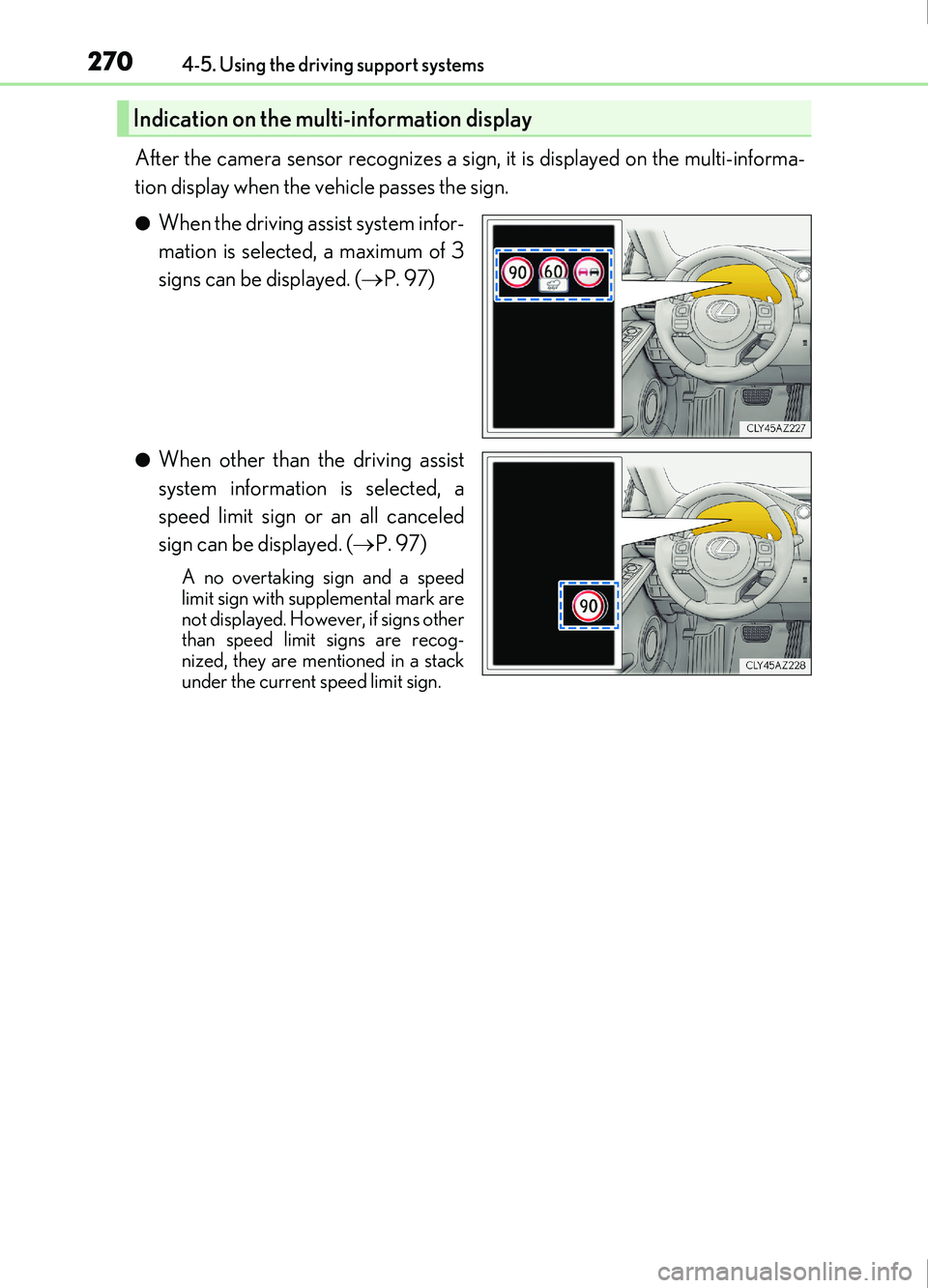
After the camera sensor recognizes a sign, it is displayed on the multi-informa-
tion display when the vehicle passes the sign.
●When the driving assist system infor-
mation is selected, a maximum of 3
signs can be displayed. (P. 97)
●When other than the driving assist
system information is selected, a
speed limit sign or an all canceled
sign can be displayed. ( P. 97)
A no overtaking sign and a speed
limit sign with supplemental mark are
not displayed. However, if signs other
than speed limit signs are recog-
nized, they are mentioned in a stack
under the current speed limit sign.
Indication on the multi-information display
Page 271 of 676
2714-5. Using the driving support systems
4
Driving
IS200t_EE(OM53D77E)
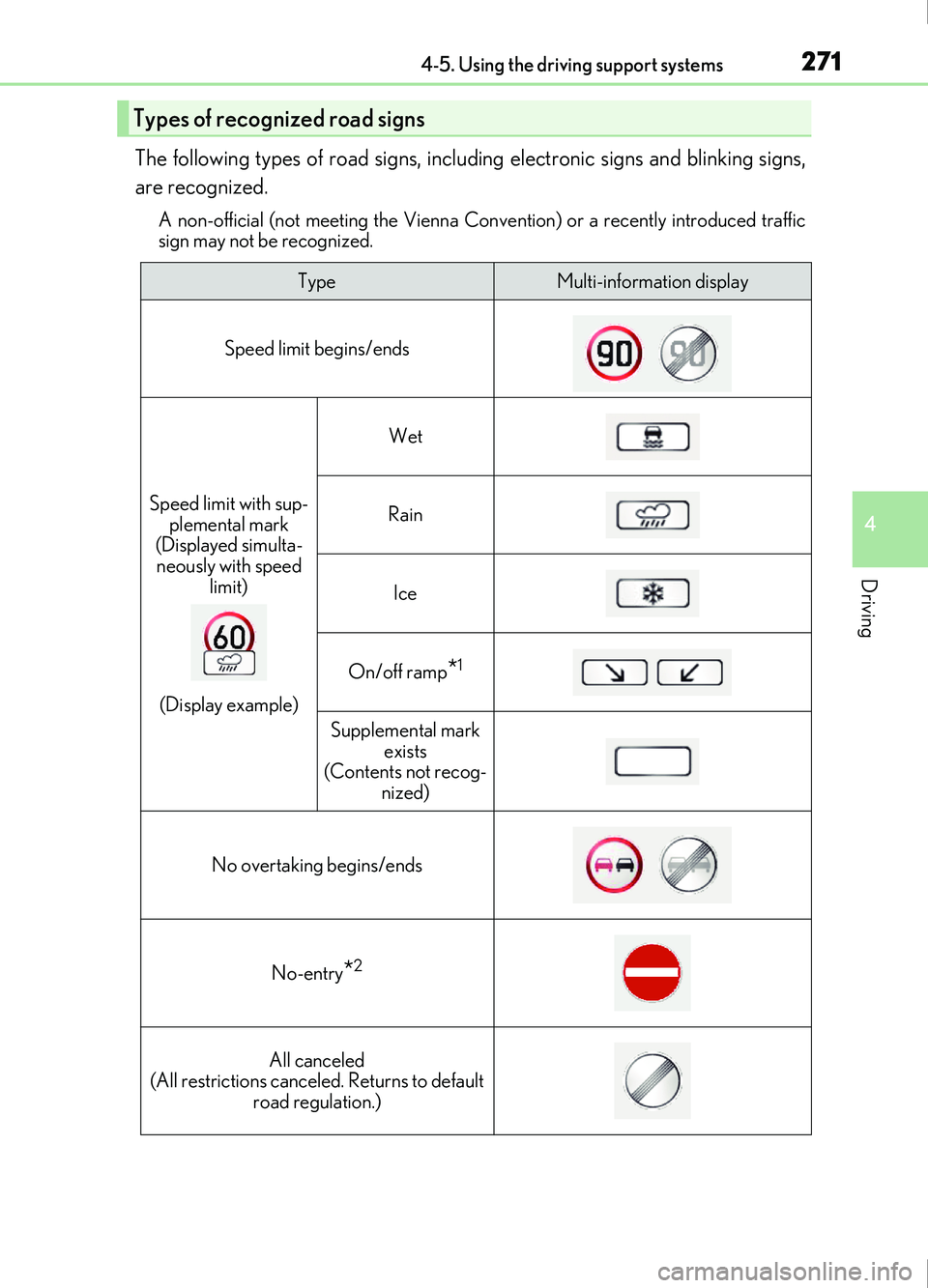
The following types of road signs, including electronic signs and blinking signs,
are recognized.
A non-official (not meeting the Vienna Convention) or a recently introduced traffic
sign may not be recognized.
Types of recognized road signs
TypeMulti-information display
Speed limit begins/ends
Speed limit with sup- plemental mark
(Displayed simulta-
neously with speed limit)
(Display example)
Wet
Rain
Ice
On/off ramp*1
Supplemental mark exists
(Contents not recog-
nized)
No overtaking begins/ends
No-entry*2
All canceled
(All restrictions canceled. Returns to default road regulation.)
Page 272 of 676

2724-5. Using the driving support systems
IS200t_EE(OM53D77E)
*1: If the turn signal indicator is not operated when changing lanes, the mark does not dis-play.
*2: Vehicles with a navigation system
In the following situations, the RSA system alerts the driver using a warning dis-
play.
●When the vehicle speed exceeds the speed warning threshold applied to the
speed limit of the sign displayed on the multi-information display, the sign
color becomes inverted.
●If it is detected that your vehicle is overtaking when a no overtaking sign is dis-
played on the multi-information display, the sign flashes.
●Vehicles with a navigation system: When the RSA system recognizes a no-
entry sign and detects that the vehicle has entered a no-entry area based on
the map information of the navigation system, the no-entry sign flashes.
Depending on the situation, traffic environment (traffic direction, speed, unit)
may be detected incorrectly and a warning display may not operate properly.
■Automatic turn-off of RSA sign display
One or more signs automatically turn off in the following situations.
●A new sign is not recognized for a certain distance.
●The road changes due to a left or right turn, etc.
■Conditions in which the function may not operate or detect correctly
In the following situations, RSA does not op erate normally and may not recognize signs,
display the incorrect sign, etc. However, this does not indicate a malfunction.
●The camera sensor is misaligned due to a strong impact being applied to the sensor,
etc.
●Dirt, snow, stickers, etc. are on the windshield near the camera sensor.
●In inclement weather such as heavy rain, fog, snow or sand storms
●Light from an oncoming vehicle, the sun, etc. enters the camera sensor.
●The sign is dirty, faded, tilted or bent, and if an electronic sign, the contrast is poor.
●All or part of the sign is hidden by the leaves of a tree, a pole, etc.
●The sign is only visible to the camera sensor for a short amount of time.
●The driving scene (turning, lane change, etc.) is judged incorrectly.
●Even if it is a sign not appropriate for the currently traveled lane, such a sign exists
directly after a freeway branches, or in an adjacent lane just before merging.
●Stickers are attached to the rear of the preceding vehicle.
●A sign resembling a system compatible sign is recognized.
●The vehicle is driven in a country with a different direction of traffic.
Warning display
Page 273 of 676
2734-5. Using the driving support systems
4
Driving
IS200t_EE(OM53D77E)
●Side road speed signs may be detected and displayed (if positioned in sight of the cam-
era sensor) while the vehicle is traveling on the main road.
●Roundabout exit road speed signs may be detected and displayed (if positioned in sight
of the camera sensor) while traveling on a roundabout.
■When driving vehicle in country with different speed unit
Since RSA recognizes signs based on the set unit of the meter, it is necessary to change
the set unit of the meter. Adjust the set unit of the meter to the speed unit of signs in the
current location. ( P. 641)
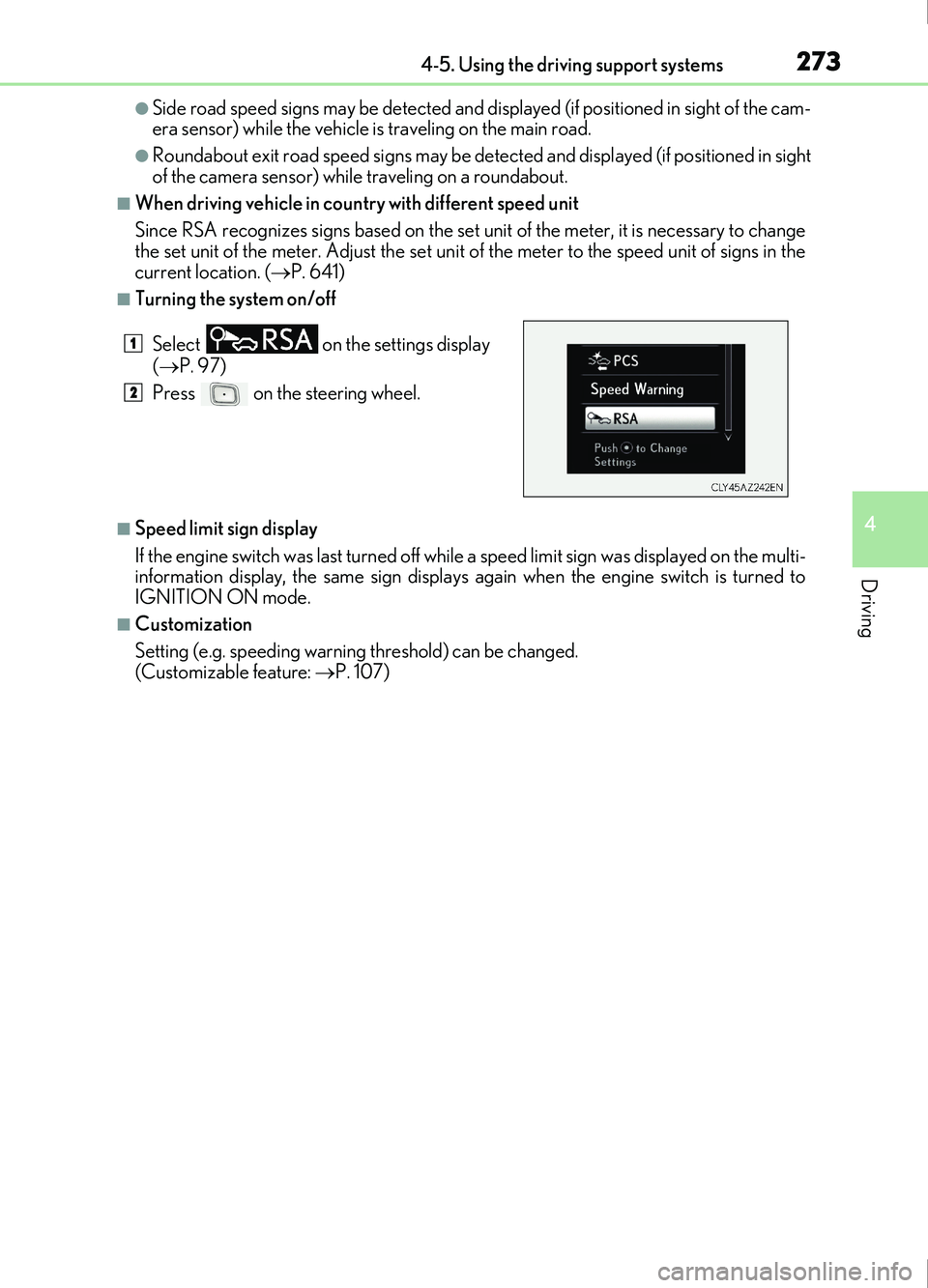
■Turning the system on/off
■Speed limit sign display
If the engine switch was last turned off while a speed limit sign was displayed on the multi-
information display, the same sign displays again when the engine switch is turned to
IGNITION ON mode.
■Customization
Setting (e.g. speeding warning threshold) can be changed.
(Customizable feature: P. 107)
Select
on the settings display
( P. 97)
Press on the steering wheel.
1
2
Page 274 of 676
2744-5. Using the driving support systems
IS200t_EE(OM53D77E)
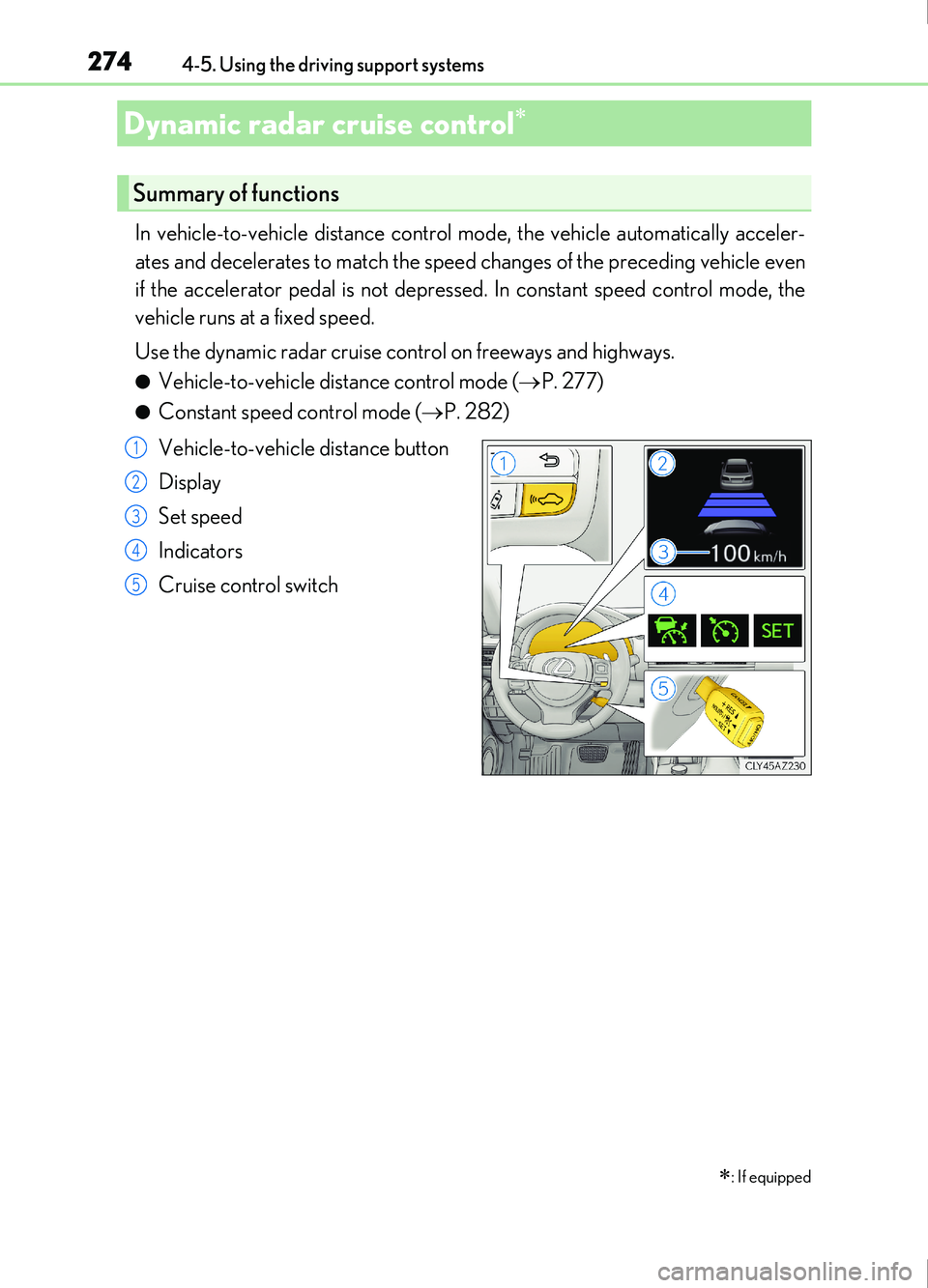
In vehicle-to-vehicle distance control mode, the vehicle automatically acceler-
ates and decelerates to match the speed changes of the preceding vehicle even
if the accelerator pedal is not depressed. In constant speed control mode, the
vehicle runs at a fixed speed.
Use the dynamic radar cruise control on freeways and highways.
●Vehicle-to-vehicle distance control mode (P. 277)
●Constant speed control mode ( P. 282)
Vehicle-to-vehicle distance button
Display
Set speed
Indicators
Cruise control switch
Dynamic radar cruise control
: If equipped
Summary of functions
1
2
3
4
5