display Lexus IS200t 2017 s Workshop Manual
[x] Cancel search | Manufacturer: LEXUS, Model Year: 2017, Model line: IS200t, Model: Lexus IS200t 2017Pages: 676, PDF Size: 149.78 MB
Page 211 of 676
2114-2. Driving procedures
4
Driving
IS200t_EE(OM53D77E)
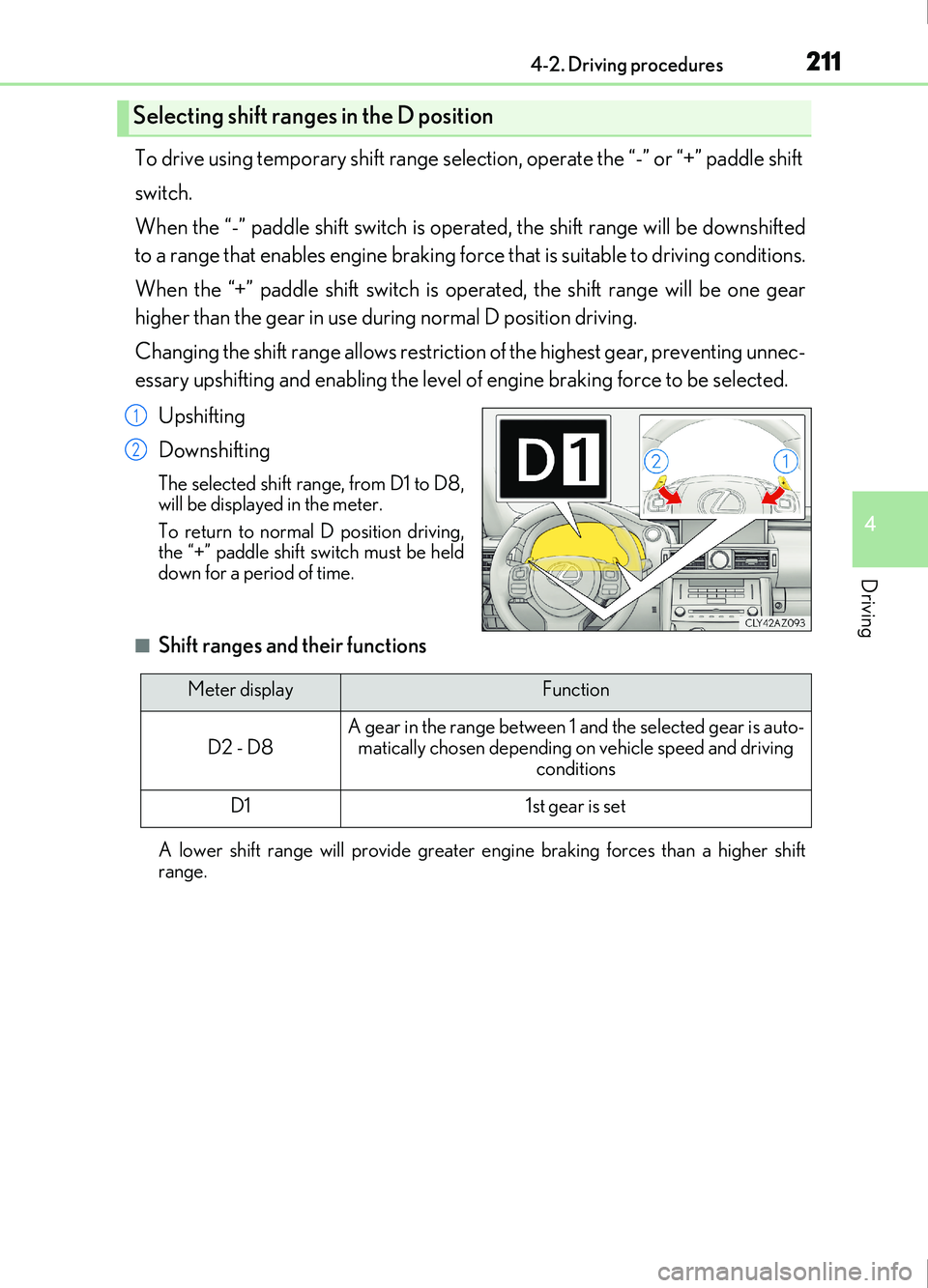
To drive using temporary shift range selection, operate the “-” or “+” paddle shift
switch.
When the “-” paddle shift switch is operated, the shift range will be downshifted
to a range that enables engine braking force that is suitable to driving conditions.
When the “+” paddle shift switch is operated, the shift range will be one gear
higher than the gear in use du ring normal D position driving.
Changing the shift range allows restrictio n of the highest gear, preventing unnec-
essary upshifting and enabling the level of engine braking force to be selected.
Upshifting
Downshifting
The selected shift range, from D1 to D8,
will be displayed in the meter.
To return to normal D position driving,
the “+” paddle shift switch must be held
down for a period of time.
■Shift ranges and their functions
A lower shift range will provide greater engi ne braking forces than a higher shift
range.
Selecting shift ranges in the D position
1
2
Meter displayFunction
D2 - D8A gear in the range between 1 and the selected gear is auto- matically chosen depending on vehicle speed and driving
conditions
D11st gear is set
Page 212 of 676
2124-2. Driving procedures
IS200t_EE(OM53D77E)
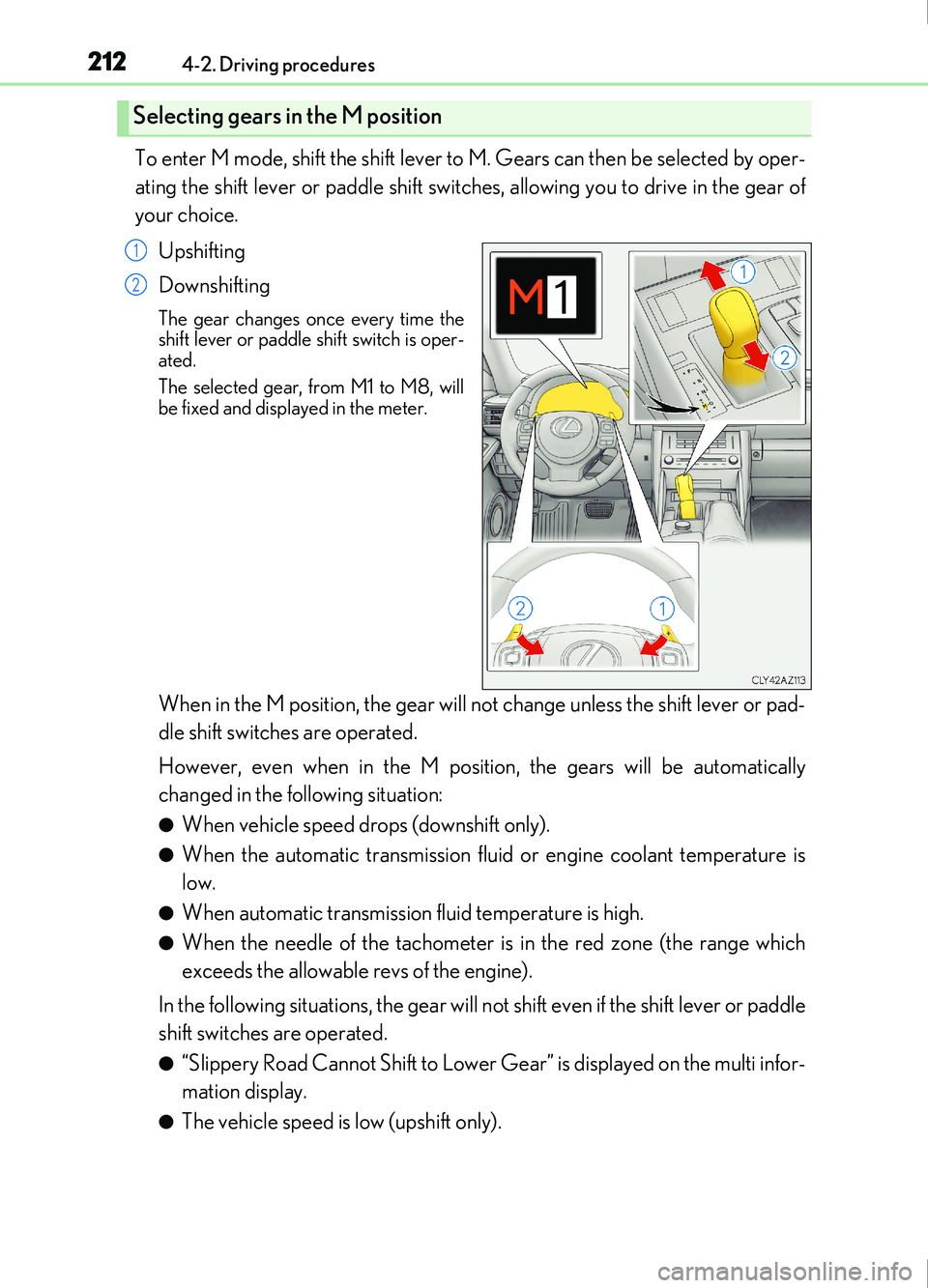
To enter M mode, shift the shift lever to M. Gears can then be selected by oper-
ating the shift lever or paddle shift switches, allowing you to drive in the gear of
your choice.Upshifting
Downshifting
The gear changes once every time the
shift lever or paddle shift switch is oper-
ated.
The selected gear, from M1 to M8, will
be fixed and displayed in the meter.
When in the M position, the gear will not change unless the shift lever or pad-
dle shift switches are operated.
However, even when in the M position, the gears will be automatically
changed in the following situation:
●When vehicle speed drops (downshift only).
●When the automatic transmission flui d or engine coolant temperature is
low.
●When automatic transmission fluid temperature is high.
●When the needle of the tachometer is in the red zone (the range which
exceeds the allowable revs of the engine).
In the following situations, the gear will not shift even if the shift lever or paddle
shift switches are operated.
●“Slippery Road Cannot Shift to Lower Gear” is displayed on the multi infor-
mation display.
●The vehicle speed is low (upshift only).
Selecting gears in the M position
1
2
Page 213 of 676
2134-2. Driving procedures
4
Driving
IS200t_EE(OM53D77E)
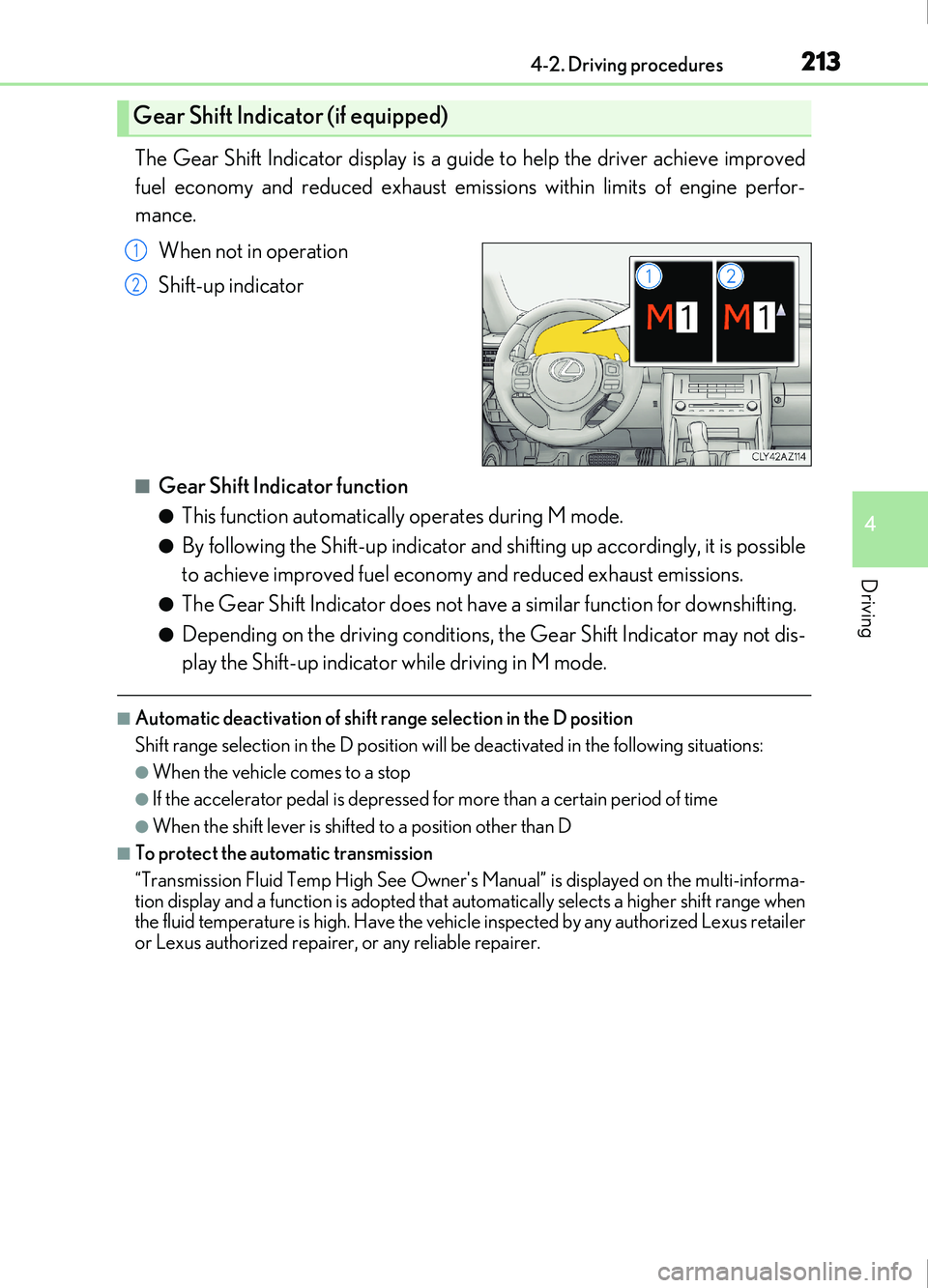
The Gear Shift Indicator display is a guide to help the driver achieve improved
fuel economy and reduced exhaust emissions within limits of engine perfor-
mance.When not in operation
Shift-up indicator
■Gear Shift Indicator function
●This function automatically operates during M mode.
●By following the Shift-up indicator and shifting up accordingly, it is possible
to achieve improved fuel economy and reduced exhaust emissions.
●The Gear Shift Indicator does not have a similar function for downshifting.
●Depending on the driving conditions, the Gear Shift Indicator may not dis-
play the Shift-up indicator while driving in M mode.
■Automatic deactivation of shift range selection in the D position
Shift range selection in the D position will be deactivated in the following situations:
●When the vehicle comes to a stop
●If the accelerator pedal is depressed for more than a certain period of time
●When the shift lever is shifted to a position other than D
■To protect the automatic transmission
“Transmission Fluid Temp High See Owner's Manual” is displayed on the multi-informa-
tion display and a function is adopted that automatically selects a higher shift range when
the fluid temperature is high. Have the vehicle inspected by any authorized Lexus retailer
or Lexus authorized repairer, or any reliable repairer.
Gear Shift Indicator (if equipped)
1
2
Page 214 of 676
2144-2. Driving procedures
IS200t_EE(OM53D77E)
■Downshifting restriction warning buzzer
To help ensure safety and driving performa nce, downshifting operation may sometimes
be restricted. In some circumstances, down shifting may not be possible even when the
shift lever or paddle shift switch is operated. (A buzzer will sound twice.)
■Snow mode automatic deactivation
Snow mode is automatically deactivated if the engine switch is turned off after driving in
snow mode.
■Gear position display on the multi-information display
When Gear positions is selected for a Drive Information screen on the multi-information
display and the shift lever is in the D or M position, the currently selected gear position
will be displayed on the multi-information di splay. (The display changes according to the
shift lever position and driving conditions.)
■When driving with cruise control or dynamic radar cruise control activated (if
equipped)
Even when performing the following actions with the intent of enabling engine braking,
engine braking will not activate because crui se control or dynamic radar cruise control
will not be canceled.
●While driving in the D position, downshifting to 7, 6, 5 or 4. ( P. 274, 286)
●When switching the drivin g mode to sport mode while driving in D position. ( P. 338)
■Restraining sudden start (Drive-Start Control)
●When the following unusual operation is performed, the engine output may be
restrained.
• When the shift lever is shifted from R to D, D to R, N to R, P to D, or P to R (D includes M) with the accelerator pedal depressed, a warning message appears on
the multi-information display. ( P. 565)
• When the accelerator pedal is depressed t oo much while the vehicle is in reverse.
■Shift lock system
The shift lock system is a system to prevent accidental operation of the shift lever in start-
ing.
The shift lever can be shifted from P only when the engine switch is in IGNITION ON
mode and the brake pedal is being depressed.
■If the shift lever cannot be shifted from P
First, check whether the brake pedal is being depressed.
If the shift lever cannot be shifted with your foot on the brake pedal, there may be a prob-
lem with the shift lock system. Have the vehicle inspected by any authorized Lexus
retailer or Lexus authorized repairer, or any reliable repairer immediately.
The following steps may be used as an emerge ncy measure to ensure that the shift lever
can be shifted.
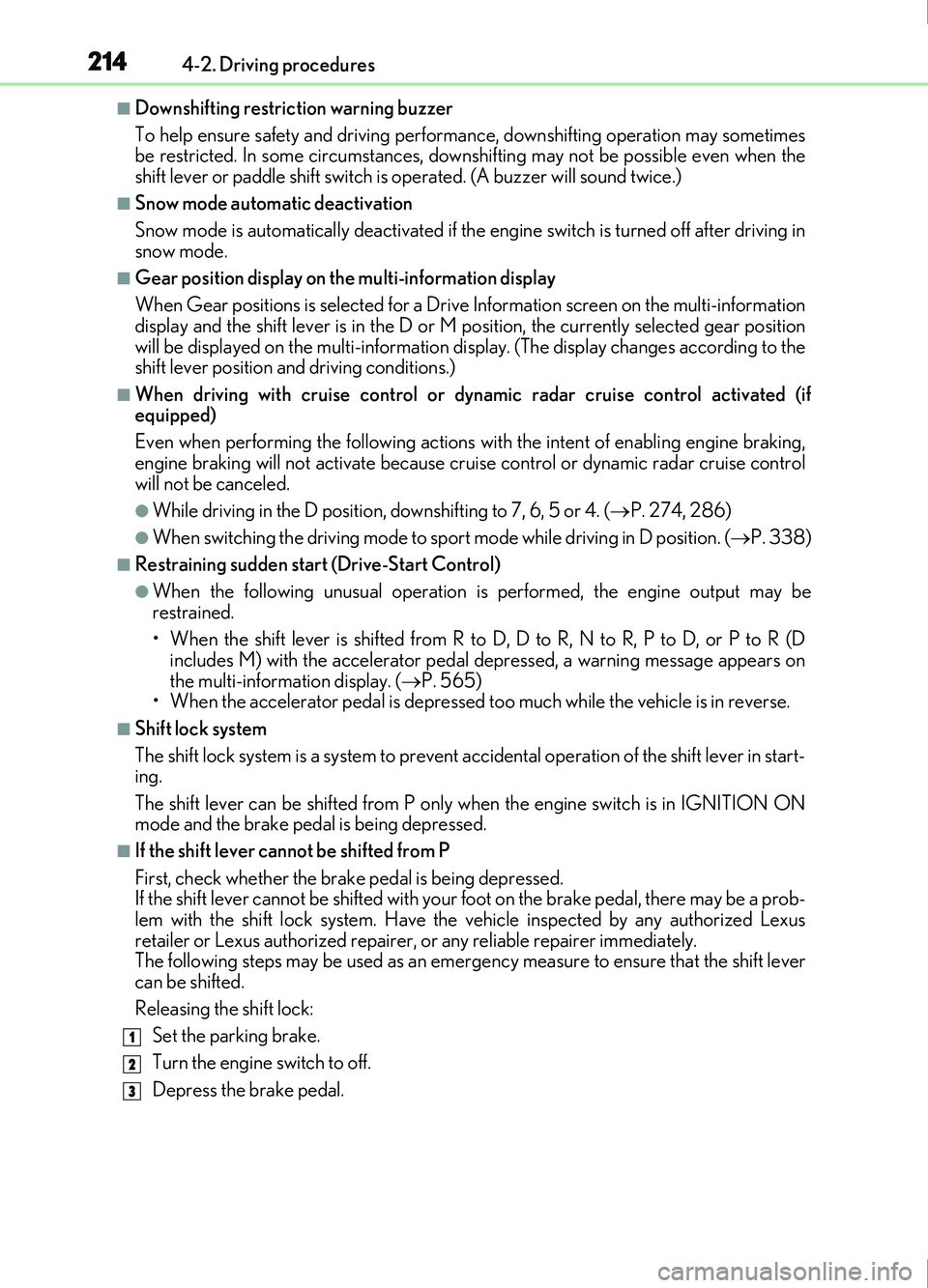
Releasing the shift lock:
Set the parking brake.
Turn the engine switch to off.
Depress the brake pedal.
1
2
3
Page 215 of 676
2154-2. Driving procedures
4
Driving
IS200t_EE(OM53D77E)
■AI-SHIFT
●The AI-SHIFT automatically selects the suitable gear according to driver performance
and driving conditions.
The AI-SHIFT automatically operates when the shift lever is in D. (Shifting the shift lever
to the M position cancels the function.)
●The G AI-SHIFT is automatically changed to a suitable gear step while running in sport
mode according to the driving operations and running conditions.
The G AI-SHIFT automatically operates when the drive mode select switch is set to
sport mode with the shift lever in the D positi on. (The function will be canceled, if the
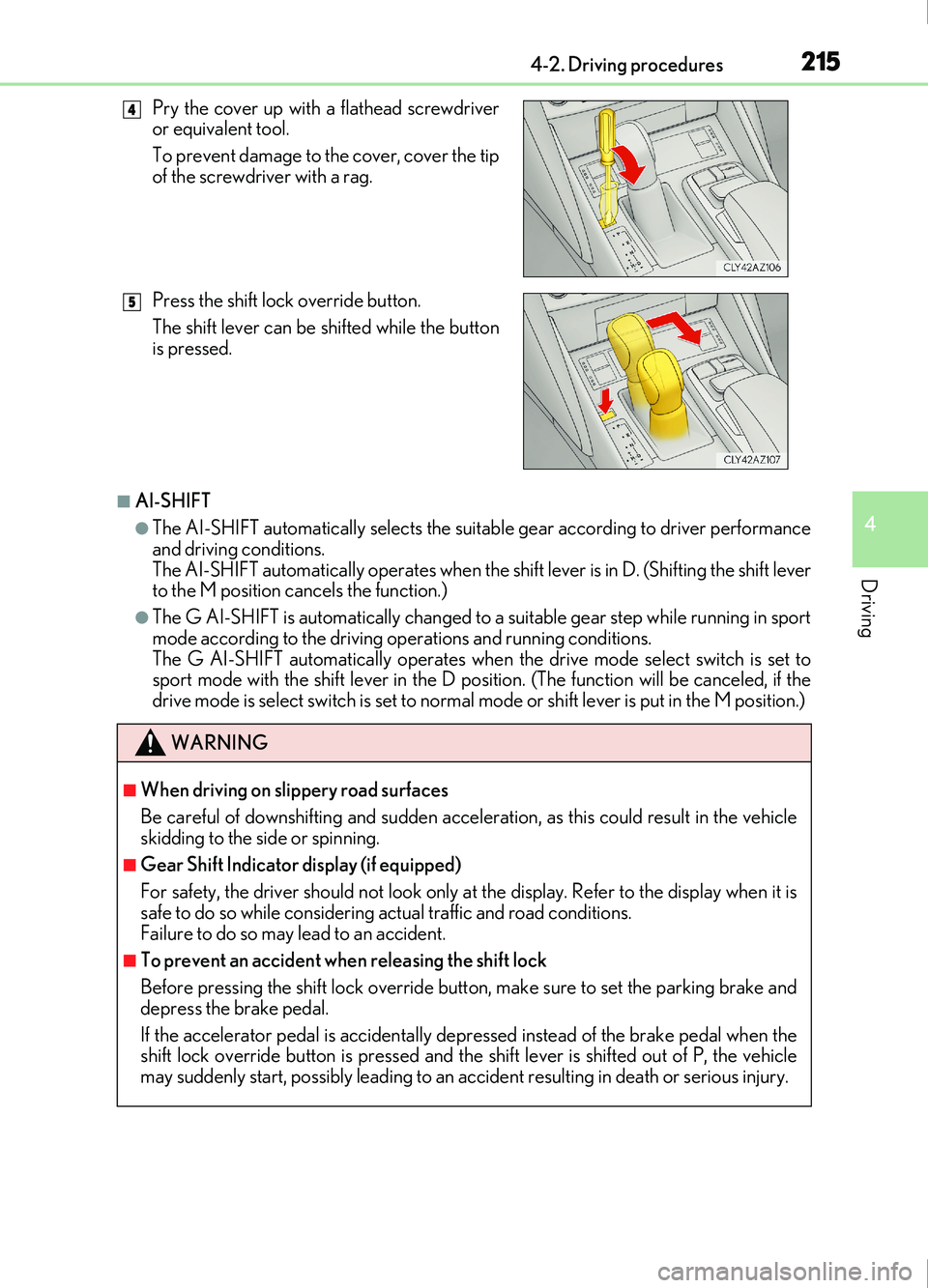
drive mode is select switch is set to normal mode or shift lever is put in the M position.) Pry the cover up with a flathead screwdriver
or equivalent tool.
To prevent damage to the cover, cover the tip
of the screwdriver with a rag.
Press the shift lock override button.
The shift lever can be shifted while the button
is pressed.
WARNING
■When driving on slippery road surfaces
Be careful of downshifting and sudden acceler ation, as this could result in the vehicle
skidding to the side or spinning.
■Gear Shift Indicator display (if equipped)
For safety, the driver should not look only at the display. Refer to the display when it is
safe to do so while considering actual traffic and road conditions.
Failure to do so may lead to an accident.
■To prevent an accident wh en releasing the shift lock
Before pressing the shift lock override butt on, make sure to set the parking brake and
depress the brake pedal.
If the accelerator pedal is accidentally depressed instead of the brake pedal when the
shift lock override button is pressed and the shift lever is shifted out of P, the vehicle
may suddenly start, possibly leading to an accident resulting in death or serious injury.
4
5
Page 246 of 676
2464-5. Using the driving support systems
IS200t_EE(OM53D77E)
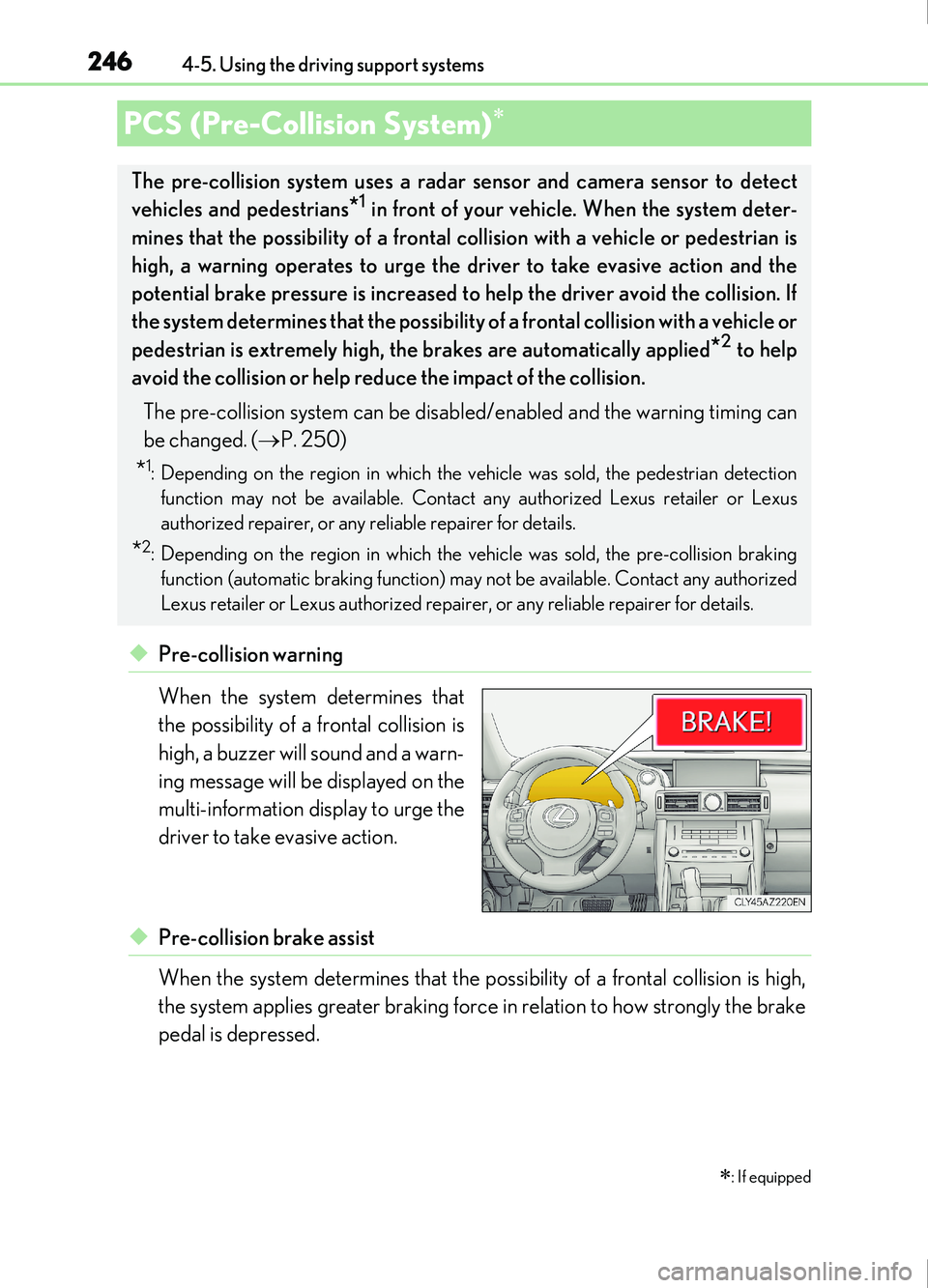
◆Pre-collision warning
When the system determines that
the possibility of a frontal collision is
high, a buzzer will sound and a warn-
ing message will be displayed on the
multi-information display to urge the
driver to take evasive action.
◆Pre-collision brake assist
When the system determines that the possibility of a frontal collision is high,
the system applies greater braking force in relation to how strongly the brake
pedal is depressed.
PCS (Pre-Collision System)
: If equipped
The pre-collision system uses a radar sensor and camera sensor to detect
vehicles and pedestrians
*1 in front of your vehicle. When the system deter-
mines that the possibility of a frontal collision with a vehicle or pedestrian is
high, a warning operates to urge the driver to take evasive action and the
potential brake pressure is increased to help the driver avoid the collision. If
the system determines that the possibility of a frontal collision with a vehicle or
pedestrian is extremely high, the brakes are automatically applied
*2 to help
avoid the collision or help reduce the impact of the collision.
The pre-collision system can be disabl ed/enabled and the warning timing can
be changed. ( P. 250)
*1: Depending on the region in which the vehicle was sold, the pedestrian detection
function may not be available. Contact any authorized Lexus retailer or Lexus
authorized repairer, or any reliable repairer for details.
*2: Depending on the region in which the vehicle was sold, the pre-collision braking
function (automatic braking function) may not be available. Contact any authorized
Lexus retailer or Lexus authorized repair er, or any reliable repairer for details.
Page 250 of 676
2504-5. Using the driving support systems
IS200t_EE(OM53D77E)
■Enabling/disabling the pre-collision system
The pre-collision system can be enabled/disabled on ( P. 107) of the
multi-information display.
The system is automatically enabled each time the engine switch is turned to IGNI-
TION ON mode.
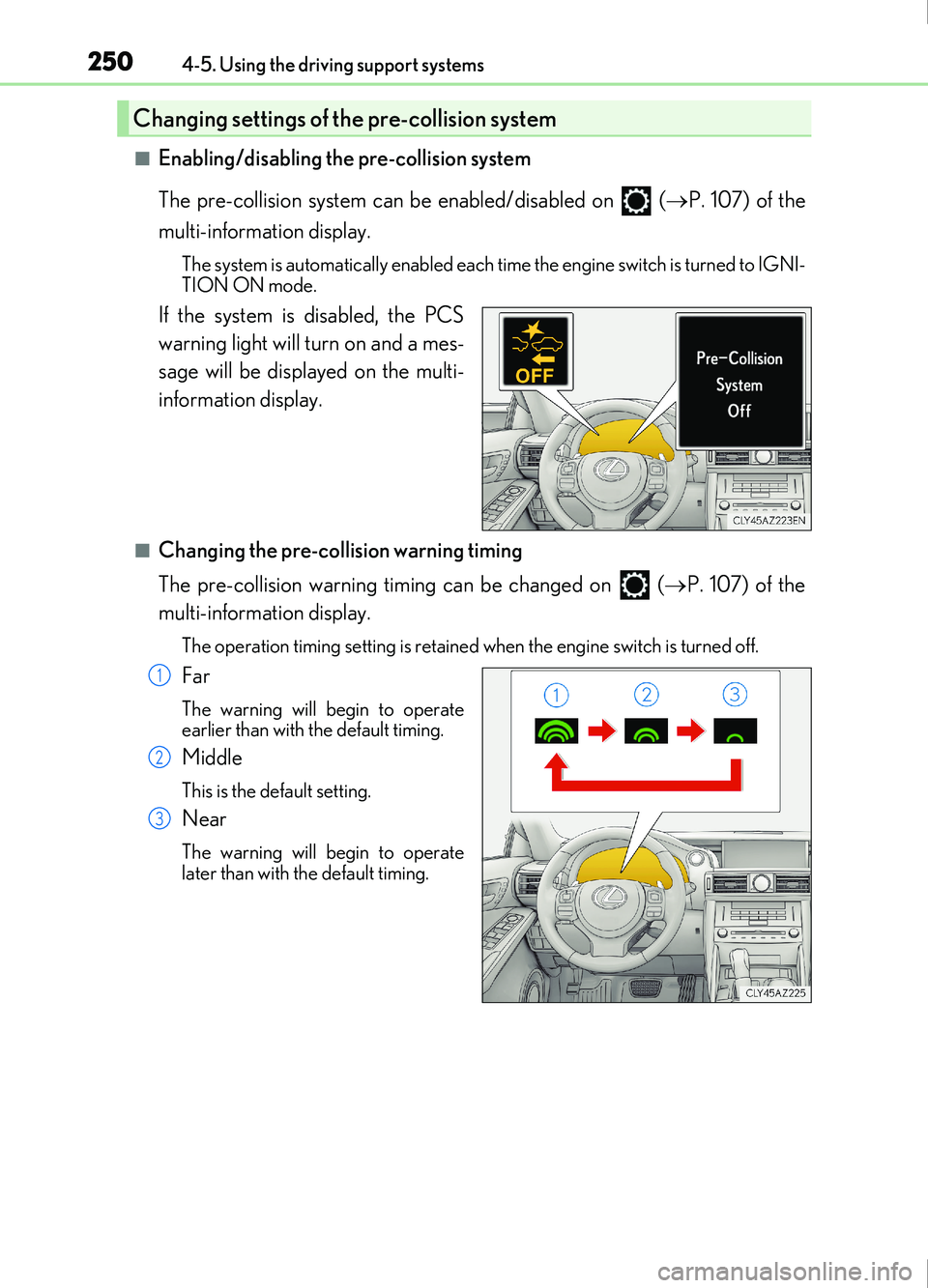
If the system is disabled, the PCS
warning light will turn on and a mes-
sage will be displayed on the multi-
information display.
■Changing the pre-collision warning timing
The pre-collision warning timing can be changed on ( P. 107) of the
multi-information display.
The operation timing setting is retained when the engine switch is turned off.
Far
The warning will begin to operate
earlier than with the default timing.
Middle
This is the default setting.
Near
The warning will begin to operate
later than with the default timing.
Changing settings of the pre-collision system
1
2
3
Page 259 of 676
2594-5. Using the driving support systems
4
Driving
IS200t_EE(OM53D77E)
■If the PCS warning light flashes and a warning message is displayed on the multi-infor-
mation display
The pre-collision system may be temporarily unavailable or there may be a malfunction
in the system.
●In the following situations, the warning light will turn off, the message will disappear and
the system will become operational when normal operating conditions return:
• When the radar sensor or camera sensor or the area around either sensor is hot, such as in the sun
• When the radar sensor or camera sensor or the area around either sensor is cold,
such as in an extremely cold environment
• When the radar sensor or front grille embl em is dirty or covered with snow, etc.
• When the part of the windshield in front of the camera sensor is fogged up or cov-
ered with condensation or ice (Defogging the windshield:
P. 458)
• If the camera sensor is obstructed, such as when the hood is open or a sticker is attached to the windshield near the camera sensor
●If the PCS warning light continues to flash or the warning message does not disappear,
the system may be malfunctioning. Have the vehicle inspected by any authorized Lexus
retailer or Lexus authorized repairer, or any reliable repairer immediately.
■If VSC is disabled
●If VSC is disabled ( P. 343), the pre-collision brake assist and pre-collision braking
functions are also disabled.
●The PCS warning light will tu rn on and “VSC Turned Off Pre-Collision Brake System
Unavailable” will be displayed on the multi-information display.
Page 260 of 676
2604-5. Using the driving support systems
IS200t_EE(OM53D77E)
When driving on highways and freeways with white (yellow) lines, this function
alerts the driver when the vehicle might depart from its lane and provides assis-
tance by operating the steering wheel to keep the vehicle in its lane.
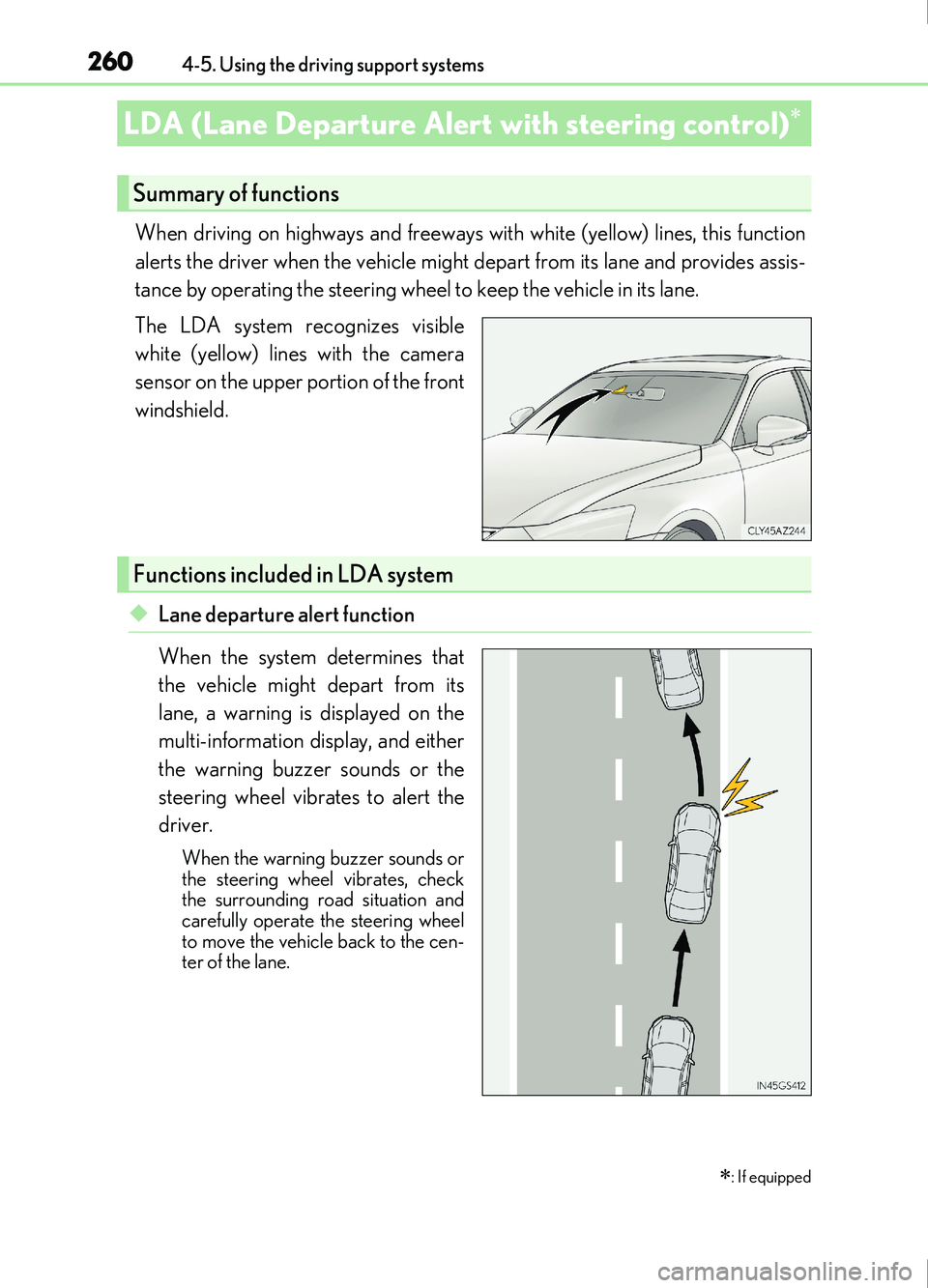
The LDA system recognizes visible
white (yellow) lines with the camera
sensor on the upper portion of the front
windshield.
◆Lane departure alert function
When the system determines that
the vehicle might depart from its
lane, a warning is displayed on the
multi-information display, and either
the warning buzzer sounds or the
steering wheel vibrates to alert the
driver.
When the warning buzzer sounds or
the steering wheel vibrates, check
the surrounding road situation and
carefully operate the steering wheel
to move the vehicle back to the cen-
ter of the lane.
LDA (Lane Departure Alert with steering control)
: If equipped
Summary of functions
Functions included in LDA system
Page 261 of 676
2614-5. Using the driving support systems
4
Driving
IS200t_EE(OM53D77E)
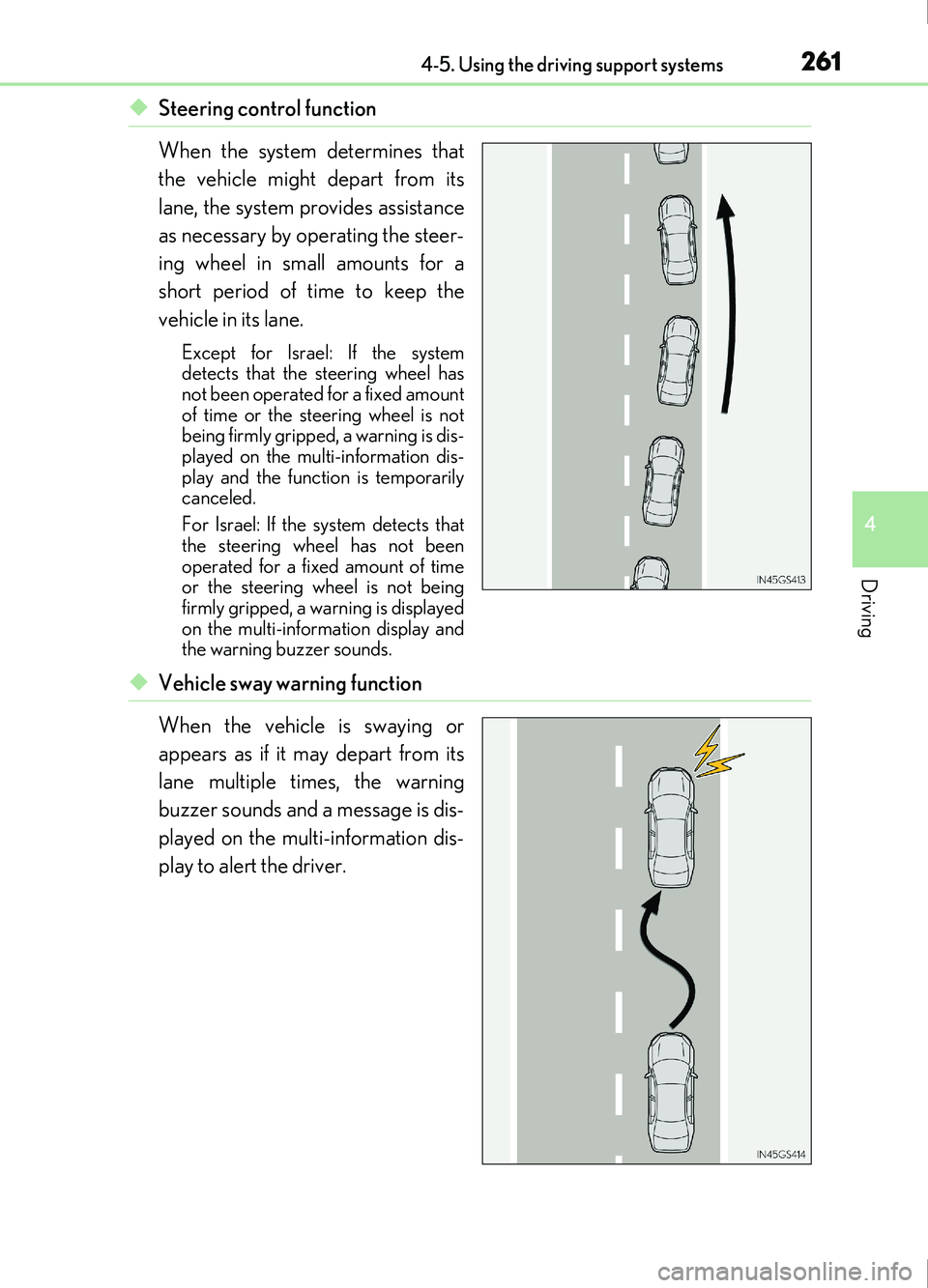
◆Steering control function
When the system determines that
the vehicle might depart from its
lane, the system provides assistance
as necessary by operating the steer-
ing wheel in small amounts for a
short period of time to keep the
vehicle in its lane.
Except for Israel: If the system
detects that the steering wheel has
not been operated for a fixed amount
of time or the steering wheel is not
being firmly gripped, a warning is dis-
played on the multi-information dis-
play and the function is temporarily
canceled.
For Israel: If the system detects that
the steering wheel has not been
operated for a fixed amount of time
or the steering wheel is not being
firmly gripped, a warning is displayed
on the multi-information display and
the warning buzzer sounds.
◆Vehicle sway warning function
When the vehicle is swaying or
appears as if it may depart from its
lane multiple times, the warning
buzzer sounds and a message is dis-
played on the multi-information dis-
play to alert the driver.