driving light Lexus IS200t 2017 s User Guide
[x] Cancel search | Manufacturer: LEXUS, Model Year: 2017, Model line: IS200t, Model: Lexus IS200t 2017Pages: 676, PDF Size: 149.78 MB
Page 91 of 676

912. Instrument cluster
2
Instrument cluster
IS200t_EE(OM53D77E)
*1: These lights turn on when the engine switch is turned to IGNITION ON mode toindicate that a system check is being performed. They will turn off after the engine is
started, or after a few seconds. There may be a malfunction in a system if a light does
not come on, or turn off. Have the vehicle inspected by any authorized Lexus retailer
or Lexus authorized repairer, or any reliable repairer.
*2: The light flashes to indicate that the system is operating.
*3: The light comes on when the system is turned off.
*4: In order to confirm operation, the BSM outside rear view mirror indicators illuminate in the following situations:
• When the engine switch is turned to IGNITION ON mode while the BSM main switch is set to ON.
• When the BSM main switch is set to ON while the engine switch is in IGNITION
ON mode.
If the system is functioning correctly, the BSM outside rear view mirror indicators will
turn off after a few seconds.
If the BSM outside rear view mirror indicators do not illuminate or do not turn off,
there may be a malfunction in the system.
If this occurs, have the vehicle inspected by any authorized Lexus retailer or Lexus
authorized repairer, or any reliable repairer.
*4, 5
(if equipped)
BSM (Blind Spot Monitor)
outside rear view mirror
indicators ( P. 324)*8Eco drive mode indicator
( P. 338)
*6Security indicator
( P. 75, 81)*9Eco drive mode indicator
( P. 338)
*7Low outside temperature
indicator ( P. 93)*8“SPORT” indicator
( P. 338)
*1Eco Driving Indicator Light
( P. 113)*9“SPORT” indicator
( P. 338)
*1
(if equipped)
Stop & Start indicator
( P. 290)Snow mode indicator
( P. 210)
*1, 3
(if equipped)
Stop & Start cancel
indicator ( P. 292)
*1, 6“PASSENGER AIR
BAG” indicator
( P. 51)
Page 96 of 676
962. Instrument cluster
IS200t_EE(OM53D77E)
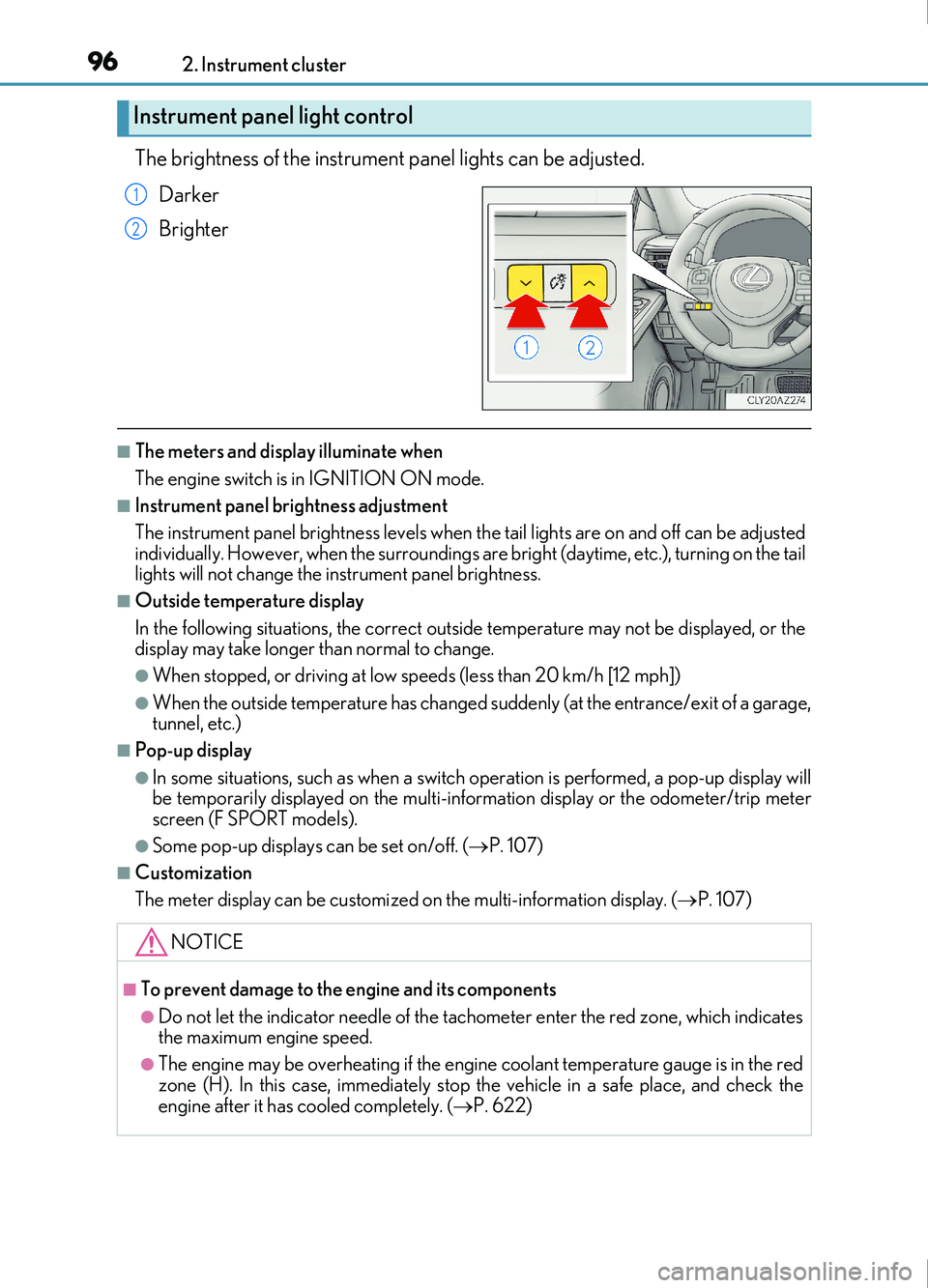
The brightness of the instrument panel lights can be adjusted.Darker
Brighter
■The meters and display illuminate when
The engine switch is in IGNITION ON mode.
■Instrument panel brightness adjustment
The instrument panel brightness levels when th e tail lights are on and off can be adjusted
individually. However, when the surroundings ar e bright (daytime, etc.), turning on the tail
lights will not change the in strument panel brightness.
■Outside temperature display
In the following situations, the correct outside temperature may not be displayed, or the
display may take longer than normal to change.
●When stopped, or driving at low sp eeds (less than 20 km/h [12 mph])
●When the outside temperature has changed suddenly (at the entrance/exit of a garage,
tunnel, etc.)
■Pop-up display
●In some situations, such as when a switch operation is performed, a pop-up display will
be temporarily displayed on the multi-information display or the odometer/trip meter
screen (F SPORT models).
●Some pop-up displays can be set on/off. ( P. 107)
■Customization
The meter display can be customized on the multi-information display. (P. 107)
Instrument panel light control
1
2
NOTICE
■To prevent damage to the engine and its components
●Do not let the indicator needle of the tachometer enter the red zone, which indicates
the maximum engine speed.
●The engine may be overheating if the engine coolant temperature gauge is in the red
zone (H). In this case, immediately stop the vehicle in a safe place, and check the
engine after it has cooled completely. ( P. 622)
Page 110 of 676
1102. Instrument cluster
IS200t_EE(OM53D77E)
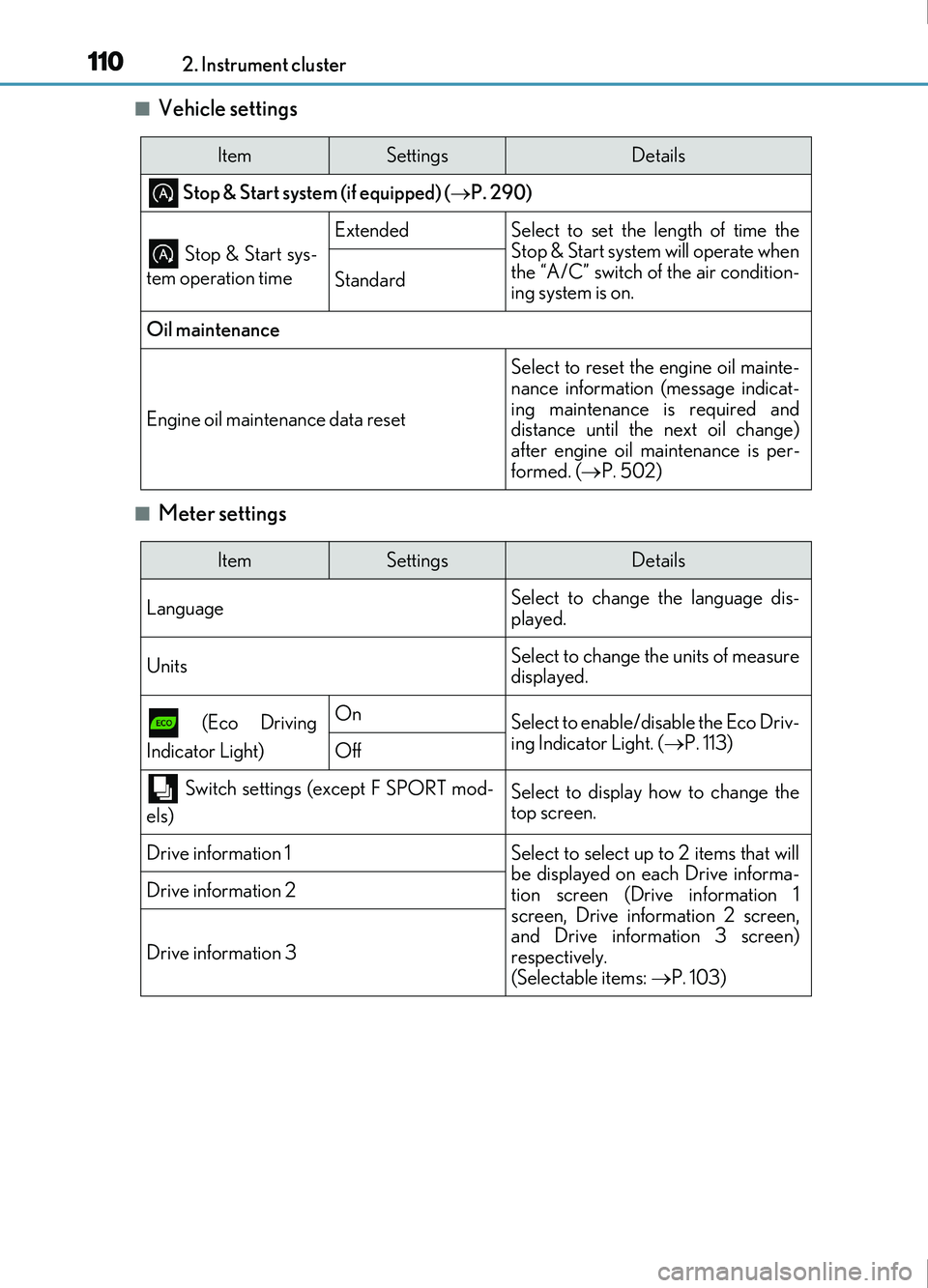
■Vehicle settings
■Meter settings
ItemSettingsDetails
Stop & Start system (if equipped) (P. 290)
Stop & Start sys-
tem operation time
ExtendedSelect to set the length of time the
Stop & Start system will operate when
the “A/C” switch of the air condition-
ing system is on.
Standard
Oil maintenance
Engine oil maintenance data reset
Select to reset the engine oil mainte-
nance information (message indicat-
ing maintenance is required and
distance until the next oil change)
after engine oil maintenance is per-
formed. ( P. 502)
ItemSettingsDetails
Language Select to change the language dis-
played.
UnitsSelect to change the units of measure
displayed.
(Eco Driving
Indicator Light)OnSelect to enable/disable the Eco Driv-
ing Indicator Light. ( P. 113)
Off
Switch settings (except F SPORT mod-
els)Select to display how to change the
top screen.
Drive information 1Select to select up to 2 items that will
be displayed on each Drive informa-
tion screen (Drive information 1
screen, Drive information 2 screen,
and Drive information 3 screen)
respectively.
(Selectable items: P. 103)
Drive information 2
Drive information 3
Page 113 of 676
1132. Instrument cluster
2
Instrument cluster
IS200t_EE(OM53D77E)
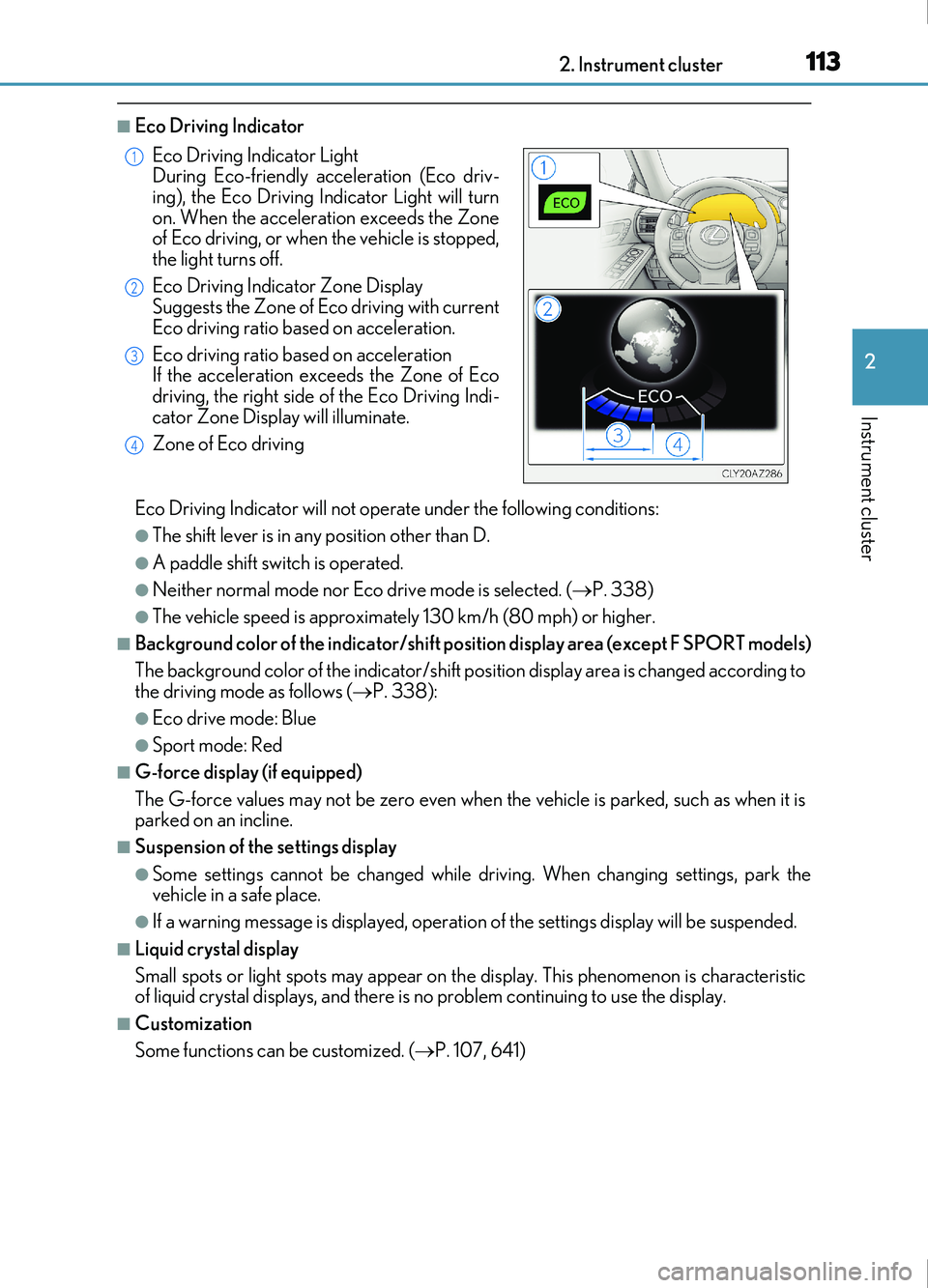
■Eco Driving Indicator
Eco Driving Indicator will not operate under the following conditions:
●The shift lever is in any position other than D.
●A paddle shift switch is operated.
●Neither normal mode nor Eco drive mode is selected. (P. 338)
●The vehicle speed is approximately 130 km/h (80 mph) or higher.
■Background color of the indicator/shift position display area (except F SPORT models)
The background color of the indicator/shift position display area is changed according to
the driving mode as follows ( P. 338):
●Eco drive mode: Blue
●Sport mode: Red
■G-force display (if equipped)
The G-force values may not be zero even when the vehicle is parked, such as when it is
parked on an incline.
■Suspension of the settings display
●Some settings cannot be changed while driving. When changing settings, park the
vehicle in a safe place.
●If a warning message is displayed, operation of the settings display will be suspended.
■Liquid crystal display
Small spots or light spots may appear on the display. This phenomenon is characteristic
of liquid crystal displays, and there is no problem continuing to use the display.
■Customization
Some functions can be customized. (P. 107, 641)
Eco Driving Indicator Light
During Eco-friendly acceleration (Eco driv-
ing), the Eco Driving In
dicator Light will turn
on. When the acceleration exceeds the Zone
of Eco driving, or when the vehicle is stopped,
the light turns off.
Eco Driving Indicator Zone Display
Suggests the Zone of Eco driving with current
Eco driving ratio based on acceleration.
Eco driving ratio based on acceleration
If the acceleration exceeds the Zone of Eco
driving, the right side of the Eco Driving Indi-
cator Zone Display will illuminate.
Zone of Eco driving
1
2
3
4
Page 160 of 676
1603-3. Adjusting the seats
IS200t_EE(OM53D77E)
WARNING
Observe the following precautions. Failure to do so may result in death or serious injury.
■When folding the rear seatbacks down
●Do not fold the seatbacks down while driving.
●Stop the vehicle on level ground, set the parking brake and shift the shift lever to P.
●Do not allow anyone to sit on a folded seatback or in the trunk while driving.
●Do not allow children to enter the trunk.
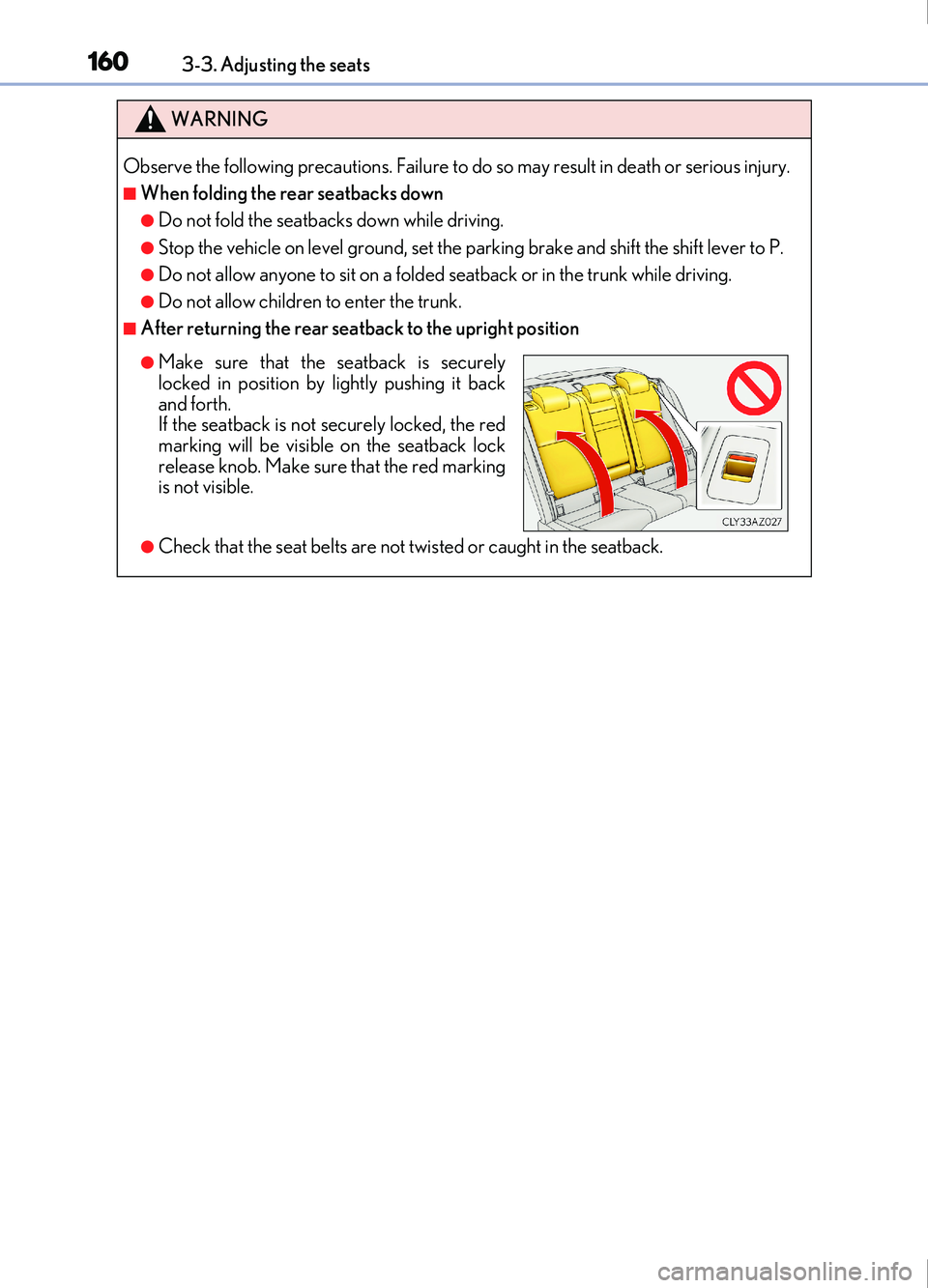
■After returning the rear seatback to the upright position
●Check that the seat belts are not twisted or caught in the seatback.
●Make sure that the seatback is securely
locked in position by lightly pushing it back
and forth.
If the seatback is not securely locked, the red
marking will be visible on the seatback lock
release knob. Make sure that the red marking
is not visible.
Page 163 of 676
1633-3. Adjusting the seats
3
Operation of each component
IS200t_EE(OM53D77E)
■To stop the position recall operation part-way through
Perform any of the following operations:
●Press the “SET” button.
●Press button “1”, “2” or “3”.
●Operate any of the seat adjustment switches (only cancels seat position recall).
●Operate the tilt and telescopic steering control switch (only cancels steering wheel
position recall).
■Seat positions that can be memorized ( P. 157)
The adjusted positions other than the position adjusted by lumbar support switch can be
memorized.
■Operating the driving position memory after turning the engine switch off
Recorded seat positions can be activated up to 180 seconds after the driver’s door is
opened and another 60 seconds after it is closed again. Recorded steering wheel posi-
tion can be activated by pressing the engine switch.
■In order to correctly use the driving position memory function
If a seat position is already in the furthest possible position and the seat is operated in the
same direction, the recorded position may be slightly different when it is recalled.
Page 164 of 676
1643-3. Adjusting the seats
IS200t_EE(OM53D77E)
Each electronic key (including a card key) can be registered to recall your pre-
ferred driving position.
■Registering procedure
Record your driving position to button “1”, “2” or “3” before performing the
following:
Carry only the key you want to register, and then close the driver’s door. If 2 or
more keys are in the vehicle, the driving position cannot be recorded properly.
Check that the shift lever is in P.
Turn the engine switch to IGNITION ON mode.
Recall the driving position that you want to record.
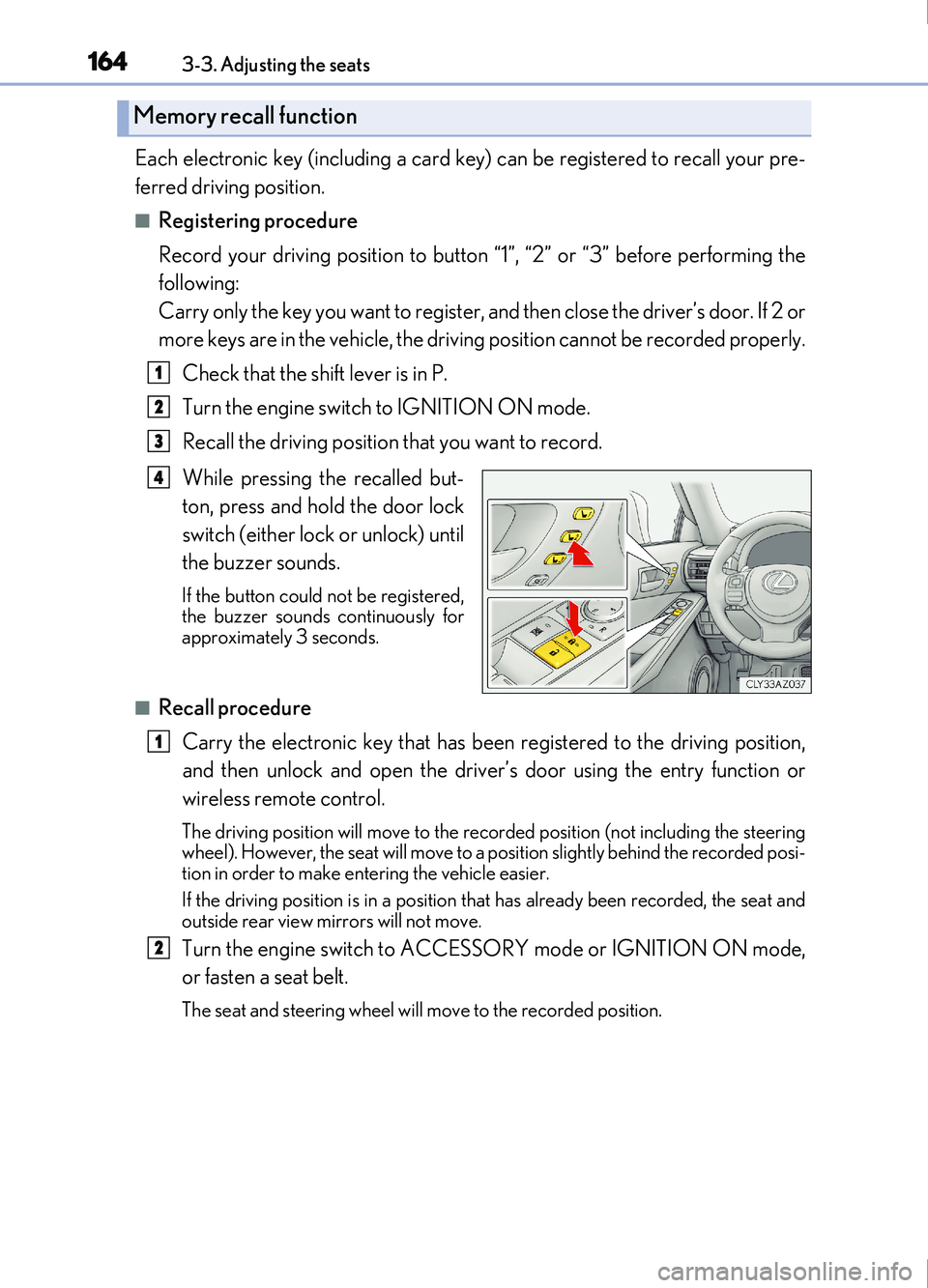
While pressing the recalled but-
ton, press and hold the door lock
switch (either lock or unlock) until
the buzzer sounds.
If the button could not be registered,
the buzzer sounds continuously for
approximately 3 seconds.
■Recall procedure
Carry the electronic key that has been registered to the driving position,
and then unlock and open the driver ’s door using the entry function or
wireless remote control.
The driving position will move to the recorded positi on (not including the steering
wheel). However, the seat will move to a posi tion slightly behind the recorded posi-
tion in order to make entering the vehicle easier.
If the driving position is in a position that has already been recorded, the seat and
outside rear view mirrors will not move.
Turn the engine switch to ACCESSORY mode or IGNITION ON mode,
or fasten a seat belt.
The seat and steering wheel will move to the recorded position.
Memory recall function
1
2
3
4
1
2
Page 171 of 676

1713-4. Adjusting the steering wheel and mirrors
3
Operation of each component
IS200t_EE(OM53D77E)
The height of the rear view mirror can be adjusted to suit your driving posture.
Adjust the height of the rear view mir-
ror by moving it up and down.
◆Manual anti-glare inside rear view mirror
Reflected light from the headlights of vehicles behind can be reduced by
operating the lever.Normal position
Anti-glare position
Inside rear view mirror
The rear view mirror’s position can be adjusted to enable sufficient confirma-
tion of the rear view.
Adjusting the height of rear view mirror
Anti-glare function
1
2
Page 172 of 676

1723-4. Adjusting the steering wheel and mirrors
IS200t_EE(OM53D77E)
◆Auto anti-glare inside rear view mirror
Responding to the level of brightness of the headlights of vehicles behind, the
reflected light is automatically reduced.
Changing automatic anti-glare func-
tion mode
ON/OFF
When the automatic anti-glare func-
tion is in ON mode, the indicator illu-
minates.
The function will set to ON mode
each time the engine switch is turned
to IGNITION ON mode.
Pressing the button turns the function
to OFF mode. (The indicator also
turns off.)
■To prevent sensor error (vehicles with auto anti-glare inside rear view mirror)
Indicator
To ensure that the sensors operate properly, do
not touch or cover them.
WARNING
Do not adjust the position of the mirror while driving.
Doing so may lead to mishandling of the vehicle and cause an accident, resulting in
death or serious injury.
Page 175 of 676
1753-4. Adjusting the steering wheel and mirrors
3
Operation of each component
IS200t_EE(OM53D77E)
When either “L” or “R” of the mirror select switch is selected, the outside rear
view mirrors will automatically angle downwards when the vehicle is reversing in
order to give a better view of the ground.
To disable this function, select neither “L” nor “R”.
■Adjusting the mirror angle when the vehicle is reversing
With the shift lever in R, adjust the mirror angle at a desired position.
The adjusted angle will be memorized and the mirror will automatically tilt to
the memorized angle whenever the shift lever is shifted to R from next time.
The memorized downward tilt position of the mirror is linked to the normal position
(angle adjusted with the shif t lever in other than R). Therefore, if the normal posi-
tion is changed after adjustment, th e tilt position will also change.
When the normal position is changed, readjust the angle in reversing.
■Mirror angle can be adjusted when
The engine switch is in ACCESSORY or IGNITION ON mode.
■When disconnecting and reconnecting battery terminals
The automatic folding/extending mirror function will return to off as default. To turn the
function on, press the switch again to select on.
■When the mirrors are fogged up
The outside rear view mirrors can be clea red using the mirror defoggers. Turn on the
rear window defogger to turn on the outside rear view mirror defoggers. ( P. 458)
■Automatic adjustment of the mirror angle (if equipped)
A desired mirror face angle can be entered to memory and recalled automatically by the
driving position memory. ( P. 161)
■Auto anti-glare function (if equipped)
When the anti-glare inside rear view mirror is set to automatic mode, the outside rear
view mirrors will activate in co njunction with the anti-glare inside rear view mirror to
reduce reflected light. ( P. 172)
■Using automatic mode in cold weather
When automatic mode is used in cold weat her, the door mirror could freeze up and
automatic stowing and return may not be possible. In this case, remove any ice and snow
from the door mirror, then either operate the mirror using manual mode or move the mir-
ror by hand.
■Customization
The automatic mirror folding and extending operation can be changed.
(Customizable features: P. 641)
Linked mirror function when reversing (if equipped)