ignition Lexus IS200t 2017 s User Guide
[x] Cancel search | Manufacturer: LEXUS, Model Year: 2017, Model line: IS200t, Model: Lexus IS200t 2017Pages: 676, PDF Size: 149.78 MB
Page 164 of 676
1643-3. Adjusting the seats
IS200t_EE(OM53D77E)
Each electronic key (including a card key) can be registered to recall your pre-
ferred driving position.
■Registering procedure
Record your driving position to button “1”, “2” or “3” before performing the
following:
Carry only the key you want to register, and then close the driver’s door. If 2 or
more keys are in the vehicle, the driving position cannot be recorded properly.
Check that the shift lever is in P.
Turn the engine switch to IGNITION ON mode.
Recall the driving position that you want to record.
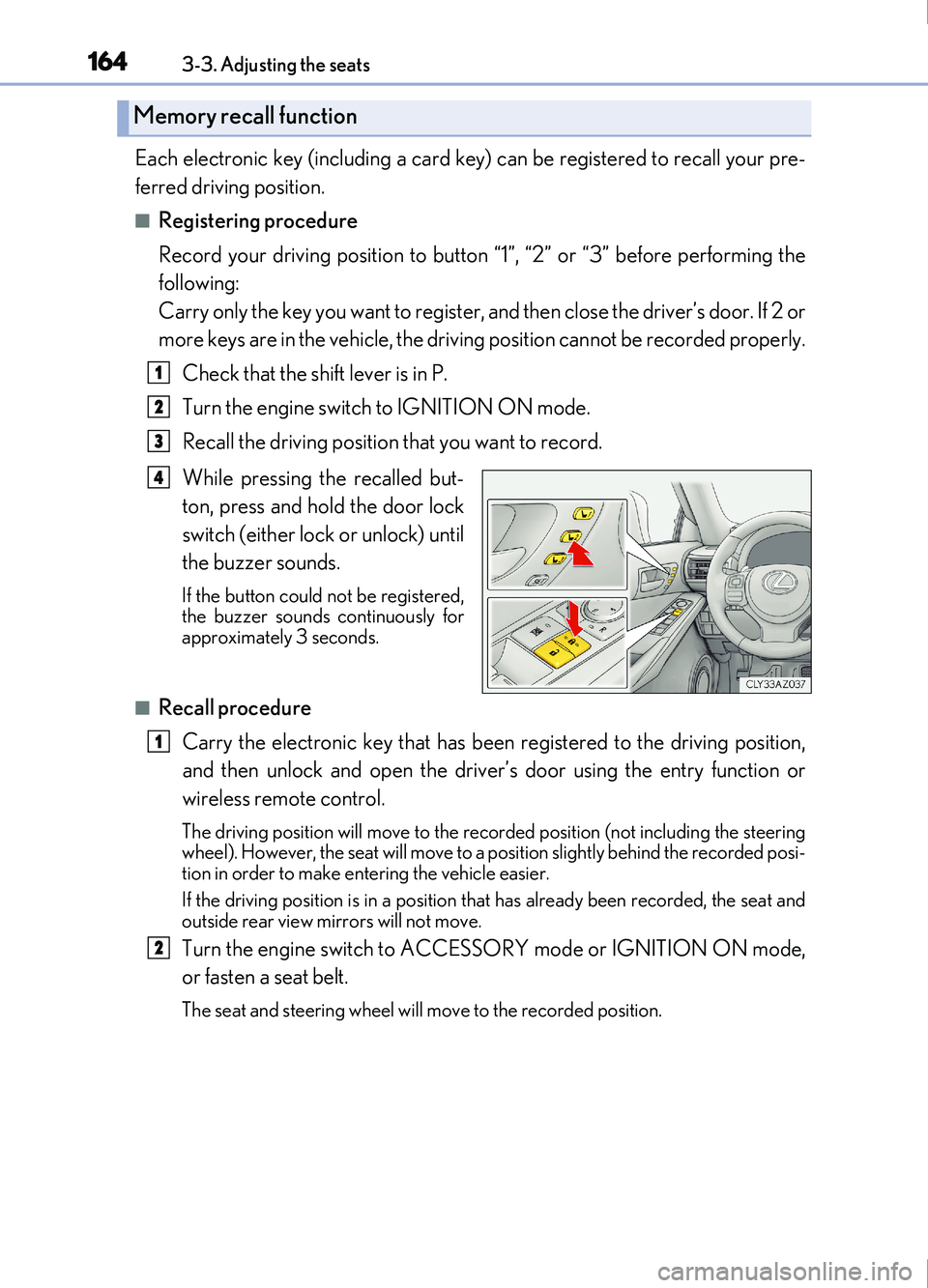
While pressing the recalled but-
ton, press and hold the door lock
switch (either lock or unlock) until
the buzzer sounds.
If the button could not be registered,
the buzzer sounds continuously for
approximately 3 seconds.
■Recall procedure
Carry the electronic key that has been registered to the driving position,
and then unlock and open the driver ’s door using the entry function or
wireless remote control.
The driving position will move to the recorded positi on (not including the steering
wheel). However, the seat will move to a posi tion slightly behind the recorded posi-
tion in order to make entering the vehicle easier.
If the driving position is in a position that has already been recorded, the seat and
outside rear view mirrors will not move.
Turn the engine switch to ACCESSORY mode or IGNITION ON mode,
or fasten a seat belt.
The seat and steering wheel will move to the recorded position.
Memory recall function
1
2
3
4
1
2
Page 165 of 676
1653-3. Adjusting the seats
3
Operation of each component
IS200t_EE(OM53D77E)
■Cancelation procedure
Carry only the key you want to cancel and then close the driver’s door. If 2 or
more keys are in the vehicle, the driving position cannot be canceled properly.Turn the engine switch to IGNITION ON mode.
While pressing the “SET” button, press and hold the door lock switch
(either lock or unlock) until the buzzer sounds twice.
If the button could not be canceled, the buzzer sounds continuously for approxi-
mately 3 seconds.
■Recalling the driving position using the memory recall function
●Different driving positions can be registered for each electronic key. Therefore, the
driving position that is recalled may be different depending on the key being carried.
●If a door other than the driver’s door is unlocked with the smart entry & start system, the
driving position cannot be reca lled. In this case, press the driving position button which
has been set.
■Customization
The unlock door settings of the memor y recall function can be customized.
(Customizable features: P. 641)
WARNING
■Seat adjustment caution
Take care during seat adjustment so that the seat does not strike the rear passenger or
squeeze your body against the steering wheel.
1
2
Page 170 of 676
1703-4. Adjusting the steering wheel and mirrors
IS200t_EE(OM53D77E)
■The steering wheel can be adjusted when
The engine switch is in ACCESSORY or IGNITION ON mode
*.
*: If the driver’s seat belt is fastened, the steering wheel can be adjusted regardless of
engine switch mode.
■Automatic adjustment of the steering position (if equipped)
A desired steering position can be entered to memory and recalled automatically by the
driving position memory system. ( P. 161)
■Power easy access system (if equipped)
The steering wheel and driver’s seat move in accordance with engine switch mode and
the driver’s seat belt condition. ( P. 161)
WARNING
■Caution while driving
Do not adjust the steering wheel while driving.
Doing so may cause the driver to mishandle the vehicle and cause an accident, result-
ing in death or serious injury.
Page 172 of 676

1723-4. Adjusting the steering wheel and mirrors
IS200t_EE(OM53D77E)
◆Auto anti-glare inside rear view mirror
Responding to the level of brightness of the headlights of vehicles behind, the
reflected light is automatically reduced.
Changing automatic anti-glare func-
tion mode
ON/OFF
When the automatic anti-glare func-
tion is in ON mode, the indicator illu-
minates.
The function will set to ON mode
each time the engine switch is turned
to IGNITION ON mode.
Pressing the button turns the function
to OFF mode. (The indicator also
turns off.)
■To prevent sensor error (vehicles with auto anti-glare inside rear view mirror)
Indicator
To ensure that the sensors operate properly, do
not touch or cover them.
WARNING
Do not adjust the position of the mirror while driving.
Doing so may lead to mishandling of the vehicle and cause an accident, resulting in
death or serious injury.
Page 175 of 676
1753-4. Adjusting the steering wheel and mirrors
3
Operation of each component
IS200t_EE(OM53D77E)
When either “L” or “R” of the mirror select switch is selected, the outside rear
view mirrors will automatically angle downwards when the vehicle is reversing in
order to give a better view of the ground.
To disable this function, select neither “L” nor “R”.
■Adjusting the mirror angle when the vehicle is reversing
With the shift lever in R, adjust the mirror angle at a desired position.
The adjusted angle will be memorized and the mirror will automatically tilt to
the memorized angle whenever the shift lever is shifted to R from next time.
The memorized downward tilt position of the mirror is linked to the normal position
(angle adjusted with the shif t lever in other than R). Therefore, if the normal posi-
tion is changed after adjustment, th e tilt position will also change.
When the normal position is changed, readjust the angle in reversing.
■Mirror angle can be adjusted when
The engine switch is in ACCESSORY or IGNITION ON mode.
■When disconnecting and reconnecting battery terminals
The automatic folding/extending mirror function will return to off as default. To turn the
function on, press the switch again to select on.
■When the mirrors are fogged up
The outside rear view mirrors can be clea red using the mirror defoggers. Turn on the
rear window defogger to turn on the outside rear view mirror defoggers. ( P. 458)
■Automatic adjustment of the mirror angle (if equipped)
A desired mirror face angle can be entered to memory and recalled automatically by the
driving position memory. ( P. 161)
■Auto anti-glare function (if equipped)
When the anti-glare inside rear view mirror is set to automatic mode, the outside rear
view mirrors will activate in co njunction with the anti-glare inside rear view mirror to
reduce reflected light. ( P. 172)
■Using automatic mode in cold weather
When automatic mode is used in cold weat her, the door mirror could freeze up and
automatic stowing and return may not be possible. In this case, remove any ice and snow
from the door mirror, then either operate the mirror using manual mode or move the mir-
ror by hand.
■Customization
The automatic mirror folding and extending operation can be changed.
(Customizable features: P. 641)
Linked mirror function when reversing (if equipped)
Page 178 of 676
1783-5. Opening, closing the windows and moon roof
IS200t_EE(OM53D77E)
■The power windows can be operated when
The engine switch is in IGNITION ON mode.
■Operating the power windows after turning the engine off
The power windows can be operated for approximately 45 seconds after the engine
switch is turned to ACCESSORY mode or turned off. They cannot, however, be oper-
ated once either front door is opened.
■Jam protection function
If an object becomes jammed between the window and the window frame while the win-
dow is closing, window movement is stop ped and the window is opened slightly.
■Catch protection function
If an object becomes caught between the door and window while the window is opening,
window movement is stopped.
■When the window cannot be opened or closed
When the jam protection function or catch protection function operates unusually and
the door window cannot be opened or closed , perform the following operations with the
power window switch of that door.
●Stop the vehicle. With the engine switch in IGNITION ON mode, within 4 seconds of
the jam protection function or catch protecti on function activating, continuously oper-
ate the power window switch in the one-touch closing direction or one-touch opening
direction so that the door window can be opened and closed.
●If the door window cannot be opened and closed even when performing the above
operations, perform the following procedure for function initialization.
Turn the engine switch to IGNITION ON mode.
Pull and hold the power window switch in the one-touch closing direction and com-
pletely close the door window.
Release the power window switch for a moment, resume pulling the switch in the
one-touch closing direction, and hold it there for approximately 6 seconds or more.
Press and hold the power window switch in the one-touch opening direction. After
the door window is completely opened, cont inue holding the switch for an additional
1 second or more.
Release the power window switch for a moment, resume pushing the switch in the
one-touch opening direction, and hold it there for approximately 4 seconds or
more.
Pull and hold the power window switch in the one-touch closing direction again.
After the door window is completely clos ed, continue holding the switch for a fur-
ther 1 second or more.
If you release the switch while the window is moving, start again from the beginning.
If the window reverses and cannot be fully closed or opened, have the vehicle inspected
by any authorized Lexus retailer or Lexus authorized repairer, or any reliable repairer.
1
2
3
4
5
6
Page 182 of 676
1823-5. Opening, closing the windows and moon roof
IS200t_EE(OM53D77E)
■The moon roof can be operated when
The engine switch is in IGNITION ON mode.
■Operating the moon roof after turning the engine off
The moon roof can be operated for approximately 45 seconds after the engine switch is
turned to ACCESSORY mode or turned off. It cannot, however, be operated once either
front door is opened.
■Jam protection function
If an object is detected between the moon roof and the frame while the moon roof is clos-
ing or tilting down, travel is sto pped and the moon roof opens slightly.
■Sunshade
The sunshade can be opened and closed manually. However, the sunshade will open
automatically when the moon roof is opened.
■Door lock linked moon roof operation
●The moon roof can be opened and closed using the mechanical key.* ( P. 615)
●The moon roof can be opened and closed using the wireless remote control.*
( P. 128)
*: These settings must be customized at any authorized Lexus retailer or Lexus autho-
rized repairer, or any reliable repairer.
Page 185 of 676
185
4Driving
IS200t_EE(OM53D77E)
4-1. Before drivingDriving the vehicle...................... 186
Cargo and luggage .................... 194
Trailer towing (vehicles without
a towing package) ................... 195
Trailer towing (vehicles with a towing package) ................... 196
4-2. Driving procedures Engine (ignition) switch ...........204
Automatic transmission...........209
Turn signal lever .......................... 216
Parking brake ................................217
4-3. Operating the lights and wipers
Headlight switch .......................... 218
Automatic High Beam .............. 221
Fog light switch ...........................225
Windshield wipers and washer ......................................... 226
4-4. Refueling Opening the fuel tank cap...... 234 4-5. Using the driving support
systems
Lexus Safety System+ ..............238
PCS (Pre-Collision System) ......... 246
LDA (Lane Departure Alert with steering control) ............ 260
RSA (Road Sign Assist) .......... 269
Dynamic radar cruise control ......................................... 274
Cruise control ............................. 286
Stop & Start system................... 290
Lexus parking assist-sensor.............................. 299
Lexus parking assist monitor....................................... 308
BSM (Blind Spot Monitor) ..... 324 • BSM function .........................330
• RCTA function...................... 333
Driving mode select switch ...........................................338
Driving assist systems ..............340
4-6. Driving tips Winter driving tips ..................... 346
Page 204 of 676
204
IS200t_EE(OM53D77E)4-2. Driving procedures
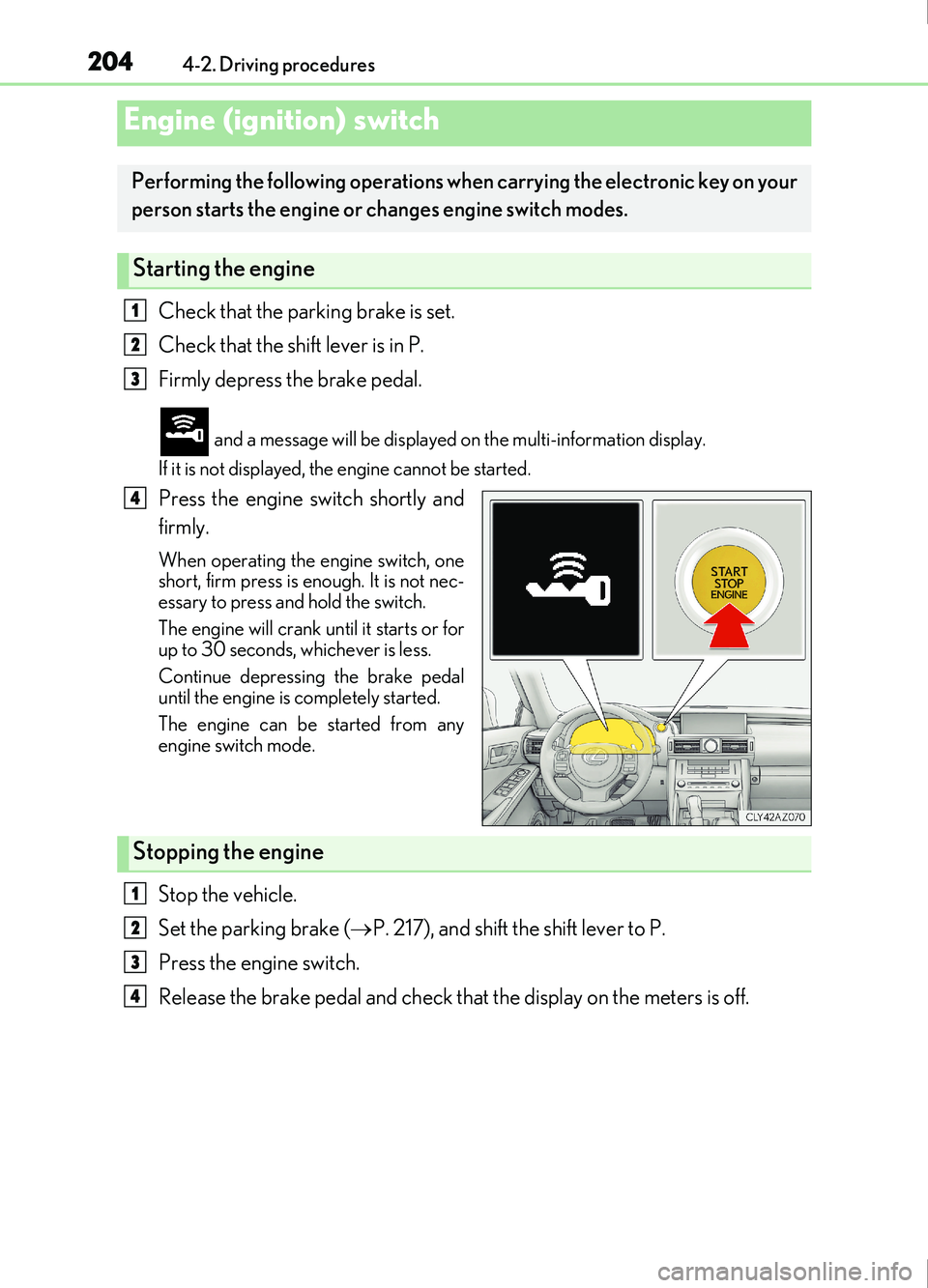
Check that the parking brake is set.
Check that the shift lever is in P.
Firmly depress the brake pedal.
and a message will be displayed on the multi-information display.
If it is not displayed, the engine cannot be started.
Press the engine switch shortly and
firmly.
When operating the engine switch, one
short, firm press is enough. It is not nec-
essary to press and hold the switch.
The engine will crank un til it starts or for
up to 30 seconds, whichever is less.
Continue depressing the brake pedal
until the engine is completely started.
The engine can be started from any
engine switch mode.
Stop the vehicle.
Set the parking brake ( P. 217), and shift the shift lever to P.
Press the engine switch.
Release the brake pedal and check that the display on the meters is off.
Engine (ignition) switch
Performing the following operations when carrying the electronic key on your
person starts the engine or changes engine switch modes.
Starting the engine
1
2
3
4
Stopping the engine
1
2
3
4
Page 205 of 676
2054-2. Driving procedures
4
Driving
IS200t_EE(OM53D77E)
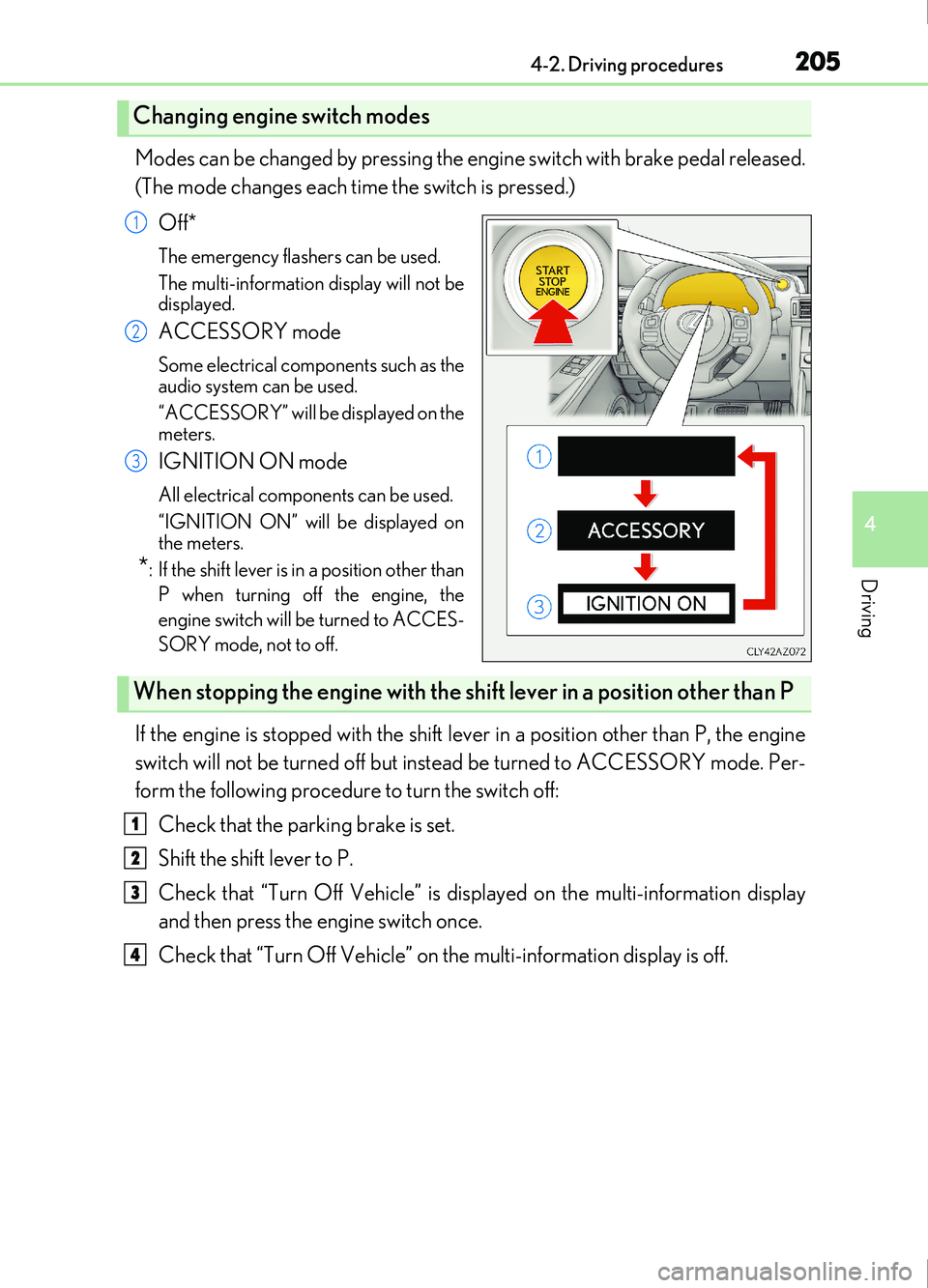
Modes can be changed by pressing the engine switch with brake pedal released.
(The mode changes each time the switch is pressed.)Off*
The emergency flashers can be used.
The multi-information display will not be
displayed.
ACCESSORY mode
Some electrical components such as the
audio system can be used.
“ACCESSORY” will be displayed on the
meters.
IGNITION ON mode
All electrical components can be used.
“IGNITION ON” will be displayed on
the meters.
*: If the shift lever is in a position other thanP when turning off the engine, the
engine switch will be turned to ACCES-
SORY mode, not to off.
If the engine is stopped with the shift lever in a position other than P, the engine
switch will not be turned off but inst ead be turned to ACCESSORY mode. Per-
form the following procedure to turn the switch off:
Check that the parking brake is set.
Shift the shift lever to P.
Check that “Turn Off Vehicle” is displayed on the multi-information display
and then press the engine switch once.
Check that “Turn Off Vehicle” on the multi-information display is off.
Changing engine switch modes
1
2
3
When stopping the engine with the shift lever in a position other than P
1
2
3
4