wheel Lexus IS200t 2017 s Workshop Manual
[x] Cancel search | Manufacturer: LEXUS, Model Year: 2017, Model line: IS200t, Model: Lexus IS200t 2017Pages: 676, PDF Size: 149.78 MB
Page 293 of 676
2934-5. Using the driving support systems
4
Driving
IS200t_EE(OM53D77E)
After the engine is stopped by the Stop & Start system when the vehicle is on an
incline, brake force is temporarily maintained to prevent rolling backwards until
the engine is restarted and drive force is generated.
When drive force is generated, the ma intained brake force is automatically
canceled.
●This function operates on flat surfaces as well as steep inclines.
●Sound may be generated from the brak es, but this is not a malfunction.
●Brake pedal response may change and vibration may occur, but these are not
malfunctions.
■Operating conditions
●The Stop & Start system is operational when all of the following conditions are met:
• The brake pedal is being depressed firmly.
• The shift lever is in D or P.
• Normal mode or Eco drive mode is selected as the driving mode.
• is off.
• The driver’s seat belt is fastened.
• The engine is adequately warmed up.
• The driver’s door is closed.
• The accelerator pedal is not being depressed.
• The outside temperature is -5°C (23°F) or higher.
• The hood is closed.
●In the following situations the engine may not be stopped by the Stop & Start system.
This is not a malfunction of the Stop & Start system.
• The air conditioning system is being used when the ambient temperature is high or
low.
• The battery is not sufficiently charged, such as if the vehicle has been parked for a long time and the battery charge has decreased, the electric load is large, the bat-
tery temperature is excessively low or the battery has deteriorated, or is undergoing
a periodic recharge.
• The brake booster vacuum is low.
• The vehicle is stoppe d on a steep incline.
• The steering wheel is being operated.
• Due to traffic or other circumstances the vehicle is stopped repeatedly.
• The vehicle is being driven in a high altitude area.
• Engine coolant temperature or transmissi on fluid temperature is extremely low or
high.
• The battery fluid temperature is extremely low or high.
• For a while after the battery terminals have been disconnected and reconnected.
• For a while after the battery has been replaced.
• Vehicles with a power heater: The power heater is being used.
Hill-start assist control
Page 294 of 676
2944-5. Using the driving support systems
IS200t_EE(OM53D77E)
●In the following situations, the engine will restart automatically if the engine is stopped
by the Stop & Start system. (To enable stoppi ng of the engine by the Stop & Start sys-
tem, drive the vehicle.)
• The air conditioning system is turned on.
• is turned on.
• The steering wheel is operated.
• The shift lever is shifted to M, N or R from D.
• The shift lever is shifted from P.
• Sport mode or snow mode is selected as the driving mode.
• The driver’s seat belt is unfastened.
• The driver’s door is opened.
• The accelerator pedal is depressed.
• The Stop & Start cancel switch is pressed.
• The vehicle starts to roll on an incline.
• Vehicles with a power heater: The power heater is turned on.
●In the following situations, the engine may re start automatically if the engine is stopped
by the Stop & Start system. (To enable stoppi ng of the engine by the Stop & Start sys-
tem, drive the vehicle.)
• The brake pedal is pumped or strongly depressed.
• The air conditioning system is being used.
• The battery is not sufficiently charged.
■If the steering wheel is turned shortly after the engine has started
If the steering wheel is turned shortly after the engine has been started by the Stop &
Start system, the steering wheel may feel heavy.
■Hood
●If the hood is opened while the engine is stopped by the Stop & Start system with the
shift lever in D, the engine will stall and will not be able to be restarted by the automatic
engine start function. In this case, restart the engine using the normal engine starting
procedure. ( P. 204)
●If the hood is opened while the engine is stopped by the Stop & Start system with the
shift lever in P, the engine will be restarted automatically.
●Even if the hood is closed after the engine is started with the hood open, the Stop &
Start system will not operate. Close the hood, turn the engine switch off, wait 30 sec-
onds or more, and then start the engine.
■When to use the Stop & Start system
●When the system does not operate, is canceled, or is malfunctioning, warning mes-
sages and a warning buzzer are used to inform the driver. ( P. 296)
●If the engine switch is pressed when the en gine is stopped by the Stop & Start system,
the engine will stall and will not be able to be restarted by the automatic engine start
function. In this case, restart the engine using the normal engine starting procedure.
( P. 204)
●When the engine is restarted by the Stop & Start system, the power outlet may be tem-
porarily unusable, but this is not a malfunction.
●Installation and removal of electrical components and wireless devices may affect the
Stop & Start system. Contact any authorized Lexus retailer or Lexus authorized
repairer, or any reliable repairer for details.
Page 297 of 676
2974-5. Using the driving support systems
4
Driving
IS200t_EE(OM53D77E)
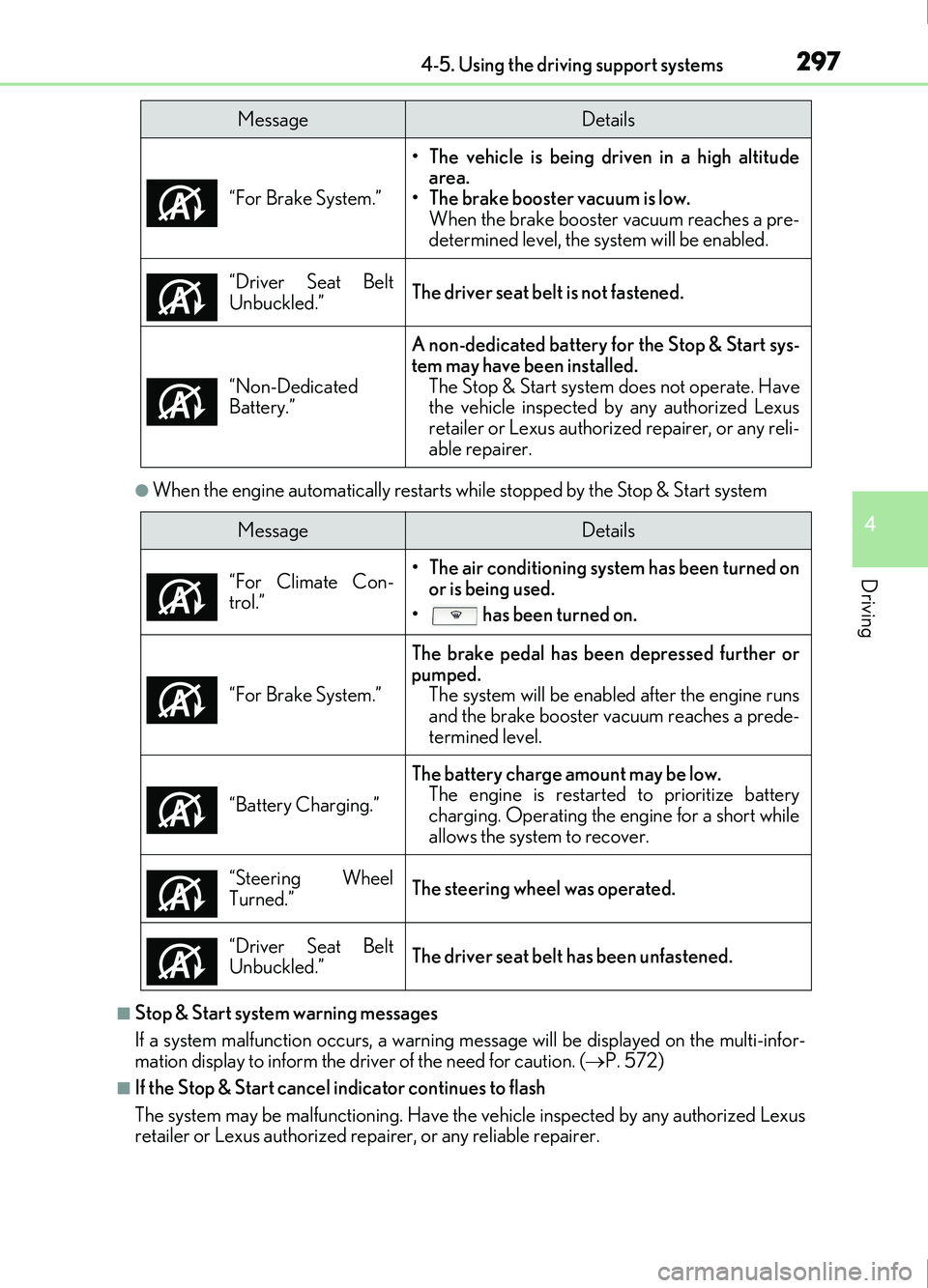
●When the engine automatically restarts while stopped by the Stop & Start system
■Stop & Start system warning messages
If a system malfunction occurs, a warning message will be displayed on the multi-infor-
mation display to inform the driver of the need for caution. ( P. 572)
■If the Stop & Start cancel indicator continues to flash
The system may be malfunctioning. Have the vehicle inspected by any authorized Lexus
retailer or Lexus authorized repa irer, or any reliable repairer.
MessageDetails
“For Brake System.” • The vehicle is being driven in a high altitude
area.
• The brake booster vacuum is low.
When the brake booster vacuum reaches a pre-
determined level, the system will be enabled.
“Driver Seat Belt
Unbuckled.”
The driver seat belt is not fastened.
“Non-Dedicated
Battery.”
A non-dedicated battery for the Stop & Start sys-
tem may have been installed. The Stop & Start system does not operate. Have
the vehicle inspected by any authorized Lexus
retailer or Lexus authoriz ed repairer, or any reli-
able repairer.
MessageDetails
“For Climate Con-
trol.”
• The air conditioning system has been turned on or is being used.
• has been turned on.
“For Brake System.”
The brake pedal has been depressed further or
pumped. The system will be enable d after the engine runs
and the brake booster vacuum reaches a prede-
termined level.
“Battery Charging.”
The battery charge amount may be low. The engine is restarted to prioritize battery
charging. Operating the engine for a short while
allows the system to recover.
“Steering Wheel
Turned.”
The steering wheel was operated.
“Driver Seat Belt
Unbuckled.”
The driver seat belt has been unfastened.
Page 309 of 676
3094-5. Using the driving support systems
4
Driving
IS200t_EE(OM53D77E)
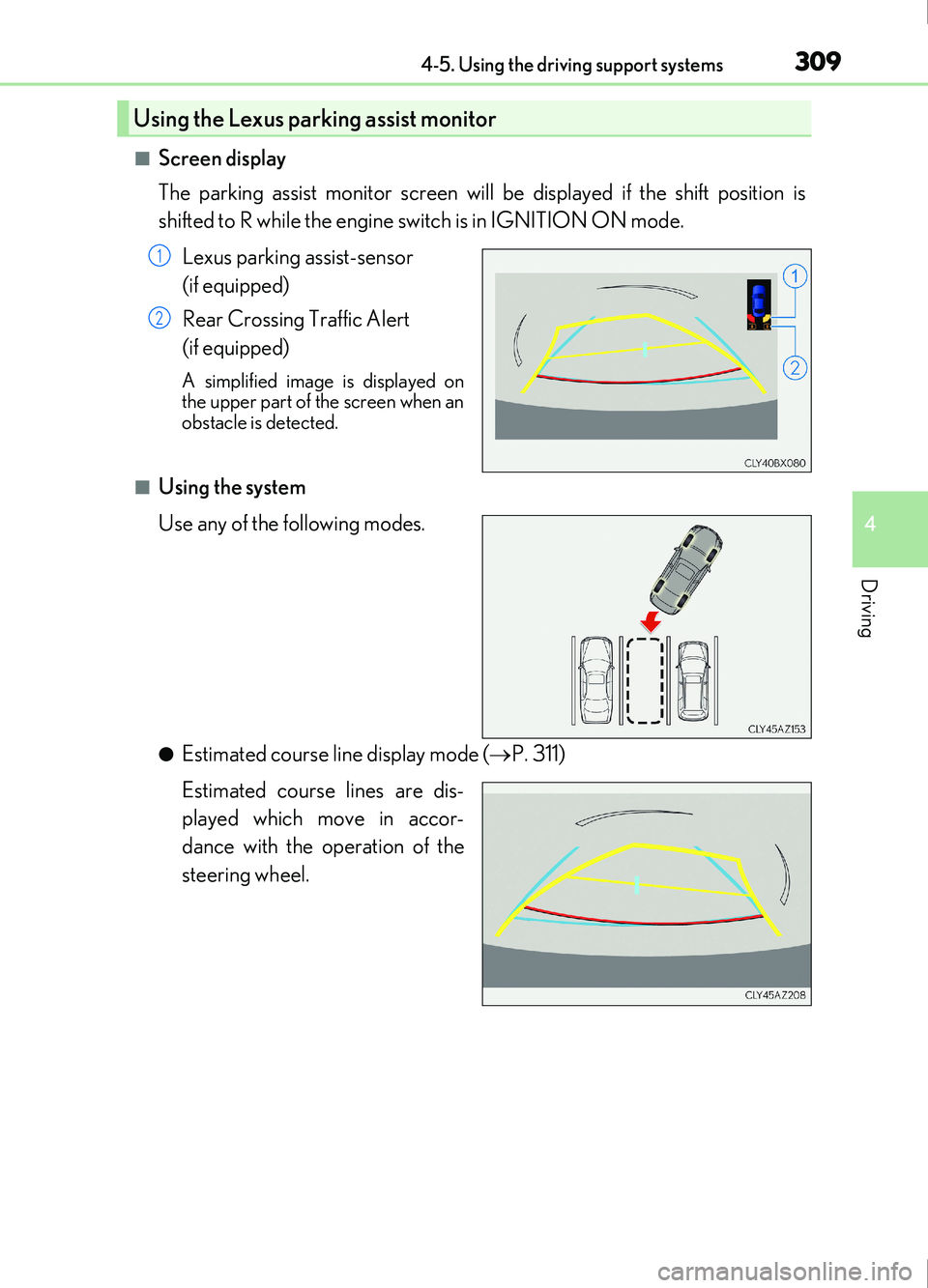
■Screen display
The parking assist monitor screen will be displayed if the shift position is
shifted to R while the engine switch is in IGNITION ON mode.Lexus parking assist-sensor
(if equipped)
Rear Crossing Traffic Alert
(if equipped)
A simplified image is displayed on
the upper part of the screen when an
obstacle is detected.
■Using the system
Use any of the following modes.
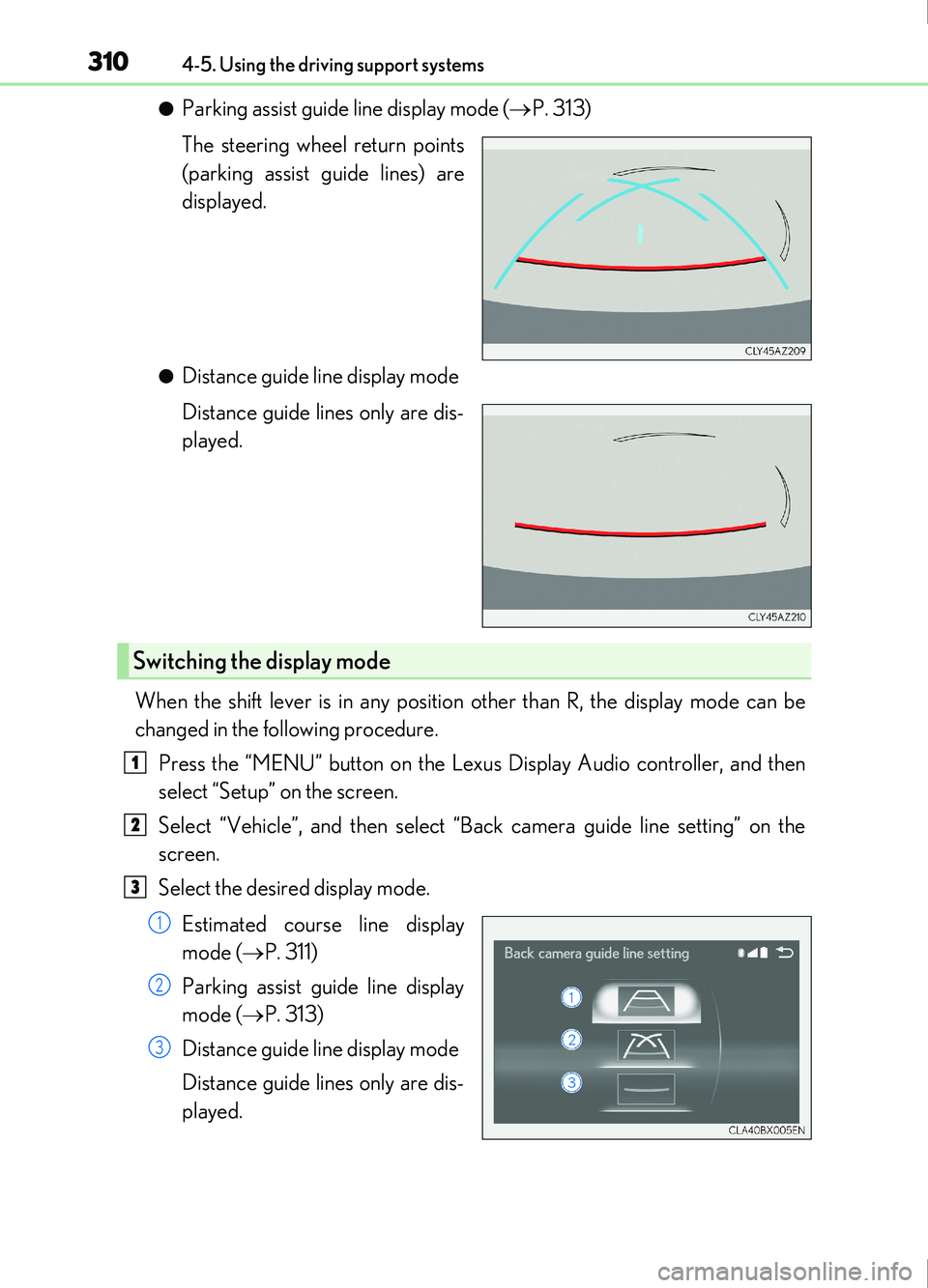
●Estimated course line display mode ( P. 311)
Estimated course lines are dis-
played which move in accor-
dance with the operation of the
steering wheel.
Using the Lexus parking assist monitor
1
2
Page 310 of 676
3104-5. Using the driving support systems
IS200t_EE(OM53D77E)
●Parking assist guide line display mode (P. 313)
The steering wheel return points
(parking assist guide lines) are
displayed.
●Distance guide line display mode
Distance guide lines only are dis-
played.
When the shift lever is in any position other than R, the display mode can be
changed in the following procedure. Press the “MENU” button on the Lexus Display Audio controller, and then
select “Setup” on the screen.
Select “Vehicle”, and then select “Back camera guide line setting” on the
screen.
Select the desired display mode.
Estimated course line display
mode ( P. 311)
Parking assist guide line display
mode ( P. 313)
Distance guide line display mode
Distance guide lines only are dis-
played.
Switching the display mode
1
2
3
1
2
3
Page 311 of 676
3114-5. Using the driving support systems
4
Driving
IS200t_EE(OM53D77E)
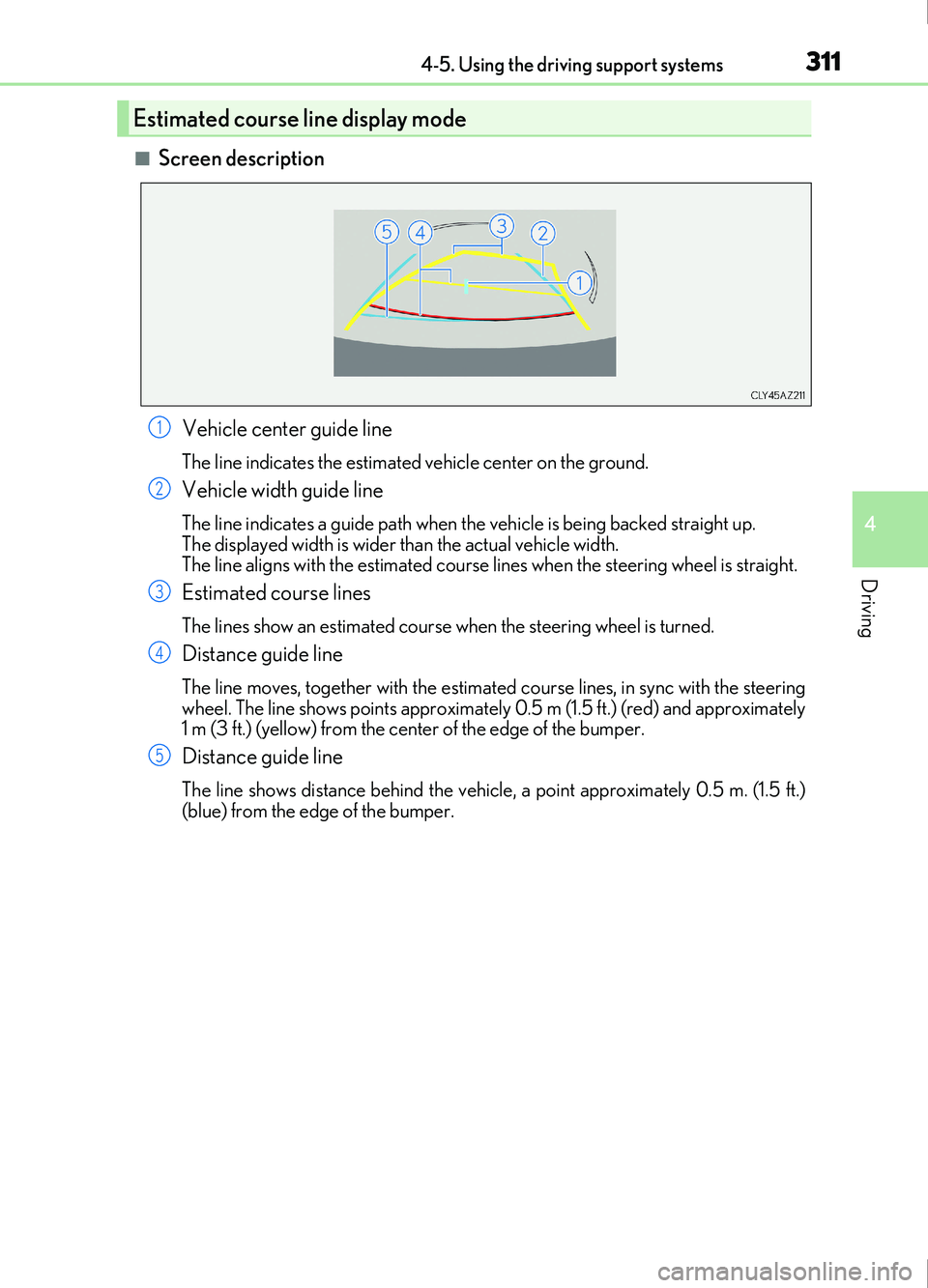
■Screen descriptionVehicle center guide line
The line indicates the estimated vehicle center on the ground.
Vehicle width guide line
The line indicates a guide path when the vehicle is being backed straight up.
The displayed width is wider than the actual vehicle width.
The line aligns with the estimated course lines when the steering wheel is straight.
Estimated course lines
The lines show an estimated course when the steering wheel is turned.
Distance guide line
The line moves, together with the estimated course lines, in sync with the steering
wheel. The line shows points approximately 0.5 m (1.5 ft.) (red) and approximately
1 m (3 ft.) (yellow) from the cent er of the edge of the bumper.
Distance guide line
The line shows distance behind the vehicle, a point approximately 0.5 m. (1.5 ft.)
(blue) from the edge of the bumper.
Estimated course line display mode
1
2
3
4
5
Page 312 of 676
3124-5. Using the driving support systems
IS200t_EE(OM53D77E)
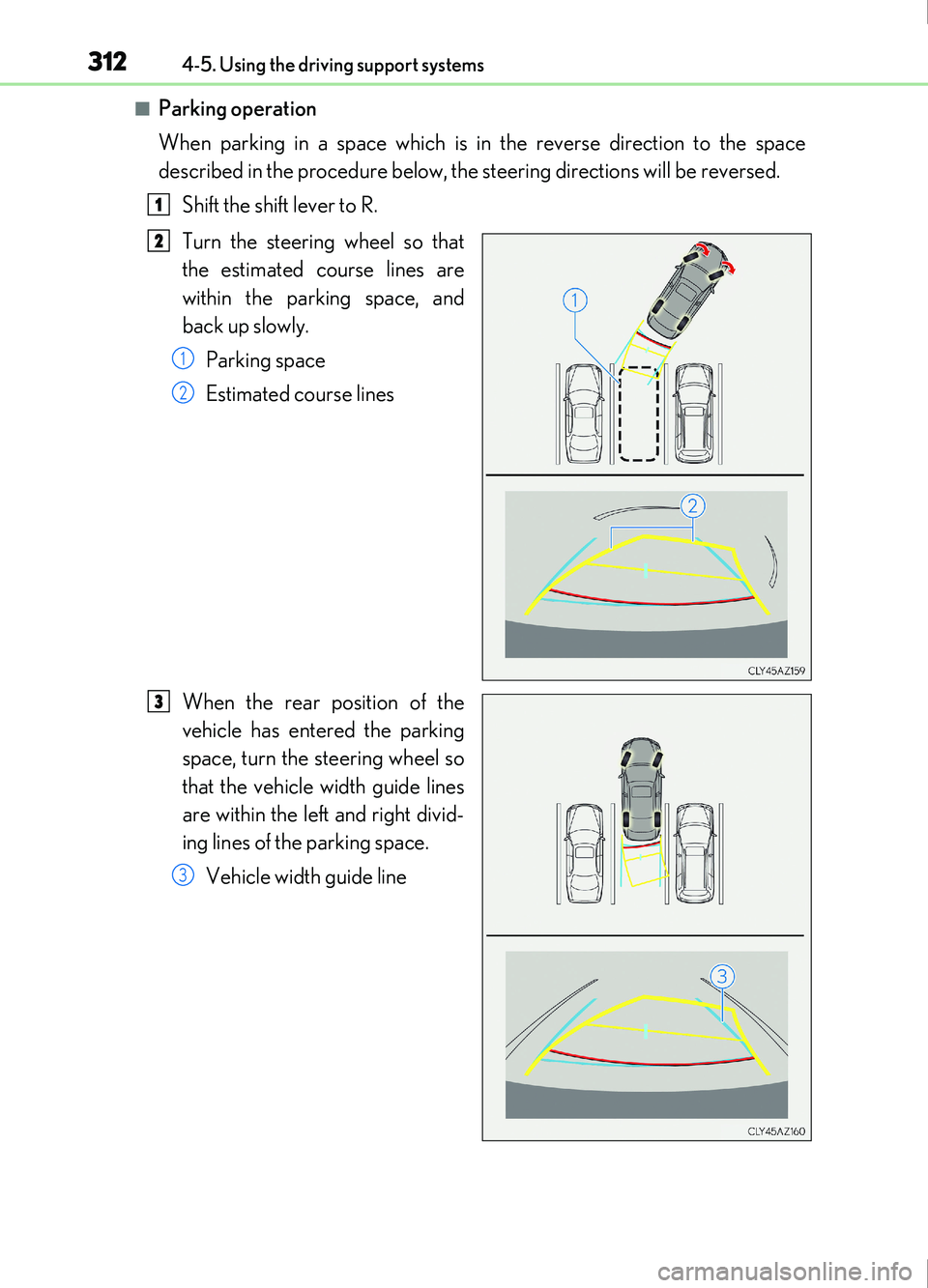
■Parking operation
When parking in a space which is in the reverse direction to the space
described in the procedure below, the steering directions will be reversed.Shift the shift lever to R.
Turn the steering wheel so that
the estimated course lines are
within the parking space, and
back up slowly.Parking space
Estimated course lines
When the rear position of the
vehicle has entered the parking
space, turn the steering wheel so
that the vehicle width guide lines
are within the left and right divid-
ing lines of the parking space. Vehicle width guide line
1
2
1
2
3
3
Page 313 of 676
3134-5. Using the driving support systems
4
Driving
IS200t_EE(OM53D77E)
Once the vehicle width guide lines and the parking space lines are parallel,
straighten the steering wheel and back up slowly until the vehicle has com-
pletely entered the parking space.
Stop the vehicle in an appropriate place, and finish parking.
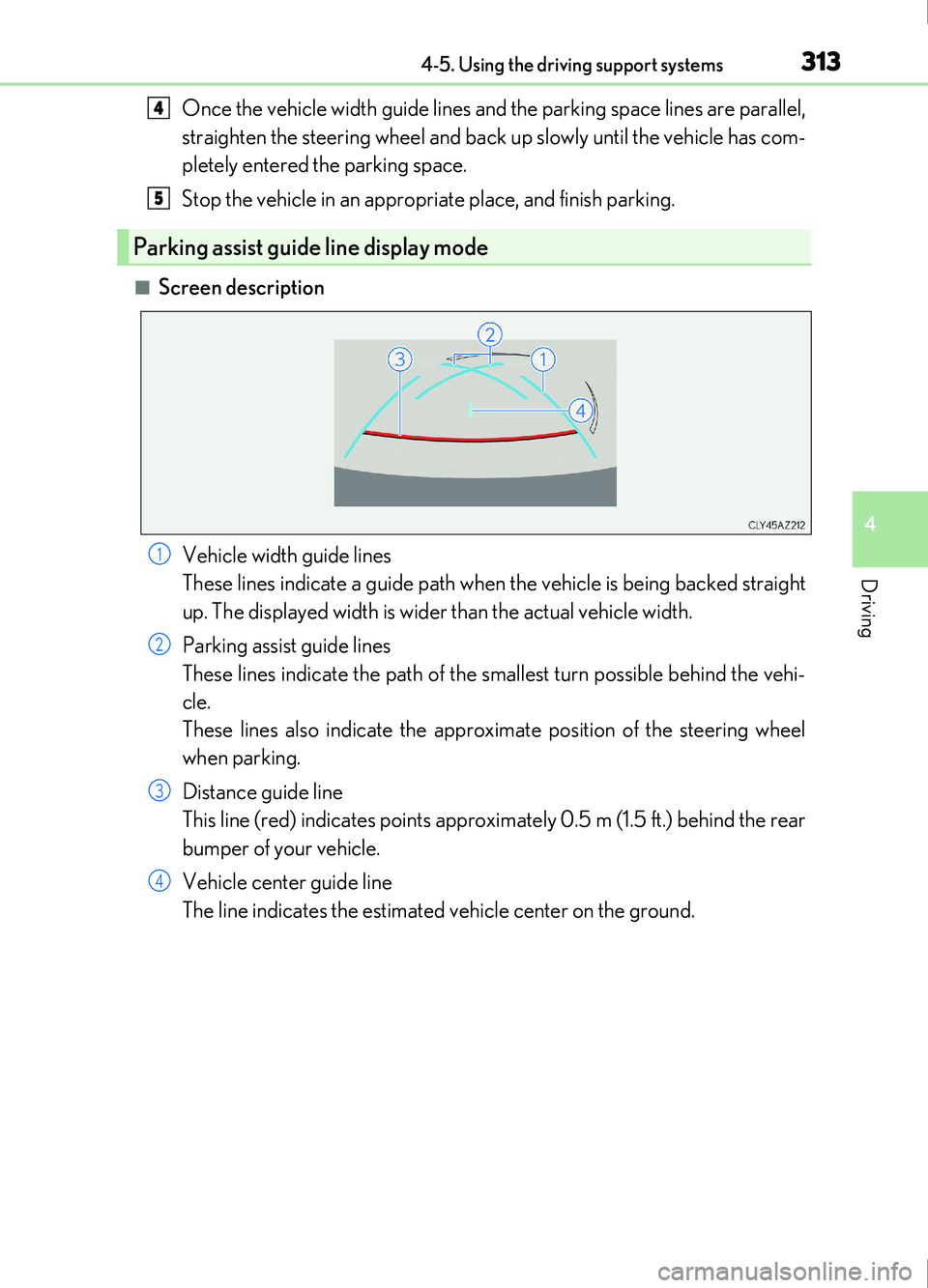
■Screen descriptionVehicle width guide lines
These lines indicate a guide path when the vehicle is being backed straight
up. The displayed width is wider than the actual vehicle width.
Parking assist guide lines
These lines indicate the path of the smallest turn possible behind the vehi-
cle.
These lines also indicate the approximate position of the steering wheel
when parking.
Distance guide line
This line (red) indicates points approximately 0.5 m (1.5 ft.) behind the rear
bumper of your vehicle.
Vehicle center guide line
The line indicates the estimated vehicle center on the ground.
Parking assist guide line display mode
4
5
1
2
3
4
Page 314 of 676
3144-5. Using the driving support systems
IS200t_EE(OM53D77E)
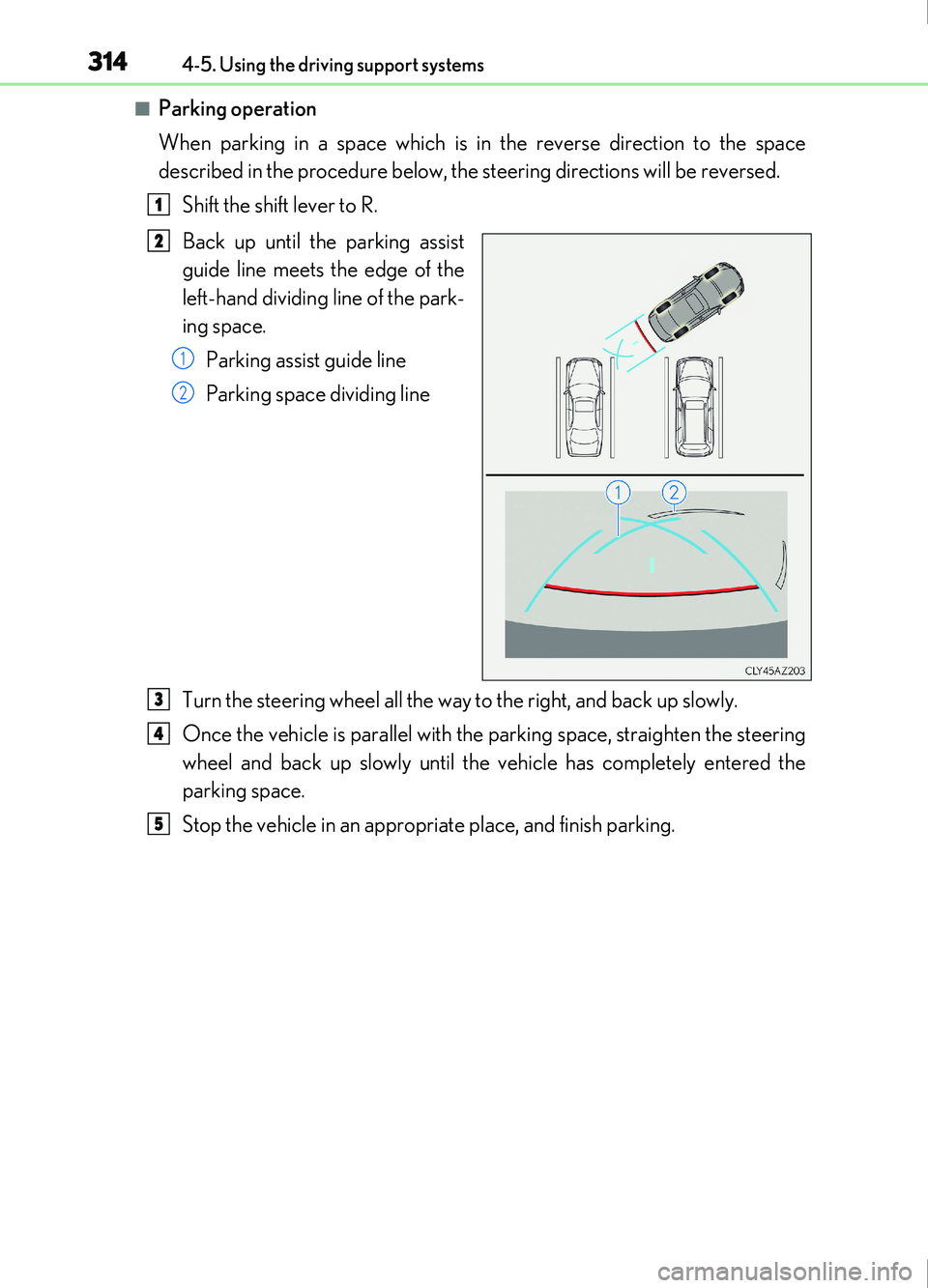
■Parking operation
When parking in a space which is in the reverse direction to the space
described in the procedure below, the steering directions will be reversed.Shift the shift lever to R.
Back up until the parking assist
guide line meets the edge of the
left-hand dividing line of the park-
ing space.Parking assist guide line
Parking space dividing line
Turn the steering wheel all the way to the right, and back up slowly.
Once the vehicle is parallel with the parking space, straighten the steering
wheel and back up slowly until the vehicle has completely entered the
parking space.
Stop the vehicle in an appropriate place, and finish parking.
1
2
1
2
3
4
5
Page 321 of 676
3214-5. Using the driving support systems
4
Driving
IS200t_EE(OM53D77E)
The estimated course lines move even though the steering wheel is straight
There is a malfunction in the signals being
output by the steering sensor.Have the vehicle inspected by any autho-
rized Lexus retailer or Lexus authorized
repairer, or any reliable repairer.
Guide lines are not displayed
The trunk lid is open.
Close the trunk lid.
If this does not resolve the symptom, have
the vehicle inspected by any authorized
Lexus retailer or Lexus authorized
repairer, or any reliable repairer.
The estimated course lines are not displayed
• The steering wheel has been moved
while the battery was being reinstalled.
• Battery power is low.
• The steering sensor has been rein- stalled.
• There is a malfunct ion in the signals
being output by the steering sensor.Stop the vehicle, and turn the steering
wheel as far as it will go to the left and
right.
If this does not resolve the symptom, have
the vehicle inspected by any authorized
Lexus retailer or Lexus authorized
repairer, or any reliable repairer.
Likely causeSolution