speed Lexus IS300h 2013 Manual PDF
[x] Cancel search | Manufacturer: LEXUS, Model Year: 2013, Model line: IS300h, Model: Lexus IS300h 2013Pages: 628, PDF Size: 20.23 MB
Page 399 of 628
385
5
Lexus Display Audio system
IS300h_EE(OM53B95E)5-11. Bluetooth
®
When using the Bluetooth® audio system
In the following situations, the system may not function.
• If the portable audio player is turned off
• If the portable audio player is not connected
• If the portable audio player’s battery is low
There may be a delay if a cellular phone connection is made during Bluetooth®
audio play.
Depending on the type of portable audio player that is connected to the system,
operation may differ slightly and certain functions may not be available.
When using the hands-free system
The audio system is muted when making a call.
If both parties speak at the same time, it may be difficult to hear.
If the received call volume is overly loud, an echo may be heard.
If the Bluetooth® phone is too close to the system, quality of the sound may
deteriorate and connection status may deteriorate.
In the following situations, it may be difficult to hear the other party:
• When driving on unpaved roads
• When driving at high speeds
• If a window is open
• If the air conditioning is blowing directly on the microphone
• If there is interference from the network of the cellular phone
Conditions under which the system will not operate
If using a cellular phone that does not support Bluetooth®
If the cellular phone is turned off
If you are outside of cellular phone service coverage
If the cellular phone is not connected
If the cellular phone’s battery is low
When outgoing calls are controlled, due to heavy traffic on telephone lines, etc.
When the cellular phone itself cannot be used
When transferring phonebook data from the cellular phone
Bluetooth®
Page 407 of 628
3935-12. Other function
5
Lexus Display Audio system
IS300h_EE(OM53B95E)
Go to “USB photo”: “Info” “USB1 photo” or “USB2 photo”
P. 3 2 3
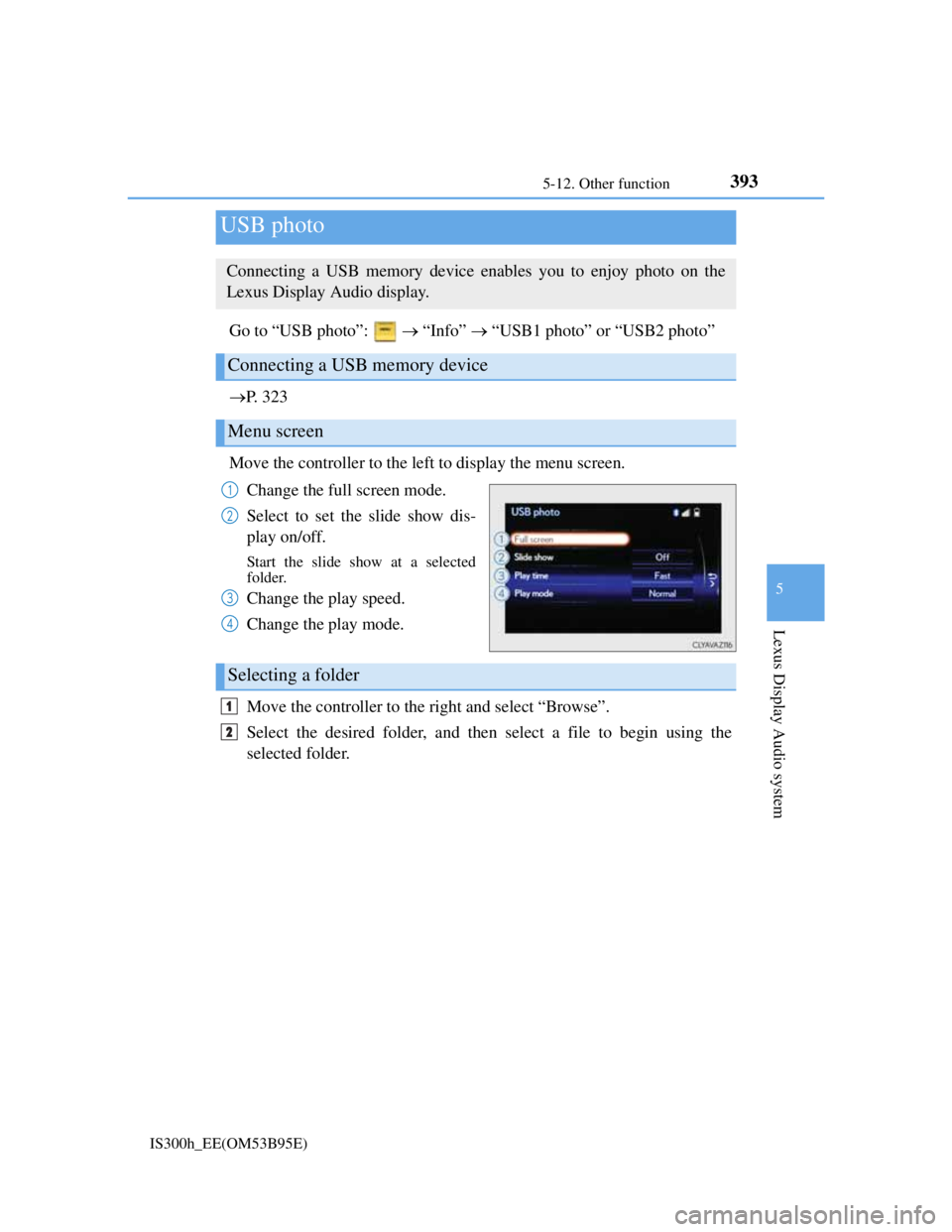
Move the controller to the left to display the menu screen.
Change the full screen mode.
Select to set the slide show dis-
play on/off.
Start the slide show at a selected
folder.
Change the play speed.
Change the play mode.
Move the controller to the right and select “Browse”.
Select the desired folder, and then select a file to begin using the
selected folder.
USB photo
Connecting a USB memory device enables you to enjoy photo on the
Lexus Display Audio display.
Connecting a USB memory device
Menu screen
1
2
3
4
Selecting a folder
1
2
Page 412 of 628
398
IS300h_EE(OM53B95E)6-1. Using the air conditioning system
Automatic air conditioning system
Air outlets and fan speed are automatically adjusted according to the
temperature setting.
Vehicles with a Lexus Display Audio system: Press the “MENU” button
on the Lexus Display Audio controller, then select “Climate” to display
the air conditioning operation screen.
For details on the Lexus Display Audio controller, refer to “Lexus Dis-
play Audio controller” on P. 318.
Vehicles with a navigation system: Press the “MENU” button on the
Remote Touch, then select “Climate” to display the air conditioning con-
trol screen.
For details on the Remote Touch, refer to the “Navigation System
Owner’s Manual”.
The illustrations below are for left-hand drive vehicles.
The button positions and shapes will differ for right-hand drive vehicles.
Also, the display and button positions will differ depending on the type
of the system.
Page 414 of 628
4006-1. Using the air conditioning system
IS300h_EE(OM53B95E)
Adjusting the temperature setting
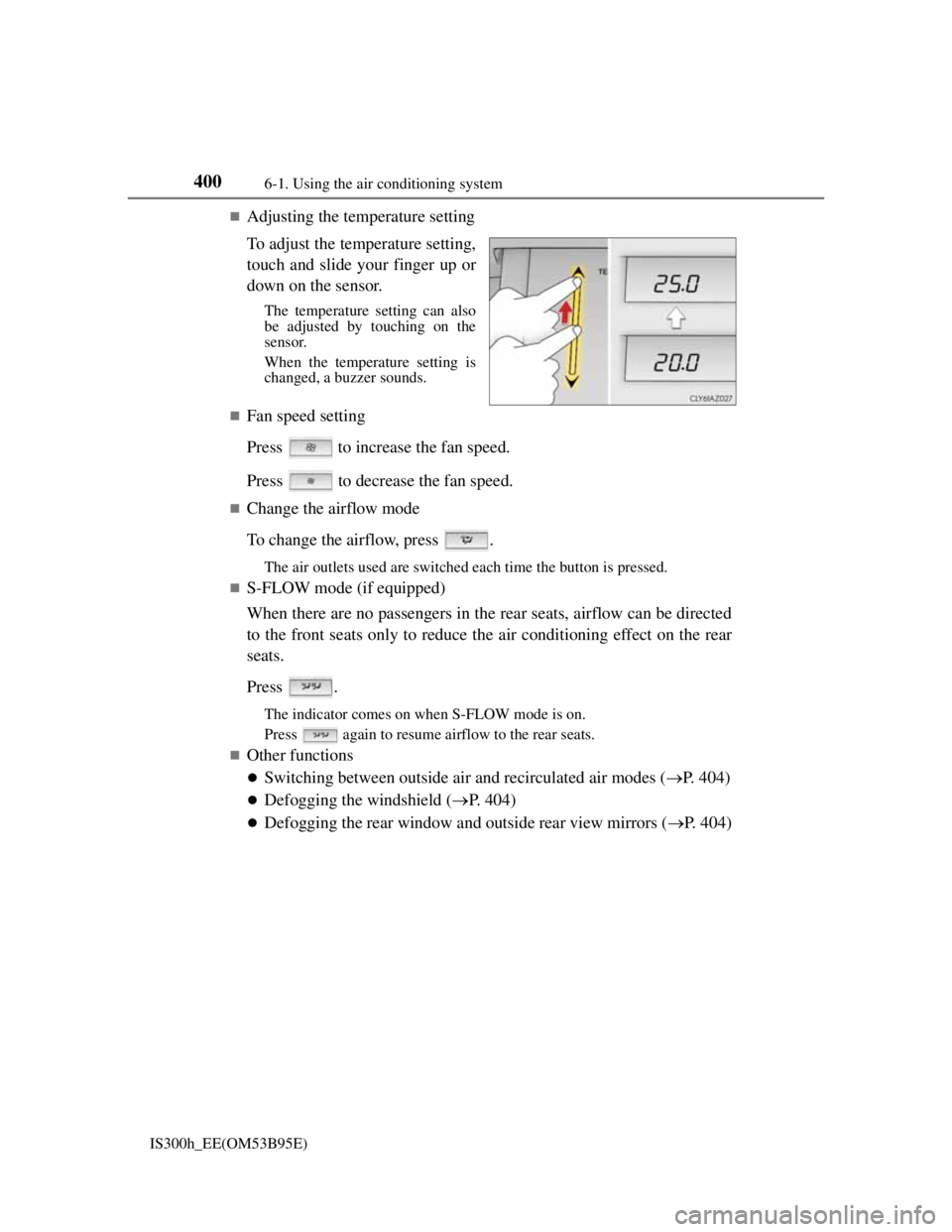
To adjust the temperature setting,
touch and slide your finger up or
down on the sensor.
The temperature setting can also
be adjusted by touching on the
sensor.
When the temperature setting is
changed, a buzzer sounds.
Fan speed setting
Press to increase the fan speed.
Press to decrease the fan speed.
Change the airflow mode
To change the airflow, press .
The air outlets used are switched each time the button is pressed.
S-FLOW mode (if equipped)
When there are no passengers in the rear seats, airflow can be directed
to the front seats only to reduce the air conditioning effect on the rear
seats.
Press .
The indicator comes on when S-FLOW mode is on.
Press again to resume airflow to the rear seats.
Other functions
Switching between outside air and recirculated air modes (P. 404)
Defogging the windshield (P. 404)
Defogging the rear window and outside rear view mirrors (P. 404)
Page 415 of 628
4016-1. Using the air conditioning system
6
Interior features
IS300h_EE(OM53B95E)
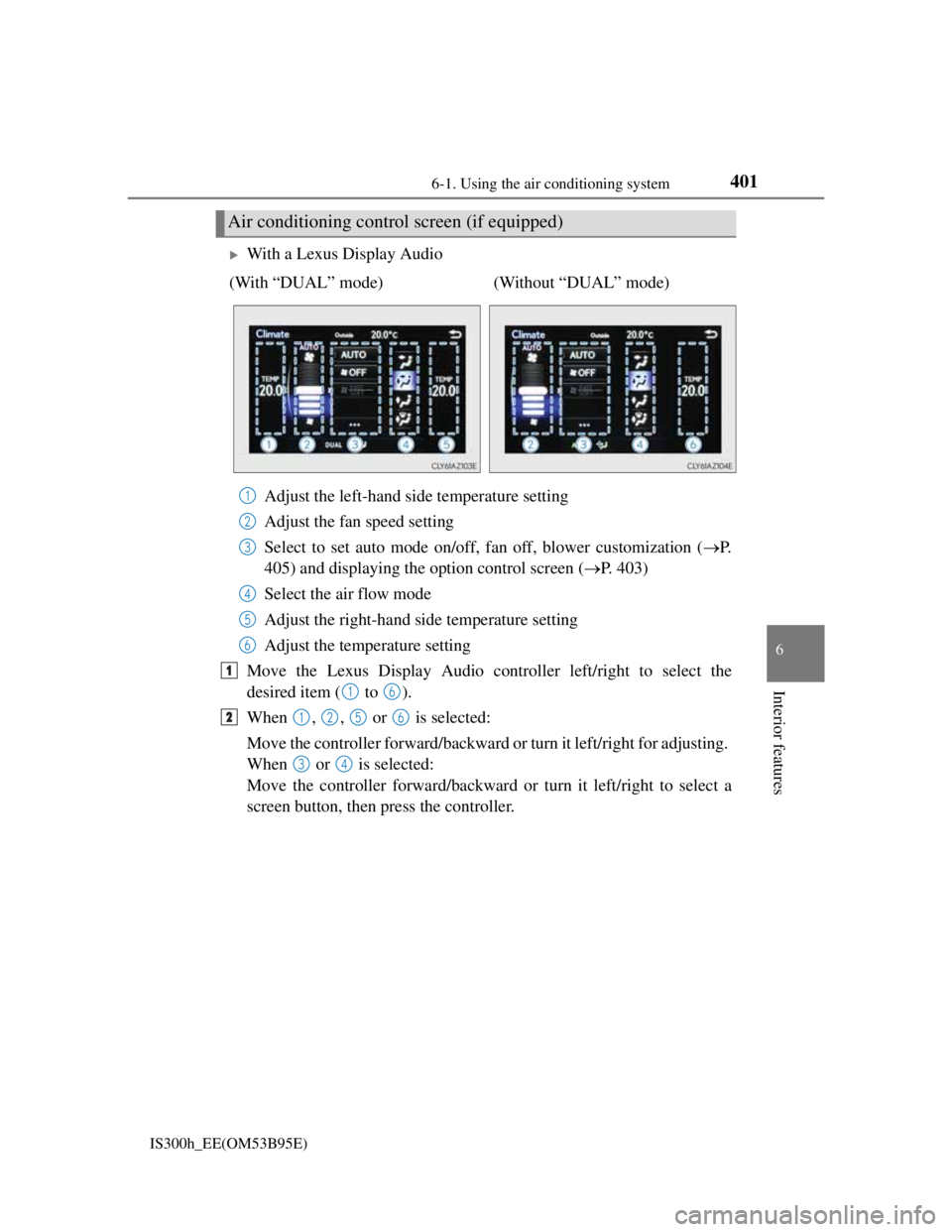
With a Lexus Display Audio
Adjust the left-hand side temperature setting
Adjust the fan speed setting
Select to set auto mode on/off, fan off, blower customization (P.
405) and displaying the option control screen (P. 403)
Select the air flow mode
Adjust the right-hand side temperature setting
Adjust the temperature setting
Move the Lexus Display Audio controller left/right to select the
desired item ( to ).
When , , or is selected:
Move the controller forward/backward or turn it left/right for adjusting.
When or is selected:
Move the controller forward/backward or turn it left/right to select a
screen button, then press the controller.
Air conditioning control screen (if equipped)
(With “DUAL” mode) (Without “DUAL” mode)
1
2
3
4
5
6
1
16
21256
34
Page 416 of 628
4026-1. Using the air conditioning system
IS300h_EE(OM53B95E)
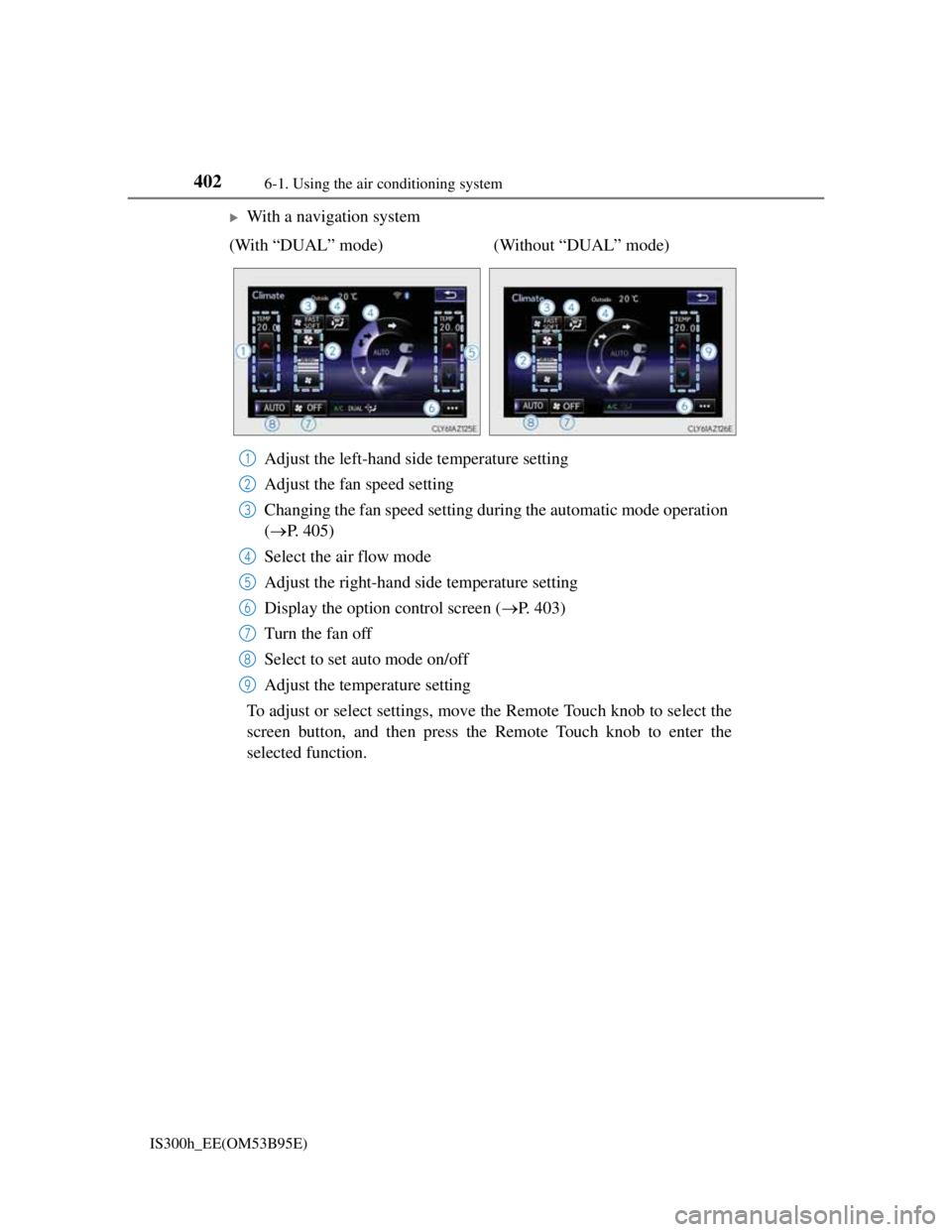
With a navigation system
Adjust the left-hand side temperature setting
Adjust the fan speed setting
Changing the fan speed setting during the automatic mode operation
(P. 405)
Select the air flow mode
Adjust the right-hand side temperature setting
Display the option control screen (P. 403)
Turn the fan off
Select to set auto mode on/off
Adjust the temperature setting
To adjust or select settings, move the Remote Touch knob to select the
screen button, and then press the Remote Touch knob to enter the
selected function. (With “DUAL” mode) (Without “DUAL” mode)
1
2
3
4
5
6
7
8
9
Page 417 of 628
4036-1. Using the air conditioning system
6
Interior features
IS300h_EE(OM53B95E)
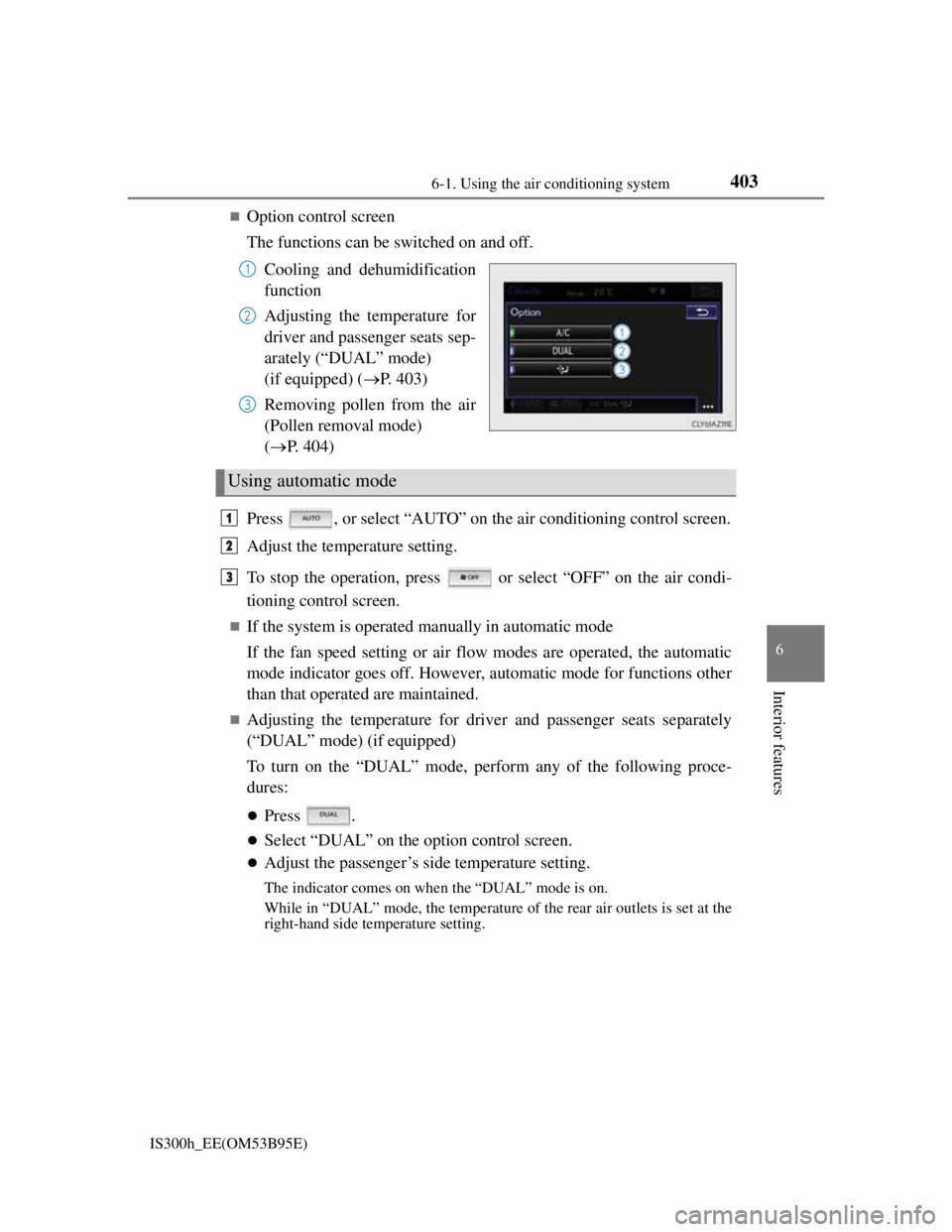
Option control screen
The functions can be switched on and off.
Cooling and dehumidification
function
Adjusting the temperature for
driver and passenger seats sep-
arately (“DUAL” mode)
(if equipped) (P. 403)
Removing pollen from the air
(Pollen removal mode)
(P. 404)
Press , or select “AUTO” on the air conditioning control screen.
Adjust the temperature setting.
To stop the operation, press or select “OFF” on the air condi-
tioning control screen.
If the system is operated manually in automatic mode
If the fan speed setting or air flow modes are operated, the automatic
mode indicator goes off. However, automatic mode for functions other
than that operated are maintained.
Adjusting the temperature for driver and passenger seats separately
(“DUAL” mode) (if equipped)
To turn on the “DUAL” mode, perform any of the following proce-
dures:
Press .
Select “DUAL” on the option control screen.
Adjust the passenger’s side temperature setting.
The indicator comes on when the “DUAL” mode is on.
While in “DUAL” mode, the temperature of the rear air outlets is set at the
right-hand side temperature setting.
1
2
3
Using automatic mode
1
2
3
Page 419 of 628
4056-1. Using the air conditioning system
6
Interior features
IS300h_EE(OM53B95E)
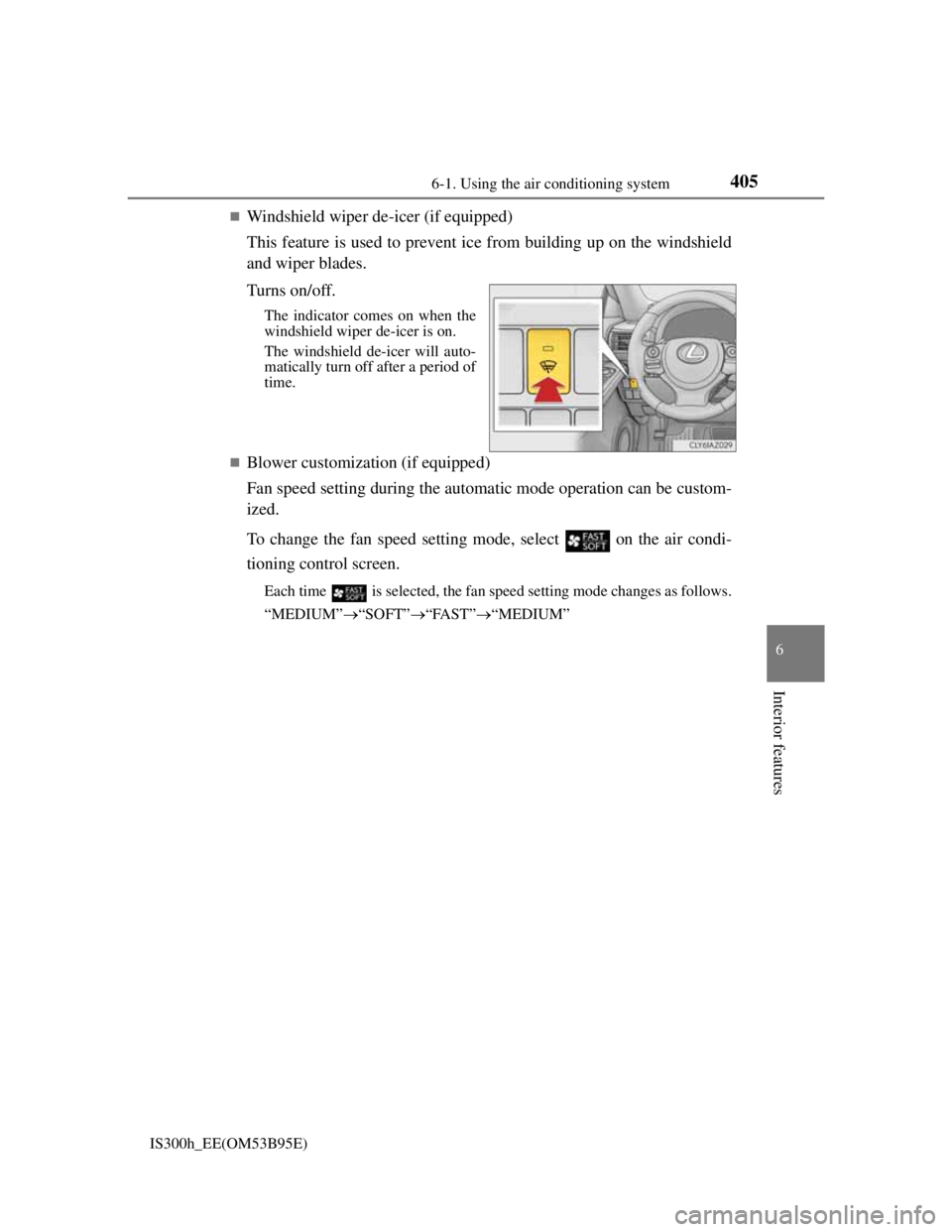
Windshield wiper de-icer (if equipped)
This feature is used to prevent ice from building up on the windshield
and wiper blades.
Turns on/off.
The indicator comes on when the
windshield wiper de-icer is on.
The windshield de-icer will auto-
matically turn off after a period of
time.
Blower customization (if equipped)
Fan speed setting during the automatic mode operation can be custom-
ized.
To change the fan speed setting mode, select
on the air condi-
tioning control screen.
Each time is selected, the fan speed setting mode changes as follows.
“MEDIUM”“SOFT”“FAST”“MEDIUM”
Page 421 of 628

4076-1. Using the air conditioning system
6
Interior features
IS300h_EE(OM53B95E)
Registering air conditioning settings to electronic keys (vehicles with driving
position memory)
Unlocking the vehicle using an electronic key and turning the power switch to
ON mode will recall that key’s registered air conditioning settings.
When the power switch is turned off, the current air conditioning settings will
automatically be registered to the electronic key that was used to unlock the
vehicle.
The system may not operate correctly if more than one electronic key is in the
vicinity or if the smart entry & start system is used to unlock a passenger door.
The doors that can recall the air conditioning setting when unlocked using the
smart entry & start system can be changed.* For details, contact any authorized
Lexus dealer or repairer, or another duly qualified and equipped professional.
*: The doors that can recall the driving position memory are changed at the same
time.
Using automatic mode
Fan speed is adjusted automatically according to the temperature setting and the
ambient conditions.
Therefore, the fan may stop for a while until warm or cool air is ready to flow
immediately after is pressed or “AUTO” is selected.
Fogging up of the windows
The windows will easily fog up when the humidity in the vehicle is high. Turning
(“A/C”) on will dehumidify the air from the outlets and defog the wind-
shield effectively.
If you turn (“A/C”) off, the windows may fog up more easily.
The windows may fog up if the recirculated air mode is used.
Outside/recirculated air mode
When driving on dusty roads such as tunnels or in heavy traffic, set the outside/
recirculated air mode button to the recirculated air mode. This is effective in
preventing outside air from entering the vehicle interior. During cooling opera-
tion, setting the recirculated air mode will also cool the vehicle interior effec-
tively.
Outside/recirculated air mode may automatically switch depending on the tem-
perature setting or the inside temperature.
Operation of the air conditioning system in Eco drive mode
In Eco drive mode, the air conditioning system is controlled as follows to priori-
tize fuel efficiency:
Engine speed and compressor operation controlled to restrict heating/cooling
capacity
Fan speed restricted when automatic mode is selected
To improve air conditioning performance, perform the following operations:
Adjust the fan speed
Turn off Eco drive mode
Page 437 of 628
4236-4. Using the other interior features
6
Interior features
IS300h_EE(OM53B95E)
The rear sunshade can be used when the power switch is in ON mode.
The rear sunshade can be operated for approximately 1 minute even after the
power switch is turned to ACCESSORY mode or turned off.
Reverse operation feature: To ensure adequate rear visibility, the rear sunshade
automatically lowers when the shift lever is shifted to R.
However, the rear sunshade is raised again if any of the following occurs:
• The button is pressed again.
*
• The shift lever is shifted into P.
• The shift lever is shifted out of R, and the vehicle reaches a speed of 15 km/
h (9 mph).
If the hybrid system is off when the rear sunshade has been lowered due to the
reverse operation feature, it will not be raised even when the hybrid system is
turned on again and the vehicle reaches a speed of 15 km/h (9 mph). To raise
the sunshade again, press the button.
*: Occasionally, the reverse function may not be carried out after the switch has
been pressed. Repeat the above operation to operate the function.
CAUTION
When the rear sunshade is being operated, do not place fingers or other objects
in the fastener section or in the opening. They may get caught, causing injury.
NOTICE
To prevent 12-volt battery discharge, do not operate the rear sunshade when
the hybrid system is off.
Observe the following precautions to ensure normal operation of the rear sun-
shade.
• Do not place excessive load on the motor or other components of the rear
sunshade.
• Do not place objects where they may hinder opening and closing opera-
tions.
• Do not attach items to the rear sunshade.
• Keep the opening clean and clear of obstructions.
• Do not operate the rear sunshade continuously for long periods of time.