speed Lexus IS300h 2013 Repair Manual
[x] Cancel search | Manufacturer: LEXUS, Model Year: 2013, Model line: IS300h, Model: Lexus IS300h 2013Pages: 628, PDF Size: 20.23 MB
Page 301 of 628
2994-5. Using the driving support systems
4
Driving
IS300h_EE(OM53B95E)
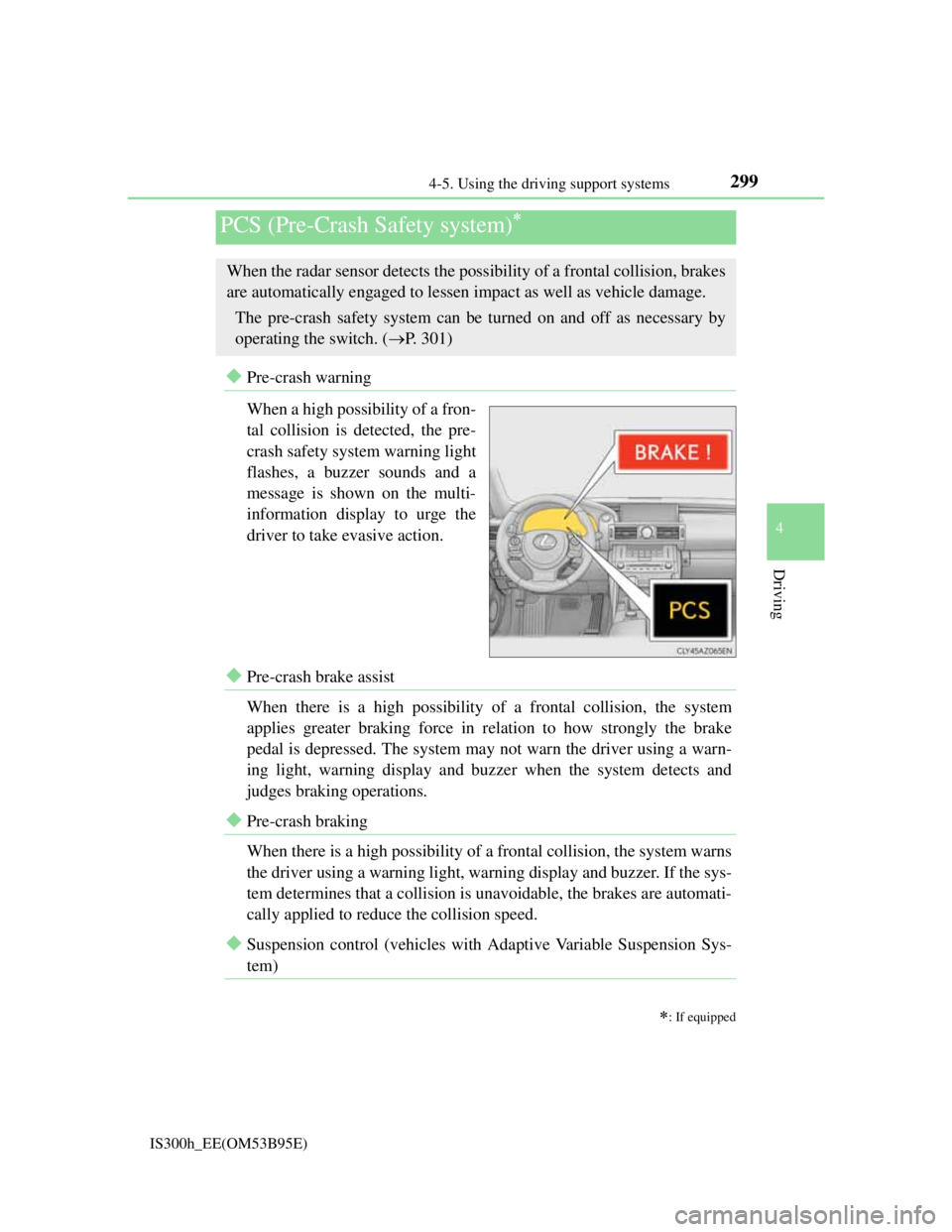
Pre-crash warning
When a high possibility of a fron-
tal collision is detected, the pre-
crash safety system warning light
flashes, a buzzer sounds and a
message is shown on the multi-
information display to urge the
driver to take evasive action.
Pre-crash brake assist
When there is a high possibility of a frontal collision, the system
applies greater braking force in relation to how strongly the brake
pedal is depressed. The system may not warn the driver using a warn-
ing light, warning display and buzzer when the system detects and
judges braking operations.
Pre-crash braking
When there is a high possibility of a frontal collision, the system warns
the driver using a warning light, warning display and buzzer. If the sys-
tem determines that a collision is unavoidable, the brakes are automati-
cally applied to reduce the collision speed.
Suspension control (vehicles with Adaptive Variable Suspension Sys-
tem)
PCS (Pre-Crash Safety system)
: If equipped
When the radar sensor detects the possibility of a frontal collision, brakes
are automatically engaged to lessen impact as well as vehicle damage.
The pre-crash safety system can be turned on and off as necessary by
operating the switch. (P. 301)
Page 303 of 628
3014-5. Using the driving support systems
4
Driving
IS300h_EE(OM53B95E)
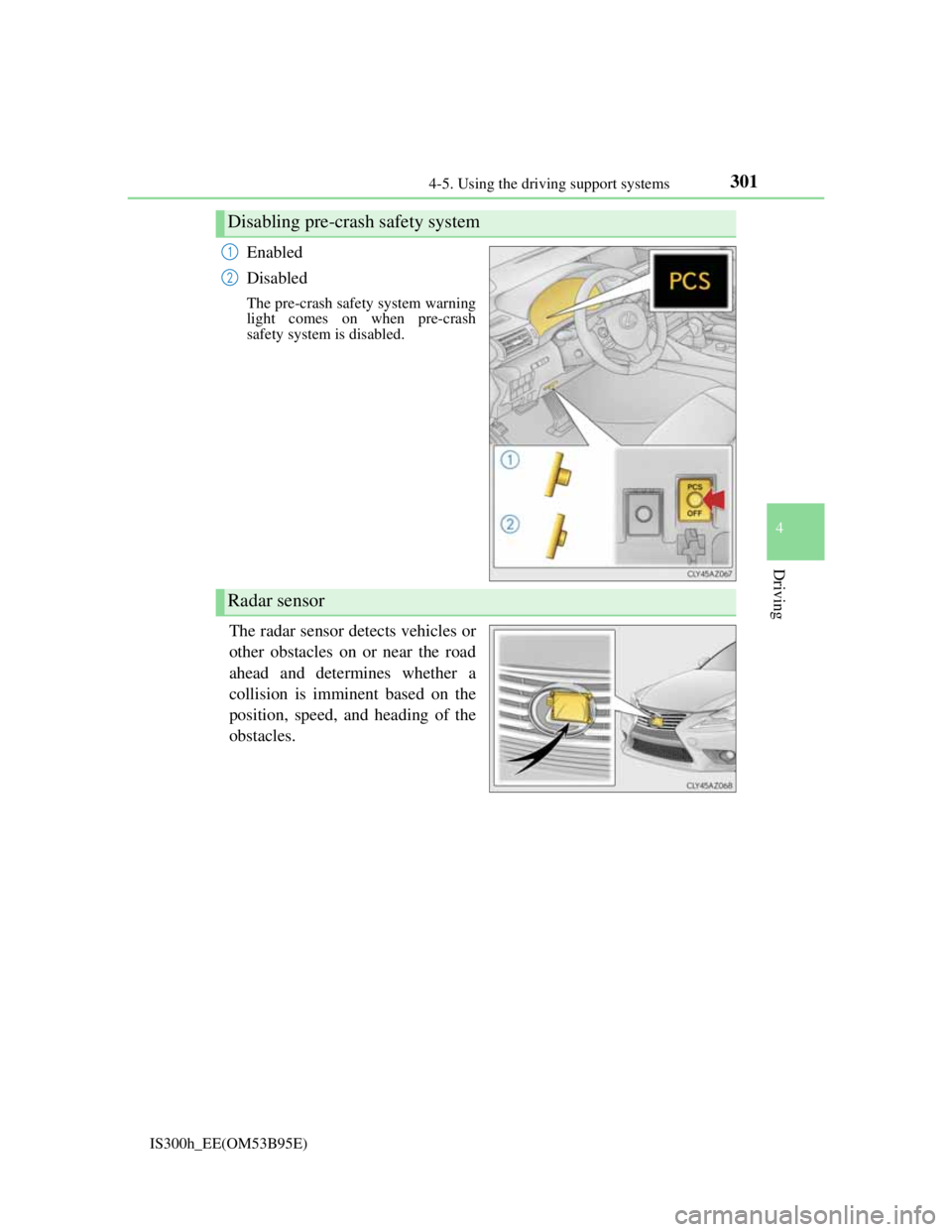
Enabled
Disabled
The pre-crash safety system warning
light comes on when pre-crash
safety system is disabled.
The radar sensor detects vehicles or
other obstacles on or near the road
ahead and determines whether a
collision is imminent based on the
position, speed, and heading of the
obstacles.
Disabling pre-crash safety system
1
2
Radar sensor
Page 304 of 628

3024-5. Using the driving support systems
IS300h_EE(OM53B95E)
The pre-crash safety system is operational when
The PCS OFF switch is not pressed and the following conditions are met:
Pre-crash warning:
• Vehicle speed is greater than about 15 km/h (10 mph).
• The speed at which your vehicle is approaching the obstacle or the vehicle
running ahead of you is greater than about 15 km/h (10 mph).
Pre-crash brake assist:
• The VSC OFF switch is not pressed.
• Vehicle speed is greater than about 30 km/h (19 mph).
• The speed at which your vehicle is approaching the obstacle or the vehicle
running ahead of you is greater than about 30 km/h (19 mph).
• The brake pedal is depressed.
Pre-crash braking:
• The VSC OFF switch is not pressed.
• Vehicle speed is greater than about 15 km/h (10 mph).
• The speed at which your vehicle is approaching the obstacle or the vehicle
running ahead of you is greater than about 15 km/h (10 mph).
Suspension control (vehicles with Adaptive Variable Suspension System):
• Vehicle speed is greater than about 5 km/h (4 mph).
• The speed at which your vehicle is approaching the obstacle or the vehicle
running ahead of you is greater than about 30 km/h (19 mph).
Conditions that may trigger the system even if there is no danger of a collision
When there is an object by the roadside at the entrance to a curve
When passing an oncoming vehicle on a curve
When driving over a narrow iron bridge
When there is a metal object on the road surface
When driving on an uneven road surface
When passing an oncoming vehicle on a left-turn (left-hand drive vehicles) or
right-turn (right-hand drive vehicles)
When your vehicle rapidly closes on the vehicle in front
When a grade separation/interchange, sign, billboard, or other structure appears
to be directly in the vehicle’s line of travel
When there is a metal plate in the road in front of the vehicle on a downhill
slope
When climbing a steep hill causes an overhead billboard or other metallic struc-
ture to appear directly in the vehicle’s line of travel
When driving under an overpass
When an extreme change in vehicle height occurs
When passing through certain toll gates
When passing through a tunnel
When the radar sensor moves off position due to its surrounding area being sub-
jected to a strong impact
When the system is activated in the situations described above, there is also a
possibility that the brakes will be applied with a force greater than normal.
Page 317 of 628

3154-5. Using the driving support systems
4
Driving
IS300h_EE(OM53B95E)
The Blind Spot Monitor function is operational when
The BSM main switch is set to on
Vehicle speed is greater than approximately 16 km/h (10 mph).
The Blind Spot Monitor function will detect a vehicle when
A vehicle in an adjacent lane overtakes your vehicle.
Another vehicle enters the detection area when it changes lanes.
Conditions under which the Blind Spot Monitor function will not detect a vehicle
The Blind Spot Monitor function is not designed to detect the following types of
vehicles and/or objects:
Small motorcycles, bicycles, pedestrians etc.*
Vehicles traveling in the opposite direction
Guardrails, walls, signs, parked vehicles and similar stationary objects*
Following vehicles that are in the same lane*
Vehicles driving 2 lanes across from your vehicle*
*
: Depending on conditions, detection of a vehicle and/or object may occur.
Conditions under which the Blind Spot Monitor function may not function cor-
rectly
The Blind Spot Monitor function may not detect vehicles correctly in the fol-
lowing conditions:
• During bad weather such as heavy rain, fog, snow etc.
• When ice or mud etc. is attached to the rear bumper
• When driving on a road surface that is wet due to rain, standing water etc.
• When there is a significant difference in speed between your vehicle and the
vehicle that enters the detection area
• When a vehicle is in the detection area from a stop and remains in the detec-
tion area as your vehicle accelerates
• When driving up or down consecutive steep inclines, such as hills, a dip in
the road etc.
• When multiple vehicles approach with only a small gap between each vehi-
cle
• When vehicle lanes are wide, and the vehicle in the next lane is too far away
from your vehicle
• When the vehicle that enters the detection area is traveling at about the same
speed as your vehicle
• When there is a significant difference in height between your vehicle and the
vehicle that enters the detection area
• Directly after the BSM main switch is set to on
• When your vehicle is towing a trailer
Instances of the Blind Spot Monitor function unnecessarily detecting a vehicle
and/ or object may increase under the following conditions:
• When there is only a short distance between your vehicle and a guardrail,
wall etc.
• When there is only a short distance between your vehicle and a following
vehicle
• When vehicle lanes are narrow and a vehicle driving 2 lanes across from
your vehicle enters the detection area
Page 320 of 628
3184-5. Using the driving support systems
IS300h_EE(OM53B95E)
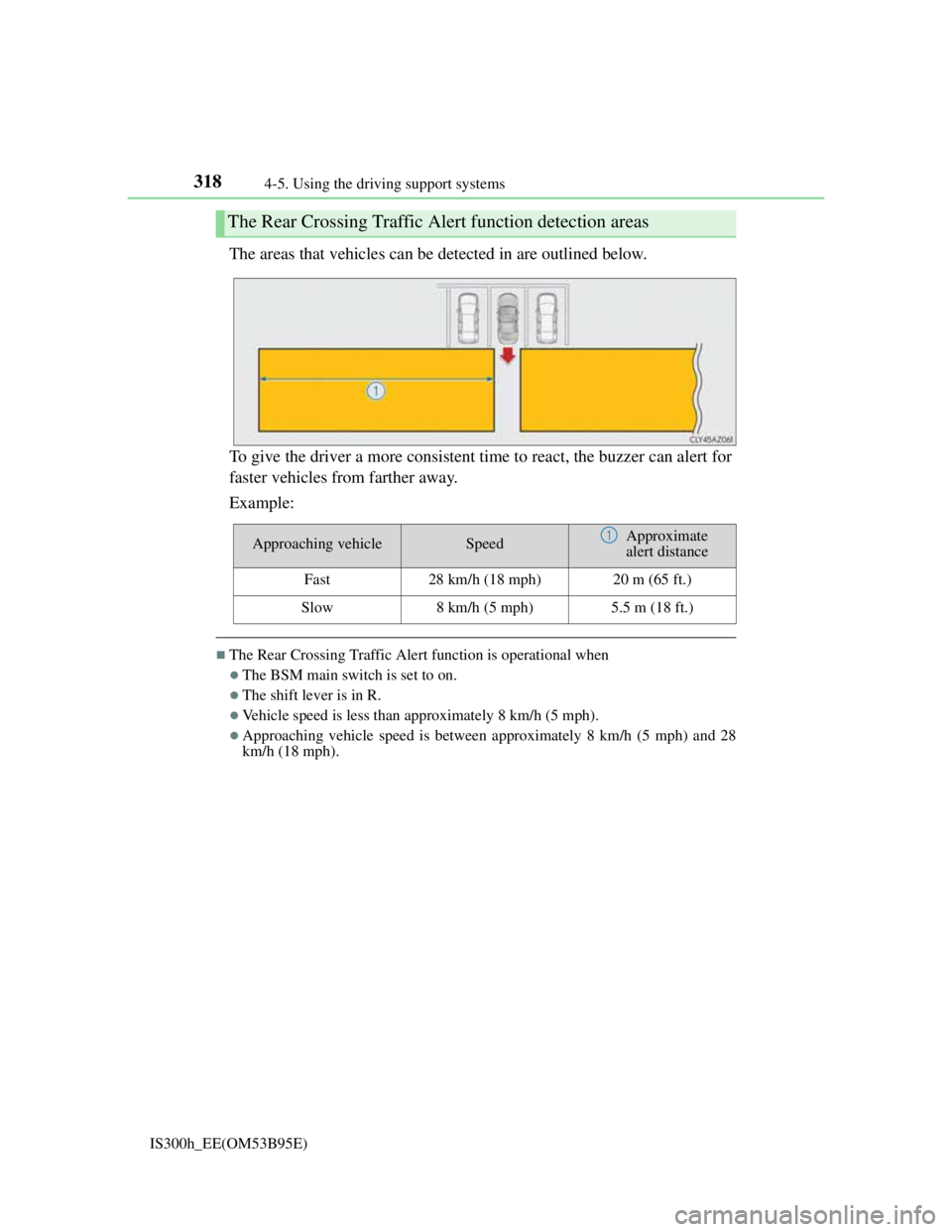
The areas that vehicles can be detected in are outlined below.
To give the driver a more consistent time to react, the buzzer can alert for
faster vehicles from farther away.
Example:
The Rear Crossing Traffic Alert function is operational when
The BSM main switch is set to on.
The shift lever is in R.
Vehicle speed is less than approximately 8 km/h (5 mph).
Approaching vehicle speed is between approximately 8 km/h (5 mph) and 28
km/h (18 mph).
The Rear Crossing Traffic Alert function detection areas
Approaching vehicleSpeedApproximate
alert distance
Fast28 km/h (18 mph)20 m (65 ft.)
Slow8 km/h (5 mph)5.5 m (18 ft.)
1
Page 321 of 628
3194-5. Using the driving support systems
4
Driving
IS300h_EE(OM53B95E)
Conditions under which the Rear Crossing Traffic Alert function will not detect a
vehicle
The Rear Crossing Traffic Alert function is not designed to detect the following
types of vehicles and/or objects.
Small motorcycles, bicycles, pedestrians etc.*
Vehicles approaching from directly behind
Guardrails, walls, signs, parked vehicles and similar stationary objects*
Vehicles moving away from your vehicle
Vehicles approaching from the parking spaces next to your vehicle*
Vehicles backing up in the parking space next to your vehicle
*: Depending on conditions, detection of a vehicle and/or object may occur.
Conditions under which the Rear Crossing Traffic Alert function may not func-
tion correctly
The Rear Crossing Traffic Alert function may not detect vehicles correctly in the
following conditions:
During bad weather such as heavy rain, fog, snow etc.
When ice or mud etc. is attached to the rear bumper
When multiple vehicles approach continuously
Shallow angle parking
When a vehicle is approaching at high speed
When parking on a steep incline, such as hills, a dip in the road etc.
Directly after the BSM main switch is set to on
When your vehicle is towing a trailer
Directly after the hybrid system is started with the BSM main switch on
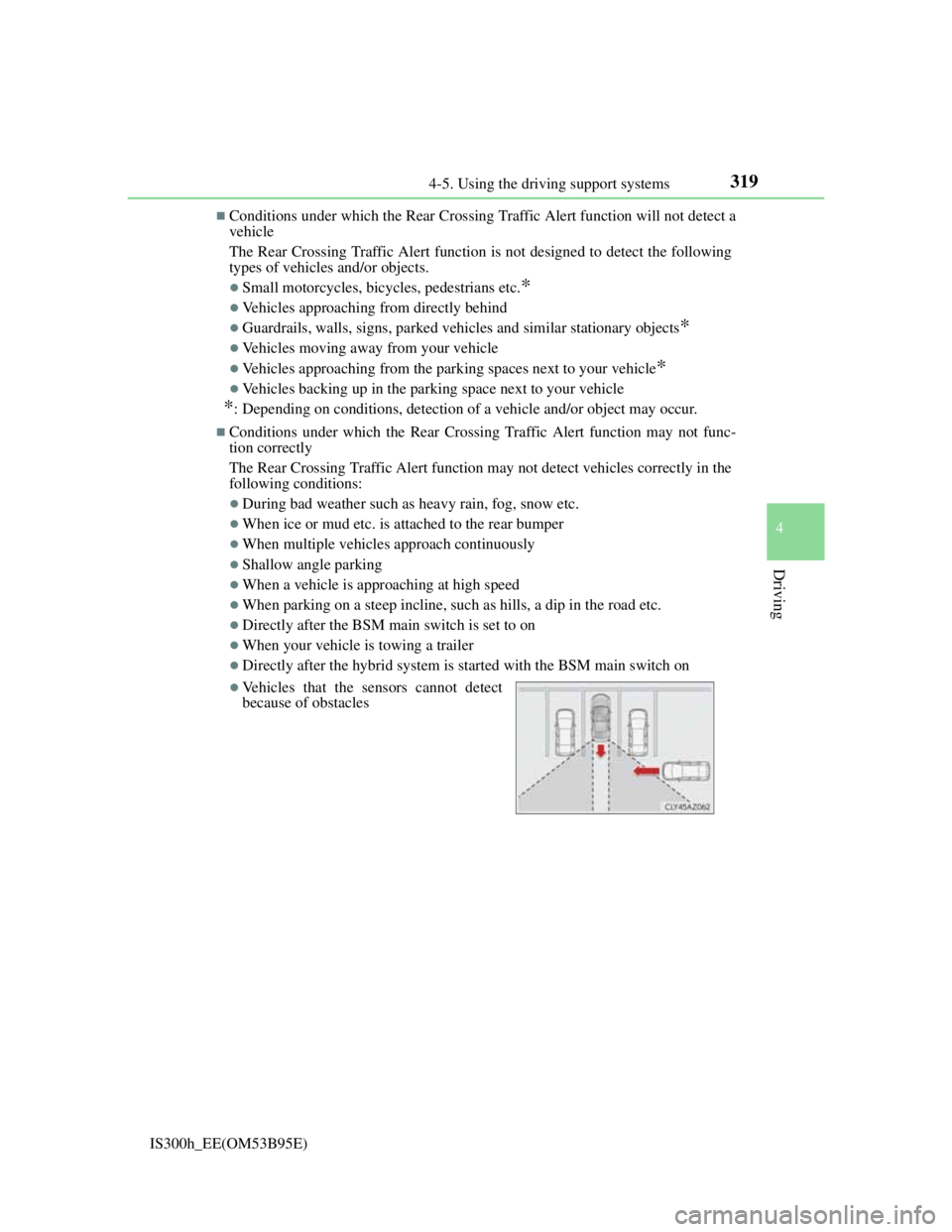
Vehicles that the sensors cannot detect
because of obstacles
Page 322 of 628

309
4
Driving
IS300h_EE(OM53B95E)4-6. Driving tips
Using Eco drive mode
When using Eco drive mode, the torque corresponding to the accelera-
tor pedal depression amount can be generated more smoothly than it is
in normal conditions. In addition, the operation of the air conditioning
system (heating/cooling) will be minimized, improving the fuel econ-
omy. (P. 290)
Use of Hybrid System Indicator
Eco-friendly driving is possible by keeping the indicator needle
(except F SPORT models) or bar display (F SPORT models) of Hybrid
System Indicator within the Eco area. (P. 1 1 4 )
When braking
Make sure to operate the brakes gently and in good time. A greater
amount of electrical energy can be regenerated when slowing down.
Delays
Repeated acceleration and deceleration, as well as long waits at traffic
lights, will lead to bad fuel economy. Check traffic reports before leav-
ing and avoid delays as much as possible. When driving in a traffic
jam, gently release the brake pedal to allow the vehicle to move for-
ward slightly while avoiding overuse of the accelerator pedal. Doing so
can help control excessive gasoline consumption.
Highway driving
Control your speed and keep at a constant speed. Before stopping at a
toll booth or similar, allow plenty of time to release the accelerator and
gently apply the brakes. A greater amount of electrical energy can be
regenerated when slowing down.
Hybrid vehicle driving tips
For economical and ecological driving, pay attention to the following
points:
Page 324 of 628
3114-6. Driving tips
4
Driving
IS300h_EE(OM53B95E)
Use fluids that are appropriate to the prevailing outside temperatures.
•Engine oil
• Engine/power control unit coolant
•Washer fluid
Have a service technician inspect the condition of the 12-volt battery.
Have the vehicle fitted with four snow tires or purchase a set of tire
chains for the rear tires.
*
Ensure that all tires are the specified size and brand, and that chains match
the size of the tires.
*: Tire chains cannot be mounted on the 18-inch tires.
Perform the following according to the driving conditions:
Do not try to forcibly open a window or move a wiper that is frozen.
Pour warm water over the frozen area to melt the ice. Wipe away the
water immediately to prevent it from freezing.
To ensure proper operation of the climate control system fan, remove
any snow that has accumulated on the air inlet vents in front of the
windshield.
Check for and remove any excess ice or snow that may have accumu-
lated on the exterior lights, vehicle’s roof, chassis, around the tires or
on the brakes.
Remove any snow or mud from the bottom of your shoes before get-
ting in the vehicle.
Accelerate the vehicle slowly, keep a safe distance between you and the
vehicle ahead, and drive at a reduced speed suitable to road conditions.
Winter driving tips
Carry out the necessary preparations and inspections before driving the
vehicle in winter. Always drive the vehicle in a manner appropriate to the
prevailing weather conditions.
Preparation for winter
Before driving the vehicle
When driving the vehicle
Page 326 of 628
3134-6. Driving tips
4
Driving
IS300h_EE(OM53B95E)
CAUTION
Driving with snow tires
Observe the following precautions to reduce the risk of accidents.
Failure to do so may result in a loss of vehicle control and cause death or seri-
ous injury.
Use tires of the specified size.
Maintain the recommended level of air pressure.
Do not drive at speeds in excess of the speed limit or the speed limit specified
for the snow tires being used.
Use snow tires on all, not just some wheels.
Driving with tire chains (except vehicles with 18-inch tires)
Observe the following precautions to reduce the risk of accidents.
Failure to do so may result in the vehicle being unable to be driven safely, and
may cause death or serious injury.
Do not drive in excess of the speed limit specified for the tire chains being
used, or 50 km/h (30 mph), whichever is lower.
Avoid driving on bumpy road surfaces or over potholes.
Avoid sudden acceleration, abrupt steering, sudden braking and shifting oper-
ations that cause sudden engine braking.
Slow down sufficiently before entering a curve to ensure that vehicle control
is maintained.
Do not use LDA (Lane Departure Alert) system.
NOTICE
Repairing or replacing snow tires
Request repairs or replacement of snow tires from Lexus dealers or legitimate
tire retailers.
This is because the removal and attachment of snow tires affects the operation
of the tire pressure warning valves and transmitters.
Fitting tire chains (except vehicles with 18-inch tires)
The tire pressure warning valves and transmitters may not function correctly
when tire chains are fitted.
Page 345 of 628
3315-3. Using the audio system
5
Lexus Display Audio system
IS300h_EE(OM53B95E)
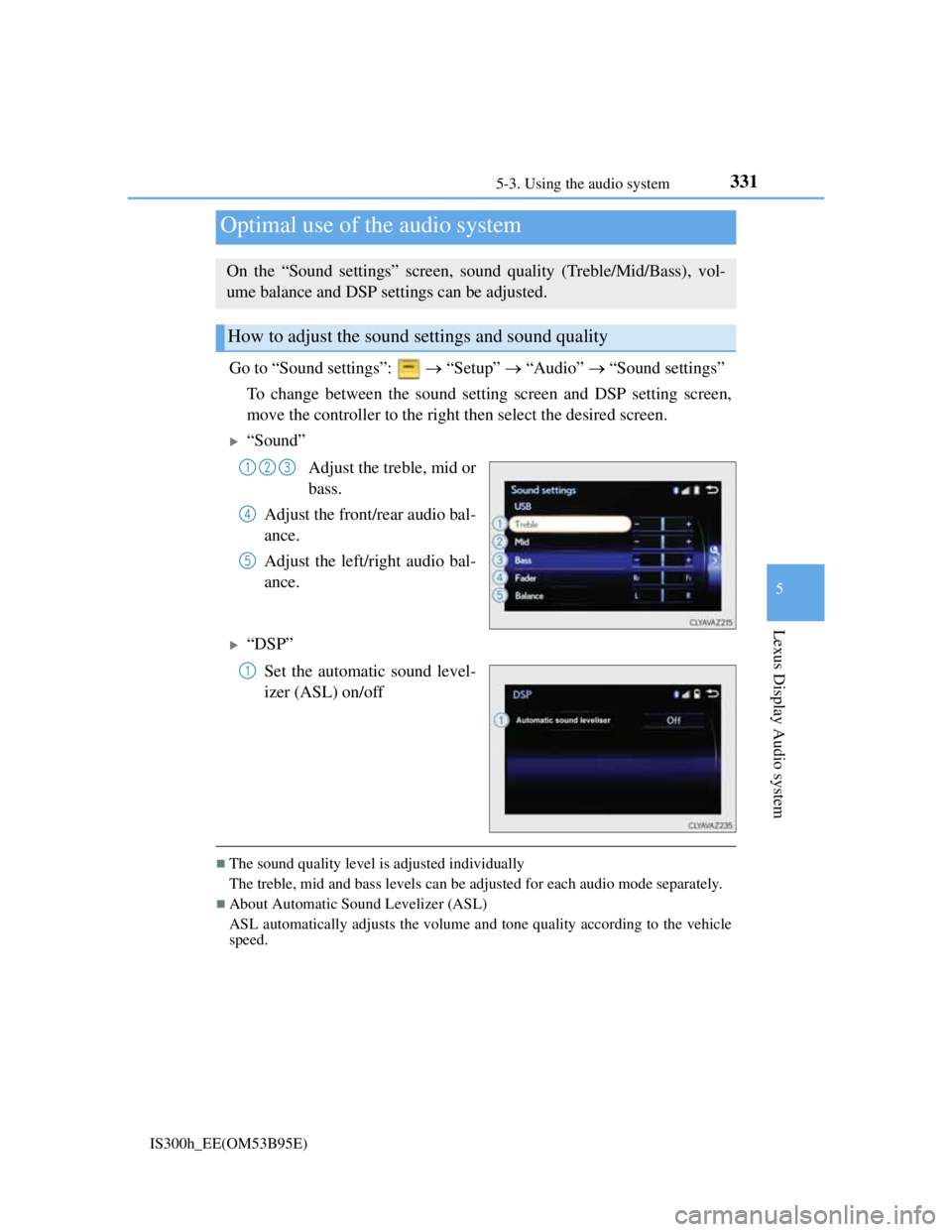
Go to “Sound settings”: “Setup” “Audio” “Sound settings”
To change between the sound setting screen and DSP setting screen,
move the controller to the right then select the desired screen.
“Sound”
Adjust the treble, mid or
bass.
Adjust the front/rear audio bal-
ance.
Adjust the left/right audio bal-
ance.
“DSP”
Set the automatic sound level-
izer (ASL) on/off
The sound quality level is adjusted individually
The treble, mid and bass levels can be adjusted for each audio mode separately.
About Automatic Sound Levelizer (ASL)
ASL automatically adjusts the volume and tone quality according to the vehicle
speed.
Optimal use of the audio system
On the “Sound settings” screen, sound quality (Treble/Mid/Bass), vol-
ume balance and DSP settings can be adjusted.
How to adjust the sound settings and sound quality
123
4
5
1