speed Lexus IS300h 2013 Owner's Guide
[x] Cancel search | Manufacturer: LEXUS, Model Year: 2013, Model line: IS300h, Model: Lexus IS300h 2013Pages: 628, PDF Size: 20.23 MB
Page 221 of 628
2194-2. Driving procedures
4
Driving
IS300h_EE(OM53B95E)
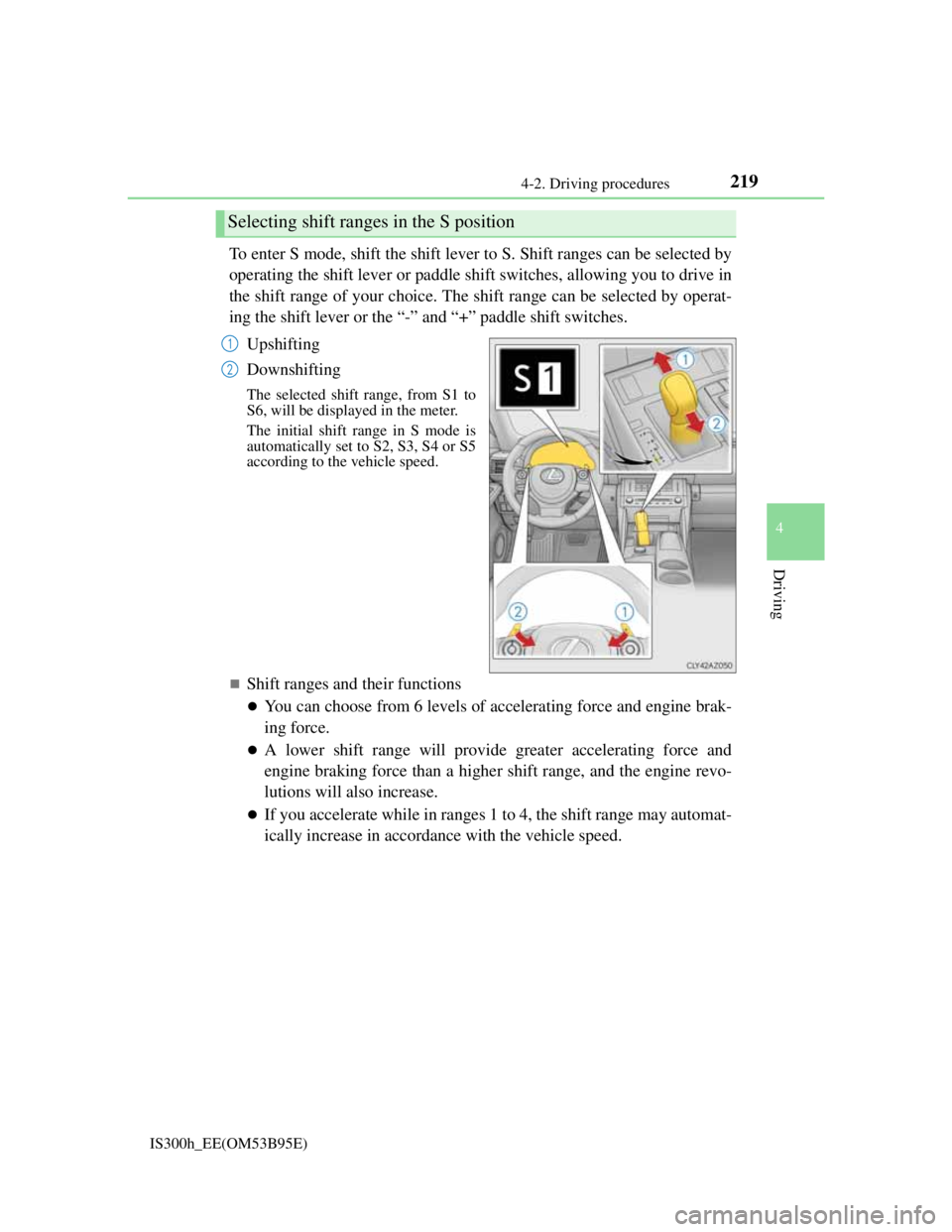
To enter S mode, shift the shift lever to S. Shift ranges can be selected by
operating the shift lever or paddle shift switches, allowing you to drive in
the shift range of your choice. The shift range can be selected by operat-
ing the shift lever or the “-” and “+” paddle shift switches.
Upshifting
Downshifting
The selected shift range, from S1 to
S6, will be displayed in the meter.
The initial shift range in S mode is
automatically set to S2, S3, S4 or S5
according to the vehicle speed.
Shift ranges and their functions
You can choose from 6 levels of accelerating force and engine brak-
ing force.
A lower shift range will provide greater accelerating force and
engine braking force than a higher shift range, and the engine revo-
lutions will also increase.
If you accelerate while in ranges 1 to 4, the shift range may automat-
ically increase in accordance with the vehicle speed.
Selecting shift ranges in the S position
1
2
Page 232 of 628
2304-3. Operating the lights and wipers
IS300h_EE(OM53B95E)
When all of the following conditions are met, the high beam will be auto-
matically turned on (after approximately 1 second):
Vehicle speed is above approximately 40 km/h (25 mph).
The area ahead of the vehicle is dark.
There are no oncoming or preceding vehicles with headlights or tail
lights turned on.
There are few streetlights on the road ahead.
If any of the following conditions are met, the high beam will be automat-
ically turned off:
Vehicle speed drops below approximately 30 km/h (19 mph).
The area ahead of the vehicle is not dark.
Oncoming or preceding vehicles have headlights or tail lights turned
on.
There are many streetlights on the road ahead.
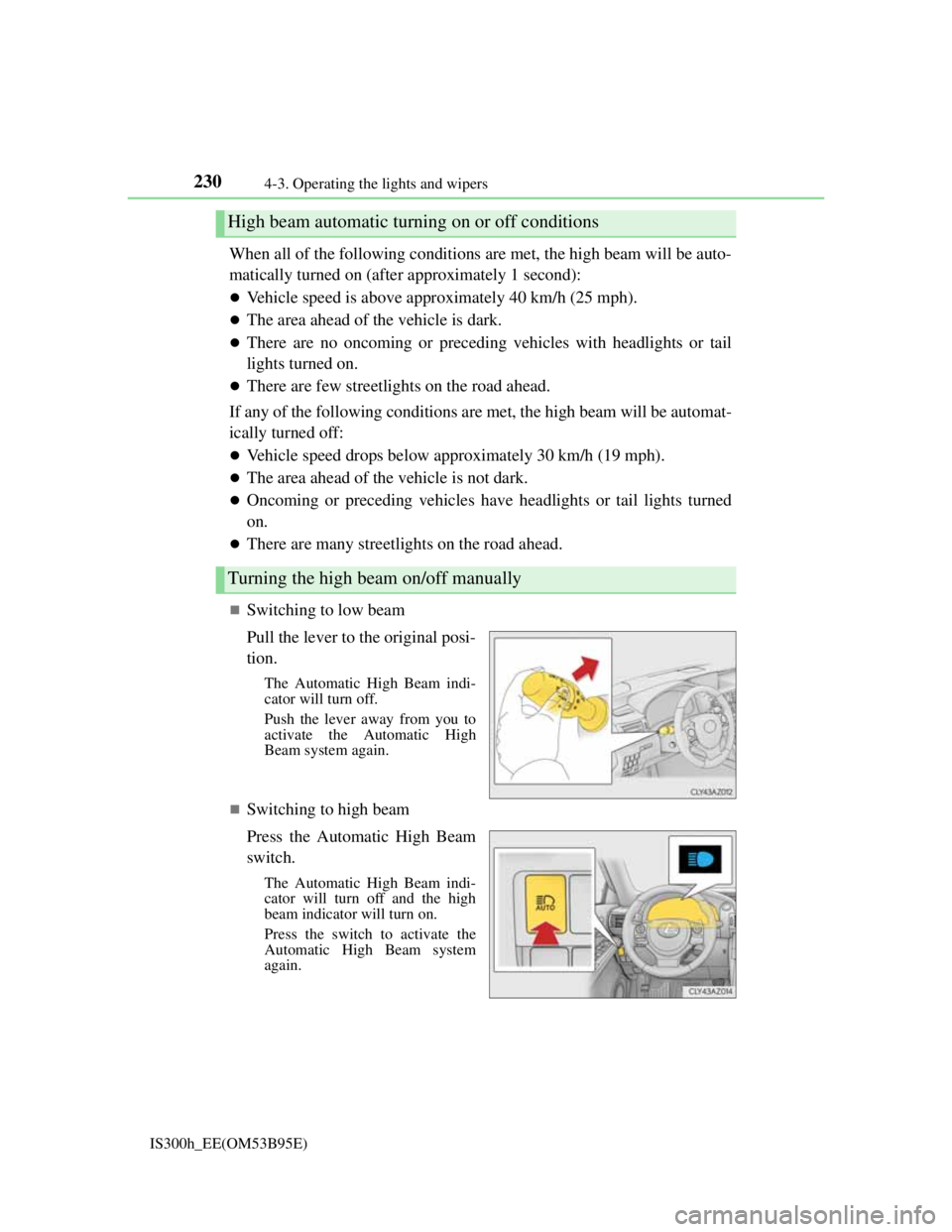
Switching to low beam
Pull the lever to the original posi-
tion.
The Automatic High Beam indi-
cator will turn off.
Push the lever away from you to
activate the Automatic High
Beam system again.
Switching to high beam
Press the Automatic High Beam
switch.
The Automatic High Beam indi-
cator will turn off and the high
beam indicator will turn on.
Press the switch to activate the
Automatic High Beam system
again.
High beam automatic turning on or off conditions
Turning the high beam on/off manually
Page 237 of 628
2354-3. Operating the lights and wipers
4
Driving
IS300h_EE(OM53B95E)
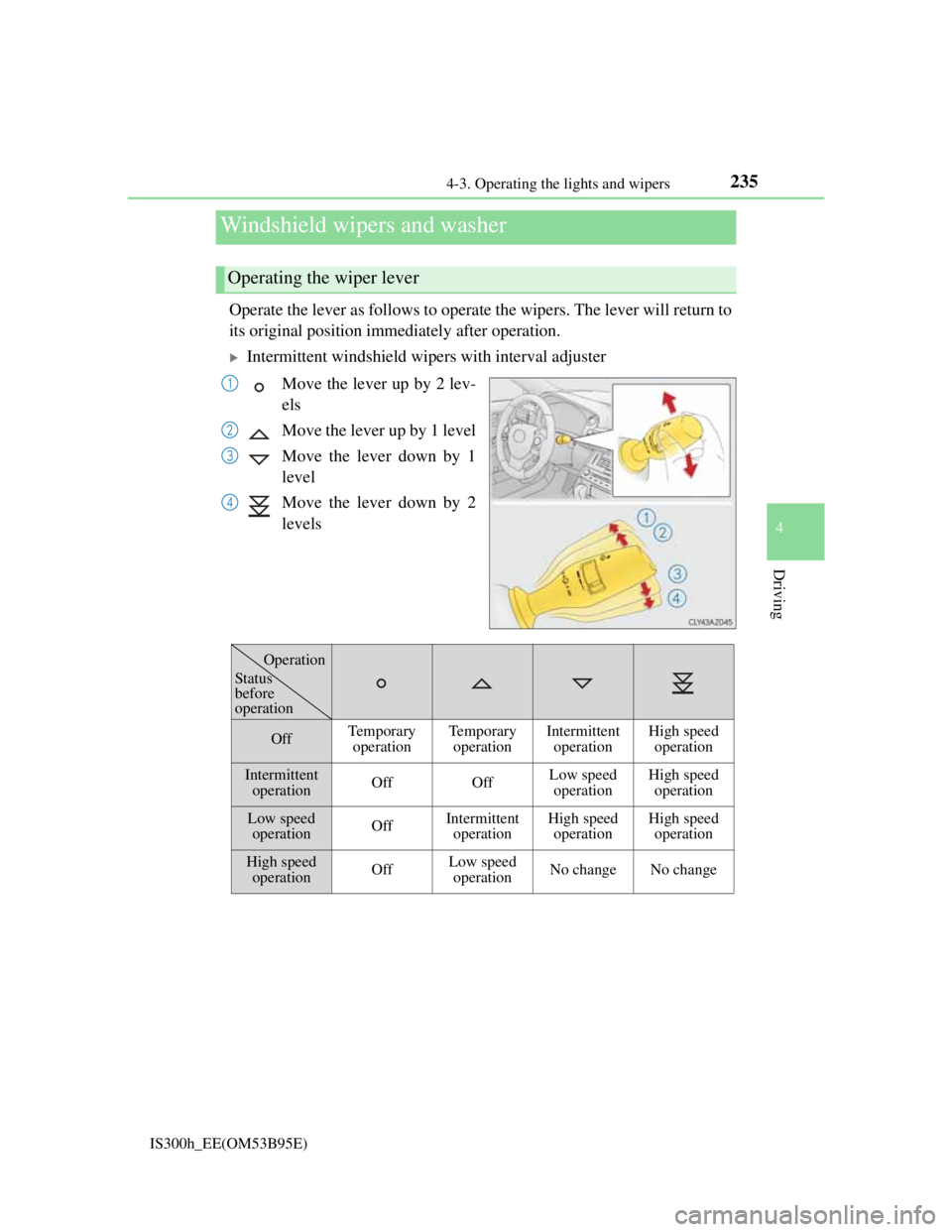
Operate the lever as follows to operate the wipers. The lever will return to
its original position immediately after operation.
Intermittent windshield wipers with interval adjuster
Move the lever up by 2 lev-
els
Move the lever up by 1 level
Move the lever down by 1
level
Move the lever down by 2
levels
Windshield wipers and washer
Operating the wiper lever
1
2
3
4
OffTemporary
operationTemporary
operationIntermittent
operationHigh speed
operation
Intermittent
operationOffOffLow speed
operationHigh speed
operation
Low speed
operationOffIntermittent
operationHigh speed
operationHigh speed
operation
High speed
operationOffLow speed
operationNo changeNo change
Status
before
operation
Operation
Page 239 of 628
2374-3. Operating the lights and wipers
4
Driving
IS300h_EE(OM53B95E)
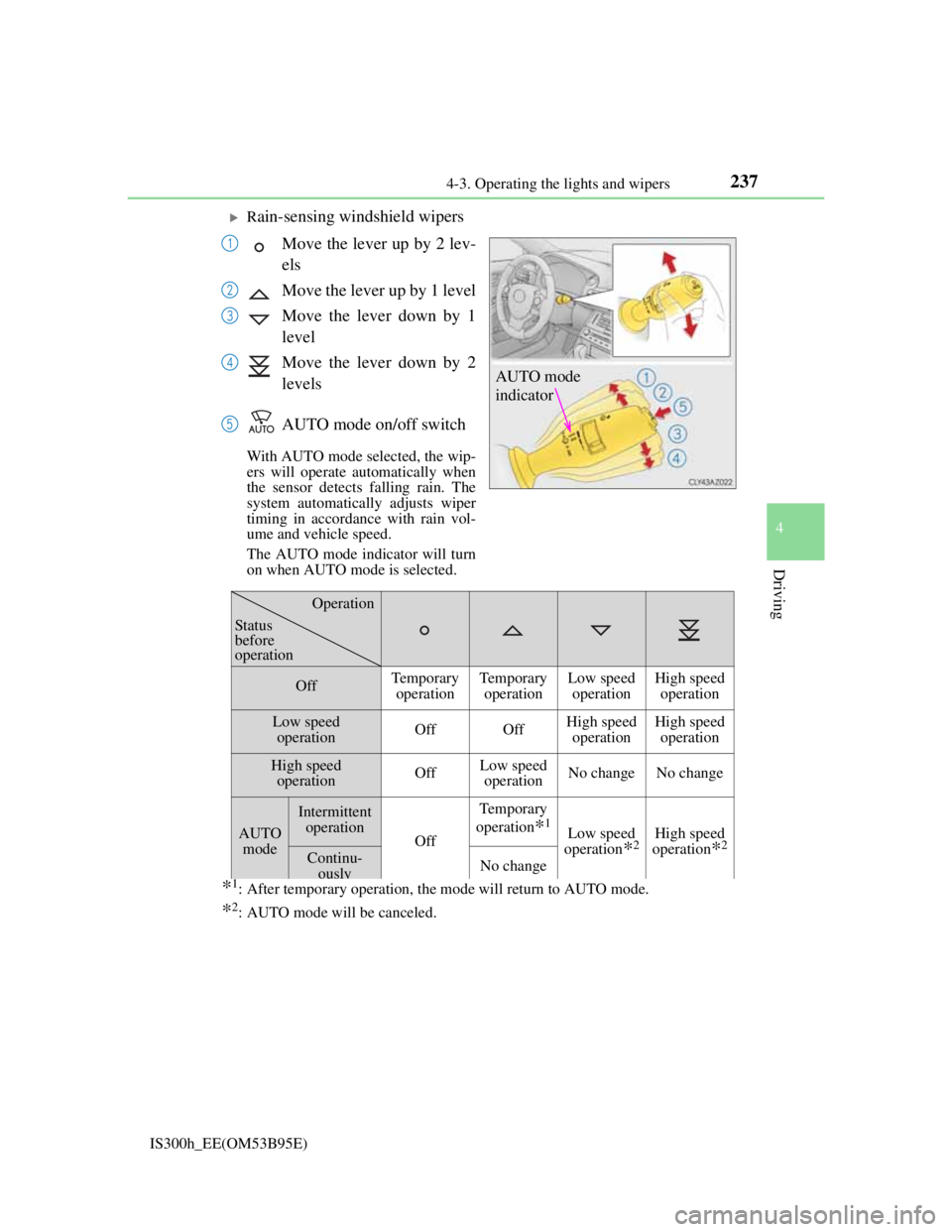
Rain-sensing windshield wipers
Move the lever up by 2 lev-
els
Move the lever up by 1 level
Move the lever down by 1
level
Move the lever down by 2
levels
AUTO mode on/off switch
With AUTO mode selected, the wip-
ers will operate automatically when
the sensor detects falling rain. The
system automatically adjusts wiper
timing in accordance with rain vol-
ume and vehicle speed.
The AUTO mode indicator will turn
on when AUTO mode is selected.
*1: After temporary operation, the mode will return to AUTO mode.
*2: AUTO mode will be canceled.
AUTO mode
indicator
1
2
3
4
5
OffTemporary
operationTemporary
operationLow speed
operationHigh speed
operation
Low speed
operationOffOffHigh speed
operationHigh speed
operation
High speed
operationOffLow speed
operationNo changeNo change
AUTO
mode
Intermittent
operation
Off
Temporary
operation
*1Low speed
operation
*2High speed
operation
*2Continu-
ouslyNo change
Operation
Status
before
operation
Page 240 of 628
2384-3. Operating the lights and wipers
IS300h_EE(OM53B95E)
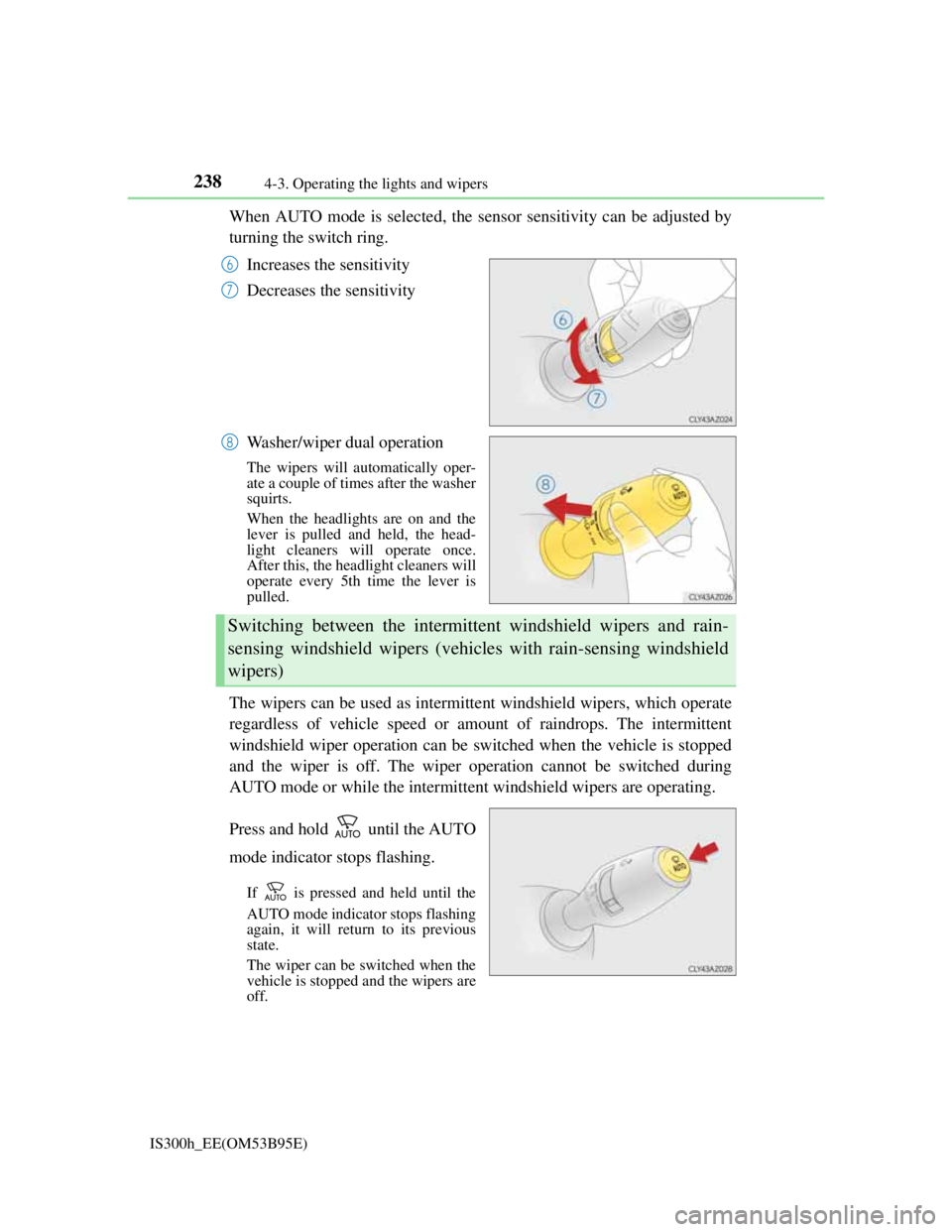
When AUTO mode is selected, the sensor sensitivity can be adjusted by
turning the switch ring.
Increases the sensitivity
Decreases the sensitivity
Washer/wiper dual operation
The wipers will automatically oper-
ate a couple of times after the washer
squirts.
When the headlights are on and the
lever is pulled and held, the head-
light cleaners will operate once.
After this, the headlight cleaners will
operate every 5th time the lever is
pulled.
The wipers can be used as intermittent windshield wipers, which operate
regardless of vehicle speed or amount of raindrops. The intermittent
windshield wiper operation can be switched when the vehicle is stopped
and the wiper is off. The wiper operation cannot be switched during
AUTO mode or while the intermittent windshield wipers are operating.
Press and hold until the AUTO
mode indicator stops flashing.
If is pressed and held until the
AUTO mode indicator stops flashing
again, it will return to its previous
state.
The wiper can be switched when the
vehicle is stopped and the wipers are
off.
6
7
8
Switching between the intermittent windshield wipers and rain-
sensing windshield wipers (vehicles with rain-sensing windshield
wipers)
Page 241 of 628
2394-3. Operating the lights and wipers
4
Driving
IS300h_EE(OM53B95E)
The windshield wiper and washer can be operated when
The power switch is in ON mode.
Dripping prevention wiper sweep
After performing a washing and wiping operation several times, the wipers oper-
ate one more time after a short delay to prevent dripping.
However, the last sweep will not happen if the vehicle is traveling above 170 km/
h (106 mph).
Effects of vehicle speed on wiper operation (vehicles with rain-sensing wind-
shield wipers)
Vehicle speed affects the following even when the wipers are not in AUTO
mode.
Intermittent wiper interval
Wiper operation when the washer is being used (delay until drip prevention
wiper sweep occurs)
With low speed windshield wiper operation selected, wiper operation will be
switched from low speed to intermittent wiper operation only when the vehicle is
stationary.
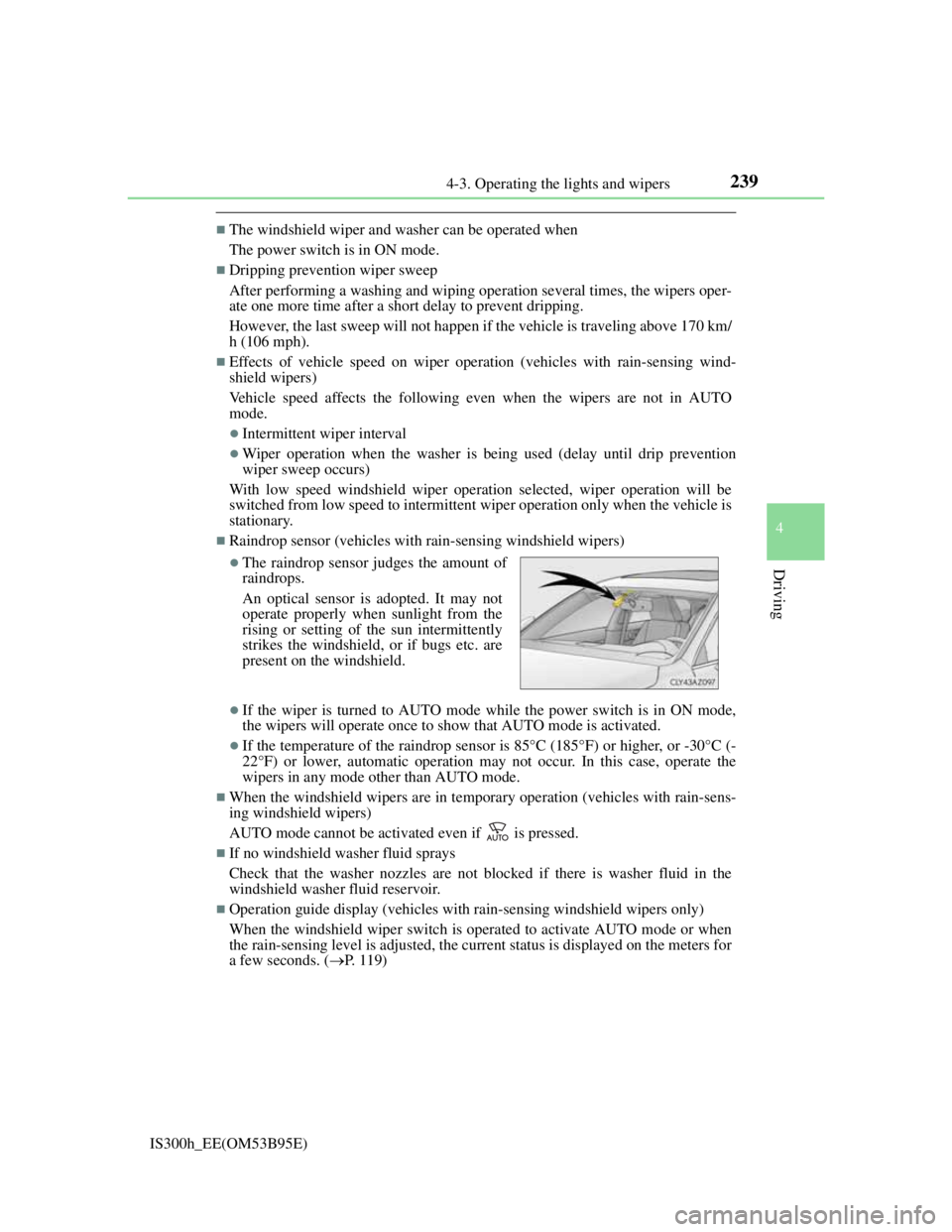
Raindrop sensor (vehicles with rain-sensing windshield wipers)
If the wiper is turned to AUTO mode while the power switch is in ON mode,
the wipers will operate once to show that AUTO mode is activated.
If the temperature of the raindrop sensor is 85°C (185°F) or higher, or -30°C (-
22°F) or lower, automatic operation may not occur. In this case, operate the
wipers in any mode other than AUTO mode.
When the windshield wipers are in temporary operation (vehicles with rain-sens-
ing windshield wipers)
AUTO mode cannot be activated even if is pressed.
If no windshield washer fluid sprays
Check that the washer nozzles are not blocked if there is washer fluid in the
windshield washer fluid reservoir.
Operation guide display (vehicles with rain-sensing windshield wipers only)
When the windshield wiper switch is operated to activate AUTO mode or when
the rain-sensing level is adjusted, the current status is displayed on the meters for
a few seconds. (P. 1 1 9 )
The raindrop sensor judges the amount of
raindrops.
An optical sensor is adopted. It may not
operate properly when sunlight from the
rising or setting of the sun intermittently
strikes the windshield, or if bugs etc. are
present on the windshield.
Page 247 of 628
245
4
Driving
IS300h_EE(OM53B95E)4-5. Using the driving support systems
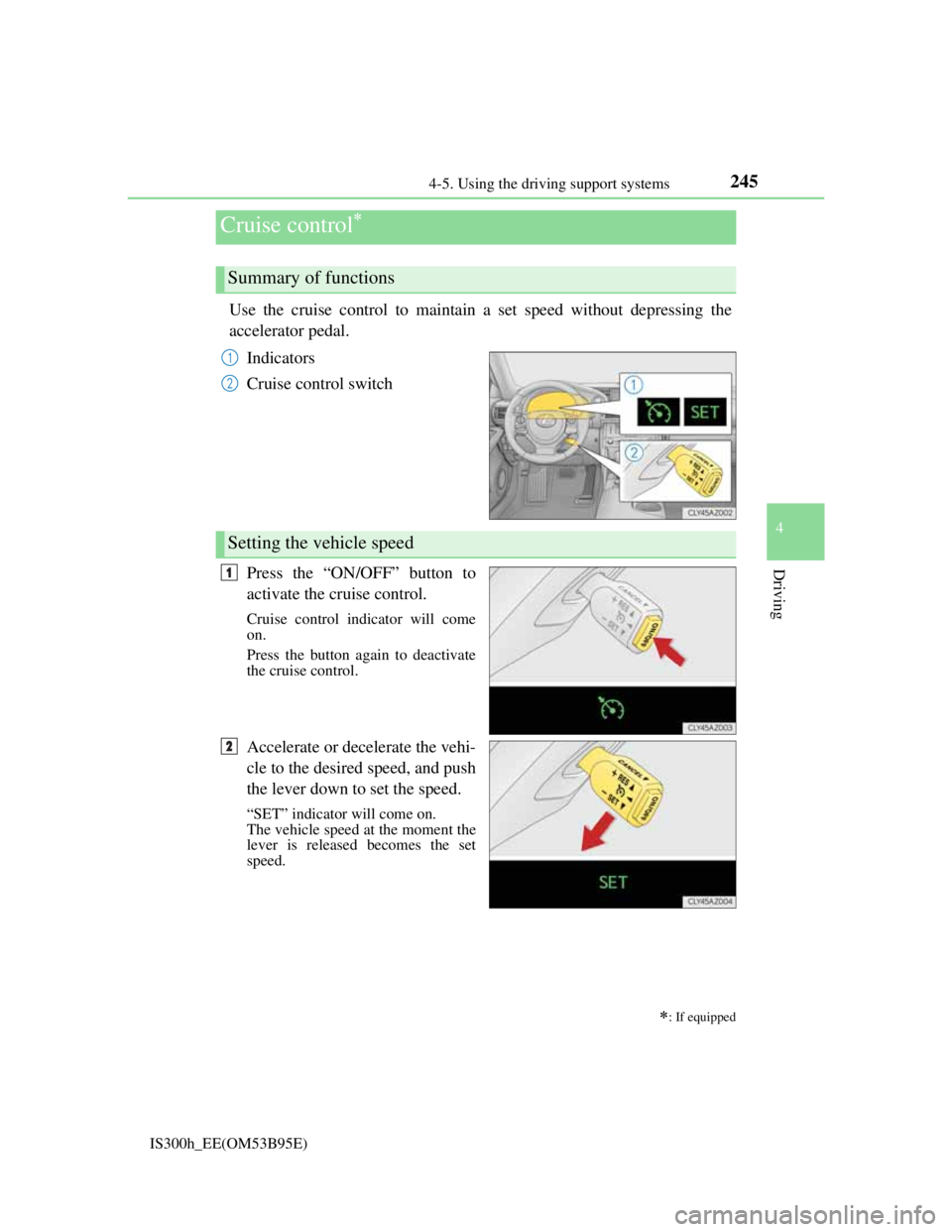
Use the cruise control to maintain a set speed without depressing the
accelerator pedal.
Indicators
Cruise control switch
Press the “ON/OFF” button to
activate the cruise control.
Cruise control indicator will come
on.
Press the button again to deactivate
the cruise control.
Accelerate or decelerate the vehi-
cle to the desired speed, and push
the lever down to set the speed.
“SET” indicator will come on.
The vehicle speed at the moment the
lever is released becomes the set
speed.
Cruise control
: If equipped
Summary of functions
1
2
Setting the vehicle speed
1
2
Page 248 of 628
2464-5. Using the driving support systems
IS300h_EE(OM53B95E)
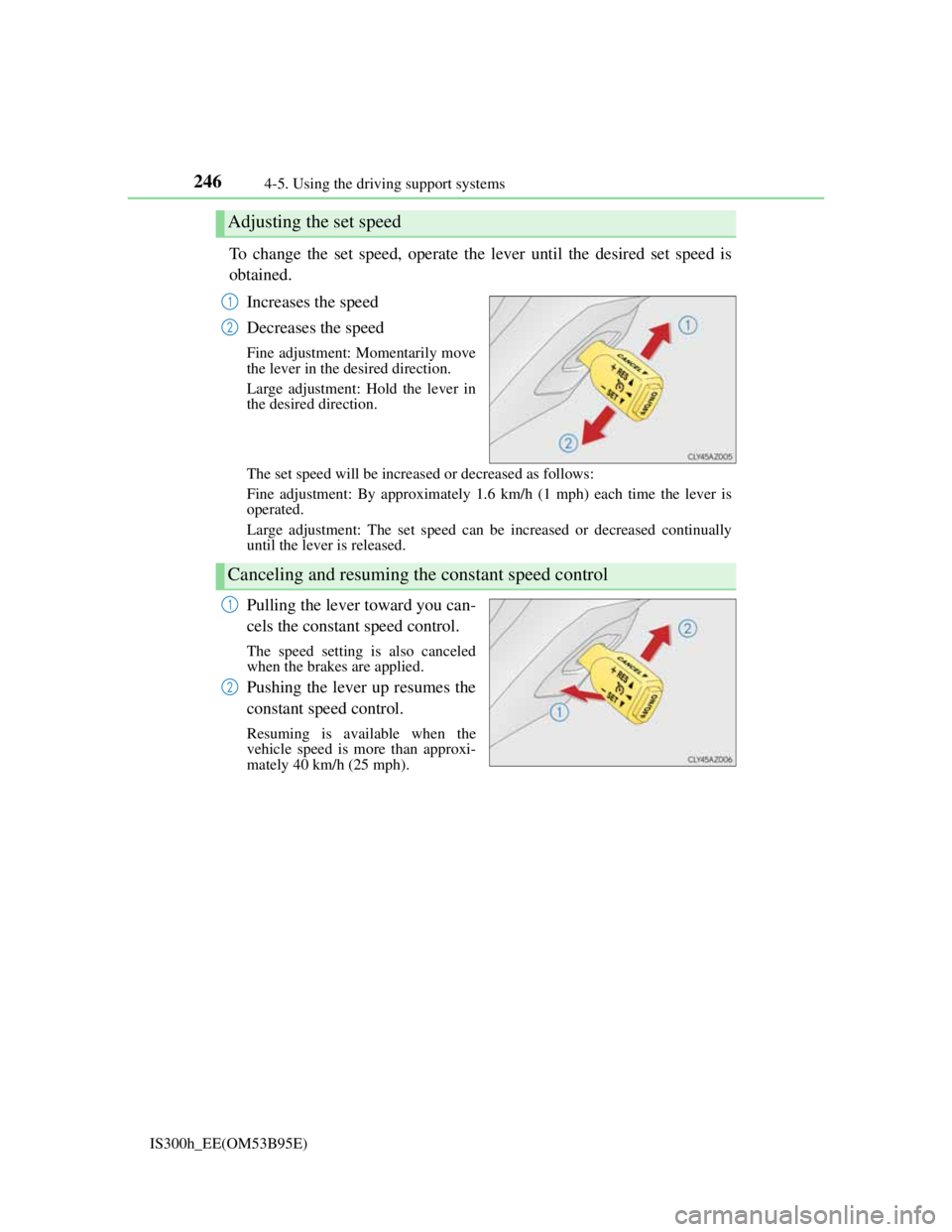
To change the set speed, operate the lever until the desired set speed is
obtained.
Increases the speed
Decreases the speed
Fine adjustment: Momentarily move
the lever in the desired direction.
Large adjustment: Hold the lever in
the desired direction.
The set speed will be increased or decreased as follows:
Fine adjustment: By approximately 1.6 km/h (1 mph) each time the lever is
operated.
Large adjustment: The set speed can be increased or decreased continually
until the lever is released.
Pulling the lever toward you can-
cels the constant speed control.
The speed setting is also canceled
when the brakes are applied.
Pushing the lever up resumes the
constant speed control.
Resuming is available when the
vehicle speed is more than approxi-
mately 40 km/h (25 mph).
Adjusting the set speed
1
2
Canceling and resuming the constant speed control
1
2
Page 249 of 628

2474-5. Using the driving support systems
4
Driving
IS300h_EE(OM53B95E)
Cruise control can be set when
The shift lever is in D or range 4 or higher of S has been selected.
Range 4 or higher of D has been selected by using the paddle shift.
Vehicle speed is above approximately 40 km/h (25 mph).
Accelerating after setting the vehicle speed
The vehicle can be accelerated normally. After acceleration, the set speed
resumes.
Even without canceling the cruise control, the set speed can be increased by
first accelerating the vehicle to the desired speed and then pushing the lever
down to set the new speed.
Automatic cruise control cancelation
Cruise control will stop maintaining the vehicle speed in any of the following sit-
uations.
Actual vehicle speed falls more than approximately 16 km/h (10 mph) below
the preset vehicle speed.
At this time, the memorized set speed is not retained.
Actual vehicle speed is below approximately 40 km/h (25 mph).
VSC is activated.
TRC is activated for a period of time.
When the VSC or TRC system is turned off by pressing the VSC OFF switch.
If the warning message for the cruise control is shown on the multi-information
display
Press the “ON/OFF” button once to deactivate the system, and then press the but-
ton again to reactivate the system.
If the cruise control speed cannot be set or if the cruise control cancels immedi-
ately after being activated, there may be a malfunction in the cruise control sys-
tem. Have the vehicle inspected by any authorized Lexus dealer or repairer, or
another duly qualified and equipped professional.
Page 250 of 628

2484-5. Using the driving support systems
IS300h_EE(OM53B95E)
CAUTION
To avoid operating the cruise control by mistake
Switch the cruise control off using the “ON/OFF” button when not in use.
Situations unsuitable for cruise control
Do not use cruise control in any of the following situations.
Doing so may result in loss of control and could cause an accident resulting in
death or serious injury.
In heavy traffic
On roads with sharp bends
On winding roads
On slippery roads, such as those covered with rain, ice or snow
On steep hills
Vehicle speed may exceed the set speed when driving down a steep hill.
When your vehicle is towing a trailer or during emergency towing