speed Lexus IS300h 2013 Workshop Manual
[x] Cancel search | Manufacturer: LEXUS, Model Year: 2013, Model line: IS300h, Model: Lexus IS300h 2013Pages: 628, PDF Size: 20.23 MB
Page 267 of 628
2654-5. Using the driving support systems
4
Driving
IS300h_EE(OM53B95E)
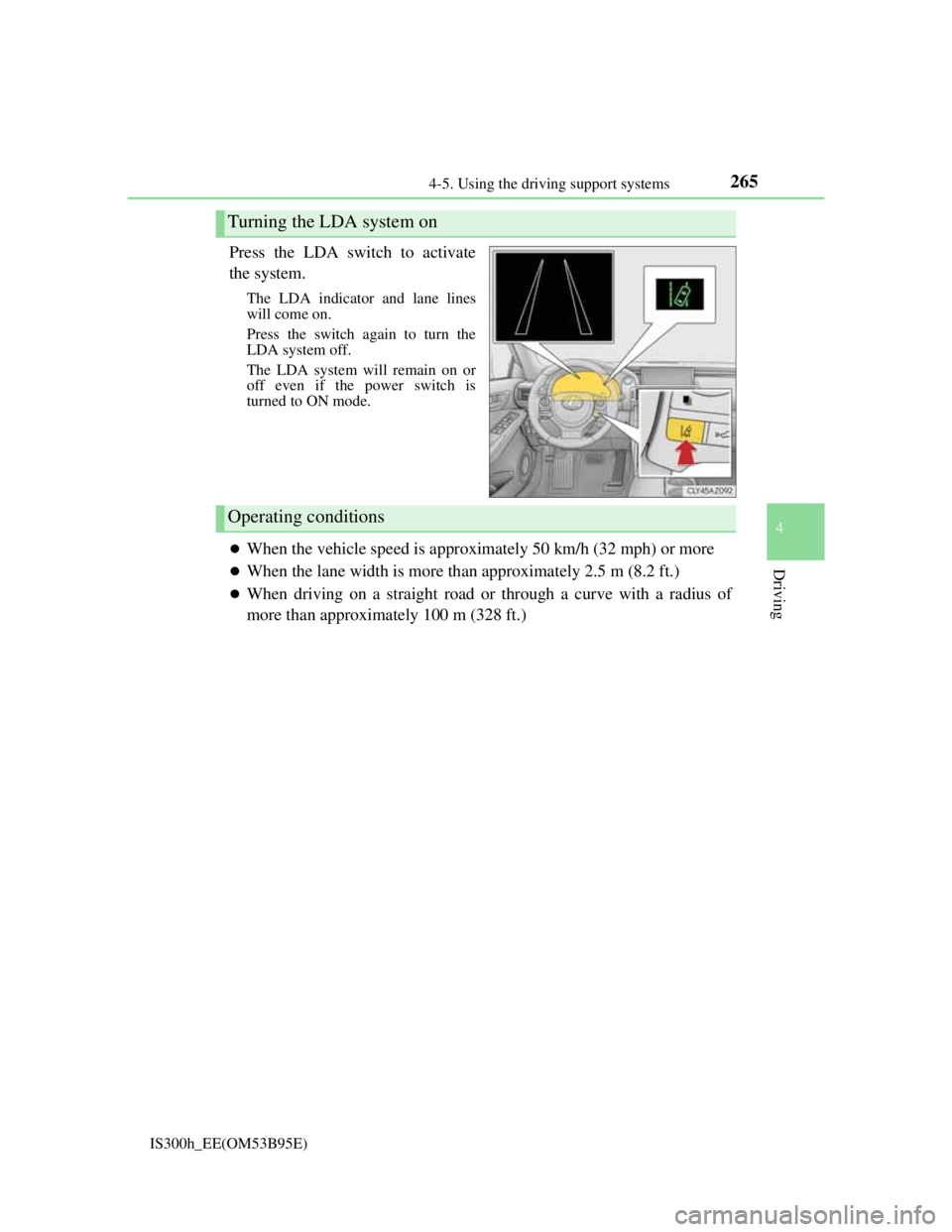
Press the LDA switch to activate
the system.
The LDA indicator and lane lines
will come on.
Press the switch again to turn the
LDA system off.
The LDA system will remain on or
off even if the power switch is
turned to ON mode.
When the vehicle speed is approximately 50 km/h (32 mph) or more
When the lane width is more than approximately 2.5 m (8.2 ft.)
When driving on a straight road or through a curve with a radius of
more than approximately 100 m (328 ft.)
Turning the LDA system on
Operating conditions
Page 269 of 628

2674-5. Using the driving support systems
4
Driving
IS300h_EE(OM53B95E)
Temporary cancelation of the LDA system functions
If any of the following occurs, the LDA system functions will be temporarily
canceled. The functions will resume after the necessary operating conditions
have returned.
The turn signal lever is operated.
The vehicle speed deviates from the operating range of the LDA system func-
tions.
When the lane lines cannot be recognized while driving.
When the lane departure warning sounds.
The lane departure warning function will not operate again for a several sec-
onds after it has been activated, even if the vehicle leaves the lane again.
The lane departure warning
Depending on the audio system sound level or air conditioning fan noise while
the audio system or air conditioning system is in use, it may be difficult to hear
the warning sound.
After the vehicle has been parked in the sun
The LDA system may not be available and a warning message (P. 518) will be
displayed for a while after driving has started. When the temperature in the cabin
decreases and the temperature around the camera sensor (P. 264) becomes suit-
able for its operation, the functions will begin to operate.
If there are lane markers on only one side of the vehicle
The lane departure warning will not operate for the side on which lane markers
could not be recognized.
Conditions in which the function may not operate correctly
In the following situations, the camera sensor may be unable to recognize lane
markers causing the lane departure warning function to operate incorrectly. How-
ever, this does not indicate a malfunction.
When driving through an area with no lane markers, such as a tollbooth, a
crossing or before a ticket checkpoint
When driving on a sharp curve
When lane markers are extremely narrow or extremely wide
When the vehicle leans to one side an unusual amount due to a heavy load or
improper tire inflation pressure
When the following distance between your vehicle and the vehicle ahead is
extremely short
When the lane markers are yellow (These may be more difficult for the system
to recognize compared to white markers.)
When the lane markers are broken, Botts’ dots (raised pavement markers) or
stones
When the lane markers are on a curb etc.
When lane markers are obscured or partially obscured by sand, dirt, etc.
When there are shadows on the road running parallel with lane markers, or if a
shadow covers the lane markers
When driving on a particularly bright road surface, such as concrete
Page 277 of 628
2754-5. Using the driving support systems
4
Driving
IS300h_EE(OM53B95E)
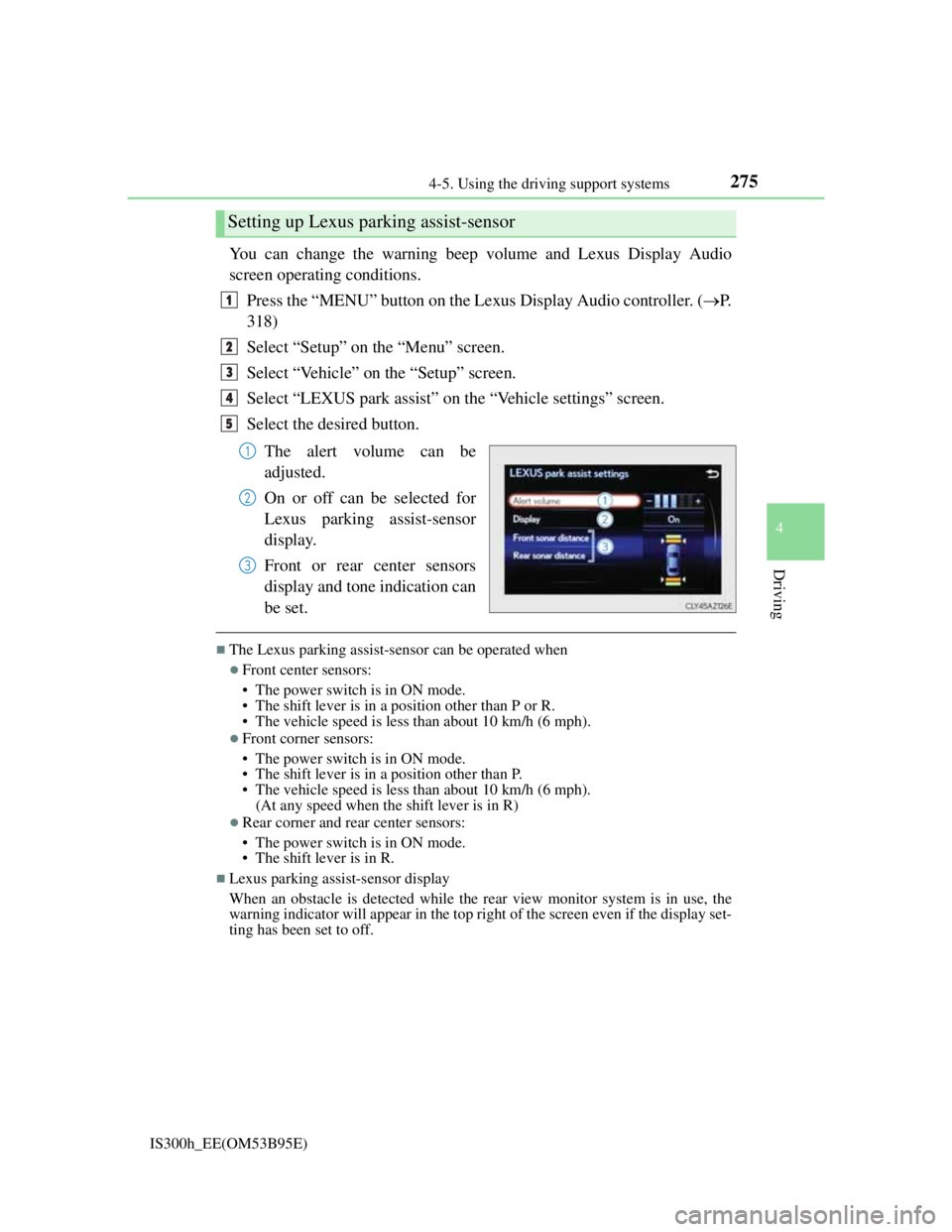
You can change the warning beep volume and Lexus Display Audio
screen operating conditions.
Press the “MENU” button on the Lexus Display Audio controller. (P.
318)
Select “Setup” on the “Menu” screen.
Select “Vehicle” on the “Setup” screen.
Select “LEXUS park assist” on the “Vehicle settings” screen.
Select the desired button.
The alert volume can be
adjusted.
On or off can be selected for
Lexus parking assist-sensor
display.
Front or rear center sensors
display and tone indication can
be set.
The Lexus parking assist-sensor can be operated when
Front center sensors:
• The power switch is in ON mode.
• The shift lever is in a position other than P or R.
• The vehicle speed is less than about 10 km/h (6 mph).
Front corner sensors:
• The power switch is in ON mode.
• The shift lever is in a position other than P.
• The vehicle speed is less than about 10 km/h (6 mph).
(At any speed when the shift lever is in R)
Rear corner and rear center sensors:
• The power switch is in ON mode.
• The shift lever is in R.
Lexus parking assist-sensor display
When an obstacle is detected while the rear view monitor system is in use, the
warning indicator will appear in the top right of the screen even if the display set-
ting has been set to off.
Setting up Lexus parking assist-sensor
1
2
3
4
5
1
2
3
Page 278 of 628

2764-5. Using the driving support systems
IS300h_EE(OM53B95E)
Sensor detection information
The sensor’s detection areas are limited to the areas around the vehicle’s front
corner and rear bumpers.
Certain vehicle conditions and the surrounding environment may affect the
ability of the sensor to correctly detect obstacles. Particular instances where this
may occur are listed below.
• There is dirt, snow or ice on the sensor. (Wiping the sensors will resolve this
problem.)
• The sensor is frozen. (Thawing the area will resolve this problem.)
In especially cold weather, if a sensor is frozen the screen may show an
abnormal display, or obstacles may not be detected.
• The sensor is covered in any way.
• The vehicle is leaning considerably to one side.
• On an extremely bumpy road, on an incline, on gravel, or on grass.
• The vicinity of the vehicle is noisy due to vehicle horns, motorcycle engines,
air brakes of large vehicles, or other loud noises producing ultrasonic waves.
• There is another vehicle equipped with parking assist sensors in the vicinity.
• The sensor is coated with a sheet of spray or heavy rain.
• The vehicle is equipped with a fender pole or wireless antenna.
• Towing eyelets are installed.
• The bumper or sensor receives a strong impact.
• The vehicle is approaching a tall or curved curb.
• In harsh sunlight or intense cold weather.
• The area directly under the bumpers is not detected.
• If obstacles draw too close to the sensor.
• A non-genuine Lexus suspension (lowered suspension etc.) is installed.
• People may not be detected if they are wearing certain types of clothing.
In addition to the examples above, there are instances in which, because of their
shape, signs and other objects may be judged by the sensor to be closer than they
are.
The shape of the obstacle may prevent the sensor from detecting it. Pay particu-
lar attention to the following obstacles:
• Wires, fences, ropes, etc.
• Cotton, snow and other materials that absorb sound waves
• Sharply-angled objects
• Low obstacles
• Tall obstacles with upper sections projecting outwards in the direction of
your vehicle
The following situations may occur during use.
• Depending on the shape of the obstacle and other factors, the detection dis-
tance may shorten, or detection may be impossible.
• Obstacles may not be detected if they are too close to the sensor.
• There will be a short delay between obstacle detection and display. Even at
slow speeds, there is a possibility that the obstacle will come within the sen-
sor’s detection areas before the display is shown and the warning beep
sounds.
• Thin posts or objects lower than the sensor may not be detected when
approached, even if they have been detected once.
• It might be difficult to hear beeps due to the volume of the audio system or
air flow noise of the air conditioning system.
Page 280 of 628

2784-5. Using the driving support systems
IS300h_EE(OM53B95E)
CAUTION
When using the Lexus parking assist-sensor
Observe the following precautions.
Failing to do so may result in the vehicle being unable to be driven safely and
possibly cause an accident.
Do not use the sensor at speeds in excess of 10 km/h (6 mph).
The sensors’ detection areas and reaction times are limited. When moving
forward or reversing, check the areas surrounding the vehicle (especially the
sides of the vehicle) for safety, and drive slowly, using the brake to control the
vehicle’s speed.
Do not install accessories within the sensors’ detection areas.
NOTICE
When using Lexus parking assist-sensor
In the following situations, the system may not function correctly due to a sen-
sor malfunction etc. Have the vehicle checked by any authorized Lexus dealer
or repairer, or another duly qualified and equipped professional.
The Lexus parking assist-sensor operation display flashes, and a beep sounds
when no obstacles are detected.
If the area around a sensor collides with something, or is subjected to strong
impact.
If the bumper or grille collides with something.
If the display shows continuously without beeping, except when the buzzer
mute switch has been turned on.
If a display error occurs, first check the sensor.
If the error occurs even when there is no ice, snow or mud on the sensor, it is
likely that the sensor is malfunctioning.
Notes when washing the vehicle
Do not apply intensive bursts of water or steam to the sensor area.
Doing so may result in the sensor malfunctioning.
Page 290 of 628

2884-5. Using the driving support systems
IS300h_EE(OM53B95E)
CAUTION
When using the rear view monitor system
The rear view monitor system is a supplemental device intended to assist the
driver when backing up. When backing up, be sure to check visually behind
and all around the vehicle before proceeding.
Observe the following precautions to avoid an accident that could result in
death or serious injuries.
Never depend on the rear view monitor system entirely when backing up. The
image and the position of the guide lines displayed on the screen may differ
from the actual state.
Use caution, just as you would when backing up any vehicle.
Be sure to back up slowly, depressing the brake pedal to control vehicle
speed.
The instructions given are only guidelines.
When and how much to turn the steering wheel will vary according to traffic
conditions, road surface conditions, vehicle condition, etc. when parking. It is
necessary to be fully aware of this before using the rear view monitor system.
When parking, be sure to check that the parking space will accommodate your
vehicle before maneuvering into it.
Do not use the rear view monitor system in the following cases:
• On icy or slick road surfaces, or in snow
• When using tire chains
• When the trunk lid is not closed completely
• On roads that are not flat or straight, such as curves or slopes.
In low temperatures, the screen may darken or the image may become faint.
The image could distort when the vehicle is moving, or you may become
unable to see the image on the screen. Be sure to check direct visually and
with the mirrors all around the vehicle before proceeding.
If the tire sizes are changed, the position of the fixed guide lines displayed on
the screen may change.
The camera uses a special lens. The distances between objects and pedestrians
that appear in the image displayed on the screen will differ from the actual
distances.
(P. 281)
Page 294 of 628

2924-5. Using the driving support systems
IS300h_EE(OM53B95E)
Sport mode
• SPORT S mode
Assists acceleration response by controlling the hybrid system. Suit-
able for when powerful acceleration is desirable.
When not in SPORT S mode and the driving mode select switch is turned
to the right, the “SPORT S” indicator comes on, and the hybrid system
indicator changes to the tachometer. (P. 1 1 0 )
• SPORT S+ mode
Helps to ensure steering performance and driving stability by simul-
taneously controlling the steering and suspension in addition to the
hybrid system. Suitable for sporty driving.
When in SPORT S mode and the driving mode select switch is turned to the
right, the “SPORT S+” indicator comes on.
Operation of the air conditioning system in Eco drive mode
Eco drive mode controls the heating/cooling operations and fan speed of the air
conditioning system to enhance fuel efficiency (P. 398). To improve air condi-
tioning performance, adjust the fan speed or turn off Eco drive mode.
Sport mode automatic deactivation
Sport mode is automatically deactivated if the power switch is turned off after
driving in sport mode.
3
Page 298 of 628

2964-5. Using the driving support systems
IS300h_EE(OM53B95E)
When the 12-volt battery is disconnected
The steering wheel may move from its straight forward position, but this will be
corrected automatically when driving.
Sounds and vibrations caused by the ABS, brake assist, TRC, VSC, hill-start
assist control systems
A sound may be heard from the engine compartment when the brake pedal is
depressed repeatedly, when the hybrid system is started or just after the vehicle
begins to move. This sound does not indicate that a malfunction has occurred in
any of these systems.
Any of the following conditions may occur when the above systems are operat-
ing. None of these indicates that a malfunction has occurred.
• Vibrations may be felt through the vehicle body and steering.
• A motor sound may be heard after the vehicle comes to a stop.
EPS operation sound
When the steering wheel is operated, a motor sound may be heard. This does not
indicate a malfunction.
Reactivation of the TRC/VSC systems
Even after the TRC/VSC systems have been turned off, turning the hybrid sys-
tem off and then on again will automatically reactivate the TRC/VSC systems.
Reactivation of the TRC system linked to vehicle speed
When only the TRC system is turned off, the TRC system will turn on when
vehicle speed increases. However, when both TRC and VSC systems are turned
off, the systems will not turn on even when vehicle speed increases.
Reduced effectiveness of the EPS system
The effectiveness of the EPS system is reduced to prevent the system from over-
heating when there is frequent steering input over an extended period of time.
The steering wheel may feel heavy as a result. Should this occur, refrain from
excessive steering input or stop the vehicle and turn the hybrid system off. The
EPS system should return to normal within 10 minutes.
Page 299 of 628

2974-5. Using the driving support systems
4
Driving
IS300h_EE(OM53B95E)
Operating conditions of hill-start assist control
When the following four conditions are met, the hill-start assist control will oper-
ate:
The shift lever is in a position other than P or N (when starting off forward/
backward on an upward incline).
The vehicle is stopped.
The accelerator pedal is not depressed.
The parking brake is not engaged.
Automatic system cancelation of hill-start assist control
The hill-start assist control will turn off in any of the following situations:
The shift lever is moved to P or N.
The accelerator pedal is depressed.
The parking brake is engaged.
Approximately 2 seconds elapse after the brake pedal is released.
Operating conditions of emergency brake signal
When the following three conditions are met, the emergency brake signal will
operate:
The emergency flashers are off.
Actual vehicle speed is over 55 km/h (35 mph).
The brake pedal is depressed in a manner that cause the system to judge from
the vehicle deceleration that this is a sudden braking operation.
Automatic system cancelation of emergency brake signal
The emergency brake signal will turn off in any of the following situations:
The emergency flashers are turned on.
The brake pedal is released.
The system judges from the vehicle deceleration that is not a sudden braking
operation.
Page 300 of 628
2984-5. Using the driving support systems
IS300h_EE(OM53B95E)
CAUTION
The ABS does not operate effectively when
The limits of tire gripping performance have been exceeded (such as exces-
sively worn tires on a snow covered road).
The vehicle hydroplanes while driving at high speed on wet or slick roads.
Stopping distance when the ABS is operating may exceed that of normal condi-
tions
The ABS is not designed to shorten the vehicle’s stopping distance. Always
maintain a safe distance from the vehicle in front of you, especially in the fol-
lowing situations:
When driving on dirt, gravel or snow-covered roads
When driving with tire chains
When driving over bumps in the road
When driving over roads with potholes or uneven surfaces
TRC may not operate effectively when
Directional control and power may not be achievable while driving on slippery
road surfaces, even if the TRC system is operating.
Drive the vehicle carefully in conditions where stability and power may be lost.
Hill- start assist control does not operate effectively when
Do not overly rely on hill-start assist control. Hill-start assist control may not
operate effectively on steep inclines and roads covered with ice.
Unlike the parking brake, hill-start assist control is not intended to hold the
vehicle stationary for an extended period of time. Do not attempt to use hill-
start assist control to hold the vehicle on an incline, as doing so may lead to an
accident.
When the VSC is activated
The slip indicator light flashes. Always drive carefully. Reckless driving may
cause an accident. Exercise particular care when the indicator light flashes.
When the TRC/VSC systems are turned off
Be especially careful and drive at a speed appropriate to the road conditions. As
these are the systems to ensure vehicle stability and driving force, do not turn
the TRC/VSC systems off unless necessary.
Replacing tires
Make sure that all tires are of the specified size, brand, tread pattern and total
load capacity. In addition, make sure that the tires are inflated to the recom-
mended tire inflation pressure level.
The ABS, TRC and VSC systems will not function correctly if different tires
are installed on the vehicle.
Contact any authorized Lexus dealer or repairer, or another duly qualified and
equipped professional for further information when replacing tires or wheels.
Handling of tires and the suspension
Using tires with any kind of problem or modifying the suspension will affect
the driving assist systems, and may cause a system to malfunction.