Head light sensor Lexus IS300h 2016 Owner's Manual
[x] Cancel search | Manufacturer: LEXUS, Model Year: 2016, Model line: IS300h, Model: Lexus IS300h 2016Pages: 628, PDF Size: 137.89 MB
Page 3 of 628
3
1
9 8
7
6 4 3
2
IS300h_EE(OM53D56E)
5
3-5. Opening, closing the windows and moon roof
Power windows ............................ 185
Moon roof ...................................... 189
4-1. Before driving Driving the vehicle ...................... 194
Cargo and luggage ...................202
Trailer towing (vehicles without a towing package) ..................203
Trailer towing (vehicles with a towing package) ..................204
4-2. Driving procedures Power (ignition) switch.............. 212
EV drive mode ..............................217
Hybrid transmission ................... 219
Turn signal lever ..........................225
Parking brake............................... 227
ASC (Active Sound Control) ........228
4-3. Operating the lights and wipers
Headlight switch ......................... 229
Automatic High Beam ............. 232
Fog light switch............................236
Windshield wipers and washer......................................... 238 4-4. Refueling
Opening the fuel tank cap...... 246
4-5. Using the driving support systems
Cruise control ............................ 250
Dynamic radar cruise control..........................................254
LDA (Lane Departure Alert) ........ 270
Lexus parking assist-sensor ...............................276
Rear view monitor system ..........................................283
Driving mode select switch ........................................... 293
Driving assist systems ............... 296
PCS (Pre-Crash Safety system).........................................302
BSM (Blind Spot Monitor) ...... 310 •The Blind Spot Monitor function...................................... 315
•The Rear Crossing Traffic Alert function ............ 317
4-6. Driving tips Hybrid vehicle driving tips .................................................320
Winter driving tips ..................... 322
4Driving
Page 106 of 628
1062. Instrument cluster
IS300h_EE(OM53D56E)
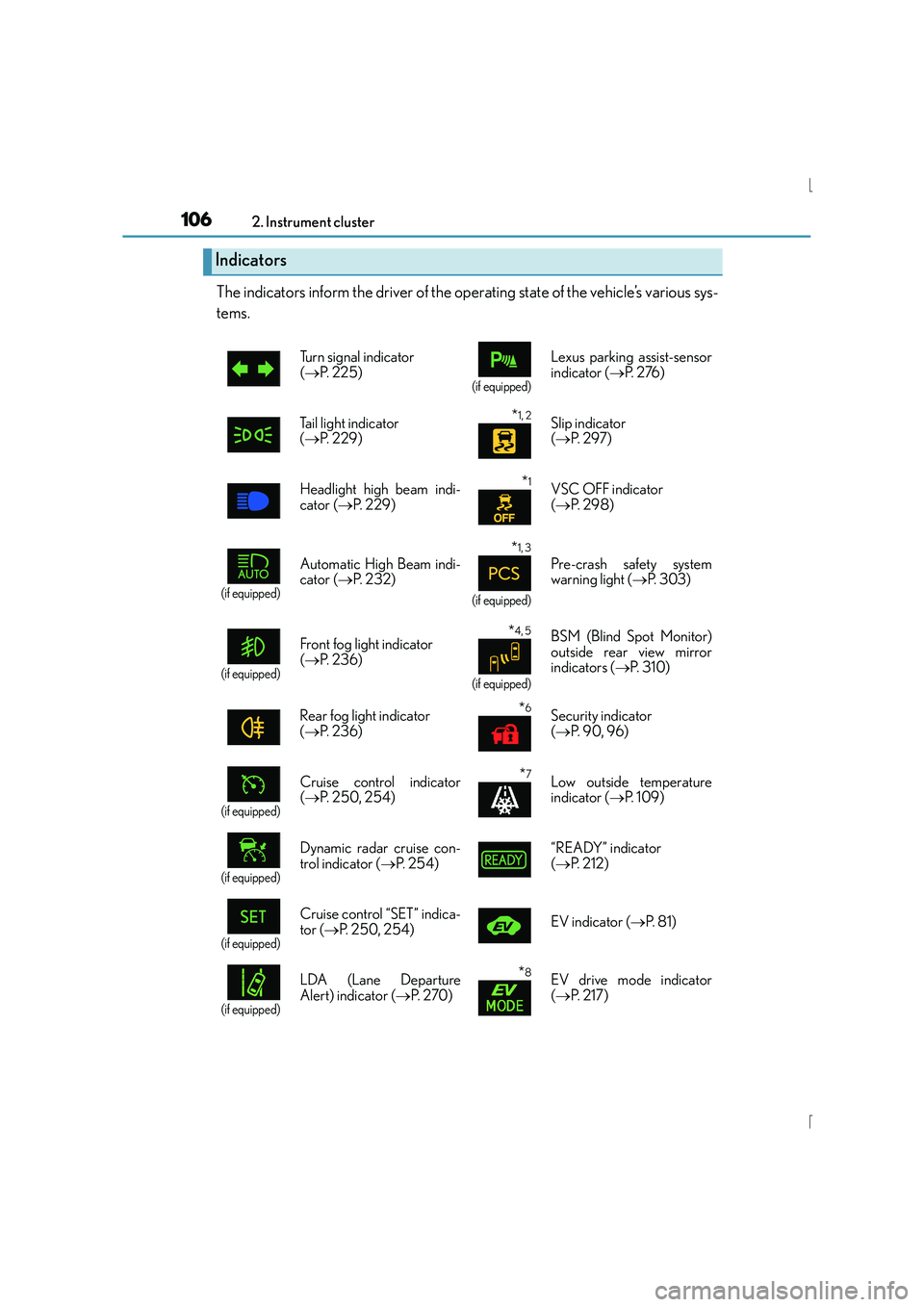
The indicators inform the driver of the operating state of the vehicle’s various sys-
tems.
Indicators
Turn signal indicator
(→ P. 2 2 5 )
(if equipped)
Lexus parking assist-sensor
indicator ( →P. 2 76 )
Tail light indicator
( → P. 229)
*1, 2 Slip indicator
(→ P. 2 9 7 )
Headlight high beam indi-
cator ( →P. 229)
*1VSC OFF indicator
(→ P. 2 9 8 )
(if equipped)
Automatic High Beam indi-
cator ( →P. 232)
*1, 3
(if equipped)
Pre-crash safety system
warning light ( →P. 303)
(if equipped)
Front fog light indicator
(→ P. 2 3 6 )*4, 5
(if equipped)
BSM (Blind Spot Monitor)
outside rear view mirror
indicators ( →P. 3 1 0 )
Rear fog light indicator
( → P. 2 3 6 )
*6Security indicator
(→ P. 9 0 , 9 6 )
(if equipped)
Cruise control indicator
(→ P. 250, 254)*7Low outside temperature
indicator ( →P. 1 0 9 )
(if equipped)
Dynamic radar cruise con-
trol indicator ( →P. 2 5 4 ) “READY” indicator
(
→ P. 212)
(if equipped)
Cruise control “SET” indica-
tor ( →P. 250, 254) EV indicator (
→P. 8 1 )
(if equipped)
LDA (Lane Departure
Alert) indicator ( →P. 2 7 0 )*8EV drive mode indicator
(→ P. 2 1 7 )
Page 180 of 628
1803-4. Adjusting the steering wheel and mirrors
IS300h_EE(OM53D56E)
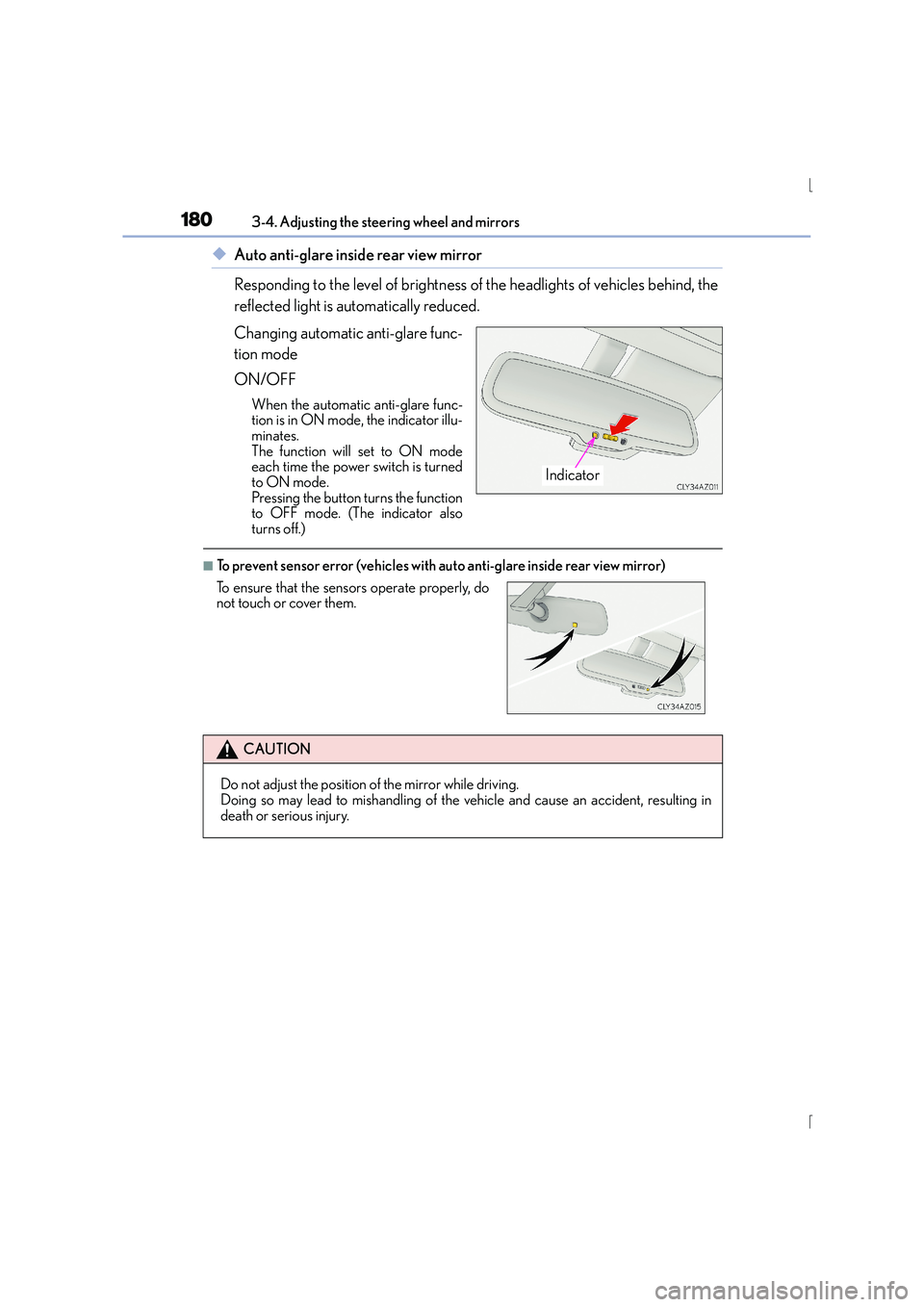
◆Auto anti-glare inside rear view mirror
Responding to the level of brightness of the headlights of vehicles behind, the
reflected light is automatically reduced.
Changing automatic anti-glare func-
tion mode
ON/OFF
When the automatic anti-glare func-
tion is in ON mode, the indicator illu-
minates.
The function will set to ON mode
each time the power switch is turned
to ON mode.
Pressing the button turns the function
to OFF mode. (The indicator also
turns off.)
■To prevent sensor error (vehicles with auto anti-glare inside rear view mirror)
Indicator
To ensure that the sensors operate properly, do
not touch or cover them.
CAUTION
Do not adjust the position of the mirror while driving.
Doing so may lead to mishandling of the vehicle and cause an accident, resulting in
death or serious injury.
Page 193 of 628
193
4Driving
IS300h_EE(OM53D56E)
4-1. Before drivingDriving the vehicle ...................... 194
Cargo and luggage ...................202
Trailer towing (vehicles without a towing
package) .....................................203
Trailer towing (vehicles with a towing package) ..................204
4-2. Driving procedures Power (ignition) switch.............. 212
EV drive mode ..............................217
Hybrid transmission ................... 219
Turn signal lever ..........................225
Parking brake............................... 227
ASC (Active Sound Control) ........228
4-3. Operating the lights and wipers
Headlight switch ......................... 229
Automatic High Beam ............. 232
Fog light switch............................ 236
Windshield w ipers and washer.................................238
4-4. Refueling Opening the fuel tank cap...... 246 4-5. Using the driving support
systems
Cruise control .............................250
Dynamic radar cruise control ......................................... 254
LDA (Lane Departure Alert) ........ 270
Lexus parking assist-sensor............................... 276
Rear view monitor system .......................................... 283
Driving mode select switch ........................................... 293
Driving assist systems............... 296
PCS (Pre-Crash Safety system) ........................................ 302
BSM (Blind Spot Monitor) ...... 310 •The Blind Spot Monitor function ..................................... 315
•The Rear Crossing Traffic Alert function .............317
4-6. Driving tips Hybrid vehicle driving tips..................................320
Winter driving tips ..................... 322
Page 230 of 628
2304-3. Operating the lights and wipers
IS300h_EE(OM53D56E)
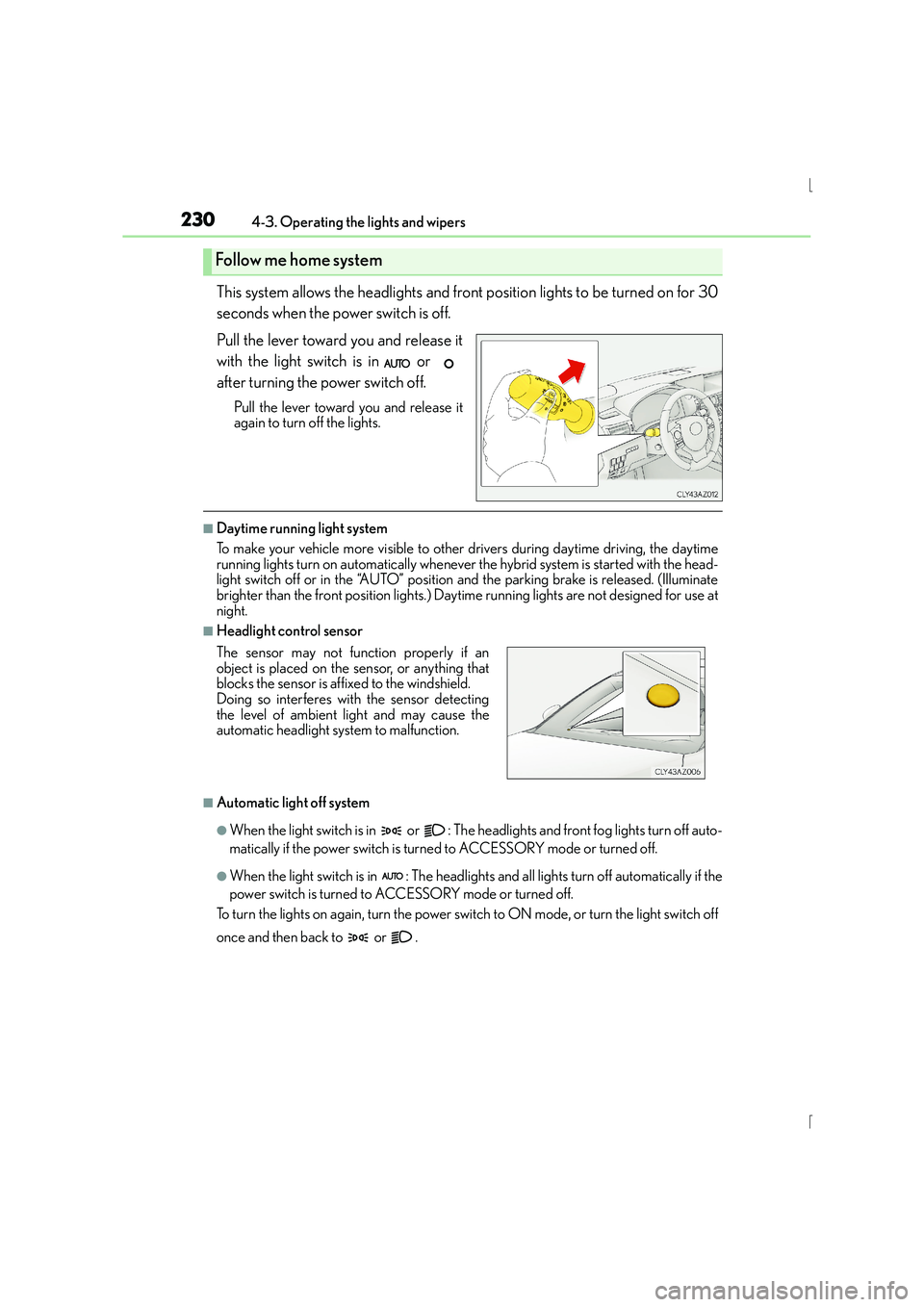
This system allows the headlights and front position lights to be turned on for 30
seconds when the power switch is off.
Pull the lever toward you and release it
with the light switch is in or
after turning the power switch off.
Pull the lever toward you and release it
again to turn off the lights.
■Daytime running light system
To make your vehicle more visible to other drivers during daytime driving, the daytime
running lights turn on automatically whenever the hybrid system is started with the head-
light switch off or in the “AUTO” position and the parking brake is released. (Illuminate
brighter than the front position lights.) Dayt ime running lights are not designed for use at
night.
■Headlight control sensor
■Automatic light off system
●When the light switch is in or : The he adlights and front fog lights turn off auto-
matically if the power switch is turned to ACCESSORY mode or turned off.
●When the light switch is in : The headlights and all lights turn off automatically if the
power switch is turned to ACCESSORY mode or turned off.
To turn the lights on again, turn the power swit ch to ON mode, or turn the light switch off
once and then back to or .
Follow me home system
The sensor may not function properly if an
object is placed on the sensor, or anything that
blocks the sensor is affixed to the windshield.
Doing so interferes with the sensor detecting
the level of ambient light and may cause the
automatic headlight system to malfunction.
Page 231 of 628
2314-3. Operating the lights and wipers
4
Driving
IS300h_EE(OM53D56E)
■Light reminder buzzer
A buzzer sounds when the power switch is turned off or turned to ACCESSORY mode
and the driver’s door is opened while the lights are turned on.
■Automatic headlight leveling system
The level of the headlights is automatically adjusted according to the number of passen-
gers and the loading condition of the vehicle to ensure that the headlights do not inter-
fere with other road users.
■Customization
Settings (e.g. light sensor se nsitivity) can be changed.
(Customizable features: →P. 5 9 7 )
NOTICE
■To prevent 12-volt battery discharge
Do not leave the lights on longer than necessary when the hybrid system is off.
Page 232 of 628
2324-3. Operating the lights and wipers
IS300h_EE(OM53D56E)
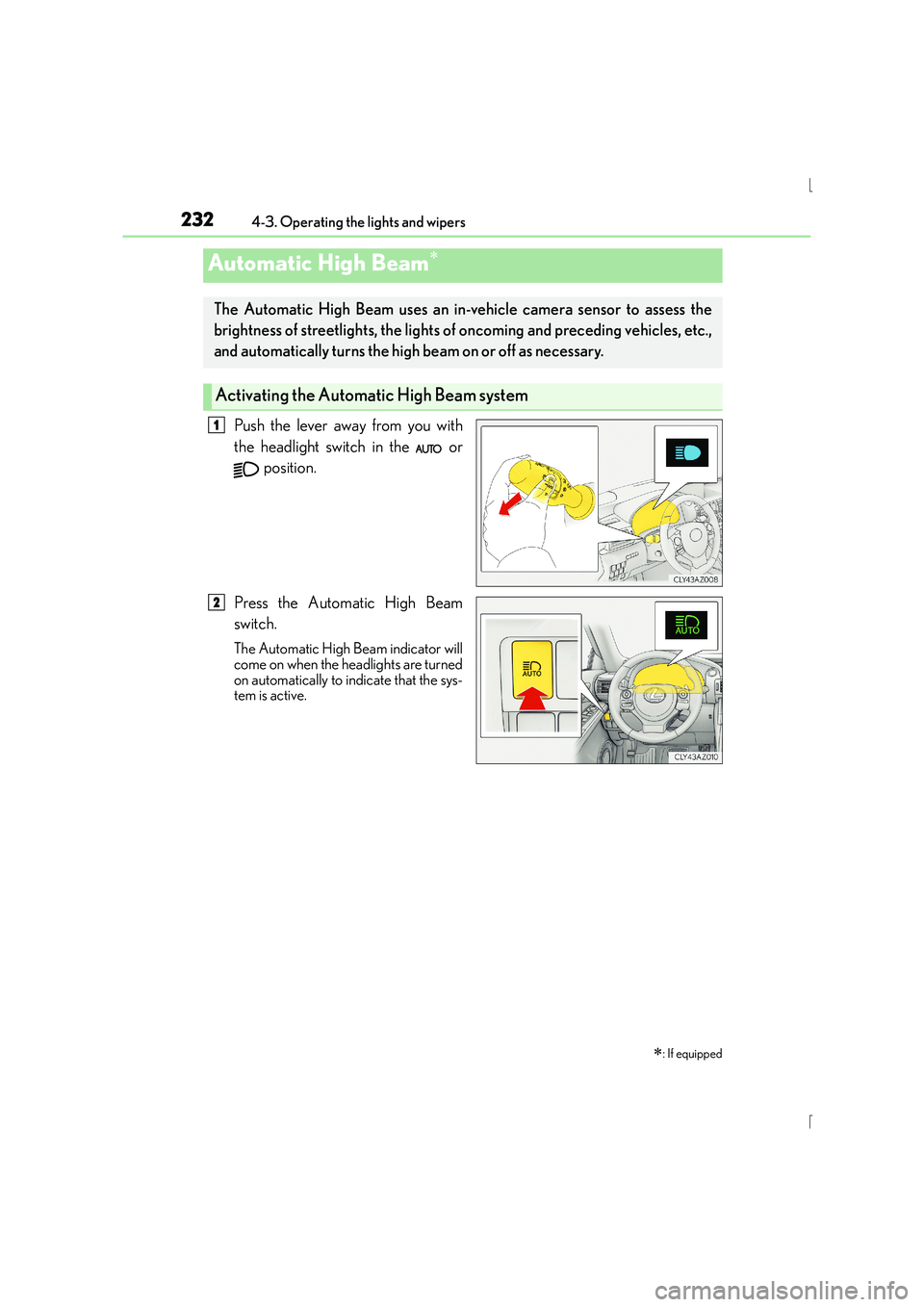
Push the lever away from you with
the headlight switch in the or position.
Press the Automatic High Beam
switch.
The Automatic High Beam indicator will
come on when the headlights are turned
on automatically to indicate that the sys-
tem is active.
Automatic High Beam∗
∗
: If equipped
The Automatic High Beam uses an in-v ehicle camera sensor to assess the
brightness of streetlights, the lights of oncoming and preceding vehicles, etc.,
and automatically turns the high beam on or off as necessary.
Activating the Automa tic High Beam system
1
2
Page 234 of 628
2344-3. Operating the lights and wipers
IS300h_EE(OM53D56E)
■The Automatic High Beam can be operated when
The power switch is in ON mode.
■Camera sensor detection information
●High beam may not be automatically turned off in the following situations:
• When oncoming vehicles suddenly appear from a curve
• When the vehicle is cut in front of by another vehicle
• When oncoming or preceding vehicles are hidden from sight due to repeatedcurves, road dividers or roadside trees
●High beam may be turned off if an oncomi ng vehicle that is using fog lights without
using the headlights is detected.
●House lights, street lights, red traffic sign als, and illuminated billboards or signs may
cause the high beam to turn off.
●The following factors may affect the amount of time taken to turn high beam on or off:
• The brightness of headlights, fog lights, and tail lights of oncoming and preceding
vehicles
• The movement and direction of oncoming and preceding vehicles
• When an oncoming or preceding vehicle only has operational lights on one side
• When an oncoming or preceding vehicle is a two-wheeled vehicle
• The condition of the road (gradient, curve, condition of the road surface etc.)
• The number of passengers and amount of luggage
●High beam may be turned on or off when unexpected by the driver.
●Small vehicles, such as bicycles, may not be detected.
●In the situations below, the system may not be able to correctly detect the surrounding
brightness levels, and may flash or expose nearby pedestrians to the high beam. There-
fore, you should consider turning the high be ams on or off manually rather than relying
on the Automatic High Beam system.
• In bad weather (rain, snow, fog, sandstorms etc.)
• The windshield is obscured by fog, mist, ice, dirt etc.
• The windshield is cracked or damaged.
• The camera sensor is deformed or dirty.
• Surrounding brightness levels are equal to th ose of headlights, tail lights or fog lights.
• Vehicles ahead have headlights or tail lights that are either switched off, dirty, chang-
ing color, or have improperly adjusted aim.
• When driving through an area of intermittently changing brightness and darkness.
• When frequently and repeatedly driving ascending/descending roads, or roads with
rough, bumpy or uneven surfaces (such as stone-paved roads, gravel tracks etc.).
• When frequently and repeatedly taking curves or driving on a winding road.
• There is a highly reflective object ahead of the vehicle, such as a sign or a mirror.
• The vehicle’s headlights are damaged or dirty.
• The vehicle is listing or titling, due to a flat tire, a trailer being towed etc.
• The driver believes that the high beam may be causing problems or distress to other drivers or pedestrians nearby.
• The vehicle is used in a territory in which vehicles travel on the opposite side of the
road of the country for which the vehicle is approved, for example using a vehicle
designed for right-hand traffic in a left-hand traffic territory, or vice versa.
Page 235 of 628
2354-3. Operating the lights and wipers
4
Driving
IS300h_EE(OM53D56E)
CAUTION
■Limitations of the Automatic High Beam
Do not rely on the Automatic High Beam. Always drive safely, taking care to observe
your surroundings and turning high beam on or off manually if necessary.
NOTICE
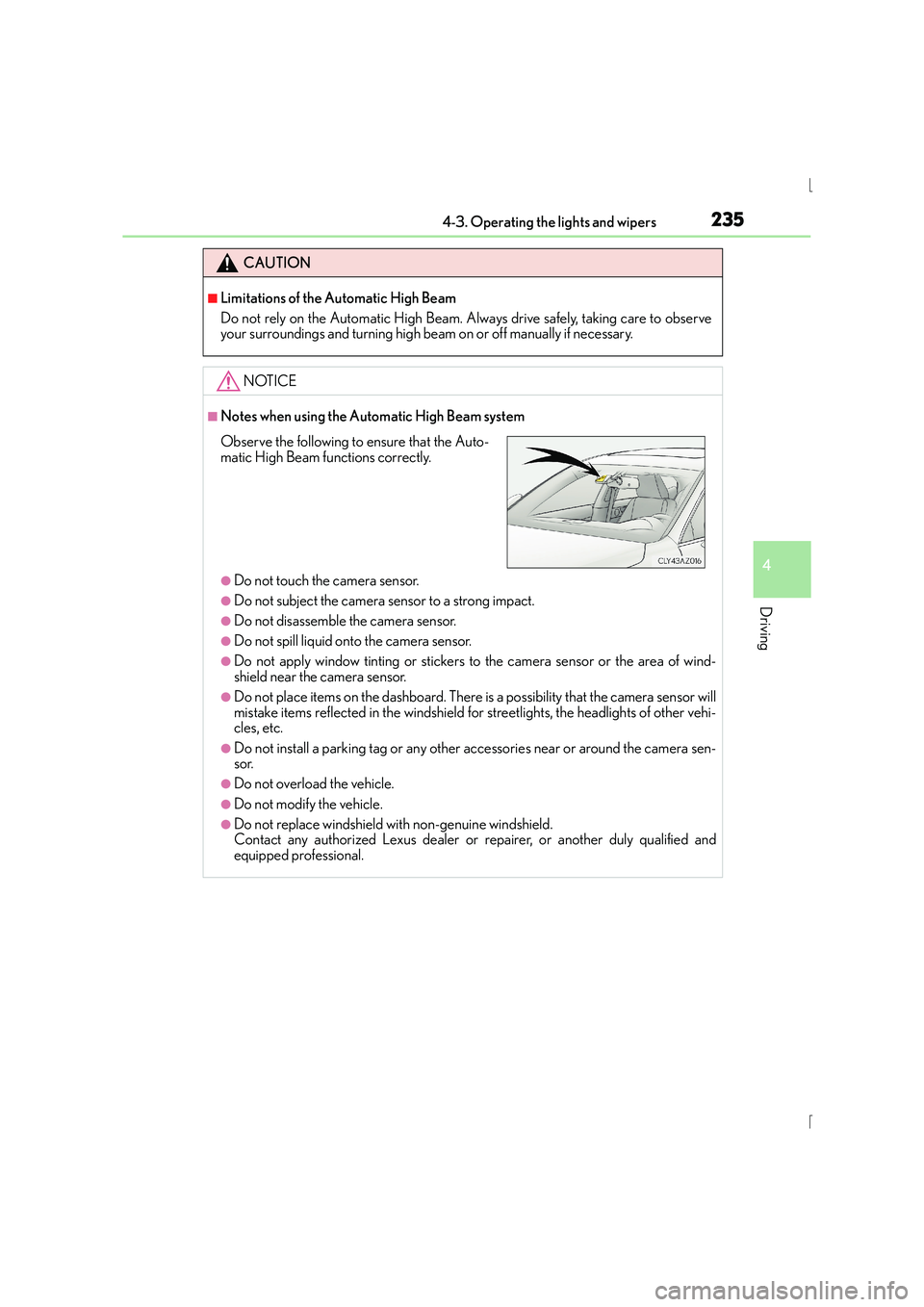
■Notes when using the Automatic High Beam system
●Do not touch the camera sensor.
●Do not subject the camera sensor to a strong impact.
●Do not disassemble the camera sensor.
●Do not spill liquid onto the camera sensor.
●Do not apply window tinting or stickers to the camera sensor or the area of wind-
shield near the camera sensor.
●Do not place items on the dashboard. There is a possibility that the camera sensor will
mistake items reflected in the windshield for streetlights, the headlights of other vehi-
cles, etc.
●Do not install a parking tag or any other accessories near or around the camera sen-
sor.
●Do not overload the vehicle.
●Do not modify the vehicle.
●Do not replace windshield with non-genuine windshield.
Contact any authorized Lexus dealer or repairer, or another duly qualified and
equipped professional.
Observe the following to ensure that the Auto-
matic High Beam functions correctly.
Page 241 of 628

2414-3. Operating the lights and wipers
4
Driving
IS300h_EE(OM53D56E)
When AUTO mode is selected, the sensor sensitivity can be adjusted by turning
the switch ring.Increases the sensitivity
Decreases the sensitivity
Washer/wiper dual operation
The wipers will automatically operate a
couple of times after the washer squirts.
When the power switch is in ON mode
and the headlights are on, if the lever is
pulled, the headlight cleaners will oper-
ate once. After this, the headlight clean-
ers will operate every 5th time the lever
is pulled.
The wipers can be used as intermittent windshield wipers, which operate regard-
less of vehicle speed or amount of raindrops. The intermittent windshield wiper
operation can be switched when the vehicl e is stopped and the wiper is off. The
wiper operation cannot be switched duri ng AUTO mode or while the intermit-
tent windshield wipers are operating.
Press and hold until the AUTO
mode indicator stops flashing.
If is pressed and held until the
AUTO mode indicator stops flashing
again, it will return to its previous state.
The wiper can be switched when the
vehicle is stopped and the wipers are off.
6
7
8
Switching between the in termittent windshield wipers and rain-sensing
windshield wipers (vehicles with rain-sensing windshield wipers)