smart key Lexus IS300h 2016 Owner's Manual
[x] Cancel search | Manufacturer: LEXUS, Model Year: 2016, Model line: IS300h, Model: Lexus IS300h 2016Pages: 628, PDF Size: 137.89 MB
Page 2 of 628
TABLE OF CONTENTS2
IS300h_EE(OM53D56E)
For your information ...................................8
Reading this manual .................................. 12
How to search.............................................. 13
Pictorial index .............................................. 14
1-1. For safe useBefore driving .................................34
For safety drive ............................... 36
Seat belts ..........................................38
SRS airbags ..................................... 43
Airbag manual on-off system .............................................54
Pop Up Hood..................................56
Safety information for children........................................... 59
Child restraint systems................60
Installing child restraints ............. 69
Exhaust gas precautions ............ 78
1-2. Hybrid system Hybrid system features ............... 79
Hybrid system precautions .......83
1-3. Theft deterrent system Immobilizer system.......................90
Double locking system................ 95
Alarm ................................................. 96 2. Instrument cluster
Warning lights and indicators ..................................... 104
Gauges and meters ................... 109
Multi-information display...........115
Energy monitor/ consumption screen .................121
3-1. Key information Keys................................................... 130
3-2. Opening, closing and locking the doors and trunk
Doors ............................................... 136
Trunk ................................................. 143
Smart entry & start system ...... 149
3-3. Adjusting the seats Front seats ...................................... 165
Rear seats (folding type) ...........167
Driving position memory ......... 169
Head restraints.............................. 174
3-4. Adjusting the steering wheel and mirrors
Steering wheel ..............................177
Inside rear view mirror ...............179
Outside rear view mirrors ........ 181
1For safety and security
2Instrument cluster
3Operation of
each component
Page 129 of 628
129
3
Operation of
each component
IS300h_EE(OM53D56E)
3-1. Key information
Keys .................................................. 130
3-2. Opening, closing and locking the doors and trunk
Doors ............................................... 136
Trunk ................................................. 143
Smart entry & start system ............................................149
3-3. Adjusting the seats Front seats...................................... 165
Rear seats (folding type) ........... 167
Driving position memory..........169
Head restraints ............................. 174
3-4. Adjusting the steering wheel and mirrors
Steering wheel .............................. 177
Inside rear view mirror...............179
Outside rear view mirrors .........181
3-5. Opening, closing the windows and moon roof
Power windows ............................ 185
Moon roof ...................................... 189
Page 130 of 628
130
IS300h_EE(OM53D56E)3-1. Key information
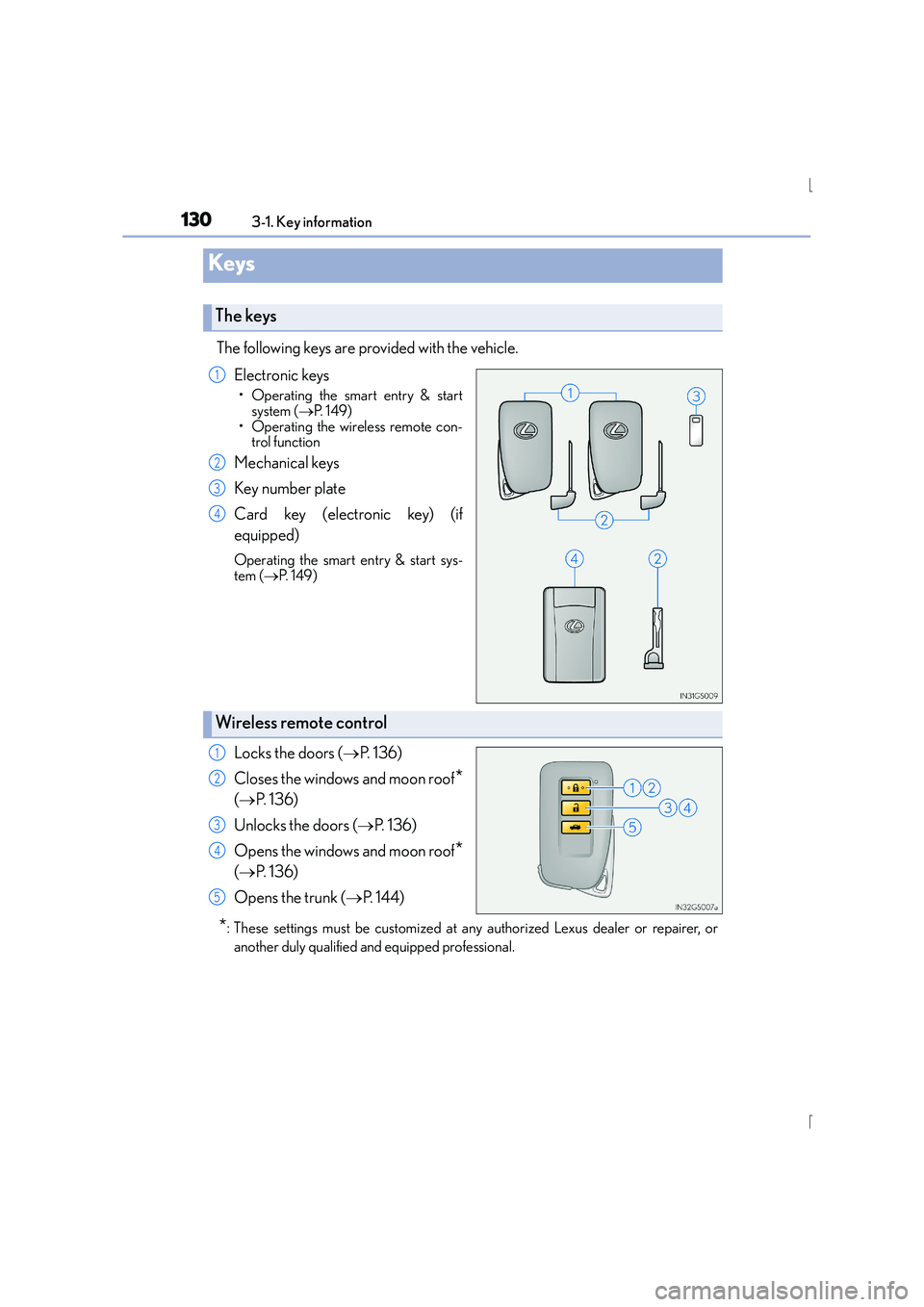
The following keys are provided with the vehicle.
Electronic keys
• Operating the smart entry & startsystem ( →P. 1 4 9 )
• Operating the wireless remote con- trol function
Mechanical keys
Key number plate
Card key (electronic key) (if
equipped)
Operating the smart entry & start sys-
tem ( →P. 1 4 9 )
Locks the doors ( →P. 136)
Closes the windows and moon roof
*
( → P. 136)
Unlocks the doors ( →P. 136)
Opens the windows and moon roof
*
( → P. 136)
Opens the trunk ( →P. 1 4 4 )
*: These settings must be customized at any authorized Lexus dealer or repairer, or
another duly qualified and equipped professional.
Keys
The keys
1
2
3
4
Wireless remote control
1
2
3
4
5
Page 133 of 628
1333-1. Key information
3
Operation of each component
IS300h_EE(OM53D56E)
■When riding in an aircraft
When bringing an electronic key onto an aircraft, make sure you do not press any but-
tons on the electronic key while inside the aircraft cabin. If you are carrying an electronic
key in your bag etc., ensure that the buttons are not likely to be pressed accidentally.
Pressing a button may cause the electronic key to emit radio waves that could interfere
with the operation of the aircraft.
■Electronic key battery depletion
●The standard battery life is 1 to 2 years. (The card key battery life is about a year and a
half.)
●If the battery becomes low, an alarm will so und in the cabin when the hybrid system is
stopped. ( →P. 5 4 2 )
●As the electronic key always receives radio waves, the battery will become depleted
even if the electronic key is not used. The following symptoms indicate that the elec-
tronic key battery may be depleted. Replace the battery when necessary. ( →P. 4 8 8 )
• The smart entry & start system or the wireless remote control does not operate.
• The detection area becomes smaller.
• The LED indicator on the key surface does not turn on.
●To avoid serious deterioration, do not leave the electronic key within 1 m (3 ft.) of the
following electrical appliances that produce a magnetic field:
•TVs
• Personal computers
• Cellular phones, cordless phones and battery chargers
• Recharging cellular phones or cordless phones
• Table lamps
• Induction cookers
■Replacing the battery
→ P. 4 8 8
■Confirmation of the registered key number
The number of keys already registered to the vehicle can be confirmed. Ask any autho-
rized Lexus dealer or repairer, or another duly qualified and equipped professional for
details.
■If a wrong key is used
The key cylinder rotates freely to isolate inside mechanism.
Page 134 of 628
1343-1. Key information
IS300h_EE(OM53D56E)
NOTICE
■To prevent key damage
●Do not drop the keys, subject them to strong shocks or bend them.
●Do not expose the keys to high temperatures for long periods of time.
●Do not get the keys wet or wash them in an ultrasonic washer etc.
●Do not attach metallic or magnetic materials to the keys or place the keys close to
such materials.
●Do not disassemble the keys.
●Do not attach a sticker or anything else to the surface of the electronic key.
●Do not place the keys near objects that produce magnetic fields, such as TVs, audio
systems and induction cookers, or medical electrical equipment, such as low-fre-
quency therapy equipment.
■Carrying the electronic key on your person
Carry the electronic key 10 cm (3.9 in.) or more away from electric appliances that are
turned on. Radio waves emitted from electric appliances within 10 cm (3.9 in.) of the
electronic key may interfere with the key, causing the key to not function properly.
■In case of a smart entry & start system malfunction or other key-related problems
Take your vehicle with all the electronic keys provided with your vehicle, including the
card key, to any authorized Lexus dealer or repairer, or another duly qualified and
equipped professional.
Page 137 of 628
1373-2. Opening, closing and locking the doors and trunk
3
Operation of each component
IS300h_EE(OM53D56E)
■Operation signals
The emergency flashers flash to indicate that the doors have been locked/unlocked.
(Locked: once; Unlocked: twice)
A buzzer sounds to indicate that the windows and moon roof are operating.
■Security feature
If a door is not opened within approximately 30 seconds after the vehicle is unlocked, the
security feature automatically locks the vehicle again.
■Welcome light illumination control
The front position, tail and license plate lights automatically turn on at night when the
doors are unlocked using the entry function or wireless remote control if the light switch
is in the “AUTO” position.
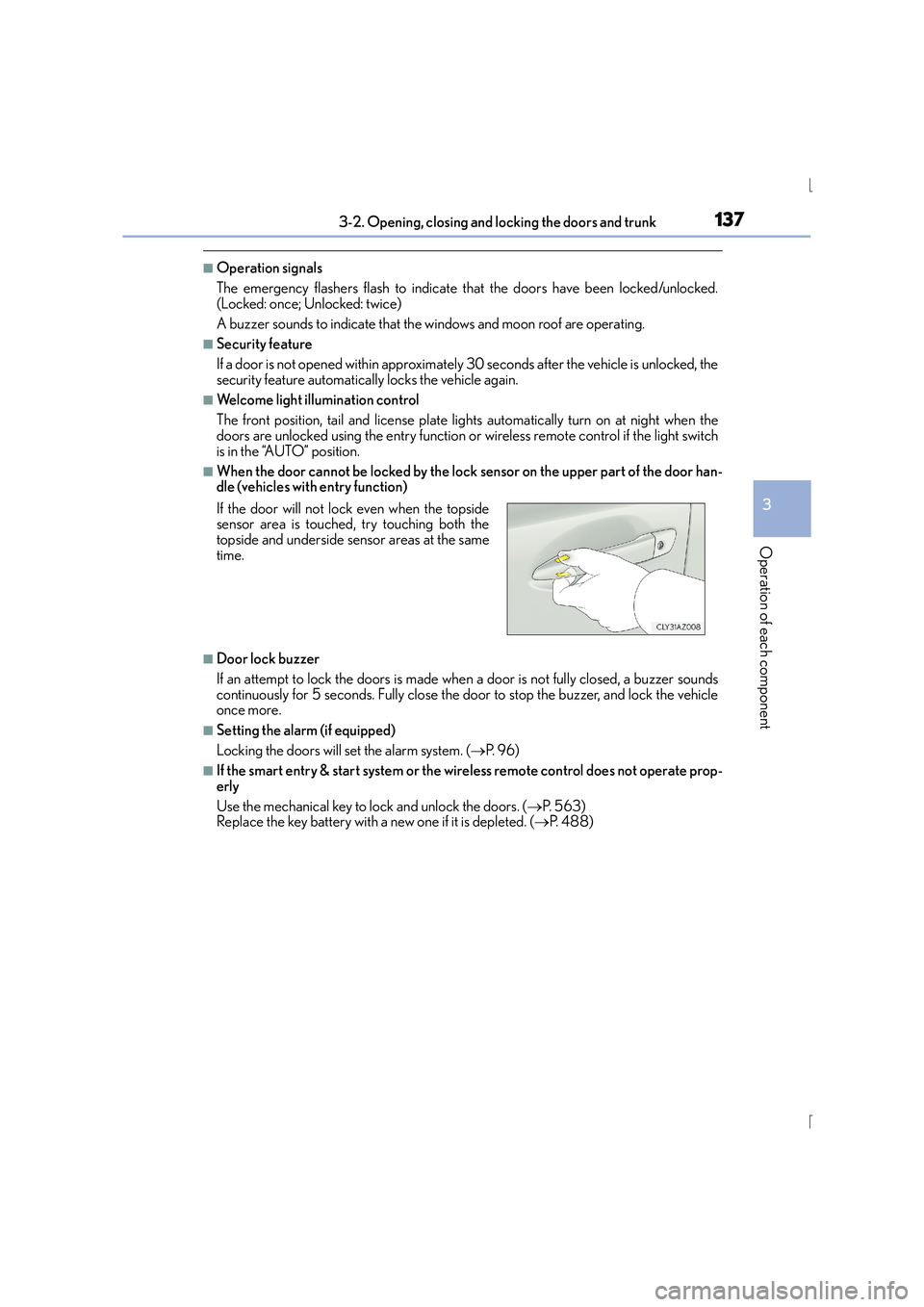
■When the door cannot be locked by the lock sensor on the upper part of the door han-
dle (vehicles with entry function)
■Door lock buzzer
If an attempt to lock the doors is made when a door is not fully closed, a buzzer sounds
continuously for 5 seconds. Fully close the door to stop the buzzer, and lock the vehicle
once more.
■Setting the alarm (if equipped)
Locking the doors will set the alarm system. ( →P. 9 6 )
■If the smart entry & start system or the wireless remote control does not operate prop-
erly
Use the mechanical key to lock and unlock the doors. ( →P. 5 6 3 )
Replace the key battery with a new one if it is depleted. ( →P. 4 8 8 )
If the door will not lock even when the topside
sensor area is touched, try touching both the
topside and underside sensor areas at the same
time.
Page 142 of 628
1423-2. Opening, closing and locking the doors and trunk
IS300h_EE(OM53D56E)
■Impact detection door lock release system
In the event that the vehicle is subject to a strong impact, all the doors are unlocked.
Depending on the force of the impact or the type of accident, however, the system may
not operate.
■Using the mechanical key
The doors can also be locked and unlocked with the mechanical key. ( →P. 5 6 3 )
■Conditions affecting the operation of the smart entry & start system or wireless remote
control
→P. 1 5 1
■Customization
Settings (e.g. unlocking function using a key) can be changed.
(Customizable features: →P. 5 9 1 )
CAUTION
■To prevent an accident
Observe the following precautions while driving the vehicle.
Failure to do so may result in a door open ing and an occupant being thrown out of the
vehicle, resulting in de ath or serious injury.
●Ensure that all doors are properly closed.
●Do not pull the inside handle of the doors while driving.
Be especially careful with the front doors, as the doors may be opened even if the
inside lock buttons are in locked position.
●Set the rear door child-protector locks when children are seated in the rear seats.
Page 146 of 628
1463-2. Opening, closing and locking the doors and trunk
IS300h_EE(OM53D56E)
■Trunk light (if equipped)
The trunk light turns on when the trunk is opened.
■Function to prevent the trunk being locked with the electronic key inside
●When all doors are locked, closing the trunk lid with the electronic key left inside the
trunk will sound an alarm.
In this case, the trunk lid can be opened pressing the trunk release button on the trunk
lid.
●If the spare electronic key is put in the trunk with all the doors locked, the key confine-
ment prevention function is activated so the trunk can be opened. In order to prevent
theft, take all electronic keys with you when leaving the vehicle.
●If the electronic key is put in the trunk with all the doors locked, the key may not be
detected depending on the location of the key and the surrounding radio wave condi-
tions. In this case, the key confinement prevention function cannot be activated, causing
the doors to lock when the trunk is closed. Make sure to check where the key is before
closing the trunk.
●The key confinement prevention function canno t be activated if any one of the doors is
unlocked. In this case, open the trunk using the trunk opener.
■Using the mechanical key
The trunk can be also opened using the mechanical key. ( →P. 5 6 3 )
■If the smart entry & start system or the wireless remote control does not operate prop-
erly
Use the mechanical key to unlock the trunk. ( →P. 5 6 3 )
Replace the key battery with a new one if it is depleted. ( →P. 4 8 8 )
■When leaving a key to the vehicle with a parking attendant
→P. 1 3 2
■Customization
The trunk unlocking operation can be changed. (Customizable features: →P. 5 9 1 )
Page 149 of 628
1493-2. Opening, closing and locking the doors and trunk
3
Operation of each component
IS300h_EE(OM53D56E)
●Locks and unlocks the doors (vehicles with entry function) (→P. 136)
●Opens the trunk (vehicles with entry function) ( →P. 1 4 3 )
●Starts the hybrid system ( →P. 212)
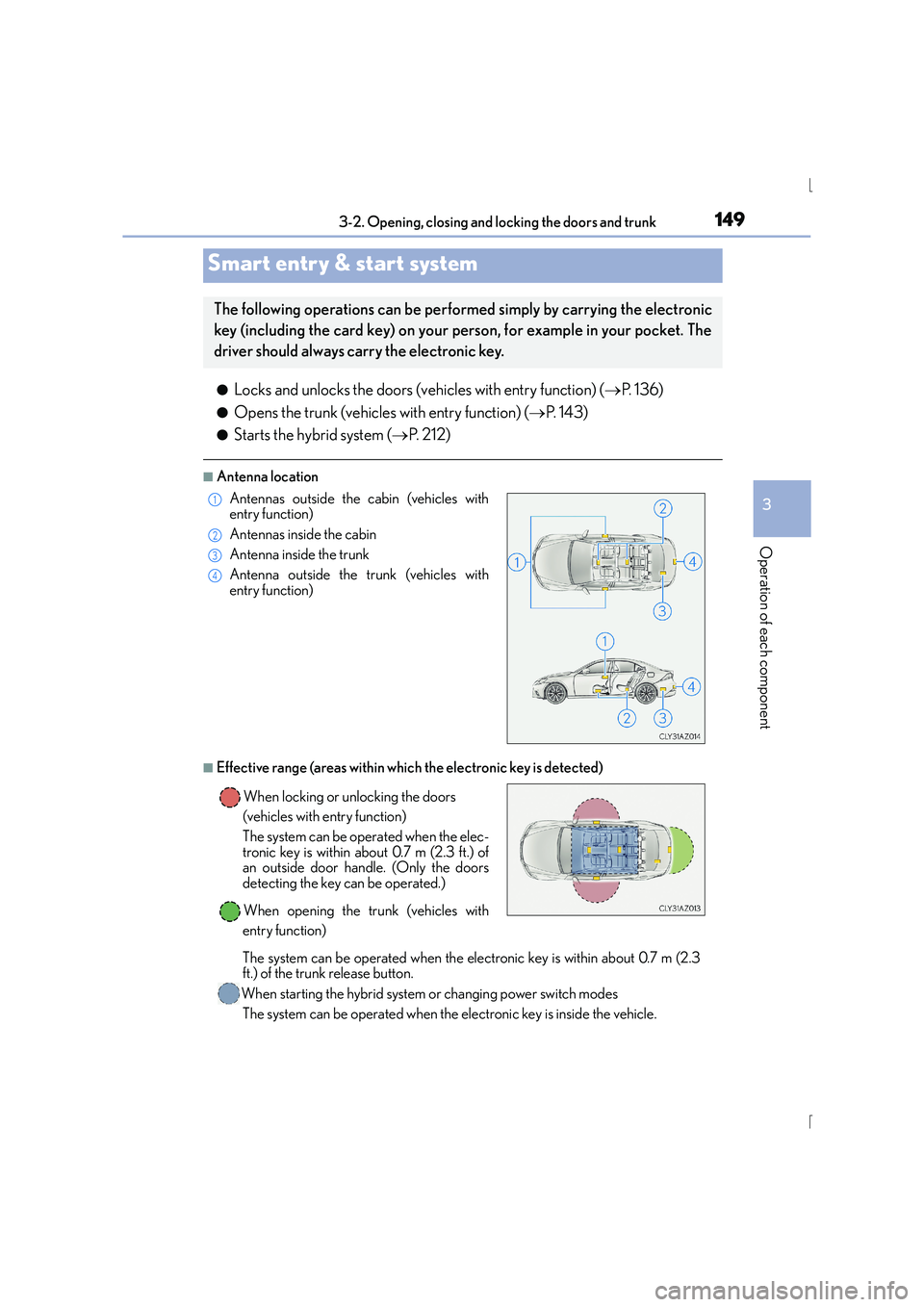
■Antenna location
■Effective range (areas within which the electronic key is detected)
Smart entry & start system
The following operations can be perfor med simply by carrying the electronic
key (including the card key) on your person, for example in your pocket. The
driver should always carry the electronic key.
Antennas outside the cabin (vehicles with
entry function)
Antennas inside the cabin
Antenna inside the trunk
Antenna outside the trunk (vehicles with
entry function)
When locking or unlocking the doors
(vehicles with entry function)
The system can be operated when the elec-
tronic key is within about 0.7 m (2.3 ft.) of
an outside door handle. (Only the doors
detecting the key can be operated.)
When opening the trunk (vehicles with
entry function)
The system can be operated when the electronic key is within about 0.7 m (2.3
ft.) of the trunk release button.
When starting the hybrid system or changing power switch modes The system can be operated when the electronic key is inside the vehicle.1
2
3
4
Page 150 of 628
1503-2. Opening, closing and locking the doors and trunk
IS300h_EE(OM53D56E)
■Battery-saving function (vehicles with entry function)
The battery-saving function will be activated in order to prevent the electronic key bat-
tery and the 12-volt battery from being discharged while the vehicle is not in operation
for a long time.
●In the following situations, the smart entry & start system may take some time to unlock
the doors.
• The electronic key has been left within approximately 2 m (6 ft.) of the outside of the vehicle for 10 minutes or longer.
• The smart entry & start system has not been used for 5 days or longer.
●If the smart entry & start system has not been used for 14 days or longer, the doors can-
not be unlocked at any door except the driver ’s door. In this case, hold the driver’s door
handle, or use the wireless remote control or mechanical key, to unlock the doors.
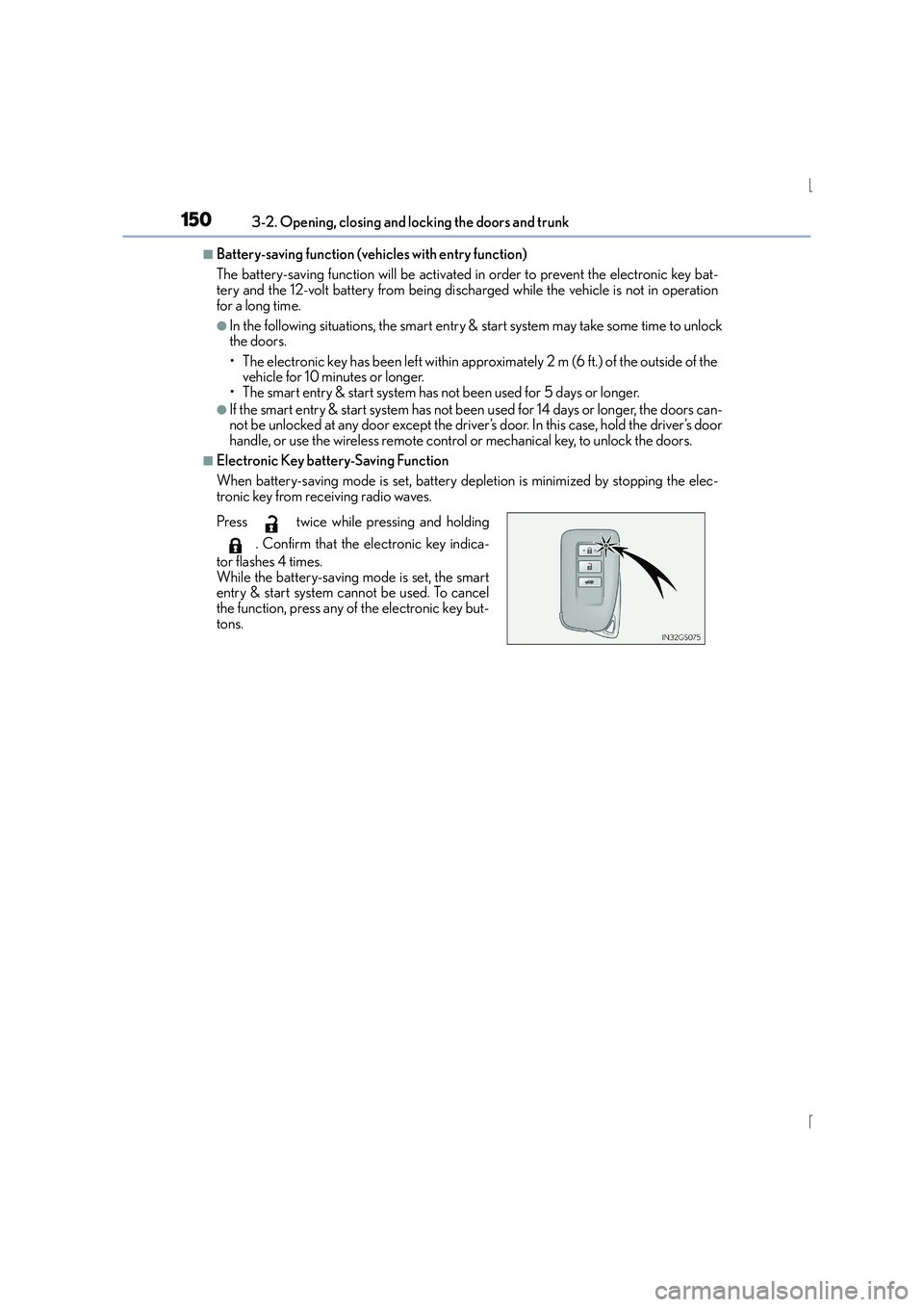
■Electronic Key battery-Saving Function
When battery-saving mode is set, battery depletion is minimized by stopping the elec-
tronic key from receiving radio waves.
Press twice while pressing and holding
. Confirm that the electronic key indica-
tor flashes 4 times.
While the battery-saving mode is set, the smart
entry & start system cannot be used. To cancel
the function, press any of the electronic key but-
tons.