air condition Lexus IS300h 2017 User Guide
[x] Cancel search | Manufacturer: LEXUS, Model Year: 2017, Model line: IS300h, Model: Lexus IS300h 2017Pages: 692, PDF Size: 163.7 MB
Page 159 of 692

1593-2. Opening, closing and locking the doors and trunk
3
Operation of each component
IS300h_EE(OM53D89E)
■Conditions affecting operation
The smart entry & start system uses weak ra dio waves. In the following situations, the communication between the electronic key and the vehicle may be affected, preventing
the smart entry & start system, wireless re mote control and immobilizer system from
operating properly. (Ways of coping: P. 628)
●When the electronic key battery is depleted
●Near a TV tower, electric power plant, gas station, radio station, large display, airport or
other facility that gene rates strong radio waves or electrical noise
●When carrying a portable radio, cellular phone, cordless phone or other wireless com-
munication device
●When the electronic key is in contact wi th, or is covered by the following metallic objects
• Cards to which aluminum foil is attached
• Cigarette boxes that have aluminum foil inside • Metallic wallets or bags
•Coins
• Hand warmers made of metal • Media such as CDs and DVDs
●When other wireless keys (that emit radio waves) are being used nearby
●When carrying the electronic key together with the following devices that emit radio
waves
• Another vehicle’s electronic key or a wireless key that emits radio waves • Personal computers or person al digital assistants (PDAs)
• Digital audio players
• Portable game systems
●If window tint with a metallic content or me tallic objects are attached to the rear win-
dow
Page 208 of 692
2084-1. Before driving
IS300h_EE(OM53D89E)
NOTICE
■When driving the vehicle
●Do not depress the accelerator and brake pedals at the same time during driving, as
this may restrain the hybrid system output.
●Do not use the accelerator pedal or depress the accelerator and brake pedals at the same time to hold the vehicle on a hill.
■When parking the vehicle
Always set the parking brake, and shift the shift lever to P. Failure to do so may cause the vehicle to move or the vehicle may accelerate suddenly if the accelerator pedal is
accidentally depressed.
■Avoiding damage to vehicle parts
●Do not turn the steering wheel fully in either direction and hold it there for an
extended period of time.
Doing so may damage the power steering motor.
●When driving over bumps in the road, drive as slowly as possible to avoid damaging
the wheels, underside of the vehicle, etc.
■If you get a flat tire while driving
A flat or damaged tire may cause the following situations. Hold the steering wheel
firmly and gradually depress the brake pedal to slow down the vehicle.
●It may be difficult to control your vehicle.
●The vehicle will make abnormal sounds or vibrations.
●The vehicle will lean abnormally.
Information on what to do in case of a flat tire (P. 610, 625)
■When encountering flooded roads
Do not drive on a road that has flooded af ter heavy rain etc. Doing so may cause the
following serious damage to the vehicle:
●Engine stalling
●Short in electrical components
●Engine damage caused by water immersion
In the event that you drive on a flooded road and the vehicle is flooded, be sure to have
any authorized Lexus retailer or Lexus auth orized repairer, or any reliable repairer
check the following:
●Brake function
●Changes in quantity and quality of oil and fluid used for the engine, hybrid transmis-
sion, differential, etc.
●Lubricant condition for the pr opeller shaft, bearings and suspension joints (where
possible), and the function of all joints, bearings, etc.
Page 217 of 692
2174-1. Before driving
4
Driving
IS300h_EE(OM53D89E)
■Important points regarding stability
Vehicle movement resulting from unev en road surfaces and strong cross-
winds will affect handling. The vehicle ma y also be rocked by passing buses or
large trucks. Frequently check behind when moving alongside such vehicles.
As soon as such vehicle movement o ccurs, immediately start to decelerate
smoothly by slowly applying the brakes. Always steer the vehicle straight
ahead while braking.
■Passing other vehicles
Consider the total combined length of your vehicle and trailer and ensure that
the vehicle-to-vehicle distance is su fficient before executing lane changes.
■Transmission information
To maintain engine braking efficiency, when using engine braking when driv-
ing on a long steep downward grade, do not use the transmission in D. The
vehicle must be driven in gear shift position “4” in S mode. (P. 229)
■If the engine overheats
Towing a loaded trailer up a long, steep incline in temperatures exceeding
30 C (85F) may result in the engine overheating. If the engine coolant tem-
perature gauge indicates that the engine is overheating, turn the air condition-
ing off immediately, leave the road and stop the vehicle in a safe place.
( P. 636)
■When parking the vehicle
Always place wheel chocks under the wheels of both the vehicle and trailer.
Firmly set the parking brake an d shift the shift lever to P.
Page 221 of 692
2214-2. Driving procedures
4
Driving
IS300h_EE(OM53D89E)
If the hybrid system is stopped with the shift lever in a position other than P, the
power switch will not be turned off but instead be turned to ACCESSORY
mode. Perform the following proc edure to turn the switch off:
Check that the parking brake is set.
Shift the shift lever to P.
Check that “Turn Off Vehicle” is disp layed on the multi-information display
and then press the power switch once.
Check that “Turn Off Vehicle” on th e multi-information display is off.
■Auto power off function
If the vehicle is left in ACCESSORY mode for more than 20 minutes or ON mode (the
hybrid system is not operating) for more than an hour with the shift lever in P, the power switch will automatically turn of f. However, this function cannot entirely prevent 12-volt
battery discharge. Do not leave the vehicle with the power switch in ACCESSORY or
ON mode for long periods of time when the hybrid system is not operating.
■Sounds and vibrations specific to a hybrid vehicle
P. 80
■Electronic key battery depletion
P. 141
■When the ambient temperature is low, such as during winter driving conditions
When starting the hybrid system, the flashing time of the “READY” indicator may be long. Leave the vehicle as it is until the “READY” indicator is steady on, as steady means
the vehicle is able to move.
■Conditions affe cting operation
P. 159
■Notes for the entry function
P. 160
■If the hybrid system does not start
●The immobilizer system may not have been deactivated. (P. 86)
Contact any authorized Lexus retailer or Le xus authorized repairer, or any reliable
repairer.
●Check that the shift lever is se curely set in P. The hybrid system may not start if the shift
lever is displaced out of P. “T o Start Vehicle, Put Shift Lever into P” will be displayed on
the multi-information display.
When stopping the hybrid system with the shift lever in a position other
than P
1
2
3
4
Page 278 of 692
2784-5. Using the driving support systems
IS300h_EE(OM53D89E)
■If the PCS warning light flashes and a warning message is displayed on the multi-infor-
mation display
The pre-collision system may be temporarily unavailable or there may be a malfunction
in the system.
●In the following situations, the warning light will turn off, the message will disappear and the system will become operational when normal operating conditions return:
• When the radar sensor or camera sensor or the area around either sensor is hot,
such as in the sun • When the radar sensor or came ra sensor or the area around either sensor is cold,
such as in an extremely cold environment
• When the radar sensor or front grille embl em is dirty or covered with snow, etc. • When the part of the windshield in front of the camera sensor is fogged up or cov-
ered with condensation or ic e (Defogging the windshield: P. 474)
• If the camera sensor is obstructed, such as when the hood is open or a sticker is attached to the windshield near the camera sensor
●If the PCS warning light continues to flash or the warning message does not disappear, the system may be malfunctioning. Have the vehicle inspected by any authorized Lexus
retailer or Lexus authoriz ed repairer, or any reliable repairer immediately.
■If VSC is disabled
●If VSC is disabled (P. 354), the pre-collision brake assist and pre-collision braking
functions are also disabled.
●The PCS warning light will turn on and “VSC Turned Off Pre-Collision Brake System Unavailable” will be displayed on the multi-information display.
Page 303 of 692
3034-5. Using the driving support systems
4
Driving
IS300h_EE(OM53D89E)
■Automatic cancelation of constant speed control mode
Constant speed control mode is automatica lly canceled in the following situations:
●Actual vehicle speed is more than approximately 16 km/h (10 mph) below the set vehi-
cle speed.
●Actual vehicle speed falls below approximately 40 km/h (25 mph).
●VSC is activated.
●TRC is activated for a period of time.
●When the VSC or TRC system is turned off by pressing the VSC OFF switch.
●Pre-collision braking is activated.
If constant speed control mode is automati cally canceled for any other reason, there may
be a malfunction in the syst em. Contact any authorized Lexus retailer or Lexus autho- rized repairer, or an y reliable repairer.
■Warning messages and buzzers for dynamic radar cruise control
Warning messages and buzzers are used to indicate a system malfunction or to inform the driver of the need for ca ution while driving. If a warning message is shown on the
multi-information display, read the message and follow the instructions.
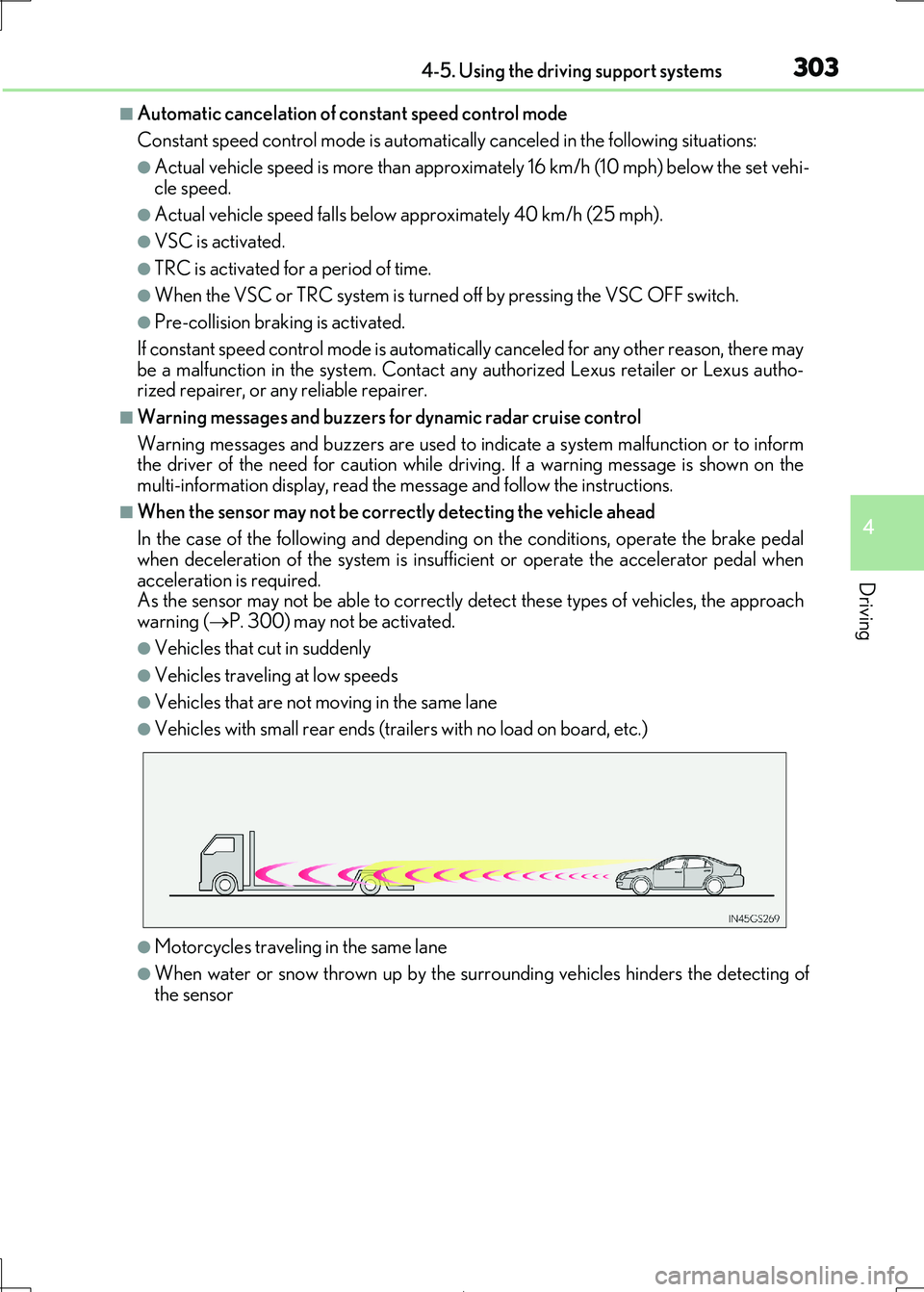
■When the sensor may not be correctly detecting the vehicle ahead
In the case of the following and depending on the conditions, operate the brake pedal
when deceleration of the system is insuff icient or operate the accelerator pedal when
acceleration is required. As the sensor may not be able to correctly detect these types of vehicles, the approach
warning ( P. 300) may not be activated.
●Vehicles that cut in suddenly
●Vehicles traveling at low speeds
●Vehicles that are not moving in the same lane
●Vehicles with small rear ends (trailers with no load on board, etc.)
●Motorcycles traveling in the same lane
●When water or snow thrown up by the surrounding vehicles hinders the detecting of
the sensor
Page 316 of 692
3164-5. Using the driving support systems
IS300h_EE(OM53D89E)
WARNING
■Sensor detection information
●The sensor’ detection areas are limited to the areas around the vehicle’ bumper.
●Certain vehicle conditions and surrounding environments, such as the following, may
affect the ability of the sensor s to correctly detect objects. Pay particular attention in the following situations. Failure to do so may result in the vehicle being driven
unsafely, possibly leading to an accident.
• There is dirt, snow or ice on the sensor. (Wiping the sensors will resolve this prob- lem.)
• The sensor is frozen. (Thawing th e area will resolve this problem.)
In especially cold weather, if a sensor is frozen the screen may show an abnormal dis- play, or obstacles may not be detected.
• The sensor is covered in any way.
• The vehicle is leaning considerably to one side. • On an extremely bumpy road, on an incline, on gravel, or on grass.
• The vicinity of the vehicle is noisy due to vehicle horns, motorcycle engines, air
brakes of large vehicles, or other lo ud noises producing ultrasonic waves. • There is another vehicle equipped with parking assist sensors in the vicinity.
• The sensor is coated with a sheet of spray or heavy rain.
• The vehicle is equipped with a fender pole or wireless antenna. • Towing eyelets are installed.
• The bumper or sensor receives a strong impact.
• The vehicle is approaching a tall or curved curb. • In harsh sunlight or intense cold weather.
• The area directly under the bumpers is not detected.
• If obstacles draw too close to the sensor. • A non-genuine Lexus suspension (low ered suspension etc.) is installed.
• People may not be detected if they are wearing certain types of clothing.
In addition to the examples above, there ar e instances in which, because of their shape, signs and other objects may be judged by a sensor to be closer than they are.
●The shape of the obstacle may prevent a sensor from detecting it. Pay particular
attention to the following obstacles:
• Wires, fences, ropes, etc.
• Cotton, snow and other materi als that absorb sound waves
• Sharply-angled objects • Low obstacles
• Tall obstacles with upper sections projec ting outwards in the direction of your
vehicle • People, animals and other moving objects
• People wearing certain types of clothing
Page 317 of 692
3174-5. Using the driving support systems
4
Driving
IS300h_EE(OM53D89E)
WARNING
●The following situations may occur during use.
• Depending on the shape of the obstacle and other factors, the detection distance
may shorten, or detect ion may be impossible.
• Obstacles may not be detected if they are too close to the sensor. • There will be a short delay between obstac le detection and display. Even at slow
speeds, there is a possibility that the ob stacle will come within the sensor’ detec-
tion areas before the display is shown and the buzzer sounds. • Thin posts or objects lower than th e sensor may not be detected when
approached, even if they have been detected once.
• It might be difficult to hear beeps due to the volume of audio system or air flow noise of the air conditioning system.
NOTICE
■When using Lexus parking assist-sensor
In the following situations, the system may not function correctly due to a sensor mal-
function, etc. Have the vehicle checked by any authorized Lexus retailer or Lexus
authorized repairer, or any reliable repairer.
●The Lexus parking assist-sensor operation display flashes, and a buzzer sounds when
no obstacles are detected.
●If the area around a sensor co llides with something, or is subjected to strong impact.
●If the bumper collides with something.
●If the display shows continuously without beeping, except when the buzzer mute
switch has been turned on.
●If a display error occurs , first check the sensor.
If the error occurs even if there is no ice, sn ow or mud on the sensor, it is likely that the
sensor is malfunctioning.
■Notes when washing the vehicle
Do not apply intensive bursts of wa ter or steam to the sensor area.
Doing so may result in the sensor malfunctioning.
Page 330 of 692
3304-5. Using the driving support systems
IS300h_EE(OM53D89E)
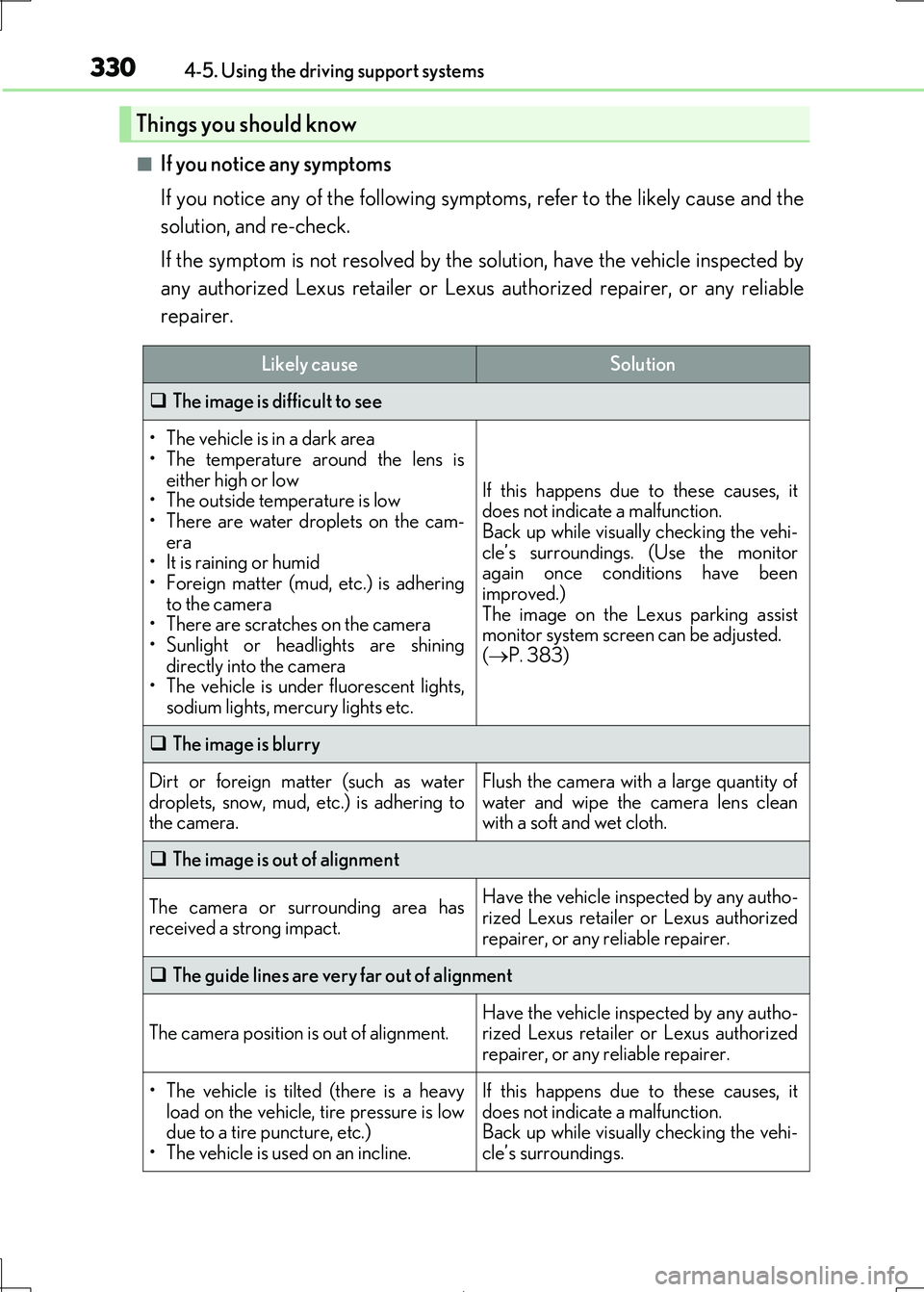
■If you notice any symptoms
If you notice any of the following symp toms, refer to the likely cause and the
solution, and re-check.
If the symptom is not resolved by the solution, have the vehicle inspected by
any authorized Lexus retailer or Lexus authorized repairer, or any reliable
repairer.
Things you should know
Likely causeSolution
The image is difficult to see
• The vehicle is in a dark area
• The temperature around the lens is either high or low
• The outside temperature is low
• There are water droplets on the cam- era
• It is raining or humid
• Foreign matter (mud, etc.) is adhering to the camera
• There are scratches on the camera
• Sunlight or headlights are shining directly into the camera
• The vehicle is under fluorescent lights,
sodium lights, me rcury lights etc.
If this happens due to these causes, it does not indicate a malfunction.
Back up while visually checking the vehi-
cle’s surroundings. (Use the monitor again once conditions have been
improved.)
The image on the Lexus parking assist monitor system screen can be adjusted.
( P. 383)
The image is blurry
Dirt or foreign matter (such as water
droplets, snow, mud, etc.) is adhering to the camera.
Flush the camera with a large quantity of
water and wipe the camera lens clean with a soft and wet cloth.
The image is out of alignment
The camera or surrounding area has received a strong impact.
Have the vehicle inspected by any autho-
rized Lexus retailer or Lexus authorized
repairer, or any reliable repairer.
The guide lines are very far out of alignment
The camera position is out of alignment.Have the vehicle inspected by any autho- rized Lexus retailer or Lexus authorized
repairer, or any reliable repairer.
• The vehicle is tilted (there is a heavy
load on the vehicle, tire pressure is low due to a tire puncture, etc.)
• The vehicle is used on an incline.
If this happens due to these causes, it
does not indicate a malfunction. Back up while visually checking the vehi-
cle’s surroundings.
Page 332 of 692
3324-5. Using the driving support systems
IS300h_EE(OM53D89E)
WARNING
■When using the Lexus parking assist monitor system
The parking assist monitor is a supplemental device intended to assist the driver when
backing up. When backing up, be sure to chec k visually behind and all around the vehi-
cle before proceeding.
Observe the following precautions to avoid an accident that could result in death or
serious injuries.
●Never depend on the parking assist monitor entirely when backing up. The image and the position of the guide lines displayed on the screen may differ from the actual
state.
Use caution, just as you would when backing up any vehicle.
●Be sure to back up slowly, depressing the brake pedal to control vehicle speed.
●If you seem likely to hit nearby vehicles, obstacles, people or mount the shoulder,
depress the brake pedal to stop the vehicle.
●The instructions given are only guidelines.
When and how much to turn the steering wheel will vary according to traffic condi-
tions, road surface conditions, vehicle condit ion, etc. when parking. It is necessary to be fully aware of this before using the parking assist system.
●When parking, be sure to check that the parking space will accommodate your vehi-
cle before maneuvering into it.
●Do not use the parking assist monitor in the following cases:
• On icy or slick road surfaces, or in snow
• When using tire chains or emergency tires • When the trunk lid is not closed completely
• On roads that are not flat or stra ight, such as curves or slopes.
●In low temperatures, the screen may darken or the image may become faint. The
image could distort when the vehicle is movi ng, or you may become unable to see the
image on the screen. Be sure to check dire ct visually and with the mirrors all around the vehicle before proceeding.
●If the tire sizes are changed, the position of the guide lines displayed on the screen
may change.
●The camera uses a special lens. The distances between objects and pedestrians that
appear in the image displayed on the screen will differ from the actual distances.
( P. 326)
●Estimated course line display mode: If the steering wheel is straight and the vehicle
width guide lines and the estimated course li nes are not in alignment, have the vehicle
inspected by any authorized Lexus retailer or Lexus authorized repairer, or any reli- able repairer.