air condition Lexus IS300h 2017 Owner's Guide
[x] Cancel search | Manufacturer: LEXUS, Model Year: 2017, Model line: IS300h, Model: Lexus IS300h 2017Pages: 692, PDF Size: 163.7 MB
Page 339 of 692
3394-5. Using the driving support systems
4
Driving
IS300h_EE(OM53D89E)
WARNING
■Handling the radar sensor
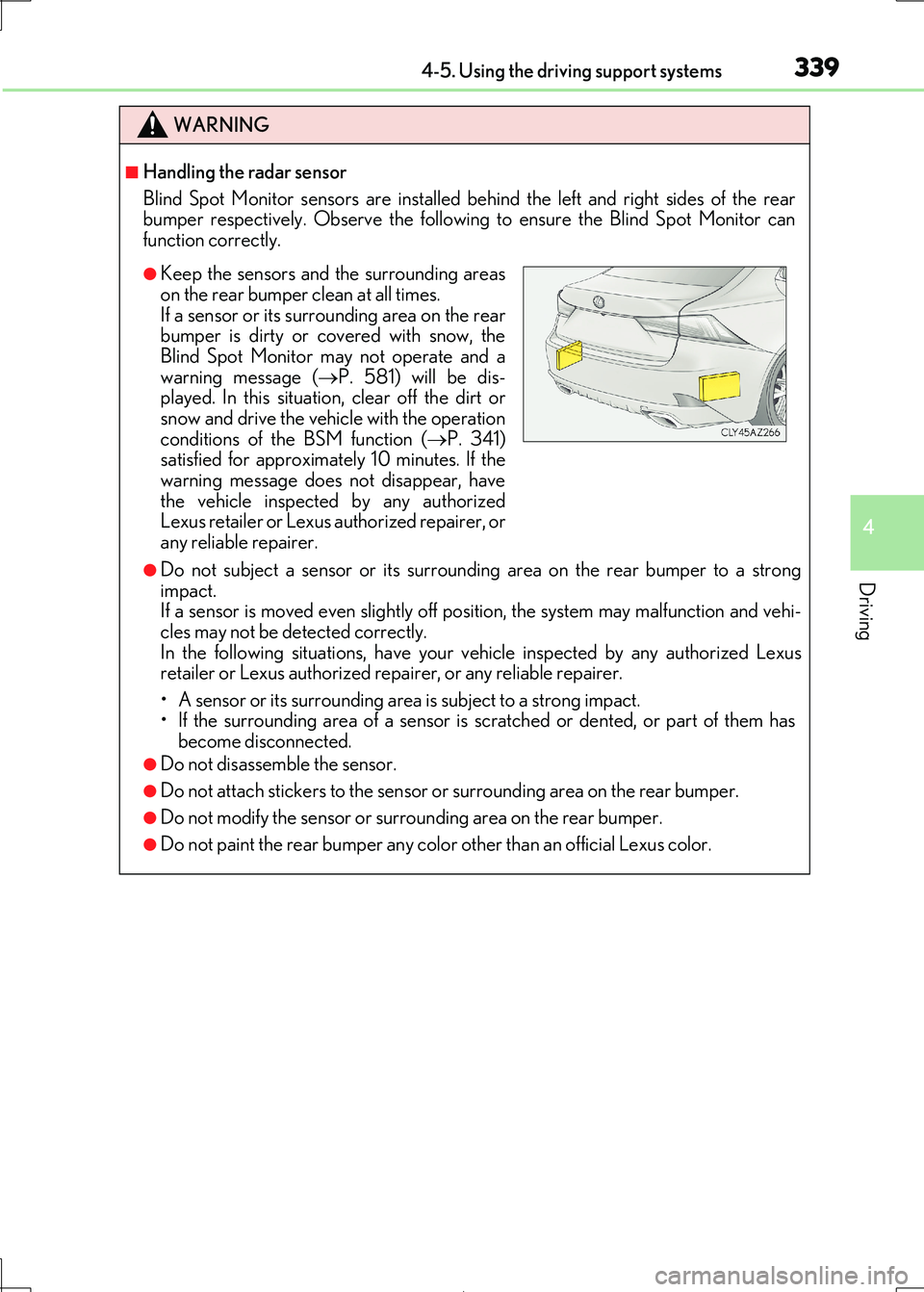
Blind Spot Monitor sensors are installed be hind the left and right sides of the rear
bumper respectively. Observe the following to ensure the Blind Spot Monitor can
function correctly.
●Do not subject a sensor or its surrounding area on the rear bumper to a strong impact.
If a sensor is moved even slightly off position, the system may malfunction and vehi-
cles may not be detected correctly. In the following situations, have your ve hicle inspected by any authorized Lexus
retailer or Lexus authorized repa irer, or any reliable repairer.
• A sensor or its surrounding area is subject to a strong impact. • If the surrounding area of a sensor is sc ratched or dented, or part of them has
become disconnected.
●Do not disassemble the sensor.
●Do not attach stickers to the sensor or surrounding area on the rear bumper.
●Do not modify the sensor or surrounding area on the rear bumper.
●Do not paint the rear bumper any color other than an official Lexus color.
●Keep the sensors and the surrounding areas
on the rear bumper clean at all times.
If a sensor or its surrounding area on the rear bumper is dirty or covered with snow, the
Blind Spot Monitor may not operate and a
warning message ( P. 581) will be dis- played. In this situation, clear off the dirt or
snow and drive the vehicle with the operation
conditions of the BSM function ( P. 341) satisfied for approximately 10 minutes. If the
warning message does not disappear, have
the vehicle inspected by any authorized Lexus retailer or Lexus authorized repairer, or
any reliable repairer.
Page 348 of 692
3484-5. Using the driving support systems
IS300h_EE(OM53D89E)
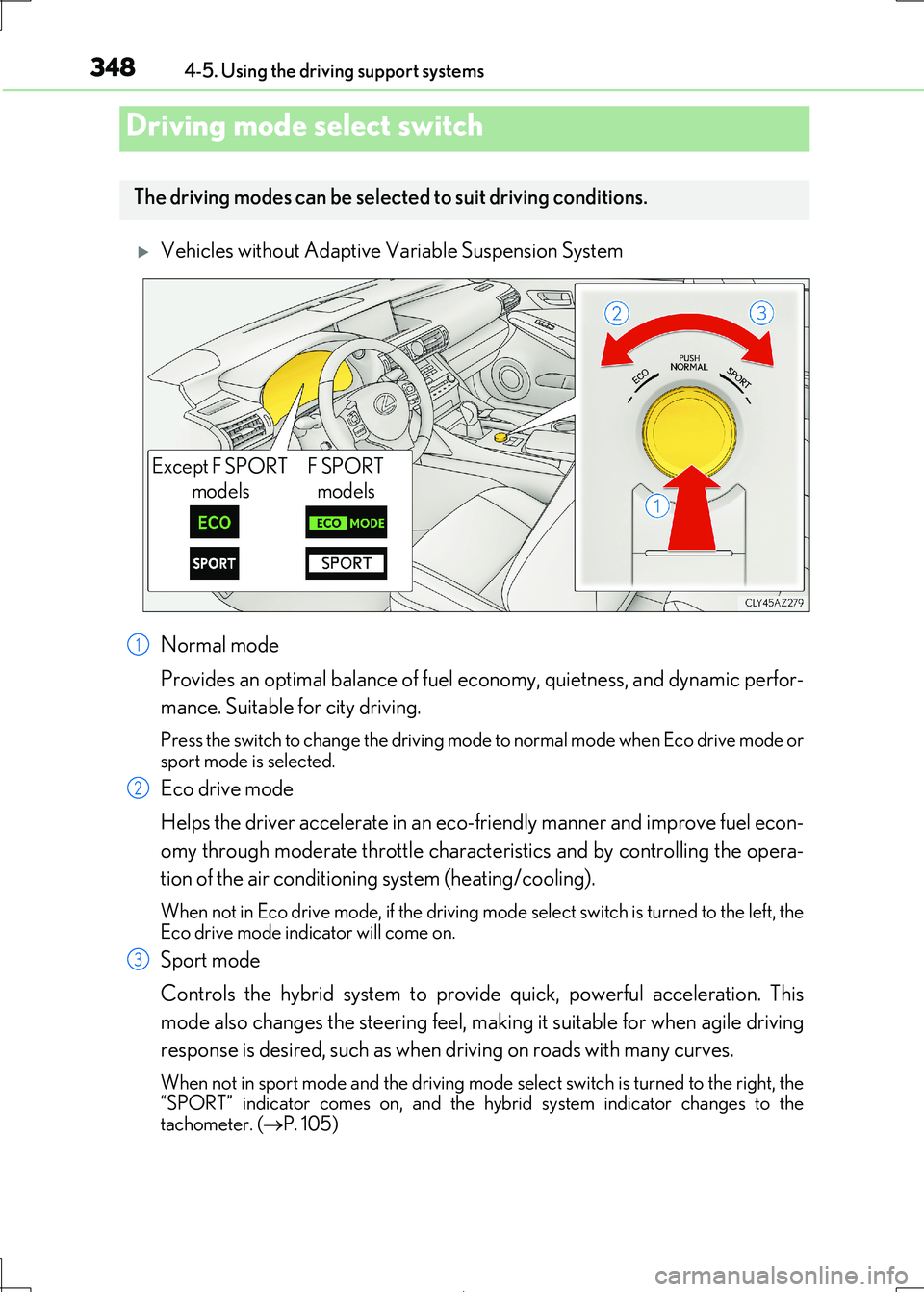
Vehicles without Adaptive Variable Suspension System
Normal mode
Provides an optimal balance of fuel ec onomy, quietness, and dynamic perfor-
mance. Suitable for city driving.
Press the switch to change the driving mode to normal mode when Eco drive mode or sport mode is selected.
Eco drive mode
Helps the driver accelerate in an eco-fr iendly manner and improve fuel econ-
omy through moderate throttle charact eristics and by controlling the opera-
tion of the air conditioning system (heating/cooling).
When not in Eco drive mode, if the driving mode select switch is turned to the left, the
Eco drive mode indicator will come on.
Sport mode
Controls the hybrid system to prov ide quick, powerful acceleration. This
mode also changes the steering feel, maki ng it suitable for when agile driving
response is desired, such as when driving on roads with many curves.
When not in sport mode and the driving mode select switch is turned to the right, the “SPORT” indicator comes on, and the hybrid system indicator changes to the
tachometer. ( P. 105)
Driving mode select switch
The driving modes can be selected to suit driving conditions.
Except F SPORT
models
F SPORT
models
1
2
3
Page 350 of 692
3504-5. Using the driving support systems
IS300h_EE(OM53D89E)
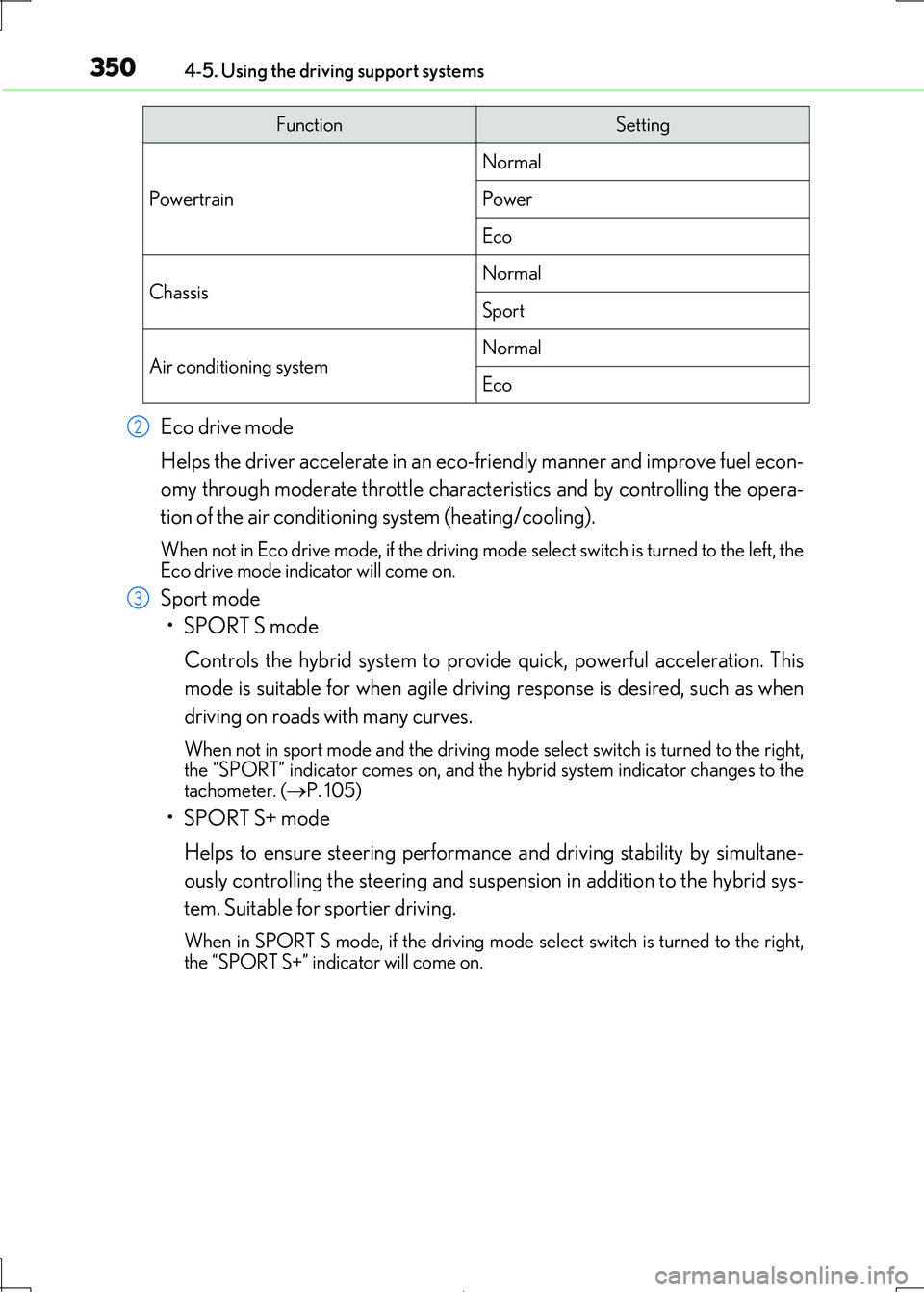
Eco drive mode
Helps the driver accelerate in an eco-fr iendly manner and improve fuel econ-
omy through moderate throttle charact eristics and by controlling the opera-
tion of the air conditioning system (heating/cooling).
When not in Eco drive mode, if the driving mode select switch is turned to the left, the
Eco drive mode indicator will come on.
Sport mode
•SPORT S mode
Controls the hybrid system to prov ide quick, powerful acceleration. This
mode is suitable for when agile drivin g response is desired, such as when
driving on roads with many curves.
When not in sport mode and the driving mode select switch is turned to the right, the “SPORT” indicator comes on, and the hy brid system indicator changes to the
tachometer. ( P. 105)
•SPORT S+ mode
Helps to ensure steering performanc e and driving stability by simultane-
ously controlling the steering and suspension in addition to the hybrid sys-
tem. Suitable for sportier driving.
When in SPORT S mode, if the driving mode select switch is turned to the right, the “SPORT S+” indicator will come on.
FunctionSetting
Powertrain
Normal
Power
Eco
ChassisNormal
Sport
Air conditioning systemNormal
Eco
2
3
Page 351 of 692

3514-5. Using the driving support systems
4
Driving
IS300h_EE(OM53D89E)
■Operation of the air conditioning system in Eco drive mode
Eco drive mode controls the heating/cooling operations and fan speed of the air condi-
tioning system to enhance fuel efficiency. To improve air conditioning performance, adjust the fan speed or turn off Eco drive mode.
■Automatic deactivation of sport mode and customized mode
If the power switch is turned off after driv ing in sport mode or customized mode, the drive mode will be changed to normal mode.
■Driving mode pop-up display (veh icles with a 10.3-inch display)
When the driving mode is changed, the sele cted driving mode will be temporarily dis- played on the side display. ( P. 464)
Page 357 of 692
3574-5. Using the driving support systems
4
Driving
IS300h_EE(OM53D89E)
WARNING
■The ABS does not operate effectively when
●The limits of tire gripping performance have been exceeded (such as excessively
worn tires on a snow covered road).
●The vehicle hydroplanes while driving at high speed on wet or slick roads.
■Stopping distance when the ABS is operating may exceed that of normal conditions
The ABS is not designed to sh orten the vehicle’s stopping distance. Always maintain a
safe distance from the vehicle in front of you, especially in the following situations:
●When driving on dirt, gravel or snow-covered roads
●When driving with tire chains
●When driving over bumps in the road
●When driving over roads with potholes or uneven surfaces
■TRC/VSC may not operate effectively when
Directional control and power may not be achievable while driving on slippery road surfaces, even if the TRC/VSC system is operating.
Drive the vehicle carefully in conditions where stability and power may be lost.
■Hill- start assist control does not operate effectively when
●Do not overly rely on hill-start assist control. Hill-start assist control may not operate
effectively on steep inclines and roads covered with ice.
●Unlike the parking brake, hill-start assist co ntrol is not intended to hold the vehicle stationary for an extended pe riod of time. Do not attempt to use hill-start assist con-
trol to hold the vehicle on an incline, as doing so may lead to an accident.
■When the VSC is activated
The slip indicator light flashes. Always drive carefully. Reckless driving may cause an
accident. Exercise particular care when the indicator light flashes.
■When the TRC/VSC systems are turned off
Be especially careful and drive at a speed appropriate to the road conditions. As these
are the systems to help ensure vehicle stability and driving force, do not turn the TRC/
VSC systems off unless necessary.
■Replacing tires
Make sure that all tires are of the specif ied size, brand, tread pattern and total load
capacity. In addition, make sure that the tire s are inflated to the recommended tire infla- tion pressure level.
The ABS, TRC and VSC systems will not function correctly if different tires are installed
on the vehicle. Contact any authorized Lexus retailer or Le xus authorized repairer, or any reliable
repairer for further information when replacing tires or wheels.
■Handling of tires and the suspension
Using tires with any kind of problem or modi fying the suspension will affect the driving assist systems, and may cause a system to malfunction.
Page 358 of 692
358
IS300h_EE(OM53D89E)
4-6. Driving tips
◆Using Eco drive mode
When using Eco drive mode, the torq ue corresponding to the accelerator
pedal depression amount can be generate d more smoothly than it is in normal
conditions. In addition, the operation of the air conditioning system (heating/
cooling) will be minimized, im proving the fuel economy. (P. 348)
◆Use of Hybrid System Indicator
The Eco-friendly driving is possible by keeping the indicator needle (except F
SPORT models) or bar display (F SPOR T models) of Hybrid System Indicator
within the Eco area. ( P. 109)
◆Shift lever operation
Shift the shift lever to D wh en stopped at a traffic light, or driving in heavy traf-
fic, etc. Shift the shift lever to P when parking. When using the N, there is no
positive effect on fuel consumption. In the N, the gasoline engine operates but
electricity cannot be genera ted. Also, when using the air conditioning system,
etc., the hybrid battery (tractio n battery) power is consumed.
◆Accelerator pedal/brake pedal operation
●Drive your vehicle smoothly. Avoid abrupt acceleration and deceleration.
Gradual acceleration and deceleration will make more effective use of the
electric motor (traction motor) withou t having to use gasoline engine power.
●Avoid repeated acceleration. Repeated acceleration consumes hybrid bat-
tery (traction battery) power, resulting in poor fuel consumption. Battery
power can be restored by driving with the accelerator pedal slightly released.
◆When braking
Make sure to operate the brakes gently and in a timely manner. A greater
amount of electrical energy can be regenerated when slowing down.
Hybrid vehicle driving tips
For economical and ecological driving, pay attention to the following points:
Page 359 of 692
3594-6. Driving tips
4
Driving
IS300h_EE(OM53D89E)
◆Delays
Repeated acceleration and deceleration, as well as long waits at traffic lights,
will lead to bad fuel economy. Check tr affic reports before leaving and avoid
delays as much as possible. When drivin g in a traffic jam, gently release the
brake pedal to allow the vehicle to move forward slightly while avoiding over-
use of the accelerator pedal. Doing so can help control excessive gasoline
consumption.
◆Highway driving
Control and maintain the vehicle at a co nstant speed. Before stopping at a toll
booth or similar, allow plenty of ti me to release the accelerator and gently
apply the brakes. A greater amount of electrical energy can be regenerated
when slowing down.
◆Air conditioning
Use the air conditioning only when necessary. Doing so can help reduce
excessive gasoline consumption.
In summer: When the ambient temperature is high, use the recirculated air
mode. Doing so will help to reduce the burden on the air conditioning system
and reduce fuel consumption as well.
In winter: Because the gasoline engine will not automatically cut out until it
and the interior of the vehicle are warm , it will consume fuel. Also, fuel con-
sumption can be improved by av oiding overuse of the heater.
◆Checking tire inflation pressure
Make sure to check the tire inflation pr essure frequently. Improper tire infla-
tion pressure can caus e poor fuel economy.
Also, as snow tires can cause large amou nts of friction, their use on dry roads
can lead to poor fuel economy. Use ti res that are appropriate for the season.
◆Luggage
Carrying heavy luggage will lead to poor fuel economy. Avoid carrying
unnecessary luggage. Installing a large roof rack will also cause poor fuel
economy.
Page 361 of 692
3614-6. Driving tips
4
Driving
IS300h_EE(OM53D89E)
●Use fluids that are appropriate to the prevailing outside temperatures.
•Engine oil
• Engine/power cont rol unit coolant
•Washer fluid
●Have a service technician inspect the condition of the 12-volt battery.
●Have the vehicle fitted with four snow tires or purchase a set of tire chains for
the rear tires.*
Ensure that all tires are the specified size and brand, and that chains match the size
of the tires.
*: Tire chains cannot be mounted on the 18-inch tires.
Perform the following according to the driving conditions:
●Do not try to forcibly open a window or move a wiper that is frozen. Pour
warm water over the frozen area to me lt the ice. Wipe away the water imme-
diately to prevent it from freezing.
●To ensure proper operation of the c limate control system fan, remove any
snow that has accumulated on the air inlet vents in front of the windshield.
●Check for and remove any excess ice or snow that may have accumulated on
the exterior lights, vehicle’s roof, chassi s, around the tires or on the brakes.
●Remove any snow or mud from the bottom of your shoes before getting in the
vehicle.
Accelerate the vehicle slowly, keep a sa fe distance between you and the vehicle
ahead, and drive at a reduced spee d suitable to road conditions.
Winter driving tips
Carry out the necessary preparations and inspections before driving the vehi-
cle in winter. Always drive the vehicle in a manner appropriate to the prevail-
ing weather conditions.
Preparation for winter
Before driving the vehicle
When driving the vehicle
Page 369 of 692
3695-1. Basic Operations
5
Lexus Display Audio system
IS300h_EE(OM53D89E)
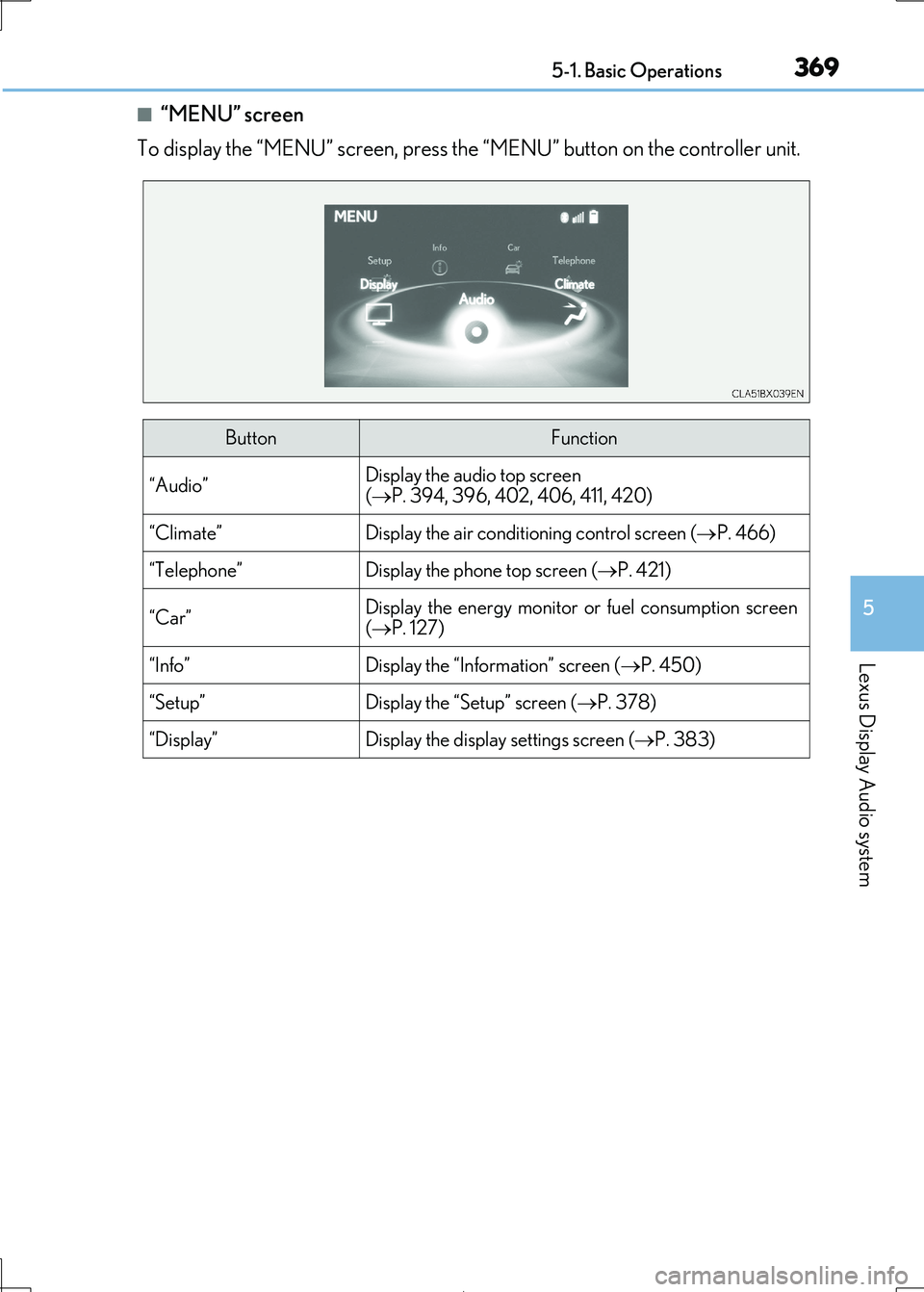
■“MENU” screen
To display the “MENU” screen, press the “MENU” button on the controller unit.
ButtonFunction
“Audio”Display the audio top screen
( P. 394, 396, 402, 406, 411, 420)
“Climate”Display the air conditioning control screen (P. 466)
“Telephone”Display the phone top screen (P. 421)
“Car” Display the energy monitor or fuel consumption screen
( P. 127)
“Info”Display the “Information” screen (P. 450)
“Setup”Display the “Setup” screen (P. 378)
“Display”Display the display settings screen (P. 383)
Page 442 of 692

4425-11. Bluetooth®
IS300h_EE(OM53D89E)
■When using the Bluetooth® audio system
●In the following situations, the system may not function.
• If the portable audio player is turned off • If the portable audio player is not connected
• If the portable audio player’s battery is low
●There may be a delay if a cellular phon e connection is made during Bluetooth® audio
play.
●Depending on the type of portable audio play er that is connected to the system, opera- tion may differ slightly and cert ain functions may not be available.
■When using the hands-free system
●The audio system is muted when making a call.
●If both parties speak at the same time, it may be difficult to hear.
●If the received call volume is overly loud, an echo may be heard.
If the Bluetooth® phone is too close to the system, quality of the sound may deteriorate and connection stat us may deteriorate.
●In the following situations, it may be difficult to hear the other party:
• When driving on unpaved roads • When driving at high speeds
• If a window is open
• If the air conditioning is blow ing directly on the microphone • If there is interference from the network of the cellular phone
●Depending on the type of phone, certain functions may not be available.
■Conditions under which the system will not operate
●If using a cellular phone that does not support Bluetooth®
●If the cellular phone is turned off
●If you are outside of cellular phone service coverage
●If the cellular phone is not connected
●If the cellular phone’s battery is low
●When outgoing calls are controlled, due to heavy traffic on phone lines, etc.
●When the cellular phone itself cannot be used
●When transferring phonebook data from the cellular phone
Bluetooth®