phone LEXUS LS430 2003 Factory Repair Manual
[x] Cancel search | Manufacturer: LEXUS, Model Year: 2003, Model line: LS430, Model: LEXUS LS430 2003Pages: 4500, PDF Size: 87.45 MB
Page 228 of 4500

AIR MIX STEP-
DAir mix servomotor target STEP
(Driver side) / min.: 257 STEP
max.: 1571 STEPMAX COOL: Approx. 257 STEP
MAX HOT: Approx. 1,571 STEP-
AIR MIX STEP-
PAir mix servomotor target STEP
(Passenger side) / min.: 257 STEP
max.: 1571 STEPMAX COOL: Approx. 257 STEP
MAX HOT: Approx. 1,571 STEP-
AIR OUT STEP-
DAir outlet servomotor target STEP
(Driver side) / min.: 274 STEP
max.: 2060 STEPFACE: Approx. 274 STEP DEF:
Approx. 2,060 STEP-
AIR OUT STEP-
PAir outlet servomotor target STEP
(Passenger side) / min.: 274 STEP
max.: 2060 STEPFACE: Approx. 274 STEP DEF:
Approx. 2,060 STEP-
HAND FREE
TELHand free telephone / OFF, ON--
BLOWER
LEVELBlower motor speed level / min.:
0 level max.: 31 levelIncreases in the range between 0 and
31 as the speed increase-
AMBI TEMP
Adjusted ambient temperature /
min.: -30.8°C (-23.44°F) max.:
50.8°C (123.44°F)
--
LOW VOLT
COUNT+B abnormal low voltage / min.: 0
times max.: 255 times--
EMISS GAS
SENSEmission gas / min.: 0 V max.:
255 VIncreases as the gas amount increases-
SET TEMP
SHIFTShift set temperature / +2C, +1C,
NORMAL, -1C, -2CCustomized value will be displayed-
AIR INLET
MODEAir inlet mode / AUTO,
MANUALCustomized value will be displayed-
COMPRESSOR
MODECompressor mode / AUTO,
MANUALCustomized value will be displayed-
COMPRS/DEF
OPERCompressor/ DEF operation
mode /LINK, NORMALCustomized value will be displayed-
MOTOR
INITIALIZEMotor initialize after IG SW being
turned OFFCustomized value will be displayed-
EVAP CTRLEvaporator control /AUTO,
MANUALCustomized value will be displayed-
GAS SENS
SHIFT
Emission Gas Sensor Shift / MU
MORE, MORE, LI MORE,
NORMAL, LI LESS, LESS, MU
LESS
Customized value will be displayed-
AUTO MODESwing resister auto mode /
AUTO, MANUALCustomized value will be displayed-
BUTTON PRS
BUZButton press buzzer / ON, OFFCustomized value will be displayed-
FILTER SENSFilter sensor / LESS, NORMAL,
MORECustomized value will be displayed-
Page 674 of 4500
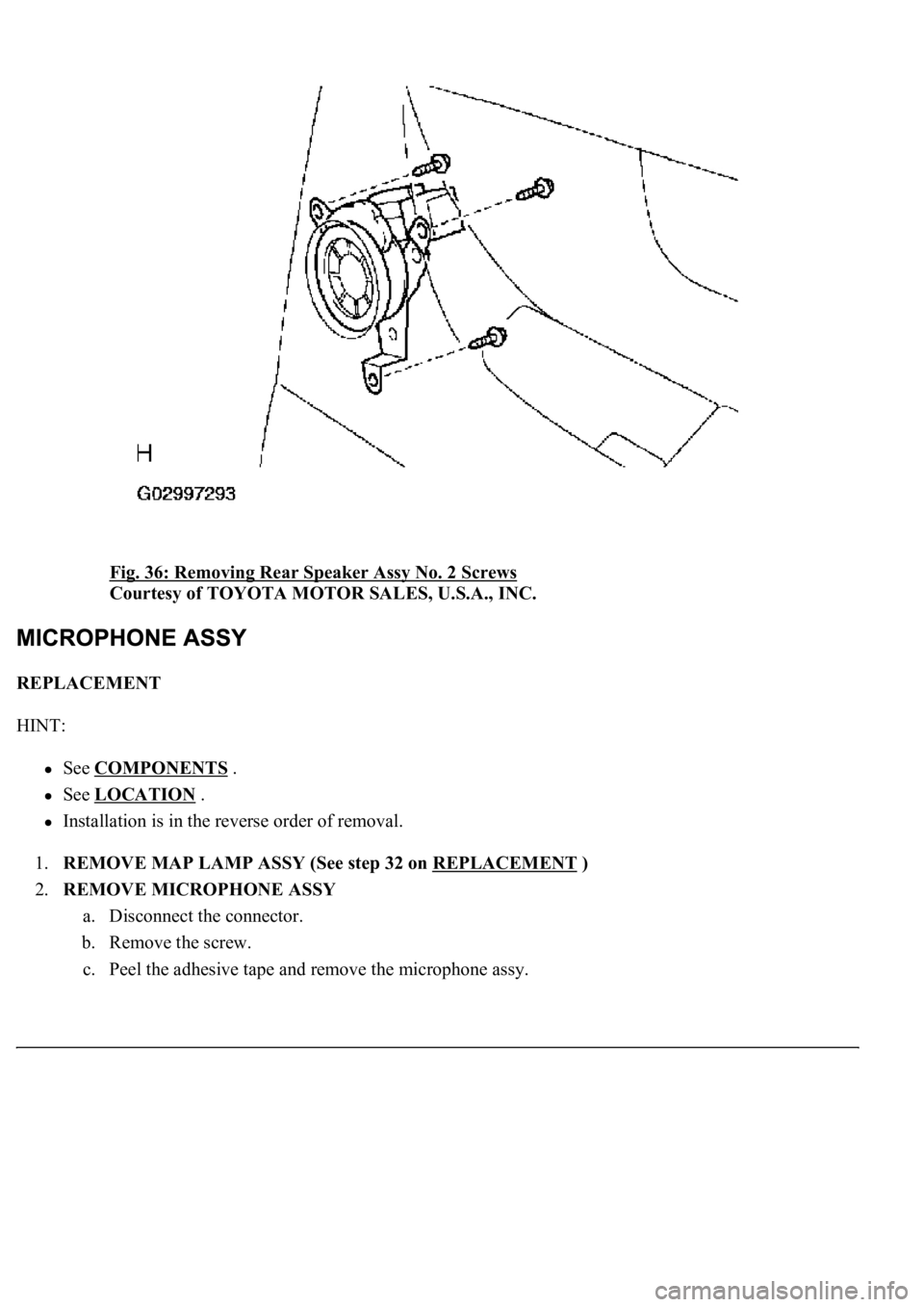
Fig. 36: Removing Rear Speaker Assy No. 2 Screws
Courtesy of TOYOTA MOTOR SALES, U.S.A., INC.
REPLACEMENT
HINT:
See COMPONENTS .
See LOCATION .
Installation is in the reverse order of removal.
1.REMOVE MAP LAMP ASSY (See step 32 on REPLACEMENT
)
2.REMOVE MICROPHONE ASSY
a. Disconnect the connector.
b. Remove the screw.
c. Peel the adhesive tape and remove the microphone assy.
Page 675 of 4500
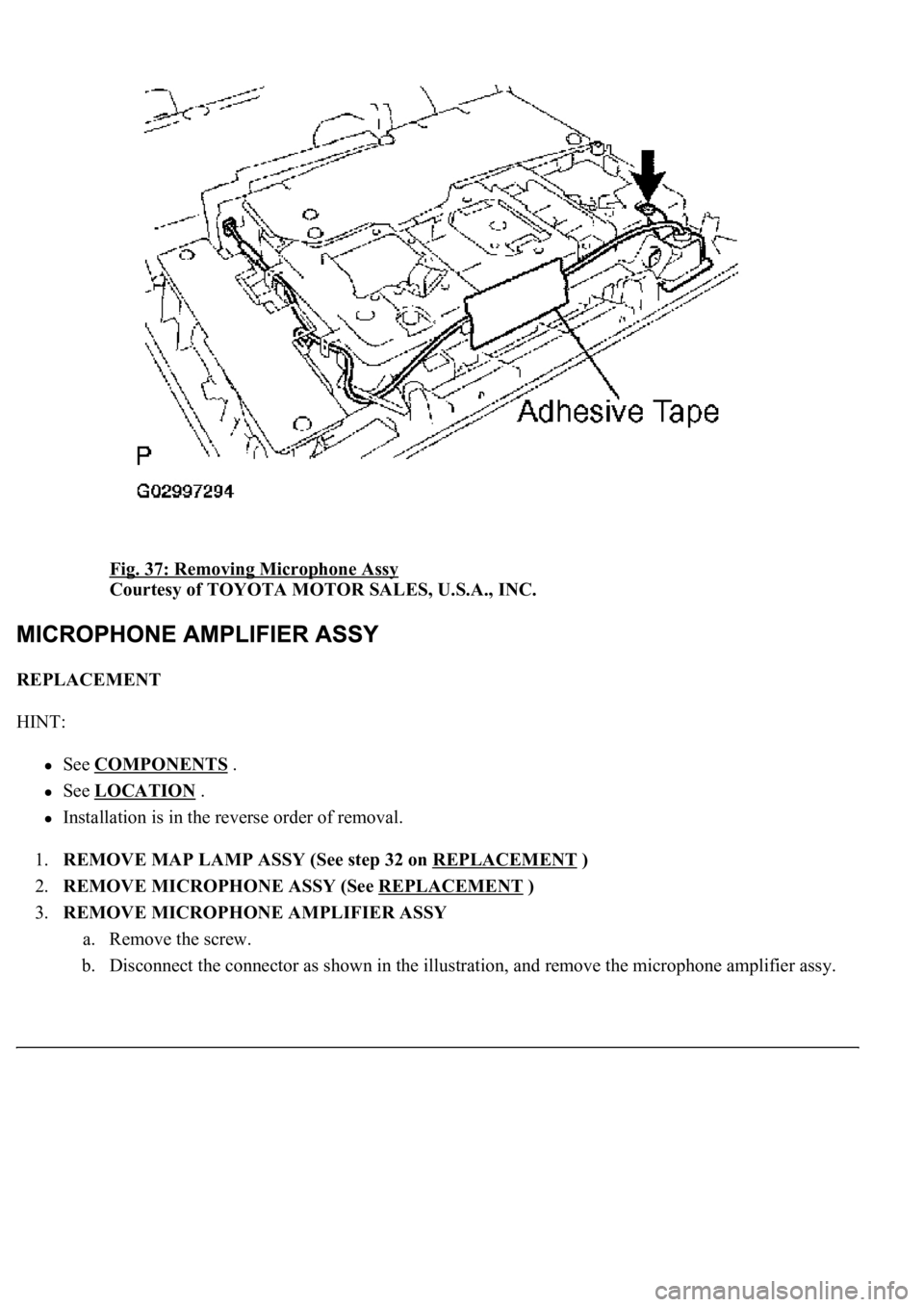
Fig. 37: Removing Microphone Assy
Courtesy of TOYOTA MOTOR SALES, U.S.A., INC.
REPLACEMENT
HINT:
See COMPONENTS .
See LOCATION .
Installation is in the reverse order of removal.
1.REMOVE MAP LAMP ASSY (See step 32 on REPLACEMENT
)
2.REMOVE MICROPHONE ASSY (See REPLACEMENT
)
3.REMOVE MICROPHONE AMPLIFIER ASSY
a. Remove the screw.
b. Disconnect the connector as shown in the illustration, and remove the microphone amplifier assy.
Page 676 of 4500
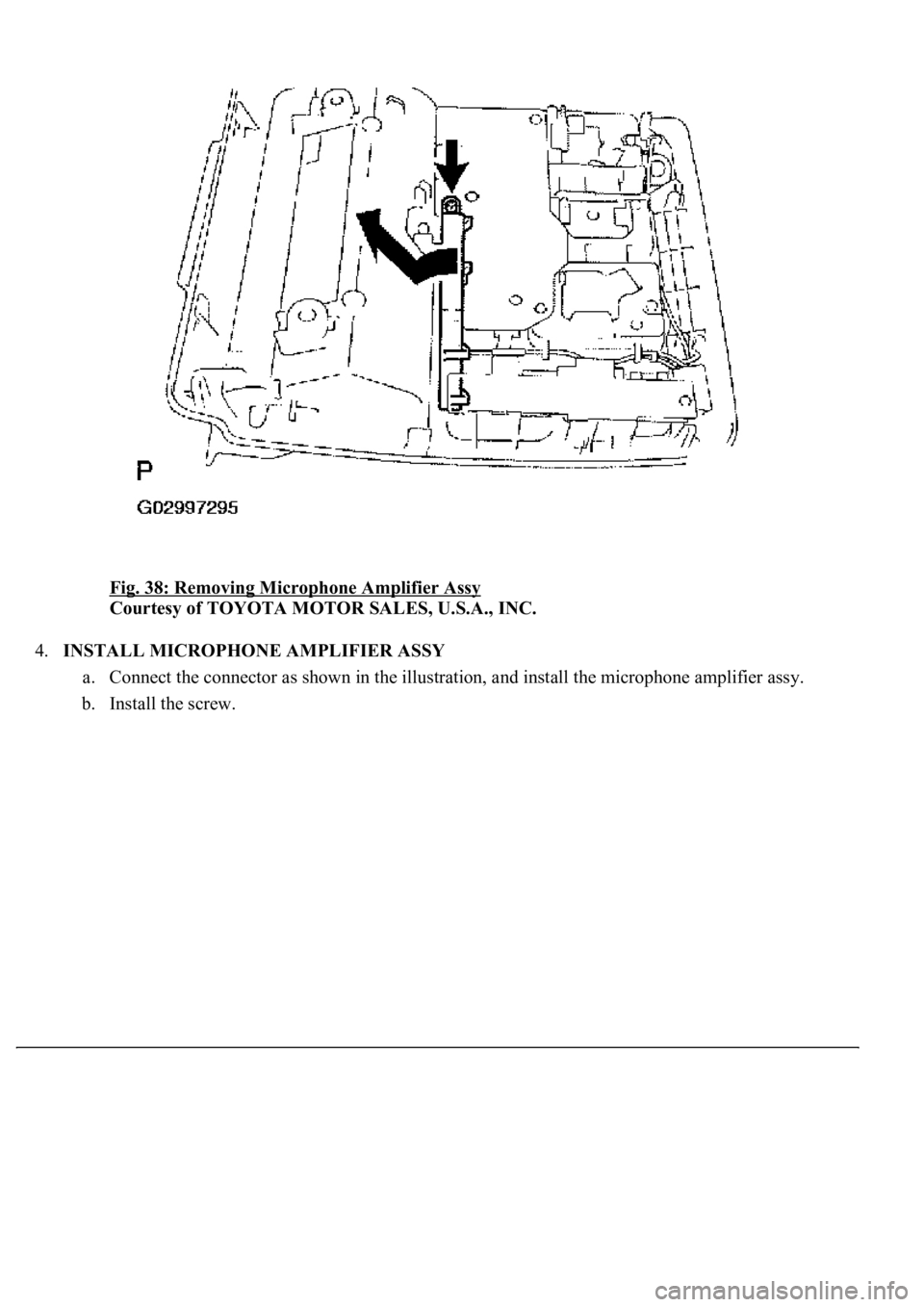
Fig. 38: Removing Microphone Amplifier Assy
Courtesy of TOYOTA MOTOR SALES, U.S.A., INC.
4.INSTALL MICROPHONE AMPLIFIER ASSY
a. Connect the connector as shown in the illustration, and install the microphone amplifier assy.
b. Install the screw.
Page 677 of 4500
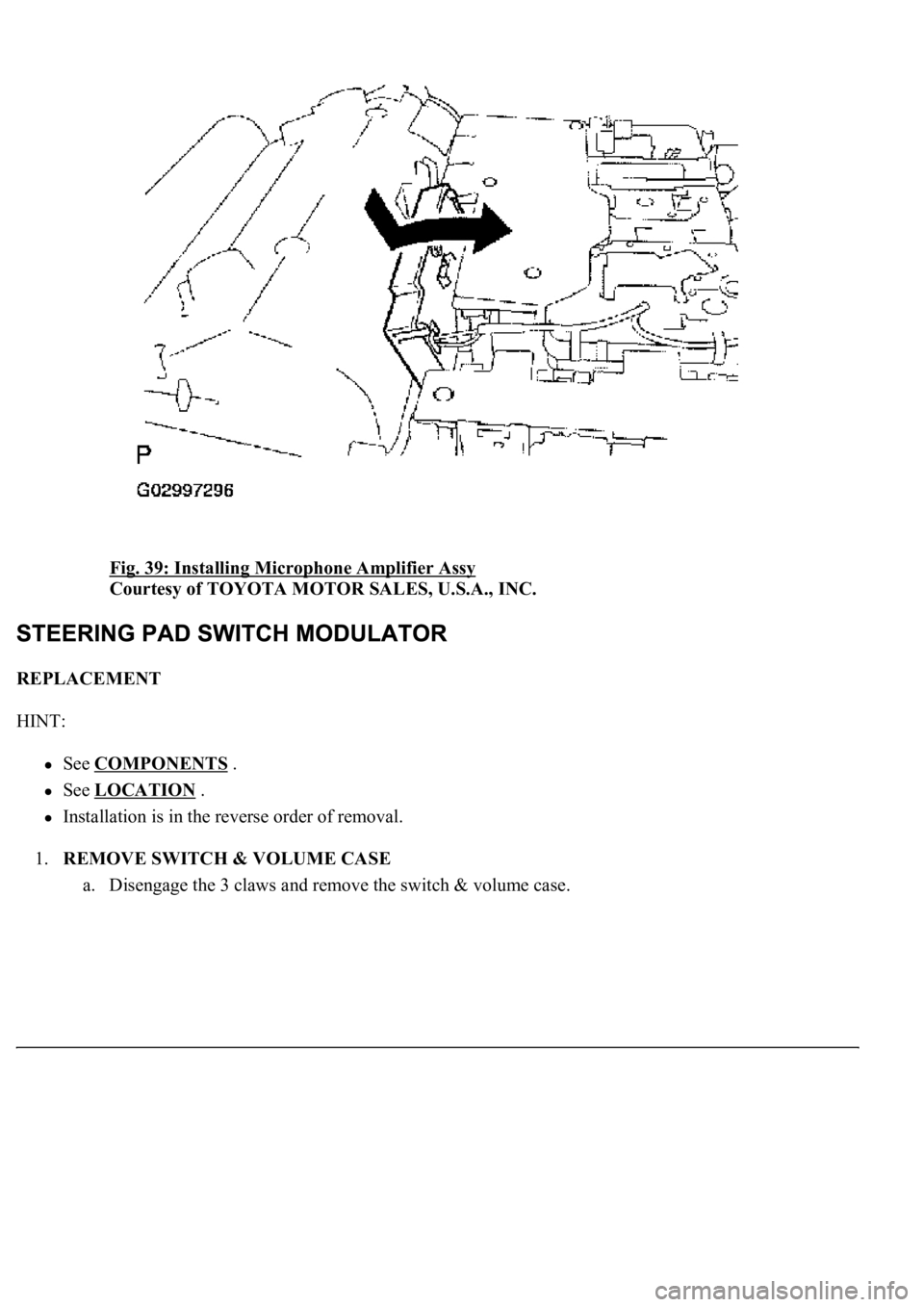
Fig. 39: Installing Microphone Amplifier Assy
Courtesy of TOYOTA MOTOR SALES, U.S.A., INC.
REPLACEMENT
HINT:
See COMPONENTS .
See LOCATION .
Installation is in the reverse order of removal.
1.REMOVE SWITCH & VOLUME CASE
a. Disengage the 3 claws and remove the switch & volume case.
Page 688 of 4500
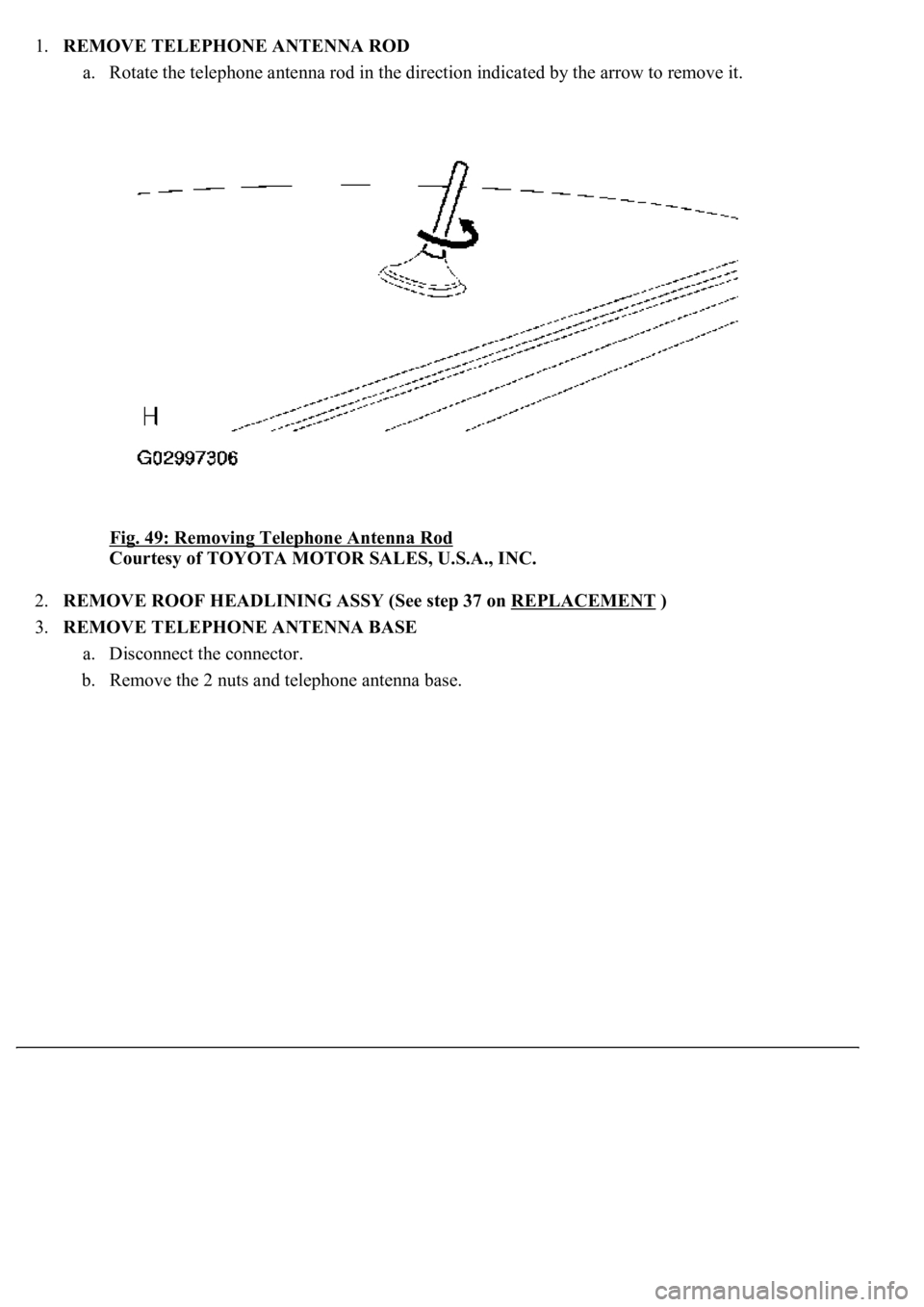
1.REMOVE TELEPHONE ANTENNA ROD
a. Rotate the telephone antenna rod in the direction indicated by the arrow to remove it.
Fig. 49: Removing Telephone Antenna Rod
Courtesy of TOYOTA MOTOR SALES, U.S.A., INC.
2.REMOVE ROOF HEADLINING ASSY (See step 37 on REPLACEMENT
)
3.REMOVE TELEPHONE ANTENNA BASE
a. Disconnect the connector.
b. Remove the 2 nuts and telephone antenna base.
Page 689 of 4500
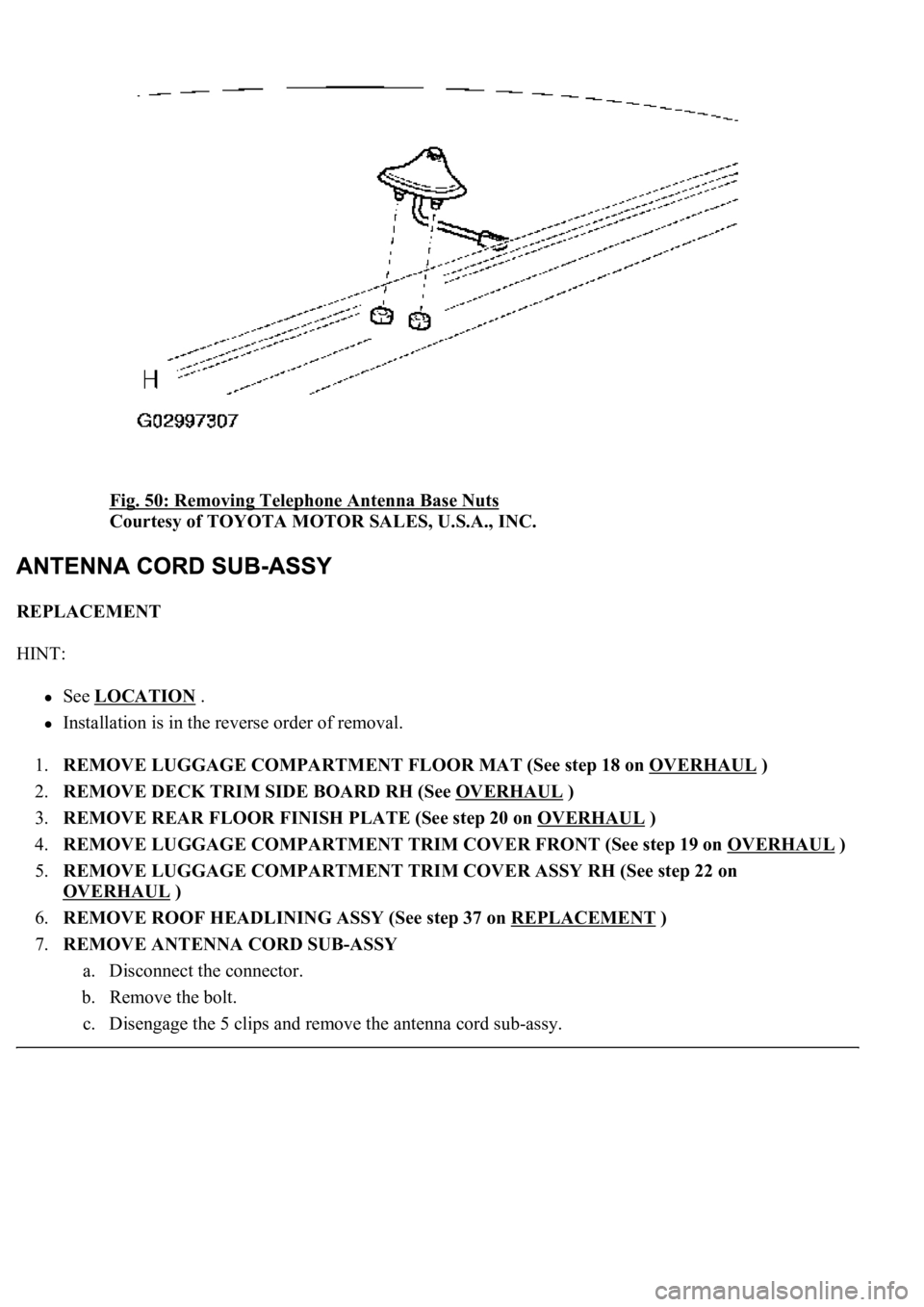
Fig. 50: Removing Telephone Antenna Base Nuts
Courtesy of TOYOTA MOTOR SALES, U.S.A., INC.
REPLACEMENT
HINT:
See LOCATION .
Installation is in the reverse order of removal.
1.REMOVE LUGGAGE COMPARTMENT FLOOR MAT (See step 18 on OVERHAUL
)
2.REMOVE DECK TRIM SIDE BOARD RH (See OVERHAUL
)
3.REMOVE REAR FLOOR FINISH PLATE (See step 20 on OVERHAUL
)
4.REMOVE LUGGAGE COMPARTMENT TRIM COVER FRONT (See step 19 on OVERHAUL
)
5.REMOVE LUGGAGE COMPARTMENT TRIM COVER ASSY RH (See step 22 on
OVERHAUL
)
6.REMOVE ROOF HEADLINING ASSY (See step 37 on REPLACEMENT
)
7.REMOVE ANTENNA CORD SUB-ASSY
a. Disconnect the connector.
b. Remove the bolt.
c. Disengage the 5 clips and remove the antenna cord sub-assy.
Page 733 of 4500
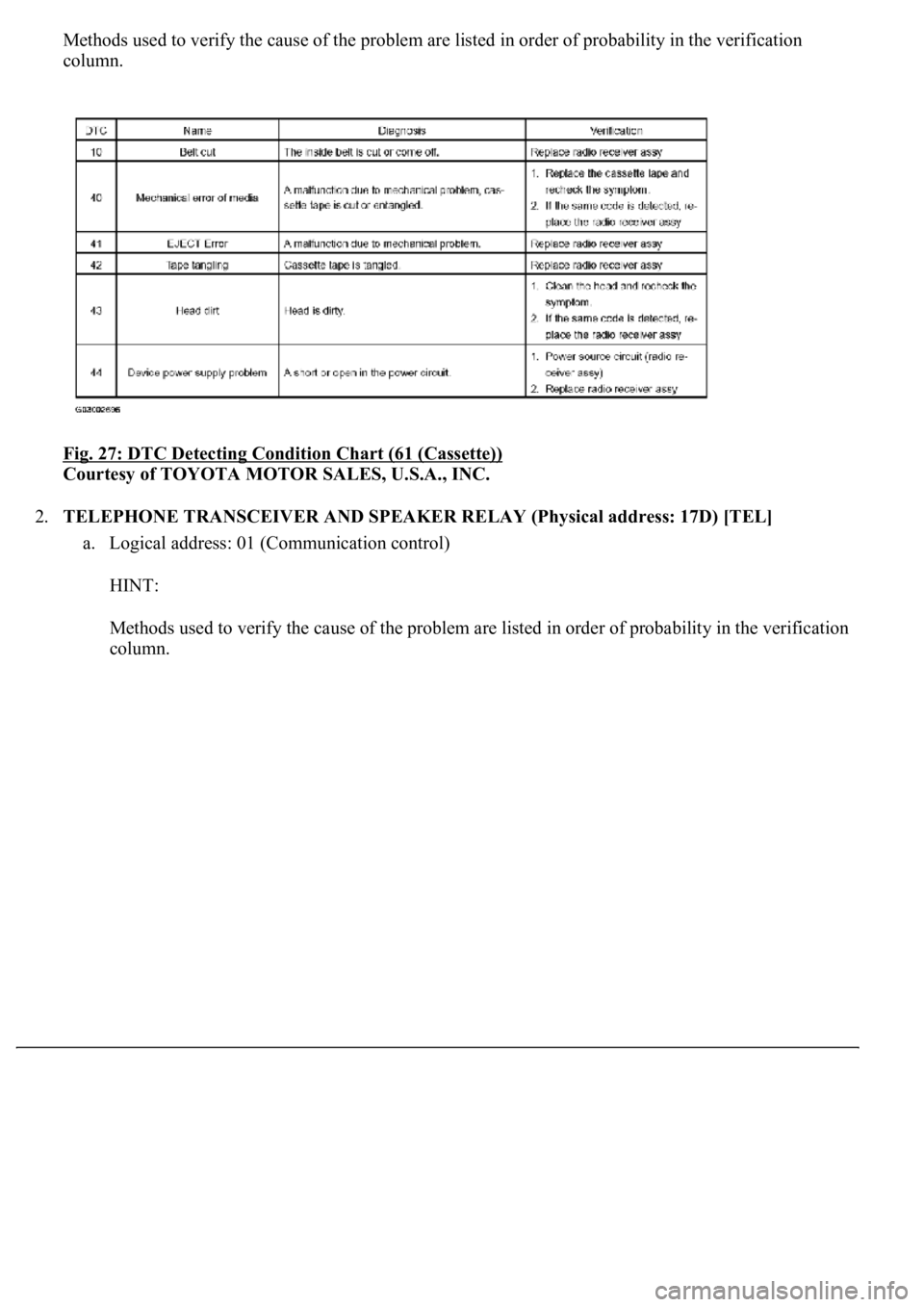
Methods used to verify the cause of the problem are listed in order of probability in the verification
column.
Fig. 27: DTC Detecting Condition Chart (61 (Cassette))
Courtesy of TOYOTA MOTOR SALES, U.S.A., INC.
2.TELEPHONE TRANSCEIVER AND SPEAKER RELAY (Physical address: 17D) [TEL]
a. Logical address: 01 (Communication control)
HINT:
Methods used to verify the cause of the problem are listed in order of probability in the verification
column.
Page 735 of 4500
![LEXUS LS430 2003 Factory Repair Manual Fig. 28: DTC Detecting Condition Chart (Physical address: 17D) [TEL])
Courtesy of TOYOTA MOTOR SALES, U.S.A., INC.
HINT:
*1: Even if no failure is detected, a trouble code may be recorded depending](/img/36/57050/w960_57050-734.png "LEXUS LS430 2003 Factory Repair Manual Fig. 28: DTC Detecting Condition Chart (Physical address: 17D) [TEL])
Courtesy of TOYOTA MOTOR SALES, U.S.A., INC.
HINT:
*1: Even if no failure is detected, a trouble code may be recorded depending")
Fig. 28: DTC Detecting Condition Chart (Physical address: 17D) [TEL])
Courtesy of TOYOTA MOTOR SALES, U.S.A., INC.
HINT:
*1: Even if no failure is detected, a trouble code may be recorded depending on the battery
condition or engine start voltage.
*2: If the power connector is disconnected after the engine starts, this code is recorded after
180 seconds.
*3: This code may be stored if the ignition key is turned again after the engine starts.
*4: This code may be stored if the ignition key is held in the START position for one minute
or more before returning to the ON position.
*5: If the device is reported as not existing during verification, check the power source circuit
and AVC-LAN circuit for the device.
b. Logical address: 57 (telephone information drawing): 68 (TEL)
HINT:
Methods used to verify the cause of the problem are listed in order of probability in the verification
column.
Fig. 29: DTC Detecting Condition Chart
Courtesy of TOYOTA MOTOR SALES, U.S.A., INC.
3.AUDIO AND REAR A/C CONTROL SW (Physical address: 1CO) [Rr-CONT]
a. Logical address: 01 (Communication control)
HINT:
Methods used to verify the cause of the problem are listed in order of probability in the verification
column.
Page 743 of 4500
INSPECTION PROCEDURE
1.CHECK CABIN
a. Check that conditions in the cabin are likely to cause condensation.
HINT:
This problem occurs when the cabin is humid and the temperature changes rapidly. This may produce
condensation, resulting in a short circuit.
OK: Condensation is not likely.
NG: DRY CABIN AND RECHECK CONDITIONS
OK: PROCEED TO NEXT CIRCUIT INSPECTION SHOWN IN PROBLEM SYMPTOMS
TABLE
2 CHECK AUDIO SETTINGS
OK: END
NG: PROCEED TO NEXT CIRCUIT INSPECTION SHOWN IN PROBLEM SYMPTOMS
TABLE
INSPECTION PROCEDURE
1.CHECK RADIO RECEIVER ASSY
a. Check the radio's automatic search function.
1. Check the radio's automatic station search function by activating it.
OK: The radio's automatic station search function works properly.
OK: REPLACE RADIO RECEIVER ASSY (SEE REPLACEMENT
)
NG: Go to next step
2.CHECK OPTIONAL COMPONENTS
a. Check the optional components (sun-shade film, telephone antenna, etc.)
1. Check if optional components, such as sun-shade film or telephone antenna that ma
y