light LEXUS LS460L 2016 Owners Manual
[x] Cancel search | Manufacturer: LEXUS, Model Year: 2016, Model line: LS460L, Model: LEXUS LS460L 2016Pages: 708, PDF Size: 36.57 MB
Page 364 of 708
3644-5. Using the driving support systems
LS460/LS460L_GE (OM50G06E)
■When the message is displayed on the multi-information display showing that TRC
has been disabled even if the VSC OFF switch has not been pressed
TRC and hill-start assist control cannot be operated. Contact your Lexus dealer.
■Hill-start assist control is operational when
●The system has detected that the vehicle is moving backward.
●Vehicles without paddle shift switches: The shift lever is in the D or S position.
Vehicles with paddle shift switches: The shift lever is in the D or M position.
●The brake pedal is not depressed.
■VGRS is disabled when
VGRS may stop operating in the following situations.
In this event, the steering wheel may move from its straight forward position, but it
will return when the system restarts.
●When the steering wheel is operated for an extended period of time while the vehi-
cle is stopped or is moving very slowly
●When the steering wheel has been held fully to the left or right
●When the battery is low or the voltage temporarily drops
The center position of the steering wheel may change when VGRS is disabled. How-
ever, the position will return to normal after VGRS is reactivated.
■Sounds and vibrations caused by the ABS, brake assist, TRC, VSC, hill-start assist
control and VGRS systems
●A sound may be heard from the engine compartment when the brake pedal is
depressed repeatedly, when the engine is started or just after the vehicle begins to
move. This sound does not indicate that a malfunction has occurred in any of these
systems.
●Any of the following conditions may occur when the above systems are operating.
None of these indicates that a malfunction has occurred.
• Vibrations may be felt through the vehicle body and steering.
• A motor sound may be heard after the vehicle comes to a stop.
●The steering wheel may be moved slightly or a sound may be heard when the
engine is started or stopped. None of these indicate that a malfunction has
occurred.
■EPS operation sound
When the steering wheel is operated, a motor sound (whirring sound) may be heard.
This does not indicate a malfunction.
Page 366 of 708
3664-5. Using the driving support systems
LS460/LS460L_GE (OM50G06E)
CAUTION
■The ABS does not operate effectively when
●The limits of tire gripping performance have been exceeded (such as excessively
worn tires on a snow covered road).
●The vehicle hydroplanes while driving at high speed on wet or slick roads.
■Stopping distance when the ABS is operating may exceed that of normal condi-
tions
The ABS is not designed to shorten the vehicle’s stopping distance. Always main-
tain a safe distance from the vehicle in front of you, especially in the following situa-
tions:
●When driving on dirt, gravel or snow-covered roads
●When driving with tire chains
●When driving over bumps in the road
●When driving over roads with potholes or uneven surfaces
■TRC may not operate effectively when
Directional control and power may not be achievable while driving on slippery
road surfaces, even if the TRC system is operating.
Do not drive the vehicle in conditions where stability and power may be lost.
■Hill- start assist control does not operate effectively when
Do not overly rely on the hill-start assist control. The hill-start assist control may not
operate effectively on steep inclines and roads covered with ice.
■When the VSC is activated
The slip indicator light flashes. Always drive carefully. Reckless driving may cause
an accident. Exercise particular care when the indicator light flashes.
■When the TRC/VSC systems are turned off
Be especially careful and drive at a speed appropriate to the road conditions. As
these are the systems to help ensure vehicle stability and driving force, do not turn
the TRC/VSC systems off unless necessary.
Page 368 of 708
3684-5. Using the driving support systems
LS460/LS460L_GE (OM50G06E)
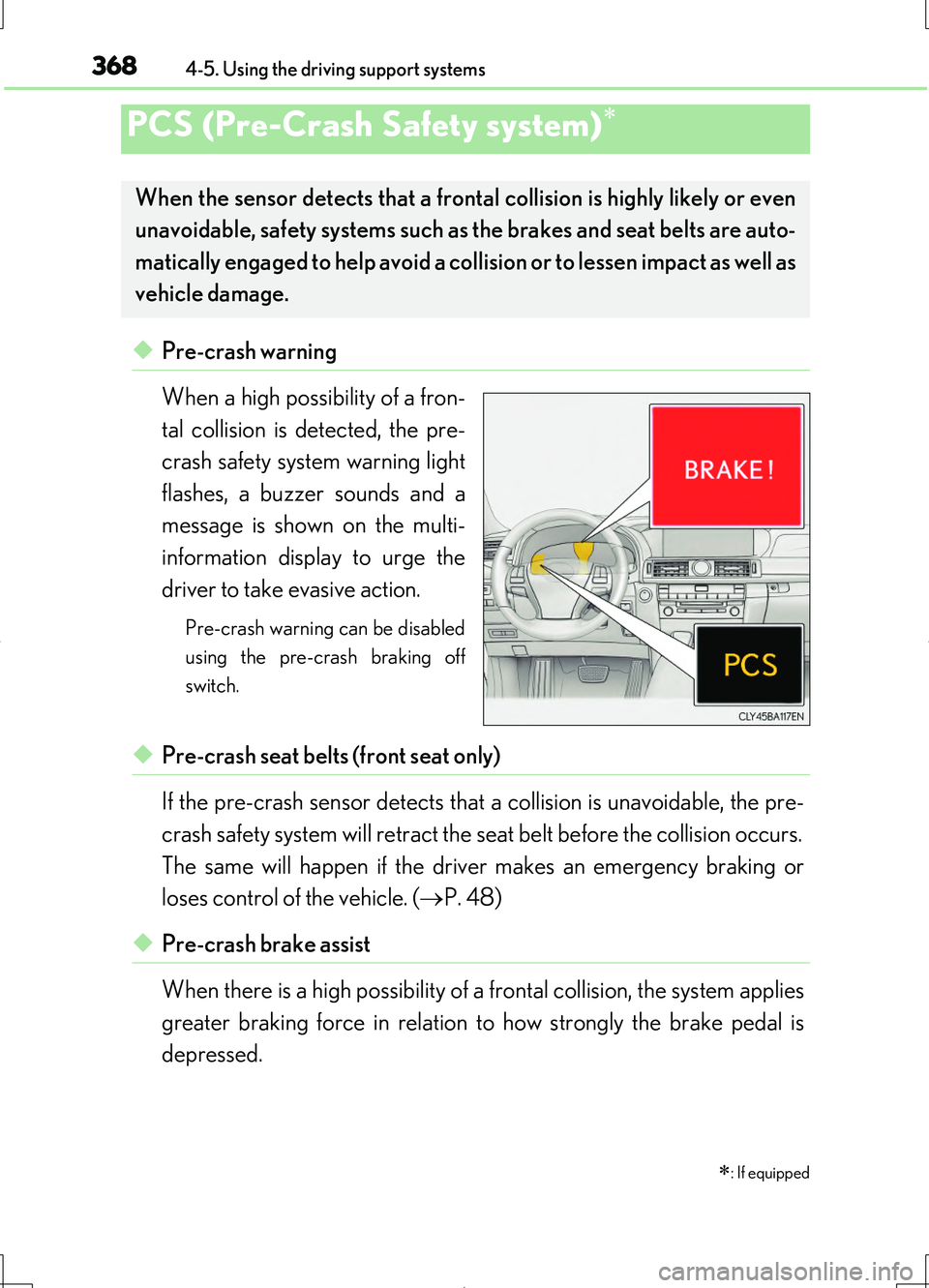
◆Pre-crash warning
When a high possibility of a fron-
tal collision is detected, the pre-
crash safety system warning light
flashes, a buzzer sounds and a
message is shown on the multi-
information display to urge the
driver to take evasive action.
Pre-crash warning can be disabled
using the pre-crash braking off
switch.
◆Pre-crash seat belts (front seat only)
If the pre-crash sensor detects that a collision is unavoidable, the pre-
crash safety system will retract the seat belt before the collision occurs.
The same will happen if the driver makes an emergency braking or
loses control of the vehicle. ( P. 48)
◆Pre-crash brake assist
When there is a high possibility of a frontal collision, the system applies
greater braking force in relation to how strongly the brake pedal is
depressed.
PCS (Pre-Crash Safety system)
: If equipped
When the sensor detects that a frontal collision is highly likely or even
unavoidable, safety systems such as the brakes and seat belts are auto-
matically engaged to help avoid a collision or to lessen impact as well as
vehicle damage.
Page 369 of 708
3694-5. Using the driving support systems
4
Driving
LS460/LS460L_GE (OM50G06E)
◆Pre-crash braking (if equipped)
When there is a high possibility of a frontal collision, the system warns
the driver using a warning light, warning display and buzzer. If the sys-
tem determines that a collision is unavoidable, the brakes are automati-
cally applied to help avoid a collision or to reduce the collision speed.
When the vehicle is being stopped by pre-crash braking, the brake will
be engaged for a maximum of 2 seconds and then released automati-
cally. This pre-crash braking can be canceled by depressing the accel-
erator pedal or brake pedal.
Pre-crash braking can be disabled using the pre-crash braking off switch.
◆Suspension control
When there is a high possibility of a frontal collision, the operation of
suspension control helps prevent the front of the vehicle from dropping
when the brakes are applied suddenly.
◆Steering gear control (VGRS) (vehicles with camera sensors)
When the system determines that a collision is unavoidable, the steer-
ing gear ratio is changed to help improve the response to steering
input.
◆Driver monitor system (if equipped)
When the system determines that there is a possibility of a collision, and
either the driver is not facing forward or the driver’s eyes are closed,
pre-crash warnings are given in adva nce to warn the driver. If the sys-
tem determines that the conditions to operate pre-crash alert braking
have been met even when the possibility of a collision increases further,
pre-crash alert braking will operate.
Pre-crash alert braking can be disabled using the pre-crash braking off switch.
Page 370 of 708
3704-5. Using the driving support systems
LS460/LS460L_GE (OM50G06E)
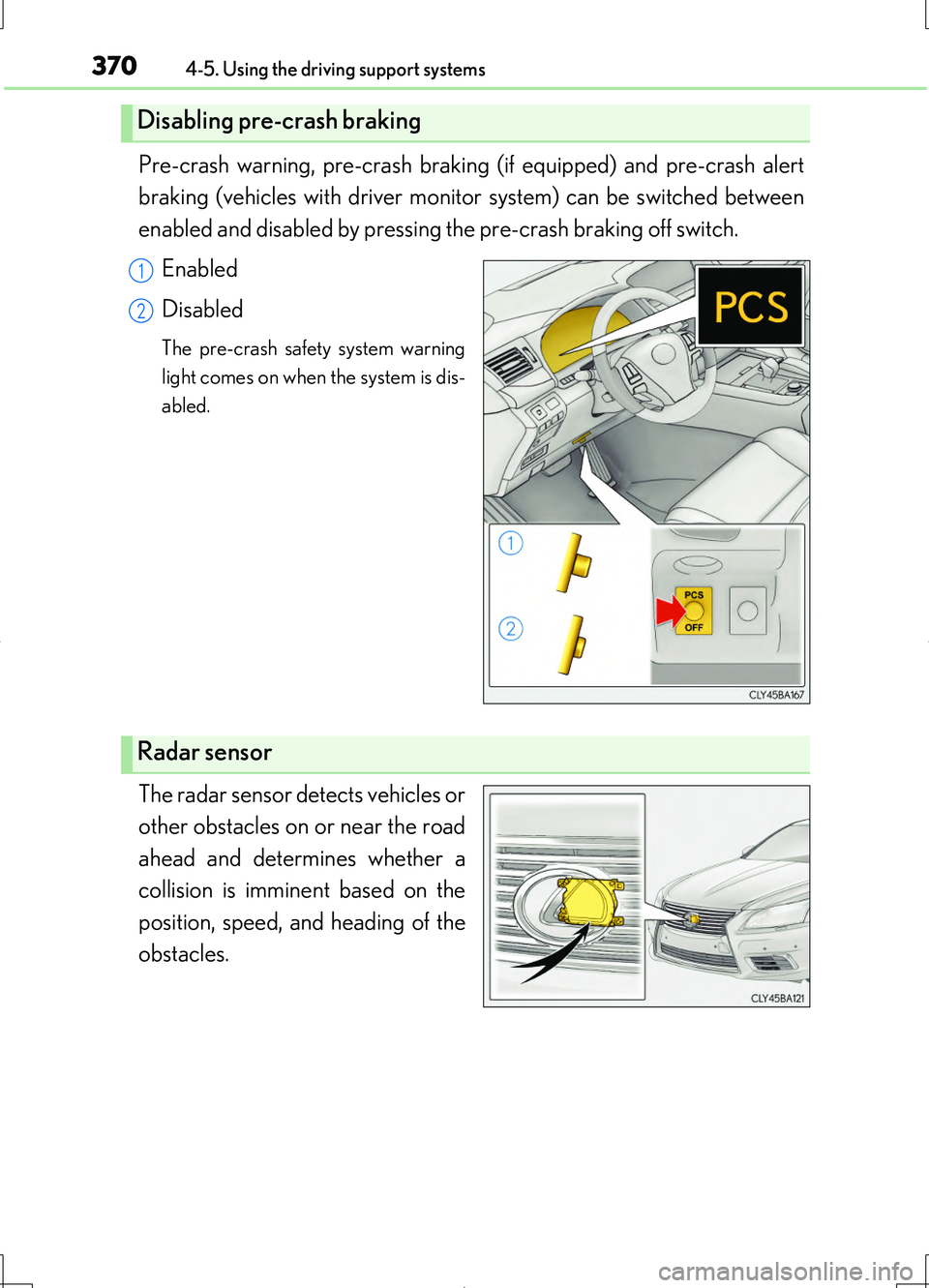
Pre-crash warning, pre-crash braking (if equipped) and pre-crash alert
braking (vehicles with driver monitor system) can be switched between
enabled and disabled by pressing the pre-crash braking off switch.
Enabled
Disabled
The pre-crash safety system warning
light comes on when the system is dis-
abled.
The radar sensor detects vehicles or
other obstacles on or near the road
ahead and determines whether a
collision is imminent based on the
position, speed, and heading of the
obstacles.
Disabling pre-crash braking
1
2
Radar sensor
Page 371 of 708
3714-5. Using the driving support systems
4
Driving
LS460/LS460L_GE (OM50G06E)
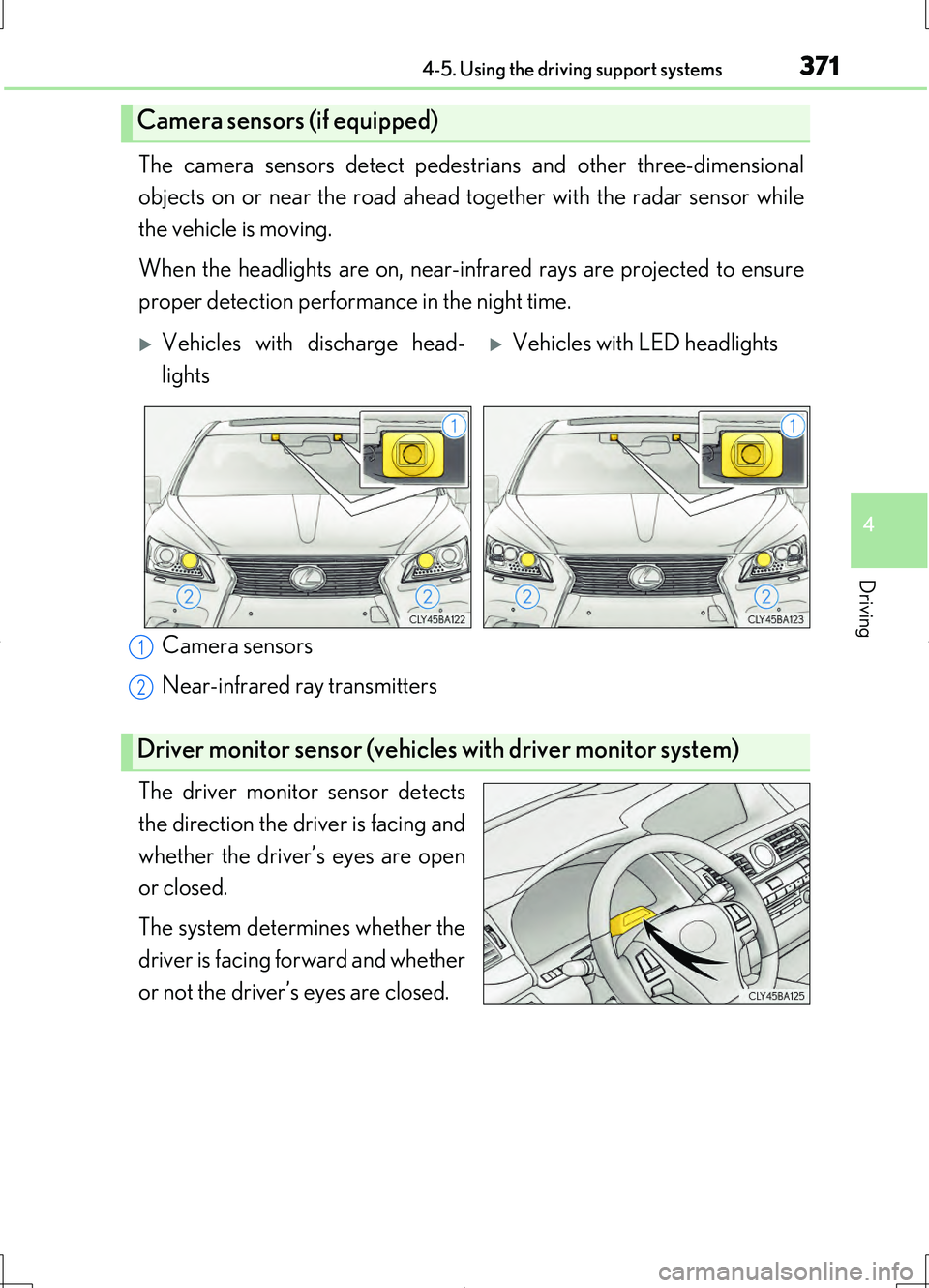
The camera sensors detect pedestrians and other three-dimensional
objects on or near the road ahead to gether with the radar sensor while
the vehicle is moving.
When the headlights are on, near-inf rared rays are projected to ensure
proper detection performance in the night time.
Camera sensors
Near-infrared ray transmitters
The driver monitor sensor detects
the direction the driver is facing and
whether the driver’s eyes are open
or closed.
The system determines whether the
driver is facing forward and whether
or not the driver’s eyes are closed.
Camera sensors (if equipped)
Vehicles with discharge head-
lights
Vehicles with LED headlights
Driver monitor sensor (vehicles with driver monitor system)
1
2
Page 374 of 708
3744-5. Using the driving support systems
LS460/LS460L_GE (OM50G06E)
■Conditions that may trigger the system even if there is no danger of a collision
In any of the following situations where the frontal area of the radar sensor is inter-
rupted, the radar sensor may detect possibility of a frontal collision and the system
may be activated.
●When passing by an oncoming vehicle in a curve or a turn to the right or the left.
●When rapidly approaching an obstacle ahead (e.g. preceding vehicle, toll gate bar-
rier, etc.)
●When there is a structural object (billboard, low ceiling, fluorescent light, etc.)
above the uphill road ahead
●When driving on a narrow road or through under a low overhead structure (bridge,
tunnel, fly-under, etc.)
●When driving on an uneven road surface
●When there is a metal object, bump, or protrusion on the road surface
●When vehicle front part is raised or lowered depending on loading conditions
●When the direction of radar sensor is misaligned by strong impact applied on an
area around the radar sensor, etc.
●When there is an obstacle (guard rail, etc.) by the roadside at the entrance to a
curve
●When the front of your vehicle is pointing upwards (caused by putting a heavy load
in the trunk etc.)
●When driving through an area filled with steam or smoke
When the system is activated in the situatio ns described above, there is also a possi-
bility that the seat belts will retract quickly and the brakes may be applied with a force
greater than normal. When the seat belt is locked in the retracted position, stop the
vehicle in a safe place, release the seat belt and refasten it.
■Obstacles not detected
The radar sensor cannot detect plastic obstacles such as traffic cones. There may
also be occasions when the sensor cannot detect pedestrians, animals, bicycles,
motorcycles, trees, or snowdrifts.
■A camera sensor cannot detect obstacles in the following situations:
●A camera sensor is directly receiving intense light, such as sunlight.
●Visibility is poor because of bad weather or other reasons.
●The sensor temperature is extremely high.
●The headlights are not turned on in darkness such as at night or in a tunnel.
Page 375 of 708
3754-5. Using the driving support systems
4
Driving
LS460/LS460L_GE (OM50G06E)
■Situations in which the pre-crash safety system does not function properly
The system may not function effectively in situations such as the following:
●On roads with sharp bends or uneven surfaces
●If a vehicle suddenly moves in front of your vehicle, such as at an intersection
●If a vehicle suddenly cuts in front of your vehicle, such as when overtaking
●In inclement weather such as heavy rain, fog, snow or sand storms
●If the vehicle is skidding when VSC is not operating
●When an extreme change in vehicle height occurs
●When only part of your vehicle’s front end collides with, or contacts, a vehicle or
object in a frontal collision
●When the radar sensor moves off position due to its surrounding area being sub-
jected to a strong impact
●If an obstacle in front of the vehicle is small
●When the system judges that the driver performed a collision avoidance operation
via the accelerator pedal, brake pedal, or steering wheel
■Automatic cancelation of the pre-crash safety system
When a malfunction occurs due to sensor contamination, etc. that results in the sen-
sors being unable to detect obstacles, the pre-crash safety system will be automati-
cally disabled. In this case, the system will not activate even if there is a collision
possibility.
■When there is a malfunction in the system
The pre-crash safety system warning light will flash and warning messages will be
displayed. ( P. 607, 614)
Page 377 of 708
3774-5. Using the driving support systems
4
Driving
LS460/LS460L_GE (OM50G06E)
For vehicles sold in Ukraine
MODEL: DNMWR004
CAUTION
■Limitations of the pre-crash safety system
The driver is solely responsible for safe driving. Always drive safely, taking care to
observe your surroundings.
Do not use the pre-crash safety system instead of normal braking operations under
any circumstances. This system will not prevent collisions or lessen damage or inju-
ries in all cases. Do not overly rely on this system. Failure to do so may cause an
accident, resulting in death or serious injury.
This system has been designed to help avoid and reduce the impact of collisions.
However, the system operates differently depending on the situation ( P. 372,
374). As a result, the same level of performance may not be expected in all cases.
Also, the pre-crash safety brakes may not operate if the driver is depressing the
brake pedal or turning the steering wheel, as the system will determine such condi-
tions as collision avoidance operations.
■Handling the radar sensor
Observe the following to ensure the pre-crash safety system can function effec-
tively. Otherwise, the system may not function correctly and could result in an acci-
dent.
●Keep the sensor and grille cover clean at all times.
Clean the sensor and grille cover with a soft cloth so you do not mark or damage
them.
●Do not subject the sensor or surrounding area to a strong impact.
If the sensor moves even slightly off position, the system may malfunction. If the
sensor or surrounding area is subject to a strong impact, always have the area
inspected and adjusted by your Lexus dealer.
●Do not disassemble the sensor.
●Do not attach accessories or stickers to the sensor, grille cover or surrounding
area.
●Do not modify or paint the sensor and grille cover.
●If the radar sensor needs to be replaced, contact your Lexus dealer.
Page 378 of 708
3784-5. Using the driving support systems
LS460/LS460L_GE (OM50G06E)
CAUTION
■Handling the camera sensors (if equipped)
Observe the following to ensure that the PCS functions effectively:
●Keep the windshield clean at all times.
PCS effectiveness may be reduced due to the presence of raindrops, condensa-
tion, ice or snow on the windshield.
●Do not subject the camera sensor to a st rong impact or force, and do not disas-
semble the camera sensor.
●Do not change the installation position of the camera sensor, or remove and rein-
stall it. The direction of the camera sensor is precisely adjusted.
●When the windshield fogs up, use the wi ndshield defogger to dry the windshield.
During cold weather, using the heater with air blowing to the feet may allow the
upper part of the windshield to fog up, having a negative effect on the images.
●Do not place anything on the dashboard.
Images reflected on the windshield may reduce the effectiveness of the camera
sensor.
●Do not scratch the camera lens, or let it get dirty.
●Do not attach a sticker or other items to the windshield near the camera sensor.
■Headlights (vehicles with camera sensors)
●Observe the following to ensure proper near-infrared ray projection:
• Keep the headlights clean at all times.
• The detection performance may deteriorate if the high beams are misaligned
or inoperative.
●The near-infrared ray transmitters project strong energy that is not visible.
Although the transmitters normally turn off when the vehicle is stopped, never
look into the headlights for your safety.