light LEXUS LS460L 2016 Owners Manual
[x] Cancel search | Manufacturer: LEXUS, Model Year: 2016, Model line: LS460L, Model: LEXUS LS460L 2016Pages: 708, PDF Size: 36.57 MB
Page 379 of 708
3794-5. Using the driving support systems
4
Driving
LS460/LS460L_GE (OM50G06E)
CAUTION
■Determining the direction the driver is facing and whether the driver’s eyes are
open or closed (vehicles with driver monitor system)
The direction the driver is facing and whether the driver’s eyes are open or closed
may not be determined correctly if the following conditions exist:
●There is an object between the driver monitor sensor and the driver’s face, such
as when the sensor is blocked.
●A part of the driver’s face is covered.
●The sensor or the driver’s face is exposed to intense light such as sunlight.
●The driving posture is improper.
●The vehicle is parked.
■Handling the driver monitor sensor (vehicles with driver monitor system)
Observe the following to ensure the driver monitor sensor can function effectively.
Failure to do so may result in a malfunction or may prevent the system from cor-
rectly determining the direction the driver is facing and whether the driver’s eyes
are open or closed, resulting in an unexpected accident.
●Do not disassemble, damage, lift or pull on the sensor.
●Do not touch the sensor while driving.
●Do not wet or spill water on the sensor.
●Do not drop anything on or allow anything to hit against the sensor. Do not sub-
ject the sensor to an impact.
●Make sure that there are no scratches, dirt or stickers on the side of the sensor
that faces the driver.
●Do not place any objects in front of the side of the sensor that faces the driver or
cover the sensor.
Page 382 of 708
3824-5. Using the driving support systems
LS460/LS460L_GE (OM50G06E)
■The outside rear view mirror indicators visibility
When under strong sunlight, the outside rear view mirror indicator may be difficult to
see.
■RCTA buzzer hearing
RCTA function may be difficult to hear over loud noises such as high audio volume.
■When there is a malfunction in the Blind Spot Monitor
If a system malfunction is detected due to any of the following reasons, warning mes-
sages will be displayed: ( P. 614)
●There is a malfunction with the sensors
●The sensors have become dirty
●The outside temperature is extremely high or low
●The sensor voltage has become abnormal
Outside rear view mirror indicators
Blind Spot Monitor function:
When a vehicle is detected in the blind spot, the outside rear view mirror indica-
tor comes on while the turn signal lever is not operated. If the turn signal lever is
operated toward the detected side, the outside rear view mirror indicator flashes.
RCTA function:
When a vehicle approaching from the right or left rear of the vehicle is detected,
the outside rear view mirror indicators flash.
RCTA buzzer (RCTA function only)
When a vehicle approaching from the right or left rear of the vehicle is detected,
a buzzer sounds from behind the rear seat.
2
3
Page 386 of 708
3864-5. Using the driving support systems
LS460/LS460L_GE (OM50G06E)
For vehicles sold in Republic of El Salvador
FCC ID : OAYSRR2A
This device complies with part 15 of the FCC Rules. Operation is subject to the fol-
lowing two conditions:
(1) This device may not cause harmful interference, and
(2) this device must accept any interference received, including interference that
may cause undesired operation.
FCC Warning
Changes or modifications not expressly approved by the party responsible for com-
pliance could void the user’s authority to operate the equipment.
CAUTION
■Handling the radar sensor
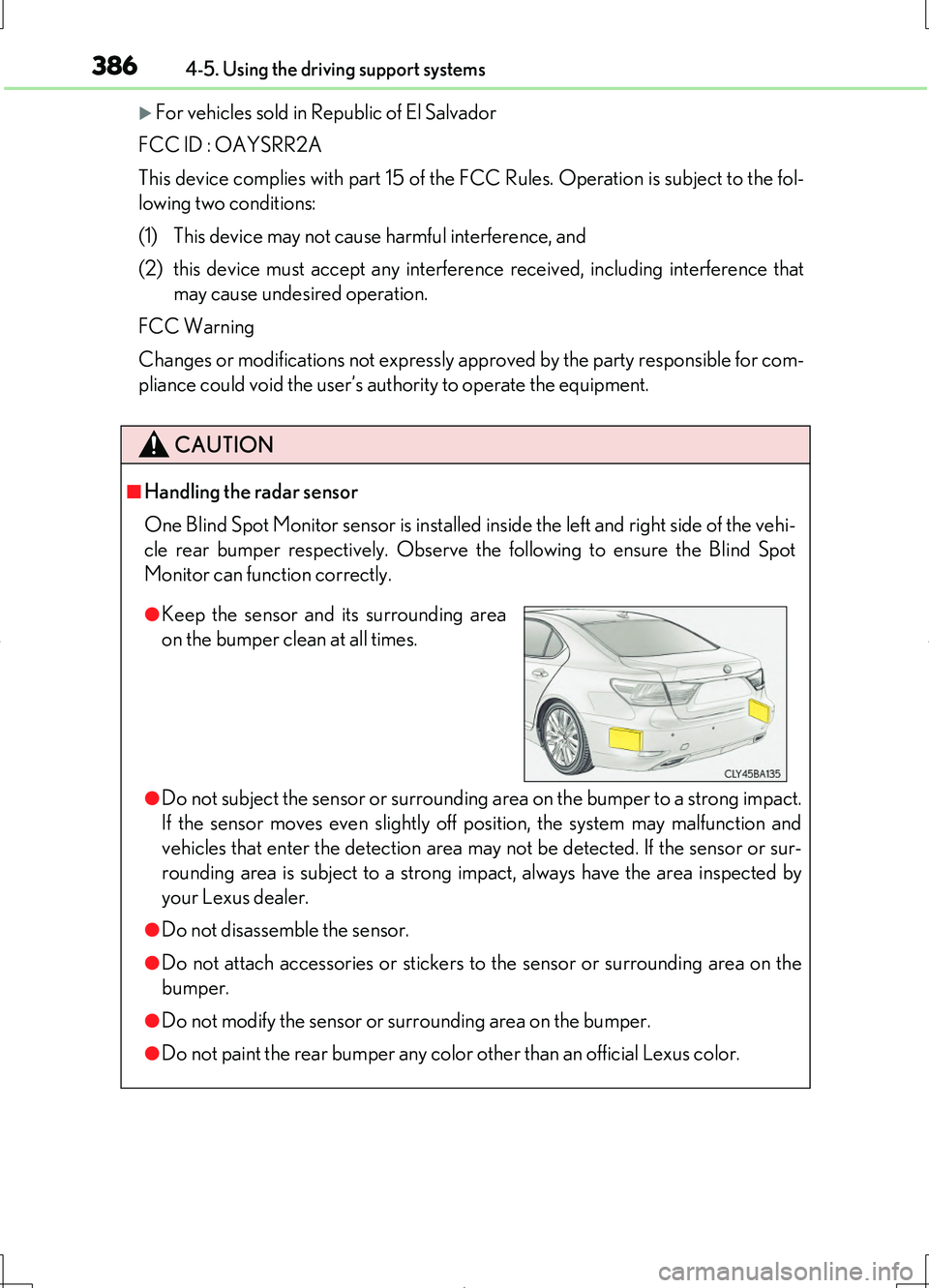
One Blind Spot Monitor sensor is installed inside the left and right side of the vehi-
cle rear bumper respectively. Observe the following to ensure the Blind Spot
Monitor can function correctly.
●Do not subject the sensor or surrounding area on the bumper to a strong impact.
If the sensor moves even slightly off position, the system may malfunction and
vehicles that enter the detection area may not be detected. If the sensor or sur-
rounding area is subject to a strong impact, always have the area inspected by
your Lexus dealer.
●Do not disassemble the sensor.
●Do not attach accessories or stickers to the sensor or surrounding area on the
bumper.
●Do not modify the sensor or surrounding area on the bumper.
●Do not paint the rear bumper any color other than an official Lexus color.
●Keep the sensor and its surrounding area
on the bumper clean at all times.
Page 393 of 708
3934-5. Using the driving support systems
4
Driving
LS460/LS460L_GE (OM50G06E)
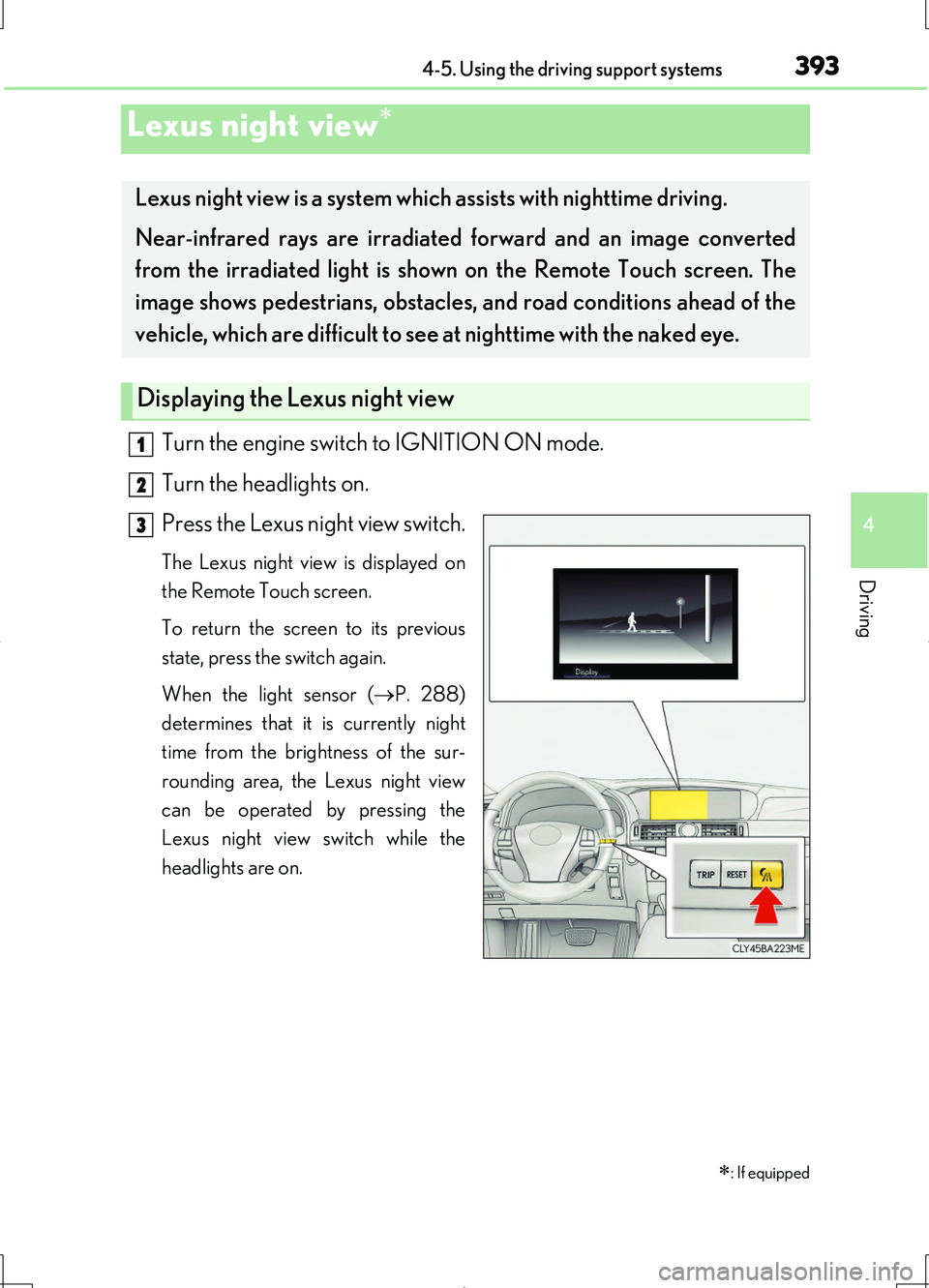
Turn the engine switch to IGNITION ON mode.
Turn the headlights on.
Press the Lexus night view switch.
The Lexus night view is displayed on
the Remote Touch screen.
To return the screen to its previous
state, press the switch again.
When the light sensor ( P. 288)
determines that it is currently night
time from the brightness of the sur-
rounding area, the Lexus night view
can be operated by pressing the
Lexus night view switch while the
headlights are on.
Lexus night view
: If equipped
Lexus night view is a system which assists with nighttime driving.
Near-infrared rays are irradiated forward and an image converted
from the irradiated light is show n on the Remote Touch screen. The
image shows pedestrians, obstacles, and road conditions ahead of the
vehicle, which are difficult to see at nighttime with the naked eye.
Displaying the Lexus night view
1
2
3
Page 396 of 708
3964-5. Using the driving support systems
LS460/LS460L_GE (OM50G06E)
CAUTION
■Before using the Lexus night view
Never depend on this system only.
Lexus night view is intended as a supplemental aid to help you see pedestrians and
road conditions ahead of the vehicle. As there are limits to the system, do not rely
solely on the system while in use, and drive safely while observing the following
precautions.
■When using the Lexus night view
Observe the following precautions.
Failure to do so may cause an accident resulting in death or serious injury.
●Never drive while looking at the Lexus night view screen only.
●Do not look continuously at the Lexus ni ght view screen while driving. Pedestri-
ans, objects etc. ahead of the vehicle may be overlooked by the system. The sys-
tem should always be used as a supplemental aid only.
●Lexus night view is designed to help you see objects better when driving in dark-
ness on a road with few curves. Do not use the Lexus night view in well-lit areas or
on roads with many curves or slopes. There may be areas that cannot be dis-
played by the system due to the road conditions (curve size, gradient, etc.)
●Lexus night view may be unable to project some features at an appropriate level
of brightness. Some or all parts of certain features may be dark or difficult to see.
Do not rely solely on the Lexus night view, and drive carefully while checking the
surroundings for safety, as you would with a normal vehicle. Also, the following
features and conditions may not be displayed clearly.
Features that are difficult to display:
• Clothing of a pedestrian made of a certain kind of material (ex. leather jackets)
• The characters on signs and billboards
• The information on road signs
Conditions in which display is difficult:
• Unfavorable weather conditions such as rain, fog, snowfall, snow storms etc.
• There are large puddles of water on the road surface following rainfall
• The area of the windshield in front of the camera is fogged up, dirty or icy
• The areas around the headlights are covered with ice, snow, mud etc.
• The battery voltage is remarkably low
• There are bright lights ahead of the vehicle
Page 397 of 708
3974-5. Using the driving support systems
4
Driving
LS460/LS460L_GE (OM50G06E)
CAUTION
■The near-infrared light
Follow these precautions to avoid damage to
or incorrect operation of the Lexus night
view system.
●System performance may deteriorate if the
areas around the headlights are dirty. Clean
the vehicle if it is dirty.
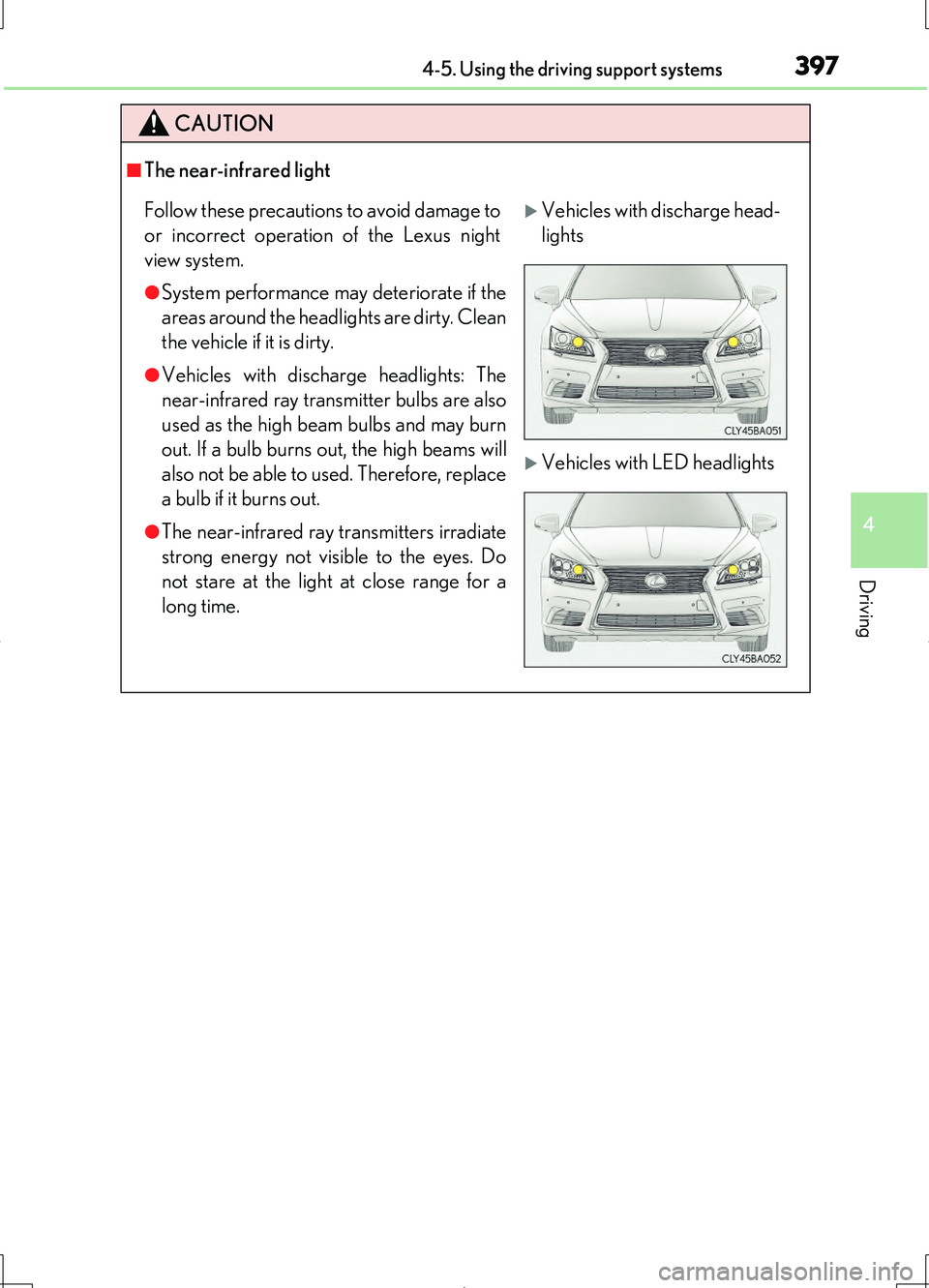
●Vehicles with discharge headlights: The
near-infrared ray transmitter bulbs are also
used as the high beam bulbs and may burn
out. If a bulb burns out, the high beams will
also not be able to used. Therefore, replace
a bulb if it burns out.
●The near-infrared ray transmitters irradiate
strong energy not visible to the eyes. Do
not stare at the light at close range for a
long time.
Vehicles with discharge head-
lights
Vehicles with LED headlights
Page 400 of 708
4004-6. Driving tips
LS460/LS460L_GE (OM50G06E)
Perform the following according to the driving conditions:
●Do not try to forcibly open a window or move a wiper that is frozen.
Pour warm water over the frozen area to melt the ice. Wipe away the
water immediately to prevent it from freezing.
●To ensure proper operation of the climate control system fan, remove
any snow that has accumulated on the air inlet vents in front of the wind-
shield.
●Check for and remove any excess ice or snow that may have accumu-
lated on the exterior lights, vehicle’s roof, chassis, around the tires or on
the brakes.
●Remove any snow or mud from the bottom of your shoes before getting
in the vehicle.
Accelerate the vehicle slowly, keep a safe distance between you and the
vehicle ahead, and drive at a reduced speed suitable to road conditions.
●Park the vehicle and move the shift lever to P without setting the park-
ing brake. The parking brake may free ze up, preventing it from being
released. If the vehicle is parked without setting the parking brake,
make sure to block the wheels.
Failure to do so may be dangerous because it may cause the vehicle to
move unexpectedly, possibly leading to an accident.
●If the vehicle is parked without setting the parking brake, confirm that
the shift lever cannot be moved out of P*.
*: The shift lever will be locked if it is attempted to be shifted from P to any other
position without depressing the brake pedal. If the shift lever can be shifted
from P, there may be a problem with the shift lock system. Have the vehicle
inspected by your Lexus dealer immediately.
Before driving the vehicle
When driving the vehicle
When parking the vehicle
Page 403 of 708
4034-6. Driving tips
4
Driving
LS460/LS460L_GE (OM50G06E)
◆Using Eco drive mode
When using Eco drive mode, the torque corresponding to the accelerator
pedal depression amount can be generate d more smoothly than it is in normal
conditions. In addition, the operation of the air conditioning system (heating/
cooling) will be minimized, improving the fuel economy. ( P. 354)
◆Use of Eco Driving Indicator
The Eco-friendly driving is possible by keeping the bar display of the Eco Driv-
ing Indicator shown in the multi-information display within the Zone of Eco
driving. ( P. 132)
◆Accelerator pedal/brake pedal operation
Drive your vehicle smoothly. Avoid abrupt acceleration and deceleration.
Gradual acceleration and deceleration will help reduce excessive fuel con-
sumption.
◆When braking
Observe conditions in front of and ar ound the vehicle, and estimate your
stopping position. Release the accelerator pedal early and continue coasting.
Use the brake pedal to adjust your stopping position. Make sure to operate
the brake pedal gently.
◆Delays
Repeated acceleration and deceleration, as well as long waits at traffic lights,
will lead to bad fuel economy. Check traffic reports before leaving and avoid
delays as much as possible.
◆Highway driving
Control and maintain the vehicle at a constant speed. Before stopping at a toll
booth or similar, allow plenty of time to release the accelerator pedal and gen-
tly apply the brakes.
Eco-friendly driving tips
For improved fuel economy and reduced CO2 emissions, pay attention to the
following points:
Page 405 of 708
405
5Interior features
LS460/LS460L_GE (OM50G06E)
5-1. Remote Touch screen
Remote Touch .............................406
12.3-inch display.......................... 413
5-2. Lexus Climate Concierge
Lexus Climate
Concierge ....................................417
5-3. Using the air conditioning
system and defogger
Front automatic air
conditioning system ................ 418
Rear air conditioning
system ......................................... 438
Rear window and outside
rear view mirror
defoggers ...................................445
Windshield wiper de-icer ....... 446
5-4. Using the interior lights
Interior lights list.......................... 447
• Interior lights ..........................448
• Personal lights ....................... 449
5-5. Using the storage features
List of storage features ............. 451
• Glove box ...............................453
• Coin holder ............................454
• Door pockets .........................454
• Cup holders ...........................455
• Console box........................... 457
• Cool box/auxiliary
box .............................................459
• Auxiliary boxes ..................... 462
Trunk features..............................465
5-6. Other interior features
Sun visors and vanity
mirrors ......................................... 467
Clock .............................................. 469
Ashtrays ......................................... 470
Cigarette lighters.........................471
Power outlets............................... 473
Heated steering wheel ............ 476
Climate control seats/seat
heaters......................................... 478
Armrest..........................................483
Retractable table........................ 484
Rear sunshade ............................486
Rear door sunshades ...............490
Trunk storage extension ......... 494
Coat hooks ................................... 496
Assist grips.................................... 497
Garage door opener ...............498
ERA-GLONASS ......................504
Page 436 of 708
4365-3. Using the air conditioning system and defogger
LS460/LS460L_GE (OM50G06E)
■Ventilation and air conditioning odors
●To let fresh air in, set the air conditioning system to the outside air mode.
●During use, various odors from inside and outside the vehicle may enter into and
accumulate in the air conditioning system. This may then cause odor to be emitted
from the vents.
●To reduce potential odors from occurring:
• It is recommended that the air conditioning system be set to outside air mode
prior to turning the vehicle off.
• The start timing of the blower may be delayed for a short period of time immedi-
ately after the air conditioning system is started in automatic mode.
■nanoe *1
The air conditioning system adopts nanoe technology. This helps to fill the cabin
with refreshing air by emitting slightly acidic nanoe ions coated with water parti-
cles through the front center vent on driver’s side*2.
●When the fan is turned on and “nanoe” on the option control screen is selected, the
nanoe is activated.
●When the fan is operated in the following conditions, system performance will be
maximized. If the following conditions are not met, the nanoe may not operate at
full capacity.
• The , or air outlets are being used.
• The front center vent on driver’s side is open.
●When nanoe is generated, a small amount of ozone is emitted and may be faintly
smelled in some situations. However, this is approximately the same as the amount
that already exists in nature, such as in forests, and it has no affect on the human
body.
●A slight noise may be heard during operation. This is not a malfunction.
*1:nanoe and the nanoe mark are trademarks of Panasonic Corporation.
*2: According to temperature and humidity conditions, fan speed and direction of
the air flow, the nanoe may not operate at full capacity.