Time LEXUS LS460L 2016 Owner's Manual
[x] Cancel search | Manufacturer: LEXUS, Model Year: 2016, Model line: LS460L, Model: LEXUS LS460L 2016Pages: 708, PDF Size: 36.57 MB
Page 133 of 708
1332. Instrument cluster
2
Instrument cluster
LS460/LS460L_GE (OM50G06E)
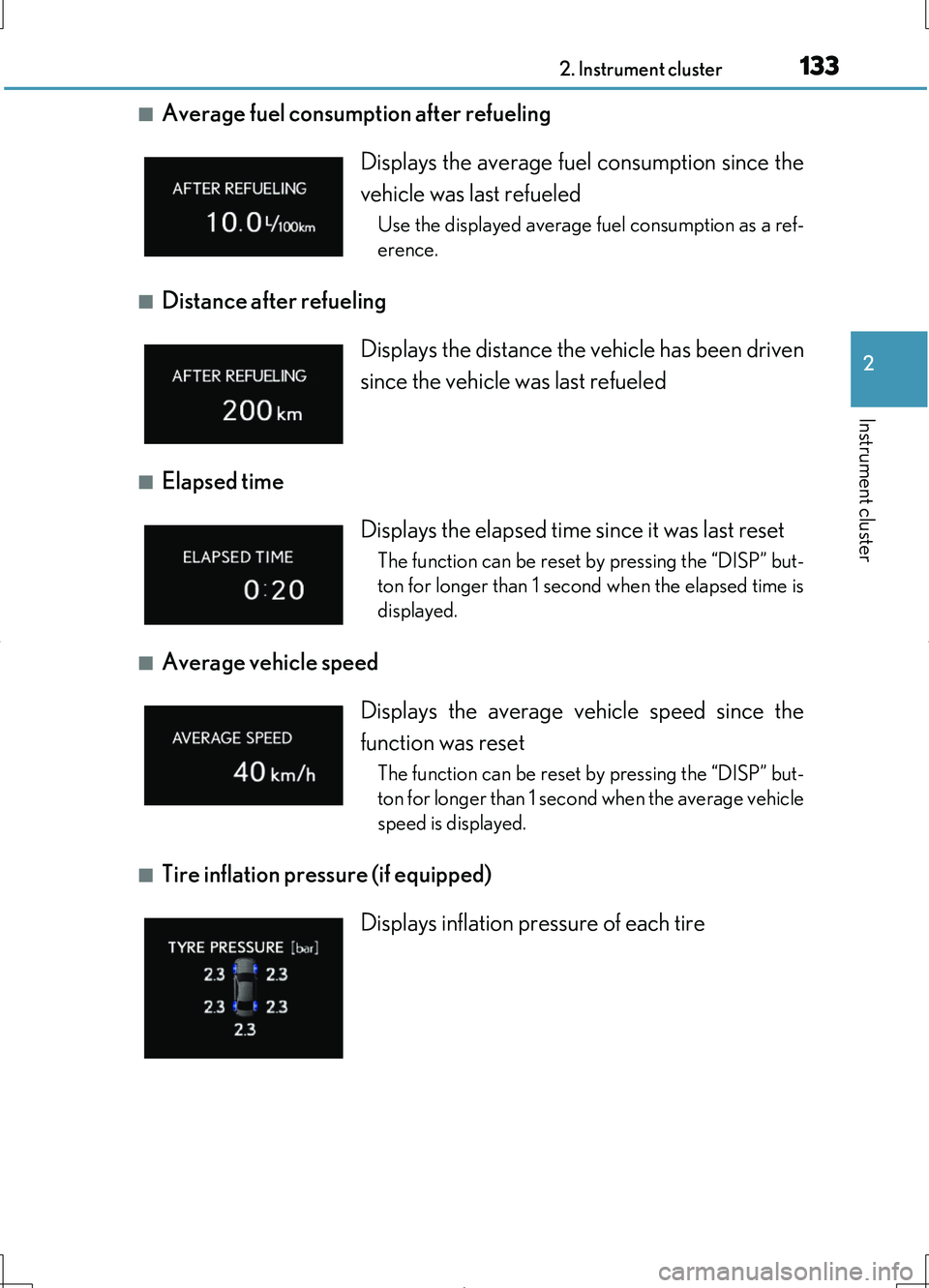
■Average fuel consumption after refueling
■Distance after refueling
■Elapsed time
■Average vehicle speed
■Tire inflation pressure (if equipped)
Displays the average fuel consumption since the
vehicle was last refueled
Use the displayed average fuel consumption as a ref-
erence.
Displays the distance the vehicle has been driven
since the vehicle was last refueled
Displays the elapsed time since it was last reset
The function can be reset by pressing the “DISP” but-
ton for longer than 1 second when the elapsed time is
displayed.
Displays the average vehicle speed since the
function was reset
The function can be reset by pressing the “DISP” but-
ton for longer than 1 second when the average vehicle
speed is displayed.
Displays inflation pressure of each tire
Page 136 of 708
1362. Instrument cluster
LS460/LS460L_GE (OM50G06E)
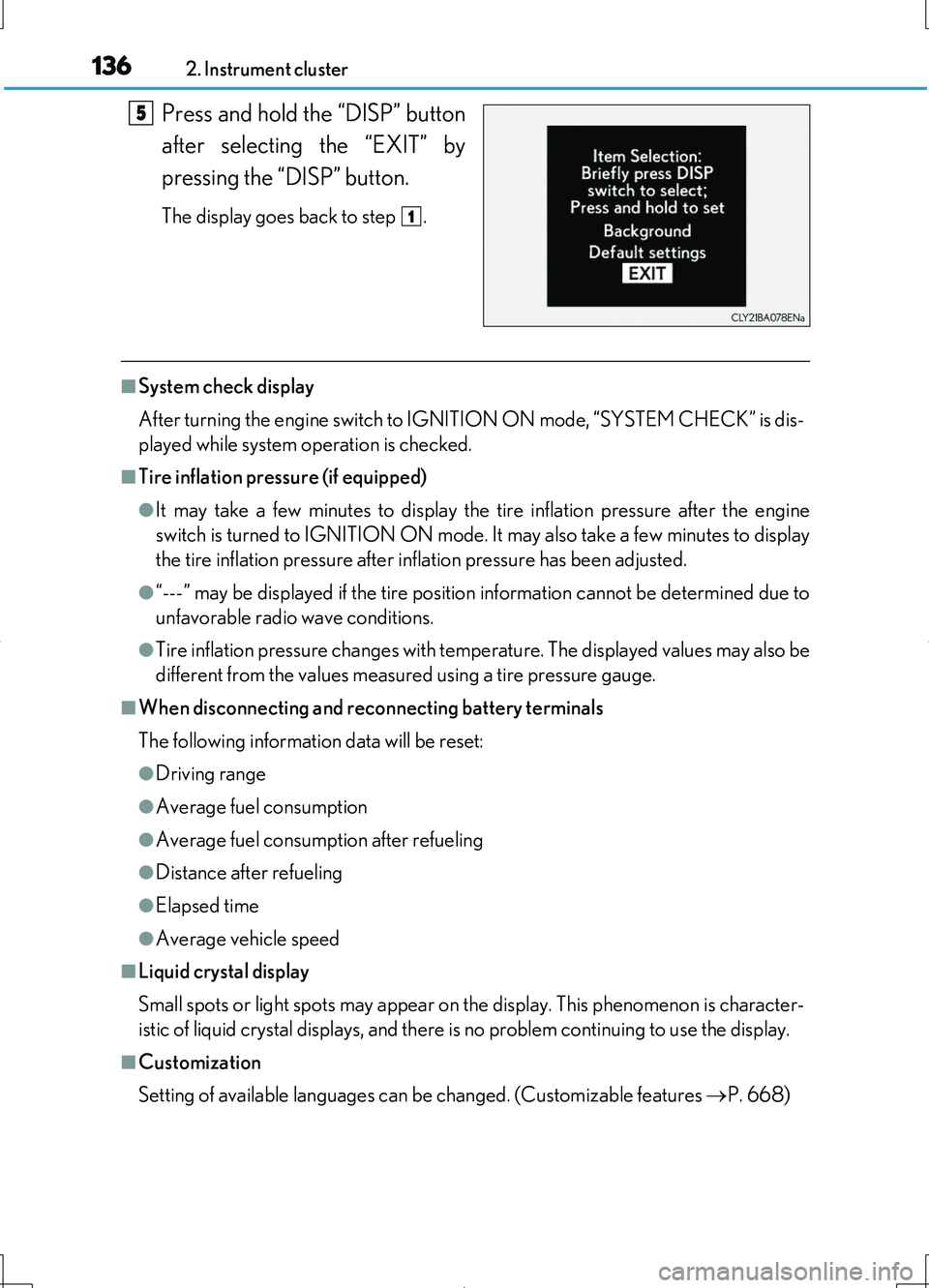
Press and hold the “DISP” button
after selecting the “EXIT” by
pressing the “DISP” button.
The display goes back to step .
■System check display
After turning the engine switch to IGNITION ON mode, “SYSTEM CHECK” is dis-
played while system operation is checked.
■Tire inflation pressure (if equipped)
●It may take a few minutes to display the tire inflation pressure after the engine
switch is turned to IGNITION ON mode. It may also take a few minutes to display
the tire inflation pressure after inflation pressure has been adjusted.
●“---” may be displayed if the tire position information cannot be determined due to
unfavorable radio wave conditions.
●Tire inflation pressure changes with temperature. The displayed values may also be
different from the values measured using a tire pressure gauge.
■When disconnecting and reconnecting battery terminals
The following information data will be reset:
●Driving range
●Average fuel consumption
●Average fuel consumption after refueling
●Distance after refueling
●Elapsed time
●Average vehicle speed
■Liquid crystal display
Small spots or light spots may appear on the display. This phenomenon is character-
istic of liquid crystal displays, and there is no problem continuing to use the display.
■Customization
Setting of available languages can be changed. (Customizable features P. 668)
5
1
Page 139 of 708
1392. Instrument cluster
2
Instrument cluster
LS460/LS460L_GE (OM50G06E)
Press the “MENU” button on the Remote Touch, then select on the
“Menu” screen.
If does not appear, select on the “Menu” screen. If the “Information”
screen appears, select “Fuel consumption” on the screen.
If the “Past Record” screen is displayed, select “Trip Information”.
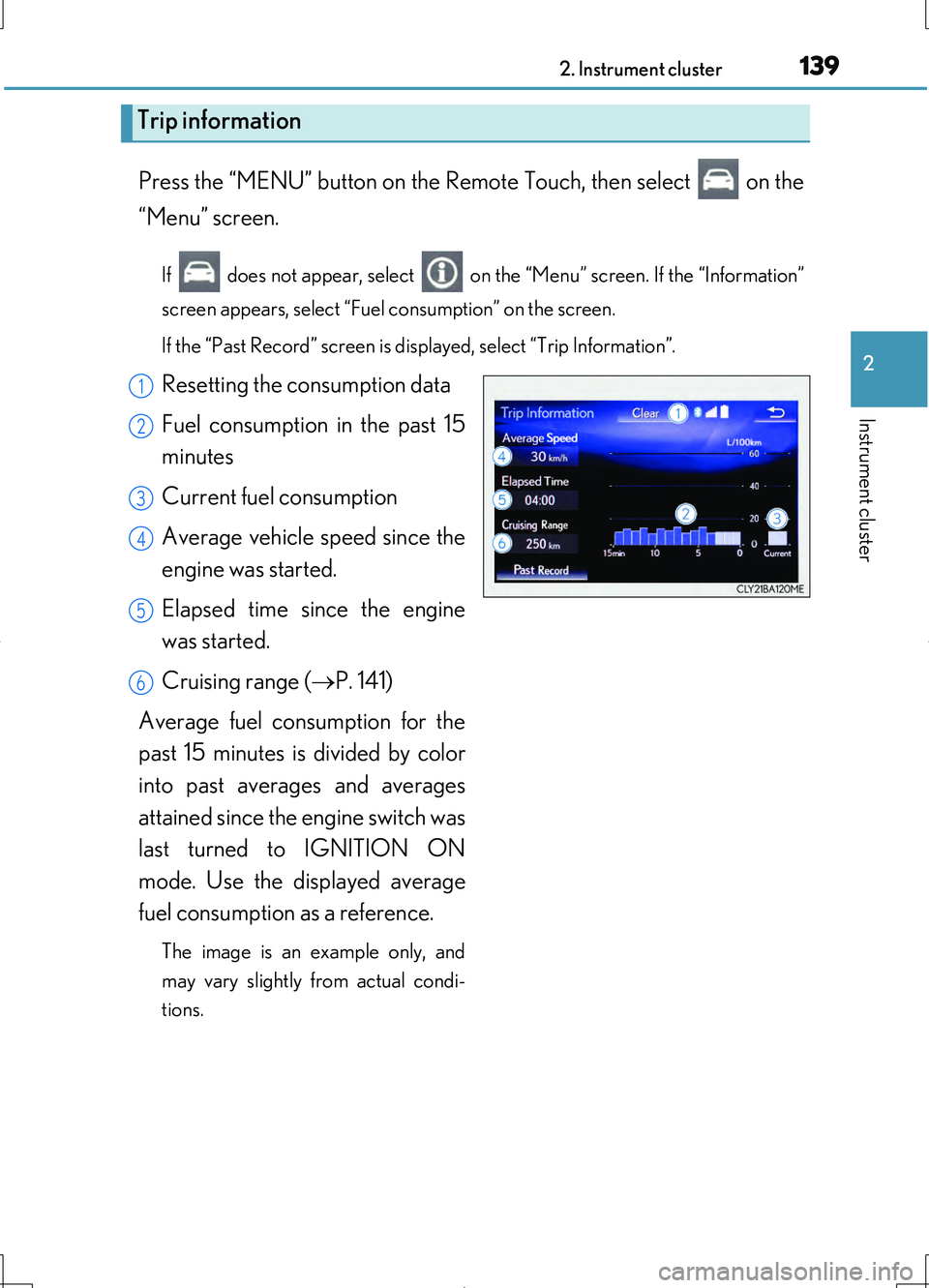
Resetting the consumption data
Fuel consumption in the past 15
minutes
Current fuel consumption
Average vehicle speed since the
engine was started.
Elapsed time since the engine
was started.
Cruising range ( P. 141)
Average fuel consumption for the
past 15 minutes is divided by color
into past averages and averages
attained since the engine switch was
last turned to IGNITION ON
mode. Use the displayed average
fuel consumption as a reference.
The image is an example only, and
may vary slightly from actual condi-
tions.
Trip information
1
2
3
4
5
6
Page 142 of 708
1422. Instrument cluster
LS460/LS460L_GE (OM50G06E)
Vehicle information can be displayed on the side display (P. 415), then
select “<” or “>” to select the desired screen.
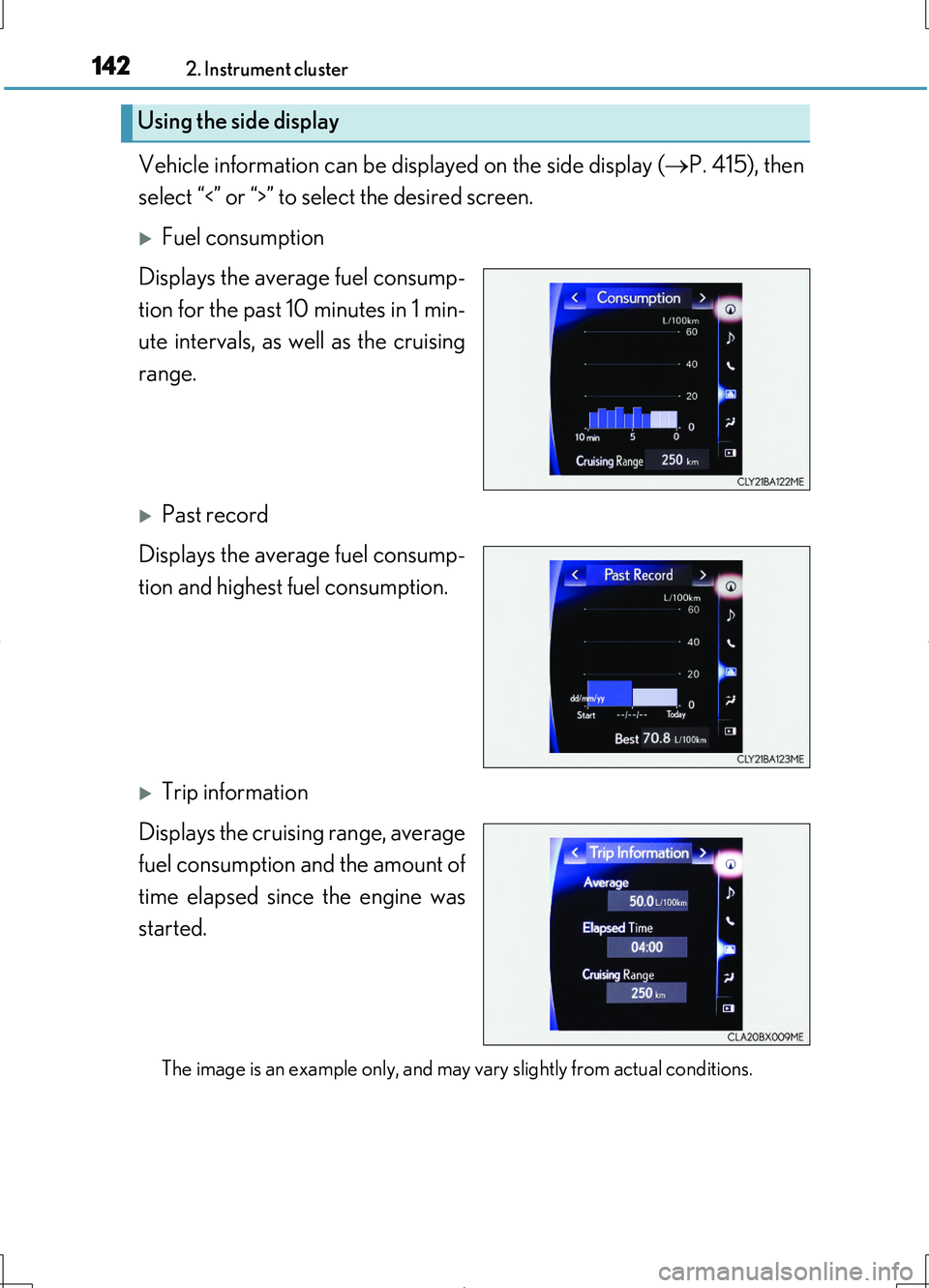
Fuel consumption
Displays the average fuel consump-
tion for the past 10 minutes in 1 min-
ute intervals, as well as the cruising
range.
Past record
Displays the average fuel consump-
tion and highest fuel consumption.
Trip information
Displays the cruising range, average
fuel consumption and the amount of
time elapsed since the engine was
started.
The image is an example only, and may vary slightly from actual conditions.
Using the side display
Page 146 of 708
1463-1. Key information
LS460/LS460L_GE (OM50G06E)
■Electronic keys
●Part of the electronic key uses leather. Refer to P. 514 for details on cleaning the
leather portion.
●When cleaning the metallic portion, wet a cloth and firmly wring out any excess
water from it, then thoroughly wipe off any dirt.
●When not using the electronic key for an extended period of time, store it in a dry
place of normal temperature away from direct sunlight and interior light after
removing any dirt.
■Card key (if equipped)
●The card key is not waterproof.
●The mechanical key that is stored inside the card key should be used only if a prob-
lem arises, such as when the card key does not operate properly.
●If it is difficult to take out the mechanical key, push down the lock release button
using a pen tip etc. If it is still difficult to pull it out, use a coin etc.
■When required to leave the vehicle’s key with a parking attendant
Turn the trunk opener main switch off and lock the glove box and the trunk storage
extension (if equipped) as circumstances demand. ( P. 192, 453, 494)
Remove the mechanical key for your own use and provide the attendant with the
electronic key only.
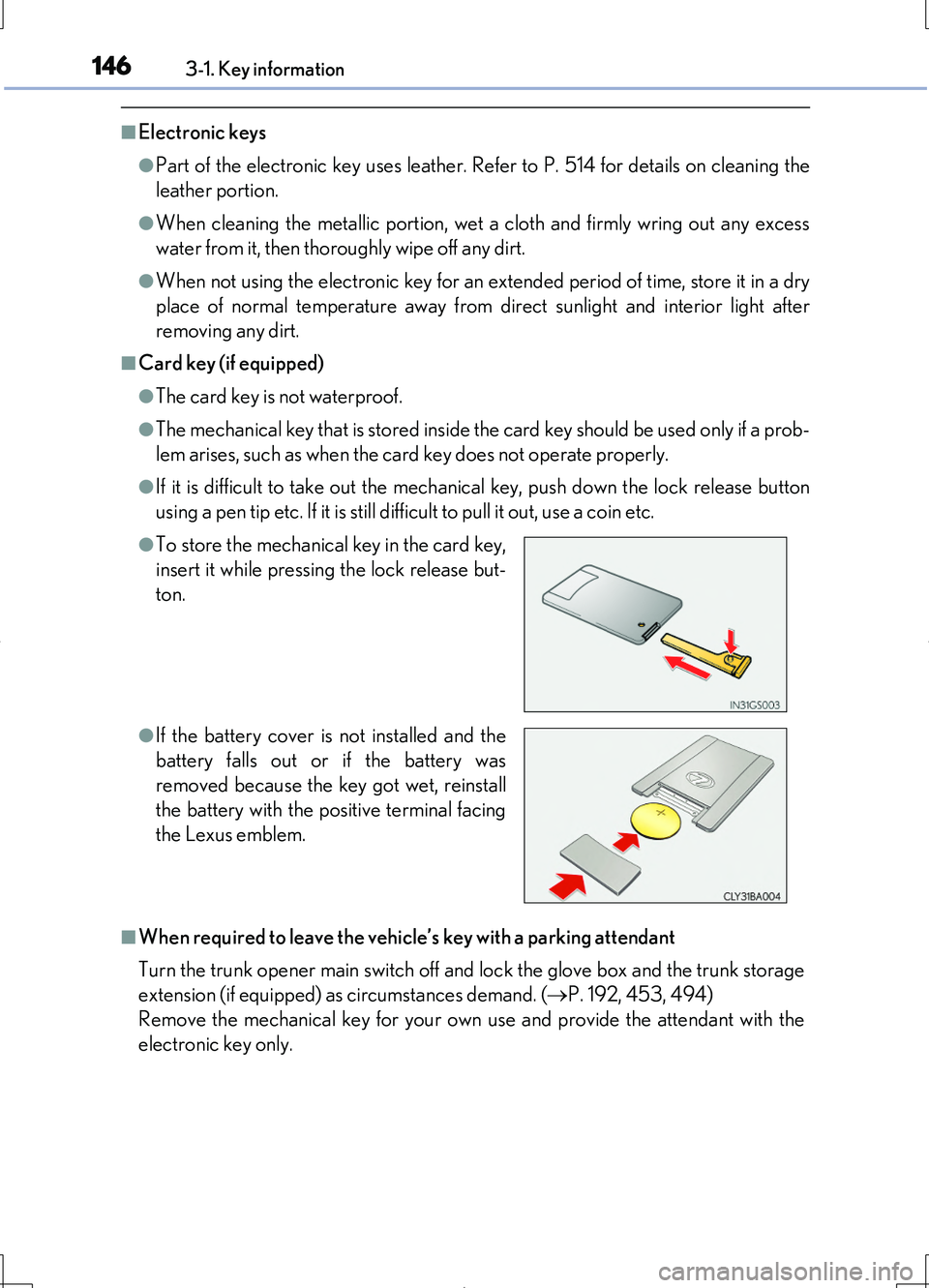
●To store the mechanical key in the card key,
insert it while pressing the lock release but-
ton.
●If the battery cover is not installed and the
battery falls out or if the battery was
removed because the key got wet, reinstall
the battery with the positive terminal facing
the Lexus emblem.
Page 151 of 708
1513-1. Key information
3
Operation of each component
LS460/LS460L_GE (OM50G06E)
NOTICE
■To prevent key damage
●Do not drop the keys, subject them to strong shocks or bend them.
●Do not expose the keys to high temperatures for a long period of time.
●Do not get the keys wet or wash them in an ultrasonic washer etc.
●Do not attach metallic or magnetic materials to the keys or place the keys close to
such materials.
●Do not disassemble the keys.
●Do not attach a sticker or anything else to the surface of the electronic key.
●Do not place the keys near objects that produce magnetic fields, such as TVs,
audio systems and induction cookers, or medical electrical equipment, such as
low-frequency therapy equipment.
■Handling the electronic keys
●Observe the following to prevent deterioration, changes in shape and damage to
the leather area.
• Do not carry the electronic key together with hard objects, such as other keys
or accessories.
• Do not expose the electronic keys to direct sunlight or interior light for
extended periods of time.
• Do not place the electronic key on items made of vinyl, plastic or that contain
wax.
They may stick to the leather surface if the items become warm.
• Do not get the electronic key wet.
Even if the electronic gets slightly wet, dry it with a soft cloth and let it dry in the
shade.
• Do not touch the electronic key with hands that have oil, medicine, hand
cream or perfume on them.
• When cleaning, do not use a leather cleaner, solvents or leather filling agents.
●Because the leather portion is dyed, if the electronic key touches clothing while it
has sweat and moisture adhered to it, there is a possibility that the clothing may
change color.
Page 160 of 708
1603-2. Opening, closing and locking the doors
LS460/LS460L_GE (OM50G06E)
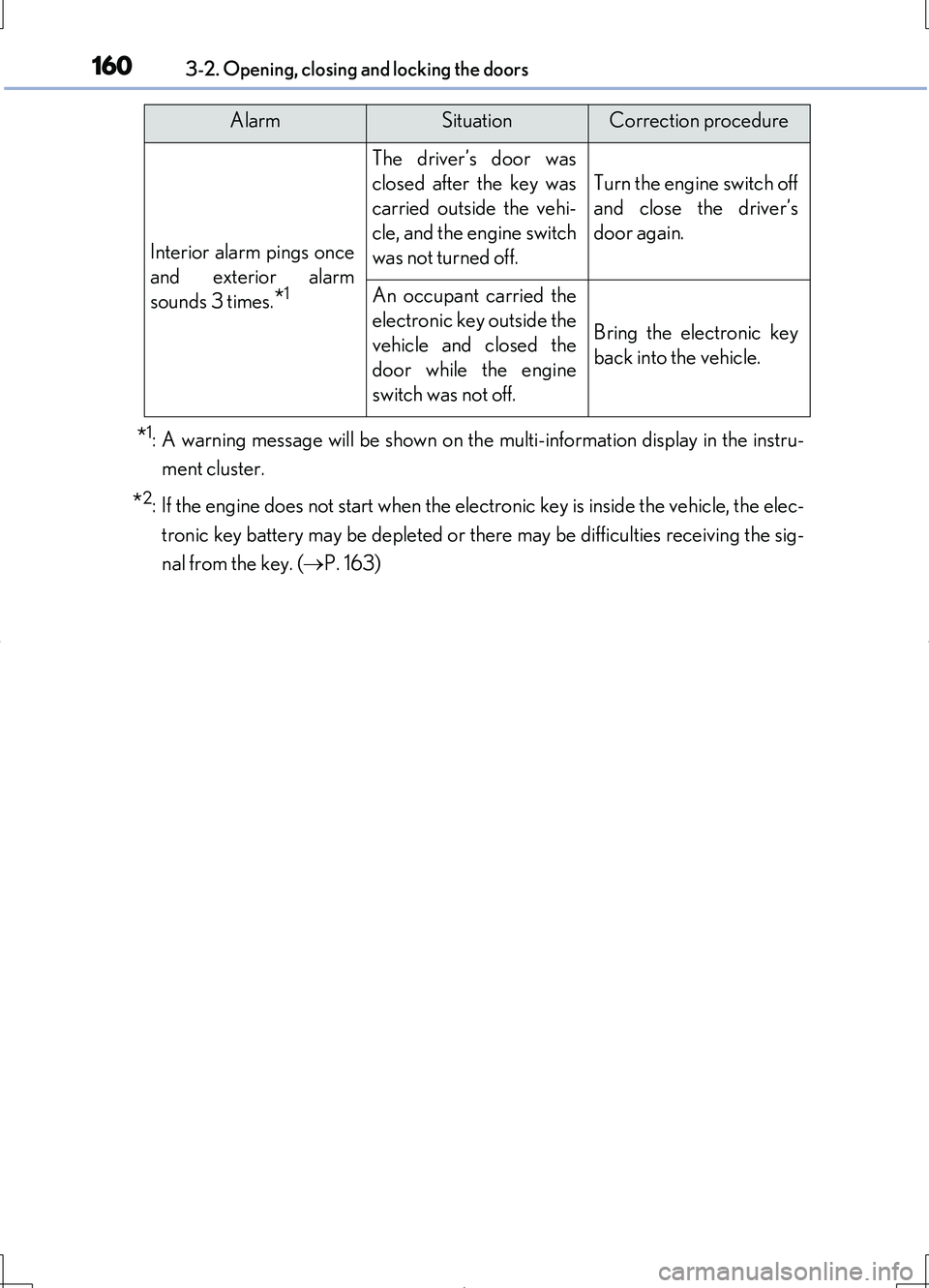
*1: A warning message will be shown on the multi-information display in the instru-
ment cluster.
*2: If the engine does not start when the electronic key is inside the vehicle, the elec-
tronic key battery may be depleted or there may be difficulties receiving the sig-
nal from the key. ( P. 163)
Interior alarm pings once
and exterior alarm
sounds 3 times.*1
The driver’s door was
closed after the key was
carried outside the vehi-
cle, and the engine switch
was not turned off.
Turn the engine switch off
and close the driver’s
door again.
An occupant carried the
electronic key outside the
vehicle and closed the
door while the engine
switch was not off.
Bring the electronic key
back into the vehicle.
AlarmSituationCorrection procedure
Page 161 of 708
1613-2. Opening, closing and locking the doors
3
Operation of each component
LS460/LS460L_GE (OM50G06E)
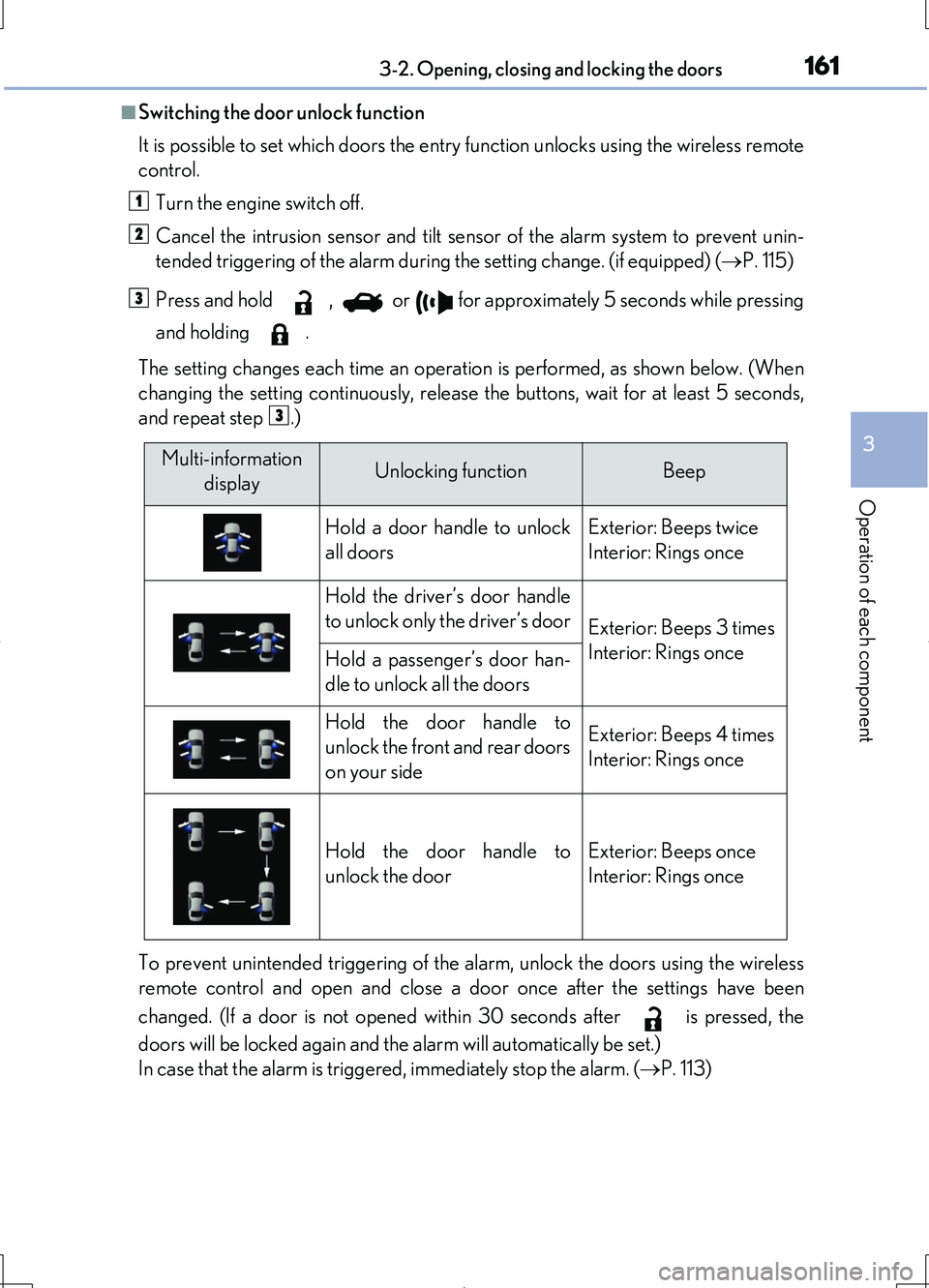
■Switching the door unlock function
It is possible to set which doors the entry function unlocks using the wireless remote
control.
Turn the engine switch off.
Cancel the intrusion sensor and tilt sensor of the alarm system to prevent unin-
tended triggering of the alarm during the setting change. (if equipped) ( P. 115)
Press and hold , or for approximately 5 seconds while pressing
and holding .
The setting changes each time an operation is performed, as shown below. (When
changing the setting continuously, release the buttons, wait for at least 5 seconds,
and repeat step .)
To prevent unintended triggering of the alarm, unlock the doors using the wireless
remote control and open and close a door once after the settings have been
changed. (If a door is not opened within 30 seconds after is pressed, the
doors will be locked again and the alarm will automatically be set.)
In case that the alarm is triggered, immediately stop the alarm. ( P. 113)
1
2
3
3
Multi-information
displayUnlocking functionBeep
Hold a door handle to unlock
all doors
Exterior: Beeps twice
Interior: Rings once
Hold the driver’s door handle
to unlock only the driver’s doorExterior: Beeps 3 times
Interior: Rings onceHold a passenger’s door han-
dle to unlock all the doors
Hold the door handle to
unlock the front and rear doors
on your side
Exterior: Beeps 4 times
Interior: Rings once
Hold the door handle to
unlock the door
Exterior: Beeps once
Interior: Rings once
Page 193 of 708
1933-2. Opening, closing and locking the doors
3
Operation of each component
LS460/LS460L_GE (OM50G06E)
■Trunk lid light/trunk light
The trunk lid light/trunk light turns on when the trunk is opened.
■Trunk easy closer
In the event that the trunk lid is left slightly open, the trunk easy closer will automati-
cally close it to the fully closed position.
■Function to prevent the trunk being locked with the electronic key inside (when all
the doors are locked)
Closing the trunk lid with the electronic key left inside the trunk will sound an alarm.
In this case, the trunk lid can be opened by pressing the button on the trunk lid.
■Overload protection function
The trunk lid will not operate when excessive load is present on the top of the trunk
lid.
■Fall-down protection function
While the trunk lid is opening automatically, applying excessive force to it will stop
the opening operation to prevent the trunk lid from rapidly falling down.
■Jam protection function
While the trunk lid is closing automatically, the trunk lid will stop closing and open if
something gets caught.
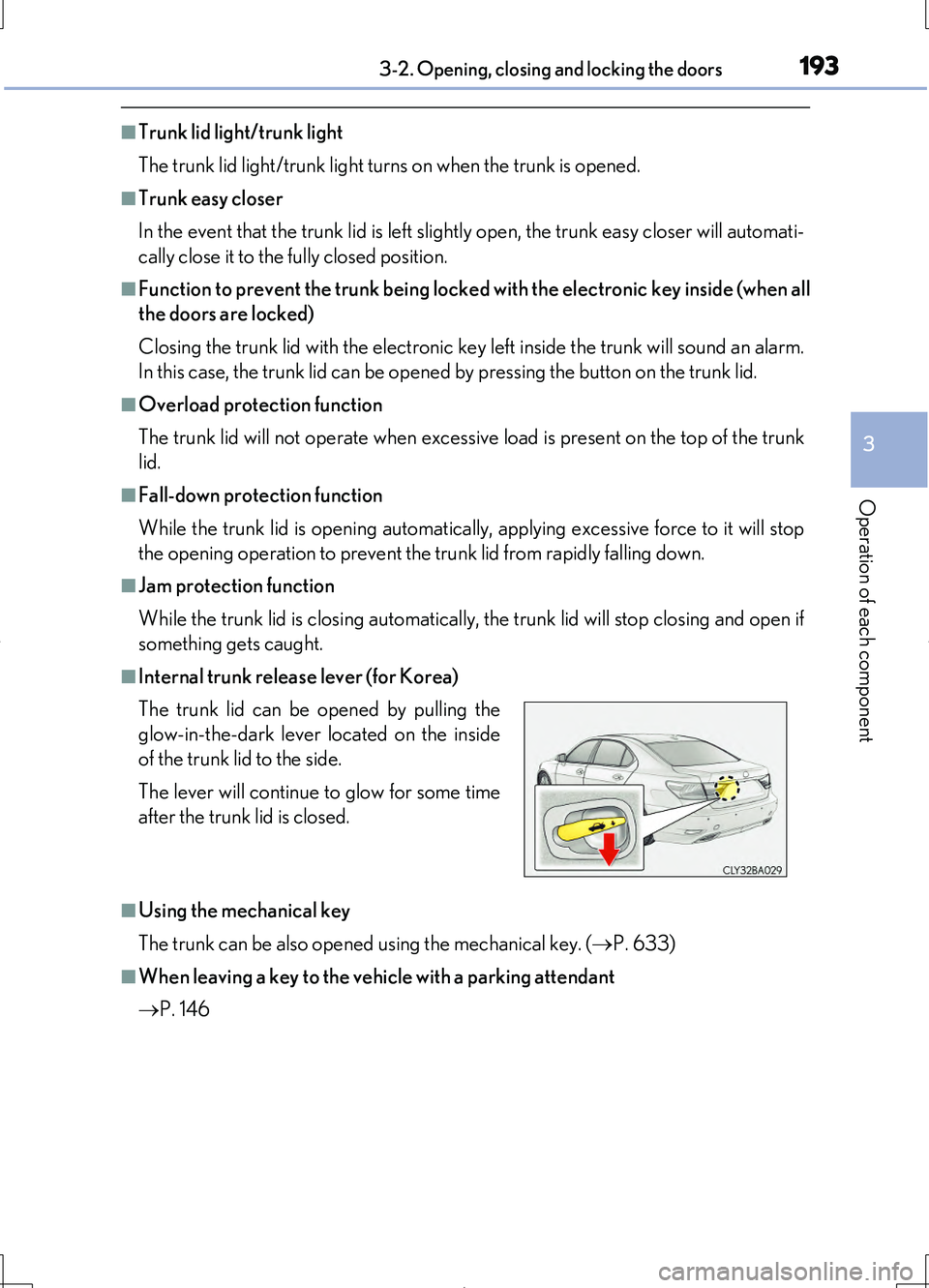
■Internal trunk release lever (for Korea)
■Using the mechanical key
The trunk can be also opened using the mechanical key. ( P. 633)
■When leaving a key to the vehicle with a parking attendant
P. 146
The trunk lid can be opened by pulling the
glow-in-the-dark lever located on the inside
of the trunk lid to the side.
The lever will continue to glow for some time
after the trunk lid is closed.
Page 210 of 708
2103-3. Adjusting the seats
LS460/LS460L_GE (OM50G06E)
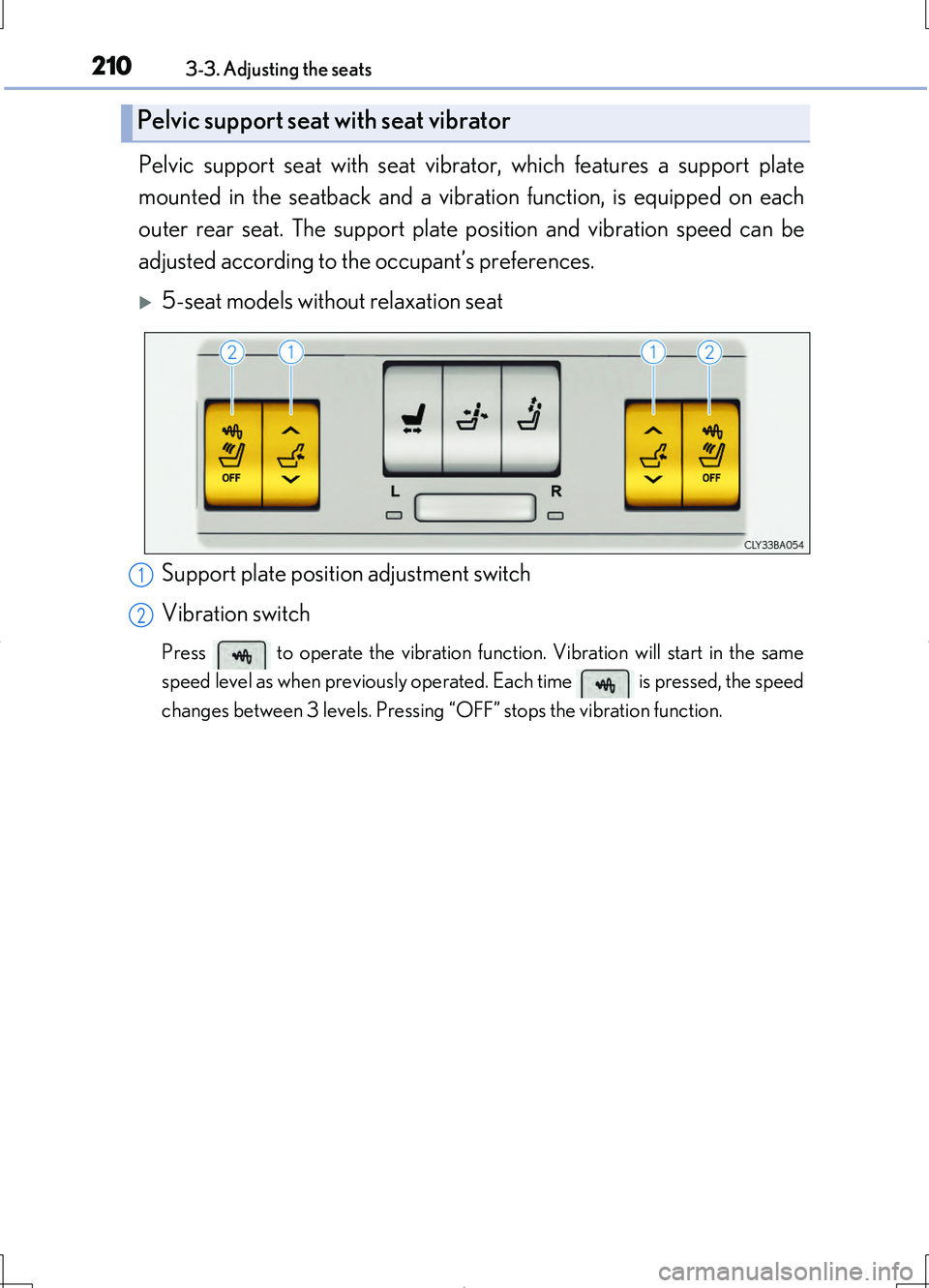
Pelvic support seat with seat vibrator, which features a support plate
mounted in the seatback and a vibration function, is equipped on each
outer rear seat. The support plate position and vibration speed can be
adjusted according to the occupant’s preferences.
5-seat models without relaxation seat
Support plate position adjustment switch
Vibration switch
Press to operate the vibration function. Vibration will start in the same
speed level as when previously operated. Each time is pressed, the speed
changes between 3 levels. Pressing “OFF” stops the vibration function.
Pelvic support seat with seat vibrator
1
2