Time LEXUS LS460L 2016 Workshop Manual
[x] Cancel search | Manufacturer: LEXUS, Model Year: 2016, Model line: LS460L, Model: LEXUS LS460L 2016Pages: 708, PDF Size: 36.57 MB
Page 283 of 708
2834-2. Driving procedures
4
Driving
LS460/LS460L_GE (OM50G06E)
■Brake hold function
●If the brake pedal is left released for a period of about 3 minutes after the system
has started holding the brake, the parking brake will be set automatically. In this
case, a warning buzzer sounds and a message is shown on the multi-information
display.
●To turn the system off while the system is holding the brake, firmly depress the
brake pedal and press the switch again.
●The brake hold function may not hold the vehicle when the vehicle is on a steep
incline. In this situation, it may be necessary for the driver to apply the brakes. The
multi-information display will inform the driver of this situation.
■When the parking brake is set automatically while the system is holding the brakes
The parking brake will not be released automatically. Release the parking brake by
operating the parking brake switch, making sure that the parking brake indicator
light goes off. ( P. 279)
■When there is a malfunction in the system
Warning lights and/or warning messages will turn on or flash. ( P. 607, 614)
CAUTION
■When the vehicle is on a steep incline
When using the brake hold system on a steep incline exercise caution. The brake
hold function may not hold the vehicle in such a situation.
■When stopped on a slippery road
The system cannot stop the vehicle when the gripping ability of the tires has been
exceeded. Do not use the system when stopped on a slippery road.
NOTICE
■When parking the vehicle
The brake hold system is not designed for use when parking the vehicle for a long
period of time. Turning the engine switch off while the system is holding the brake
may release the brake, which would cause the vehicle to move. When operating
the engine switch, depress the brake pedal, set the parking brake and shift the shift
lever to P.
Page 285 of 708
285
4
Driving
LS460/LS460L_GE (OM50G06E)
4-3. Operating the lights and wipers
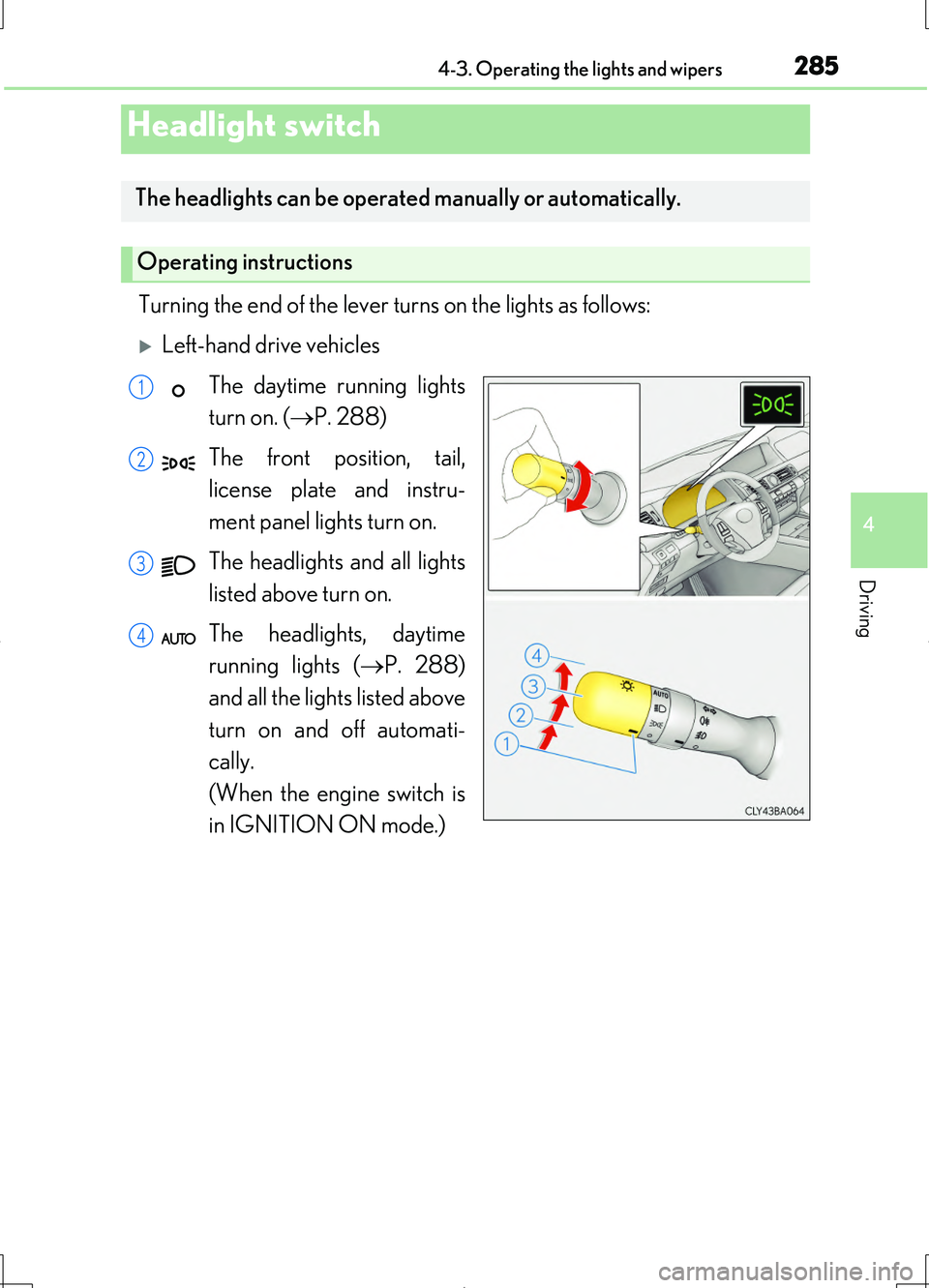
Turning the end of the lever turns on the lights as follows:
Left-hand drive vehicles
The daytime running lights
turn on. ( P. 288)
The front position, tail,
license plate and instru-
ment panel lights turn on.
The headlights and all lights
listed above turn on.
The headlights, daytime
running lights ( P. 288)
and all the lights listed above
turn on and off automati-
cally.
(When the engine switch is
in IGNITION ON mode.)
Headlight switch
The headlights can be operated manually or automatically.
Operating instructions
1
2
3
4
Page 286 of 708
2864-3. Operating the lights and wipers
LS460/LS460L_GE (OM50G06E)
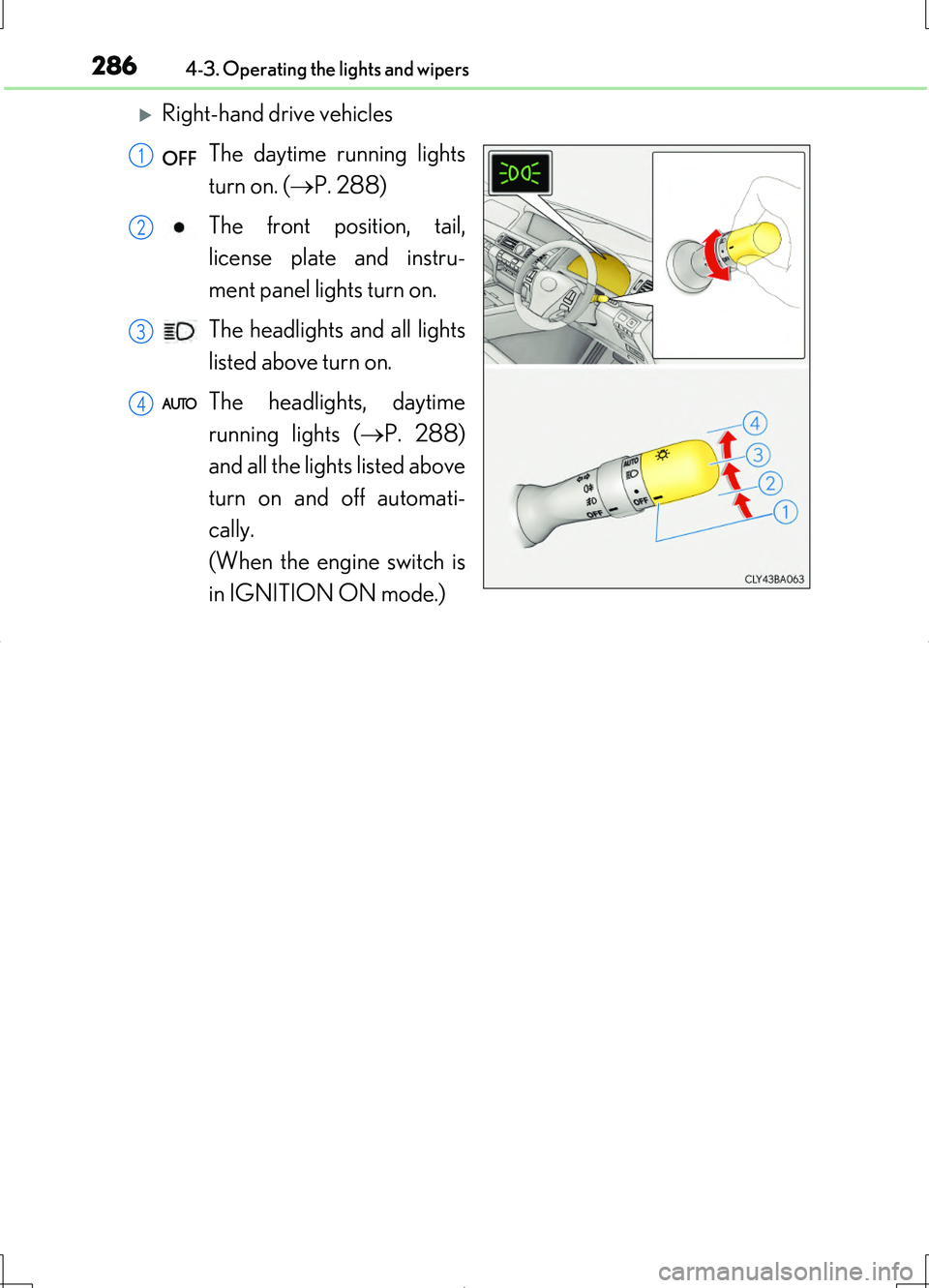
Right-hand drive vehicles
The daytime running lights
turn on. ( P. 288)
The front position, tail,
license plate and instru-
ment panel lights turn on.
The headlights and all lights
listed above turn on.
The headlights, daytime
running lights ( P. 288)
and all the lights listed above
turn on and off automati-
cally.
(When the engine switch is
in IGNITION ON mode.)
1
2
3
4
Page 288 of 708
2884-3. Operating the lights and wipers
LS460/LS460L_GE (OM50G06E)
AFS (Adaptive Front-lighting System) secures excellent visibility at inter-
sections and on curves by automatically adjusting the direction of the light
axis of the headlights according to vehicle speed and the degree of the
tire’s angle as controlled by steering input.
AFS operates at speeds of 10 km/h (6 mph) or higher.
■Daytime running light system
To make your vehicle more visible to othe r drivers during daytime driving, the day-
time running lights turn on automatically whenever the engine is started and the
parking brake is released with the headlight switch off or in the position. (Illumi-
nate brighter than the front position ligh ts.) Daytime running lights are not designed
for use at night.
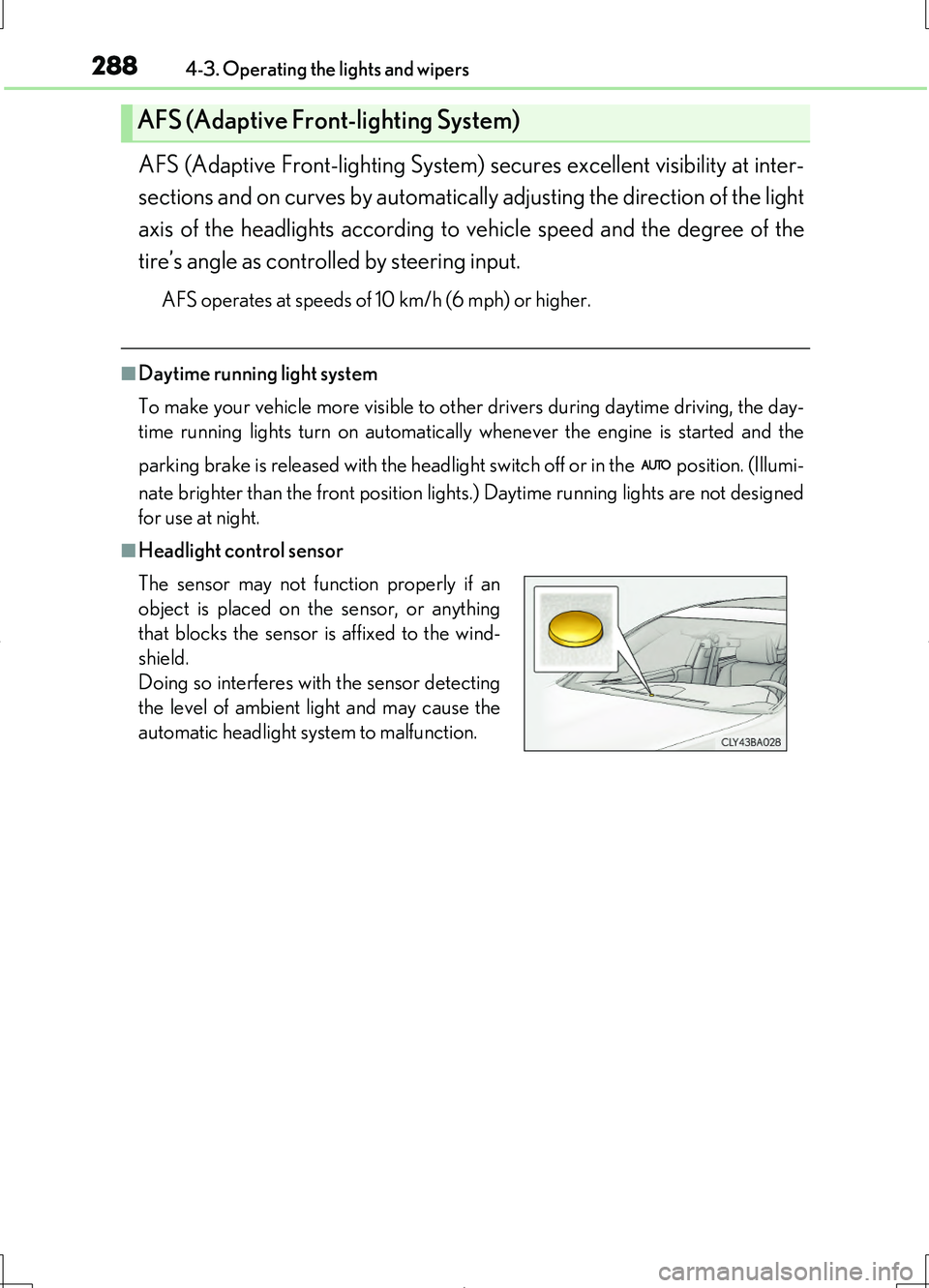
■Headlight control sensor
AFS (Adaptive Front-lighting System)
The sensor may not function properly if an
object is placed on the sensor, or anything
that blocks the sensor is affixed to the wind-
shield.
Doing so interferes with the sensor detecting
the level of ambient light and may cause the
automatic headlight system to malfunction.
Page 295 of 708
2954-3. Operating the lights and wipers
4
Driving
LS460/LS460L_GE (OM50G06E)
■The Adaptive High-beam System can be operated when
The engine switch is in IGNITION ON mode.
■Camera sensor detection information
●High beam may not be automatically turned off or changed to variable shade beam
in the following situations:
• When oncoming vehicles suddenly appear from a curve
• When the vehicle is cut in front of by another
• When oncoming or preceding vehicles are hidden from sight due to repeated
curves, road dividers or roadside trees
●High beam may be turned off or variable shade beam may be changed to if an
oncoming vehicle that is using fog lights without using the headlights is detected.
●House lights, street lights, red traffic signals, and illuminated billboards or signs may
cause the high beam to turn off or variable shade beam to be changed to and may
change the area that is shielded.
●The following factors may affect the amount of time taken to turn high beam on or
off, or the speed by which the shielded areas change:
• The brightness of headlights, fog lights, and tail lights of oncoming and preced-
ing vehicles
• The movement and direction of oncoming and preceding vehicles
• When a oncoming or preceding vehicle only has operational lights on one side
• When a oncoming or preceding vehicle is a two-wheeled vehicle
• The condition of the road (gradient, curve, condition of the road surface etc.)
• The number of passengers and amount of luggage
●High beam and variable shade beam may be turned on or off when unexpected by
the driver.
●Small vehicles, such as bicycles, may not be detected.
Page 300 of 708
3004-3. Operating the lights and wipers
LS460/LS460L_GE (OM50G06E)
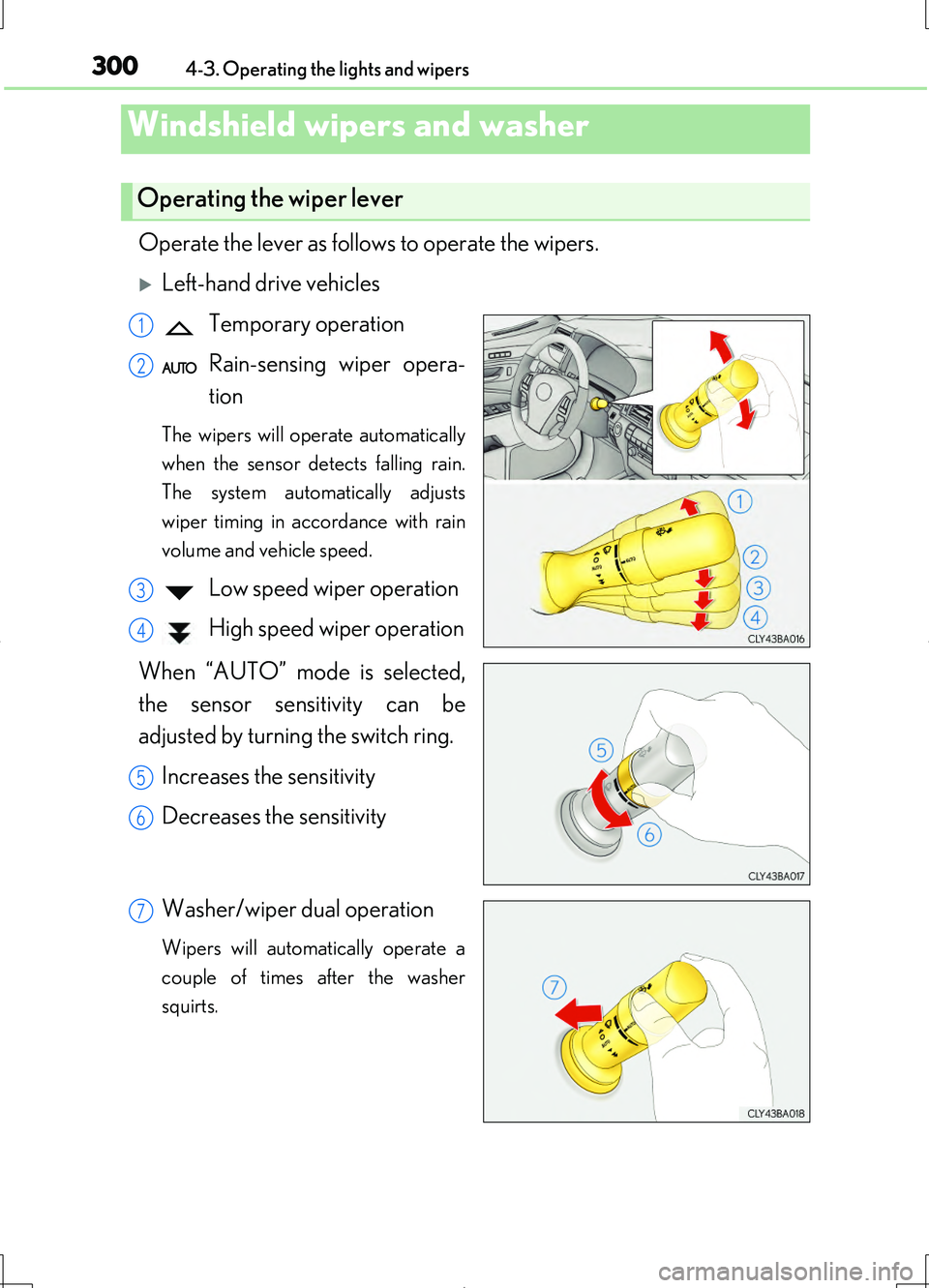
Operate the lever as follows to operate the wipers.
Left-hand drive vehicles
Temporary operation
Rain-sensing wiper opera-
tion
The wipers will operate automatically
when the sensor detects falling rain.
The system automatically adjusts
wiper timing in accordance with rain
volume and vehicle speed.
Low speed wiper operation
High speed wiper operation
When “AUTO” mode is selected,
the sensor sensitivity can be
adjusted by turning the switch ring.
Increases the sensitivity
Decreases the sensitivity
Washer/wiper dual operation
Wipers will automatically operate a
couple of times after the washer
squirts.
Windshield wipers and washer
Operating the wiper lever
1
2
3
4
5
6
7
Page 301 of 708
3014-3. Operating the lights and wipers
4
Driving
LS460/LS460L_GE (OM50G06E)
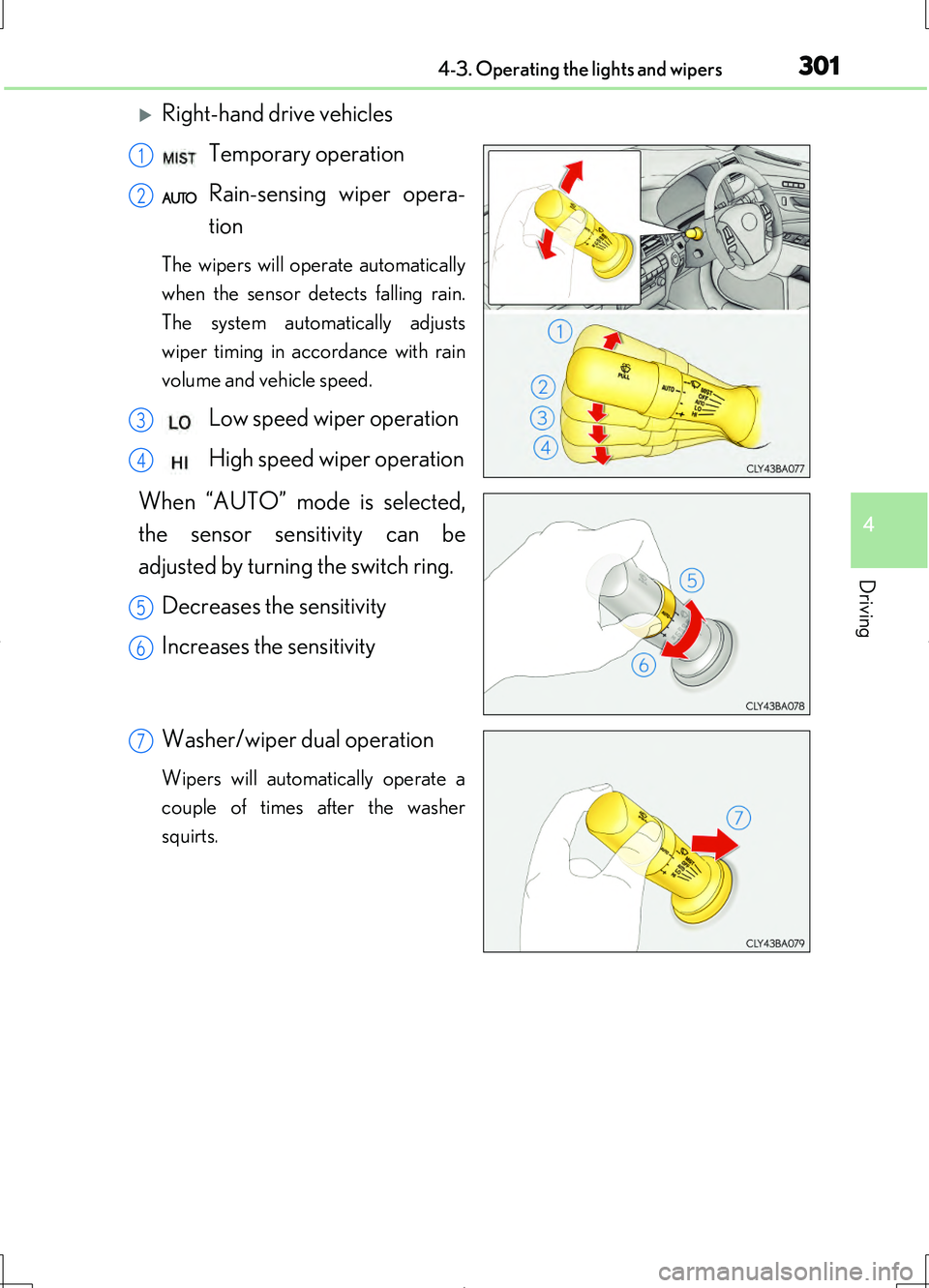
Right-hand drive vehicles
Temporary operation
Rain-sensing wiper opera-
tion
The wipers will operate automatically
when the sensor detects falling rain.
The system automatically adjusts
wiper timing in accordance with rain
volume and vehicle speed.
Low speed wiper operation
High speed wiper operation
When “AUTO” mode is selected,
the sensor sensitivity can be
adjusted by turning the switch ring.
Decreases the sensitivity
Increases the sensitivity
Washer/wiper dual operation
Wipers will automatically operate a
couple of times after the washer
squirts.
1
2
3
4
5
6
7
Page 302 of 708
3024-3. Operating the lights and wipers
LS460/LS460L_GE (OM50G06E)
■The windshield wiper and washer can be operated when
The engine switch is in IGNITION ON mode.
■Dripping prevention wiper sweep
After washing and the wiper has operated several times, the wipers operate one
more time after a short delay to prevent dripping.
However, the last sweep will not happen if the vehicle is traveling above 170 km/h
(106 mph).
■Effects of vehicle speed on wiper operation
Even when the wipers are not in “AUTO” mode, vehicle speed affects the time until
the drip prevention wiper sweep occurs.
With low speed windshield wiper operation selected, wiper operation will be
switched from low speed to intermittent wiper operation only when the vehicle is sta-
tionary.
(However, when the sensor sensitivity is adjusted to the highest level, the mode can-
not be switched.)
■Raindrop sensor
●If the wiper is turned to “AUTO” mode while the engine switch is in IGNITION ON
mode, the wipers will operate once to show that “AUTO” mode is activated.
●If the temperature of the raindrop sensor is 90 C (194F) or higher, or -15C
(5 F) or lower, automatic operation may not occur. In this case, operate the wip-
ers in any mode other than “AUTO” mode.
■If no windshield washer fluid sprays
Check that the washer nozzles are not blocked if there is washer fluid in the wind-
shield washer fluid reservoir.
■Outside rear view mirror defogger activation linked to windshield wiper operation
The outside rear view mirror defoggers automatically turn on when you operate the
windshield wipers.
The outside rear view mirror defoggers automatically turn off approximately 15 min-
utes after the wipers stop.
For details about the outside rear view mirror defoggers: P. 445
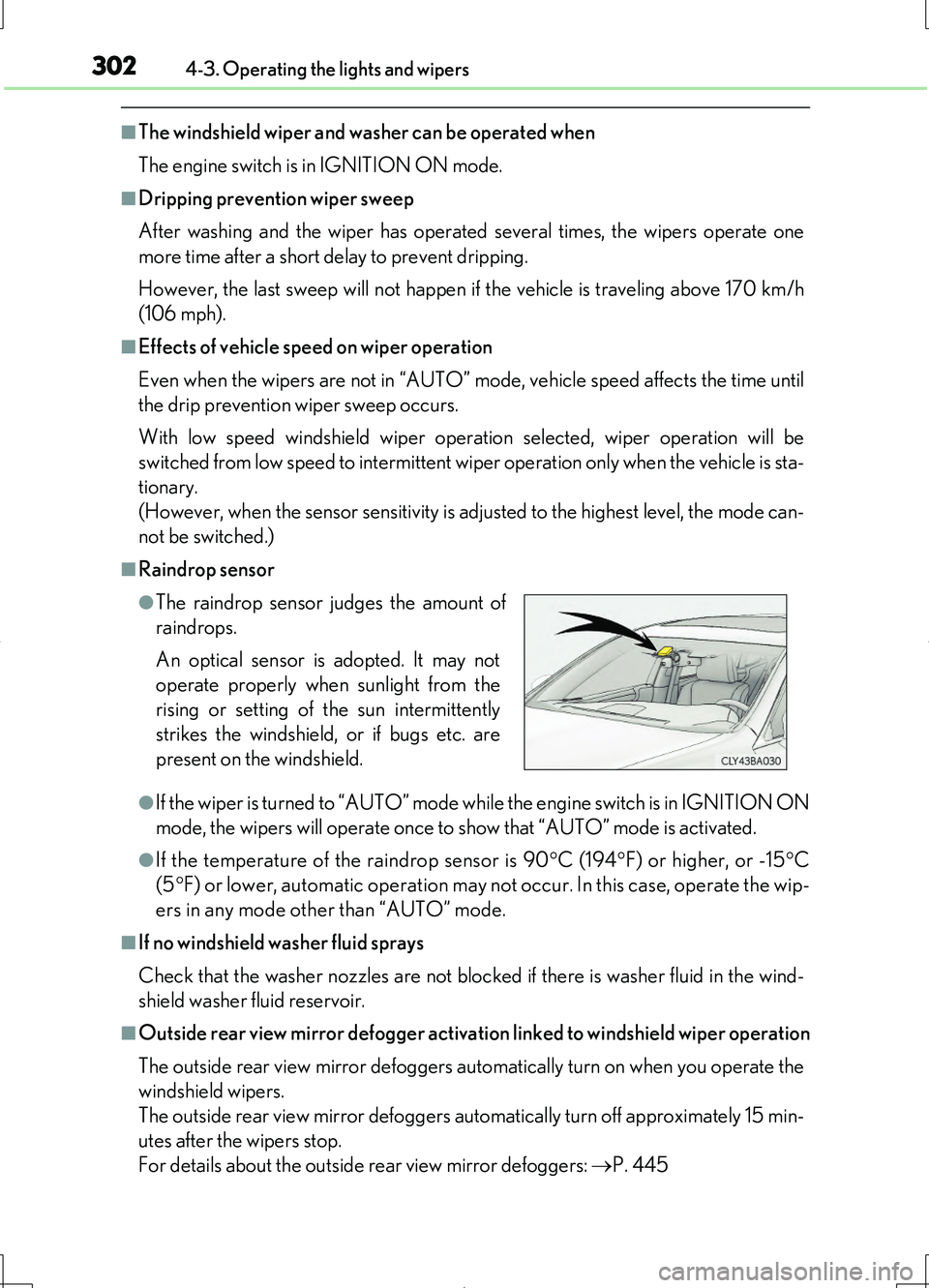
●The raindrop sensor judges the amount of
raindrops.
An optical sensor is adopted. It may not
operate properly when sunlight from the
rising or setting of the sun intermittently
strikes the windshield, or if bugs etc. are
present on the windshield.
Page 310 of 708
3104-5. Using the driving support systems
LS460/LS460L_GE (OM50G06E)
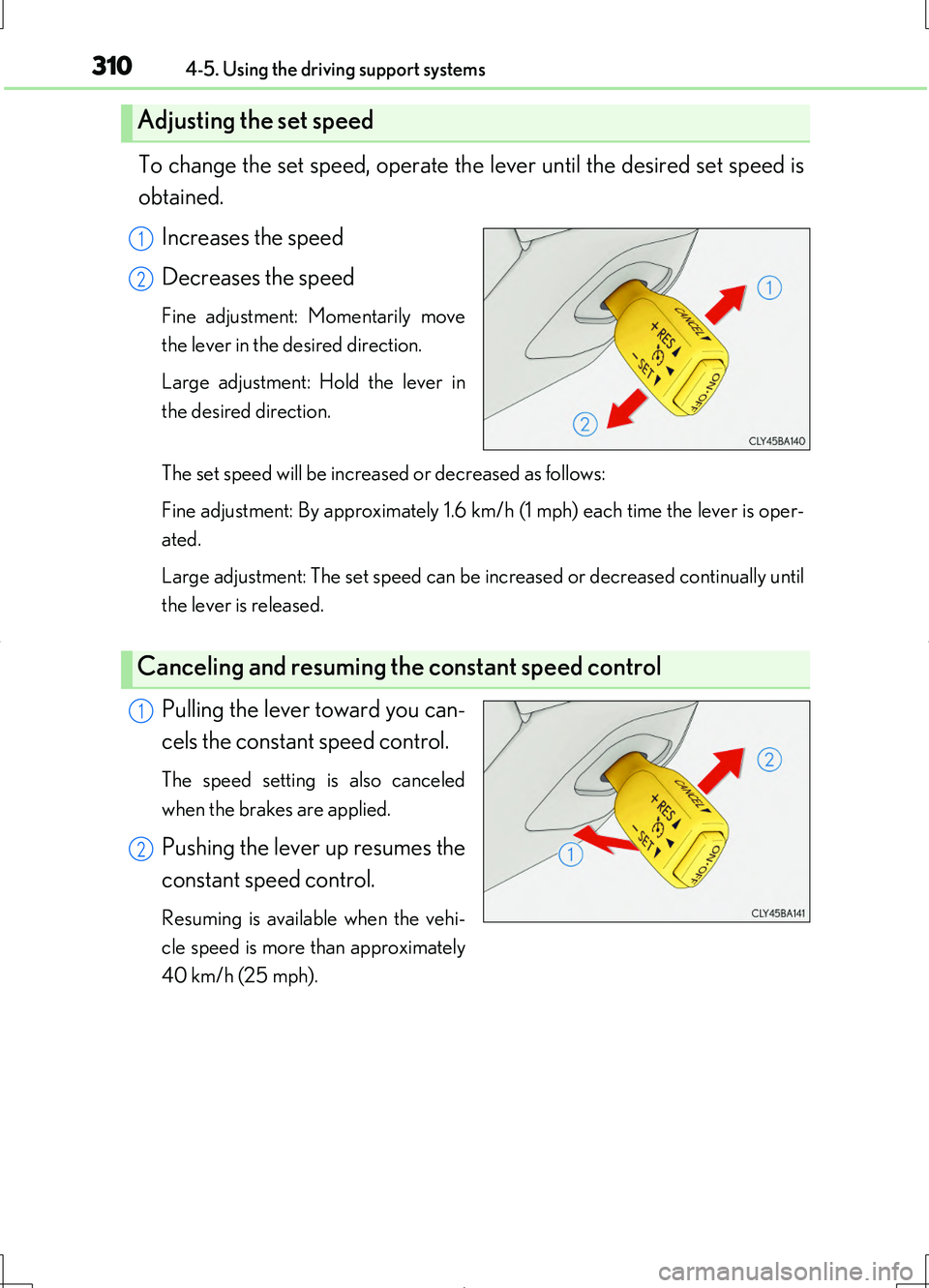
To change the set speed, operate the lever until the desired set speed is
obtained.
Increases the speed
Decreases the speed
Fine adjustment: Momentarily move
the lever in the desired direction.
Large adjustment: Hold the lever in
the desired direction.
The set speed will be increased or decreased as follows:
Fine adjustment: By approximately 1.6 km/h (1 mph) each time the lever is oper-
ated.
Large adjustment: The set speed can be increased or decreased continually until
the lever is released.
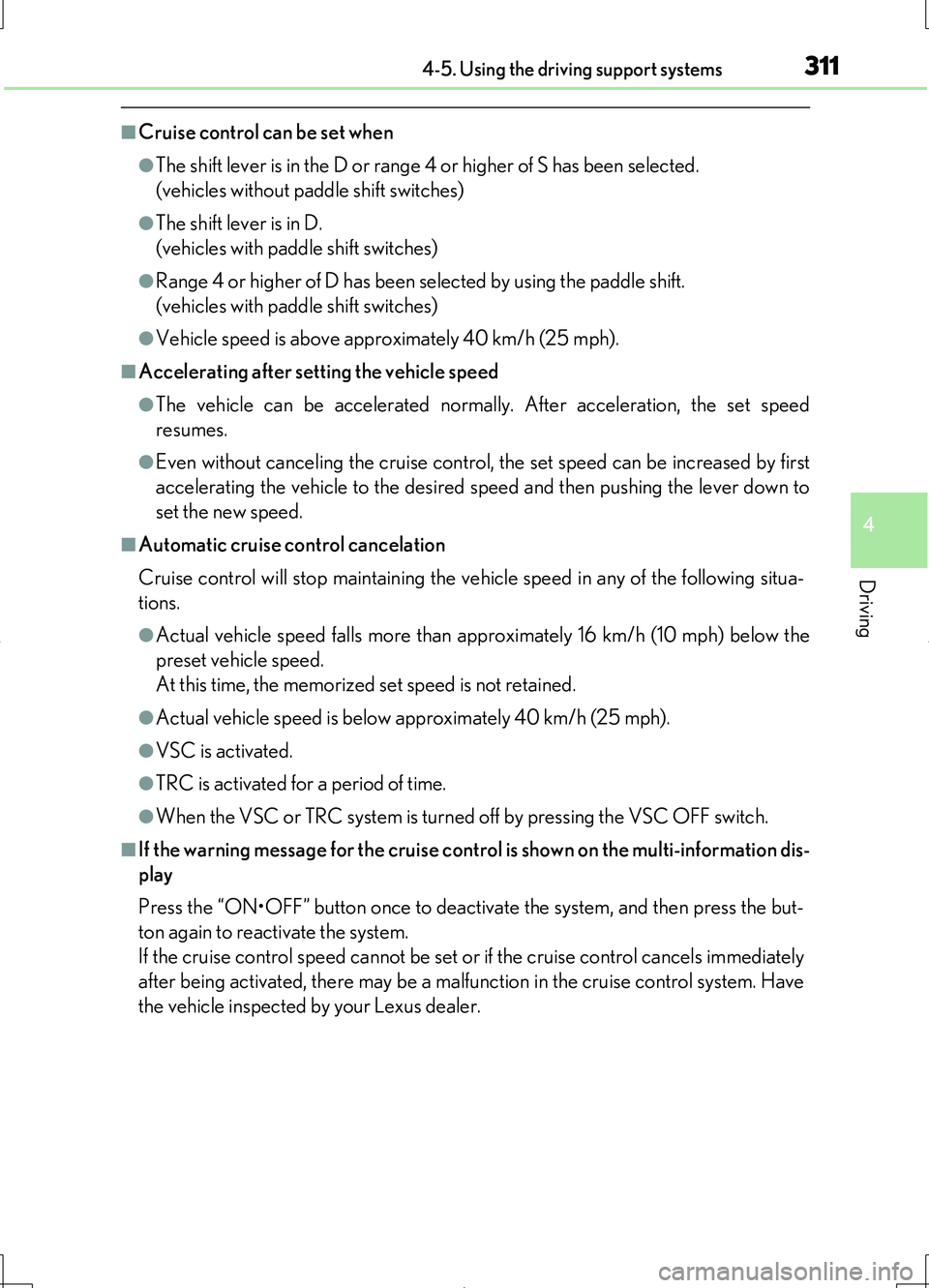
Pulling the lever toward you can-
cels the constant speed control.
The speed setting is also canceled
when the brakes are applied.
Pushing the lever up resumes the
constant speed control.
Resuming is available when the vehi-
cle speed is more than approximately
40 km/h (25 mph).
Adjusting the set speed
1
2
Canceling and resuming the constant speed control
1
2
Page 311 of 708
3114-5. Using the driving support systems
4
Driving
LS460/LS460L_GE (OM50G06E)
■Cruise control can be set when
●The shift lever is in the D or range 4 or higher of S has been selected.
(vehicles without paddle shift switches)
●The shift lever is in D.
(vehicles with paddle shift switches)
●Range 4 or higher of D has been selected by using the paddle shift.
(vehicles with paddle shift switches)
●Vehicle speed is above approximately 40 km/h (25 mph).
■Accelerating after setting the vehicle speed
●The vehicle can be accelerated normally. After acceleration, the set speed
resumes.
●Even without canceling the cruise control, the set speed can be increased by first
accelerating the vehicle to the desired speed and then pushing the lever down to
set the new speed.
■Automatic cruise control cancelation
Cruise control will stop maintaining the vehicle speed in any of the following situa-
tions.
●Actual vehicle speed falls more than approximately 16 km/h (10 mph) below the
preset vehicle speed.
At this time, the memorized set speed is not retained.
●Actual vehicle speed is below approximately 40 km/h (25 mph).
●VSC is activated.
●TRC is activated for a period of time.
●When the VSC or TRC system is turned off by pressing the VSC OFF switch.
■If the warning message for the cruise control is shown on the multi-information dis-
play
Press the “ON•OFF” button once to deactivate the system, and then press the but-
ton again to reactivate the system.
If the cruise control speed cannot be set or if the cruise control cancels immediately
after being activated, there may be a malfunction in the cruise control system. Have
the vehicle inspected by your Lexus dealer.