Time LEXUS LS460L 2016 Repair Manual
[x] Cancel search | Manufacturer: LEXUS, Model Year: 2016, Model line: LS460L, Model: LEXUS LS460L 2016Pages: 708, PDF Size: 36.57 MB
Page 315 of 708
3154-5. Using the driving support systems
4
Driving
LS460/LS460L_GE (OM50G06E)
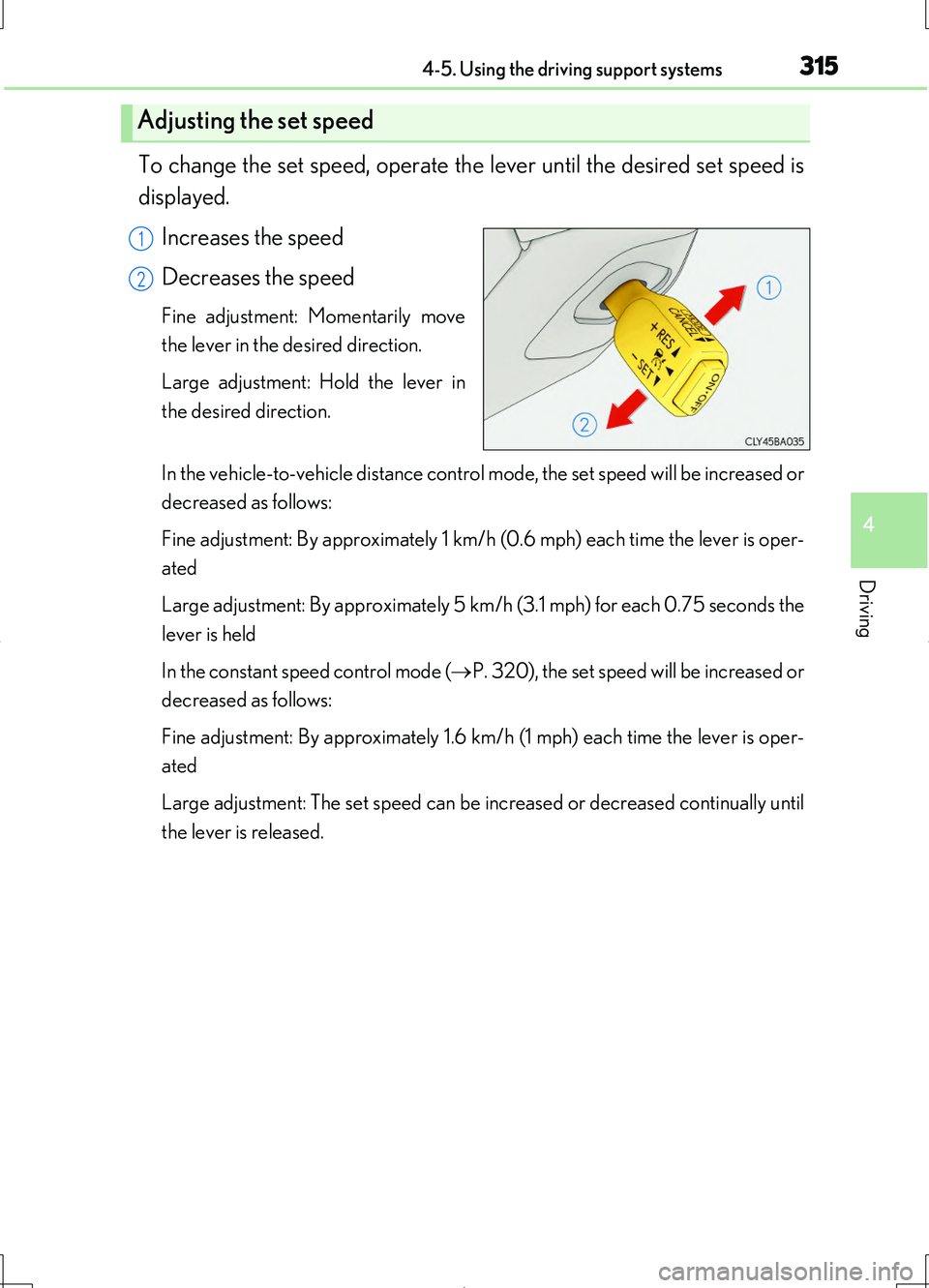
To change the set speed, operate the lever until the desired set speed is
displayed.
Increases the speed
Decreases the speed
Fine adjustment: Momentarily move
the lever in the desired direction.
Large adjustment: Hold the lever in
the desired direction.
In the vehicle-to-vehicle distance control mode, the set speed will be increased or
decreased as follows:
Fine adjustment: By approximately 1 km/h (0.6 mph) each time the lever is oper-
ated
Large adjustment: By approximately 5 km/h (3.1 mph) for each 0.75 seconds the
lever is held
In the constant speed control mode ( P. 320), the set speed will be increased or
decreased as follows:
Fine adjustment: By approximately 1.6 km/h (1 mph) each time the lever is oper-
ated
Large adjustment: The set speed can be increased or decreased continually until
the lever is released.
Adjusting the set speed
1
2
Page 321 of 708
3214-5. Using the driving support systems
4
Driving
LS460/LS460L_GE (OM50G06E)
■Dynamic radar cruise control can be set when
●The shift lever is in the D or range 4 or higher of S has been selected.
(vehicles without paddle shift switches)
●The shift lever is in D.
(vehicles with paddle shift switches)
●Range 4 or higher of D has been selected by using the paddle shift.
(vehicles with paddle shift switches)
●Vehicle speed is above approximately 50 km/h (30 mph).
■Accelerating after setting the vehicle speed
The vehicle can accelerate normally. After acceleration, the set speed resumes.
However, during vehicle-to-vehicle distance control mode, the vehicle speed may
decrease below the set speed in order to maintain the distance to the vehicle ahead.
■Automatic cancelation of vehicle -to-vehicle distance control
Vehicle-to-vehicle distance control driving is automatically canceled in the following
situations:
●Actual vehicle speed falls below approximately 40 km/h (25 mph).
●VSC is activated.
●TRC is activated for a period of time.
●When the VSC or TRC system is turned off by pressing the VSC OFF switch.
●The sensor cannot operate correctly because it is covered in some way.
●The windshield wipers are operating at high speed (when the wiper switch is set to
the “AUTO” mode or the high speed wiper operation position).
●When snow mode is set.
If vehicle-to-vehicle distance control driving is automatically canceled for any other
reason, there may be a malfunction in the system. Contact your Lexus dealer.
Page 322 of 708
3224-5. Using the driving support systems
LS460/LS460L_GE (OM50G06E)
■Automatic cancelation of constant speed control
The cruise control will stop maintaining the vehicle speed in the following situations:
●Actual vehicle speed is more than approximately 16 km/h (10 mph) below the set
vehicle speed.
At this time, the memorized set speed is not retained.
●Actual vehicle speed falls below approximately 40 km/h (25 mph).
●VSC is activated.
●TRC is activated for a period of time.
●When the VSC or TRC system is turned off by pressing the VSC OFF switch.
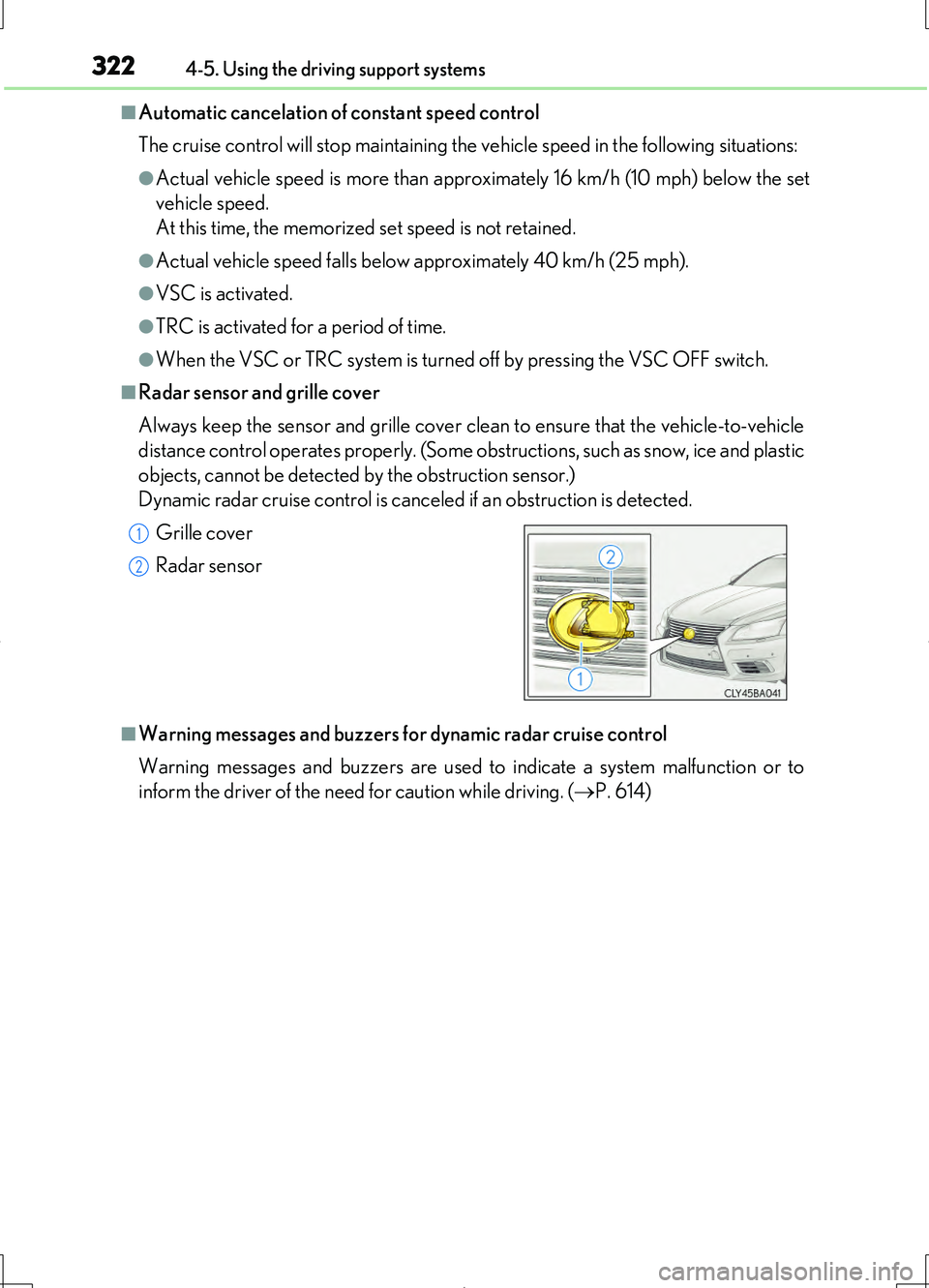
■Radar sensor and grille cover
Always keep the sensor and grille cover clean to ensure that the vehicle-to-vehicle
distance control operates properly. (Some obstructions, such as snow, ice and plastic
objects, cannot be detected by the obstruction sensor.)
Dynamic radar cruise control is canceled if an obstruction is detected.
■Warning messages and buzzers for dynamic radar cruise control
Warning messages and buzzers are used to indicate a system malfunction or to
inform the driver of the need for caution while driving. ( P. 614)
Grille cover
Radar sensor
1
2
Page 327 of 708
3274-5. Using the driving support systems
4
Driving
LS460/LS460L_GE (OM50G06E)
CAUTION
■Handling the radar sensor
Observe the following to ensure the cruise control system can function effectively.
Otherwise, the system may not function correctly and could result in an accident.
●Keep the sensor and grille cover clean at all times.
Clean the sensor and grille cover with a soft cloth so you do not mark or damage
them.
●Do not subject the sensor or surrounding area to a strong impact.
If the sensor moves even slightly off position, the system may malfunction. If the
sensor or surrounding area is subject to a strong impact, always have the area
inspected and adjusted by your Lexus dealer.
●Do not disassemble the sensor.
●Do not attach accessories or stickers to the sensor, grille cover or surrounding
area.
●Do not modify or paint the sensor and grille cover.
●If the radar sensor needs to be replaced, contact your Lexus dealer.
Page 330 of 708
3304-5. Using the driving support systems
LS460/LS460L_GE (OM50G06E)
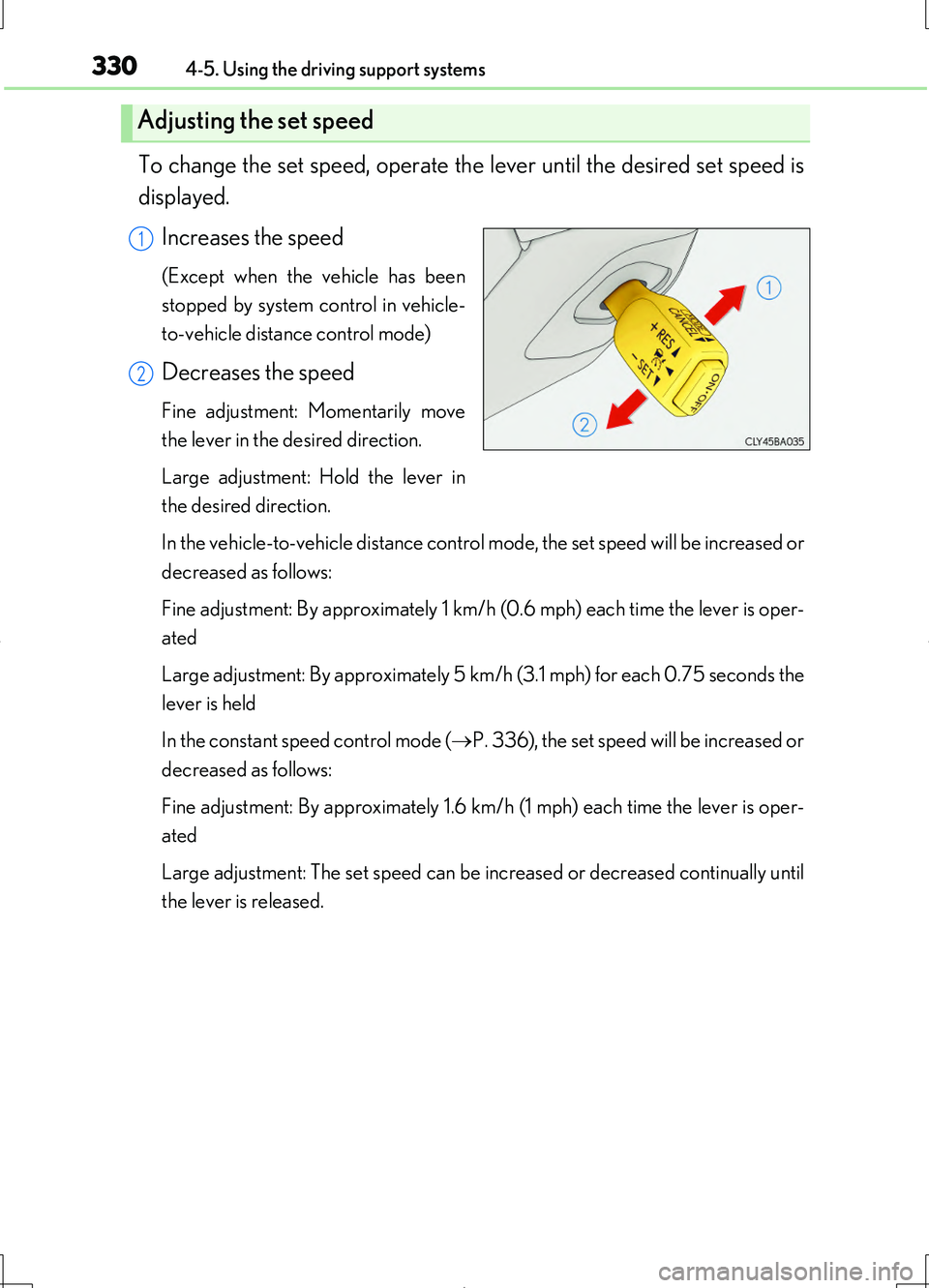
To change the set speed, operate the lever until the desired set speed is
displayed.
Increases the speed
(Except when the vehicle has been
stopped by system control in vehicle-
to-vehicle distance control mode)
Decreases the speed
Fine adjustment: Momentarily move
the lever in the desired direction.
Large adjustment: Hold the lever in
the desired direction.
In the vehicle-to-vehicle distance control mode, the set speed will be increased or
decreased as follows:
Fine adjustment: By approximately 1 km/h (0.6 mph) each time the lever is oper-
ated
Large adjustment: By approximately 5 km/h (3.1 mph) for each 0.75 seconds the
lever is held
In the constant speed control mode ( P. 336), the set speed will be increased or
decreased as follows:
Fine adjustment: By approximately 1.6 km/h (1 mph) each time the lever is oper-
ated
Large adjustment: The set speed can be increased or decreased continually until
the lever is released.
Adjusting the set speed
1
2
Page 337 of 708
3374-5. Using the driving support systems
4
Driving
LS460/LS460L_GE (OM50G06E)
■Dynamic radar cruise control with full-speed range can be set when
●The shift lever is in the D or range 4 or higher of S has been selected.
(vehicles without paddle shift switches)
●The shift lever is in D.
(vehicles with paddle shift switches)
●Range 4 or higher of D has been selected by using the paddle shift.
(vehicles with paddle shift switches)
●Vehicle speed is above approximately 50 km/h (30 mph).
■Accelerating after setting the vehicle speed
The vehicle can accelerate normally. After acceleration, the set speed resumes.
However, during vehicle-to-vehicle distance control mode, the vehicle speed may
decrease below the set speed in order to maintain the distance to the vehicle ahead.
■Automatic cancelation of vehicle -to-vehicle distance control
Vehicle-to-vehicle distance control driving is automatically canceled in the following
situations:
●Actual vehicle speed falls below approximately 40 km/h (25 mph) when there are
no vehicle ahead.
●The preceding vehicle leaves the lane when your vehicle is following at a speed
below 40 km/h (25 mph).
●VSC is activated.
●TRC is activated for a period of time.
●When the VSC or TRC system is turned off by pressing the VSC OFF switch.
●The sensor cannot operate correctly because it is covered in some way.
●The windshield wipers are operating at high speed (when the wiper switch is set to
the “AUTO” mode or the high speed wiper operation position).
●When snow mode is set.
●The parking brake is operated.
●The vehicle is stopped by system control on a steep incline.
●Pre-crash brake assist is activated.
●The following are detected when the vehicle has been stopped by system control:
• The driver is not wearing a seat belt.
• The driver’s door is opened.
• The trunk or hood is opened.
• The vehicle has been stopped for about 3 minutes.
If vehicle-to-vehicle distance control driving is automatically canceled for any other
reason, there may be a malfunction in the system. Contact your Lexus dealer.
Page 338 of 708
3384-5. Using the driving support systems
LS460/LS460L_GE (OM50G06E)
■Automatic cancelation of constant speed control
The cruise control will stop maintaining the vehicle speed in the following situations:
●Actual vehicle speed is more than approximately 16 km/h (10 mph) below the set
vehicle speed.
At this time, the memorized set speed is not retained.
●Actual vehicle speed falls below approximately 40 km/h (25 mph).
●VSC is activated.
●TRC is activated for a period of time.
●When the VSC or TRC system is turned off by pressing the VSC OFF switch.
■When the LKA (Lane-Keeping Assist) will be activated (if equipped)
Using the radar cruise control in vehicle-to-vehicle distance control mode, lane
keeping assistance control is activated.
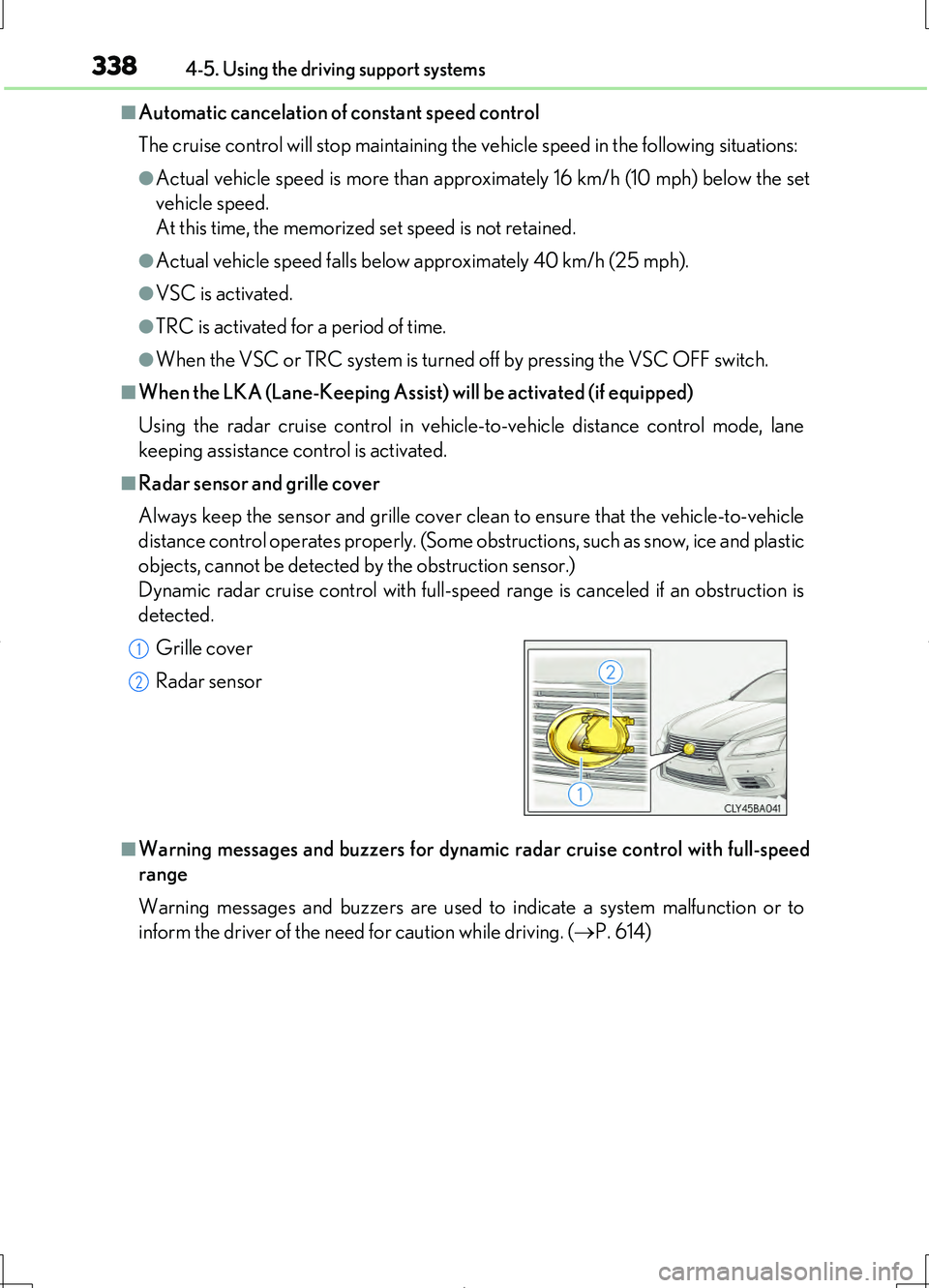
■Radar sensor and grille cover
Always keep the sensor and grille cover clean to ensure that the vehicle-to-vehicle
distance control operates properly. (Some obstructions, such as snow, ice and plastic
objects, cannot be detected by the obstruction sensor.)
Dynamic radar cruise control with full-speed range is canceled if an obstruction is
detected.
■Warning messages and buzzers for dynamic radar cruise control with full-speed
range
Warning messages and buzzers are used to indicate a system malfunction or to
inform the driver of the need for caution while driving. ( P. 614)
Grille cover
Radar sensor
1
2
Page 343 of 708
3434-5. Using the driving support systems
4
Driving
LS460/LS460L_GE (OM50G06E)
CAUTION
■Handling the radar sensor
Observe the following to ensure the cruise control system can function effectively.
Otherwise, the system may not function correctly and could result in an accident.
●Keep the sensor and grille cover clean at all times.
Clean the sensor and grille cover with a soft cloth so you do not mark or damage
them.
●Do not subject the sensor or surrounding area to a strong impact.
If the sensor moves even slightly off position, the system may malfunction. If the
sensor or surrounding area is subject to a strong impact, always have the area
inspected and adjusted by your Lexus dealer.
●Do not disassemble the sensor.
●Do not attach accessories or stickers to the sensor, grille cover or surrounding
area.
●Do not modify or paint the sensor and grille cover.
●If the radar sensor needs to be replaced, contact your Lexus dealer.
Page 345 of 708
3454-5. Using the driving support systems
4
Driving
LS460/LS460L_GE (OM50G06E)
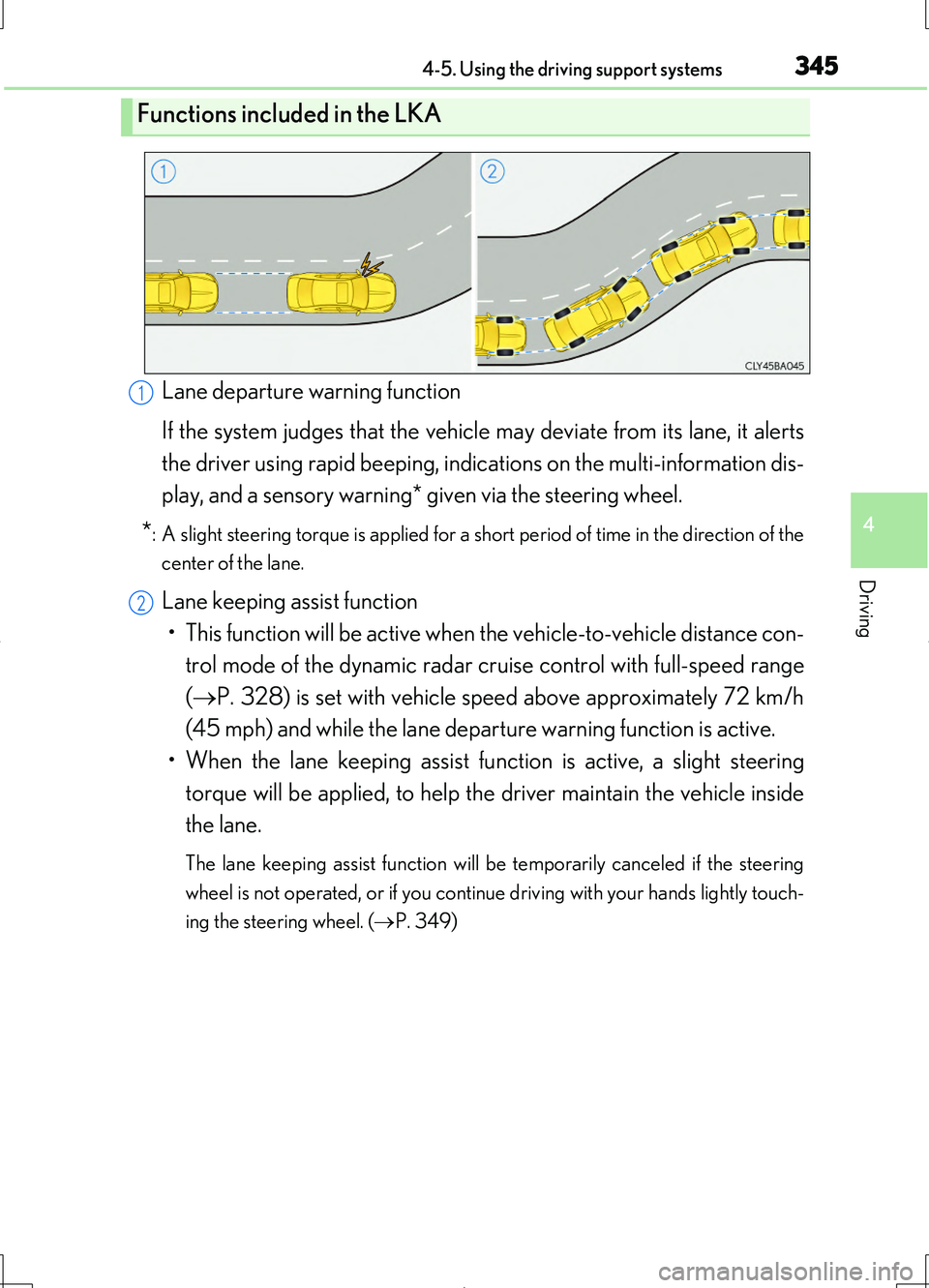
Lane departure warning function
If the system judges that the vehicle may deviate from its lane, it alerts
the driver using rapid beeping, indications on the multi-information dis-
play, and a sensory warning* given via the steering wheel.
*: A slight steering torque is applied for a short period of time in the direction of the
center of the lane.
Lane keeping assist function
• This function will be active when the vehicle-to-vehicle distance con-
trol mode of the dynamic radar crui se control with full-speed range
( P. 328) is set with vehicle speed above approximately 72 km/h
(45 mph) and while the lane departure warning function is active.
• When the lane keeping assist function is active, a slight steering
torque will be applied, to help th e driver maintain the vehicle inside
the lane.
The lane keeping assist function will be temporarily canceled if the steering
wheel is not operated, or if you continue driving with your hands lightly touch-
ing the steering wheel. ( P. 349)
Functions included in the LKA
1
2
Page 346 of 708
3464-5. Using the driving support systems
LS460/LS460L_GE (OM50G06E)
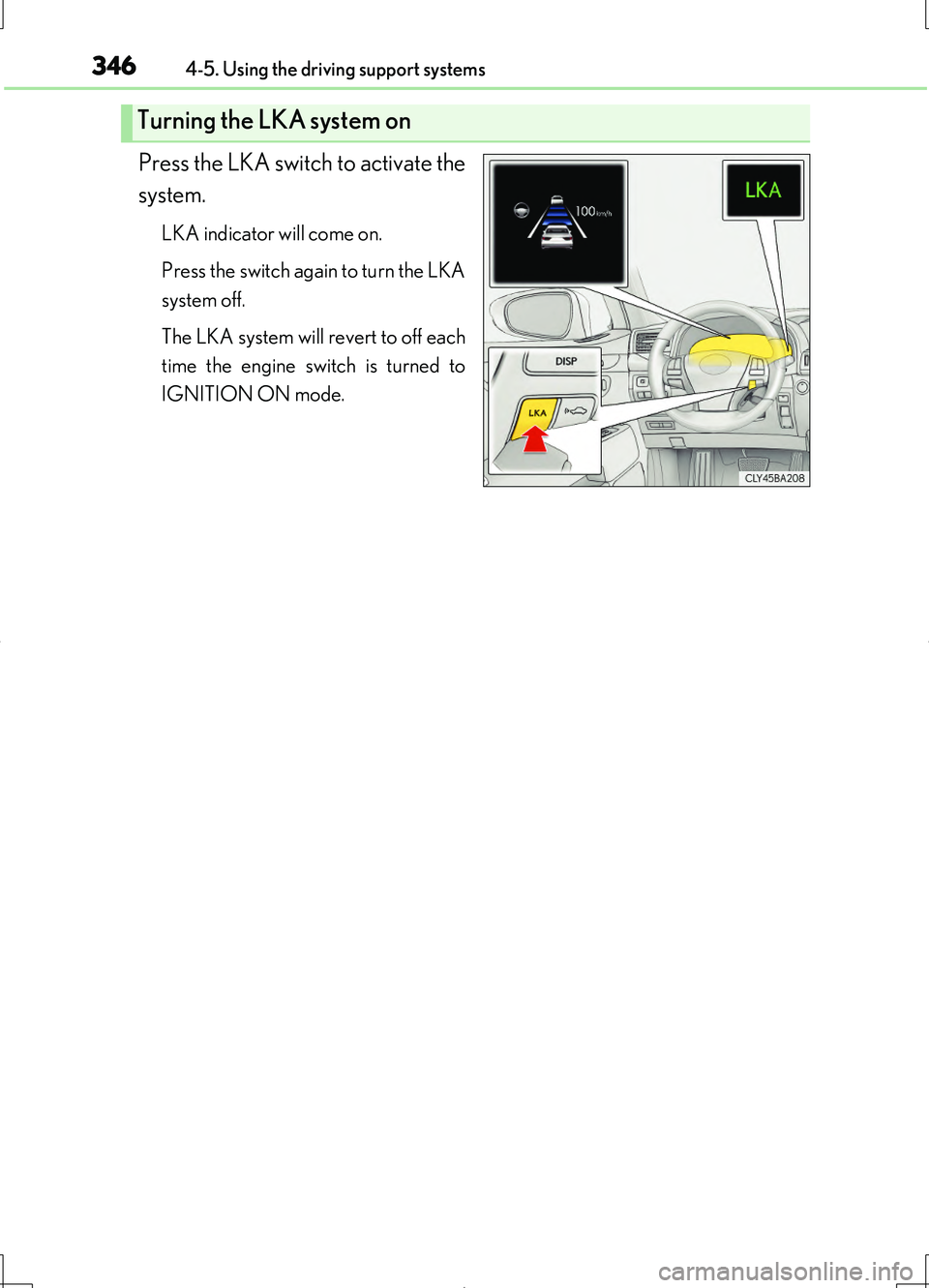
Press the LKA switch to activate the
system.
LKA indicator will come on.
Press the switch again to turn the LKA
system off.
The LKA system will revert to off each
time the engine switch is turned to
IGNITION ON mode.
Turning the LKA system on