Time LEXUS LS460L 2016 Manual PDF
[x] Cancel search | Manufacturer: LEXUS, Model Year: 2016, Model line: LS460L, Model: LEXUS LS460L 2016Pages: 708, PDF Size: 36.57 MB
Page 348 of 708
3484-5. Using the driving support systems
LS460/LS460L_GE (OM50G06E)
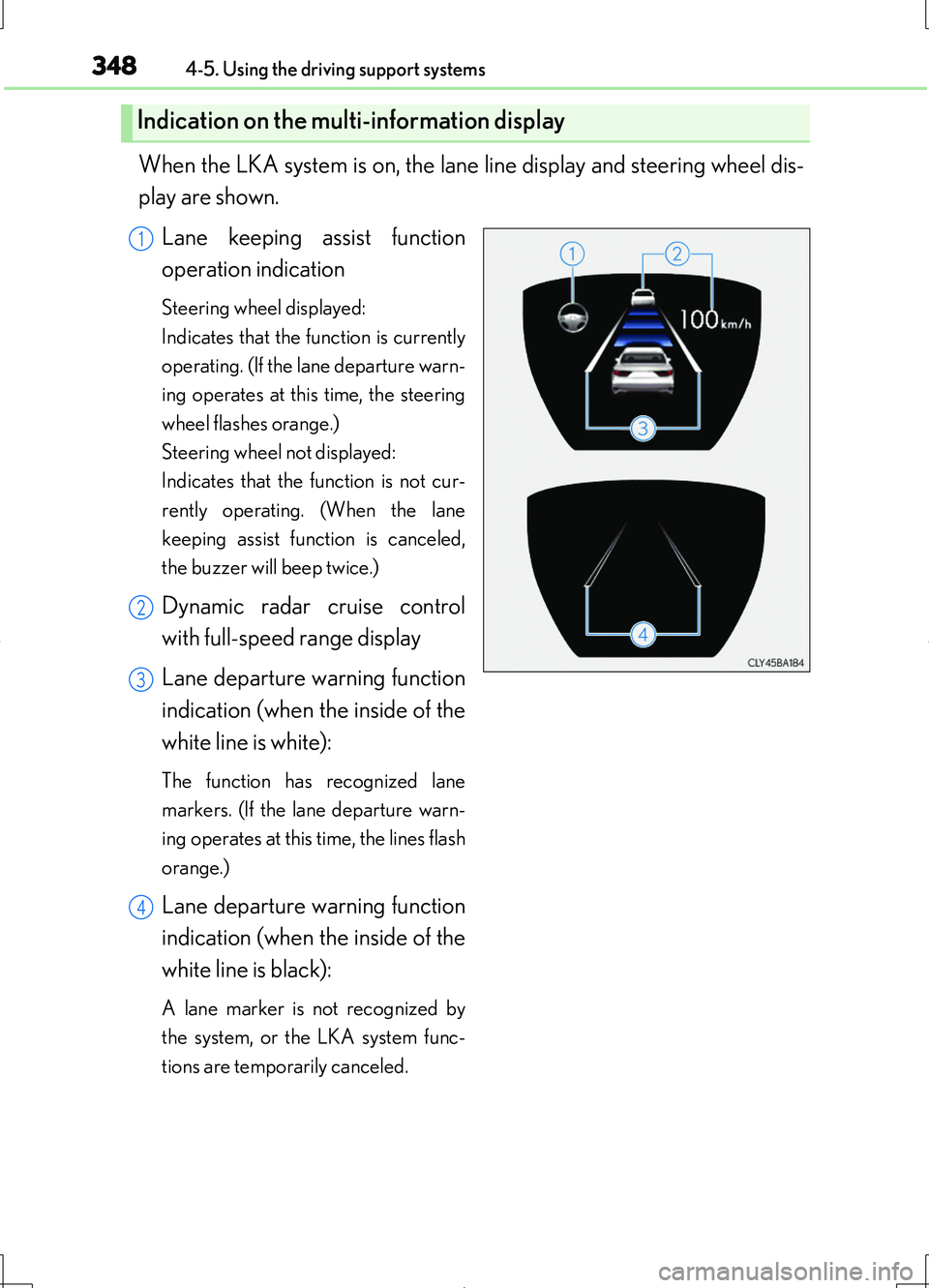
When the LKA system is on, the lane line display and steering wheel dis-
play are shown.
Lane keeping assist function
operation indication
Steering wheel displayed:
Indicates that the function is currently
operating. (If the lane departure warn-
ing operates at this time, the steering
wheel flashes orange.)
Steering wheel not displayed:
Indicates that the function is not cur-
rently operating. (When the lane
keeping assist function is canceled,
the buzzer will beep twice.)
Dynamic radar cruise control
with full-speed range display
Lane departure warning function
indication (when the inside of the
white line is white):
The function has recognized lane
markers. (If the lane departure warn-
ing operates at this time, the lines flash
orange.)
Lane departure warning function
indication (when the inside of the
white line is black):
A lane marker is not recognized by
the system, or the LKA system func-
tions are temporarily canceled.
Indication on the multi-information display
1
2
3
4
Page 351 of 708
3514-5. Using the driving support systems
4
Driving
LS460/LS460L_GE (OM50G06E)
●When driving on a road surface that is wet due to rain, previous rainfall, standing
water, etc.
●When the vehicle experiences strong up-and-down motion such as when driving
on an extremely rough road or on a seam in the pavement
●When headlight brightness at nighttime is reduced due to dirt on the lenses, or
when the headlights are misaligned
●When driving with a strong crosswind
●When driving on winding roads or roads that are uneven
●When driving on rough or unpaved roads
■When changing the tires
Depending on the tires used, such as snow tires, etc., sufficient performance may not
be maintainable.
■Warning messages for LKA
Warning messages are used to indicate a system malfunction or to inform the driver
of the need for caution while driving. ( P. 614)
CAUTION
■Before using the LKA system
Do not rely solely on the LKA system. The LKA system does not drive the vehicle
automatically, nor does it reduce the amount of care you need to take. As such, the
driver must always assume full responsibility for understanding his/her surround-
ings, for operating the steering wheel to correct the driving line, and for driving
safely.
Inappropriate or negligent driving could lead to an accident.
■To avoid operating the LKA by mistake
Switch the LKA off using the LKA switch when not in use.
Page 353 of 708
3534-5. Using the driving support systems
4
Driving
LS460/LS460L_GE (OM50G06E)
NOTICE
■Camera sensor (P. 344)
Observe the following to ensure that the LKA system functions correctly.
●Keep the windshield clean at all times.
Performance could be affected if the windshield is dirty, or if raindrops, conden-
sation or ice are adhering to the windshield.
●Do not attach window tinting to the windshield.
●Do not install an antenna in front of the camera lens.
●If the windshield is fogged up, use the windshield defogger to remove fog from
the windshield.
When it is cold, using the heater with air blowing to the feet may allow the upper
part of the windshield to fog up. This will have a negative effect on the images.
●Do not place anything on the dashboard.
The camera sensor may recognize the image reflected on the windshield as lane
markers by mistake.
●Do not scratch the camera lens, or let it get dirty.
When cleaning the inside of the windshield, be careful not to get any glass
cleaner etc. on the lens. Also, do not touch the lens.
For lens repair, contact your Lexus dealer.
●Do not change the installation position or direction of the camera sensor or
remove it. The direction of the camera sensor is precisely adjusted.
●Do not subject the camera sensor to strong impact or force, and do not disas-
semble the camera sensor.
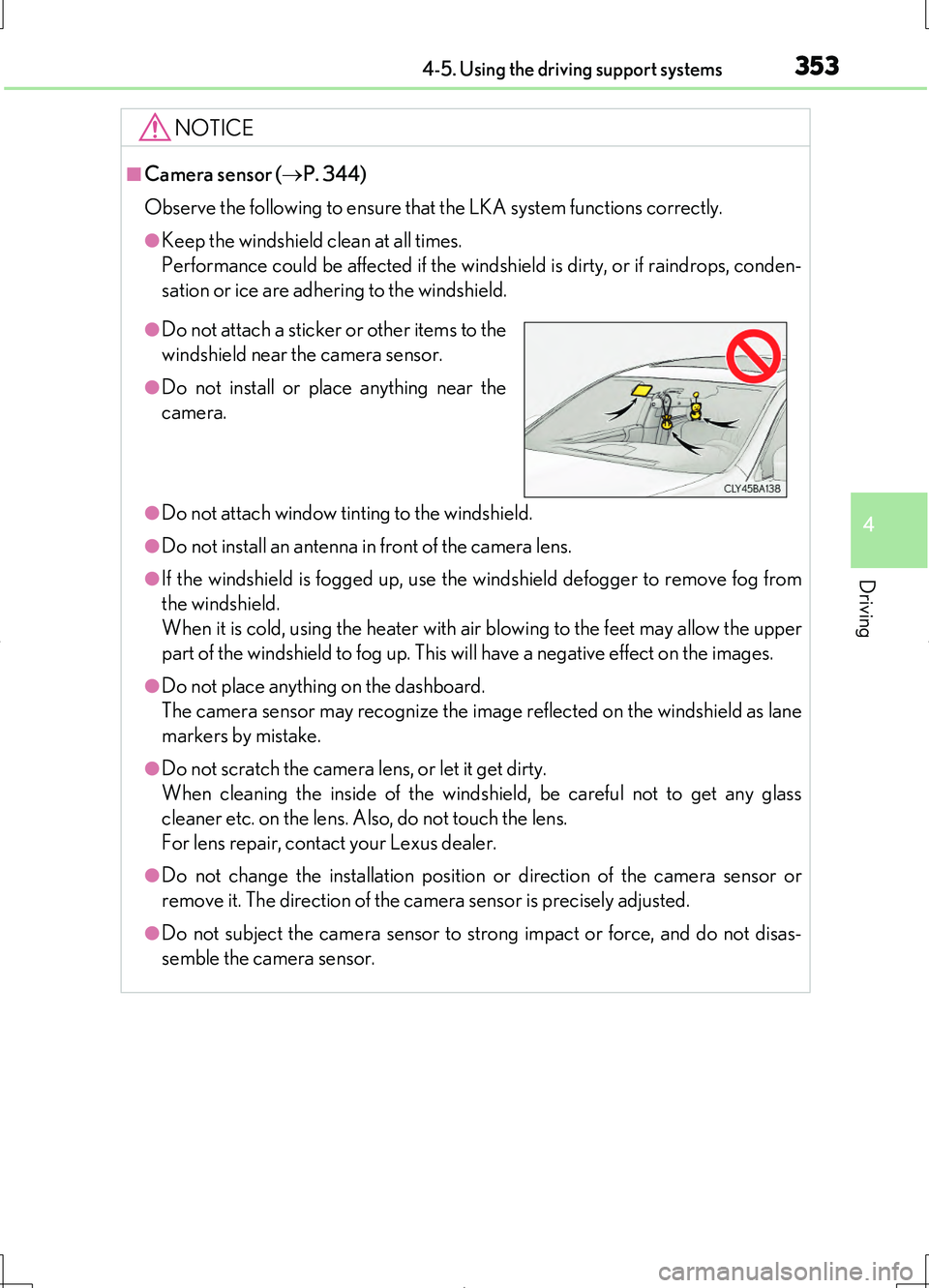
●Do not attach a sticker or other items to the
windshield near the camera sensor.
●Do not install or place anything near the
camera.
Page 364 of 708
3644-5. Using the driving support systems
LS460/LS460L_GE (OM50G06E)
■When the message is displayed on the multi-information display showing that TRC
has been disabled even if the VSC OFF switch has not been pressed
TRC and hill-start assist control cannot be operated. Contact your Lexus dealer.
■Hill-start assist control is operational when
●The system has detected that the vehicle is moving backward.
●Vehicles without paddle shift switches: The shift lever is in the D or S position.
Vehicles with paddle shift switches: The shift lever is in the D or M position.
●The brake pedal is not depressed.
■VGRS is disabled when
VGRS may stop operating in the following situations.
In this event, the steering wheel may move from its straight forward position, but it
will return when the system restarts.
●When the steering wheel is operated for an extended period of time while the vehi-
cle is stopped or is moving very slowly
●When the steering wheel has been held fully to the left or right
●When the battery is low or the voltage temporarily drops
The center position of the steering wheel may change when VGRS is disabled. How-
ever, the position will return to normal after VGRS is reactivated.
■Sounds and vibrations caused by the ABS, brake assist, TRC, VSC, hill-start assist
control and VGRS systems
●A sound may be heard from the engine compartment when the brake pedal is
depressed repeatedly, when the engine is started or just after the vehicle begins to
move. This sound does not indicate that a malfunction has occurred in any of these
systems.
●Any of the following conditions may occur when the above systems are operating.
None of these indicates that a malfunction has occurred.
• Vibrations may be felt through the vehicle body and steering.
• A motor sound may be heard after the vehicle comes to a stop.
●The steering wheel may be moved slightly or a sound may be heard when the
engine is started or stopped. None of these indicate that a malfunction has
occurred.
■EPS operation sound
When the steering wheel is operated, a motor sound (whirring sound) may be heard.
This does not indicate a malfunction.
Page 365 of 708
3654-5. Using the driving support systems
4
Driving
LS460/LS460L_GE (OM50G06E)
■Reactivation of the TRC/VSC systems
Even after the TRC/VSC systems have been turned off, turning the engine off and
then on again will automatically reactivate the TRC/VSC systems.
■Reactivation of the TRC system linked to vehicle speed
When only the TRC system is turned off, the TRC system will turn on when vehicle
speed increases. However, when both TRC and VSC systems are turned off, the sys-
tems will not turn on even when vehicle speed increases.
■Reduced effectiveness of the EPS system
The effectiveness of the EPS system is reduced to prevent the system from overheat-
ing when there is frequent steering input over an extended period of time. The steer-
ing wheel may feel heavy as a result.* Should this occur, refrain from excessive
steering input or stop the vehicle and turn the engine off. The EPS system should
return to normal within 10 minutes.
*: If the LKA (Lane-Keeping Assist) system cannot operate in this case, a warning
message will be shown on the multi-information display.
■Operating conditions of emergency brake signal
When the following three conditions are met, the emergency brake signal will oper-
ate:
●The emergency flashers are off.
●Actual vehicle speed is over 55 km/h (35 mph).
●The brake pedal is depressed in a manner that cause the system to judge from the
vehicle deceleration that this is a sudden braking operation.
■Automatic system cancelation of emergency brake signal (if equipped)
The emergency brake signal will turn o ff in any of the following situations:
●The emergency flashers are turned on.
●The brake pedal is released.
●The system judges from the vehicle deceleration that is not a sudden braking oper-
ation.
Page 371 of 708
3714-5. Using the driving support systems
4
Driving
LS460/LS460L_GE (OM50G06E)
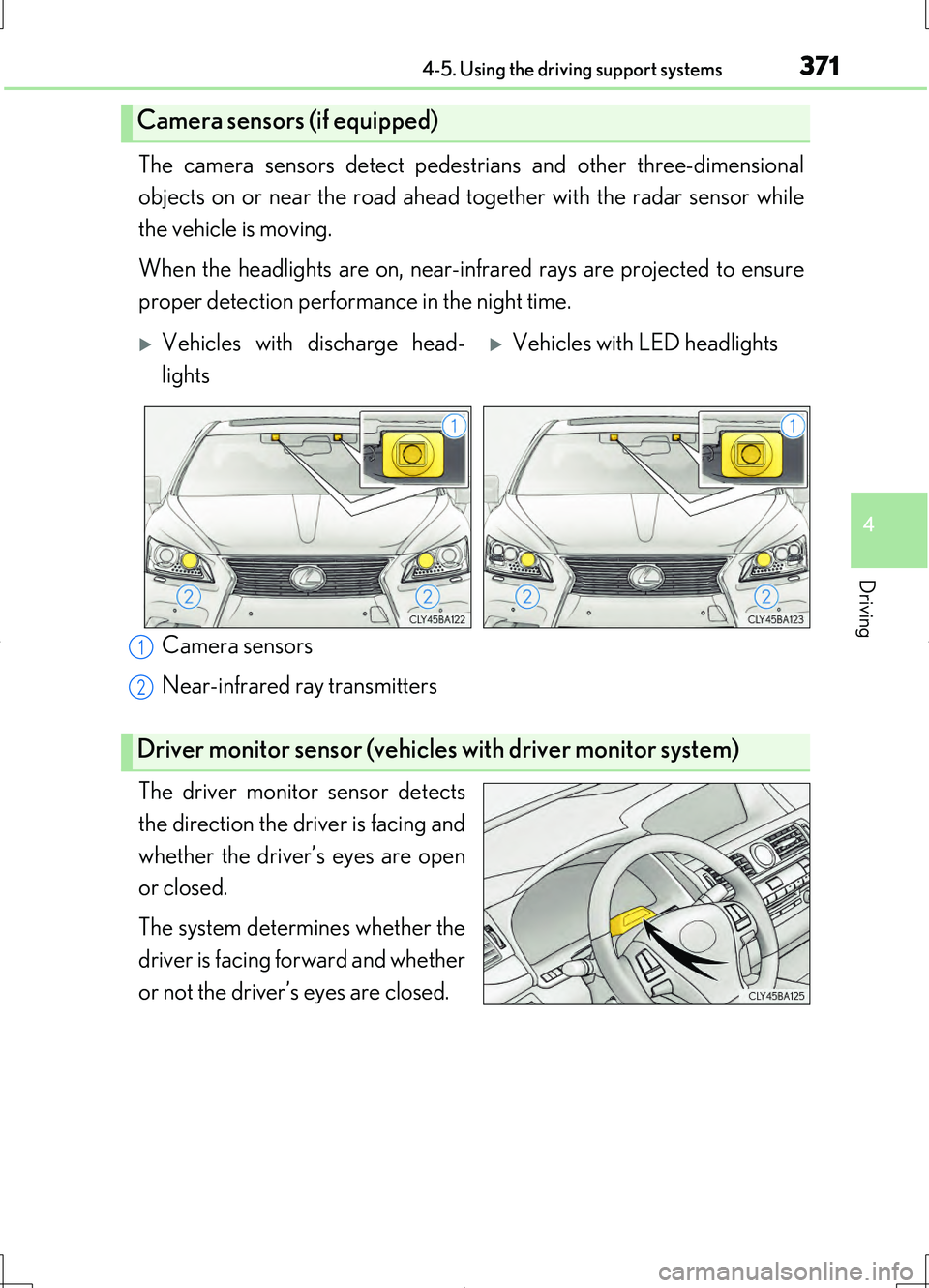
The camera sensors detect pedestrians and other three-dimensional
objects on or near the road ahead to gether with the radar sensor while
the vehicle is moving.
When the headlights are on, near-inf rared rays are projected to ensure
proper detection performance in the night time.
Camera sensors
Near-infrared ray transmitters
The driver monitor sensor detects
the direction the driver is facing and
whether the driver’s eyes are open
or closed.
The system determines whether the
driver is facing forward and whether
or not the driver’s eyes are closed.
Camera sensors (if equipped)
Vehicles with discharge head-
lights
Vehicles with LED headlights
Driver monitor sensor (vehicles with driver monitor system)
1
2
Page 377 of 708
3774-5. Using the driving support systems
4
Driving
LS460/LS460L_GE (OM50G06E)
For vehicles sold in Ukraine
MODEL: DNMWR004
CAUTION
■Limitations of the pre-crash safety system
The driver is solely responsible for safe driving. Always drive safely, taking care to
observe your surroundings.
Do not use the pre-crash safety system instead of normal braking operations under
any circumstances. This system will not prevent collisions or lessen damage or inju-
ries in all cases. Do not overly rely on this system. Failure to do so may cause an
accident, resulting in death or serious injury.
This system has been designed to help avoid and reduce the impact of collisions.
However, the system operates differently depending on the situation ( P. 372,
374). As a result, the same level of performance may not be expected in all cases.
Also, the pre-crash safety brakes may not operate if the driver is depressing the
brake pedal or turning the steering wheel, as the system will determine such condi-
tions as collision avoidance operations.
■Handling the radar sensor
Observe the following to ensure the pre-crash safety system can function effec-
tively. Otherwise, the system may not function correctly and could result in an acci-
dent.
●Keep the sensor and grille cover clean at all times.
Clean the sensor and grille cover with a soft cloth so you do not mark or damage
them.
●Do not subject the sensor or surrounding area to a strong impact.
If the sensor moves even slightly off position, the system may malfunction. If the
sensor or surrounding area is subject to a strong impact, always have the area
inspected and adjusted by your Lexus dealer.
●Do not disassemble the sensor.
●Do not attach accessories or stickers to the sensor, grille cover or surrounding
area.
●Do not modify or paint the sensor and grille cover.
●If the radar sensor needs to be replaced, contact your Lexus dealer.
Page 378 of 708
3784-5. Using the driving support systems
LS460/LS460L_GE (OM50G06E)
CAUTION
■Handling the camera sensors (if equipped)
Observe the following to ensure that the PCS functions effectively:
●Keep the windshield clean at all times.
PCS effectiveness may be reduced due to the presence of raindrops, condensa-
tion, ice or snow on the windshield.
●Do not subject the camera sensor to a st rong impact or force, and do not disas-
semble the camera sensor.
●Do not change the installation position of the camera sensor, or remove and rein-
stall it. The direction of the camera sensor is precisely adjusted.
●When the windshield fogs up, use the wi ndshield defogger to dry the windshield.
During cold weather, using the heater with air blowing to the feet may allow the
upper part of the windshield to fog up, having a negative effect on the images.
●Do not place anything on the dashboard.
Images reflected on the windshield may reduce the effectiveness of the camera
sensor.
●Do not scratch the camera lens, or let it get dirty.
●Do not attach a sticker or other items to the windshield near the camera sensor.
■Headlights (vehicles with camera sensors)
●Observe the following to ensure proper near-infrared ray projection:
• Keep the headlights clean at all times.
• The detection performance may deteriorate if the high beams are misaligned
or inoperative.
●The near-infrared ray transmitters project strong energy that is not visible.
Although the transmitters normally turn off when the vehicle is stopped, never
look into the headlights for your safety.
Page 386 of 708
3864-5. Using the driving support systems
LS460/LS460L_GE (OM50G06E)
For vehicles sold in Republic of El Salvador
FCC ID : OAYSRR2A
This device complies with part 15 of the FCC Rules. Operation is subject to the fol-
lowing two conditions:
(1) This device may not cause harmful interference, and
(2) this device must accept any interference received, including interference that
may cause undesired operation.
FCC Warning
Changes or modifications not expressly approved by the party responsible for com-
pliance could void the user’s authority to operate the equipment.
CAUTION
■Handling the radar sensor
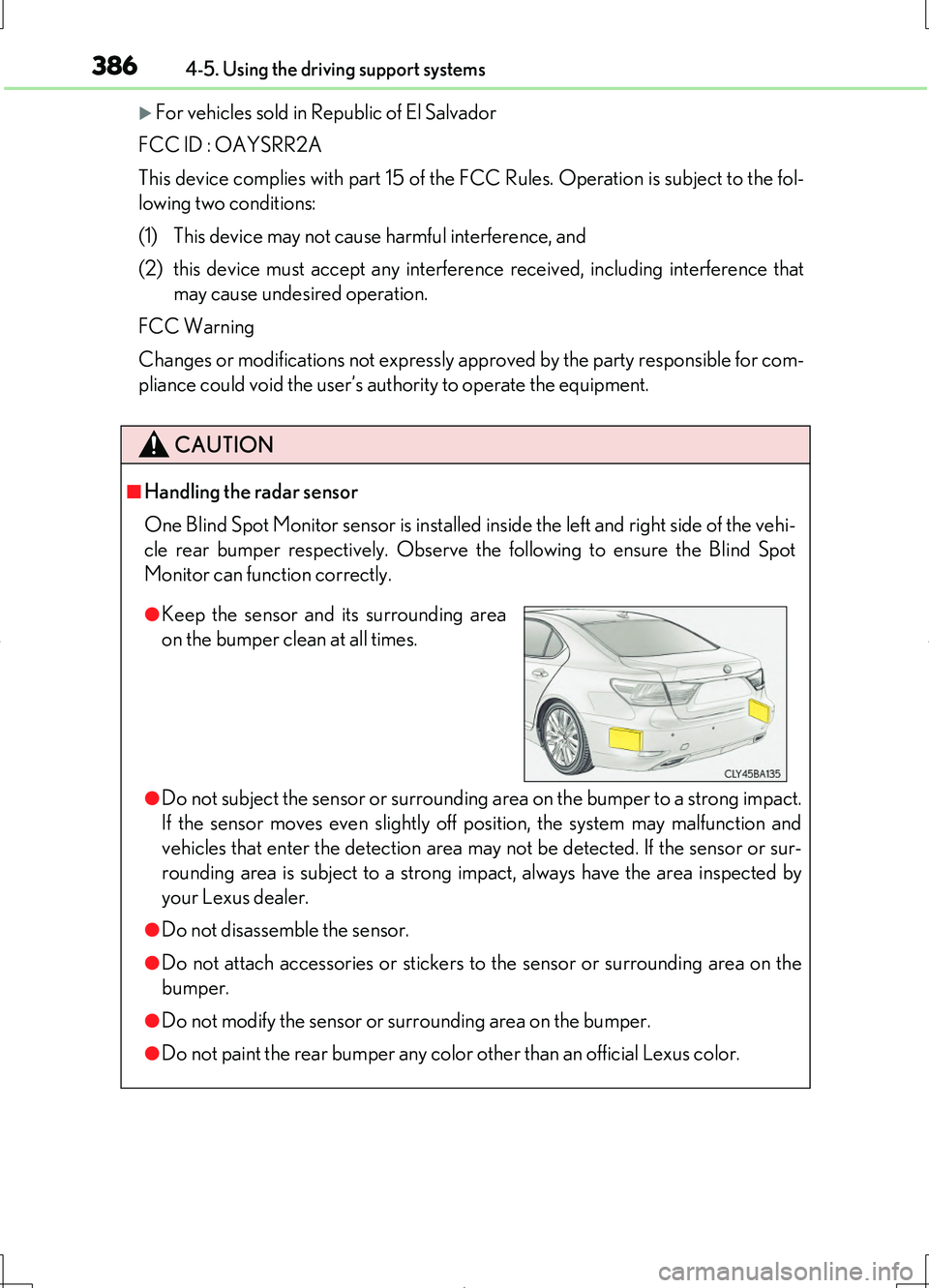
One Blind Spot Monitor sensor is installed inside the left and right side of the vehi-
cle rear bumper respectively. Observe the following to ensure the Blind Spot
Monitor can function correctly.
●Do not subject the sensor or surrounding area on the bumper to a strong impact.
If the sensor moves even slightly off position, the system may malfunction and
vehicles that enter the detection area may not be detected. If the sensor or sur-
rounding area is subject to a strong impact, always have the area inspected by
your Lexus dealer.
●Do not disassemble the sensor.
●Do not attach accessories or stickers to the sensor or surrounding area on the
bumper.
●Do not modify the sensor or surrounding area on the bumper.
●Do not paint the rear bumper any color other than an official Lexus color.
●Keep the sensor and its surrounding area
on the bumper clean at all times.
Page 391 of 708
3914-5. Using the driving support systems
4
Driving
LS460/LS460L_GE (OM50G06E)
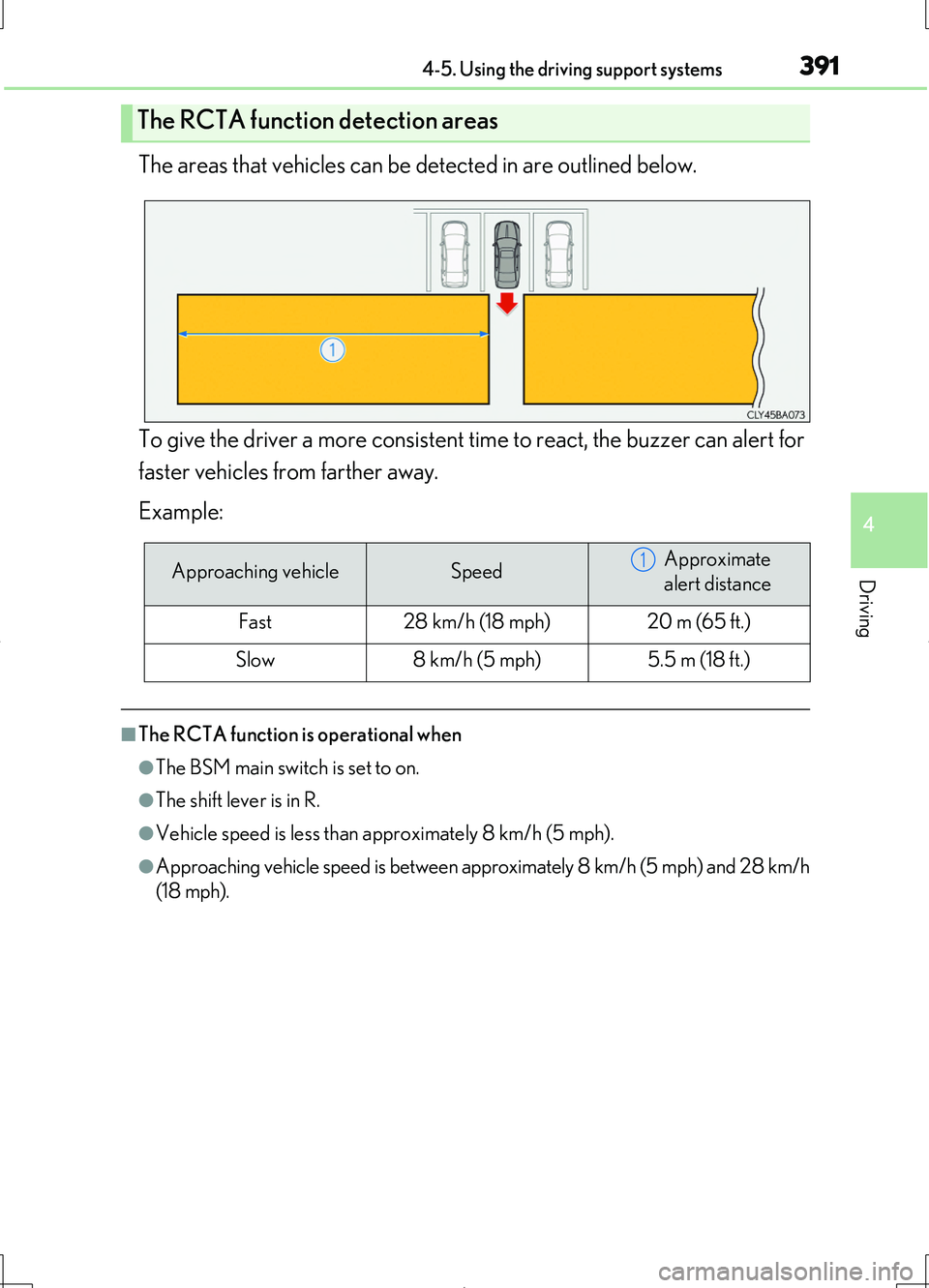
The areas that vehicles can be detected in are outlined below.
To give the driver a more consistent time to react, the buzzer can alert for
faster vehicles from farther away.
Example:
■The RCTA function is operational when
●The BSM main switch is set to on.
●The shift lever is in R.
●Vehicle speed is less than approximately 8 km/h (5 mph).
●Approaching vehicle speed is between approximately 8 km/h (5 mph) and 28 km/h
(18 mph).
The RCTA function detection areas
Approaching vehicleSpeedApproximate
alert distance
Fast28 km/h (18 mph)20 m (65 ft.)
Slow8 km/h (5 mph)5.5 m (18 ft.)
1