Buzzer LEXUS LS500 2018 User Guide
[x] Cancel search | Manufacturer: LEXUS, Model Year: 2018, Model line: LS500, Model: LEXUS LS500 2018Pages: 514, PDF Size: 10.62 MB
Page 140 of 514
140 3-5. Opening, closing the windows and moon roof
LS500_OM_OM50F54U_(U) 5 Release the power window switch for a
moment, resume push ing the switch in
the one-touch opening direction, and
hold it there for approximately 4 sec-
onds or more.
6 Pull and hold the power window switch
in the one-touch closing direction
again. After the side window is com-
pletely closed, continue holding the
switch for a further 1 second or more.
If you release the switch while the window is
moving, start again from the beginning.
If the window reverses and cannot be fully
closed or opened, have the vehicle
inspected by your Lexus dealer. ■
Door lock linked window operation●
The power windows can be opened and
closed using the mechanical key. *
( → P.437)●
The power windows can be opened using
the wireless remote control. *
( → P.96)*
: These settings must be customized at
your Lexus dealer.■
Power windows open warning buzzer
A buzzer sounds and a message is shown
on the multi-information display in the
instrument cluster when the engine switch
is turned off and the driver’s door is opened
with the power windows open. ■
Customization
Some functions can be customized.
( → P.468)
WARNING
Observe the following precautions.
Failure to do so may result in death or
serious injury. ■
Closing the windows ●
The driver is responsible for all the
power window operations, including
the operation for the passengers. In
order to prevent accidental operation,
especially by a child, do not let a child
operate the power windows. It is possi-
ble for children and other passengers
to have body parts caught in the power
window. Also, when riding with a child,
it is recommended to use the window
lock switch. ( → P.141)●
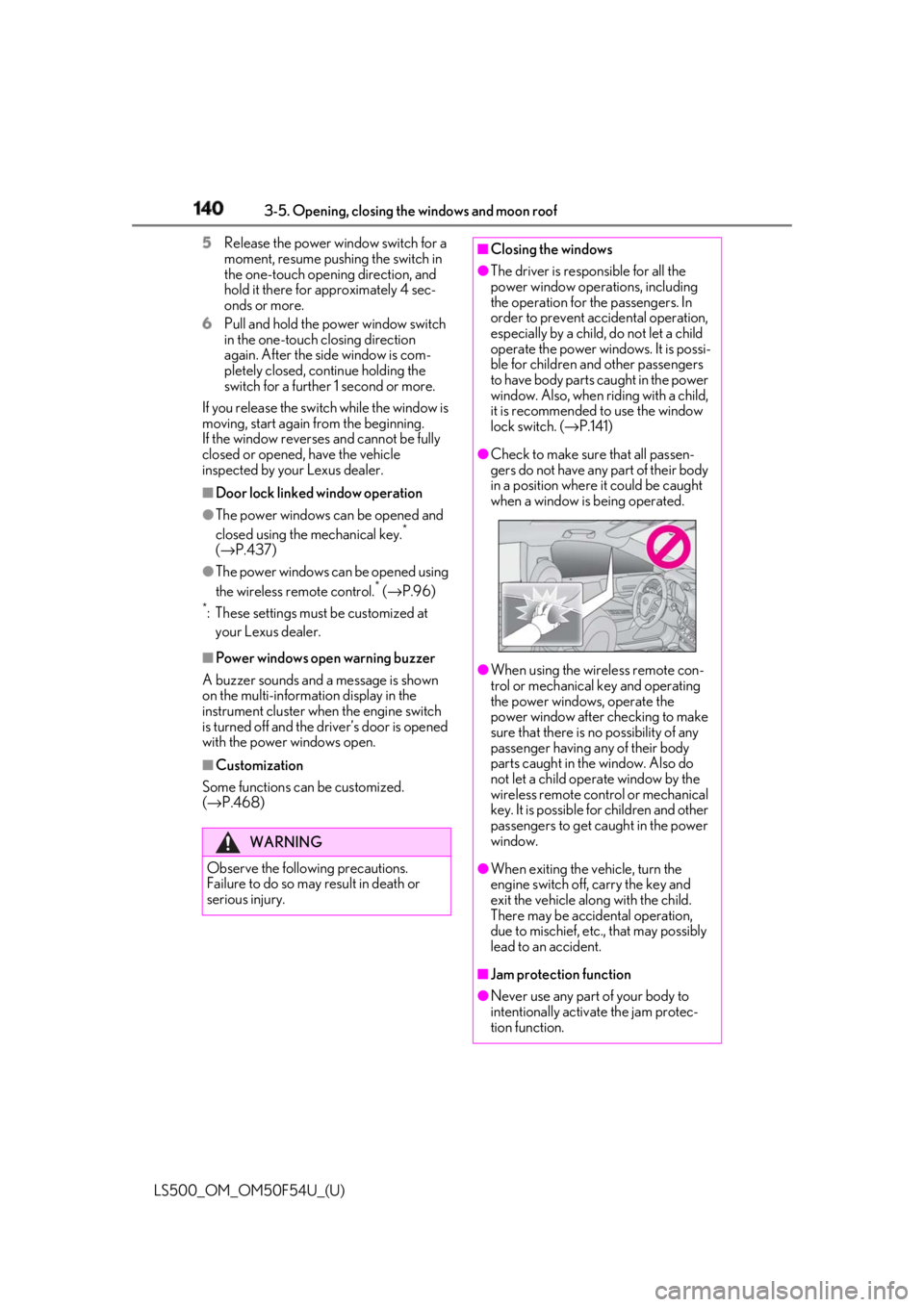
Check to make sure that all passen-
gers do not have any part of their body
in a position where it could be caught
when a window is being operated.
●
When using the wireless remote con-
trol or mechanical key and operating
the power windows, operate the
power window after checking to make
sure that there is no possibility of any
passenger having any of their body
parts caught in the window. Also do
not let a child operate window by the
wireless remote control or mechanical
key. It is possible for children and other
passengers to get caught in the power
window.
●
When exiting the vehicle, turn the
engine switch off, carry the key and
exit the vehicle along with the child.
There may be accidental operation,
due to mischief, etc., that may possibly
lead to an accident.
■
Jam protection function
●
Never use any part of your body to
intentionally activa te the jam protec-
tion function.
Page 143 of 514
1433-5. Opening, closing the windows and moon roof
LS500_OM_OM50F54U_(U) 3
Before driving after performing the above procedure cor-
rectly, have the vehicle inspected by your
Lexus dealer. ■
If the moon roof does not move normally
If the moon roof does not open or close
normally or the automatic opening function
does not operate, perform the following ini-
tialization procedure.
1 Stop the vehicle.
2 Press and hold the “DOWN” switch. *
The moon roof will stop at the tilt-up posi-
tion. After that, it will op en, close, tilt up, tilt
down, and stop at the fully closed position.
3 Confirm that the moon roof has com-
pletely stopped and release the switch. *
: If you release the switch while the moon
roof is moving, perform the procedure
again from the beginning.
If, after performing the above procedures
correctly, the moon roof still does not open
or close normally or the automatic opening
function does not operate, have the vehicle
inspected by your Lexus dealer. ■
Moon roof open warning buzzer
A buzzer sounds and a message is shown
on the multi-information display in the
instrument cluster when the engine switch
is turned off and the driver’s door is opened
with the moon roof open. ■
Customization
Some functions can be customized.
( → P.468)
WARNING
Observe the following precautions.
Failure to do so may cause death or seri-
ous injury.
■
Opening the moon roof
●
Do not allow any passengers to put
their hands or heads outside the vehi-
cle while it is moving.
●
Do not sit on top of the moon roof. ■
Opening and closing the moon roof ●
The driver is responsible for moon roof
opening and closing operations.
In order to prevent accidental opera-
tion, especially by a child, do not let a
child operate the moon roof. It is possi-
ble for children and other passengers
to have body parts caught in the moon
roof. ●
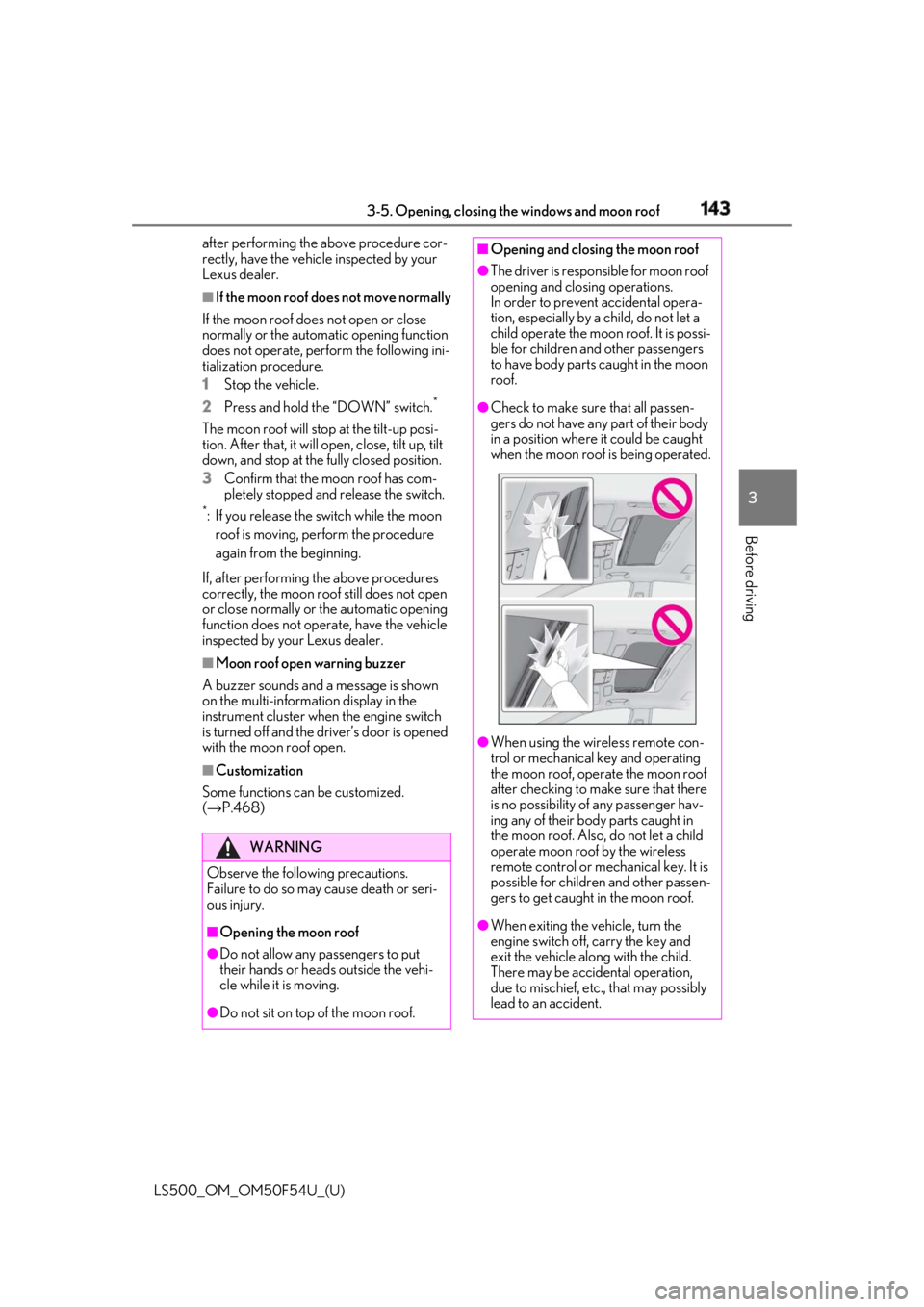
Check to make sure that all passen-
gers do not have any part of their body
in a position where it could be caught
when the moon roof is being operated.
●
When using the wireless remote con-
trol or mechanical key and operating
the moon roof, oper ate the moon roof
after checking to make sure that there
is no possibility of any passenger hav-
ing any of their body parts caught in
the moon roof. Also, do not let a child
operate moon roof by the wireless
remote control or mech anical key. It is
possible for children and other passen-
gers to get caught in the moon roof.
●
When exiting the vehicle, turn the
engine switch off, carry the key and
exit the vehicle along with the child.
There may be accidental operation,
due to mischief, etc., that may possibly
lead to an accident.
Page 147 of 514
1473-5. Opening, closing the windows and moon roof
LS500_OM_OM50F54U_(U) 3
Before driving 5 Check that the panoramic moon roof
and electronic front roof sunshade are
fully closed and release the switch. *
: If the switch is released at the incorrect
time, the procedure will have to be per-
formed again from the beginning.
If, after performing the above procedures
correctly, the panoramic moon roof and
electronic front roof sunshade still does not
open or close normally or the automatic
opening function does not operate, have
the vehicle inspected by your Lexus dealer. ■
If the electronic rear roof sunshade
does not move normally
If the electronic rear roof sunshade does
not open or close normally or the automatic
opening function does not operate, per-
form the following initialization procedure.
1 Stop the vehicle.
2 Turn the engine switch to IGNITION
ON mode.
3 Open the rear roof sunshade.
4 Press and hold the rear roof sunshade
switch. *
Continue pressing th e switch for approxi-
mately 10 seconds after the electronic rear
roof sunshade closes. The electronic rear
roof sunshade will be gin operating again
and stop at the fully closed position.
5 Check that the electronic rear roof sun-
shade are fully closed and release the
switch. *
: If the switch is released at the incorrect
time, the procedure will have to be per-
formed again from the beginning.
If, after performing the above procedures
correctly, the electronic rear roof sunshade
still does not open or close normally or the
automatic opening function does not oper-
ate, have the vehicle inspected by your
Lexus dealer.
■
Panoramic moon roof open warning
buzzer
A buzzer sounds and a message is shown
on the multi-information display in the
instrument cluster when the engine switch
is turned off and the driver’s door is opened
with the panoramic moon roof open. ■
Customization
Some functions can be customized.
( → P.468)
WARNING
Observe the following precautions.
Failing to do so may cause death or seri-
ous injury. ■
Opening and closing the electronic
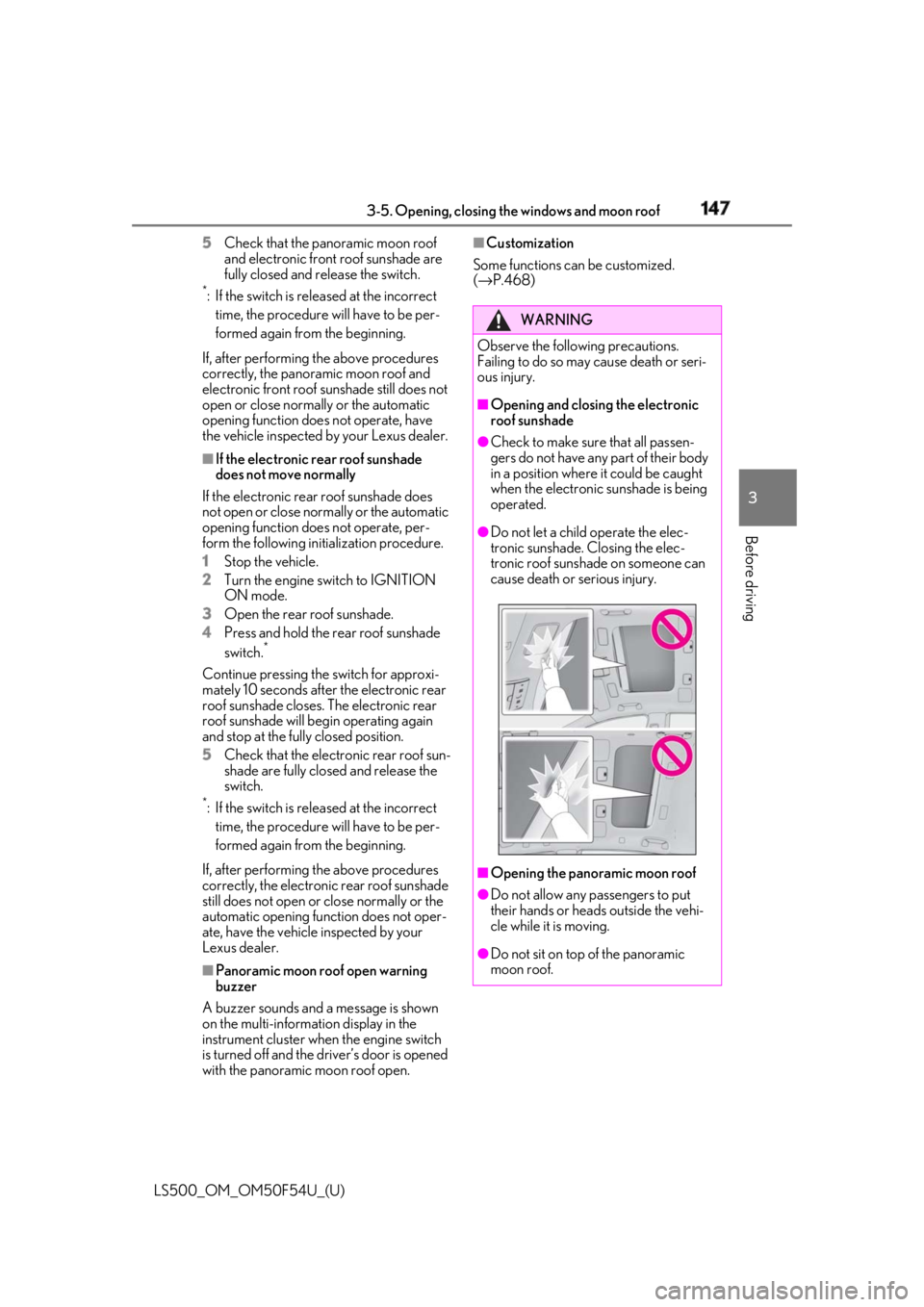
roof sunshade ●
Check to make sure that all passen-
gers do not have any part of their body
in a position where it could be caught
when the electronic sunshade is being
operated. ●
Do not let a child operate the elec-
tronic sunshade. Closing the elec-
tronic roof sunshade on someone can
cause death or serious injury.
■
Opening the panoramic moon roof
●
Do not allow any passengers to put
their hands or heads outside the vehi-
cle while it is moving.
●
Do not sit on top of the panoramic
moon roof.
Page 162 of 514
162 4-2. Driving procedures
LS500_OM_OM50F54U_(U) ■
Automatic P position selection function
→ P.166
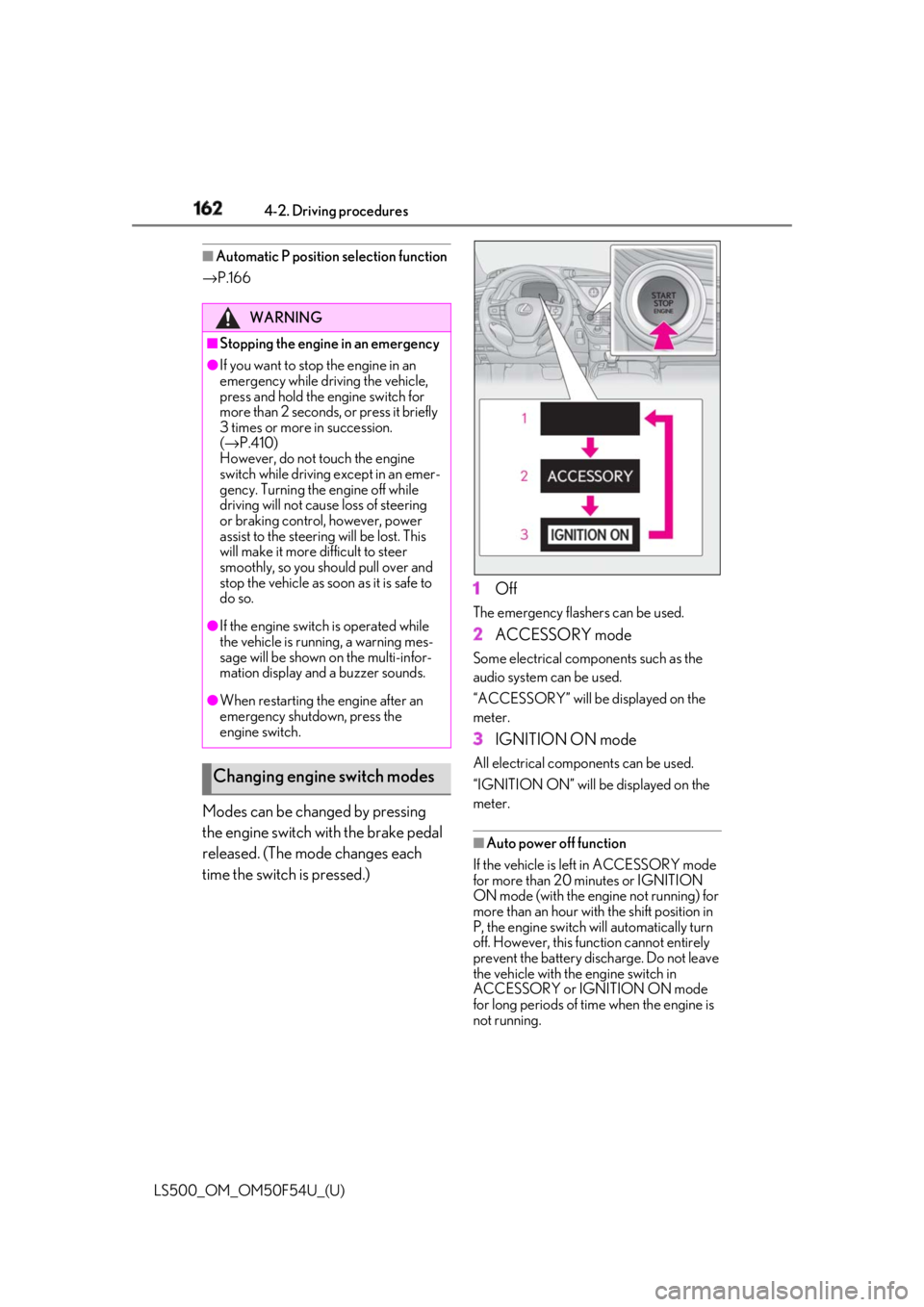
Modes can be changed by pressing
the engine switch with the brake pedal
released. (The mode changes each
time the switch is pressed.) 1 Off The emergency flashers can be used.
2 ACCESSORY mode Some electrical components such as the
audio system can be used.
“ACCESSORY” will be displayed on the
meter.
3 IGNITION ON mode All electrical components can be used.
“IGNITION ON” will be displayed on the
meter.
■
Auto power off function
If the vehicle is left in ACCESSORY mode
for more than 20 minutes or IGNITION
ON mode (with the engine not running) for
more than an hour with the shift position in
P, the engine switch will automatically turn
off. However, this function cannot entirely
prevent the battery discharge. Do not leave
the vehicle with the engine switch in
ACCESSORY or IGNITION ON mode
for long periods of time when the engine is
not running.WARNING■
Stopping the engine in an emergency●
If you want to stop the engine in an
emergency while driving the vehicle,
press and hold the engine switch for
more than 2 seconds, or press it briefly
3 times or more in succession.
( → P.410)
However, do not touch the engine
switch while driving except in an emer-
gency. Turning the engine off while
driving will not cause loss of steering
or braking control, however, power
assist to the steering will be lost. This
will make it more difficult to steer
smoothly, so you should pull over and
stop the vehicle as soon as it is safe to
do so.●
If the engine switch is operated while
the vehicle is running, a warning mes-
sage will be shown on the multi-infor-
mation display and a buzzer sounds.●
When restarting the engine after an
emergency shutdown, press the
engine switch.
Changing engine switch modes
Page 164 of 514

164 4-2. Driving procedures
LS500_OM_OM50F54U_(U) the shift position by moving the shift lever or
by pressing the P position switch in any of
the following situations, the buzzer will
sound and the shifting operation will be dis-
abled or the shift position will automatically
change to N. When this happens, select an
appropriate shift position. ●
Situations where the shifting operation
will be disabled:
• When an attempt is made to change the
shift position from P to another position
by moving the shift lever without depress-
ing the brake pedal.
• When an attempt is made to change the
shift position from P or N to M by moving
the shift lever.
• When the P position switch is pressed
while the vehicle is running. *1
●
Situations where the shift position will
automatically change to N:
• When an attempt is made to select the R
position by moving the shift lever when
the vehicle is moving forward. *2
• When an attempt is made to select the D
position by moving the shift lever when
the vehicle is moving in reverse. *3
• When the shift position is changed from
R to M●
If N is selected while driving at a certain
speed, even if the shift lever is not held in
the N position, the shift position changes
to N. In this situation, the buzzer sounds
and a confirmation message is displayed
on the multi-information display to inform
the driver that the shift position has
changed to N. *1
: Shift position may be changed to P
when driving at extremely low speeds. *2
: Shift position may be changed to R
when driving at low speeds. *3
: Shift position may be changed to D
when driving at low speeds.
■
Reverse warning buzzer
When shifting into R, a buzzer will sound to
inform the driver that the shift position is in
R.
■
To protect the automatic transmission
If the automatic transmission fluid tempera- ture is high, “Transmission Fluid Temp High
See Owner’s Manual” will be displayed on
the multi-information display and the vehi-
cle will go into transmission protection
mode automatically. Have the vehicle
inspected by your Lexus dealer. ■
When driving with dynamic radar cruise
control with full-speed range activated
Even when performing the following
actions with the intent of enabling engine
braking, engine braking will not be acti-
vated because dynamic radar cruise con-
trol with full-speed range will not be
canceled. ●
While driving in the D position, down-
shifting to 9, 8, 7, 6, 5 or 4. ●
When switching the driving mode to
sport mode while driving in the D position
( → P.289)■
Restraining sudden start (Drive-Start
Control)
→ P.151 ■
AI-SHIFT
The AI-SHIFT automatica lly selects the suit-
able gear according to driver performance
and driving conditions.
The AI-SHIFT automatically operates when
the shift position is in D. (Shifting the shift
position to the M position cancels the func-
tion.) ■
If a message about a shift operation is
shown
To prevent the shift position from being
selected incorrectly or the vehicle from
moving unexpectedly, the shift position may
be changed automatically or operating the
shift lever may be requ ired. In this case,
change the shift position following the mes-
sages on the multi-information display.
■
After recharging/reconnecting the bat-
tery
→ P.384
■
Customization
Some functions can be customized.
( → P.468)
Page 166 of 514
166 4-2. Driving procedures
LS500_OM_OM50F54U_(U) The current shift position is illuminated.
When selecting the shift position, make
sure that the shift position has been
changed to the desired position by check-
ing the shift position indicator provided on
the instrument cluster.
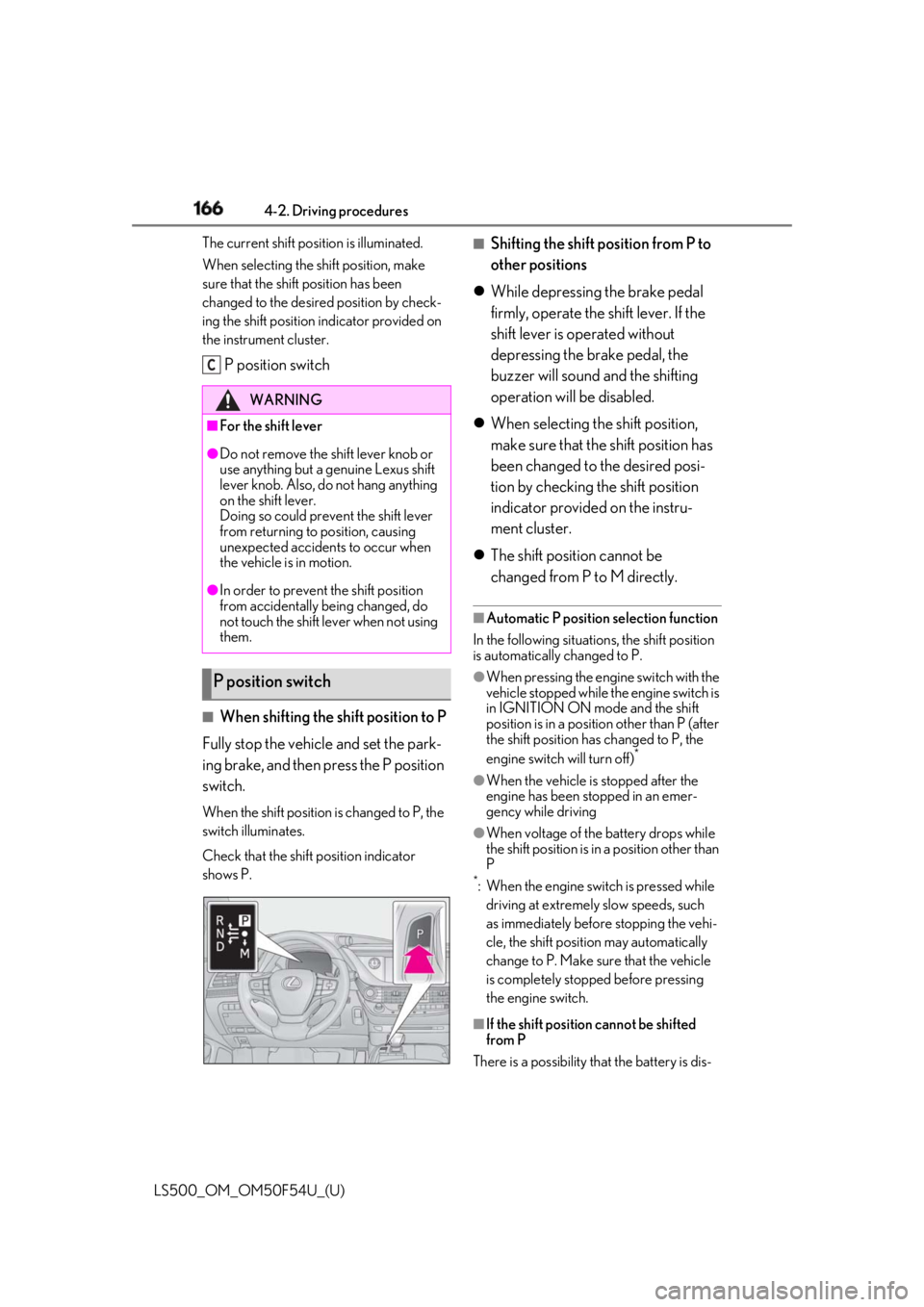
P position switch
■
When shifting the shift position to P
Fully stop the vehicle and set the park-
ing brake, and then press the P position
switch. When the shift position is changed to P, the
switch illuminates.
Check that the shift position indicator
shows P. ■
Shifting the shift position from P to
other positions
While depressing the brake pedal
firmly, operate the shift lever. If the
shift lever is operated without
depressing the brake pedal, the
buzzer will sound and the shifting
operation will be disabled.
When selecting the shift position,
make sure that the shift position has
been changed to the desired posi-
tion by checking the shift position
indicator provided on the instru-
ment cluster.
The shift position cannot be
changed from P to M directly. ■
Automatic P position selection function
In the following situations, the shift position
is automatically changed to P. ●
When pressing the engine switch with the
vehicle stopped while th e engine switch is
in IGNITION ON mode and the shift
position is in a position other than P (after
the shift position has changed to P, the
engine switch will turn off) *
●
When the vehicle is stopped after the
engine has been stopped in an emer-
gency while driving ●
When voltage of the battery drops while
the shift position is in a position other than
P *
: When the engine switch is pressed while
driving at extremely slow speeds, such
as immediately before stopping the vehi-
cle, the shift position may automatically
change to P. Make su re that the vehicle
is completely stopped before pressing
the engine switch.
■
If the shift position cannot be shifted
from P
There is a possibility th at the battery is dis-WARNING■
For the shift lever●
Do not remove the sh ift lever knob or
use anything but a genuine Lexus shift
lever knob. Also, do not hang anything
on the shift lever.
Doing so could prevent the shift lever
from returning to position, causing
unexpected accidents to occur when
the vehicle is in motion.●
In order to prevent the shift position
from accidentally being changed, do
not touch the shift lever when not using
them.
P position switch C
Page 168 of 514
168 4-2. Driving procedures
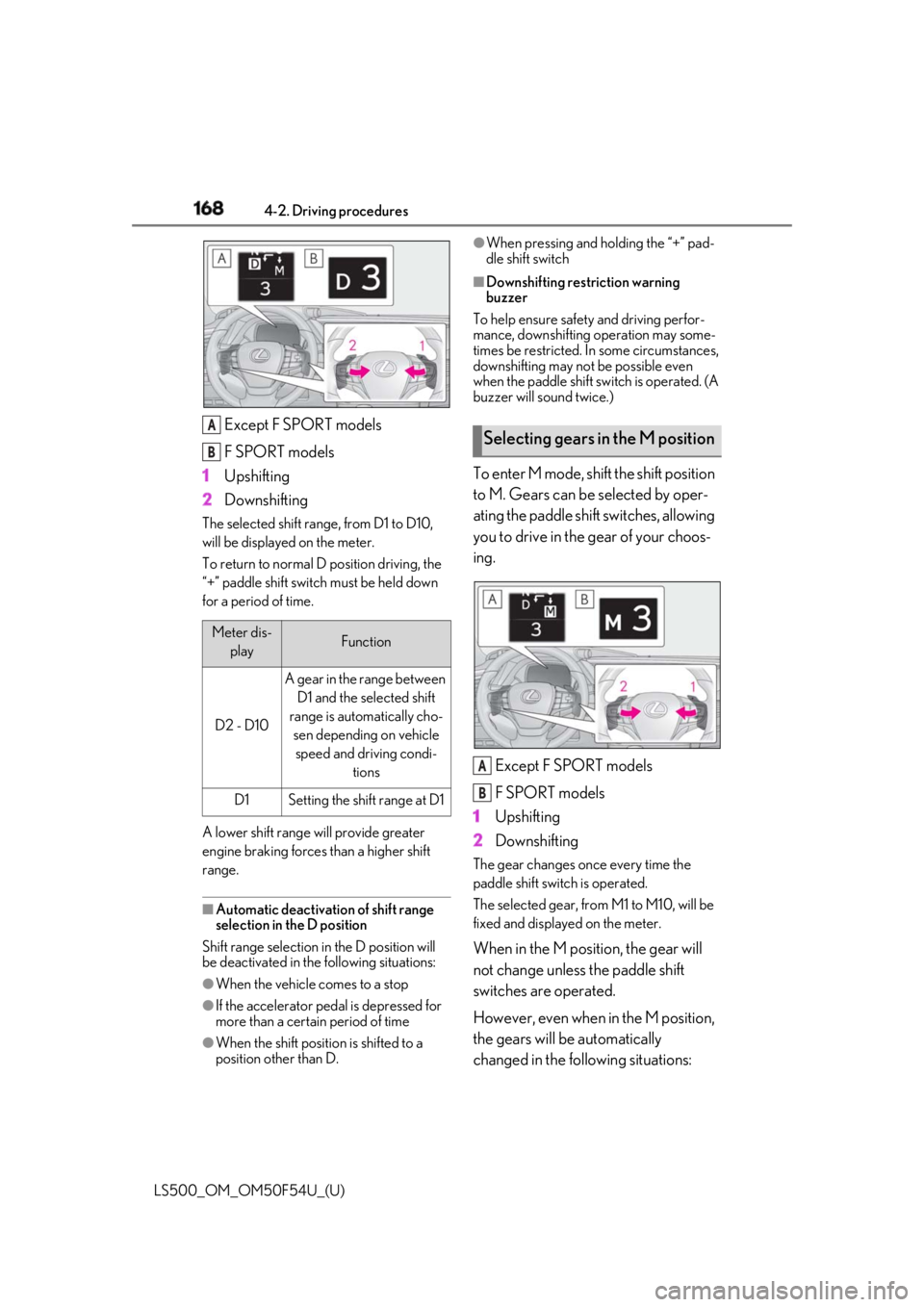
LS500_OM_OM50F54U_(U) Except F SPORT models
F SPORT models
1 Upshifting
2 DownshiftingThe selected shift rang e, from D1 to D10,
will be displayed on the meter.
To return to normal D position driving, the
“+” paddle shift switch must be held down
for a period of time.
A lower shift range will provide greater
engine braking forces than a higher shift
range.
■
Automatic deactivation of shift range
selection in the D position
Shift range selection in the D position will
be deactivated in the following situations:
●
When the vehicle comes to a stop
●
If the accelerator pedal is depressed for
more than a certain period of time
●
When the shift position is shifted to a
position other than D. ●
When pressing and holding the “+” pad-
dle shift switch ■
Downshifting restriction warning
buzzer
To help ensure safety and driving perfor-
mance, downshifting operation may some-
times be restricted. In some circumstances,
downshifting may not be possible even
when the paddle shift sw itch is operated. (A
buzzer will sound twice.)
To enter M mode, shift the shift position
to M. Gears can be selected by oper-
ating the paddle shift switches, allowing
you to drive in the gear of your choos-
ing.
Except F SPORT models
F SPORT models
1 Upshifting
2 Downshifting The gear changes once every time the
paddle shift switch is operated.
The selected gear, from M1 to M10, will be
fixed and displayed on the meter.
When in the M position, the gear will
not change unless the paddle shift
switches are operated.
However, even when in the M position,
the gears will be automatically
changed in the following situations:Meter dis-
play Function
D2 - D10 A gear in the range between
D1 and the selected shift
range is automatically cho-
sen depending on vehicle
speed and driving condi-
tions
D1 Setting the shift range at D1A
B
Selecting gears in the M position
A
B
Page 169 of 514
1694-2. Driving procedures
LS500_OM_OM50F54U_(U) 4
Driving When vehicle speed drops (down-
shift only).
When it is necessary to protect the
engine or automatic transmission
when the engine coolant tempera-
ture is low, the automatic transmis-
sion fluid temperature is high or low,
or other reasons.
Also, the gear will not shift when the
vehicle speed is low, even if an upshift
operation is performed. ■
Downshifting restriction warning
buzzer
To help ensure safety and driving perfor-
mance, downshifting operation may some-
times be restricted. In some circumstances,
downshifting may not be possible even
when the paddle shift switch is operated. (A
buzzer will sound twice.)
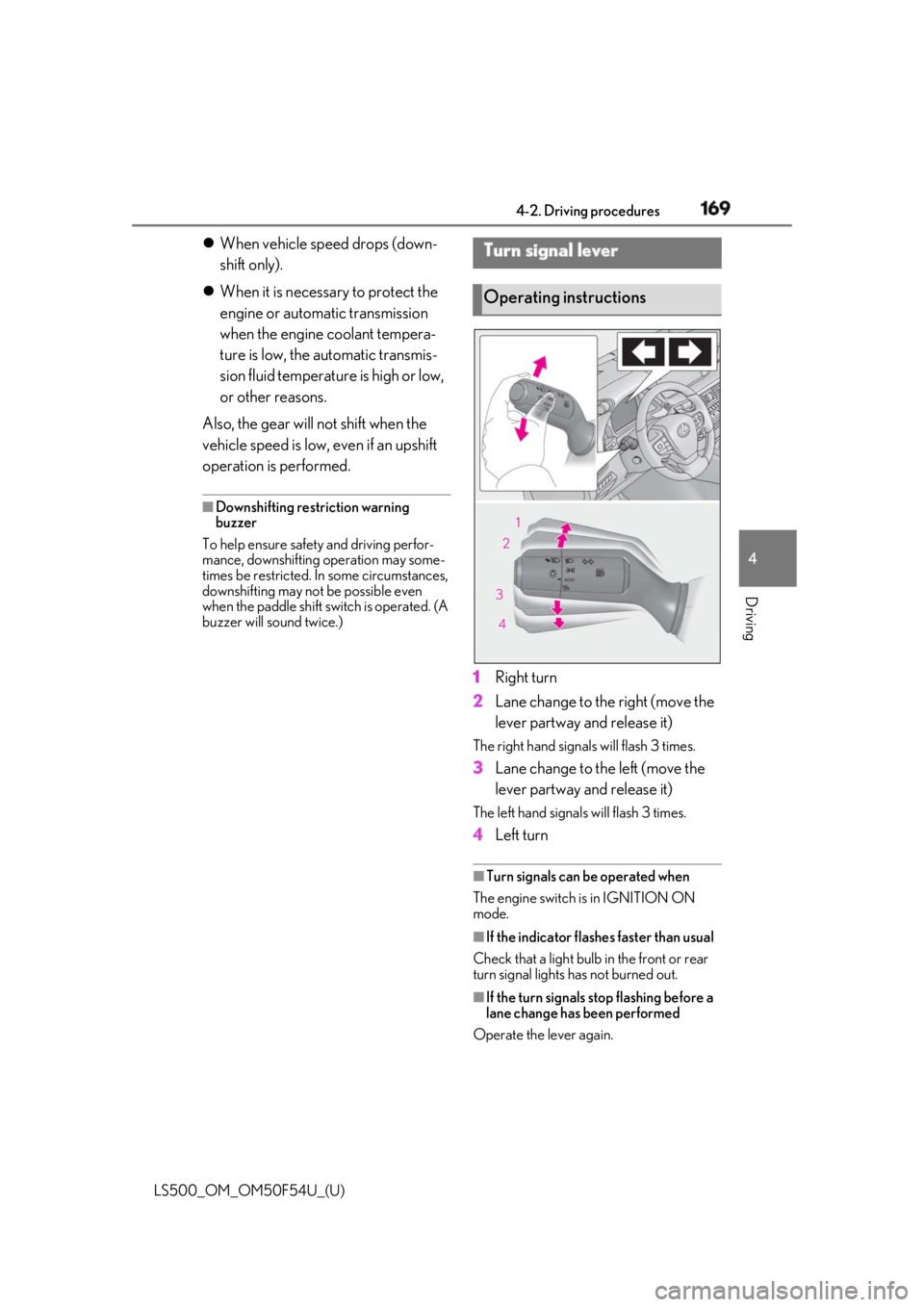
1 Right turn
2 Lane change to the right (move the
lever partway and release it) The right hand signals will flash 3 times.
3 Lane change to the left (move the
lever partway and release it) The left hand signals will flash 3 times.
4 Left turn ■
Turn signals can be operated when
The engine switch is in IGNITION ON
mode.
■
If the indicator flashes faster than usual
Check that a light bulb in the front or rear
turn signal lights has not burned out.
■
If the turn signals stop flashing before a
lane change has been performed
Operate the lever again.Turn signal lever
Operating instructions
Page 172 of 514
172 4-2. Driving procedures
LS500_OM_OM50F54U_(U) this happens, refrain from operating the
parking brake. Normal operation will return
after about 1 minute. ■
If “EPB Activation Stopped Incom-
pletely” or “EPB unavailable” is dis-
played on the multi-information display
Operate the parking brake switch. If the
message does not disappear after operat-
ing the switch several times, the system may
be malfunctioning. Have the vehicle
inspected by your Lexus dealer. ■
Parking brake operation sound
When the parking brake operates, a motor
sound (whirring sound) may be heard. This
does not indicate a malfunction. ■
Parking brake operation●
Depending on the engine switch mode,
the parking brake indi cator light will turn
on and stay on as described below:
IGNITION ON mode: Comes on until
the parking brake is released.
Not in IGNITION ON mode: Stays on
for approximately 15 seconds. ●
When the engine switch is turned off with
the parking brake set, the parking brake
indicator light will stay on for about 15
seconds. This does not indicate a mal-
function.■
When the parking brake switch mal-
functions
Automatic mode (automatic brake setting
and releasing) will be turned on automati-
cally. ■
Parking the vehicle
→ P.150
■
Parking brake engaged warning buzzer
A buzzer will sound if the vehicle is driven
with the parking brake engaged. “EPB
Applied” is displayed on the multi-informa-
tion display. (with the vehicle reached a
speed of 3 mph [5 km/h])
■
If the brake system warning light comes
on
→ P.418
■
Usage in winter time
→ P.299 WARNING■
When parking the vehicle
Do not leave a child in the vehicle alone.
The parking brake may be released unin-
tentionally and there is the danger of the
vehicle moving that may lead to an acci-
dent resulting in death or serious injury.
NOTICE■
When parking the vehicle
Before you leave the vehicle, set the
parking brake, shift the shift position to P
and make sure that the vehicle does not
move. ■
When the system malfunctions
Stop the vehicle in a safe place and
check the warning messages. ■
When the parking brake cannot be
released due to a malfunction
Driving the vehicle with the parking
brake set will lead to brake components
overheating, which may affect braking
performance and increase brake wear.
Have the vehicle inspected by your
Lexus dealer immediately if this occurs.
Page 173 of 514
1734-2. Driving procedures
LS500_OM_OM50F54U_(U) 4
Driving
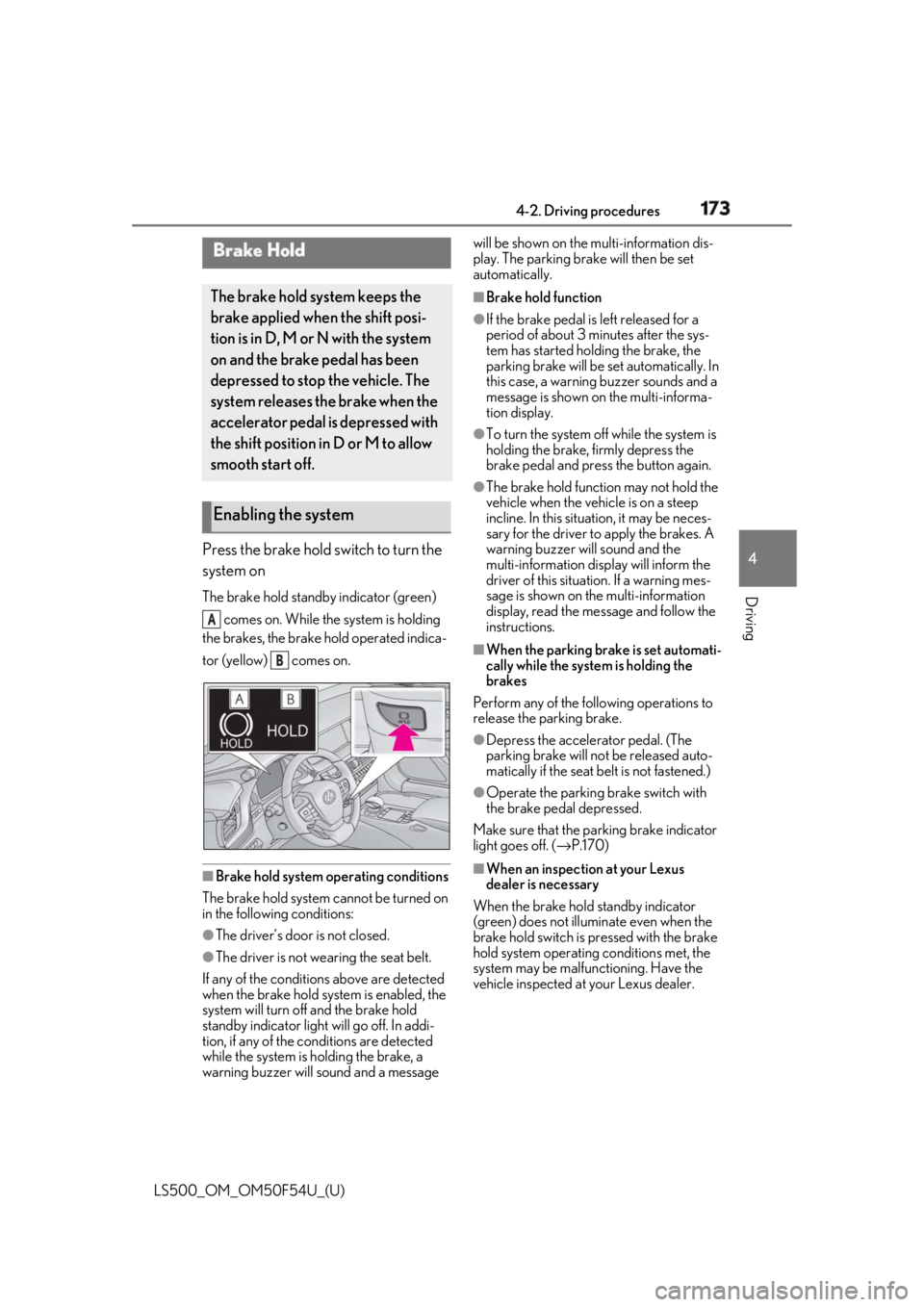
Press the brake hold switch to turn the
system on The brake hold standby indicator (green)
comes on. While the system is holding
the brakes, the brake hold operated indica-
tor (yellow) comes on.
■
Brake hold system operating conditions
The brake hold system cannot be turned on
in the following conditions:
●
The driver’s door is not closed.
●
The driver is not wearing the seat belt.
If any of the conditions above are detected
when the brake hold system is enabled, the
system will turn off and the brake hold
standby indicator light will go off. In addi-
tion, if any of the conditions are detected
while the system is holding the brake, a
warning buzzer will sound and a message will be shown on the multi-information dis-
play. The parking brake will then be set
automatically. ■
Brake hold function ●
If the brake pedal is left released for a
period of about 3 mi nutes after the sys-
tem has started holding the brake, the
parking brake will be set automatically. In
this case, a warning buzzer sounds and a
message is shown on the multi-informa-
tion display. ●
To turn the system off while the system is
holding the brake, firmly depress the
brake pedal and press the button again. ●
The brake hold function may not hold the
vehicle when the vehicle is on a steep
incline. In this situation, it may be neces-
sary for the driver to apply the brakes. A
warning buzzer will sound and the
multi-information display will inform the
driver of this situat ion. If a warning mes-
sage is shown on the multi-information
display, read the message and follow the
instructions. ■
When the parking brake is set automati-
cally while the system is holding the
brakes
Perform any of the following operations to
release the parking brake. ●
Depress the accelerator pedal. (The
parking brake will not be released auto-
matically if the seat belt is not fastened.) ●
Operate the parking brake switch with
the brake pedal depressed.
Make sure that the pa rking brake indicator
light goes off. ( → P.170)
■
When an inspection at your Lexus
dealer is necessary
When the brake hold standby indicator
(green) does not illuminate even when the
brake hold switch is pressed with the brake
hold system operating conditions met, the
system may be malfun ctioning. Have the
vehicle inspected at your Lexus dealer.Brake Hold The brake hold system keeps the
brake applied when the shift posi-
tion is in D, M or N with the system
on and the brake pedal has been
depressed to stop the vehicle. The
system releases the brake when the
accelerator pedal is depressed with
the shift position in D or M to allow
smooth start off.
Enabling the system A
B