Buzzer LEXUS LS500 2018 Owner's Guide
[x] Cancel search | Manufacturer: LEXUS, Model Year: 2018, Model line: LS500, Model: LEXUS LS500 2018Pages: 514, PDF Size: 10.62 MB
Page 232 of 514
232 4-5. Using the driving support systems
LS500_OM_OM50F54U_(U) ■
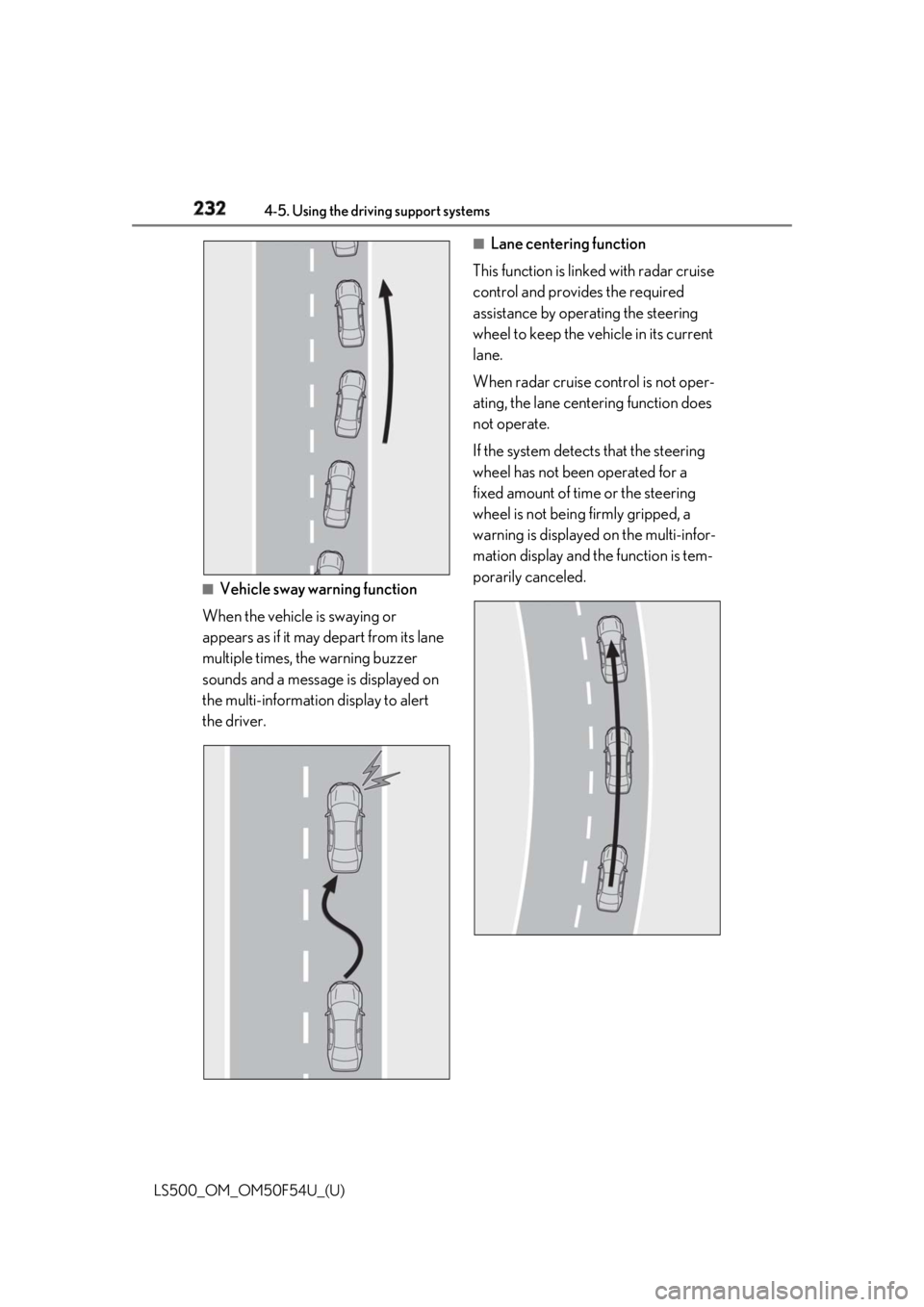
Vehicle sway warning function
When the vehicle is swaying or
appears as if it may depart from its lane
multiple times, the warning buzzer
sounds and a message is displayed on
the multi-information display to alert
the driver. ■
Lane centering function
This function is linked with radar cruise
control and provides the required
assistance by operating the steering
wheel to keep the vehicle in its current
lane.
When radar cruise control is not oper-
ating, the lane centering function does
not operate.
If the system detects that the steering
wheel has not been operated for a
fixed amount of time or the steering
wheel is not being firmly gripped, a
warning is displayed on the multi-infor-
mation display and the function is tem-
porarily canceled.
Page 236 of 514
236 4-5. Using the driving support systems
LS500_OM_OM50F54U_(U) function is automatically restored.
( → P.235)■
Steering assist function/lane centering
function
Depending on the vehicle speed, lane
departure situation, ro ad conditions, etc.,
the driver may not feel the function is oper-
ating or the function may not operate at all.■
Lane departure alert function
The warning buzzer may be difficult to hear
due to external noise, audio playback, etc.
Also, it may be difficult to feel steering
wheel vibrations due to the road conditions,
etc. ■
Hands off steering wheel alert
When the system determines that the driver
has removed the hands from the steering
wheel while the steering assist function or
lane centering function is operating, a warn-
ing message is displaye d on the multi-infor-
mation display. If the driver continues to
keep the hands off of the steering wheel, a
warning message is displayed and the func-
tion is temporarily canceled. This alert also
operates in the same way when the driver
continuously operates the steering wheel
only a small amount. However, depending
on the road conditions , etc., the function
may not cancel. ■
White (yellow) lines ar e only on one side
of road
The LKA system will not operate for the
side on which white (yellow) lines could not
be recognized. ■
Conditions in whic h functions may not
operate properly
In the following situations, the camera sen-
sor may not detect white (yellow) lines and
various functions may not operate normally.
●
There are shadows on the road that run
parallel with, or cover, the white (yellow)
lines.
●
The vehicle is driven in an area without
white (yellow) lines, such as in front of a
tollgate or checkpoint, or at an intersec-
tion, etc.
●
The white (yellow) lines are cracked,
“Botts’ dots”, “Raised pavement marker” or stones are present. ●
The white (yellow) lines cannot be seen
or are difficult to see due to sand, etc. ●
The vehicle is driven on a road surface
that is wet due to rain, puddles, etc. ●
The traffic lines are yellow (which may be
more difficult to reco gnize than lines that
are white). ●
The white (yellow) lines cross over a curb,
etc. ●
The vehicle is driven on a bright surface,
such as concrete. ●
The vehicle is driven on a surface that is
bright due to reflected light, etc. ●
The vehicle is driven in an area where the
brightness changes sudd enly, such as at
the entrances and exits of tunnels, etc. ●
Light from the headlights of an oncoming
vehicle, the sun, etc. enters the camera. ●
The vehicle is driven where the road
diverges, merges, etc. ●
The vehicle is driven on a slope. ●
The vehicle is driven on a road which tilts
left or right, or a winding road. ●
The vehicle is driven on an unpaved or
rough road. ●
The vehicle is driven around a sharp
curve. ●
The traffic lane is excessively narrow or
wide. ●
The vehicle is extremely tilted due to car-
rying heavy luggage or having improper
tire pressure. ●
The distance to the preceding vehicle is
extremely short.
●
The vehicle is moving up and down a
large amount due to road conditions
during driving (poor roads or road
seams).
●
The headlight lenses are dirty and emit a
faint amount of light at night, or the beam
axis has deviated.
●
The vehicle is struck by a crosswind.
●
The vehicle has just changed lanes or
crossed an intersection.
●
Snow tires, etc. are equipped.
Page 238 of 514
238 4-5. Using the driving support systems
LS500_OM_OM50F54U_(U) For how to change settings, refer to
→ P.468 *
: If equipped
Vehicle sway
warning function Turn function on and
off
Adjust alert sensitivity
Lane centering
function Turn function on and
offFunction Setting details
RSA (Road Sign Assist) *
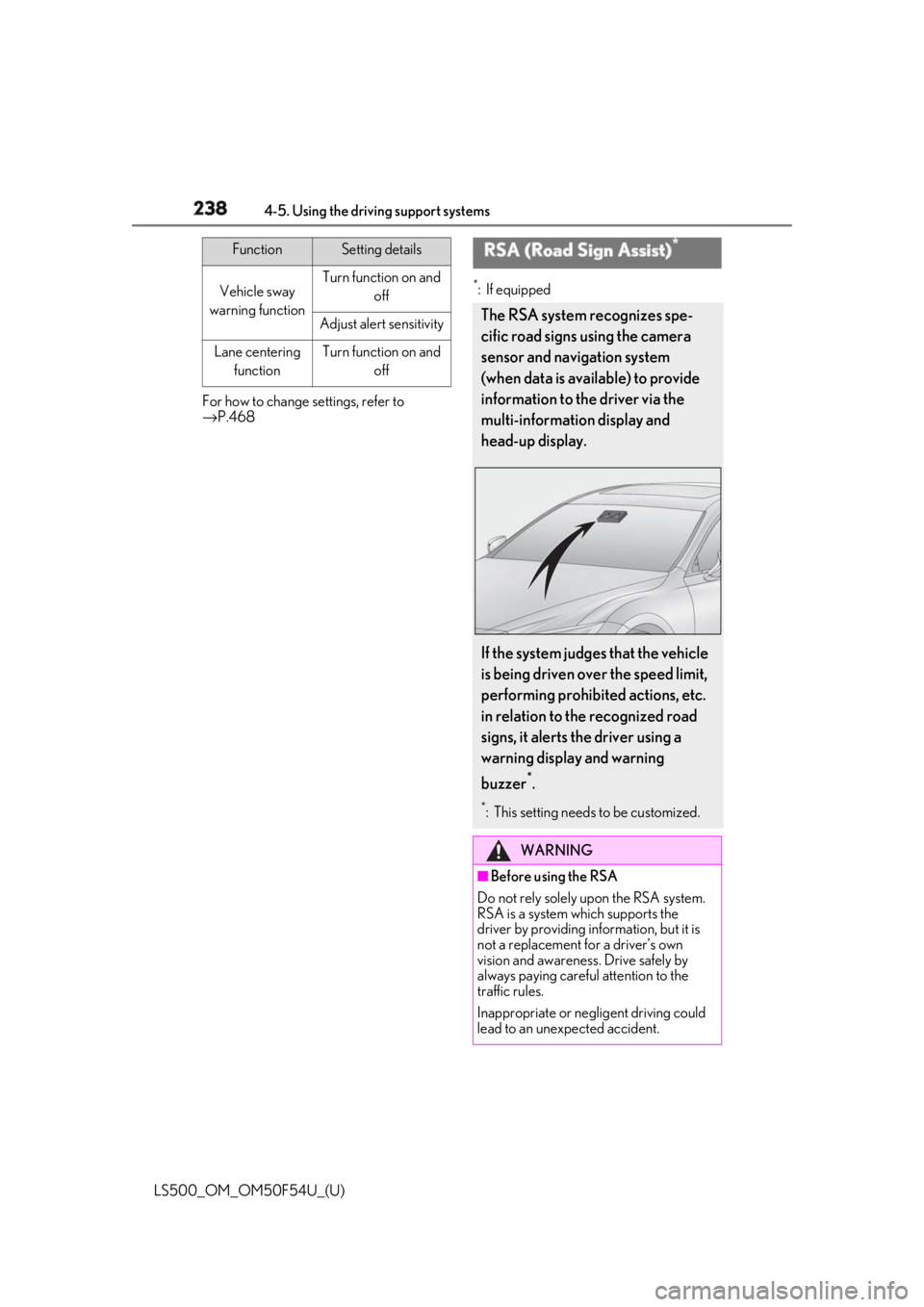
The RSA system recognizes spe-
cific road signs using the camera
sensor and navigation system
(when data is available) to provide
information to the driver via the
multi-information display and
head-up display.
If the system judges that the vehicle
is being driven over the speed limit,
performing prohibited actions, etc.
in relation to the recognized road
signs, it alerts the driver using a
warning display and warning
buzzer *
. *
: This setting needs to be customized.
WARNING
■
Before using the RSA
Do not rely solely upon the RSA system.
RSA is a system which supports the
driver by providing information, but it is
not a replacement for a driver’s own
vision and awareness. Drive safely by
always paying careful attention to the
traffic rules.
Inappropriate or neg ligent driving could
lead to an unexpected accident.
Page 240 of 514
240 4-5. Using the driving support systems
LS500_OM_OM50F54U_(U) *
: Displayed when speed limit information for th e road is available from the navigation sys-
tem
In the following situations, the RSA sys-
tem will alert the driver.
When the vehicle speed exceeds
the speed warning threshold of the
speed limit sign displayed, the sign
display will be emphasized and a
buzzer will sound.
When the RSA system recognizes a
do not enter sign and determines
that your vehicle has entered a
no-entry area, the displayed sign will
flash and a buzzer will sound.
Depending on the situation, traffic
environment (traffic direction, speed,
unit) may be detected incorrectly and a
warning display may not operate prop-
erly. ■
Turning the system on/off
1 Select on of the
multi-information display ( → P.76)
2 Press on the steering wheel.
■
Automatic turn-off of RSA sign display
In the following situations, a displayed
speed limit sign will stop being displayed
automatically:
●
A new sign is not recognized for a certain
distance. (When speed limit information
is not available from the navigation sys-
tem)
In the following situations, do not enter, stop
and yield signs will st op being displayed
automatically:
●
The system determines that your vehicle
has passed the sign.
●
The road changes due to a left or right turn, etc. ■
Conditions in which the function may
not operate or detect correctly
In the following situations, RSA does not
operate normally and may not recognize
signs, display the incorrect sign, etc. How-
ever, this does not indicate a malfunction. ●
The camera sensor is misaligned due to a
strong impact being applied to the sen-
sor, etc. ●
Dirt, snow, stickers, etc. are on the wind-
shield near the camera sensor. ●
In inclement weather such as heavy rain,
fog, snow or sand storms ●
Light from an oncoming vehicle, the sun,
etc. enters the camera sensor. ●
The sign is dirty, faded, tilted or bent. ●
All or part of the sign is hidden by the
leaves of a tree, a pole, etc. ●
The sign is only visible to the camera sen-
sor for a short amount of time. ●
The driving scene (turning, lane change,
etc.) is judged incorrectly. ●
Even if it is a sign not appropriate for the
currently traveled lane, such a sign exists
directly after a freeway branches, or in an
adjacent lane just before merging. ●
Stickers are attached to the rear of the
preceding vehicle. ●
A sign resembling a system compatible
sign is recognized. ●
The front of the vehicle is raised or low-
ered due to the carried load.
●
The surrounding brightness is not suffi-
cient or changes suddenly.
●
When a sign intended for trucks, etc. is
recognized.
●
The navigation system map data is old.
●
The navigation system is not operating.
●
Side road speed signs may be detected
and displayed (if positioned in sight of the
camera sensor) while the vehicle is trav-
eling on the main road.Warning indication
Page 243 of 514
2434-5. Using the driving support systems
LS500_OM_OM50F54U_(U) 4
Driving WARNING■
To avoid inadvertent dynamic radar
cruise control with full-speed range
activation
Switch the dynamic radar cruise control
with full-speed range setting to off, using
the cruise control main switch when not
in use. ■
Situations unsuitable for dynamic
radar cruise control with full-speed
range
Do not use dynamic radar cruise control
with full-speed range in any of the follow-
ing situations.
Doing so may result in inappropriate
speed control and could cause an acci-
dent resulting in death or serious injury. ●
Roads where there are pedestrians,
cyclists, etc.●
In heavy traffic●
On roads with sharp bends●
On winding roads●
On slippery roads, such as those cov-
ered with rain, ice or snow●
On steep downhills , or where there
are sudden changes between sharp up
and down gradients
Vehicle speed may exceed the set
speed when driving down a steep hill.
●
At entrances to freeways and highways
●
When weather conditions are bad
enough that they may prevent the sen-
sors from detectin g correctly (fog,
snow, sandstorm, heavy rain, etc.)
●
When there is rain, snow, etc. on the
front surface of the radar sensor or
camera sensor
●
In traffic conditions that require fre-
quent repeated acceleration and
deceleration
●
When an approach warning buzzer is
heard often
Page 247 of 514
2474-5. Using the driving support systems
LS500_OM_OM50F54U_(U) 4
Driving
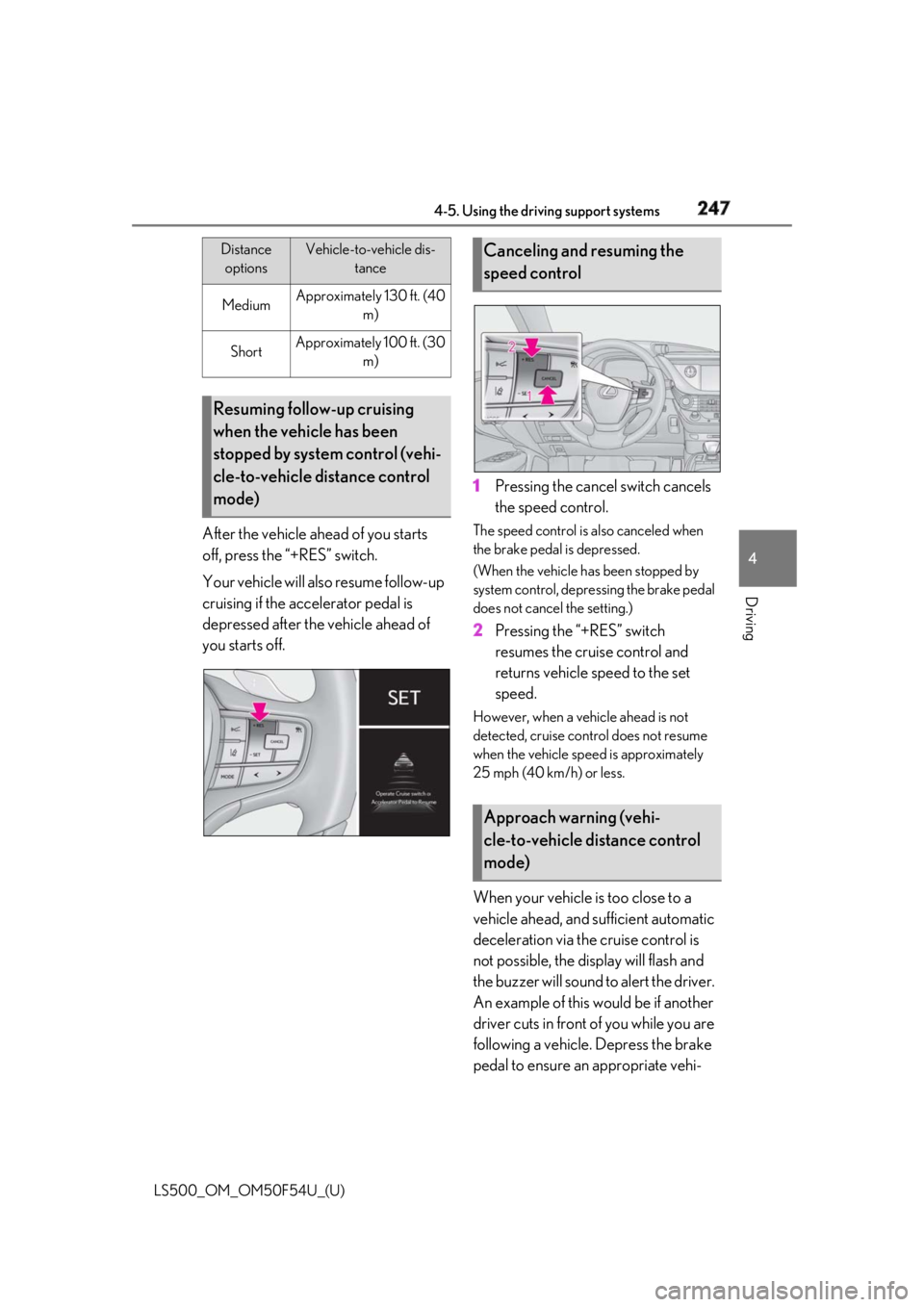
After the vehicle ahead of you starts
off, press the “+RES” switch.
Your vehicle will also resume follow-up
cruising if the accelerator pedal is
depressed after the vehicle ahead of
you starts off. 1 Pressing the cancel switch cancels
the speed control. The speed control is also canceled when
the brake pedal is depressed.
(When the vehicle has been stopped by
system control, depressing the brake pedal
does not cancel the setting.)
2 Pressing the “+RES” switch
resumes the cruise control and
returns vehicle speed to the set
speed. However, when a vehicle ahead is not
detected, cruise control does not resume
when the vehicle speed is approximately
25 mph (40 km/h) or less.
When your vehicle is too close to a
vehicle ahead, and sufficient automatic
deceleration via the cruise control is
not possible, the display will flash and
the buzzer will sound to alert the driver.
An example of this would be if another
driver cuts in front of you while you are
following a vehicle. Depress the brake
pedal to ensure an appropriate vehi-Medium Approximately 130 ft. (40
m)
Short Approximately 100 ft. (30
m)
Resuming follow-up cruising
when the vehicle has been
stopped by system control (vehi-
cle-to-vehicle distance control
mode) Distance
options Vehicle-to-vehicle dis-
tance
Canceling and resuming the
speed control
Approach warning (vehi-
cle-to-vehicle distance control
mode)
Page 250 of 514
250 4-5. Using the driving support systems
LS500_OM_OM50F54U_(U) ■
Warning messages and buzzers for
dynamic radar cruise control with
full-speed range
Warning messages and buzzers are used to
indicate a system malfunction or to inform
the driver of the need for caution while driv-
ing. If a warning message is shown on the
multi-information display, read the message
and follow the instructions. ■
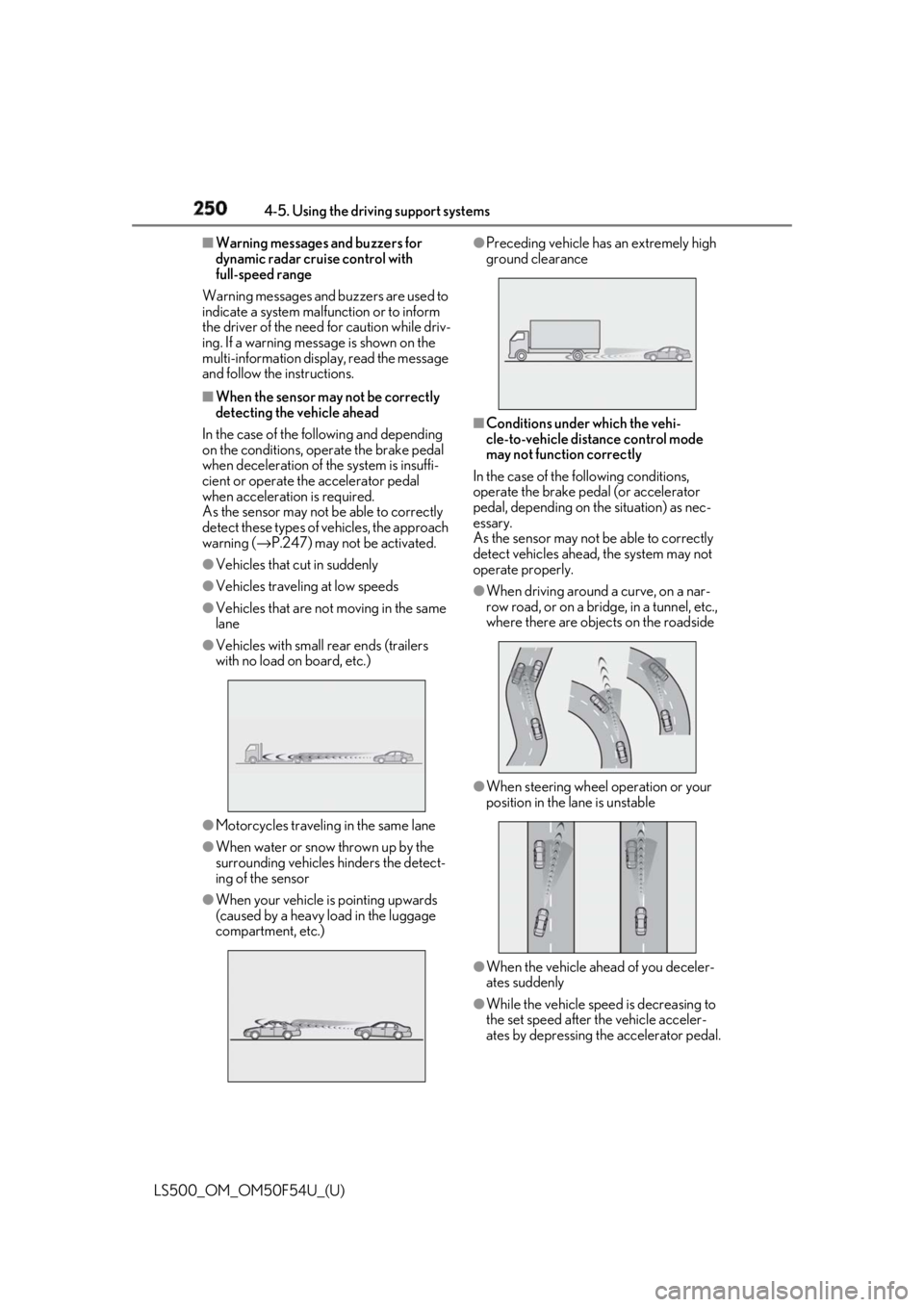
When the sensor may not be correctly
detecting the vehicle ahead
In the case of the following and depending
on the conditions, operate the brake pedal
when deceleration of the system is insuffi-
cient or operate the accelerator pedal
when acceleration is required.
As the sensor may not be able to correctly
detect these types of vehicles, the approach
warning ( → P.247) may not be activated.●
Vehicles that cut in suddenly●
Vehicles traveling at low speeds●
Vehicles that are not moving in the same
lane●
Vehicles with small rear ends (trailers
with no load on board, etc.)
●
Motorcycles travelin g in the same lane●
When water or snow thrown up by the
surrounding vehicles hinders the detect-
ing of the sensor
●
When your vehicle is pointing upwards
(caused by a heavy load in the luggage
compartment, etc.) ●
Preceding vehicle has an extremely high
ground clearance
■
Conditions under which the vehi-
cle-to-vehicle dist ance control mode
may not function correctly
In the case of the following conditions,
operate the brake pedal (or accelerator
pedal, depending on the situation) as nec-
essary.
As the sensor may not be able to correctly
detect vehicles ahead, the system may not
operate properly. ●
When driving around a curve, on a nar-
row road, or on a bridge, in a tunnel, etc.,
where there are objects on the roadside
●
When steering wheel operation or your
position in the lane is unstable
●
When the vehicle ahead of you deceler-
ates suddenly
●
While the vehicle speed is decreasing to
the set speed after the vehicle acceler-
ates by depressing the accelerator pedal.
Page 257 of 514
2574-5. Using the driving support systems
LS500_OM_OM50F54U_(U) 4
Driving ■
Adjusting the buzzer volume
The buzzer volume can be adjusted on
the multi-information display. The vol-
ume of buzzers for the intuitive parking
assist, RCTA function and RCD func-
tion will be adjusted simultaneously.
Use the meter control switches to
change settings. ( → P.77)
1 Press or to select .
2 Press or to select “PKSA”
and then press .
3 Press or to select and
then press .Each time the switch is pressed, the volume
level will change between 1, 2, and 3. ■
Muting a buzzer
A mute button will be displayed on the
multi-information display when an
object or pedestrian is detected. To
mute the buzzer, press .
The buzzers for the intuitive parking
assist, RCTA function and RCD func-
tion will be muted simultaneously.
Mute will be canceled automatically in
the following situations:
When the shift position is changed.
When the operating function is tem-
porarily canceled.
When the operating function is dis-
abled manually.
When the engine switch is turned
off. *
: If equipped
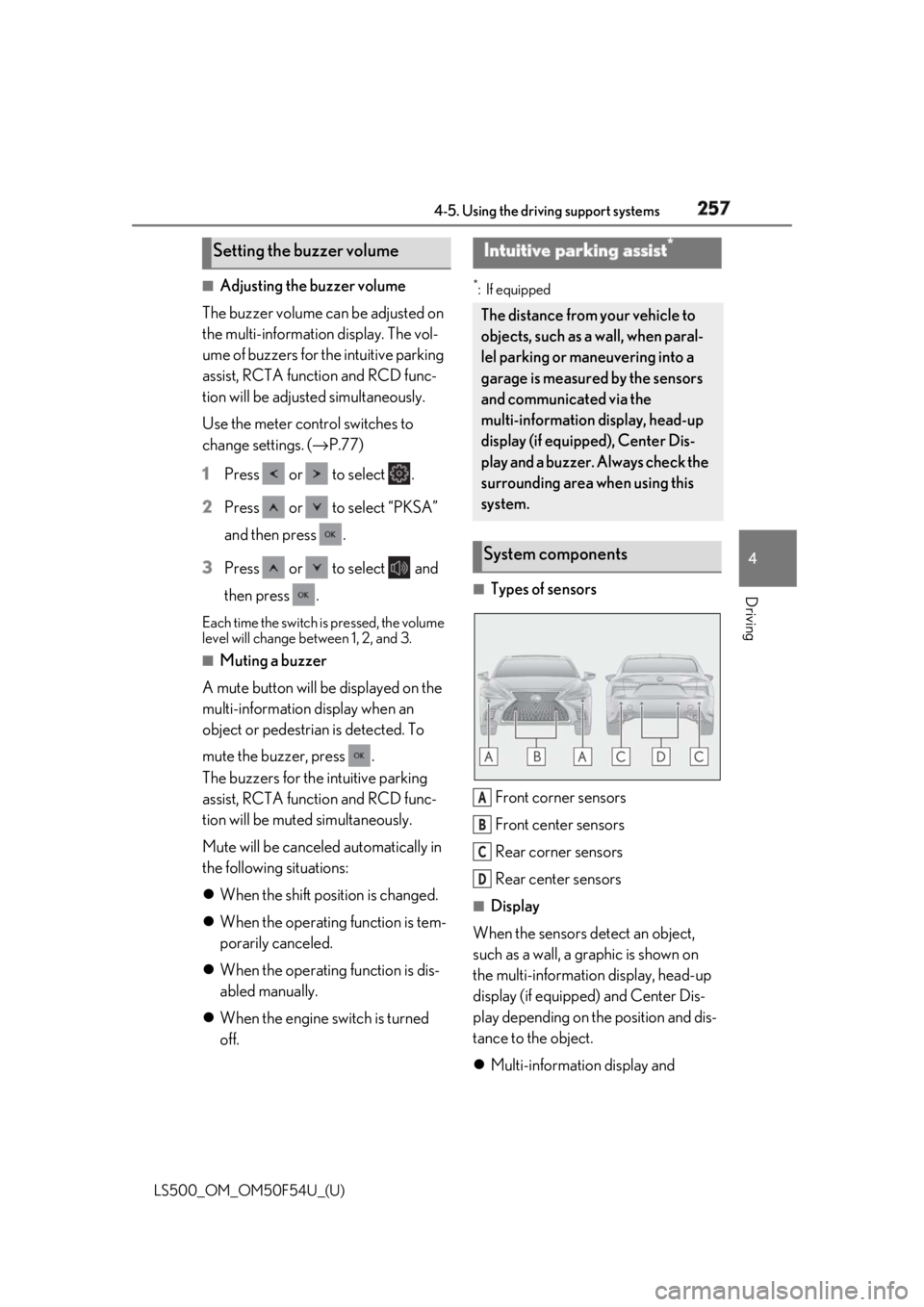
■
Types of sensors
Front corner sensors
Front center sensors
Rear corner sensors
Rear center sensors ■
Display
When the sensors detect an object,
such as a wall, a graphic is shown on
the multi-information display, head-up
display (if equipped) and Center Dis-
play depending on the position and dis-
tance to the object.
Multi-information display and Setting the buzzer volume Intuitive parking assist *
The distance from your vehicle to
objects, such as a wall, when paral-
lel parking or maneuvering into a
garage is measured by the sensors
and communicated via the
multi-information display, head-up
display (if equipped), Center Dis-
play and a buzzer. Always check the
surrounding area when using this
system.
System components
A
B
C
D
Page 259 of 514
2594-5. Using the driving support systems
LS500_OM_OM50F54U_(U) 4
Driving disabled, select on the multi-infor-
mation display, select and then On.
If disabled using this method, the sys-
tem will not be re-enabled by turning
the engine switch off and then to IGNI-
TION ON mode.
■
The system can be operated when
●
The engine switch is in IGNITION ON
mode.
●
Intuitive parking assist function is on.
●
The vehicle speed is less than about 6
mph (10 km/h).WARNING■
When using the intuitive parking
assist
Observe the following precautions.
Failing to do so may result in the vehicle
being unable to be driven safely and pos-
sibly cause an accident. ●
Do not use the sensor at speeds in
excess of 6 mph (10 km/h).●
The sensors’ detection areas and reac-
tion times are limited. When moving
forward or reversing, check the areas
surrounding the vehicle (especially the
sides of the vehicle) for safety, and
drive slowly, using the brake to control
the vehicle’s speed.●
Do not install accessories within the
sensors’ detection areas.●
The area directly under the bumpers is
not detected.
■
When to disable the function
In the following situations, disable the
function as it may operate even though
there is no possibility of a collision. ●
The vehicle is equipped with a fender
pole or wireless antenna.
●
The front or rear bu mper or a sensor
receives a strong impact.
●
A non-genuine Lexus suspension
(lowered suspension, etc.) is installed.
●
Towing eyelets are installed.
●
A backlit licence pl ate is installed. ■
When using intuitive parking assist
In the following situations, the system
may not function correctly due to a sen-
sor malfunction, etc. Have the vehicle
checked by your Lexus dealer. ●
The intuitive parking assist operation
display flashes or shows continuously,
and a buzzer sounds when no objects
are detected. ●
If the area around a sensor collides
with something, or is subjected to
strong impact. ●
If the bumper or grille collides with
something. ●
If the display flashes or is displayed
continuously and a buzzer does not
sound, except when the mute function
has been turned on. ●
If a display error oc curs, first check the
sensor.
If the error occurs even when there is
no ice, snow or mud on the sensor, it is
likely that the sensor is malfunctioning.■
Notes when washing the vehicle
Do not apply intensive bursts of water or
steam to the sensor area.
Doing so may result in the sensor mal-
functioning.
●
When using a high pressure washer to
wash the vehicle, do not spray the sen-
sors directly, as doing so may cause a
sensor to malfunction.
●
When using steam to clean the vehicle,
do not direct steam too close to the
sensors as doing so may cause a sen-
sor to malfunction.
Page 260 of 514
260 4-5. Using the driving support systems
LS500_OM_OM50F54U_(U) ●
A shift position other than P is selected.■
Setting the buzzer volume
The buzzer volume can be adjusted on the
multi-information display. ( → P.257)■
If “Parking Assist Unavailable Clean
Parking Assist Sensor” is displayed on
the multi-inform ation display
A sensor may be covered with ice, snow,
dirt, etc. Remove the ice, snow, dirt, etc.,
from the sensor to return the system to nor-
mal.
Also, due to ice forming on a sensor at low
temperatures, a warning message may be
displayed or the sensor may not be able to
detect an object. Once the ice melts, the
system will return to normal. ■
Sensor detectio n information●
The following situations may occur
during use.
• Depending on the shape of the object
and other factors, the detection distance
may shorten, or detection may be impos-
sible.
• There will be a short delay between
object detection and display. Even at low
speeds, there is a possibility that the
object will come within the sensor’s
detection areas before the display is
shown and the warning beep sounds.
• It might be difficult to hear the buzzer due
to the volume of the audio system or air
flow noise of the air conditioning system.■
Conditions under which the function
may not function correctly
Certain vehicle conditions and the sur-
rounding environment may affect the ability
of a sensor to correctly detect objects. Par-
ticular instances where this may occur are
listed below.
●
There is dirt, snow or ice on a sensor.
(Cleaning the sensors will resolve this
problem.)
●
A sensor is frozen. (Thawing the area will
resolve this problem.)
In especially cold weather, if a sensor is
frozen the sensor display may be dis-
played abnormally, or objects, such as a
wall, may not be detected.
●
A sensor is covered in any way. ●
When a sensor or the area around a sen-
sor is extremely hot or cold. ●
On an extremely bumpy road, on an
incline, on gravel, or on grass. ●
The vicinity of the vehicle is noisy due to
vehicle horns, motorcycle engines, air
brakes of large vehicles, or other loud
noises producing ultrasonic waves. ●
There is another vehicle equipped with
parking assist sensors in the vicinity. ●
A sensor is coated with a sheet of spray
or heavy rain. ●
If a sensor is hit by a large amount of
water, such as when driving on a flooded
road. ●
If the vehicle is significantly tilted. ●
The vehicle is approaching a tall or
curved curb. ●
If objects draw too close to the sensor. ■
Objects which may not be properly
detected
The shape of the object may prevent the
sensor from detectin g it. Pay particular
attention to the following objects: ●
Wires, fences, ropes, etc. ●
Cotton, snow and other materials that
absorb sound waves ●
Sharply-angled objects ●
Low objects ●
Tall objects with upper sections project-
ing outwards in the direction of your vehi-
cle
People may not be de tected if they are
wearing certain types of clothing.