Buzzer LEXUS LS500 2018 Owners Manual
[x] Cancel search | Manufacturer: LEXUS, Model Year: 2018, Model line: LS500, Model: LEXUS LS500 2018Pages: 514, PDF Size: 10.62 MB
Page 4 of 514
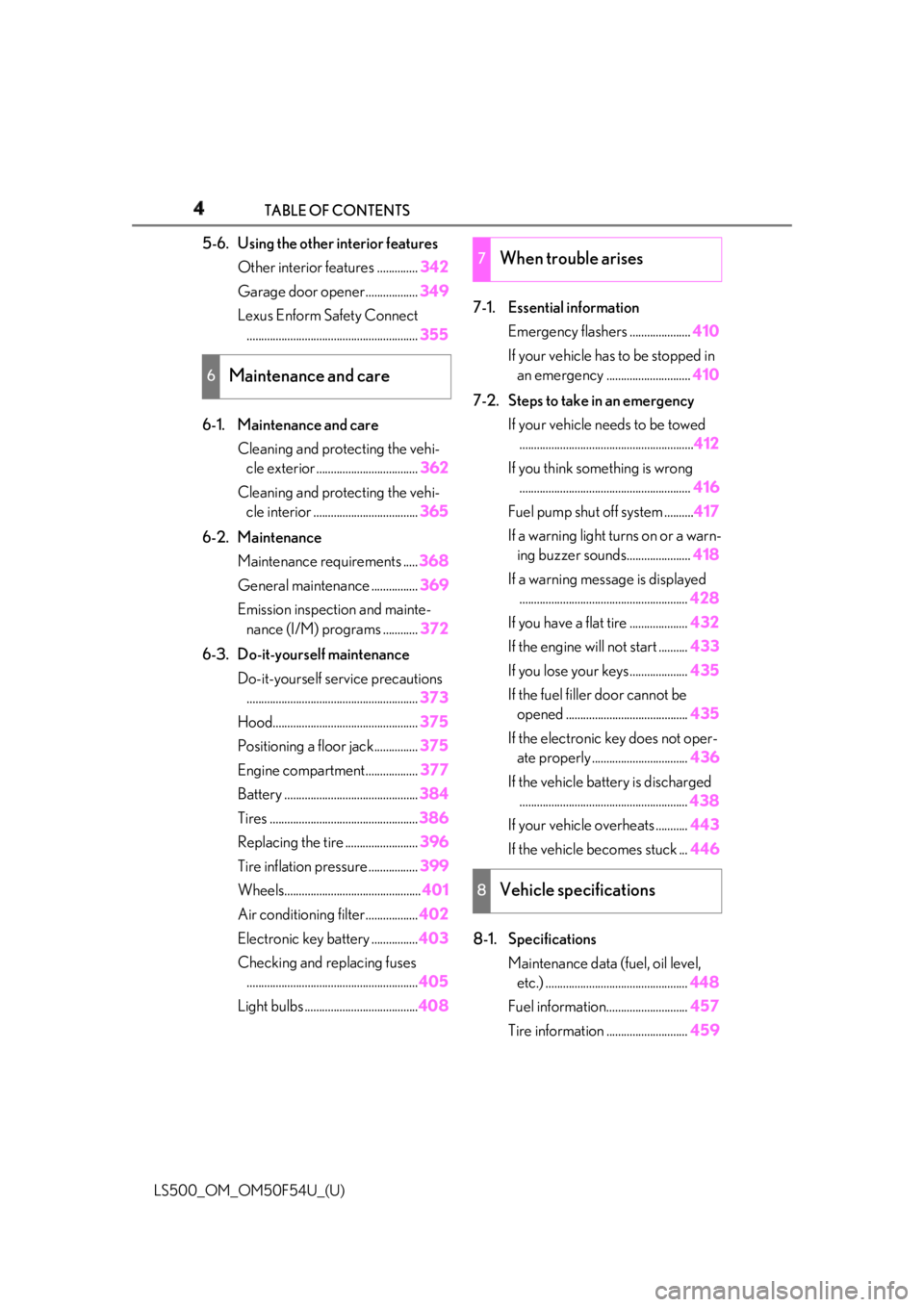
4 TABLE OF CONTENTS
LS500_OM_OM50F54U_(U) 5-6. Using the other interior features
Other interior features .............. 342
Garage door opener.................. 349
Lexus Enform Safety Connect
........................................................... 355
6-1. Maintenance and care
Cleaning and protecting the vehi-
cle exterior ................................... 362
Cleaning and protecting the vehi-
cle interior .................................... 365
6-2. Maintenance
Maintenance requirements ..... 368
General maintenance ................ 369
Emission inspection and mainte-
nance (I/M) programs ............ 372
6-3. Do-it-yourself maintenance
Do-it-yourself service precautions
........................................................... 373
Hood.................................................. 375
Positioning a floor jack............... 375
Engine compartment.................. 377
Battery .............................................. 384
Tires ................................................... 386
Replacing the tire ......................... 396
Tire inflation pressure ................. 399
Wheels............................................... 401
Air conditioning filter.................. 402
Electronic key battery ................ 403
Checking and replacing fuses
........................................................... 405
Light bulbs ....................................... 408 7-1. Essential information
Emergency flashers ..................... 410
If your vehicle has to be stopped in
an emergency ............................. 410
7-2. Steps to take in an emergency
If your vehicle needs to be towed
............................................................ 412
If you think something is wrong
........................................................... 416
Fuel pump shut off system .......... 417
If a warning light turns on or a warn-
ing buzzer sounds...................... 418
If a warning messa ge is displayed
.......................................................... 428
If you have a flat tire .................... 432
If the engine will not start .......... 433
If you lose your keys.................... 435
If the fuel filler door cannot be
opened .......................................... 435
If the electronic key does not oper-
ate properly ................................. 436
If the vehicle battery is discharged
.......................................................... 438
If your vehicle overheats ........... 443
If the vehicle becomes stuck ... 446
8-1. Specifications
Maintenance data (fuel, oil level,
etc.) ................................................. 448
Fuel information............................ 457
Tire information ............................ 4596
Maintenance and care 7
When trouble arises
8
Vehicle specifications
Page 15 of 514
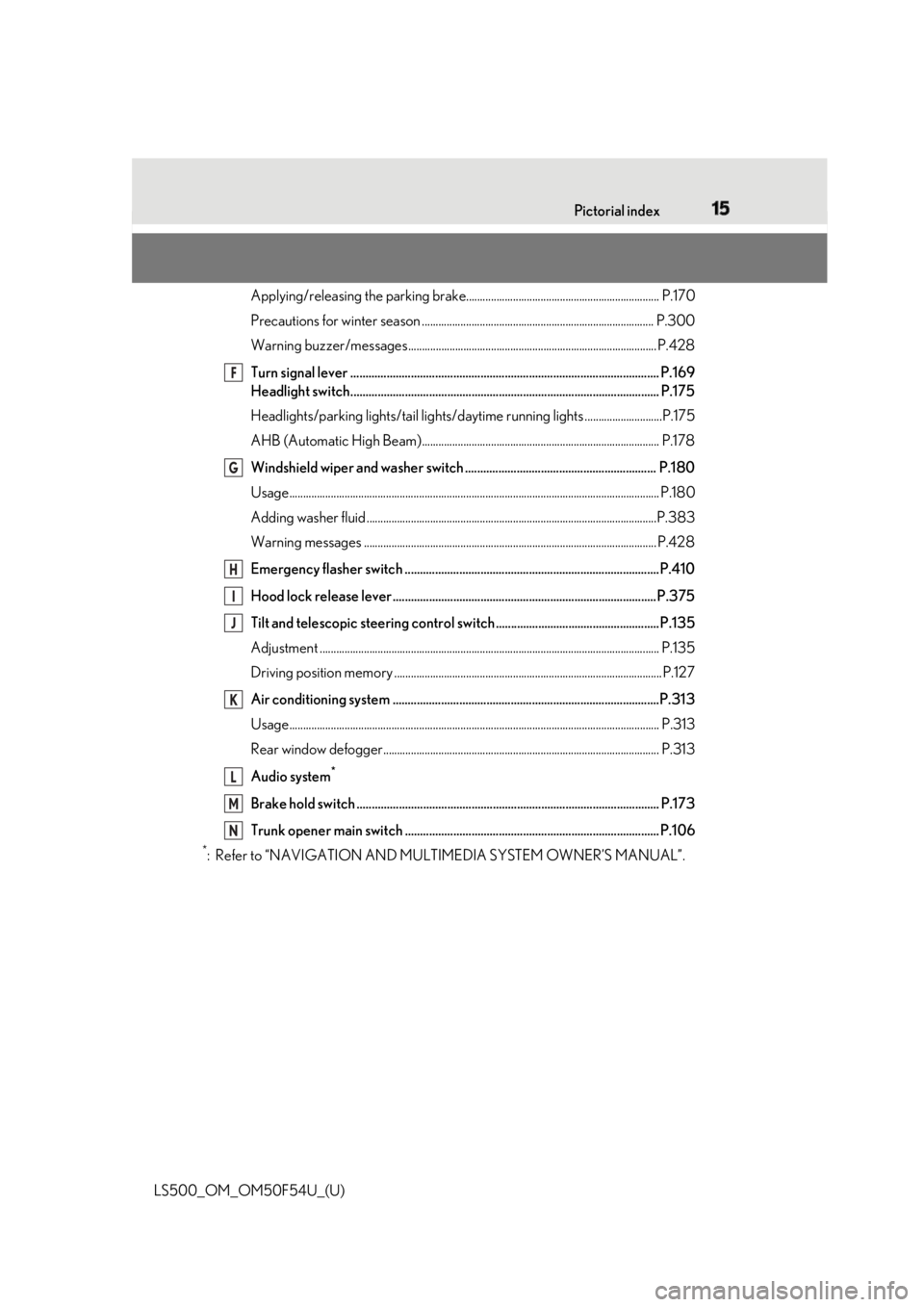
15Pictorial index
LS500_OM_OM50F54U_(U) Applying/releasing the parking brake............ .......................................................... P.170
Precautions for winter season .. .................................................................................. P.300
Warning buzzer/messages.......................................................................................... P.428
Turn signal lever ...................................................................................................... P.169
Headlight switch...................................................................................................... P.175
Headlights/parking lights/tail lights/daytime runn ing lights ............................P.175
AHB (Automatic High Beam)...................................................................................... P.178
Windshield wiper and washer switch ............................................................... P.180
Usage.......................................................................................................................... ............ P.180
Adding washer fluid .........................................................................................................P.3 83
Warning messages .......................................................................................................... P.428
Emergency flasher switch ....................................................................................P.410
Hood lock release lever ....................................................................................... P.375
Tilt and telescopic steering contro l switch...... ............ .............. .................... ..P.135
Adjustment ..................................................................................................................... ...... P.135
Driving position memory ................................................................................................. P.127
Air conditioning system ........................................................................................P.313
Usage.......................................................................................................................... ............ P.313
Rear window defogger.................................................................................................... P.313
Audio system *
Brake hold switch .................................................................................................... P.173
Trunk opener main switch .................................................................................... P.106 *
: Refer to “NAVIGATION AND MULTIMEDIA SYSTEM OWNER’S MANUAL”. F
G
H
I
J
K
L
M
N
Page 97 of 514

973-2. Opening, closing and locking the doors and trunk
LS500_OM_OM50F54U_(U) 3
Before driving
To prevent unintended triggering of the
alarm, unlock the doors using the wireless
remote control and open and close a door
once after the settings have been changed.
(If a door is not opened within 60 seconds
after is pressed, the doors will be
locked again and the alarm will automati-
cally be set.)
In a case that the alarm is triggered, imme-
diately stop the alarm. ( → P.60)■
Impact detection door lock release sys-
tem
In the event that the vehicle is subject to a
strong impact, all the doors are unlocked.
Depending on the force of the impact or the
type of accident, however, the system may
not operate.
■
Operation signals
A buzzer sounds and the emergency flash-
ers flash to indicate that the doors have
been locked/unlocked. (Locked: once;
Unlocked: twice)
A buzzer sounds to indicate that the win-
dows and moon roof or panoramic moon
roof are operating.
■
Security feature
If a door is not opened within approximately 60 seconds after the vehicle is unlocked,
the security feature automatically locks the
vehicle again. ■
When the doors cannot be locked by the
lock sensor on the upper part of the
door handle
When the doors cannot be locked even if
the lock sensor on the surface of the door
handle is touched by a finger, touch the lock
sensor with the palm.
If you are wearing gloves, remove them.
■
Open door warning buzzer
If an attempt to lock the doors is made when
a door is not fully closed, a buzzer sounds
continuously for 5 seconds. Fully close the
door to stop the buzzer, and lock the vehi-
cle once more. ■
Setting the alarm
Locking the doors will set the alarm system.
( → P.60) ■
Conditions affecting the operation of
the smart access system with push-but-
ton start or wireless remote control
→ P.108 ■
If the smart access system with
push-button start or the wireless remote
control does not operate properly
Use the mechanical key to lock and unlock
the doors. ( → P.436)
Replace the key battery with a new one if it
is depleted. ( → P.403)
■
If the battery is discharged
The doors cannot be locked and unlocked
using the smart access system with
push-button start or wireless remote con-
trol. Lock or unlock the doors using the
mechanical key. ( → P.436)Multi-information
display/Beep Unlocking function
Exterior: Beeps 3
times
Interior: Pings once Holding the driver’s
door handle unlocks
only the driver’s
door.
Holding any of the
passenger door
handles unlocks all
the doors.
Exterior: Beeps
twice
Interior: Pings once Holding a door han-
dle unlocks all the
doors.
Page 99 of 514
993-2. Opening, closing and locking the doors and trunk
LS500_OM_OM50F54U_(U) 3
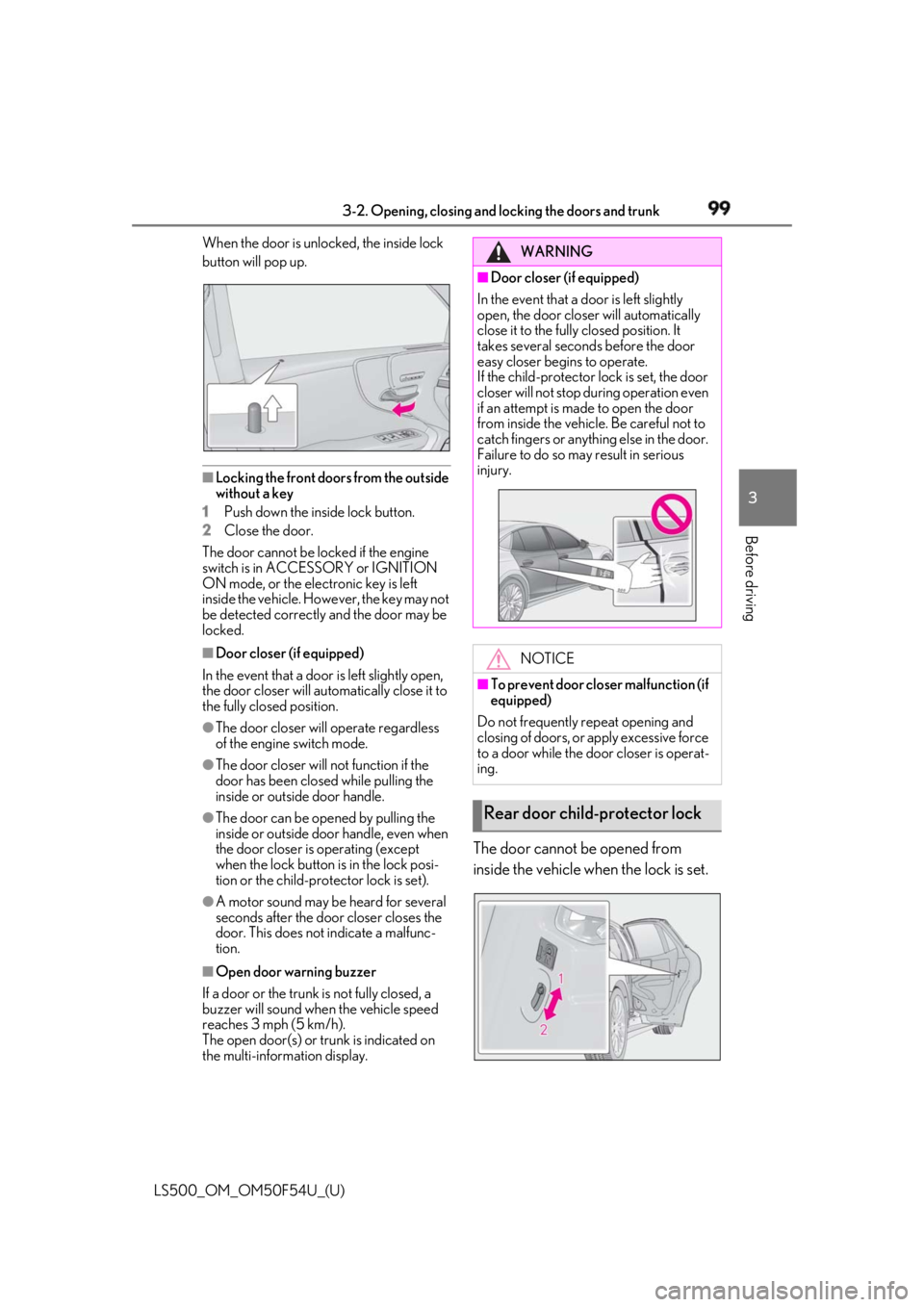
Before driving When the door is unlocked, the inside lock
button will pop up.
■
Locking the front doors from the outside
without a key
1 Push down the inside lock button.
2 Close the door.
The door cannot be locked if the engine
switch is in ACCESSORY or IGNITION
ON mode, or the electronic key is left
inside the vehicle. However, the key may not
be detected correctly and the door may be
locked. ■
Door closer (if equipped)
In the event that a door is left slightly open,
the door closer will automatically close it to
the fully closed position. ●
The door closer will operate regardless
of the engine switch mode.●
The door closer will not function if the
door has been clos ed while pulling the
inside or outside door handle.●
The door can be opened by pulling the
inside or outside door handle, even when
the door closer is operating (except
when the lock button is in the lock posi-
tion or the child-protector lock is set).
●
A motor sound may be heard for several
seconds after the door closer closes the
door. This does not indicate a malfunc-
tion.
■
Open door warning buzzer
If a door or the trunk is not fully closed, a
buzzer will sound when the vehicle speed
reaches 3 mph (5 km/h).
The open door(s) or trunk is indicated on
the multi-information display. The door cannot be opened from
inside the vehicle when the lock is set. WARNING■
Door closer (if equipped)
In the event that a d oor is left slightly
open, the door closer will automatically
close it to the fully closed position. It
takes several second s before the door
easy closer begins to operate.
If the child-protector lock is set, the door
closer will not stop during operation even
if an attempt is made to open the door
from inside the vehicle. Be careful not to
catch fingers or anything else in the door.
Failure to do so may result in serious
injury.
NOTICE■
To prevent door closer malfunction (if
equipped)
Do not frequently repeat opening and
closing of doors, or apply excessive force
to a door while the door closer is operat-
ing.
Rear door child-protector lock
Page 103 of 514
1033-2. Opening, closing and locking the doors and trunk
LS500_OM_OM50F54U_(U) 3
Before driving ■
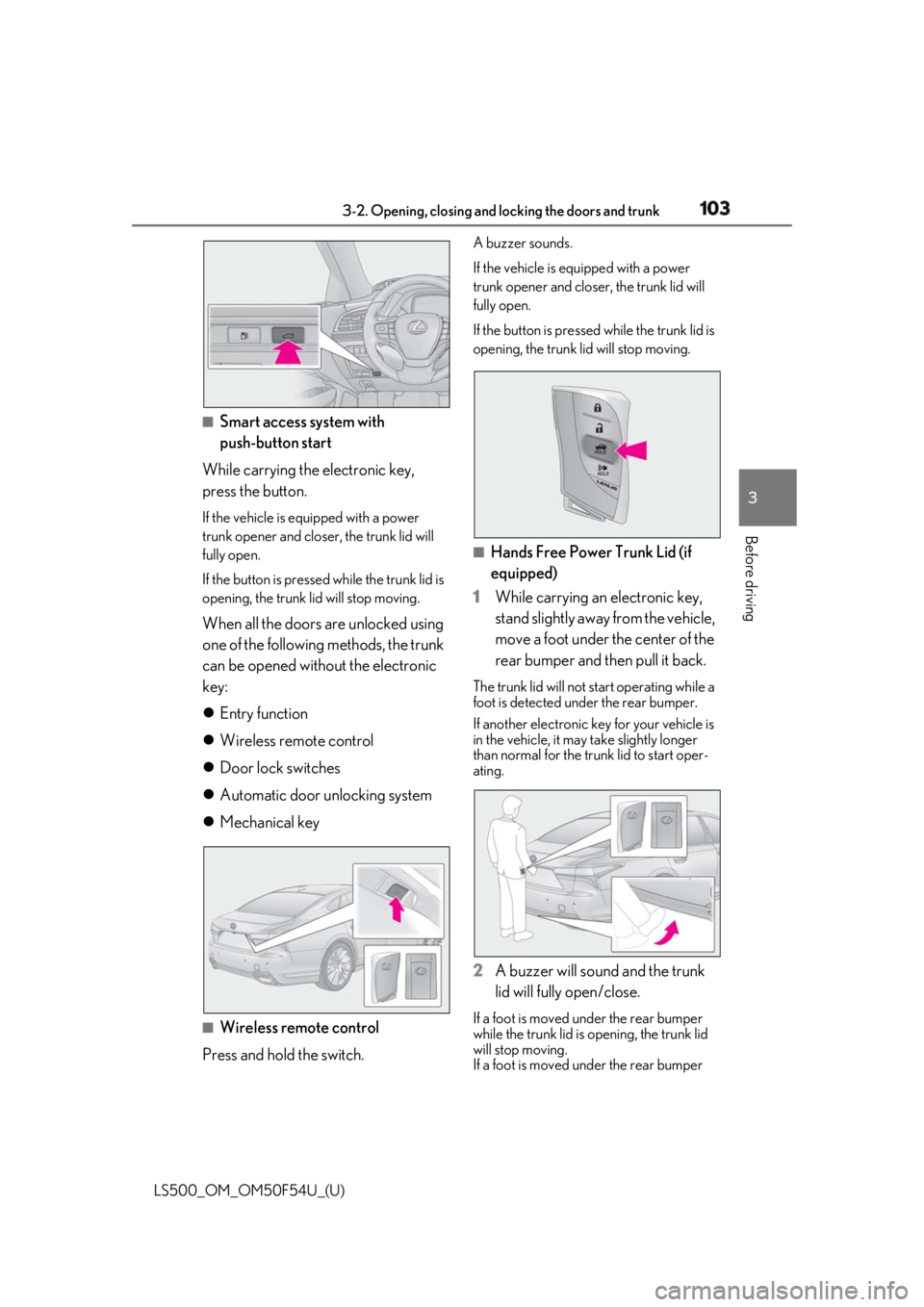
Smart access system with
push-button start
While carrying the electronic key,
press the button. If the vehicle is equipped with a power
trunk opener and closer, the trunk lid will
fully open.
If the button is presse d while the trunk lid is
opening, the trunk lid will stop moving.
When all the doors are unlocked using
one of the following methods, the trunk
can be opened without the electronic
key:
Entry function
Wireless remote control
Door lock switches
Automatic door unlocking system
Mechanical key
■
Wireless remote control
Press and hold the switch. A buzzer sounds.
If the vehicle is equipped with a power
trunk opener and closer, the trunk lid will
fully open.
If the button is presse d while the trunk lid is
opening, the trunk lid will stop moving.
■
Hands Free Power Trunk Lid (if
equipped)
1 While carrying an electronic key,
stand slightly away from the vehicle,
move a foot under the center of the
rear bumper and then pull it back. The trunk lid will not start operating while a
foot is detected under the rear bumper.
If another electronic key for your vehicle is
in the vehicle, it may take slightly longer
than normal for the trunk lid to start oper-
ating.
2 A buzzer will sound and the trunk
lid will fully open/close. If a foot is moved under the rear bumper
while the trunk lid is opening, the trunk lid
will stop moving.
If a foot is moved under the rear bumper
Page 104 of 514
104 3-2. Opening, closing and locking the doors and trunk
LS500_OM_OM50F54U_(U) while the trunk lid is closing, the trunk lid
will open. ■
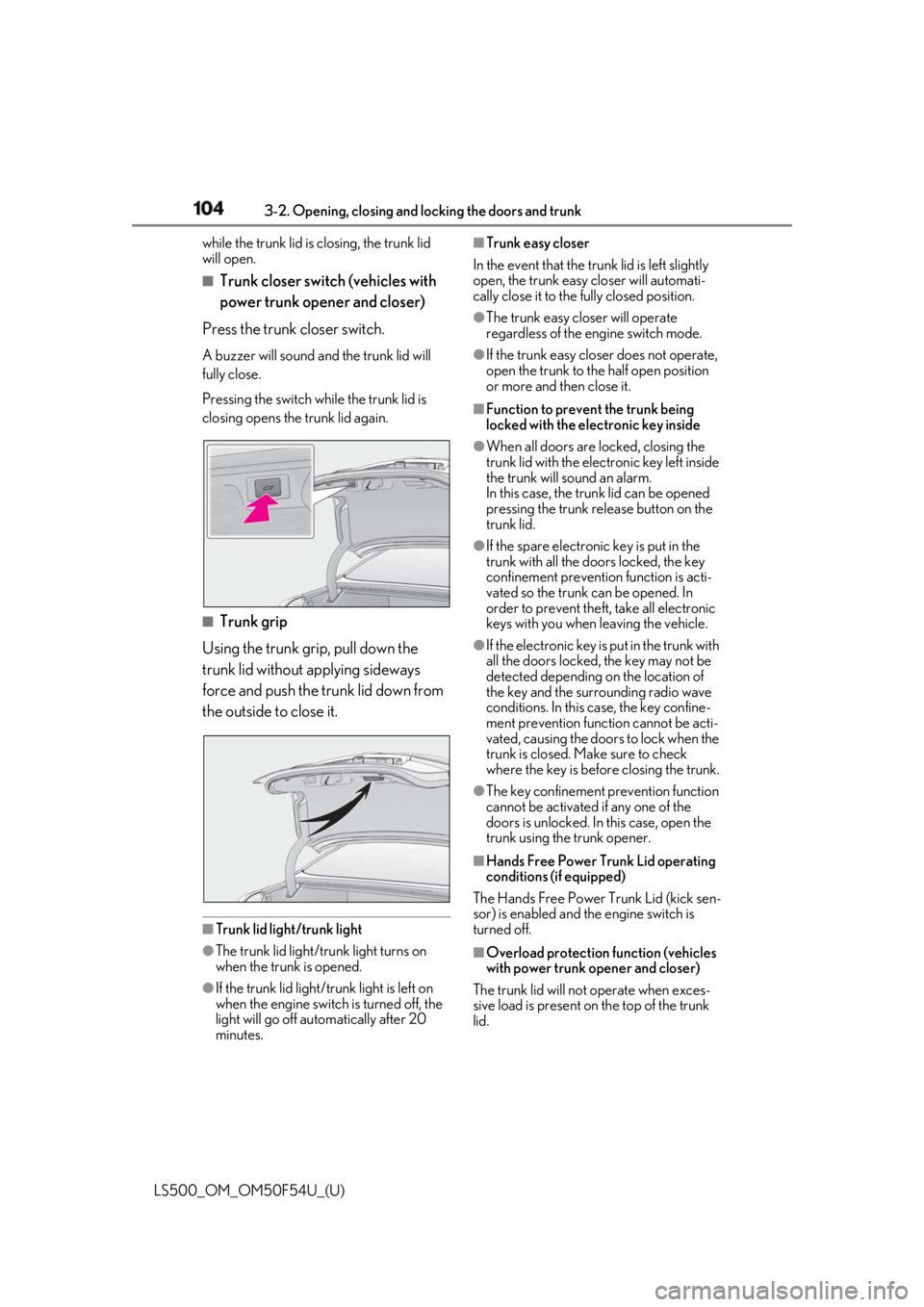
Trunk closer switch (vehicles with
power trunk opener and closer)
Press the trunk closer switch. A buzzer will sound and the trunk lid will
fully close.
Pressing the switch while the trunk lid is
closing opens the trunk lid again.
■
Trunk grip
Using the trunk grip, pull down the
trunk lid without applying sideways
force and push the trunk lid down from
the outside to close it.
■
Trunk lid light/trunk light
●
The trunk lid light/tru nk light turns on
when the trunk is opened.
●
If the trunk lid light/tru nk light is left on
when the engine switch is turned off, the
light will go off automatically after 20
minutes. ■
Trunk easy closer
In the event that the trun k lid is left slightly
open, the trunk easy closer will automati-
cally close it to the fully closed position. ●
The trunk easy closer will operate
regardless of the engine switch mode. ●
If the trunk easy closer does not operate,
open the trunk to the half open position
or more and then close it. ■
Function to prevent the trunk being
locked with the electronic key inside ●
When all doors are locked, closing the
trunk lid with the electronic key left inside
the trunk will sound an alarm.
In this case, the trun k lid can be opened
pressing the trunk release button on the
trunk lid. ●
If the spare electronic key is put in the
trunk with all the doors locked, the key
confinement prevention function is acti-
vated so the trunk can be opened. In
order to prevent theft, take all electronic
keys with you when leaving the vehicle. ●
If the electronic key is put in the trunk with
all the doors locked, the key may not be
detected depending on the location of
the key and the surrounding radio wave
conditions. In this case, the key confine-
ment prevention function cannot be acti-
vated, causing the doors to lock when the
trunk is closed. Make sure to check
where the key is before closing the trunk. ●
The key confinement prevention function
cannot be activated if any one of the
doors is unlocked. In this case, open the
trunk using the trunk opener.
■
Hands Free Power Trunk Lid operating
conditions (if equipped)
The Hands Free Power Trunk Lid (kick sen-
sor) is enabled and the engine switch is
turned off.
■
Overload protection function (vehicles
with power trunk opener and closer)
The trunk lid will not operate wh en exces-
sive load is present on the top of the trunk
lid.
Page 106 of 514
106 3-2. Opening, closing and locking the doors and trunk
LS500_OM_OM50F54U_(U) with a foot when operating the Hands Free
Power Trunk Lid.
If the rear bumper has been touched for a
while, wait for a short time before attempt-
ing to operate the Hands Free Power Trunk
Lid again.
• When an external radio wave source
interferes with the communication
between the electronic key and the vehi-
cle ( → P.108)
• When the vehicle is parked near an elec-
trical noise source which affects the sen-
sitivity of the Hands Free Power Trunk Lid,
such as a pay parking spot, gas station,
electrically heated road, or fluorescent
light
• When the vehicle is near a TV tower,
electric power plant, radio station, large
display, airport or other facility that gen-
erates strong radio waves or electrical
noise
• When a large amount of water is applied
to the rear bumper, such as when the
vehicle is being washed or in heavy rain
• When mud, snow, ice, etc. is attached to
the rear bumper
• When the vehicle has been parked for a
while near objects that may move under
the rear bumper, such as grass
• When an accessory is installed to the rear
bumper
Make sure to disable the Hands Free
Power Trunk Lid (kick sensor) if an acces-
sory is installed to the rear bumper.
●
The Hands Free Power Trunk Lid will not
operate in the following situations:
• When an electronic key is not carried
• When an electronic key is not within the
effective range (detection area)
■
Open door warning buzzer
→ P.99
■
Customization
Some functions can be customized.
( → P.468)
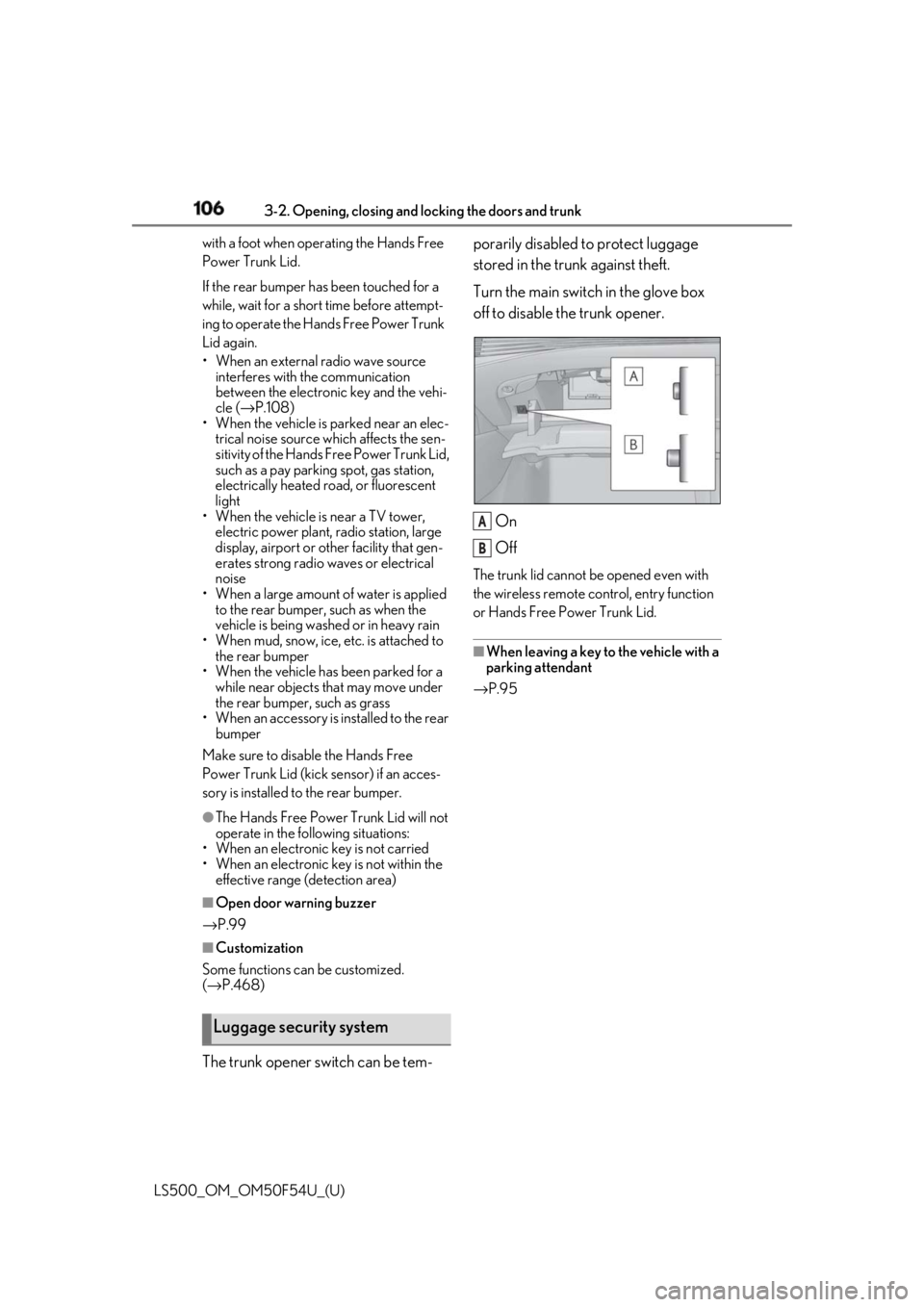
The trunk opener switch can be tem- porarily disabled to protect luggage
stored in the trunk against theft.
Turn the main switch in the glove box
off to disable the trunk opener.
On
Off The trunk lid cannot be opened even with
the wireless remote control, entry function
or Hands Free Power Trunk Lid.
■
When leaving a key to the vehicle with a
parking attendant
→ P.95
Luggage security system A
B
Page 110 of 514

110 3-2. Opening, closing and locking the doors and trunk
LS500_OM_OM50F54U_(U) stolen.)
• Set the electronic key to battery-saving
mode to disable the smart access system
with push-button start. ( → P.108)●
If the electronic key is inside the vehicle
and a door handle becomes wet during a
car wash, a message may be shown on
the multi-information display and a
buzzer will sound outside the vehicle. To
turn off the alarm, lock all the doors.●
The lock sensor may not work properly if
it comes into contact with ice, snow, mud,
etc. Clean the lock sensor and attempt to
operate it again.●
A sudden approach to the effective
range or door handle may prevent the
doors from being unlocked. In this case,
return the door handle to the original
position and check that the doors unlock
before pulling the door handle again.●
If there is another electronic key in the
detection area, it may take slightly longer
to unlock the doors after the door handle
is gripped.■
When the vehicle is not driven for
extended periods●
To prevent theft of the vehicle, do not
leave the electronic key within 6 ft. (2 m)
of the vehicle.●
The smart access syst em with push-but-
ton start can be deactivated in advance.●
Setting the electronic key to battery-sav-
ing mode helps to reduce key battery
depletion. ( → P.108)■
To operate the system properly●
Make sure to carry the electronic key
when operating the system. Do not get
the electronic key too close to the vehicle
when operating the system from the out-
side of the vehicle.
Depending on the position and holding
condition of the electronic key, the key may
not be detected correctly and the system
may not operate properly. (The alarm may
go off accidentally, or the door lock pre-
vention function may not operate.)
●
Do not leave the electronic key inside the
trunk. The key confinement prevention function
may not operate, depending on the loca-
tion of the key (the inside edge of the
Trunk), conditions (i nside a metal bag,
close to metallic objects) and the radio
waves in the surrounding area. ( → P.104)■
If the smart access system with
push-button start does not operate
properly ●
Locking and unloc king the doors and
trunk: → P.436●
Starting the engine: → P.437■
Customization
Some functions can be customized.
( → P.468) ■
If the smart access system with
push-button start has been deactivated
in a customized setting ●
Locking and unloc king the doors and
opening the trunk:
Use the wireless remote control or
mechanical key. ( → P.96, 103, 436)●
Starting the engine and changing engine
switch modes: → P.437●
Stopping the engine: → P.161
Page 129 of 514
1293-3. Adjusting the seats
LS500_OM_OM50F54U_(U) 3
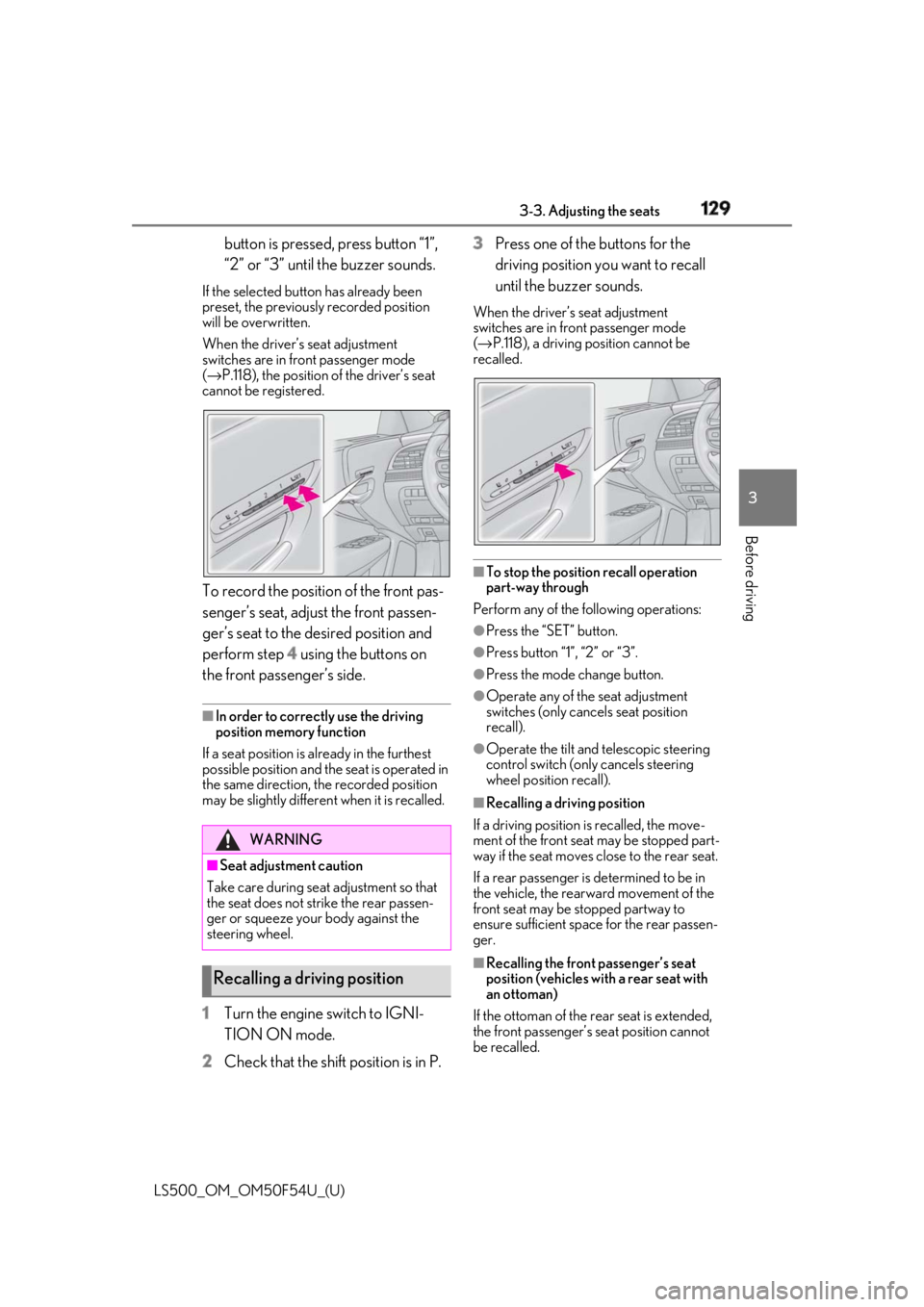
Before driving button is pressed, press button “1”,
“2” or “3” until the buzzer sounds.If the selected button has already been
preset, the previously recorded position
will be overwritten.
When the driver’s seat adjustment
switches are in front passenger mode
( → P.118), the position of the driver’s seat
cannot be registered.
To record the position of the front pas-
senger’s seat, adjust the front passen-
ger’s seat to the desired position and
perform step 4 using the buttons on
the front passenger’s side. ■
In order to correctly use the driving
position memory function
If a seat position is already in the furthest
possible position and the seat is operated in
the same direction, the recorded position
may be slightly differen t when it is recalled.
1 Turn the engine switch to IGNI-
TION ON mode.
2 Check that the shift position is in P. 3 Press one of the buttons for the
driving position you want to recall
until the buzzer sounds. When the driver’s seat adjustment
switches are in front passenger mode
( → P.118), a driving position cannot be
recalled.
■
To stop the position recall operation
part-way through
Perform any of the following operations: ●
Press the “SET” button. ●
Press button “1”, “2” or “3”. ●
Press the mode change button. ●
Operate any of the seat adjustment
switches (only cancels seat position
recall). ●
Operate the tilt and telescopic steering
control switch (onl y cancels steering
wheel position recall). ■
Recalling a driving position
If a driving position is recalled, the move-
ment of the front seat may be stopped part-
way if the seat moves close to the rear seat.
If a rear passenger is determined to be in
the vehicle, the rearward movement of the
front seat may be stopped partway to
ensure sufficient space for the rear passen-
ger.
■
Recalling the front passenger’s seat
position (vehicles with a rear seat with
an ottoman)
If the ottoman of the rear seat is extended,
the front passenger’s se at position cannot
be recalled.WARNING
■
Seat adjustment caution
Take care during seat adjustment so that
the seat does not strike the rear passen-
ger or squeeze your body against the
steering wheel.
Recalling a driving position
Page 130 of 514
130 3-3. Adjusting the seats
LS500_OM_OM50F54U_(U) ■
Operating the driving position memory
after turning the engine switch off
Driver’s seat:
Recorded seat positions can be activated
up to 180 seconds after the driver’s door is
opened and another 60 seconds after it is
closed again.
Front passenger’s seat:
Recorded seat positions can be recalled up
to 180 seconds after the front passenger’s
door is opened.
■
Registering procedure
Record your driving position to button
“1”, “2” or “3” before performing the
following:
Carry only the key you want to register,
and then close the driver’s door.
If 2 or more keys are in the vehicle, the
driving position cannot be recorded
properly.
1 Turn the engine switch to IGNI-
TION ON mode.
2 Check that the shift position is in P.
3 Recall the driving position that you
want to record.
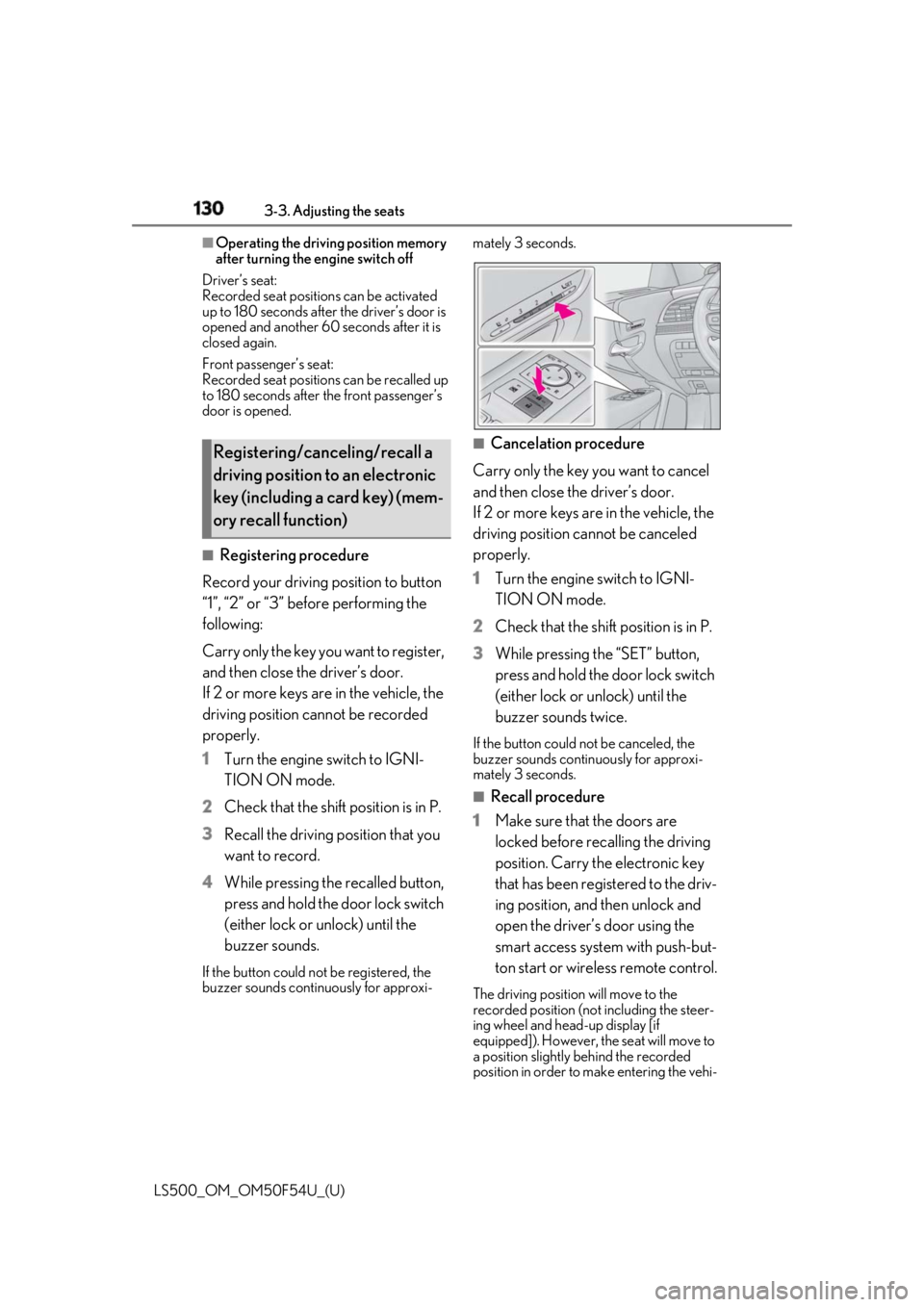
4 While pressing the recalled button,
press and hold the door lock switch
(either lock or unlock) until the
buzzer sounds.If the button could not be registered, the
buzzer sounds continuously for approxi- mately 3 seconds.
■
Cancelation procedure
Carry only the key you want to cancel
and then close the driver’s door.
If 2 or more keys are in the vehicle, the
driving position cannot be canceled
properly.
1 Turn the engine switch to IGNI-
TION ON mode.
2 Check that the shift position is in P.
3 While pressing the “SET” button,
press and hold the door lock switch
(either lock or unlock) until the
buzzer sounds twice. If the button could not be canceled, the
buzzer sounds continuously for approxi-
mately 3 seconds. ■
Recall procedure
1 Make sure that the doors are
locked before recalling the driving
position. Carry the electronic key
that has been registered to the driv-
ing position, and then unlock and
open the driver’s door using the
smart access system with push-but-
ton start or wireless remote control. The driving position will move to the
recorded position (not including the steer-
ing wheel and head-up display [if
equipped]). However, the seat will move to
a position slightly behind the recorded
position in order to make entering the vehi-Registering/canceling/recall a
driving position to an electronic
key (including a card key) (mem-
ory recall function)