ECO LEXUS LS500 2019 Owners Manual
[x] Cancel search | Manufacturer: LEXUS, Model Year: 2019, Model line: LS500, Model: LEXUS LS500 2019Pages: 512, PDF Size: 9.71 MB
Page 234 of 512

234 4-5. Using the driving support systems
LS500_OM_(U)_1810 cle speed is less than approximately 32
mph (50 km/h) when the lane center-
ing function is operating. *2
: Boundary between asphalt and the side
of the road, such as grass, soil, or a curb●
Steering assist function
This function operates when all of the fol-
lowing conditions are me t in addition to the
operation conditions for the lane depar-
ture alert function.
•Setting for “Steering Assist” in of the
multi-information display is set to “ON”.
( P.80)
• Vehicle is not accelerated or decelerated
by a fixed amount or more.
• Steering wheel is not operated with a
steering force level su itable for changing
lanes.
• ABS, VSC, TRAC and PCS are not oper-
ating.
• TRAC or VSC is not turned off.
• Hands off steering wheel warning is not
displayed. ( P.236)●
Vehicle sway warning function
This function operates when all of the fol-
lowing conditions are met.
• Setting for “Sway Warning” in of the
multi-information display is set to “ON”.
( P.80)
• Vehicle speed is approximately 32 mph
(50 km/h) or more.
• Width of traffic lane is approximately 9.8
ft. (3 m) or more.
• No system malfunctions are detected.
( P.237)
●
Lane centering function
This function operates when all of the fol-
lowing conditions are met.
• LTA is turned on.
• Setting for “Steering Assist” and “Lane
Center” in of the multi-information
display are set to “ON”. ( P.80)
• This function recognizes white (yellow)
lane lines or the position of a preceding
vehicle (except when the preceding vehi-
cle is small, such as a motorcycle).
• The dynamic radar cruise control with full-speed range is operating in vehi-
cle-to-vehicle distance control mode.
• Width of traffic lane is approximately 10
to 13 ft. (3 to 4 m).
• Turn signal lever is not operated.
• Vehicle is not being driven around a
sharp curve.
• No system malfunctions are detected.
( P.237)
• Vehicle does not ac celerate or deceler-
ate by a fixed amount or more.
• Steering wheel is not operated with a
steering force level su itable for changing
lanes.
• ABS, VSC, TRAC and PCS are not oper-
ating.
• TRAC or VSC is not turned off.
• Hands off steering wheel warning is not
displayed. ( P.236)
• The driver has one or both hands on the
steering wheel.
• The vehicle is being driven in the center
of a lane.
• Steering assist function is not operating. ●
Lane change assist fu nction (vehicles with
Lexus Safety System + A)
This function will operate when all of the
following conditions are met:
• The lane centering function is operating.
• “Lane Change Assist” is set to “ON” in
of the multi-information dis-
play.( P.80)
• The vehicle speed is between approxi-
mately 57 and 85 mph (90 and 140
km/h).
• White (yellow) lane lines are detected by
the system.
• A broken white line is detected between
your vehicle and the lane toward which
the turn signal is operated.
• The turn signal lever is held partway (lane
change position) for approximately 1 sec-
ond.
• A vehicle is not overtaking your vehicle
or detected in the lane toward which the
turn signal is operated.
• The vehicle is being driven straight or
around a slight curve.
• The vehicle is not a ccelerating or decel-
erating more than a certain amount.
• The steering wheel is not being turned
sufficiently to perf orm a lane change.
Page 235 of 512
2354-5. Using the driving support systems
LS500_OM_(U)_1810 4
Driving • ABS, VSC, TRAC and PCS are not oper-
ating.
• TRAC or VSC is not turned off.
• Hands off steering wheel warning is not
displayed. ( P.236)
• The dynamic radar cruise control with
full-speed range approach warning is not
operating.
• The lane departure alert function is not
operating.■
Temporary cancellation of functions●
When operation conditions are no longer
met, a function may be temporarily can-
celed. However, when the operation con-
ditions are met again, operation of the
function is automa tically restored.
( P.233)●
If the operation conditions ( P.233) are
no longer met while the lane centering
function is operating, the steering wheel
may vibrate and the buzzer may sound to
indicate that the function has been tem-
porarily canceled. However, if the “Alert”
customization setting is set to ,
the system will notify the driver by vibrat-
ing the steering wheel instead of sound-
ing the buzzer.●
If the operating conditions ( P.233) are
no longer met, the lane change assist
function will be canceled. (vehicles with
Lexus Safety System + A)
If a message urging operation of the steer-
ing wheel is displayed, operate the steering
wheel. ■
Steering assist function/lane centering
function●
Depending on the vehicle speed, lane
departure situation, road conditions, etc.,
the driver may not feel the function is
operating or the function may not oper-
ate at all.
●
The steering control of the function is
overrided by the driver’s steering wheel
operation.
●
When the vehicle speed is approximately
31 mph (50 km/h) or less, the warning
display of the lane ce ntering function will
not operate.
●
Do not attempt to test the operation of the steering assist function. ●
The steering assist function may operate
when attempting to cut closely in front of
another vehicle while changing lanes.■
Lane departure alert function ●
The warning buzzer may be difficult to
hear due to external noise, audio play-
back, etc. Also, it may be difficult to feel
steering wheel vibrations due to the road
conditions, etc. ●
If the edge of the course *
is not clear or
straight, the lane departure alert function
may not operate. ●
It may not be possible for the system to
determine if there is a danger of a colli-
sion with a vehicle in an adjacent lane. ●
Do not attempt to test the operation of
the lane departure alert function. ●
This function may operate if, when chang-
ing lanes, your vehicle cuts closely in front
of another vehicle. *
: Boundary between asphalt and the side
of the road, such as grass, soil, or a curb ■
Lane change assist function (vehicles
with Lexus Safety System + A)
Depending on the vehicle speed, vehicle
condition, road conditions, or conditions of
the area around the vehicle, the lane
change assist function may not operate or it
may be difficult to recognize that it has
operated.
If steering control oper ation is excessive or
insufficient, it can be corrected by the
driver’s operation of the steering wheel.
In situations such as the following, the lane
change assist function may be canceled:
●
When the system no longer detects white
(yellow) lane lines
●
When the turn signal lever is operated
fully (right/left turn position)
●
When the vehicle speed is outside of the
operational range of the function
●
When the system detects operation of
the steering wheel, brake or accelerator
pedal by the driver
While the lane change assist function is
Page 236 of 512
236 4-5. Using the driving support systems
LS500_OM_(U)_1810 operating, if the system detects that a vehi-
cle is quickly approaching in the lane
toward which the turn signal is operated,
the steering assist may slightly steer the
vehicle away from the lane while a buzzer is
sounding, the steering wheel is vibrating,
and a warning display is displayed on the
multi-information display, to help prevent
the vehicle from entering the lane and alert
the driver of the approaching vehicle. ■
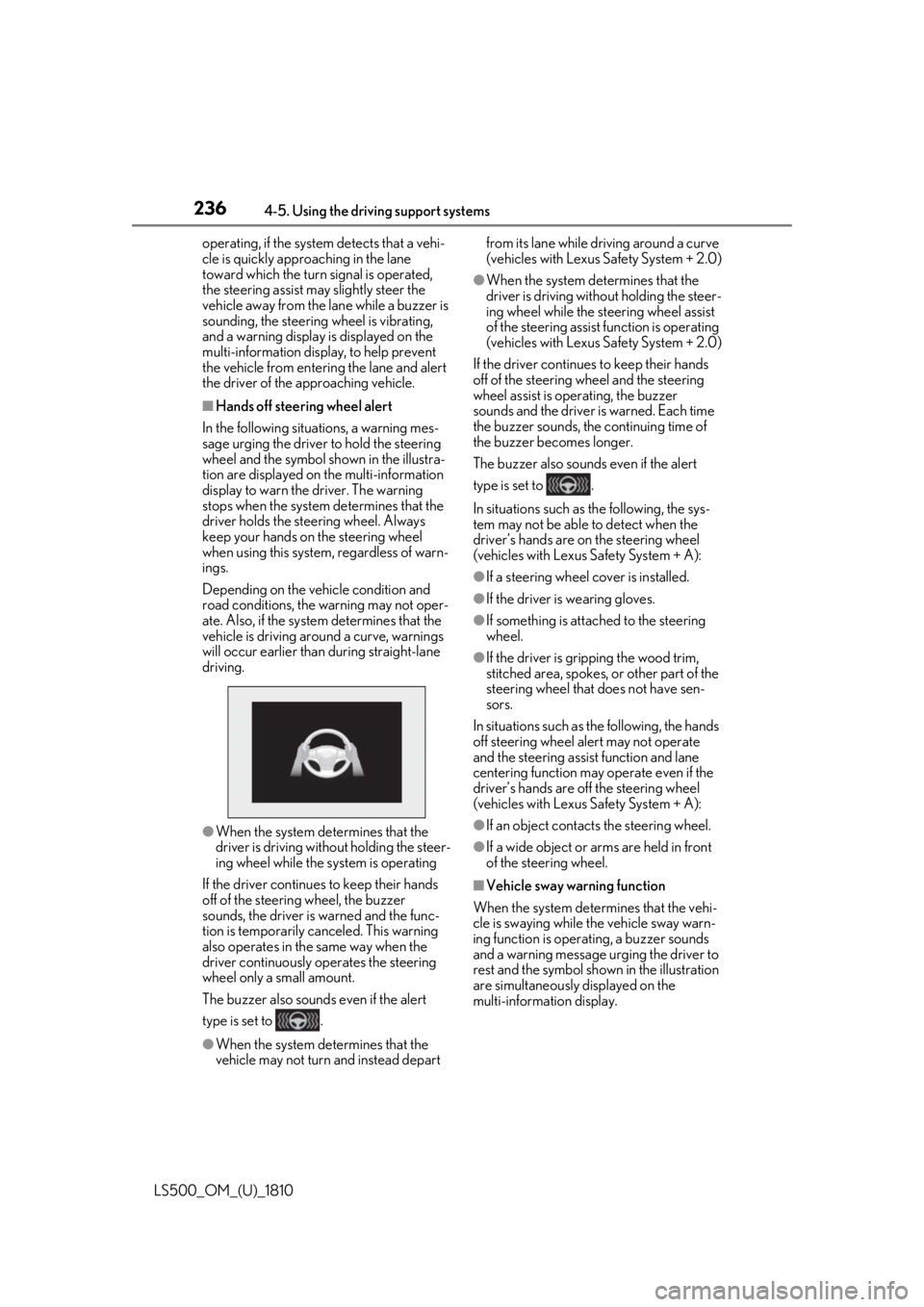
Hands off steering wheel alert
In the following situations, a warning mes-
sage urging the driver to hold the steering
wheel and the symbol shown in the illustra-
tion are displayed on the multi-information
display to warn the driver. The warning
stops when the system determines that the
driver holds the steering wheel. Always
keep your hands on the steering wheel
when using this system, regardless of warn-
ings.
Depending on the vehicle condition and
road conditions, the warning may not oper-
ate. Also, if the system determines that the
vehicle is driving around a curve, warnings
will occur earlier than during straight-lane
driving.
●
When the system determines that the
driver is driving without holding the steer-
ing wheel while the sy stem is operating
If the driver continue s to keep their hands
off of the steering wheel, the buzzer
sounds, the driver is warned and the func-
tion is temporarily ca nceled. This warning
also operates in the same way when the
driver continuously operates the steering
wheel only a small amount.
The buzzer also sounds even if the alert
type is set to .
●
When the system determines that the
vehicle may not turn and instead depart from its lane while driving around a curve
(vehicles with Lexus Safety System + 2.0) ●
When the system determines that the
driver is driving with out holding the steer-
ing wheel while the st eering wheel assist
of the steering assist function is operating
(vehicles with Lexus Safety System + 2.0)
If the driver continues to keep their hands
off of the steering wheel and the steering
wheel assist is operating, the buzzer
sounds and the driver is warned. Each time
the buzzer sounds, the continuing time of
the buzzer becomes longer.
The buzzer also sounds even if the alert
type is set to .
In situations such as the following, the sys-
tem may not be able to detect when the
driver’s hands are on the steering wheel
(vehicles with Lexus Safety System + A): ●
If a steering wheel cover is installed. ●
If the driver is wearing gloves. ●
If something is attached to the steering
wheel. ●
If the driver is gripping the wood trim,
stitched area, spokes, or other part of the
steering wheel that does not have sen-
sors.
In situations such as the following, the hands
off steering wheel alert may not operate
and the steering assist function and lane
centering function may operate even if the
driver’s hands are off the steering wheel
(vehicles with Lexus Safety System + A): ●
If an object contacts the steering wheel. ●
If a wide object or ar ms are held in front
of the steering wheel.
■
Vehicle sway warning function
When the system determines that the vehi-
cle is swaying while the vehicle sway warn-
ing function is operating, a buzzer sounds
and a warning message urging the driver to
rest and the symbol sh own in the illustration
are simultaneously displayed on the
multi-information display.
Page 240 of 512
240 4-5. Using the driving support systems
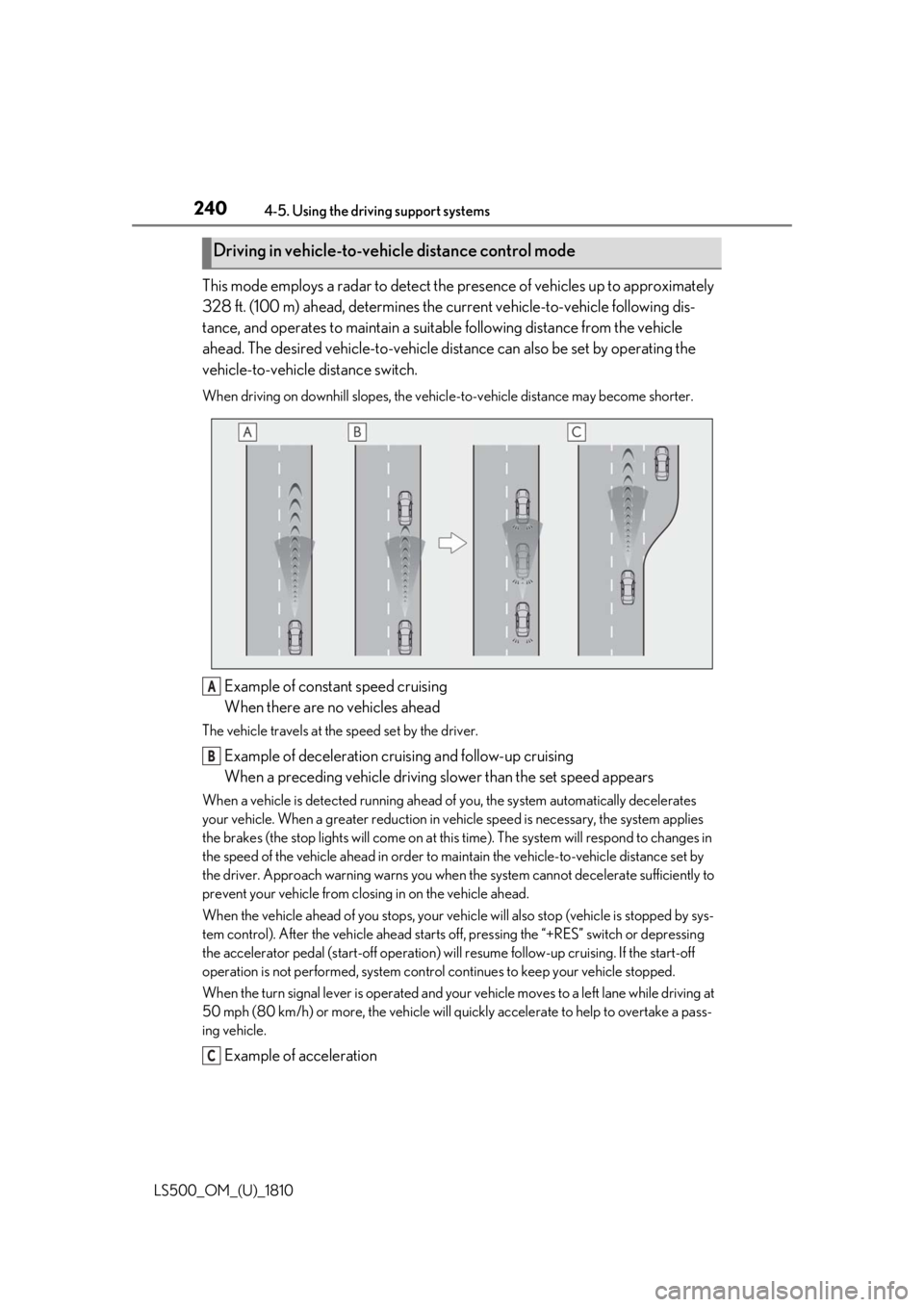
LS500_OM_(U)_1810 This mode employs a radar to detect the pr esence of vehicles up to approximately
328 ft. (100 m) ahead, determines the cu rrent vehicle-to-veh icle following dis-
tance, and operates to maintain a suitab le following distance from the vehicle
ahead. The desired vehicle-to-vehicle distance can also be set by operating the
vehicle-to-vehicle distance switch. When driving on downhill slopes, the vehicl e-to-vehicle distance may become shorter.
Example of constant speed cruising
When there are no vehicles aheadThe vehicle travels at the speed set by the driver.
Example of deceleration cruising and follow-up cruising
When a preceding vehicle driving slower than the set speed appearsWhen a vehicle is detected running ahead of you, the system automatically decelerates
your vehicle. When a greater reduction in vehicle speed is necessary, the system applies
the brakes (the stop lights will come on at this time). The sy stem will respond to changes in
the speed of the vehicle ahead in order to maintain the vehicle-to-vehicle distance set by
the driver. Approach warning warns you when th e system cannot decelera te sufficiently to
prevent your vehicle from closing in on the vehicle ahead.
When the vehicle ahead of you stops, your vehi cle will also stop (vehicle is stopped by sys-
tem control). After the vehicle ahead starts off, pressing the “+RES” switch or depressing
the accelerator pedal (start-off operation) will resume follow -up cruising. If the start-off
operation is not performed, system contro l continues to keep your vehicle stopped.
When the turn signal lever is operated and your vehicle moves to a left lane while driving at
50 mph (80 km/h) or more, the vehicle will quickly accelerate to help to overtake a pass-
ing vehicle.
Example of accelerationDriving in vehicle-to-vehicle distance control mode
A
B
C
Page 241 of 512
2414-5. Using the driving support systems
LS500_OM_(U)_1810 4
Driving When there are no longer any preceding vehicles driving slower than the set
speedThe system accelerates until the set speed is re ached. The system then returns to constant
speed cruising.
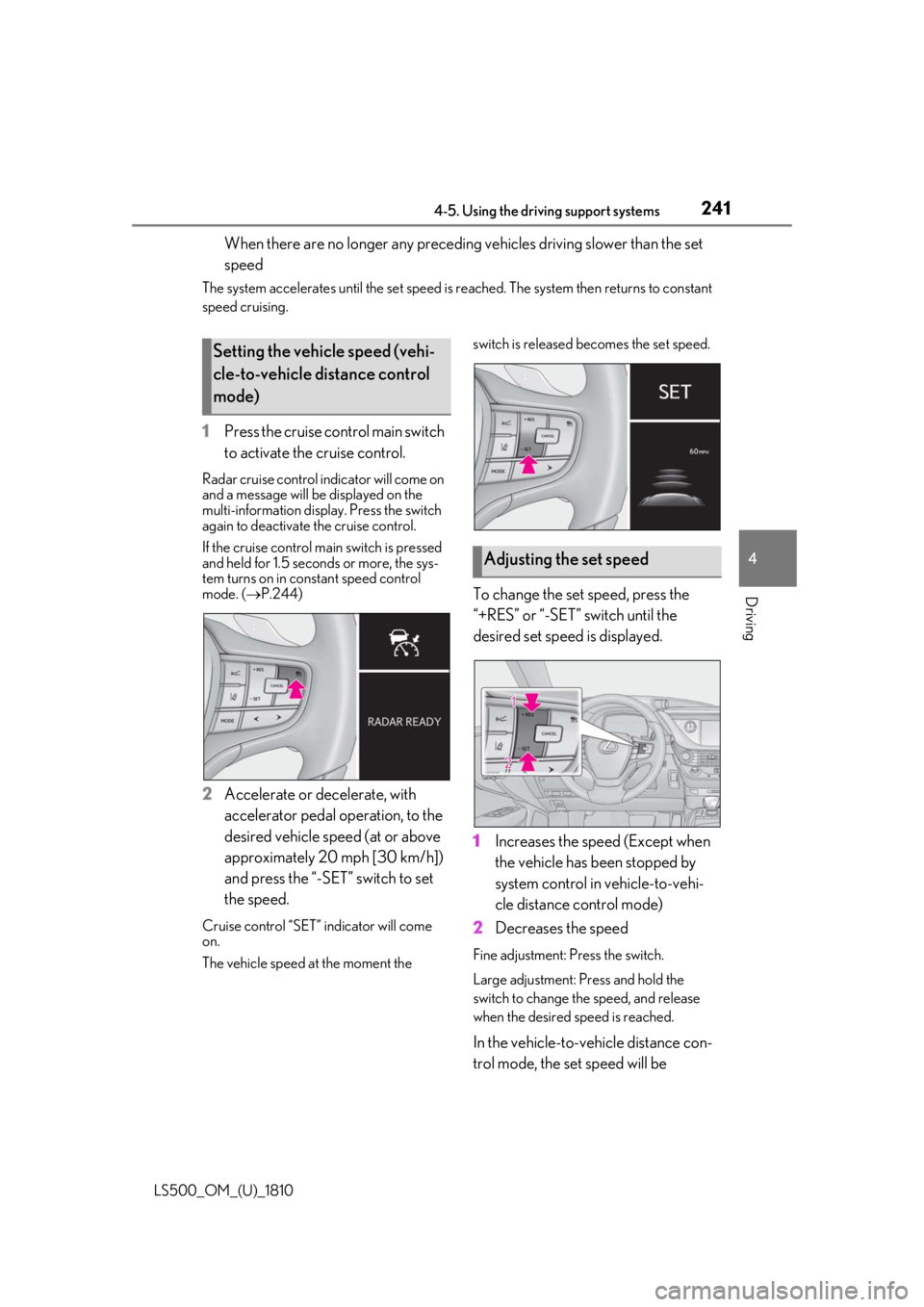
1 Press the cruise control main switch
to activate the cruise control.Radar cruise control indicator will come on
and a message will be displayed on the
multi-information displa y. Press the switch
again to deactivate the cruise control.
If the cruise control ma in switch is pressed
and held for 1.5 seconds or more, the sys-
tem turns on in constant speed control
mode. ( P.244)
2 Accelerate or decelerate, with
accelerator pedal operation, to the
desired vehicle speed (at or above
approximately 20 mph [30 km/h])
and press the “-SET” switch to set
the speed.Cruise control “SET” indicator will come
on.
The vehicle speed at the moment the switch is released becomes the set speed.
To change the set speed, press the
“+RES” or “-SET” switch until the
desired set speed is displayed.
1 Increases the speed (Except when
the vehicle has been stopped by
system control in vehicle-to-vehi-
cle distance control mode)
2 Decreases the speed Fine adjustment: Press the switch.
Large adjustment: Pr ess and hold the
switch to change the speed, and release
when the desired speed is reached.
In the vehicle-to-vehicle distance con-
trol mode, the set speed will be Setting the vehicle speed (vehi-
cle-to-vehicle distance control
mode)
Adjusting the set speed
Page 244 of 512
244 4-5. Using the driving support systems
LS500_OM_(U)_1810 ■
Warnings may not occur when
In the following instances, warnings
may not occur even when the vehi-
cle-to-vehicle distance is small.
When the speed of the preceding
vehicle matches or exceeds your
vehicle speed
When the preceding vehicle is trav-
eling at an extremely slow speed
Immediately after the cruise control
speed was set
When depressing the accelerator
pedal
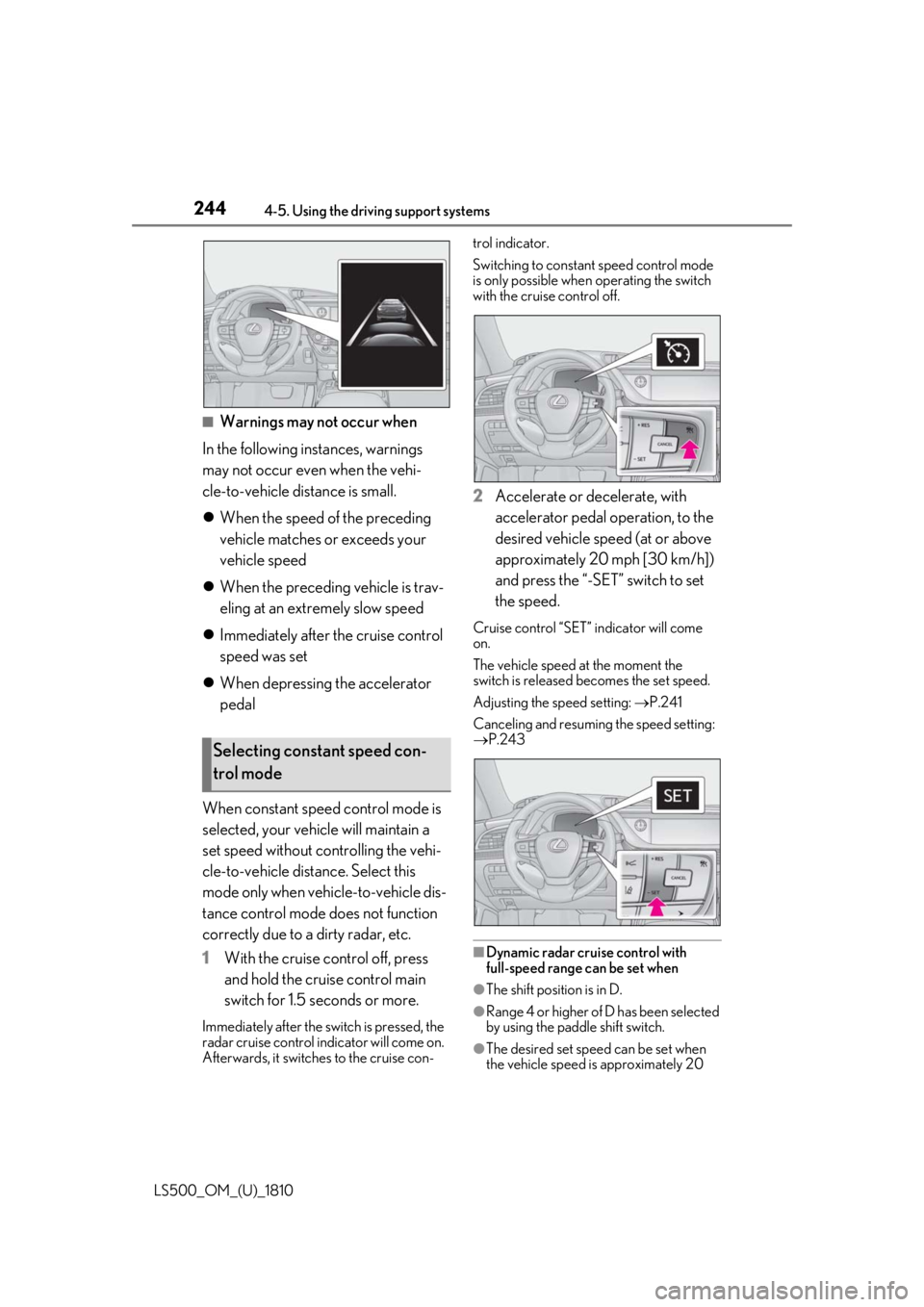
When constant speed control mode is
selected, your vehicle will maintain a
set speed without controlling the vehi-
cle-to-vehicle distance. Select this
mode only when vehicle-to-vehicle dis-
tance control mode does not function
correctly due to a dirty radar, etc.
1 With the cruise control off, press
and hold the cruise control main
switch for 1.5 seconds or more.Immediately after the switch is pressed, the
radar cruise control in dicator will come on.
Afterwards, it switches to the cruise con- trol indicator.
Switching to constant speed control mode
is only possible when operating the switch
with the cruise control off.
2 Accelerate or decelerate, with
accelerator pedal operation, to the
desired vehicle speed (at or above
approximately 20 mph [30 km/h])
and press the “-SET” switch to set
the speed. Cruise control “SET” indicator will come
on.
The vehicle speed at the moment the
switch is released becomes the set speed.
Adjusting the speed setting: P.241
Canceling and resuming the speed setting:
P.243
■
Dynamic radar cruise control with
full-speed range can be set when
●
The shift position is in D.
●
Range 4 or higher of D has been selected
by using the paddle shift switch.
●
The desired set spee d can be set when
the vehicle speed is approximately 20 Selecting constant speed con-
trol mode
Page 245 of 512
![LEXUS LS500 2019 Owners Manual 2454-5. Using the driving support systems
LS500_OM_(U)_1810 4
Driving mph (30 km/h) or more.
(However, when the vehicle speed is set
while driving at below approximately 20
mph [30 km/h], the set s](/img/36/58934/w960_58934-244.png "LEXUS LS500 2019 Owners Manual 2454-5. Using the driving support systems
LS500_OM_(U)_1810 4
Driving mph (30 km/h) or more.
(However, when the vehicle speed is set
while driving at below approximately 20
mph [30 km/h], the set s")
2454-5. Using the driving support systems
LS500_OM_(U)_1810 4
Driving mph (30 km/h) or more.
(However, when the vehicle speed is set
while driving at below approximately 20
mph [30 km/h], the set speed will be set
to approximately 20 mph [30 km/h].)■
Accelerating after setting the vehicle
speed
The vehicle can accelerate by operating the
accelerator pedal. After accelerating, the
set speed resumes. However, during vehi-
cle-to-vehicle distance control mode, the
vehicle speed may decrease below the set
speed in order to maintain the distance to
the preceding vehicle. ■
When the vehicle stops while follow-up
cruising●
Pressing the “+RES” switch while the
vehicle ahead stops w ill resume follow-up
cruising if the vehicle ahead starts off
within approximately 3 seconds after the
switch is pressed.●
If the vehicle ahead starts off within 3 sec-
onds after your vehicle stops, follow-up
cruising will be resumed.■
Automatic cancelation of vehi-
cle-to-vehicle distance control mode
Vehicle-to-vehicle dist ance control mode is
automatically canceled in the following situ-
ations. ●
VSC is activated.●
TRAC is activated for a period of time.●
When the VSC or TRAC system is
turned off.●
When snow mode is set.●
The sensor cannot detect correctly
because it is covered in some way.
●
Pre-collision braking is activated.
●
The parking brake is operated.
●
The vehicle is stopped by system control
on a steep incline.
●
The following are detected when the
vehicle has been stopped by system con-
trol:
• The driver is not wearing a seat belt.
• The driver’s door is opened.
• The vehicle has been stopped for about 3
minutes. If vehicle-to-vehicle distance control mode
is automatically canceled for any reasons
other than the above, there may be a mal-
function in the system. Contact your Lexus
dealer. ■
Automatic cancelation of constant
speed control mode
Constant speed control mode is automati-
cally canceled in the following situations: ●
Actual vehicle speed is more than
approximately 10 mph (16 km/h) below
the set vehicle speed. ●
Actual vehicle speed falls below approxi-
mately 20 mph (30 km/h). ●
VSC is activated. ●
TRAC is activated for a period of time. ●
When the VSC or TRAC system is
turned off. ●
Pre-collision braking is activated.
If constant speed control mode is automati-
cally canceled for any reasons other than
the above, there may be a malfunction in the
system. Contact your Lexus dealer. ■
Brake operation
A brake operation sound may be heard and
the brake pedal response may change, but
these are not malfunctions. ■
Warning messages and buzzers for
dynamic radar cruise control with
full-speed range
Warning messages and buzzers are used to
indicate a system malfunction or to inform
the driver of the need for caution while driv-
ing. If a warning messa ge is shown on the
multi-information displa y, read the message
and follow the instruc-
tions.( P.196,202,425)
■
When the sensor may not be correctly
detecting the vehicle ahead
In the case of the fo llowing and depending
on the conditions, operate the brake pedal
when deceleration of the system is insuffi-
cient or operate the accelerator pedal
when acceleration is required.
As the sensor may not be able to correctly
detect these types of vehicles, the approach
warning ( P.243) may not be activated.
Page 247 of 512
2474-5. Using the driving support systems
LS500_OM_(U)_1810 4
Driving *
:If equipped
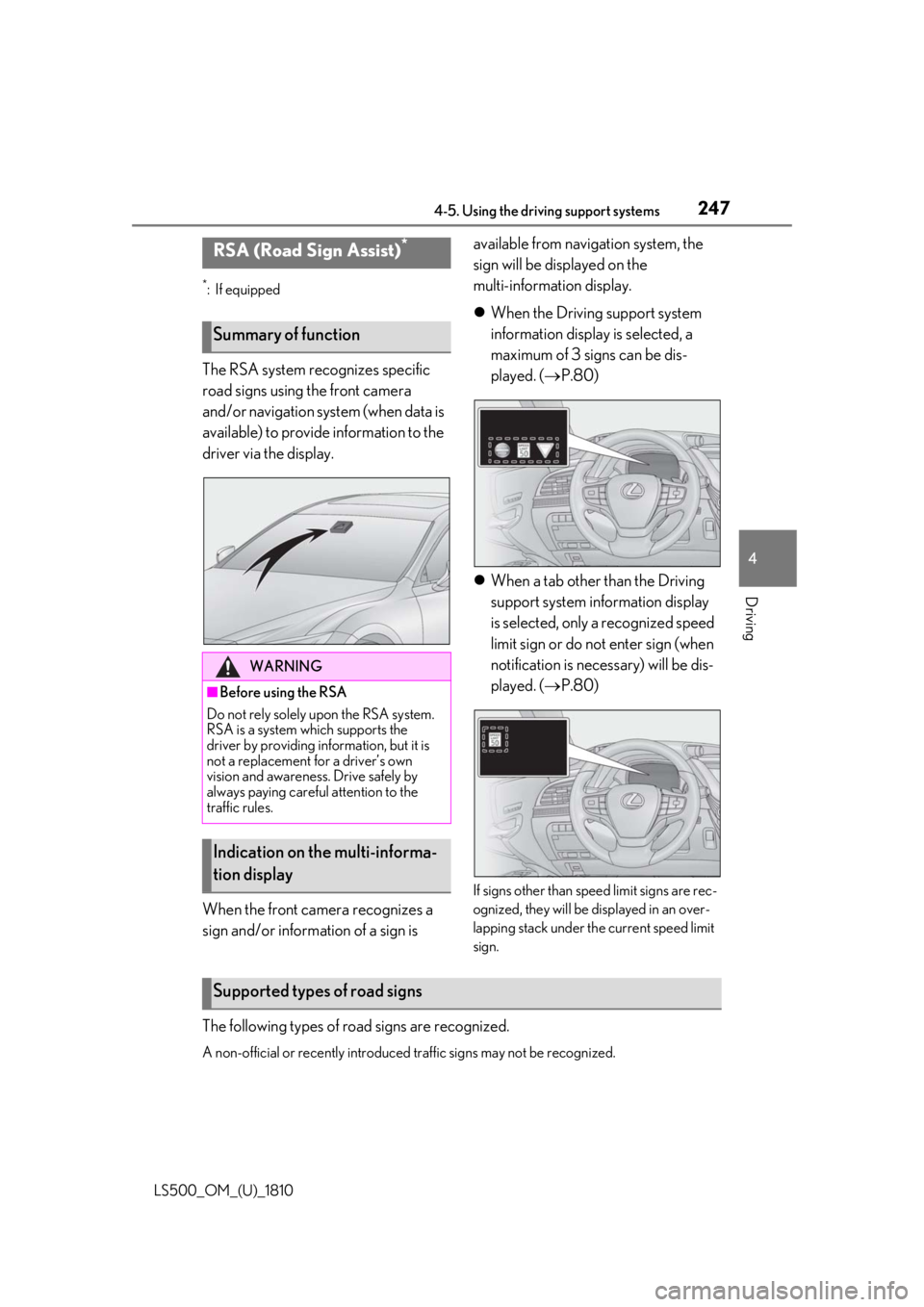
The RSA system recognizes specific
road signs using the front camera
and/or navigation system (when data is
available) to provide information to the
driver via the display.
When the front camera recognizes a
sign and/or informat ion of a sign is available from navigation system, the
sign will be displayed on the
multi-information display.
When the Driving support system
information display is selected, a
maximum of 3 signs can be dis-
played. ( P.80)
When a tab other than the Driving
support system information display
is selected, only a recognized speed
limit sign or do not enter sign (when
notification is necessary) will be dis-
played. ( P.80)
If signs other than speed limit signs are rec-
ognized, they will be displayed in an over-
lapping stack under th e current speed limit
sign.
The following types of ro ad signs are recognized.
A non-official or recently introduced traffic signs may not be recognized.RSA (Road Sign Assist) *
Summary of function
WARNING■
Before using the RSA
Do not rely solely upon the RSA system.
RSA is a system which supports the
driver by providing information, but it is
not a replacement for a driver’s own
vision and awareness. Drive safely by
always paying careful attention to the
traffic rules.
Indication on the multi-informa-
tion display
Supported types of road signs
Page 248 of 512
248 4-5. Using the driving support systems
LS500_OM_(U)_1810 In the following situations, the RSA sys-
tem will alert the driver.
When the vehicle speed exceeds
the speed warning threshold of the
speed limit sign displayed, the sign
display will be emphasized and a
buzzer will sound.
When the RSA system recognizes a
do not enter sign and determines
that your vehicle has entered a
no-entry area, the displayed sign will
flash and a buzzer will sound.
Depending on the situation, traffic
environment (traffic direction, speed
unit) may be detected incorrectly and a
warning display may not operate prop-
erly. ■
Setting procedure
1 Press or of the meter control
switches and select .
2 Press or of the meter control
switches and select “Vehicle Settings”,
then press .
3 Press or of the meter control
switches and select , then press
.
4 Press or of the meter control
switches and select “RSA”, then press
.
■
Automatic turn-off of RSA sign display
In the following situations, a displayed
speed limit sign will stop being displayed
automatically:
●
A new sign is not recognized for a certain
distance.
In the following situations, do not enter, stop
and yield signs will stop being displayed
automatically:
●
The system determines that your vehicle
has passed the sign.
●
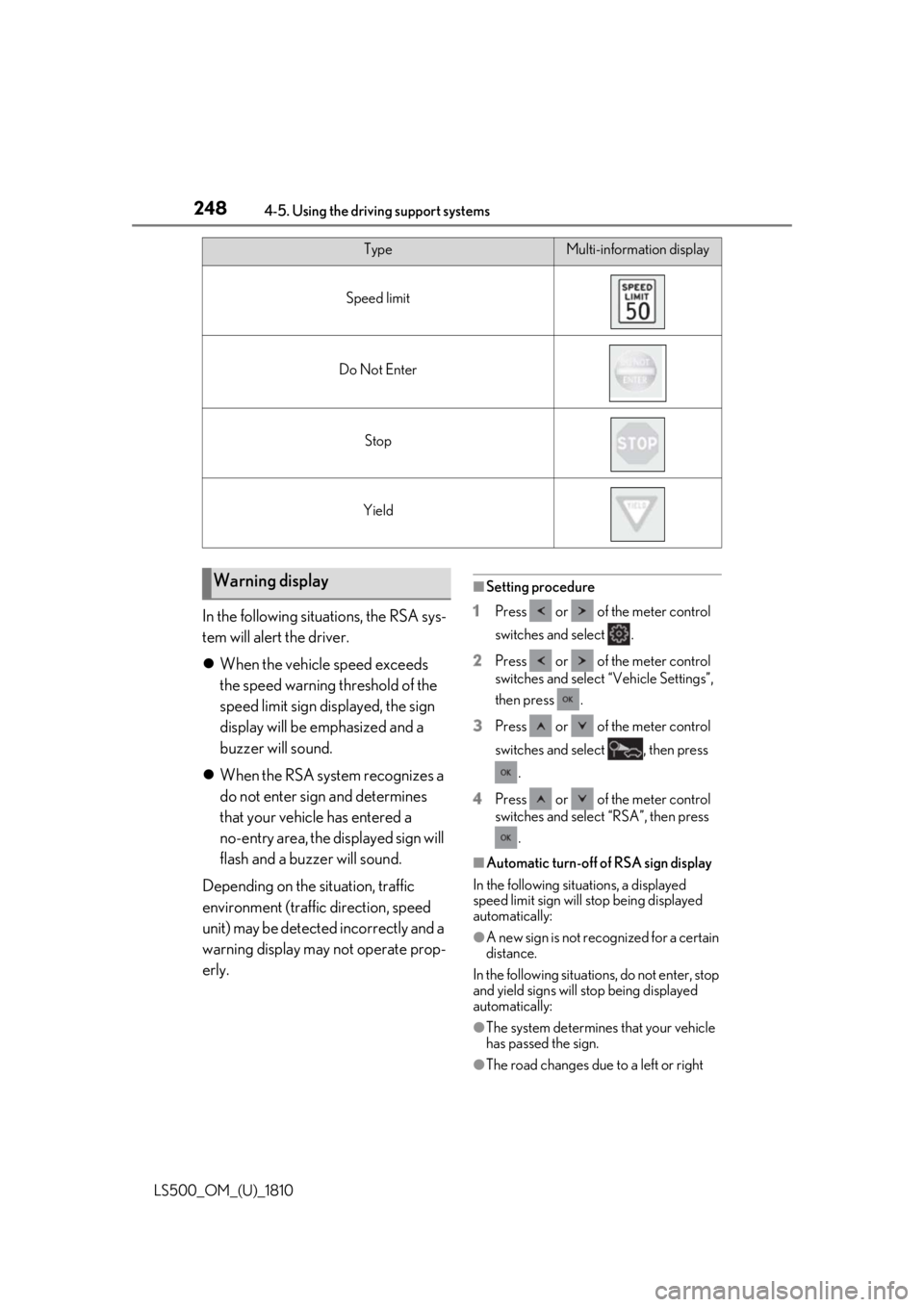
The road changes due to a left or right Type Multi-information display
Speed limit
Do Not Enter
Stop
Yield
Warning display
Page 249 of 512
2494-5. Using the driving support systems
LS500_OM_(U)_1810 4
Driving turn, etc.■
Conditions in whic h the function may
not operate or detect correctly
In the following situations, RSA does not
operate normally and may not recognize
signs, display the incorrect sign, etc. How-
ever, this does not indicate a malfunction. ●
The front camera is misaligned due to a
strong impact being applied to the sen-
sor, etc.●
Dirt, snow, stickers, etc. are on the wind-
shield near the front camera.●
In inclement weather such as heavy rain,
fog, snow or sand storms●
Light from an oncoming vehicle, the sun,
etc. enters the front camera.●
The sign is dirty, faded, tilted or bent.●
All or part of the sign is hidden by the
leaves of a tree, a pole, etc.●
The sign is only visible to the front camera
for a short amount of time.●
The driving scene (turning, lane change,
etc.) is judged incorrectly.●
Even if it is a sign not appropriate for the
currently traveled lane, such a sign exists
directly after a freeway branches, or in an
adjacent lane just before merging.●
Stickers are attached to the rear of the
preceding vehicle.●
A sign resembling a system compatible
sign is recognized.●
Side road speed signs may be detected
and displayed (if positioned in sight of the
front camera) while the vehicle is travel-
ing on the main road.
●
Roundabout exit road speed signs may
be detected and displayed (if positioned
in sight of the front camera) while travel-
ing on a roundabout.
●
The front of the vehicle is raised or low-
ered due to the carried load.
●
The surrounding brightness is not suffi-
cient or changes suddenly.
●
When a sign intended for trucks, etc. is
recognized. ■
Speed limit sign display
If the engine switch wa s last turned off while
a speed limit sign was displayed on the
multi-information display, the same sign dis-
plays again when the engine switch is
turned to IGNITION ON mode. ■
Customization
Some functions can be customized. (Cus-
tomizable features: P.466)