ECO LEXUS LS500 2019 Manual Online
[x] Cancel search | Manufacturer: LEXUS, Model Year: 2019, Model line: LS500, Model: LEXUS LS500 2019Pages: 512, PDF Size: 9.71 MB
Page 186 of 512
186 4-3. Operating the lights and wipers
LS500_OM_(U)_1810 ●
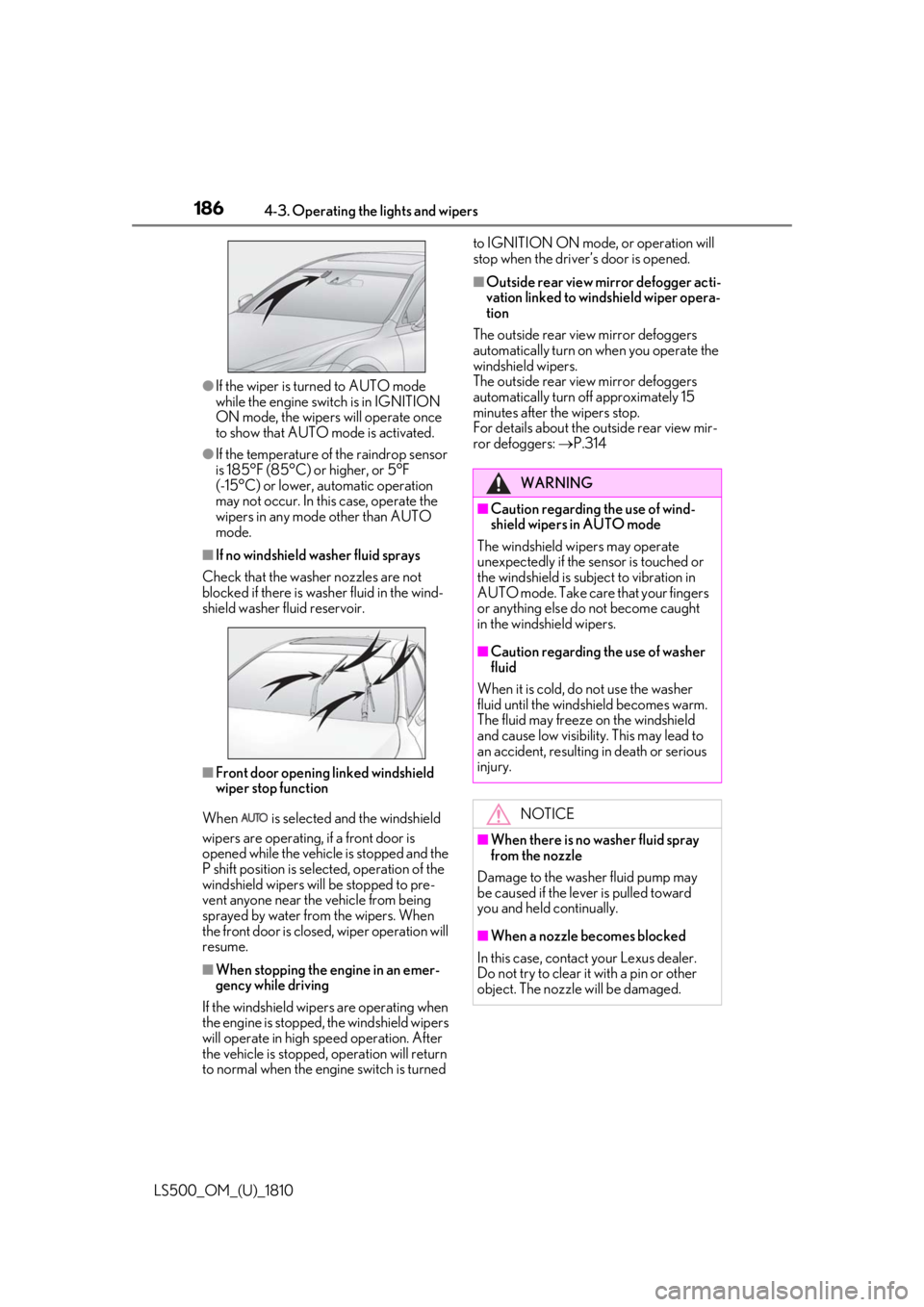
If the wiper is turned to AUTO mode
while the engine switch is in IGNITION
ON mode, the wipers will operate once
to show that AUTO mode is activated.●
If the temperature of the raindrop sensor
is 185°F (85°C) or higher, or 5°F
(-15°C) or lower, automatic operation
may not occur. In this case, operate the
wipers in any mode other than AUTO
mode.■
If no windshield washer fluid sprays
Check that the washer nozzles are not
blocked if there is wash er fluid in the wind-
shield washer fluid reservoir.
■
Front door opening linked windshield
wiper stop function
When is selected and the windshield
wipers are operating, if a front door is
opened while the vehicle is stopped and the
P shift position is sele cted, operation of the
windshield wipers w ill be stopped to pre-
vent anyone near the vehicle from being
sprayed by water from the wipers. When
the front door is closed, wiper operation will
resume.
■
When stopping the engine in an emer-
gency while driving
If the windshield wipers are operating when
the engine is stopped, the windshield wipers
will operate in high speed operation. After
the vehicle is stopped, operation will return
to normal when the engi ne switch is turned to IGNITION ON mode, or operation will
stop when the driver’s door is opened. ■
Outside rear view mirror defogger acti-
vation linked to windshield wiper opera-
tion
The outside rear view mirror defoggers
automatically turn on when you operate the
windshield wipers.
The outside rear view mirror defoggers
automatically turn off approximately 15
minutes after the wipers stop.
For details about the outside rear view mir-
ror defoggers: P.314
WARNING■
Caution regarding the use of wind-
shield wipers in AUTO mode
The windshield wipers may operate
unexpectedly if the sensor is touched or
the windshield is subj ect to vibration in
AUTO mode. Take care that your fingers
or anything else do not become caught
in the windshield wipers. ■
Caution regarding the use of washer
fluid
When it is cold, do not use the washer
fluid until the windshield becomes warm.
The fluid may freeze on the windshield
and cause low visibility. This may lead to
an accident, resulting in death or serious
injury.
NOTICE
■
When there is no washer fluid spray
from the nozzle
Damage to the washer fluid pump may
be caused if the lever is pulled toward
you and held continually.
■
When a nozzle becomes blocked
In this case, contact your Lexus dealer.
Do not try to clear it with a pin or other
object. The nozzle will be damaged.
Page 187 of 512
1874-3. Operating the lights and wipers
LS500_OM_(U)_1810 4
Driving When the windshield wipers are not
being used, they retract to below the
hood. To enable the windshield wipers
to be lifted when parking in cold condi-
tions or when replacing a windshield
wiper insert, change the rest position of
the windshield wipers to the service
position using the wiper lever. ■
Raising the wipers to the service
position
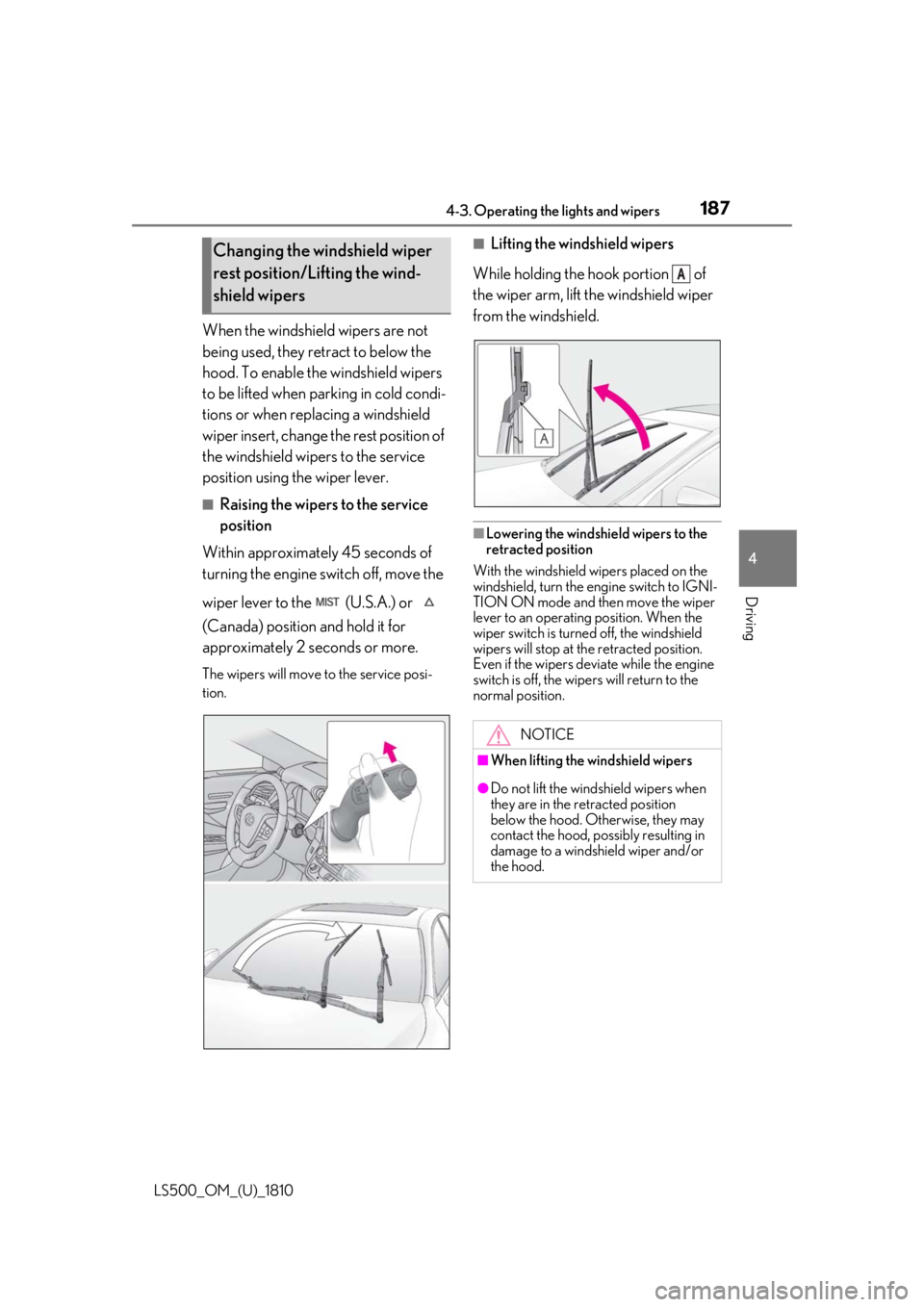
Within approximately 45 seconds of
turning the engine switch off, move the
wiper lever to the (U.S.A.) or
(Canada) position and hold it for
approximately 2 se conds or more.The wipers will move to the service posi-
tion. ■
Lifting the windshield wipers
While holding the hook portion of
the wiper arm, lift the windshield wiper
from the windshield.
■
Lowering the windshield wipers to the
retracted position
With the windshield wipers placed on the
windshield, turn the en gine switch to IGNI-
TION ON mode and then move the wiper
lever to an operating position. When the
wiper switch is turned off, the windshield
wipers will stop at the retracted position.
Even if the wipers deviate while the engine
switch is off, the wipers will return to the
normal position.Changing the windshield wiper
rest position/Lifting the wind-
shield wipers
NOTICE■
When lifting the windshield wipers
●
Do not lift the wind shield wipers when
they are in the retracted position
below the hood. Otherwise, they may
contact the hood, possibly resulting in
damage to a windshield wiper and/or
the hood. A
Page 191 of 512
1914-5. Using the driving support systems
LS500_OM_(U)_1810 4
Driving 4-5.Using the driving support systems
*
:If equipped
■
PCS (Pre-Collision System) (vehi-
cles with Lexus Safety System + A)
P.204 ■
FCTA (Front Cross Traffic Alert)
P.222 ■
LTA (Lane Tracing Assist)
P.225 ■
AHB (Automatic High Beam)
P.182 ■
RSA (Road Sign Assist) **
:If equipped
P.247 ■
Dynamic radar cruise control with
full-speed range
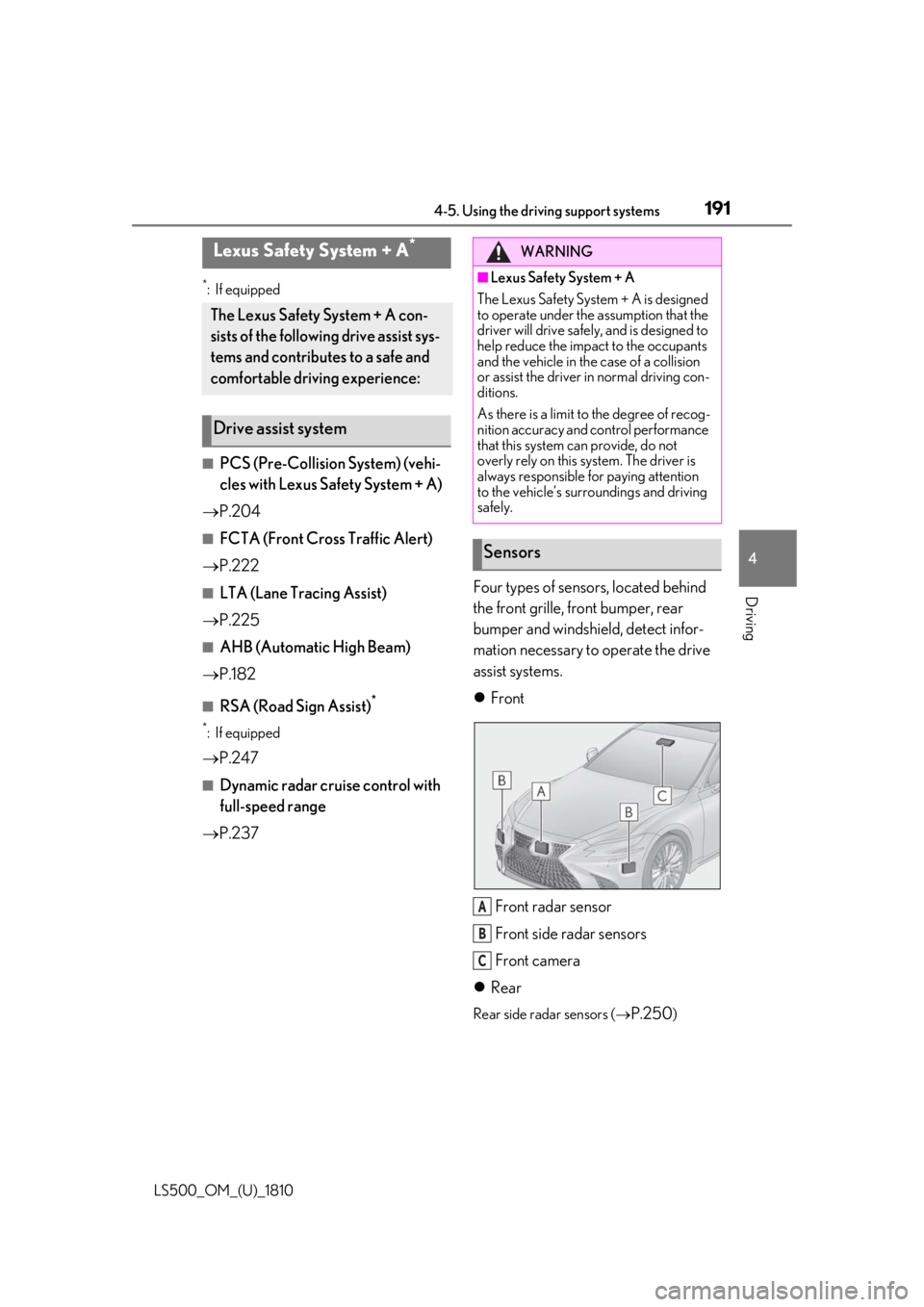
P.237 Four types of sensors, located behind
the front grille, front bumper, rear
bumper and windshield, detect infor-
mation necessary to operate the drive
assist systems.
Front
Front radar sensor
Front side radar sensors
Front camera
Rear Rear side radar sensors (
P.250 )Lexus Safety System + A *
The Lexus Safety System + A con-
sists of the following drive assist sys-
tems and contributes to a safe and
comfortable driving experience:
Drive assist system WARNING■
Lexus Safety System + A
The Lexus Safety System + A is designed
to operate under the assumption that the
driver will drive safely , and is designed to
help reduce the impact to the occupants
and the vehicle in the case of a collision
or assist the driver in normal driving con-
ditions.
As there is a limit to the degree of recog-
nition accuracy and control performance
that this system can provide, do not
overly rely on this system. The driver is
always responsible for paying attention
to the vehicle’s surroundings and driving
safely.
Sensors
A
B
C
Page 193 of 512
1934-5. Using the driving support systems
LS500_OM_(U)_1810 4
Driving WARNING●
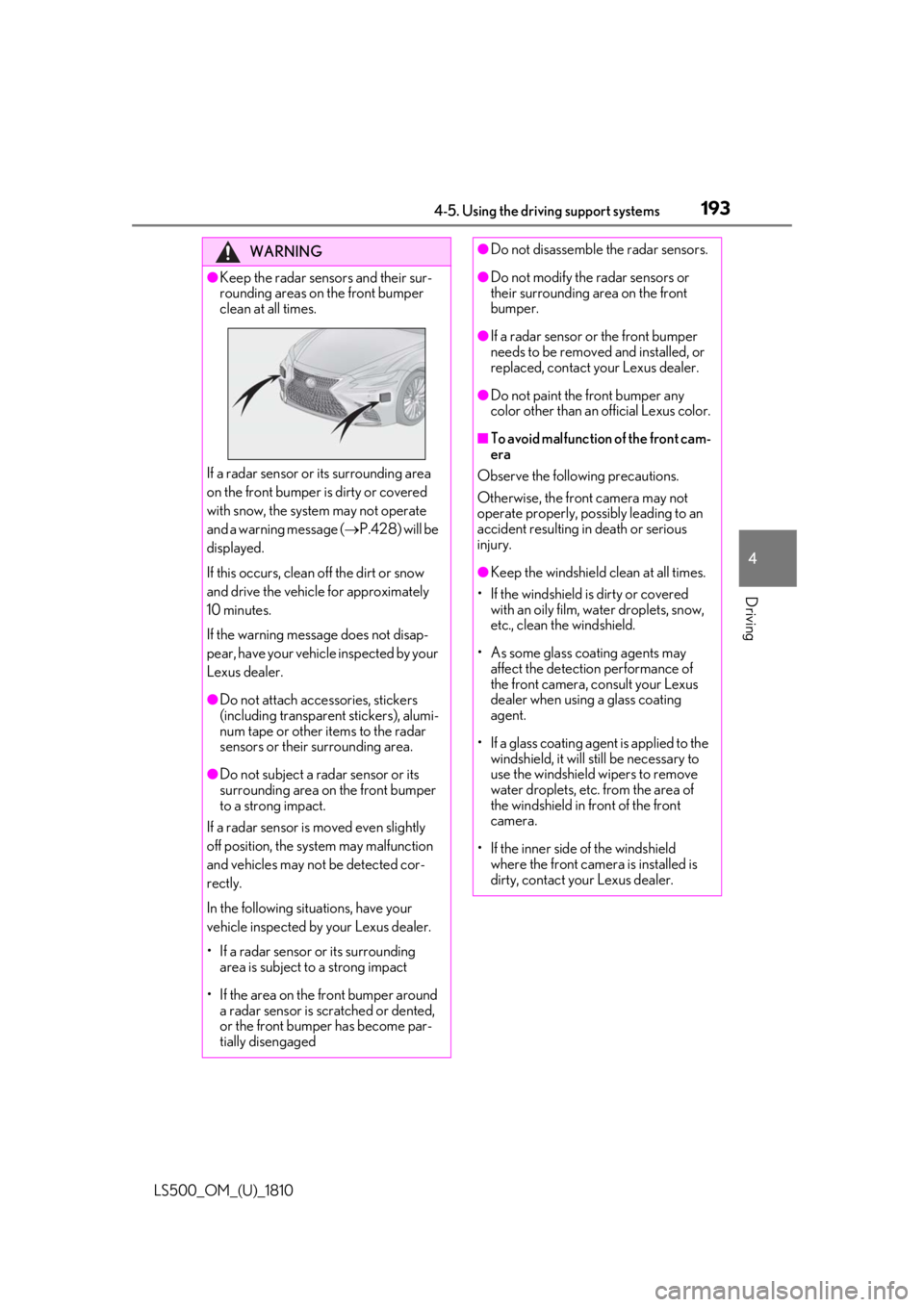
Keep the radar sensors and their sur-
rounding areas on the front bumper
clean at all times.
If a radar sensor or its surrounding area
on the front bumper is dirty or covered
with snow, the system may not operate
and a warning message ( P.428) will be
displayed.
If this occurs, clean off the dirt or snow
and drive the vehicle for approximately
10 minutes.
If the warning message does not disap-
pear, have your vehicle inspected by your
Lexus dealer. ●
Do not attach accessories, stickers
(including transparen t stickers), alumi-
num tape or other items to the radar
sensors or their surrounding area.
●
Do not subject a radar sensor or its
surrounding area on the front bumper
to a strong impact.
If a radar sensor is moved even slightly
off position, the system may malfunction
and vehicles may not be detected cor-
rectly.
In the following situations, have your
vehicle inspected by your Lexus dealer.
• If a radar sensor or its surrounding
area is subject to a strong impact
• If the area on the front bumper around
a radar sensor is scratched or dented,
or the front bumper has become par-
tially disengaged ●
Do not disassemble the radar sensors. ●
Do not modify the radar sensors or
their surrounding area on the front
bumper. ●
If a radar sensor or the front bumper
needs to be removed and installed, or
replaced, contact your Lexus dealer. ●
Do not paint the front bumper any
color other than an official Lexus color. ■
To avoid malfunction of the front cam-
era
Observe the following precautions.
Otherwise, the front camera may not
operate properly, possibly leading to an
accident resulting in death or serious
injury. ●
Keep the windshield clean at all times.
• If the windshield is dirty or covered
with an oily film, water droplets, snow,
etc., clean the windshield.
• As some glass coating agents may
affect the detection performance of
the front camera, consult your Lexus
dealer when using a glass coating
agent.
• If a glass coating agent is applied to the
windshield, it will still be necessary to
use the windshield wipers to remove
water droplets, etc. from the area of
the windshield in front of the front
camera.
• If the inner side of the windshield
where the front camera is installed is
dirty, contact your Lexus dealer.
Page 196 of 512
196 4-5. Using the driving support systems
LS500_OM_(U)_1810 ■
If a warning message is displayed on the multi-information display
A system may be temporarily unavailable or there may be a malfunction in the system.●
In the following situations, perform the actions specified in the table. When the normal
operating conditions are detected, the me ssage will disappear and the system will
become operational.
If the message does not disappea r, contact your Lexus dealer.
Situation Actions
When the area around a sensor is covered
with dirt, moisture (f ogged up, covered with
condensation, ice, etc.), or other foreign
matter To clean the part of the windshield in front of
the front camera , use the windshield wipers
or the windshield defo gger of the air condi-
tioning system ( P.314).
Page 197 of 512
1974-5. Using the driving support systems
LS500_OM_(U)_1810 4
Driving
●
In the following situations, if the situation has changed (or the vehicle has been driven for
some time) and the normal operating conditio ns are detected, the message will disappear
and the system will become operational.
If the message does not disappear, contact your Lexus dealer.
• When the temperature around the radar sensor is outside of the operational range, such
as when the vehicle is in the sun or in an extremely cold environment
• When the front camera cannot detect objects in front of the vehicle, such as when driving
in the dark, snow, or fog, or when brig ht lights are shining into the front cameraWhen the temperature around the front
camera is outside of the operational range,
such as when the vehicle is in the sun or in an
extremely cold environment If the front camera is hot, such as after the
vehicle had been parked in the sun, use the
air conditioning system to decrease the tem-
perature around the front camera.
If a sunshade was used when the vehicle
was parked, depending on its type, the sun-
light reflected from the surface of the sun-
shade may cause the temperature of the
front camera to become excessively high.
If the front camera is cold, such after the
vehicle is parked in an extremely cold envi-
ronment, use the air conditioning system to
increase the temperature around the front
camera.
The area in front of the front camera is
obstructed, such as when the hood is open
or a sticker is attached to the part of the
windshield in front of the front camera. Close the hood, remove the sticker, etc. to
clear the obstruction.Situation Actions
Page 198 of 512
198 4-5. Using the driving support systems
LS500_OM_(U)_1810 *
:If equipped
■
PCS (Pre-Collision System) (vehi-
cles with Lexus Safety System +
2.0)
P.215 ■
LTA (Lane Tracing Assist)
P.225 ■
AHB (Automatic High Beam)
P.182 ■
RSA (Road Sign Assist) *
P.247 *
:If equipped ■
Dynamic radar cruise control with
full-speed range
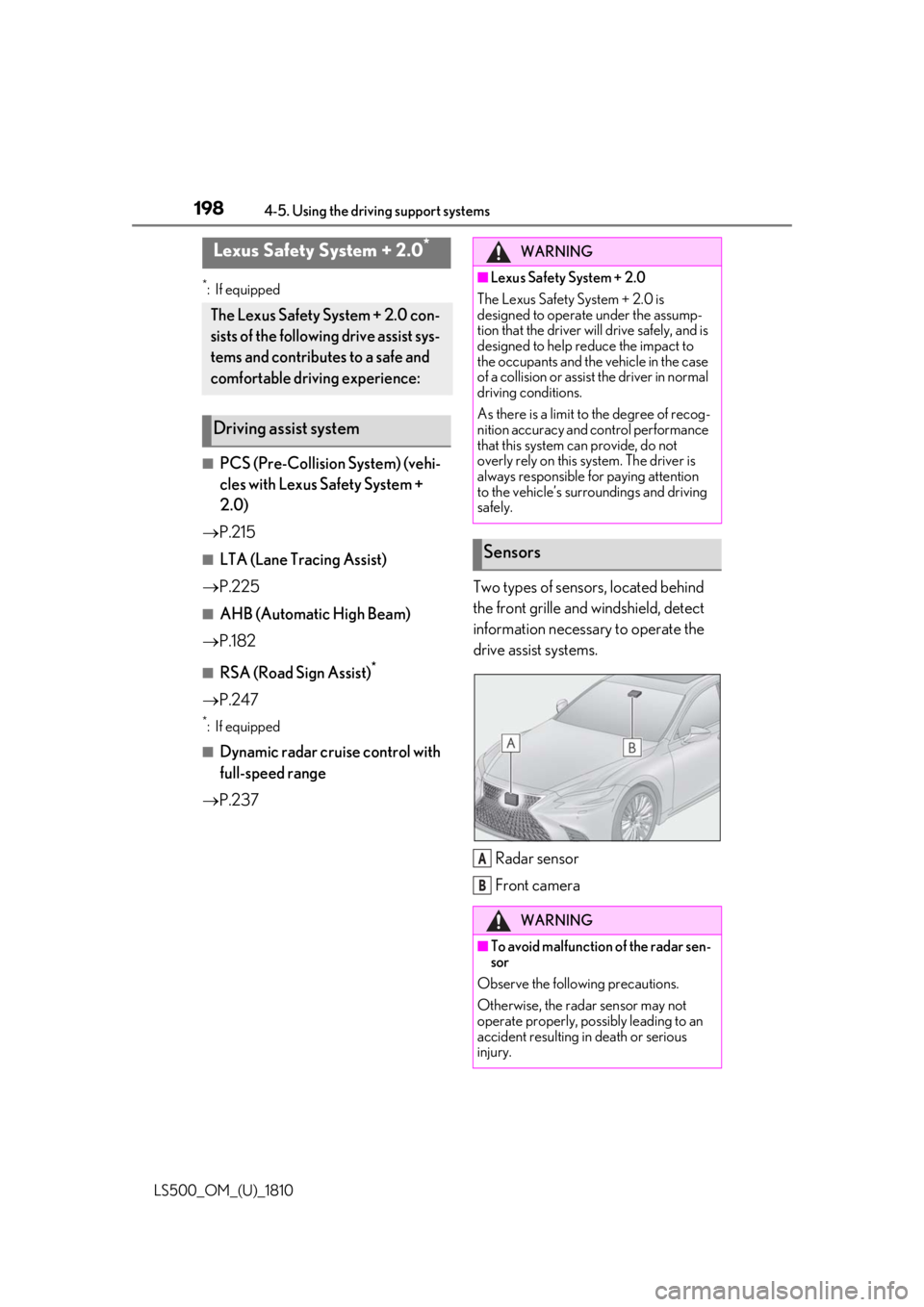
P.237 Two types of sensors, located behind
the front grille and windshield, detect
information necessary to operate the
drive assist systems.
Radar sensor
Front cameraLexus Safety System + 2.0 *
The Lexus Safety System + 2.0 con-
sists of the following drive assist sys-
tems and contributes to a safe and
comfortable driving experience:
Driving assist system WARNING■
Lexus Safety System + 2.0
The Lexus Safety System + 2.0 is
designed to operate under the assump-
tion that the driver will drive safely, and is
designed to help reduce the impact to
the occupants and the vehicle in the case
of a collision or assist the driver in normal
driving conditions.
As there is a limit to the degree of recog-
nition accuracy and control performance
that this system can provide, do not
overly rely on this system. The driver is
always responsible for paying attention
to the vehicle’s surroundings and driving
safely.
Sensors
WARNING
■
To avoid malfunction of the radar sen-
sor
Observe the following precautions.
Otherwise, the radar sensor may not
operate properly, possibly leading to an
accident resulting in death or serious
injury. A
B
Page 202 of 512
202 4-5. Using the driving support systems
LS500_OM_(U)_1810 ■
If a warning message is displayed on the multi-information display
A system may be temporarily unavailable or there may be a malfunction in the system.●
In the following situations, perform the actions specified in the table. When the normal
operating conditions are detected, the me ssage will disappear and the system will
become operational.
If the message does not disappea r, contact your Lexus dealer.
Situation Actions
When the area around a sensor is covered
with dirt, moisture (f ogged up, covered with
condensation, ice, etc.), or other foreign
matter To clean the part of the windshield in front of
the front camera , use the windshield wipers
or the windshield defo gger of the air condi-
tioning system ( P.314).
When the temperature around the front
camera is outside of the operational range,
such as when the vehicle is in the sun or in an
extremely cold environment If the front camera is hot, such as after the
vehicle had been parked in the sun, use the
air conditioning system to decrease the tem-
perature around the front camera.
If a sunshade was used when the vehicle
was parked, depending on its type, the sun-
light reflected from the surface of the sun-
shade may cause the temperature of the
front camera to become excessively high.
If the front camera is cold, such after the
vehicle is parked in an extremely cold envi-
ronment, use the air conditioning system to
increase the temperature around the front
camera.
Page 203 of 512

2034-5. Using the driving support systems
LS500_OM_(U)_1810 4
Driving ●
In the following situations, if the situation has changed (or the vehicle has been driven for
some time) and the normal operating conditio ns are detected, the message will disappear
and the system will become operational.
If the message does not disappear, contact your Lexus dealer.
• When the temperature around the radar sensor is outside of the operational range, such
as when the vehicle is in the sun or in an extremely cold environment
• When the front camera cannot detect objects in front of the vehicle, such as when driving
in the dark, snow, or fog, or when brig ht lights are shining into the front cameraThe area in front of the front camera is
obstructed, such as when the hood is open
or a sticker is attached to the part of the
windshield in front of the front camera. Close the hood, remove the sticker, etc. to
clear the obstruction.Situation Actions
Page 206 of 512
206 4-5. Using the driving support systems
LS500_OM_(U)_1810 WARNING■
Pre-collision braking●
When the pre-collision braking func-
tion is operating, a large amount of
braking force will be applied.●
If the vehicle is stopped by the opera-
tion of the pre-collision braking func-
tion, the pre-collision braking function
operation will be canceled after
approximately 2 seco nds. Depress the
brake pedal as necessary.●
The pre-collision braking function may
not operate if certain operations are
performed by the driver. If the acceler-
ator pedal is being depressed strongly
or the steering wheel is being turned,
the system may determine that the
driver is taking evasive action and pos-
sibly prevent the pre-collision braking
function from operating.●
In some situations, while the pre-colli-
sion braking function is operating,
operation of the function may be can-
celed if the accelerator pedal is
depressed strongly or the steering
wheel is turned and the system deter-
mines that the driver is taking evasive
action.
●
If the brake pedal is being depressed,
the system may determine that the
driver is taking evasive action and pos-
sibly delay the operation timing of the
pre-collision braking function.
■
Active steering assist●
The steering wheel may turn automati-
cally when active steering assist is
operating.
●
As active steering assist operation will
be canceled when the system deter-
mines that a collision has been
avoided, operate the steering wheel as
necessary. ●
In the following situations, the system
may determine that th e driver is taking
evasive action. In this case, the active
steering assist may not operate or may
be canceled.
• If the accelerator pedal is being
depressed strongly or the steering
wheel is being operat ed. In this case
the system may determine that the
driver is taking evasive action and the
pre-collision braking may not operate.
• In some situations, while the active
steering assist is operating, operation
of the function may be canceled if the
accelerator pedal is depressed
strongly or the steering wheel is turned
and the system determines that the
driver is taking evasive action.
• When the active steering assist is
operating, if the stee ring wheel is held
firmly or is operated in the opposite
direction to that which the system is
generating torque, the function may be
canceled.
• If the brake pedal is depressed, the sys-
tem may determine that the driver is
taking evasive action and the active
steering assist operation may be
delayed.
■
Pre-collision seat belts with comfort
function
If the pre-collision se at belts have oper-
ated and the seat belts are locked in a
retracted position, immediately stop the
vehicle in a safe place, release and
retract the seat belts to unlock them and
then fasten them again.
Also, if a seat belt ca n be loosened, it can
be unlocked by slightly retracting it with-
out releasing it.
■
When to disable the pre-collision sys-
tem
In the following situations, disable the
system, as it may not operate properly,
possibly leading to an accident resulting
in death or serious injury:
●
When the vehicle is being towed