ECO LEXUS LS500 2019 Owners Manual
[x] Cancel search | Manufacturer: LEXUS, Model Year: 2019, Model line: LS500, Model: LEXUS LS500 2019Pages: 512, PDF Size: 9.71 MB
Page 345 of 512
3455-6. Using the other interior features
LS500_OM_(U)_1810 5
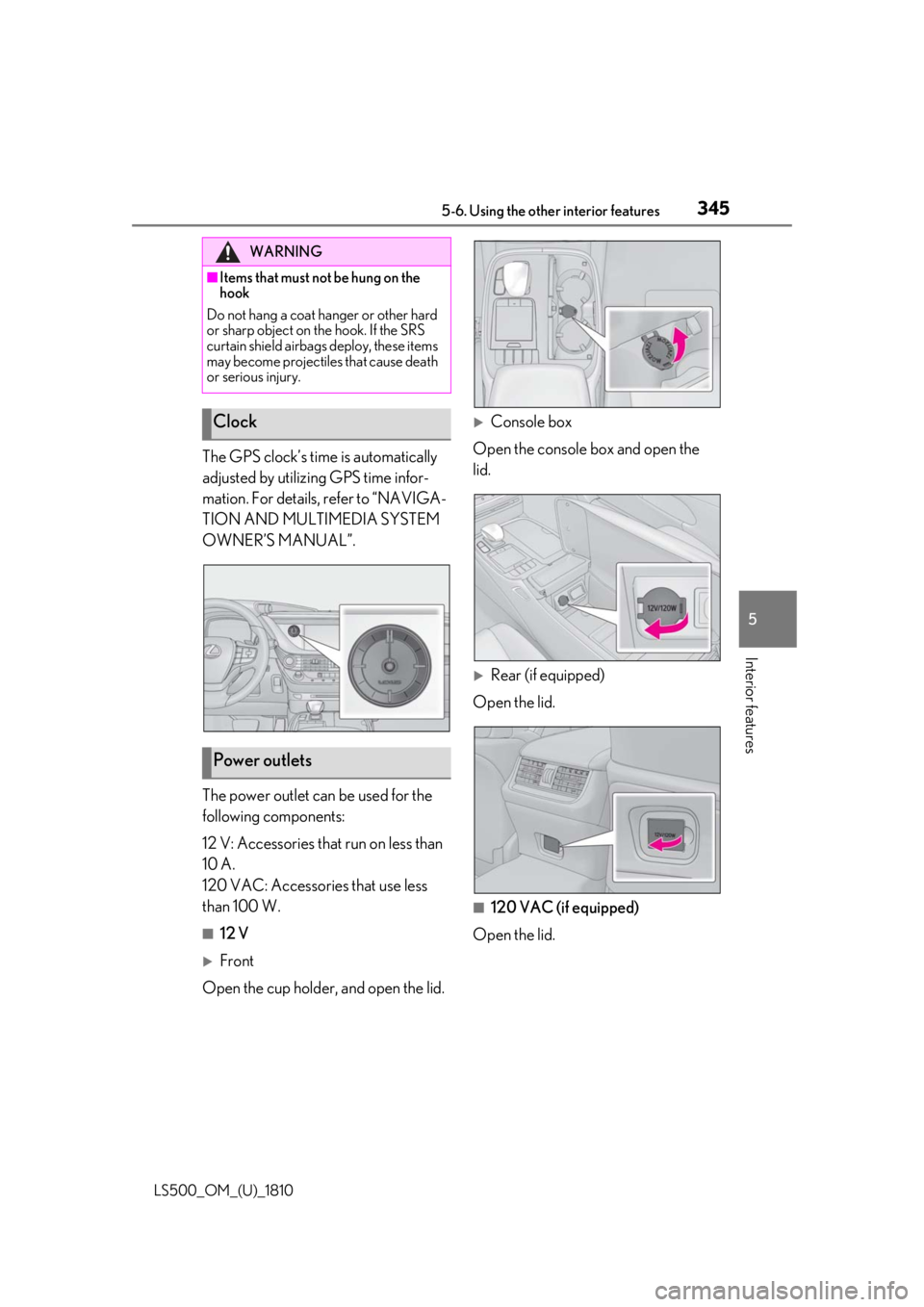
Interior features The GPS clock’s time is automatically
adjusted by utilizing GPS time infor-
mation. For details, refer to “NAVIGA-
TION AND MULTIMEDIA SYSTEM
OWNER’S MANUAL”.
The power outlet can be used for the
following components:
12 V: Accessories that run on less than
10 A.
120 VAC: Accessories that use less
than 100 W. ■
12 V
Front
Open the cup holder , and open the lid.
Console box
Open the console box and open the
lid.
Rear (if equipped)
Open the lid.
■
120 VAC (if equipped)
Open the lid.WARNING■
Items that must not be hung on the
hook
Do not hang a coat ha nger or other hard
or sharp object on the hook. If the SRS
curtain shield airbags deploy, these items
may become projectiles that cause death
or serious injury.
Clock
Power outlets
Page 348 of 512
348 5-6. Using the other interior features
LS500_OM_(U)_1810 ■
From rear seat
The rear seat power window switches
cannot be used to extend the rear door
sunshades/rear quarter sunshades.
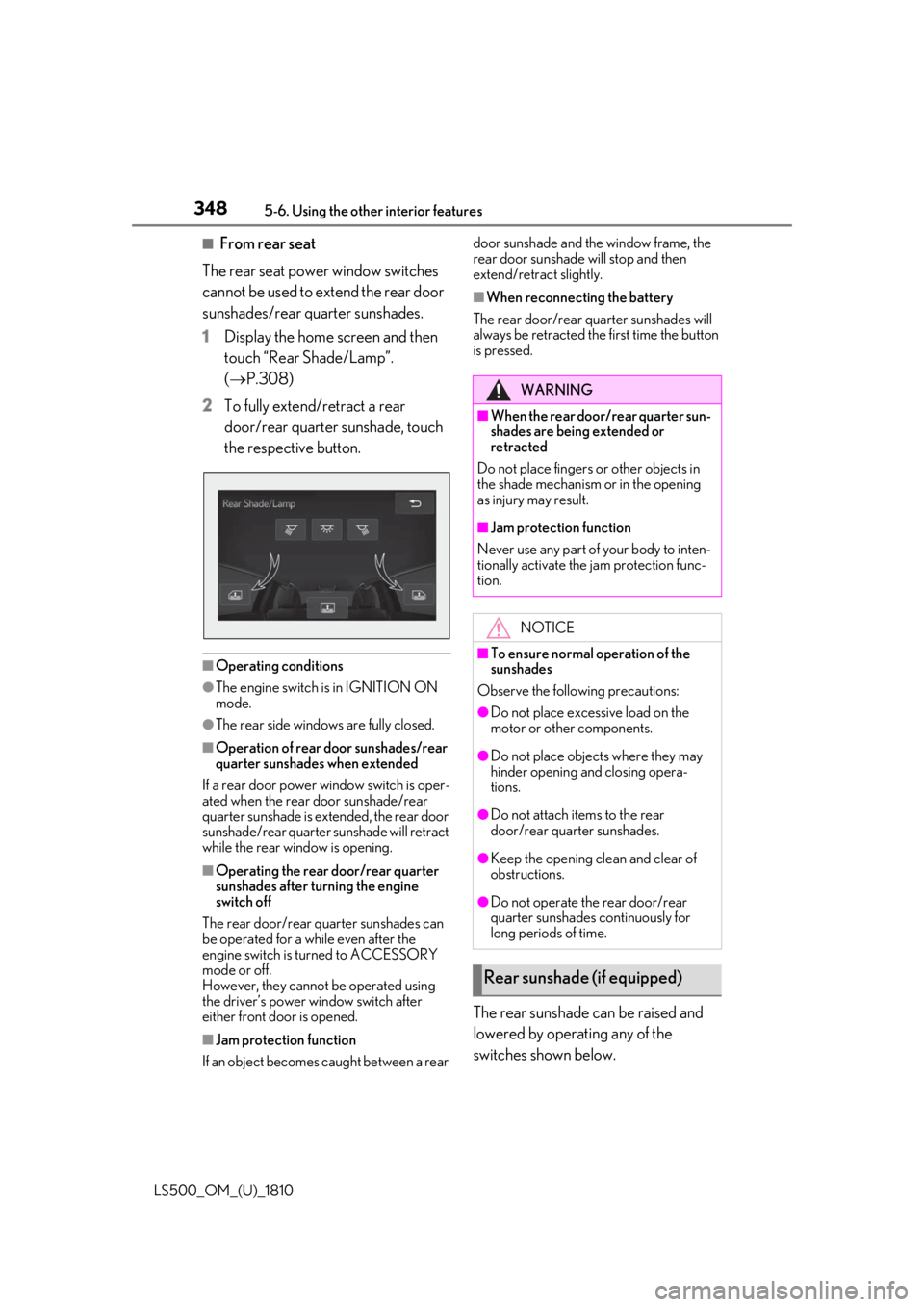
1 Display the home screen and then
touch “Rear Shade/Lamp”.
( P.308)
2 To fully extend/retract a rear
door/rear quarter sunshade, touch
the respective button.
■
Operating conditions●
The engine switch is in IGNITION ON
mode.●
The rear side windows are fully closed.■
Operation of rear door sunshades/rear
quarter sunshades when extended
If a rear door power window switch is oper-
ated when the rear door sunshade/rear
quarter sunshade is extended, the rear door
sunshade/rear quarter sunshade will retract
while the rear window is opening.
■
Operating the rear door/rear quarter
sunshades after turning the engine
switch off
The rear door/rear quarter sunshades can
be operated for a while even after the
engine switch is turned to ACCESSORY
mode or off.
However, they cannot be operated using
the driver’s power window switch after
either front door is opened.
■
Jam protection function
If an object becomes caught between a rear door sunshade and the window frame, the
rear door sunshade will stop and then
extend/retract slightly. ■
When reconnecting the battery
The rear door/rear quarter sunshades will
always be retracted the first time the button
is pressed.
The rear sunshade can be raised and
lowered by operating any of the
switches shown below. WARNING■
When the rear door/rear quarter sun-
shades are being extended or
retracted
Do not place fingers or other objects in
the shade mechanism or in the opening
as injury may result. ■
Jam protection function
Never use any part of your body to inten-
tionally activate the jam protection func-
tion.
NOTICE■
To ensure normal operation of the
sunshades
Observe the following precautions: ●
Do not place excessive load on the
motor or other components.
●
Do not place objects where they may
hinder opening and closing opera-
tions.
●
Do not attach items to the rear
door/rear quarter sunshades.
●
Keep the opening clean and clear of
obstructions.
●
Do not operate the rear door/rear
quarter sunshades continuously for
long periods of time.
Rear sunshade (if equipped)
Page 352 of 512
352 5-6. Using the other interior features
LS500_OM_(U)_1810 ■
Before programming HomeLink ®
During programming, it is possible
that garage doors, gates, or other
devices may operate. For this rea-
son, make sure that people and
objects are clear of the garage door
or other devices to prevent injury or
other potential harm.
It is recommended that a new bat-
tery be placed in the remote control
transmitter for more accurate pro-
gramming.
Garage door opener motors manu-
factured after 1995 may be
equipped with rolling code protec-
tion. If this is the case, you may need
a stepladder or other sturdy, safe
device to reach the “Learn” or
“Smart” button on the garage door
opener motor. ■
Programming HomeLink ®
Steps 1 through 3 must be performed
within 60 seconds, otherwise the indi-
cator light will stop flashing and pro-
gramming will not be able to be
completed.
1 Press and release the HomeLink ®
button you want to program and check that the HomeLink ®
indica-
tor light flashes (orange).
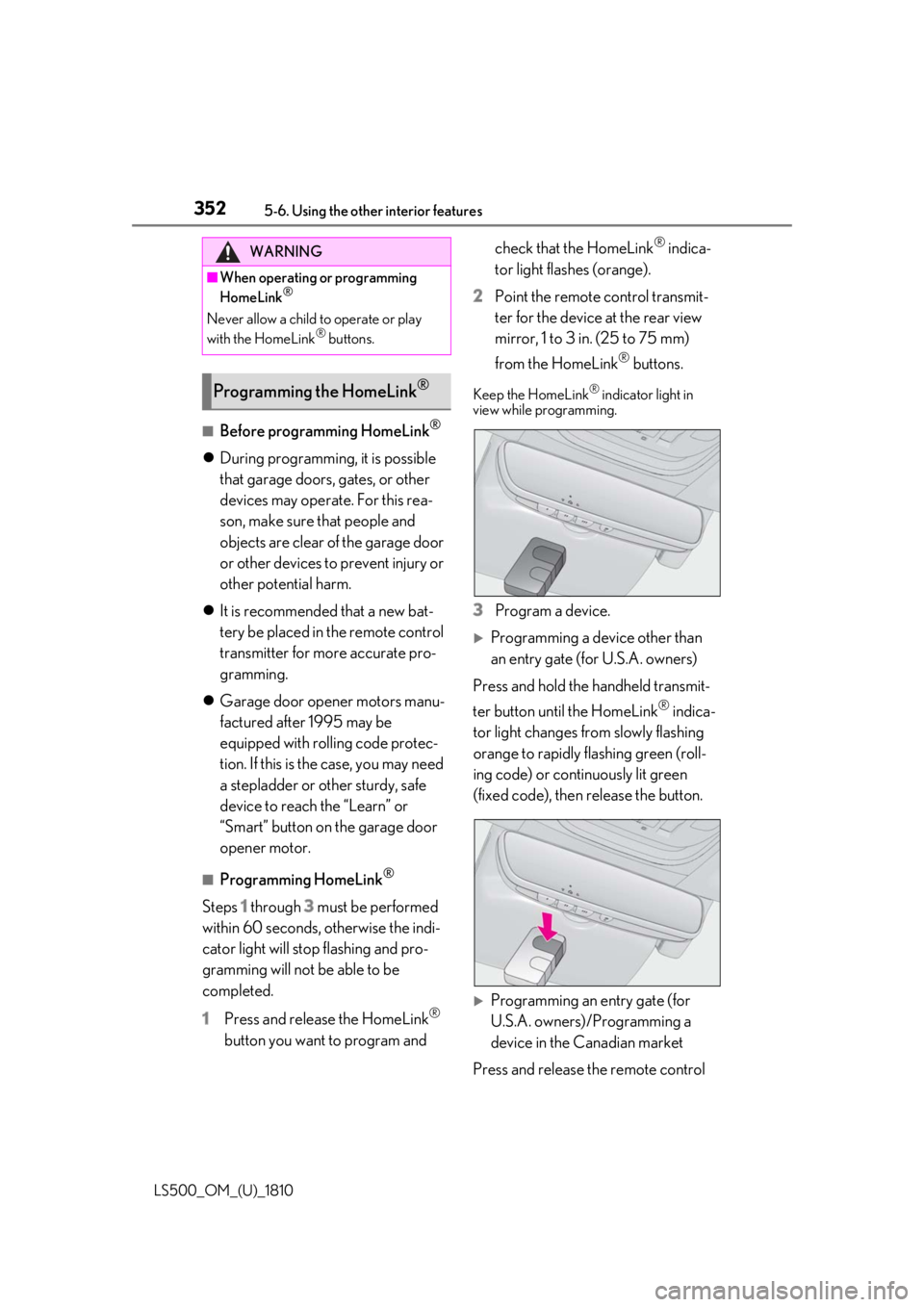
2 Point the remote control transmit-
ter for the device at the rear view
mirror, 1 to 3 in. (25 to 75 mm)
from the HomeLink ®
buttons.Keep the HomeLink ®
indicator light in
view while programming.
3 Program a device.
Programming a device other than
an entry gate (for U.S.A. owners)
Press and hold the handheld transmit-
ter button until the HomeLink ®
indica-
tor light changes from slowly flashing
orange to rapidly flashing green (roll-
ing code) or continuously lit green
(fixed code), then release the button.
Programming an entry gate (for
U.S.A. owners)/Programming a
device in the Canadian market
Press and release the remote control WARNING■
When operating or programming
HomeLink ®
Never allow a child to operate or play
with the HomeLink ®
buttons.
Programming the HomeLink ®
Page 353 of 512
3535-6. Using the other interior features
LS500_OM_(U)_1810 5
Interior features transmitter button at 2 second inter-
vals, repeatedly, until the HomeLink ®
indicator light changes from slowly
flashing (orange) to rapidly flashing
(green) (rolling code ) or continuously
lit (green) (fixed code).
4 Test the HomeLink ®
operation by
pressing the newly programmed
button and observing the indicator
light:
Indicator light illuminates: Program-
ming of a fixed code device has
completed. The garage door or
other device should operate when a
HomeLink ®
button is pressed and
released.
Indicator light flashes rapidly: The
garage door opener motor or other
device is equipped with a rolling
code. To complete programming,
firmly press and hold the Home-
Link ®
button for 2 seconds then
release it.
If the garage door or other device
does not operate, proceed to “Pro-
gramming a rolling code system”.
5 Repeat the steps above to program
another device for any of the
remaining HomeLink ®
buttons.■
Programming a rolling code sys-
tem
2 or more people may be necessary to
complete rolling code programming.
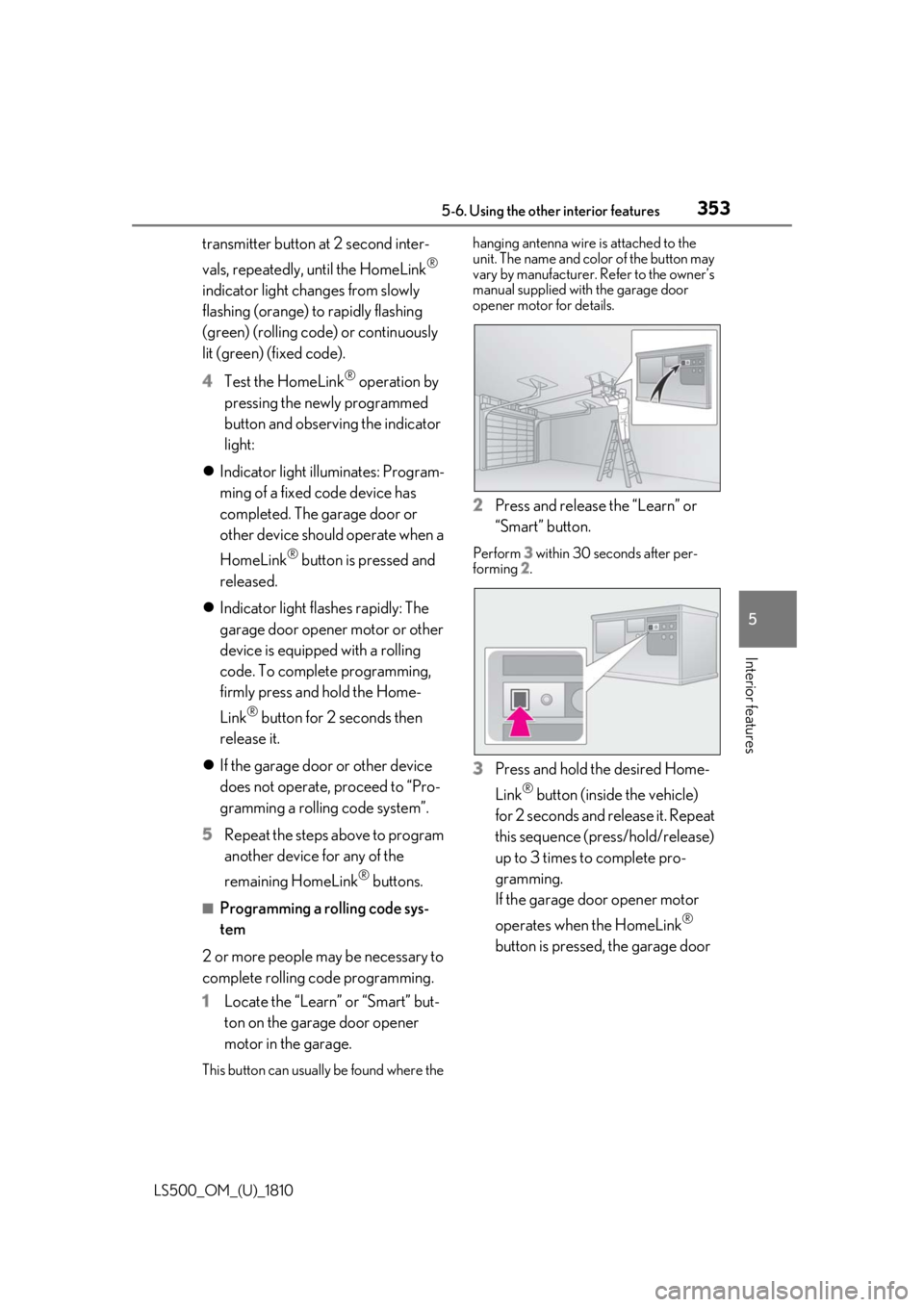
1 Locate the “Learn” or “Smart” but-
ton on the garage door opener
motor in the garage.
This button can usuall y be found where the hanging antenna wire is attached to the
unit. The name and color of the button may
vary by manufacturer. Refer to the owner’s
manual supplied with the garage door
opener motor for details.
2 Press and release the “Learn” or
“Smart” button. Perform 3 within 30 seconds after per-
forming 2 .
3 Press and hold the desired Home-
Link ®
button (inside the vehicle)
for 2 seconds and release it. Repeat
this sequence (press/hold/release)
up to 3 times to complete pro-
gramming.
If the garage door opener motor
operates when the HomeLink ®
button is pressed, the garage door
Page 354 of 512
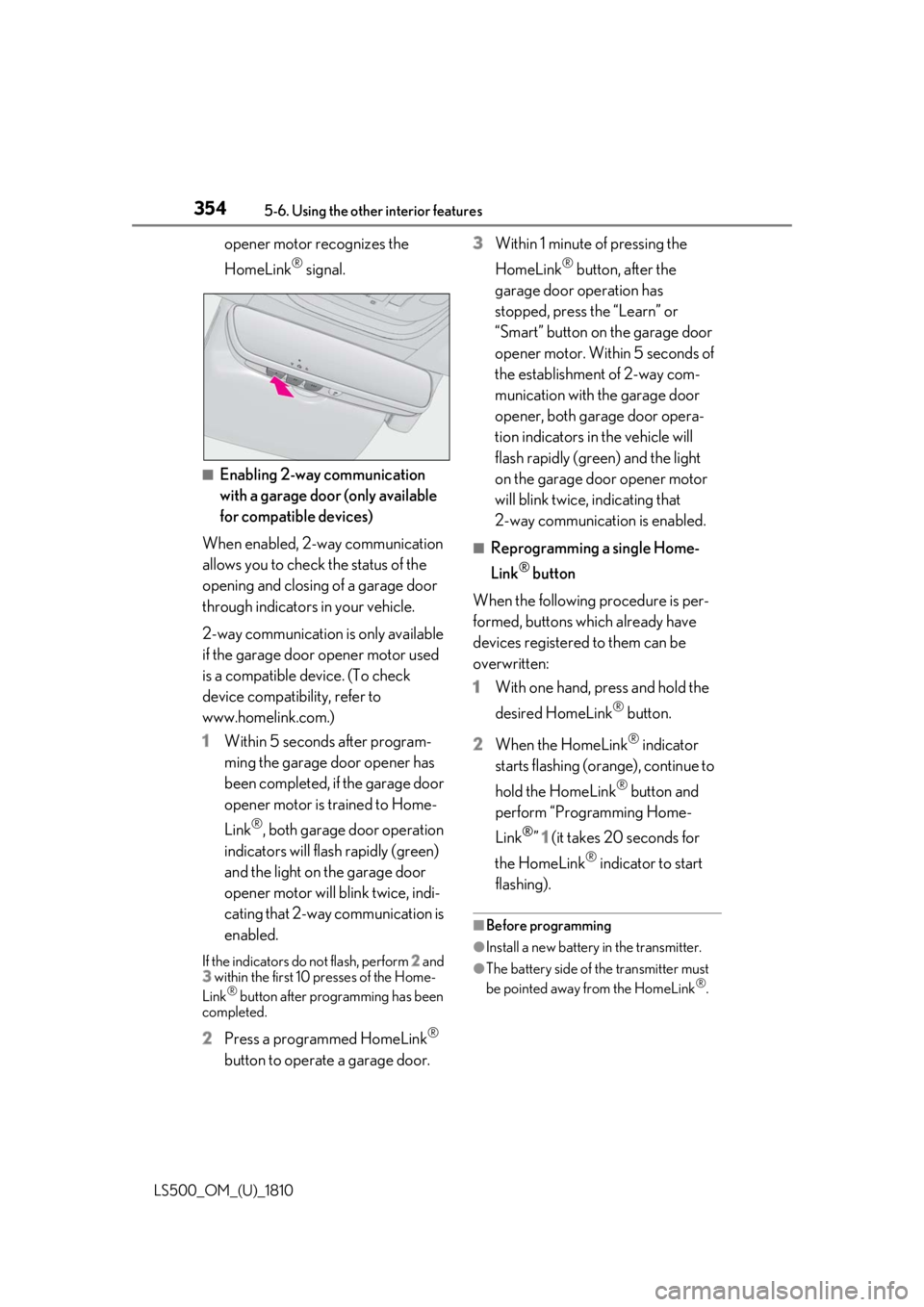
354 5-6. Using the other interior features
LS500_OM_(U)_1810 opener motor recognizes the
HomeLink ®
signal.
■
Enabling 2-way communication
with a garage door (only available
for compatible devices)
When enabled, 2-way communication
allows you to check the status of the
opening and closing of a garage door
through indicators in your vehicle.
2-way communication is only available
if the garage door opener motor used
is a compatible device. (To check
device compatibility, refer to
www.homelink.com.)
1 Within 5 seconds after program-
ming the garage door opener has
been completed, if the garage door
opener motor is trained to Home-
Link ®
, both garage door operation
indicators will flash rapidly (green)
and the light on the garage door
opener motor will b link twice, indi-
cating that 2-way communication is
enabled.If the indicators do not flash, perform 2 and
3 within the first 10 presses of the Home-
Link ®
button after programming has been
completed.
2 Press a programmed HomeLink ®
button to operate a garage door. 3 Within 1 minute of pressing the
HomeLink ®
button, after the
garage door operation has
stopped, press the “Learn” or
“Smart” button on the garage door
opener motor. Within 5 seconds of
the establishment of 2-way com-
munication with the garage door
opener, both garage door opera-
tion indicators in the vehicle will
flash rapidly (green) and the light
on the garage door opener motor
will blink twice, indicating that
2-way communication is enabled. ■
Reprogramming a single Home-
Link ®
button
When the following procedure is per-
formed, buttons which already have
devices registered to them can be
overwritten:
1 With one hand, press and hold the
desired HomeLink ®
button.
2 When the HomeLink ®
indicator
starts flashing (orange), continue to
hold the HomeLink ®
button and
perform “Programming Home-
Link ®
” 1 (it takes 20 seconds for
the HomeLink ®
indicator to start
flashing). ■
Before programming
●
Install a new battery in the transmitter.
●
The battery side of the transmitter must
be pointed away from the HomeLink ®
.
Page 355 of 512
3555-6. Using the other interior features
LS500_OM_(U)_1810 5
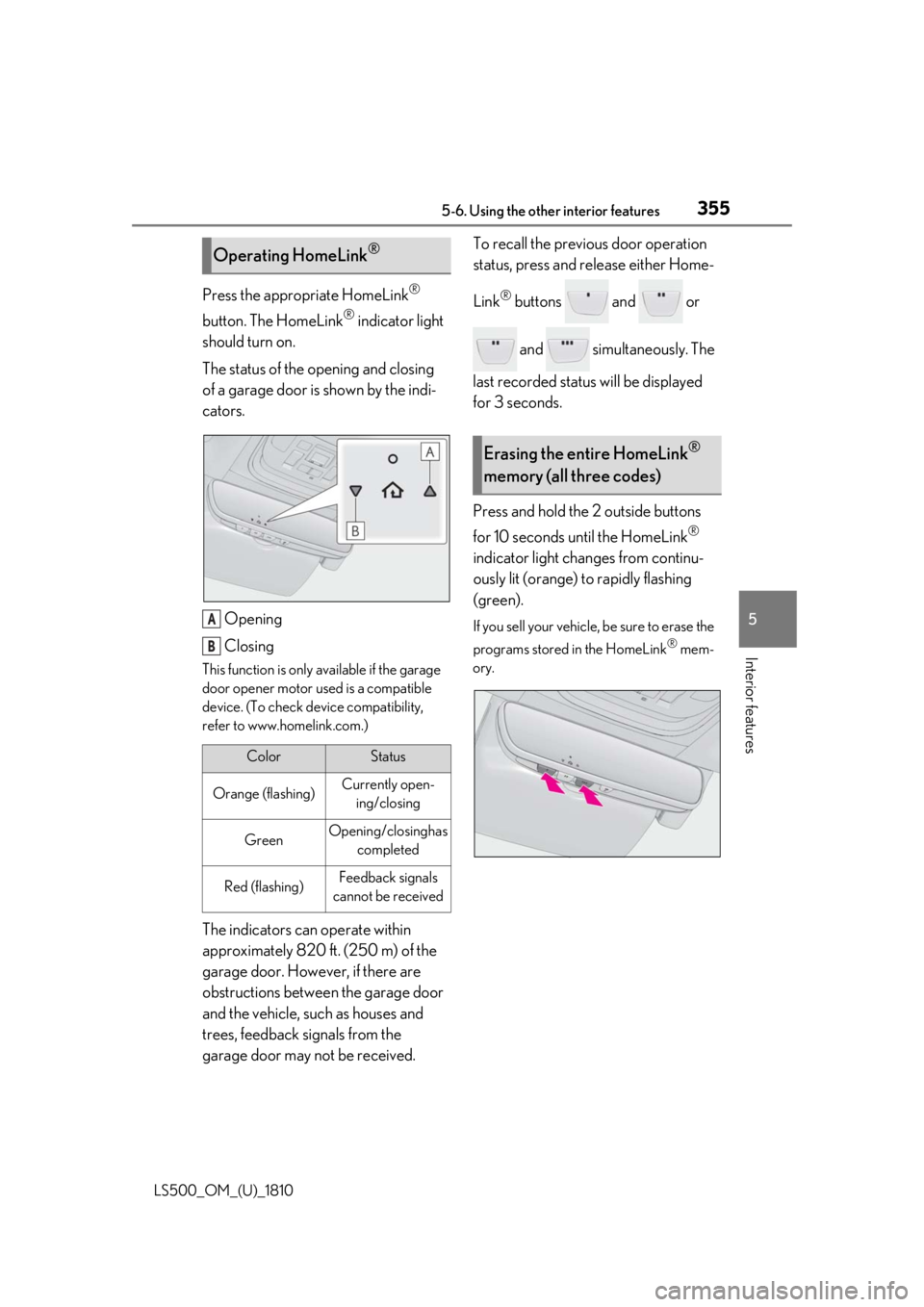
Interior features Press the appropriate HomeLink ®
button. The HomeLink ®
indicator light
should turn on.
The status of the opening and closing
of a garage door is shown by the indi-
cators.
Opening
ClosingThis function is only available if the garage
door opener motor used is a compatible
device. (To check device compatibility,
refer to www.homelink.com.)
The indicators can operate within
approximately 820 ft. (250 m) of the
garage door. However, if there are
obstructions between the garage door
and the vehicle, such as houses and
trees, feedback signals from the
garage door may not be received. To recall the previous door operation
status, press and release either Home-
Link ®
buttons and or
and simultaneously. The
last recorded status will be displayed
for 3 seconds.
Press and hold the 2 outside buttons
for 10 seconds until the HomeLink ®
indicator light changes from continu-
ously lit (orange) to rapidly flashing
(green). If you sell your vehicle, be sure to erase the
programs stored in the HomeLink ®
mem-
ory.Operating HomeLink ®
Color Status
Orange (flashing) Currently open-
ing/closing
Green Opening/closing has
completed
Red (flashing) Feedback signals
cannot be receivedA
B Erasing the entire HomeLink ®
memory (all three codes)
Page 358 of 512
358 6-1. Maintenance and care
LS500_OM_(U)_1810 6-1.Maintenance and care
Working from top to bottom, liber-
ally apply water to the vehicle body,
wheel wells and underside of the
vehicle to remove any dirt and dust.
Wash the vehicle body using a
sponge or soft cloth, such as a
chamois.
For hard-to-remove marks, use car
wash soap and rinse thoroughly with
water.
Wipe away any water.
Wax the vehicle when the water-
proof coating deteriorates. If water does not bead on a clean surface,
apply wax when the vehicle body is cool.
■
Self-restoring coat
The vehicle body has a self-restoring coat-
ing that is resistant to small surface
scratches caused in a car wash etc.
●
The coating lasts for 5 to 8 years from
when the vehicle is delivered from the
plant.
●
The restoration time differs depending on
the depth of the scratch and outside tem-
perature.
The restoration time may become
shorter when the coating is warmed by
applying warm water.
●
Deep scratches caused by keys, coins,
etc. cannot be restored.
●
Do not use wax that contains abrasives. ■
Automatic car washes ●
Before washing the vehicle:
• Fold the mirrors
• Turn off the power trunk opener and
closer (if equipped)
Start washing from the front of the vehicle.
Extend the mirrors before driving.●
Brushes used in automatic car washes
may scratch the vehicl e surface and harm
your vehicle’s paint. ■
High pressure car washes ●
Do not allow the nozzles of the car wash
to come within close proximity of the win-
dows and the air suspension unit (if
equipped). ●
Before using the car wash, check that the
fuel filler door on your vehicle is closed
properly. ■
When using a car wash
If the door handle becomes wet while the
electronic key is within the effective range,
the door may lock and unlock repeatedly. In
that case, follow the following correction
procedures to wash the vehicle: ●
Place the key in a position 6 ft. (2 m) or
more separate from the vehicle while the
vehicle is being wash ed. (Take care to
ensure that the key is not stolen.) ●
Set the electronic key to battery-saving
mode to disable the smart access system
with push-button start. ( P.112)■
Aluminum wheels ●
Remove any dirt immediately by using a
neutral detergent. ●
Wash detergent off with water immedi-
ately after use.
●
To protect the paint from damage, make
sure to observe the following precau-
tions.
• Do not use acidic, alkaline or abrasive
detergent
• Do not use hard brushes
• Do not use detergent on the wheels when
they are hot, such as after driving or park-
ing in hot weatherCleaning and protecting the
vehicle exterior Perform cleaning in a manner
appropriate to each component
and its material.
Cleaning instructions
Page 359 of 512
3596-1. Maintenance and care
LS500_OM_(U)_1810 6
Maintenance and care ■
Brake caliper coating (F SPORT mod-
els)●
When using detergent, use neutral deter-
gent. Do not use hard brushes or abra-
sive cleaners, as they will damage the
coating.●
Do not use detergent on the brake cali-
pers when they are hot.●
Wash detergent off immediately after
use.■
Bumpers and side moldings
Do not scrub with abrasive cleaners. ■
Front side windows water-repellent
coating (if equipped)●
The following precautions can extend the
effectiveness of the water-repellent coat-
ing.
• Remove any dirt, etc. from the front side
windows regularly.
• Do not allow dirt and dust to accumulate
on the windows for a long period.
Clean the windows with a soft, damp
cloth as soon as possible.
• Do not use wax or glass cleaners that
contain abrasives when cleaning the win-
dows.
• Do not use any metallic objects to
remove condensation build up.●
When the water-repellent performance
has become insufficie nt, the coating can
be repaired. Contact your Lexus dealer.■
Plated portions
If dirt cannot be removed, clean the parts as
follows: ●
Use a soft cloth dampened with an
approximately 5% solution of neutral
detergent and water to clean the dirt off.
●
Wipe the surface with a dry, soft cloth to
remove any remaining moisture.
●
To remove oily deposits, use alcohol wet
wipes or a similar product. WARNING■
When washing the vehicle
Do not apply water to the inside of the
engine compartment. Doing so may
cause the electrical components, etc. to
catch fire. ■
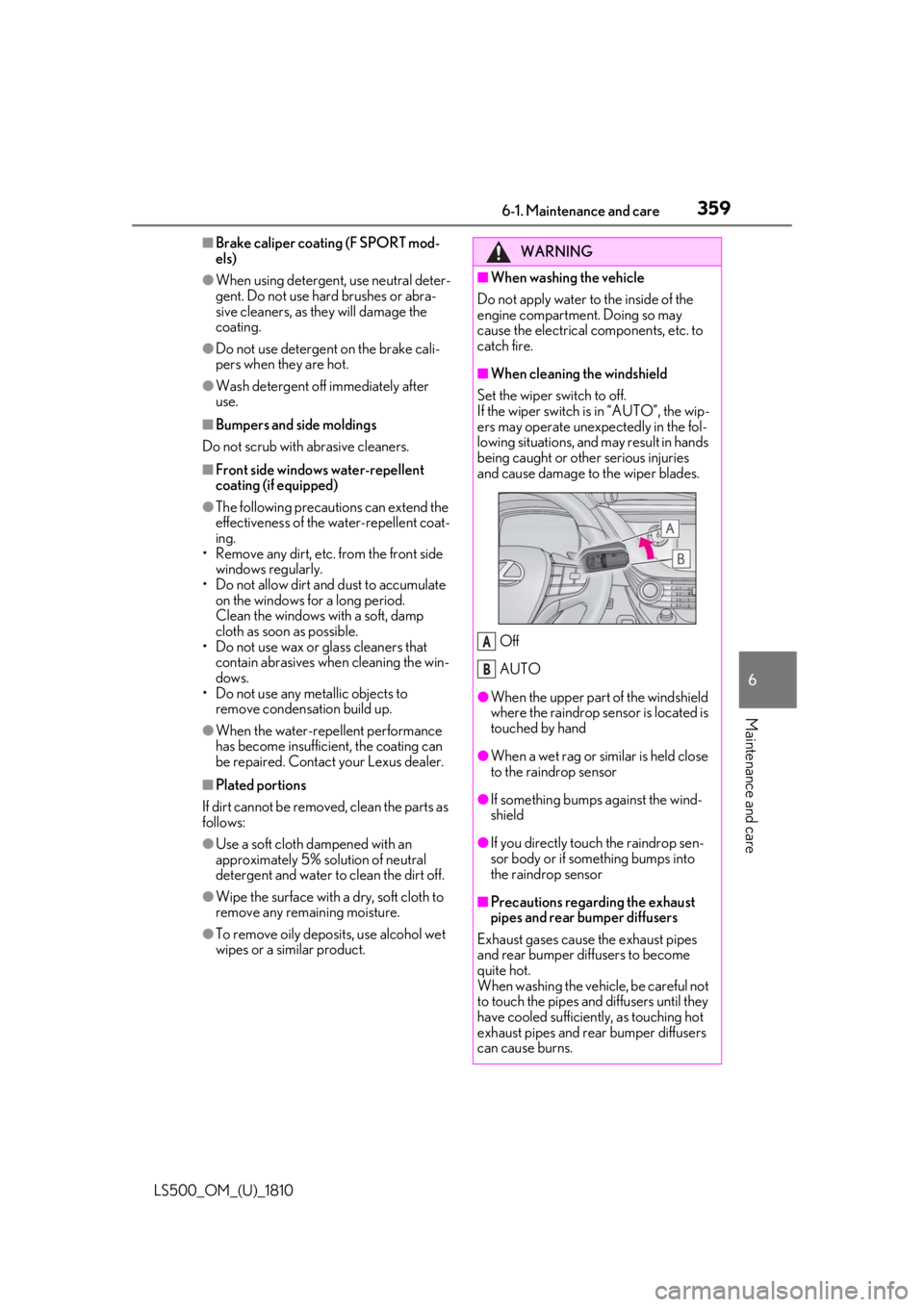
When cleaning the windshield
Set the wiper switch to off.
If the wiper switch is in “AUTO”, the wip-
ers may operate unexpectedly in the fol-
lowing situations, and may result in hands
being caught or other serious injuries
and cause damage to the wiper blades.
Off
AUTO ●
When the upper part of the windshield
where the raindrop sensor is located is
touched by hand
●
When a wet rag or similar is held close
to the raindrop sensor
●
If something bumps against the wind-
shield
●
If you directly touch the raindrop sen-
sor body or if something bumps into
the raindrop sensor
■
Precautions regarding the exhaust
pipes and rear bumper diffusers
Exhaust gases cause the exhaust pipes
and rear bumper diffusers to become
quite hot.
When washing the vehicle, be careful not
to touch the pipes and diffusers until they
have cooled sufficiently, as touching hot
exhaust pipes and rear bumper diffusers
can cause burns. A
B
Page 360 of 512
360 6-1. Maintenance and care
LS500_OM_(U)_1810 WARNING■
Precaution regarding the front
bumper (vehicles with Lexus Safety
System + A)
If the paint of the fr ont bumper is chipped
or scratched, the Le xus Safety System +
A may not function correctly. If this
occurs, consult your Lexus dealer. ■
Precaution regarding the rear
bumper
If the paint of the rear bumper is chipped
or scratched, the fo llowing systems may
not function correctly. If this occurs, con-
sult your Lexus dealer. ●
Lexus Safety System + A (if equipped)●
BSM (if equipped)●
RCTA (if equipped)●
PKSB (if equipped)
NOTICE■
To prevent paint deterioration and
corrosion on the body and compo-
nents (aluminum wheels, etc.)●
Wash the vehicle immediately in the
following cases:
• After driving near the sea coast
• After driving on salted roads
• If coal tar or tree sap is present on the
paint surface
• If dead insects, in sect droppings or
bird droppings are present on the
paint surface
• After driving in an area contaminated
with soot, oily smoke, mine dust, iron
powder or chemical substances
• If the vehicle becomes heavily soiled
with dust or mud
• If liquids such as benzene and gasoline
are spilled on the paint surface ●
If the paint is chipped or scratched,
have it repaired immediately. ●
To prevent the wheels from corroding,
remove any dirt and store in a place
with low humidity when storing the
wheels. ■
Cleaning the exterior lights ●
Wash carefully. Do not use organic
substances or scrub with a hard brush.
This may damage the surfaces of the
lights. ●
Do not apply wax to the surfaces of the
lights.
Wax may cause damage to the lenses. ■
When using an automatic car wash
Set the wiper switch to the off position.
If the wiper switch is in “AUTO”, the wip-
ers may operate and the wiper blades
may be damaged. ■
When using a high pressure car wash ●
When washing the vehicle, do not
spray the camera or its surrounding
area directly with a high pressure
washer. Shock applied from high pres-
sure water may cause the device to not
operate normally. ●
Do not bring the nozzle tip close to
boots (rubber or re sin manufactured
cover), connectors or the following
parts. The parts may be damaged if
they come into contact with high-pres-
sure water.
• Traction related parts
•Steering parts
• Suspension parts
• Brake parts
Page 362 of 512
362 6-1. Maintenance and care
LS500_OM_(U)_1810 Remove dirt using a water-damp-
ened soft cloth or synthetic chamois.
Wipe the surface with a dry, soft
cloth to remove any remaining
moisture. ■
Cleaning the areas with satin-finish
metal accents
The metal areas use a layer of real metal for
the surface. It is necessary to clean them
regularly. If dirty area s are left uncleaned for
long periods of time, they may be difficult to
clean.
Remove dirt and dust using a vac-
uum cleaner.
Wipe off any excess dirt and dust
with a soft cloth dampened with
diluted detergent. Use a diluted water solution of approxi-
mately 5% neutral wool detergent.
Wring out any excess water from
the cloth and thoroughly wipe off all
remaining traces of detergent.
Wipe the surface with a dry, soft
cloth to remove any remaining
moisture. Allow the leather to dry in
a shaded and ventilated area. ■
Caring for leather areas
Lexus recommends cleani ng the interior of
the vehicle at least twice a year to maintain
the quality of the vehicle’s interior.NOTICE■
Preventing damage to leather sur-
faces
Observe the following precautions to
avoid damage to and deterioration of
leather surfaces: ●
Remove any dust or dirt from leather
surfaces immediately.●
Do not expose the vehicle to direct
sunlight for extended periods of time.
Park the vehicle in the shade, espe-
cially during summer.●
Do not place items made of vinyl, plas-
tic, or containing wax on the uphol-
stery, as they may stick to the leather
surface if the vehicle interior heats up
significantly.■
Water on the floor
Do not wash the vehicle floor with water.
Vehicle systems such as the audio system
may be damaged if water comes into
contact with electrical components such
as the audio system above or under the
floor of the vehicle. Water may also
cause the body to rust. ■
When cleaning the inside of the wind-
shield
Do not allow glass cleaner to contact the
lens. Also, do not touch the lens. ( P.191,
198)
■
Cleaning the inside of the rear win-
dow●
Do not use glass cleaner to clean the
rear window, as this may cause dam-
age to the rear window defogger
heater wires or antenna. Use a cloth
dampened with lukewarm water to
gently wipe the window clean. Wipe
the window in strokes running parallel
to the heater wires or antenna.
●
Be careful not to scratch or damage
the heater wires or antenna. Cleaning the areas with satin-fin-
ish metal accents
Cleaning the leather areas