set LEXUS LS500 2019 Manual PDF
[x] Cancel search | Manufacturer: LEXUS, Model Year: 2019, Model line: LS500, Model: LEXUS LS500 2019Pages: 512, PDF Size: 9.71 MB
Page 239 of 512
2394-5. Using the driving support systems
LS500_OM_(U)_1810 4
Driving WARNING●
Assisting the driver to operate the
vehicle
The dynamic radar cruise control with
full-speed range does not include func-
tions which will prevent or avoid colli-
sions with vehicles ahead of your vehicle.
Therefore, if there is ever any possibility
of danger, the driver must take immedi-
ate and direct control of the vehicle and
act appropriately in order to ensure the
safety of all involved. ■
Situations unsuitable for dynamic
radar cruise control with full-speed
range
Do not use dynamic radar cruise control
with full-speed range in any of the follow-
ing situations. Doing so may result in
inappropriate speed control and could
cause an accident re sulting in death or
serious injury. ●
Roads where there are pedestrians,
cyclists, etc.●
In heavy traffic●
On roads with sharp bends●
On winding roads
●
On slippery roads, such as those cov-
ered with rain, ice or snow
●
On steep downhills , or where there
are sudden changes between sharp up
and down gradients
Vehicle speed may exceed the set
speed when driving down a steep hill.
●
At entrances to freeways and highways
●
When weather conditions are bad
enough that they may prevent the sen-
sors from detectin g correctly (fog,
snow, sandstorm, heavy rain, etc.)
●
When there is rain, snow, etc. on the
front surface of the radar or front cam-
era ●
In traffic conditions that require fre-
quent repeated acceleration and
deceleration ●
During emergency towing ●
When an approach warning buzzer is
heard often
Page 240 of 512
240 4-5. Using the driving support systems
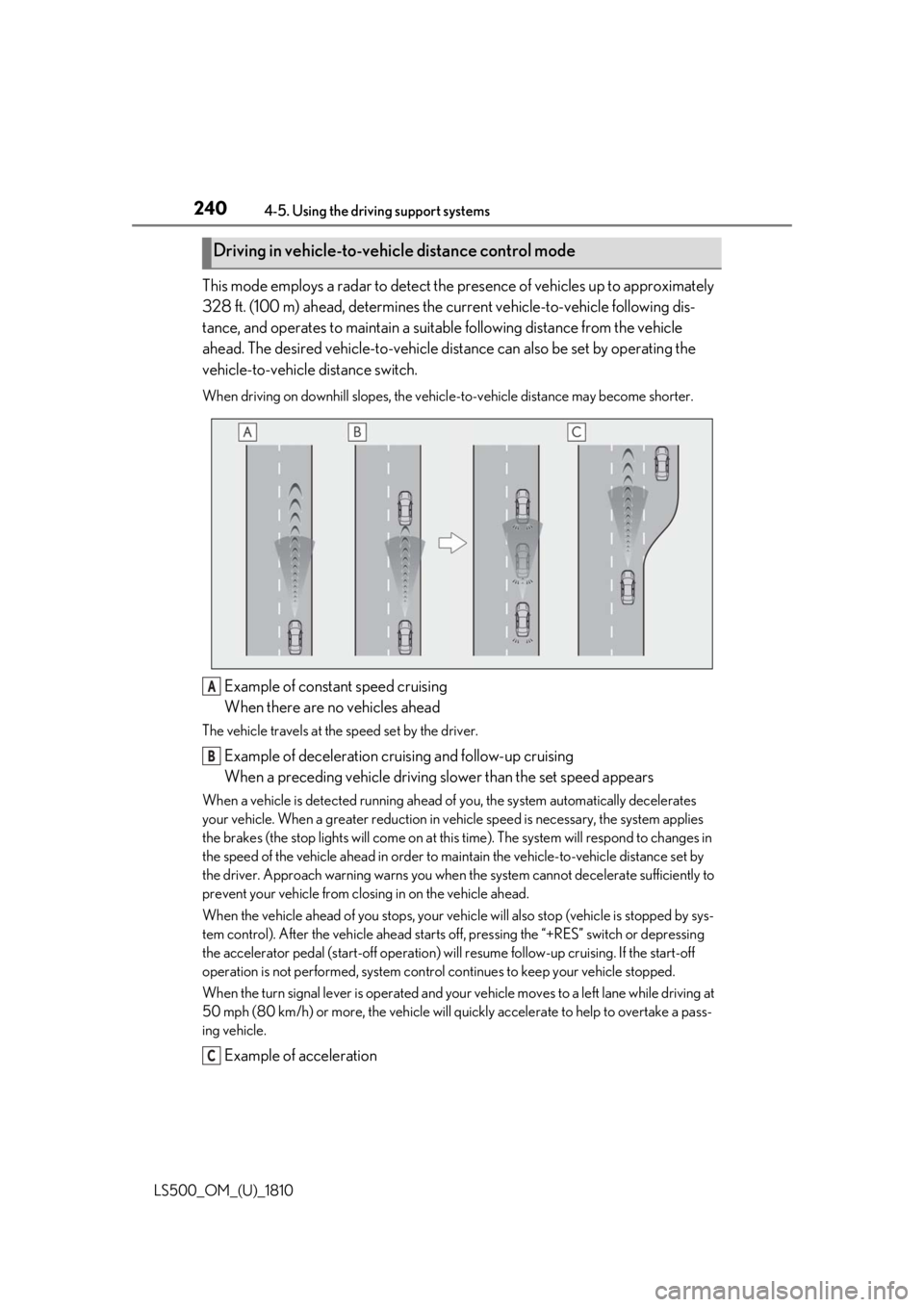
LS500_OM_(U)_1810 This mode employs a radar to detect the pr esence of vehicles up to approximately
328 ft. (100 m) ahead, determines the cu rrent vehicle-to-veh icle following dis-
tance, and operates to maintain a suitab le following distance from the vehicle
ahead. The desired vehicle-to-vehicle distance can also be set by operating the
vehicle-to-vehicle distance switch. When driving on downhill slopes, the vehicl e-to-vehicle distance may become shorter.
Example of constant speed cruising
When there are no vehicles aheadThe vehicle travels at the speed set by the driver.
Example of deceleration cruising and follow-up cruising
When a preceding vehicle driving slower than the set speed appearsWhen a vehicle is detected running ahead of you, the system automatically decelerates
your vehicle. When a greater reduction in vehicle speed is necessary, the system applies
the brakes (the stop lights will come on at this time). The sy stem will respond to changes in
the speed of the vehicle ahead in order to maintain the vehicle-to-vehicle distance set by
the driver. Approach warning warns you when th e system cannot decelera te sufficiently to
prevent your vehicle from closing in on the vehicle ahead.
When the vehicle ahead of you stops, your vehi cle will also stop (vehicle is stopped by sys-
tem control). After the vehicle ahead starts off, pressing the “+RES” switch or depressing
the accelerator pedal (start-off operation) will resume follow -up cruising. If the start-off
operation is not performed, system contro l continues to keep your vehicle stopped.
When the turn signal lever is operated and your vehicle moves to a left lane while driving at
50 mph (80 km/h) or more, the vehicle will quickly accelerate to help to overtake a pass-
ing vehicle.
Example of accelerationDriving in vehicle-to-vehicle distance control mode
A
B
C
Page 241 of 512
2414-5. Using the driving support systems
LS500_OM_(U)_1810 4
Driving When there are no longer any preceding vehicles driving slower than the set
speedThe system accelerates until the set speed is re ached. The system then returns to constant
speed cruising.
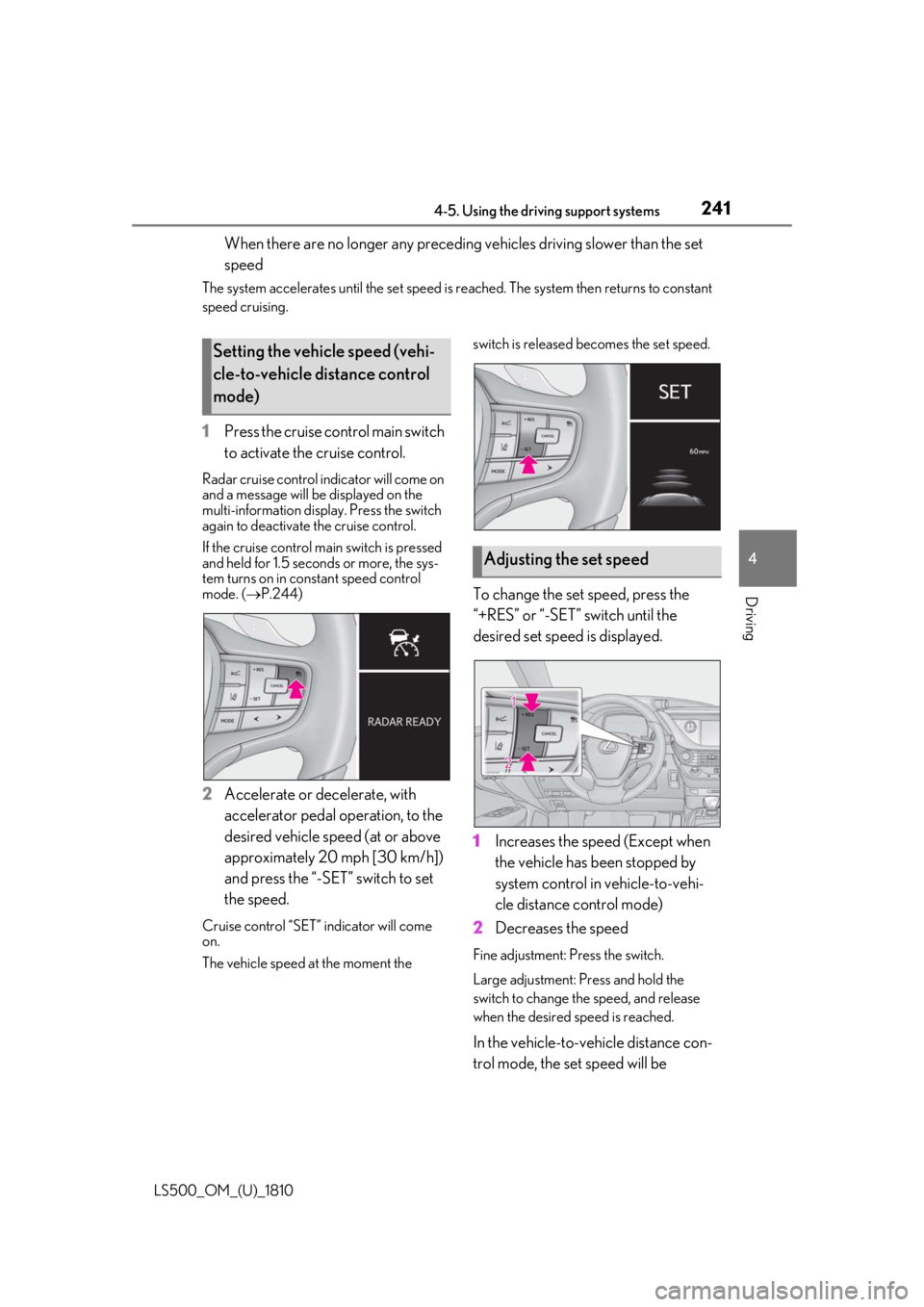
1 Press the cruise control main switch
to activate the cruise control.Radar cruise control indicator will come on
and a message will be displayed on the
multi-information displa y. Press the switch
again to deactivate the cruise control.
If the cruise control ma in switch is pressed
and held for 1.5 seconds or more, the sys-
tem turns on in constant speed control
mode. ( P.244)
2 Accelerate or decelerate, with
accelerator pedal operation, to the
desired vehicle speed (at or above
approximately 20 mph [30 km/h])
and press the “-SET” switch to set
the speed.Cruise control “SET” indicator will come
on.
The vehicle speed at the moment the switch is released becomes the set speed.
To change the set speed, press the
“+RES” or “-SET” switch until the
desired set speed is displayed.
1 Increases the speed (Except when
the vehicle has been stopped by
system control in vehicle-to-vehi-
cle distance control mode)
2 Decreases the speed Fine adjustment: Press the switch.
Large adjustment: Pr ess and hold the
switch to change the speed, and release
when the desired speed is reached.
In the vehicle-to-vehicle distance con-
trol mode, the set speed will be Setting the vehicle speed (vehi-
cle-to-vehicle distance control
mode)
Adjusting the set speed
Page 242 of 512
242 4-5. Using the driving support systems
LS500_OM_(U)_1810 increased or decreased as follows:
For the U.S. mainland, Hawaii Fine adjustment: By 1 mph (1.6 km/h) *1
or 1
km/h (0.6mph) *2
each time the switch is
pressed
Large adjustment: Increases or decreases
in 1mph (1.6 km/h) *1
or 1 km/h (0.6 mph) *2
increments for as long as the switch is held
For Canada, Guam and Puerto Rico Fine adjustment: By 1 mph (1.6 km/h) *1
or 1
km/h (0.6mph) *2
each time the switch is
pressed
Large adjustment: Increases or decreases
in 5 mph (8 km/h) *1
or 5 km/h (3.1 mph) *2
increments for as long as the switch is held
In the constant speed control mode
( P.244), the set speed will be
increased or decreased as follows: Fine adjustment: By 1 mph (1.6 km/h) *1
or 1
km/h (0.6 mph) *2
each time the switch is
pressed
Large adjustment: The speed will continue
to change while the switch is held. *1
: When the set speed is shown in “MPH” *2
: When the set speed is shown in “km/h”
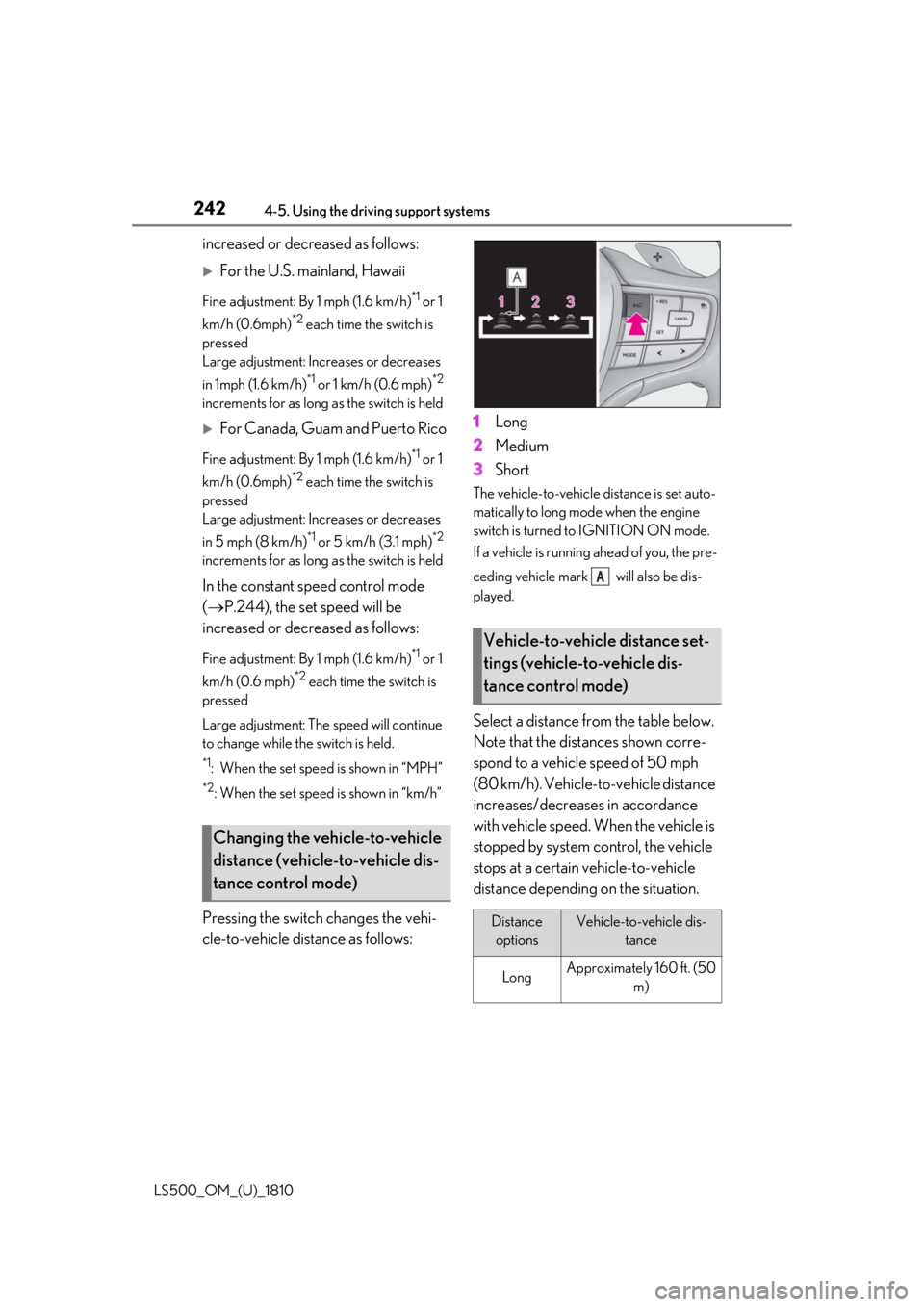
Pressing the switch changes the vehi-
cle-to-vehicle distance as follows: 1 Long
2 Medium
3 Short The vehicle-to-vehicle distance is set auto-
matically to long mode when the engine
switch is turned to IGNITION ON mode.
If a vehicle is running ahead of you, the pre-
ceding vehicle mark will also be dis-
played.
Select a distance from the table below.
Note that the distances shown corre-
spond to a vehicle speed of 50 mph
(80 km/h). Vehicle-to-vehicle distance
increases/decreases in accordance
with vehicle speed. When the vehicle is
stopped by system control, the vehicle
stops at a certain vehicle-to-vehicle
distance depending on the situation.Changing the vehicle-to-vehicle
distance (vehicle-to-vehicle dis-
tance control mode) Vehicle-to-vehicle distance set-
tings (vehicle-to-vehicle dis-
tance control mode)
Distance
options Vehicle-to-vehicle dis-
tance
Long Approximately 160 ft. (50
m) A
Page 243 of 512
2434-5. Using the driving support systems
LS500_OM_(U)_1810 4
Driving
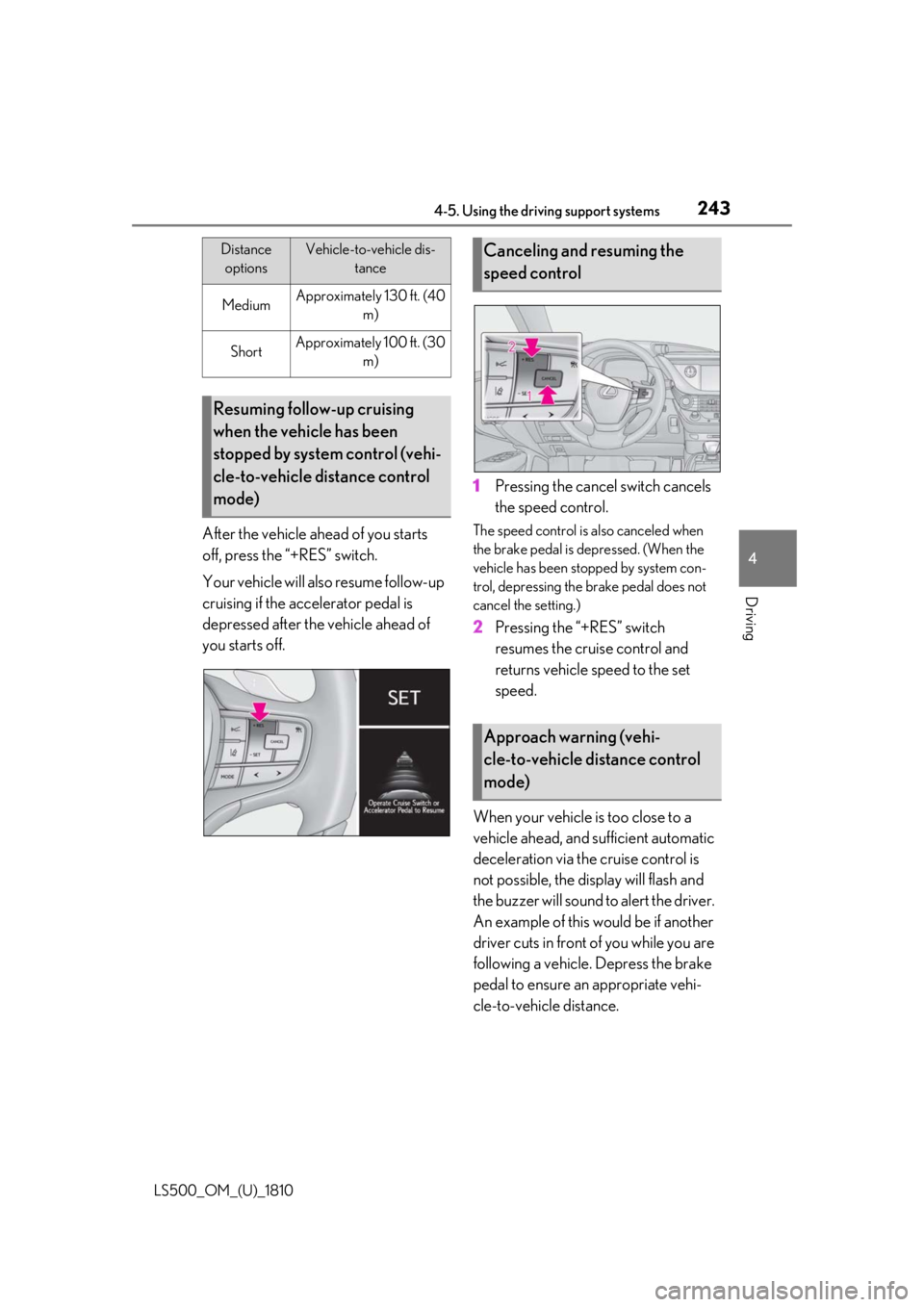
After the vehicle ahead of you starts
off, press the “+RES” switch.
Your vehicle will also resume follow-up
cruising if the accelerator pedal is
depressed after the vehicle ahead of
you starts off. 1 Pressing the cancel switch cancels
the speed control. The speed control is also canceled when
the brake pedal is depressed. (When the
vehicle has been stopped by system con-
trol, depressing the brake pedal does not
cancel the setting.)
2 Pressing the “+RES” switch
resumes the cruise control and
returns vehicle speed to the set
speed.
When your vehicle is too close to a
vehicle ahead, and sufficient automatic
deceleration via the cruise control is
not possible, the display will flash and
the buzzer will sound to alert the driver.
An example of this would be if another
driver cuts in front of you while you are
following a vehicle. Depress the brake
pedal to ensure an appropriate vehi-
cle-to-vehicle distance.Medium Approximately 130 ft. (40
m)
Short Approximately 100 ft. (30
m)
Resuming follow-up cruising
when the vehicle has been
stopped by system control (vehi-
cle-to-vehicle distance control
mode) Distance
options Vehicle-to-vehicle dis-
tance
Canceling and resuming the
speed control
Approach warning (vehi-
cle-to-vehicle distance control
mode)
Page 244 of 512
244 4-5. Using the driving support systems
LS500_OM_(U)_1810 ■
Warnings may not occur when
In the following instances, warnings
may not occur even when the vehi-
cle-to-vehicle distance is small.
When the speed of the preceding
vehicle matches or exceeds your
vehicle speed
When the preceding vehicle is trav-
eling at an extremely slow speed
Immediately after the cruise control
speed was set
When depressing the accelerator
pedal
When constant speed control mode is
selected, your vehicle will maintain a
set speed without controlling the vehi-
cle-to-vehicle distance. Select this
mode only when vehicle-to-vehicle dis-
tance control mode does not function
correctly due to a dirty radar, etc.
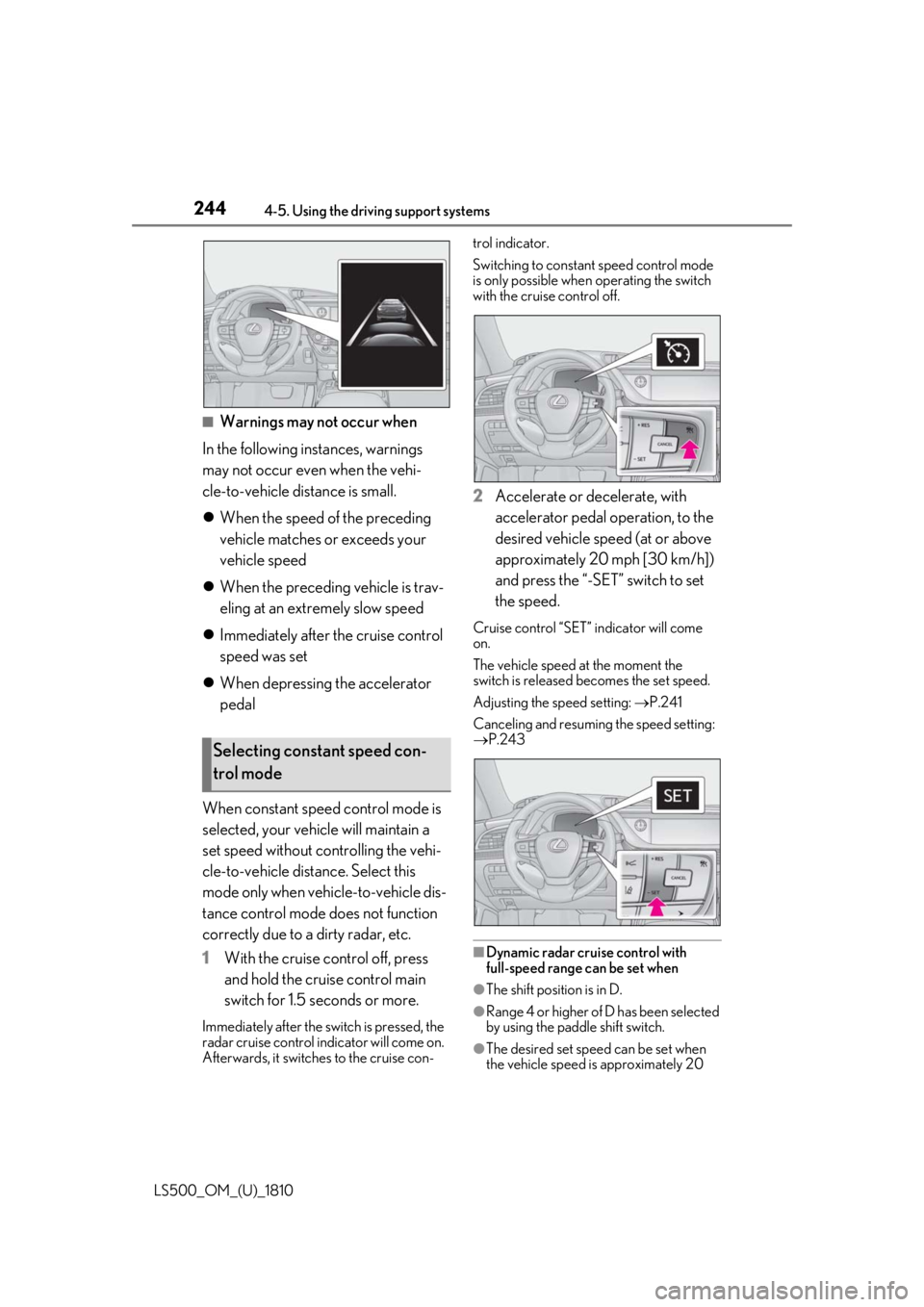
1 With the cruise control off, press
and hold the cruise control main
switch for 1.5 seconds or more.Immediately after the switch is pressed, the
radar cruise control in dicator will come on.
Afterwards, it switches to the cruise con- trol indicator.
Switching to constant speed control mode
is only possible when operating the switch
with the cruise control off.
2 Accelerate or decelerate, with
accelerator pedal operation, to the
desired vehicle speed (at or above
approximately 20 mph [30 km/h])
and press the “-SET” switch to set
the speed. Cruise control “SET” indicator will come
on.
The vehicle speed at the moment the
switch is released becomes the set speed.
Adjusting the speed setting: P.241
Canceling and resuming the speed setting:
P.243
■
Dynamic radar cruise control with
full-speed range can be set when
●
The shift position is in D.
●
Range 4 or higher of D has been selected
by using the paddle shift switch.
●
The desired set spee d can be set when
the vehicle speed is approximately 20 Selecting constant speed con-
trol mode
Page 245 of 512
![LEXUS LS500 2019 Manual PDF 2454-5. Using the driving support systems
LS500_OM_(U)_1810 4
Driving mph (30 km/h) or more.
(However, when the vehicle speed is set
while driving at below approximately 20
mph [30 km/h], the set s](/img/36/58934/w960_58934-244.png "LEXUS LS500 2019 Manual PDF 2454-5. Using the driving support systems
LS500_OM_(U)_1810 4
Driving mph (30 km/h) or more.
(However, when the vehicle speed is set
while driving at below approximately 20
mph [30 km/h], the set s")
2454-5. Using the driving support systems
LS500_OM_(U)_1810 4
Driving mph (30 km/h) or more.
(However, when the vehicle speed is set
while driving at below approximately 20
mph [30 km/h], the set speed will be set
to approximately 20 mph [30 km/h].)■
Accelerating after setting the vehicle
speed
The vehicle can accelerate by operating the
accelerator pedal. After accelerating, the
set speed resumes. However, during vehi-
cle-to-vehicle distance control mode, the
vehicle speed may decrease below the set
speed in order to maintain the distance to
the preceding vehicle. ■
When the vehicle stops while follow-up
cruising●
Pressing the “+RES” switch while the
vehicle ahead stops w ill resume follow-up
cruising if the vehicle ahead starts off
within approximately 3 seconds after the
switch is pressed.●
If the vehicle ahead starts off within 3 sec-
onds after your vehicle stops, follow-up
cruising will be resumed.■
Automatic cancelation of vehi-
cle-to-vehicle distance control mode
Vehicle-to-vehicle dist ance control mode is
automatically canceled in the following situ-
ations. ●
VSC is activated.●
TRAC is activated for a period of time.●
When the VSC or TRAC system is
turned off.●
When snow mode is set.●
The sensor cannot detect correctly
because it is covered in some way.
●
Pre-collision braking is activated.
●
The parking brake is operated.
●
The vehicle is stopped by system control
on a steep incline.
●
The following are detected when the
vehicle has been stopped by system con-
trol:
• The driver is not wearing a seat belt.
• The driver’s door is opened.
• The vehicle has been stopped for about 3
minutes. If vehicle-to-vehicle distance control mode
is automatically canceled for any reasons
other than the above, there may be a mal-
function in the system. Contact your Lexus
dealer. ■
Automatic cancelation of constant
speed control mode
Constant speed control mode is automati-
cally canceled in the following situations: ●
Actual vehicle speed is more than
approximately 10 mph (16 km/h) below
the set vehicle speed. ●
Actual vehicle speed falls below approxi-
mately 20 mph (30 km/h). ●
VSC is activated. ●
TRAC is activated for a period of time. ●
When the VSC or TRAC system is
turned off. ●
Pre-collision braking is activated.
If constant speed control mode is automati-
cally canceled for any reasons other than
the above, there may be a malfunction in the
system. Contact your Lexus dealer. ■
Brake operation
A brake operation sound may be heard and
the brake pedal response may change, but
these are not malfunctions. ■
Warning messages and buzzers for
dynamic radar cruise control with
full-speed range
Warning messages and buzzers are used to
indicate a system malfunction or to inform
the driver of the need for caution while driv-
ing. If a warning messa ge is shown on the
multi-information displa y, read the message
and follow the instruc-
tions.( P.196,202,425)
■
When the sensor may not be correctly
detecting the vehicle ahead
In the case of the fo llowing and depending
on the conditions, operate the brake pedal
when deceleration of the system is insuffi-
cient or operate the accelerator pedal
when acceleration is required.
As the sensor may not be able to correctly
detect these types of vehicles, the approach
warning ( P.243) may not be activated.
Page 246 of 512
246 4-5. Using the driving support systems
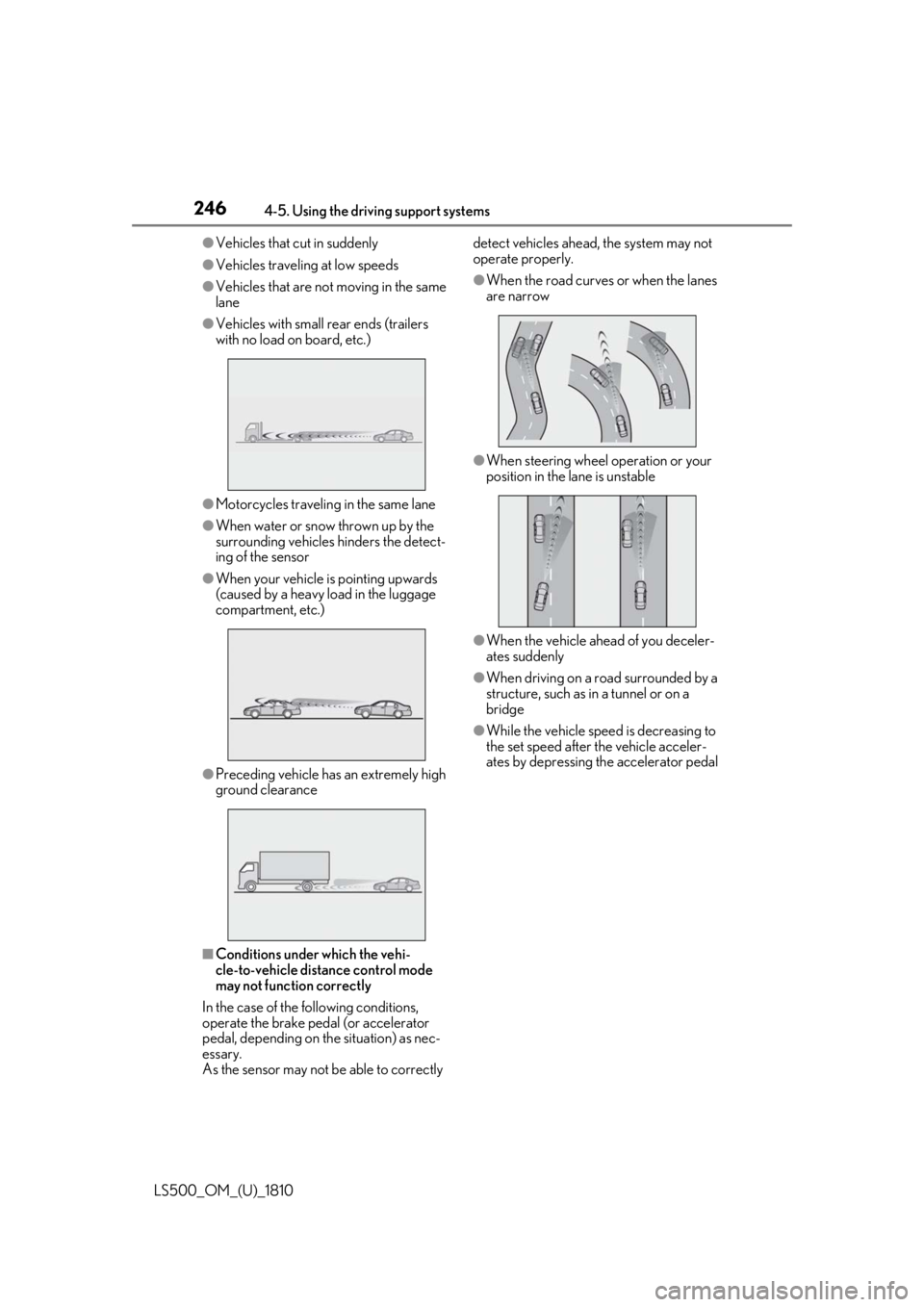
LS500_OM_(U)_1810 ●
Vehicles that cut in suddenly●
Vehicles traveling at low speeds●
Vehicles that are not moving in the same
lane●
Vehicles with small rear ends (trailers
with no load on board, etc.)
●
Motorcycles travelin g in the same lane●
When water or snow thrown up by the
surrounding vehicles hinders the detect-
ing of the sensor●
When your vehicle is pointing upwards
(caused by a heavy load in the luggage
compartment, etc.)
●
Preceding vehicle has an extremely high
ground clearance
■
Conditions under which the vehi-
cle-to-vehicle distance control mode
may not function correctly
In the case of the following conditions,
operate the brake pedal (or accelerator
pedal, depending on the situation) as nec-
essary.
As the sensor may not be able to correctly detect vehicles ahead, the system may not
operate properly. ●
When the road curves or when the lanes
are narrow
●
When steering wheel operation or your
position in the lane is unstable
●
When the vehicle ahead of you deceler-
ates suddenly ●
When driving on a road surrounded by a
structure, such as in a tunnel or on a
bridge ●
While the vehicle speed is decreasing to
the set speed after the vehicle acceler-
ates by depressing the accelerator pedal
Page 248 of 512
248 4-5. Using the driving support systems
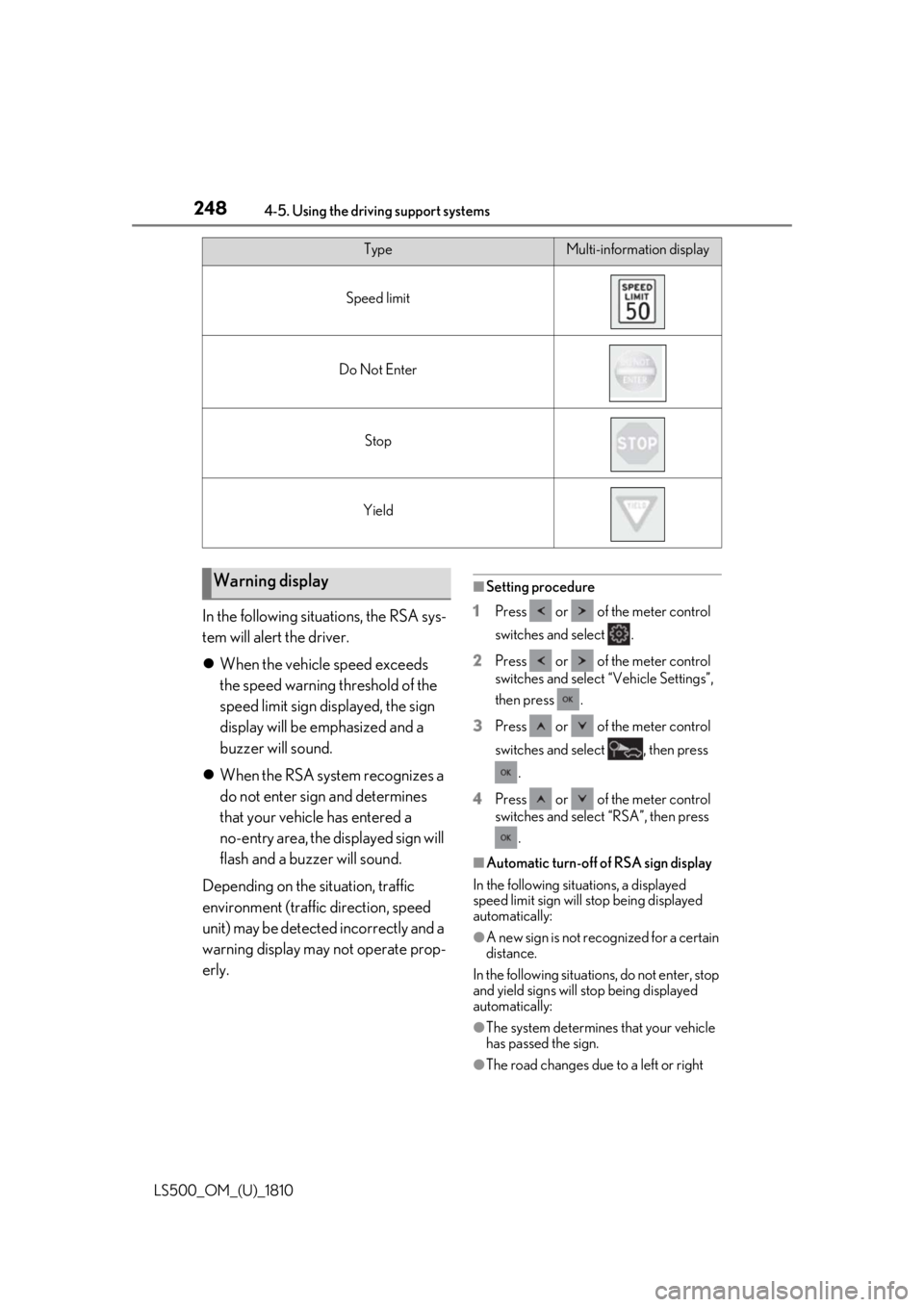
LS500_OM_(U)_1810 In the following situations, the RSA sys-
tem will alert the driver.
When the vehicle speed exceeds
the speed warning threshold of the
speed limit sign displayed, the sign
display will be emphasized and a
buzzer will sound.
When the RSA system recognizes a
do not enter sign and determines
that your vehicle has entered a
no-entry area, the displayed sign will
flash and a buzzer will sound.
Depending on the situation, traffic
environment (traffic direction, speed
unit) may be detected incorrectly and a
warning display may not operate prop-
erly. ■
Setting procedure
1 Press or of the meter control
switches and select .
2 Press or of the meter control
switches and select “Vehicle Settings”,
then press .
3 Press or of the meter control
switches and select , then press
.
4 Press or of the meter control
switches and select “RSA”, then press
.
■
Automatic turn-off of RSA sign display
In the following situations, a displayed
speed limit sign will stop being displayed
automatically:
●
A new sign is not recognized for a certain
distance.
In the following situations, do not enter, stop
and yield signs will stop being displayed
automatically:
●
The system determines that your vehicle
has passed the sign.
●
The road changes due to a left or right Type Multi-information display
Speed limit
Do Not Enter
Stop
Yield
Warning display
Page 256 of 512
256 4-5. Using the driving support systems
LS500_OM_(U)_1810 ■
Adjusting the buzzer volume
The buzzer volume can be adjusted on
the multi-information display. The vol-
ume of buzzers for the intuitive parking
assist, RCTA function and RCD func-
tion will be adjusted simultaneously.
Use the meter control switches to
change settings. ( P.81)
1 Press or to select .
2 Press or to select “PKSA”
and then press .
3 Press or to select and
then press .Each time the switch is pressed, the volume
level will change between 1, 2, and 3. ■
Muting a buzzer
A mute button will be displayed on the
multi-information display when an
object or pedestrian is detected. To
mute the buzzer, press .
The buzzers for the intuitive parking
assist, RCTA function and RCD func-
tion will be muted simultaneously.
Mute will be canceled automatically in
the following situations:
When the shift position is changed.
When the vehicle speed exceeds a
certain speed.
When the operating function is tem-
porarily canceled.
When the operating function is dis-
abled manually.
When the engine switch is turned off.
Setting the buzzer volume