belt LEXUS LS500 2020 Workshop Manual
[x] Cancel search | Manufacturer: LEXUS, Model Year: 2020, Model line: LS500, Model: LEXUS LS500 2020Pages: 516, PDF Size: 10.38 MB
Page 206 of 516

2064-5. Using the driving support systems
bility of a collision with an object, such
as a guardrail, or pedestrian is high,
even though the brakes are applied,
and that the collision may be avoidable
through steering control, the system
will steer the vehicle automatically to
help avoid the collision or help reduce
the impact of the collision.
■Pre-collision seat belts (front seat
only)
If the system determines that the possi-
bility of a frontal collision is high, the
system will retract the seat belts. Addi-
tionally, the system may retract the seat
belts if the brakes are applied suddenly
or control of the vehicle is lost.
■Pre-collision seatbacks (front pas-
senger’s seat / power rear seat [if
equipped])
If the system determines that the possi-
bility of a frontal collision is high, it may
move the seatbacks of the front pas-
senger’s seat and power rear seats to
the upright position automatically, if
reclined.
If a seat is being ad justed, it may not be
moved by the pre-collision seat function.
■Suspension control
When the system determines that the
possibility of a frontal collision is high,
the Adaptive Variable Suspension Sys-
tem ( P.298) will control the damp-
ing force of the shock absorbers to
help maintain an appropriate vehicle
posture.
■Steering control
When the system determines that the
possibility of a frontal collision is high and the driver is op
erating the steering
wheel, the LDH system ( P.298) will
control the turning angle of the front
and rear wheels and effort necessary
to turn the steering wheel to help
enhance steering responsiveness.
WARNING
■Limitations of the pre-collision system
●The driver is solely responsible for safe
driving. Always drive safely, taking
care to observe your surroundings.
Do not use the pre-collision system
instead of normal braking operations
under any circumstances. This system
will not prevent collisions or lessen col-
lision damage or injury in every situa-
tion. Do not overly rely on this system.
Failure to do so may lead to an acci-
dent, resulting in death or serious
injury.
●Although this system is designed to
help avoid a collision or help reduce
the impact of the collision, its effective-
ness may change according to various
conditions, therefore the system may
not always be able to achieve the same
level of performance.
Read the following conditions care-
fully. Do not overly rely on this system
and always drive carefully.
• Conditions under which the system may operate even if there is no possi-
bility of a collision:
P.211
• Conditions under which the system may not operate properly:
P.213
●Do not attempt to test the operation of
the pre-collision system yourself.
Depending on the objects used for
testing (dummies, cardboard objects
imitating detectable objects, etc.), the
system may not operate properly, pos-
sibly leading to an accident.
Page 207 of 516
2074-5. Using the driving support systems
4
Driving
WARNING
■Pre-collision braking
●When the pre-collision braking func-
tion is operating, a large amount of
braking force will be applied.
●If the vehicle is stopped by the opera-
tion of the pre-collision braking func-
tion, the pre-collision braking function
operation will be canceled after
approximately 2 seconds. Depress the
brake pedal as necessary.
●The pre-collision braking function may
not operate if certain operations are
performed by the driver. If the acceler-
ator pedal is being depressed strongly
or the steering wheel is being turned,
the system may determine that the
driver is taking evasive action and pos-
sibly prevent the pre-collision braking
function from operating.
●In some situations, while the pre-colli-
sion braking function is operating,
operation of the function may be can-
celed if the accelerator pedal is
depressed strongly or the steering
wheel is turned and the system deter-
mines that the driver is taking evasive
action.
●If the brake pedal is being depressed,
the system may determine that the
driver is taking evasive action and pos-
sibly delay the operation timing of the
pre-collision braking function.
■Active steering assist
●The steering wheel may turn automati-
cally when active steering assist is
operating.
●As active steering assist operation will
be canceled when the system deter-
mines that a collision has been
avoided, operate the steering wheel as
necessary.
●In the following situations, the system
may determine that th e driver is taking
evasive action. In this case, the active
steering assist may not operate or may
be canceled.
• If the accelerator pedal is being depressed strongly or the steering
wheel is being operat ed. In this case
the system may determine that the
driver is taking evasive action and the
pre-collision braking may not operate.
• In some situations, while the active steering assist is operating, operation
of the function may be canceled if the
accelerator pedal is depressed
strongly or the steering wheel is turned
and the system determines that the
driver is taking evasive action.
• When the active steering assist is operating, if the steering wheel is held
firmly or is operated in the opposite
direction to that which the system is
generating torque, the function may be
canceled.
• If the brake pedal is depressed, the sys- tem may determine that the driver is
taking evasive action and the active
steering assist operation may be
delayed.
■Pre-collision seat belts with comfort
function
If the pre-collision seat belts have oper-
ated and the seat belts are locked in a
retracted position, immediately stop the
vehicle in a safe place, release and
retract the seat belts to unlock them and
then fasten them again.
Also, if a seat belt ca n be loosened, it can
be unlocked by slightly retracting it with-
out releasing it.
■When to disable the pre-collision sys-
tem
In the following situations, disable the
system, as it may not operate properly,
possibly leading to an accident resulting
in death or serious injury:
●When the vehicle is being towed
Page 249 of 516
2494-5. Using the driving support systems
4
Driving
■Accelerating after setting the vehicle
speed
The vehicle can accelerate by operating the
accelerator pedal. After accelerating, the
set speed resumes. However, during vehi-
cle-to-vehicle distance control mode, the
vehicle speed may decrease below the set
speed in order to maintain the distance to
the preceding vehicle.
■When the vehicle stops while follow-up
cruising
●Pressing the “+RES” switch while the
vehicle ahead stops w ill resume follow-up
cruising if the vehicle ahead starts off
within approximately 3 seconds after the
switch is pressed.
●If the vehicle ahead starts off within 3 sec-
onds after your vehicle stops, follow-up
cruising will be resumed.
■Automatic cancelation of vehi-
cle-to-vehicle distance control mode
Vehicle-to-vehicle dist ance control mode is
automatically canceled in the following situ-
ations.
●VSC is activated.
●TRAC is activated for a period of time.
●When the VSC or TRAC system is
turned off.
●When snow mode is set.
●The sensor cannot detect correctly
because it is covered in some way.
●Pre-collision braking is activated.
●The parking brake is operated.
●The vehicle is stopped by system control
on a steep incline.
●The following are detected when the
vehicle has been stopped by system con-
trol:
• The driver is not wearing a seat belt.
• The driver’s door is opened.
• The vehicle has been stopped for about 3 minutes.
If vehicle-to-vehicle distance control mode
is automatically canceled for any reasons
other than the above, there may be a mal-
function in the system . Contact your Lexus
dealer.
■Automatic cancelation of constant
speed control mode
Constant speed control mode is automati-
cally canceled in the following situations:
●Actual vehicle speed is more than
approximately 10 mph (16 km/h) below
the set vehicle speed.
●Actual vehicle speed falls below approxi-
mately 20 mph (30 km/h).
●VSC is activated.
●TRAC is activated for a period of time.
●When the VSC or TRAC system is
turned off.
●Pre-collision braking is activated.
If constant speed control mode is automati-
cally canceled for any reasons other than
the above, there may be a malfunction in the
system. Contact your Lexus dealer.
■Situations in which the curve speed
reduction function may not operate
(vehicles with Lexus Safety System + A)
In situations such as the following, the curve
speed reduction function may not operate:
●When the vehicle is being driven around
a gentle curve
●When the accelerato r pedal is being
depressed
●When the vehicle is being driven around
an extremely short curve
■Brake operation
A brake operation sound may be heard and
the brake pedal response may change, but
these are not malfunctions.
■Warning messages and buzzers for
dynamic radar cruise control with
full-speed range
Warning messages and buzzers are used to
indicate a system malfunction or to inform
the driver of the need for caution while driv-
ing. If a warning messa ge is shown on the
multi-information displa y, read the message
and follow the instructions.( P.197, 203,
429)
■When the sensor may not be correctly
detecting the vehicle ahead
In the case of the fo llowing and depending
Page 334 of 516
3345-4. Using the interior lights
5-4.Using the interior lights
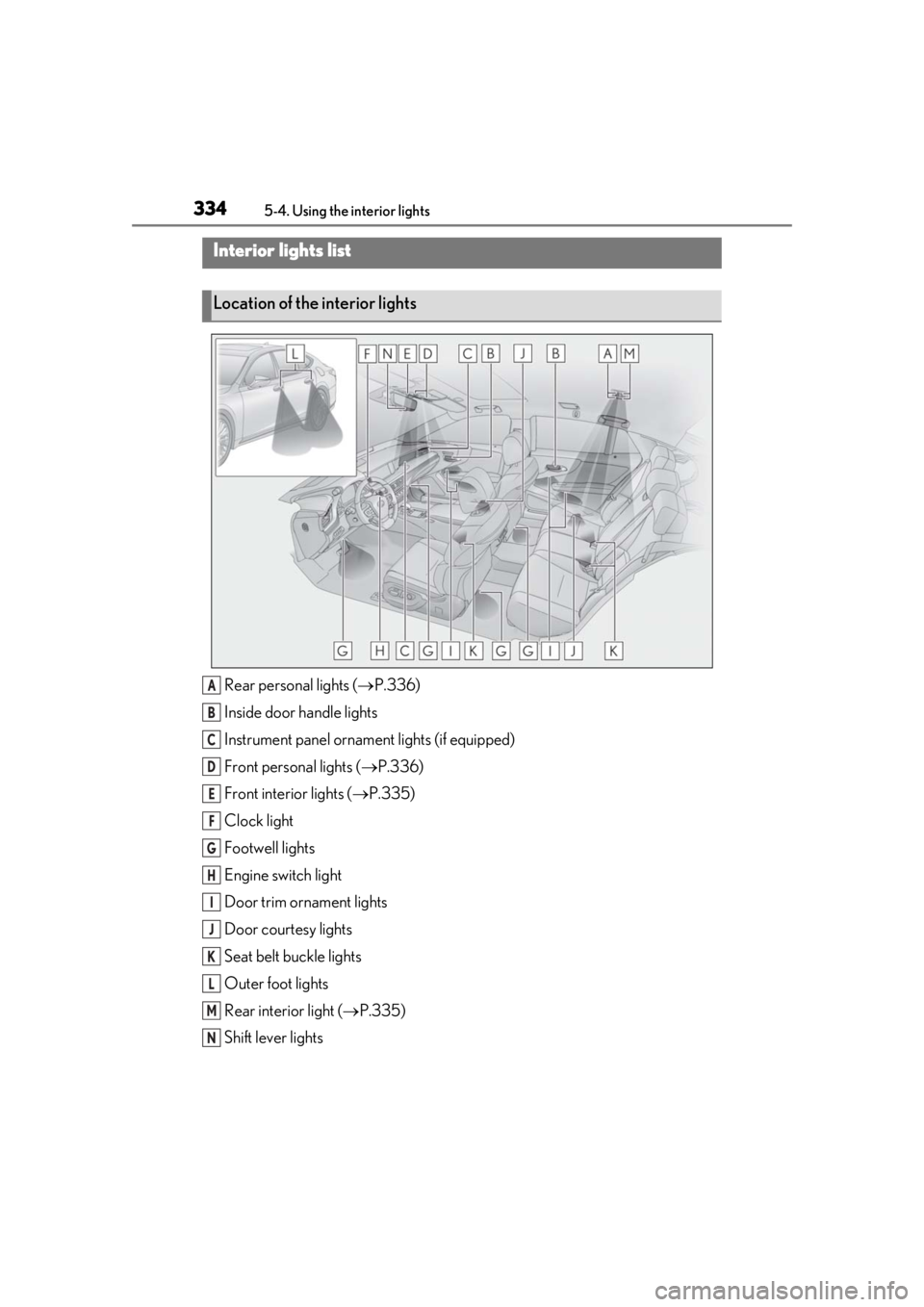
Rear personal lights ( P.336)
Inside door handle lights
Instrument panel orname nt lights (if equipped)
Front personal lights ( P.336)
Front interi or lights ( P.335)
Clock light
Footwell lights
Engine switch light
Door trim ornament lights
Door courtesy lights
Seat belt buckle lights
Outer foot lights
Rear interior light ( P.335)
Shift lever lights
Interior lights list
Location of the interior lights
A
B
C
D
E
F
G
H
I
J
K
L
M
N
Page 344 of 516
3445-5. Using the storage features
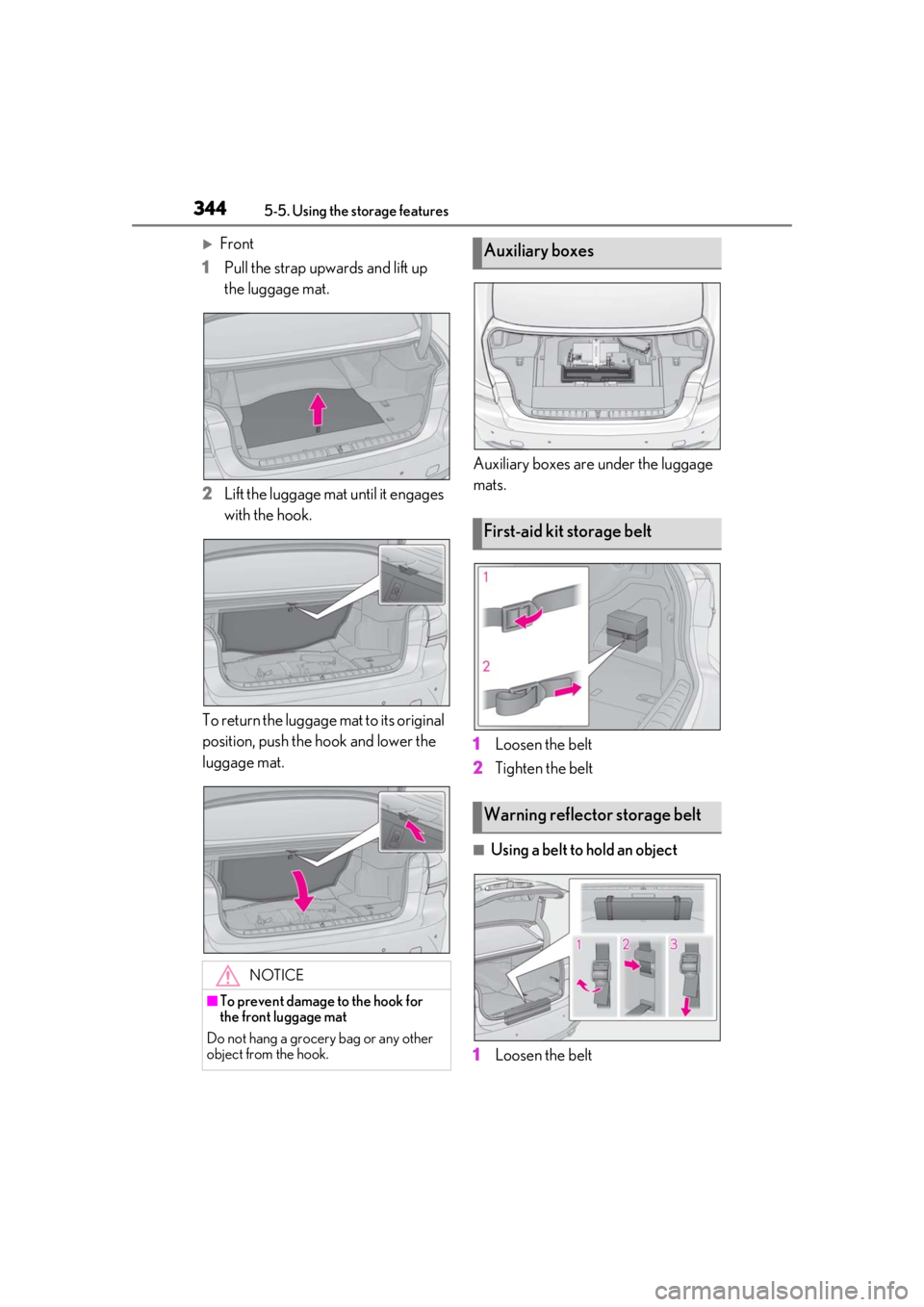
Front
1
Pull the strap upwards and lift up
the luggage mat.
2
Lift the luggage mat until it engages
with the hook.
To return the luggage mat to its original
position, push the hook and lower the
luggage mat. Auxiliary boxes are under the luggage
mats.
1
Loosen the belt
2
Tighten the belt
■Using a belt to hold an object
1
Loosen the belt
NOTICE
■To prevent damage to the hook for
the front luggage mat
Do not hang a grocery bag or any other
object from the hook.
Auxiliary boxes
First-aid kit storage belt
Warning reflector storage belt
Page 345 of 516
3455-5. Using the storage features
5
Interior features
2Pass the belt through the clip
3 Tighten the belt
Depending on the size and shape of an
object, such as the case of a warning
reflector, the object may not be able to be
secured with the belts or stowed in an aux-
iliary box.
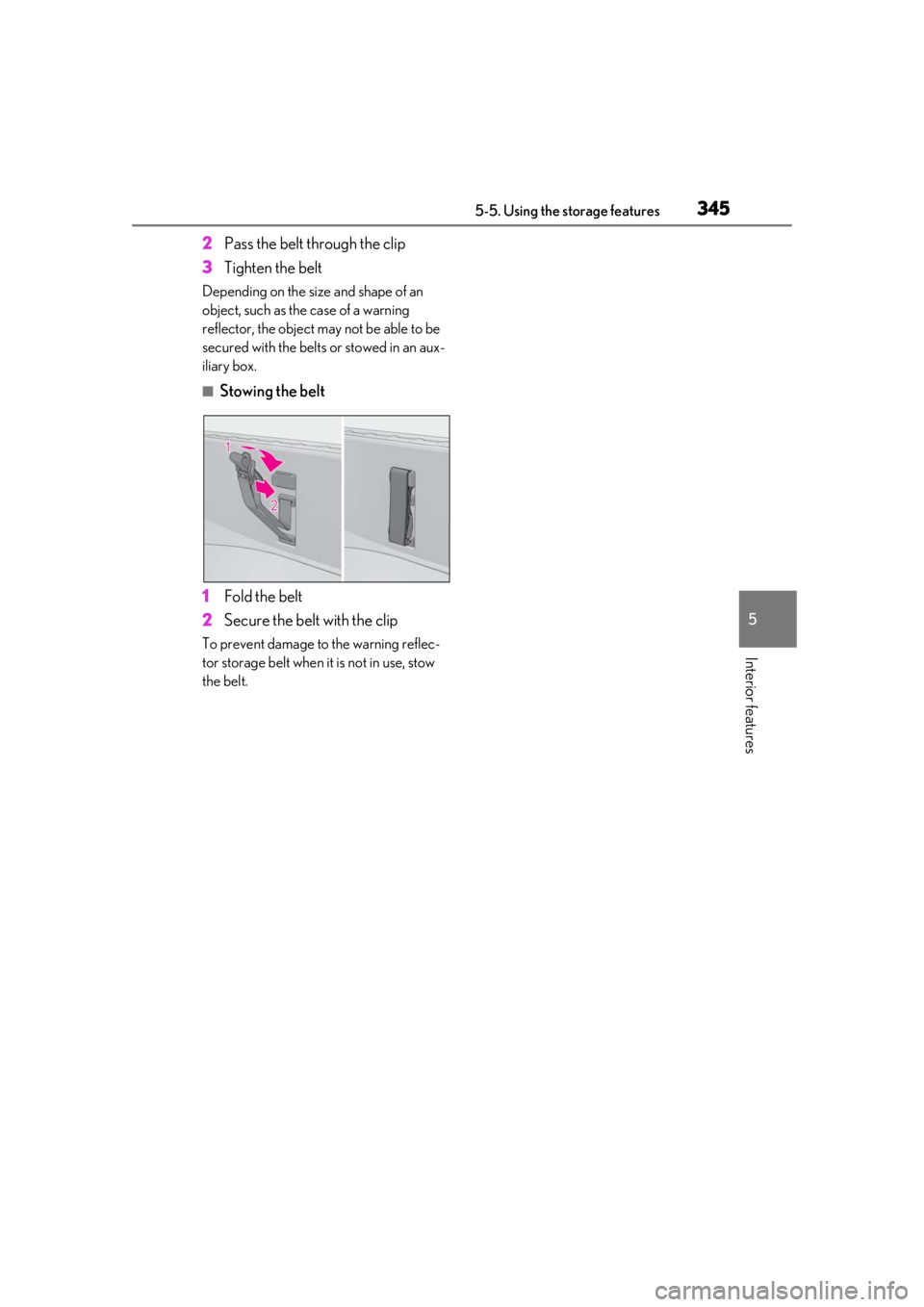
■Stowing the belt
1 Fold the belt
2 Secure the belt with the clip
To prevent damage to the warning reflec-
tor storage belt when it is not in use, stow
the belt.
Page 365 of 516
3656-1. Maintenance and care
6
Maintenance and care
Remove dirt and dust using a vac-
uum cleaner. Wipe dirty surfaces
with a cloth dampened with luke-
warm water.
If dirt cannot be removed, wipe it off
with a soft cloth dampened with
neutral detergent diluted to approx-
imately 1%.
Wring out any excess water from
the cloth and thoroughly wipe off
remaining traces of detergent and
water.
■Shampooing the carpets
There are several commercial foaming-type
cleaners available. Use a sponge or brush
to apply the foam. Rub in overlapping cir-
cles. Do not use water. Wipe dirty surfaces
and let them dry. Excellent results are
obtained by keeping the carpet as dry as
possible.
■Handling the seat belts
Clean with mild soap and lukewarm water
using a cloth or spon ge. Also check the
belts periodically for excessive wear, fraying
or cuts.
■When cleaning the carpeted portions of
the glove box, console box, etc.
If a strong adhesive tape is used, there is a
possibility that the surface of the carpet
could be damaged.
Cleaning and protecting the
v
ehicle interior
Perform cleaning in a manner
appropriate to each component
and its material.
Protecting the vehicle interior
WARNING
■Water in the vehicle
●Do not splash or spill liquid in the vehi-
cle.
Doing so may cause electrical compo-
nents, etc. to malfunction or catch fire.
●Do not get any of the SRS components
or wiring in the vehicle interior wet.
( P.29)
An electrical malfunction may cause
the airbags to deploy or not function
properly, resulting in death or serious
injury.
■Cleaning the interior (especially
instrument panel)
Do not use polish wax or polish cleaner.
The instrument panel may reflect off the
windshield, obstructing the driver’s view
and leading to an accident, resulting in
death or serious injury.
NOTICE
■Cleaning detergents
●Do not use the following types of
detergent, as they may discolor the
vehicle interior or cause streaks or
damage to painted surfaces:
• Areas other than the seats and steer- ing wheel: Organic substances such as
benzene or gasoline, alkaline or acidic
solutions, dye, and bleach
• Seats: Alkaline or acidic solutions, such as thinner, benzene, and alcohol
• Steering wheel: Organic substances, such as thinner, and cleaner that con-
tains alcohol
●Do not use polish wax or polish
cleaner. The instrument panel’s or
other interior part’s painted surface
may be damaged.
Page 371 of 516

3716-2. Maintenance
6
Maintenance and care
Parking brake
• Does the parking brake operate nor-
mally?
•When parked on a slope and the park-
ing brake is on, is the
vehicle securely
stopped?
Seat belts
• Do the seat belts operate smoothly?
• The seat belts should not be damaged.
Seats• Do the seat controls operate properly?
Steering wheel
• Does the steering wheel rotate
smoothly?
• Does the steering wheel have the cor-
rect amount of free
play?
•There should not be any strange sounds
coming from the
steering wheel.
Vehicle exterior
ItemsCheck points
Doors/trunk• Do the doors/trunk operate smoothly?
Engine hood
•Does the engine hood lock system
work properly?
Fluid leaks
•There should not be any signs of fluid
leakage after the
vehicle has been
parked.
ItemsCheck points
Tires
• Is the tire inflation pressure correct?
• The tires should not be damaged or
excessively worn.
• Have the tires been rotated according to
the maintenance
schedule?
•The wheel nuts should not be loose.
Windshield wip-
ers
• The wiper blades should not show any
signs of cracking,
splitting, wear, con-
tamination or defor-
mation.
• The wiper blades should clear the
windshield without
streaking or skip-
ping.
ItemsCheck points
Page 374 of 516
3746-3. Do-it-yourself maintenance
Tire inflation pres-
sure (P.399)• Tire pressure gauge
• Compressed air
source
Washer fluid
( P.384)
• Water or washer
fluid containing anti-
freeze (for winter
use)
• Funnel (used only for adding water or
washer fluid)
WARNING
The engine compartment contains many
mechanisms and fluids that may move
suddenly, become hot, or become elec-
trically energized. To avoid death or seri-
ous injury, observe the following
precautions.
■When working on the engine com-
partment
●Keep hands, clothi ng and tools away
from the moving fan and engine drive
belt.
●Be careful not to touch the engine,
radiator, exhaust manifold, etc. right
after driving as they may be hot. Oil
and other fluids may also be hot.
●Do not leave anything that may burn
easily, such as paper and rags, in the
engine compartment.
●Do not smoke, cause sparks or expose
an open flame to fuel. Fuel fumes are
flammable.
■When working near the electric cool-
ing fan or radiator grille
Be sure the engine switch is off.
With the engine switch in IGNITION
ON mode, the electric cooling fan may
automatically start to run if the air condi-
tioning is on and/or the coolant tempera-
ture is high. ( P.383)
ItemsParts and tools■Safety glasses
Wear safety glasses to prevent flying or
falling material, fluid spray, etc. from get-
ting in your eyes.
NOTICE
■If you remove the air cleaner filter
Driving with the air cleaner filter
removed may cause excessive engine
wear due to dirt in the air.
Page 388 of 516
3886-3. Do-it-yourself maintenance
roads, the use of snow tires is recom-
mended. When installing snow tires, be
sure to replace all four tires.
●All season tires
All season tires are designed to provide
better traction in snow and to be adequate
for driving in most winter conditions as well
as for use year-round. All season tires,
however, do not have adequate traction
performance compared with snow tires in
heavy or loose snow. Also, all season tires
fall short in acceleration and handling per-
formance compared with summer tires in
highway driving.
●Snow tires
For driving on snow-covered roads or icy
roads, we recommend using snow tires. If
you need snow tires, select tires of the
same size, construction and load capacity
as the originally installed tires. Since your
vehicle has radial tires as original equip-
ment, make sure your snow tires also have
radial construction. Do not install studded
tires without first checking local regula-
tions for possible restrictions. Snow tires
should be installe d on all wheels.
( P.303)
■If the tread on snow tires wears down
below 0.16 in. (4 mm)
The effectiveness of the tires as snow tires is
lost.
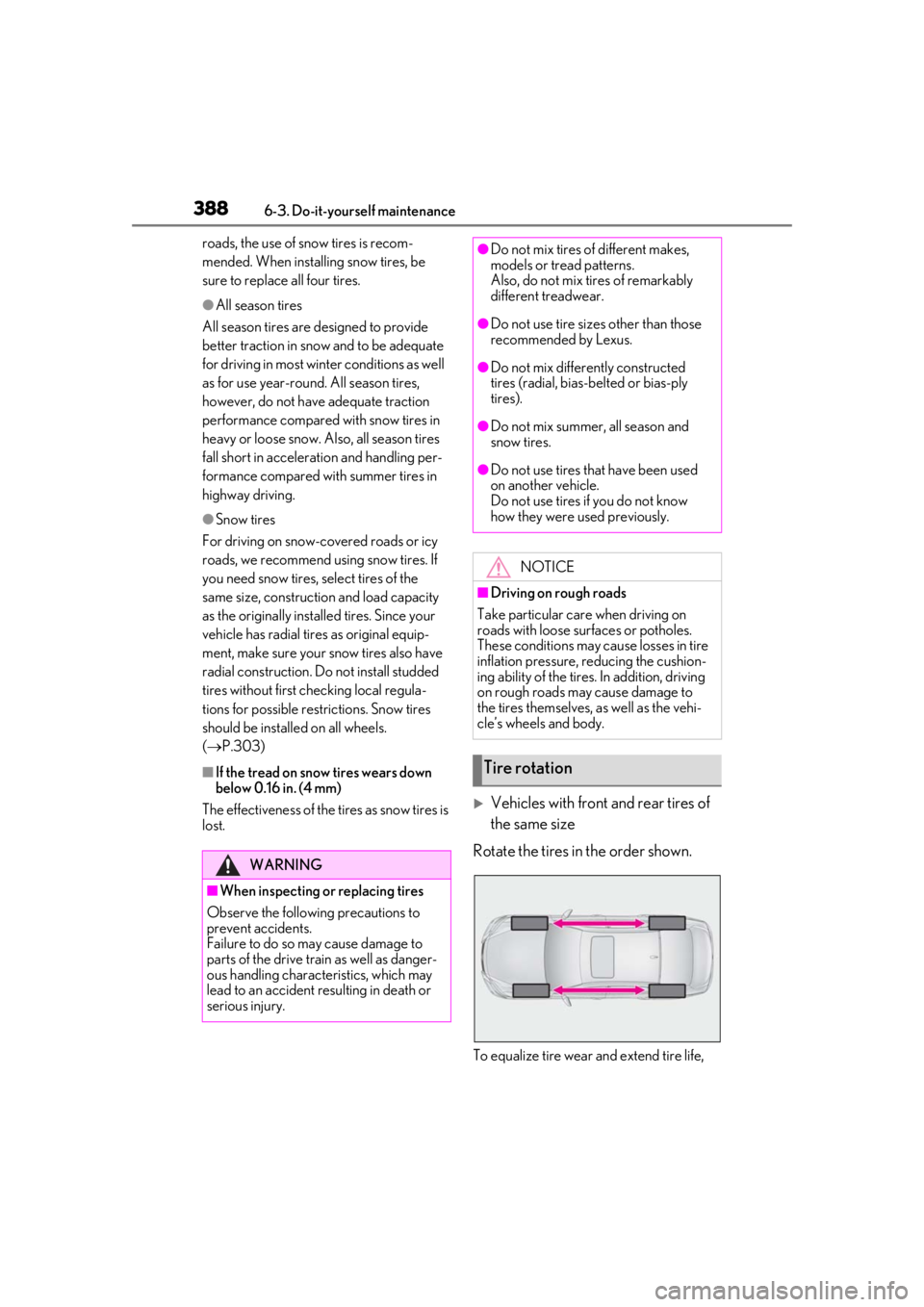
Vehicles with front and rear tires of
the same size
Rotate the tires in the order shown.
To equalize tire wear and extend tire life,
WARNING
■When inspecting or replacing tires
Observe the following precautions to
prevent accidents.
Failure to do so may cause damage to
parts of the drive train as well as danger-
ous handling characteristics, which may
lead to an accident resulting in death or
serious injury.
●Do not mix tires of different makes,
models or tread patterns.
Also, do not mix tires of remarkably
different treadwear.
●Do not use tire sizes other than those
recommended by Lexus.
●Do not mix differently constructed
tires (radial, bias-belted or bias-ply
tires).
●Do not mix summer, all season and
snow tires.
●Do not use tires that have been used
on another vehicle.
Do not use tires if you do not know
how they were used previously.
NOTICE
■Driving on rough roads
Take particular care when driving on
roads with loose surfaces or potholes.
These conditions may cause losses in tire
inflation pressure, reducing the cushion-
ing ability of the tires. In addition, driving
on rough roads may cause damage to
the tires themselves, as well as the vehi-
cle’s wheels and body.
Tire rotation