park LEXUS LS500 2021 Owners Manual
[x] Cancel search | Manufacturer: LEXUS, Model Year: 2021, Model line: LS500, Model: LEXUS LS500 2021Pages: 520, PDF Size: 9.81 MB
Page 440 of 520
4407-2. Steps to take in an emergency
( P.444)
The battery terminal connections
may be loose or corroded.
( P.391)
The engine starting system may be
malfunctioning due to an electrical
problem such as electronic key battery
depletion or a blown fuse. However, an
interim measure is available to start the
engine. ( P.440)
One of the following may be the cause
of the problem:
One or both of the battery terminals
may be disconnected. ( P.391)
The battery may be discharged.
( P.444)
There may be a malfunction in the
steering lock system.
Contact your Lexus dealer if the problem
cannot be repaired, or if repair procedures
are unknown.
When the engine does not start, the
following steps can be used as an
interim measure to start the engine if
the engine switch is functioning nor- mally.
Do not use this starting procedure
except in cases of emergency.
1
Press the parking brake switch to
check that the parking brake is set.
(P.186)
Parking brake indicator will come on.
2 Turn the engine switch to ACCES-
SORY mode.
3 Press and hold the engine switch
for about 15 seconds while
depressing the brake pedal firmly.
Even if the engine can be started using
the above steps, the system may be
malfunctioning. Have the vehicle
inspected by your Lexus dealer.
The starter motor does not turn
over
The starter motor does not turn
over, the interior lights and head-
lights do not turn on, or the horn
does not sound.
Starting the engine in an emer-
gency
Page 443 of 520
4437-2. Steps to take in an emergency
7
When trouble arises
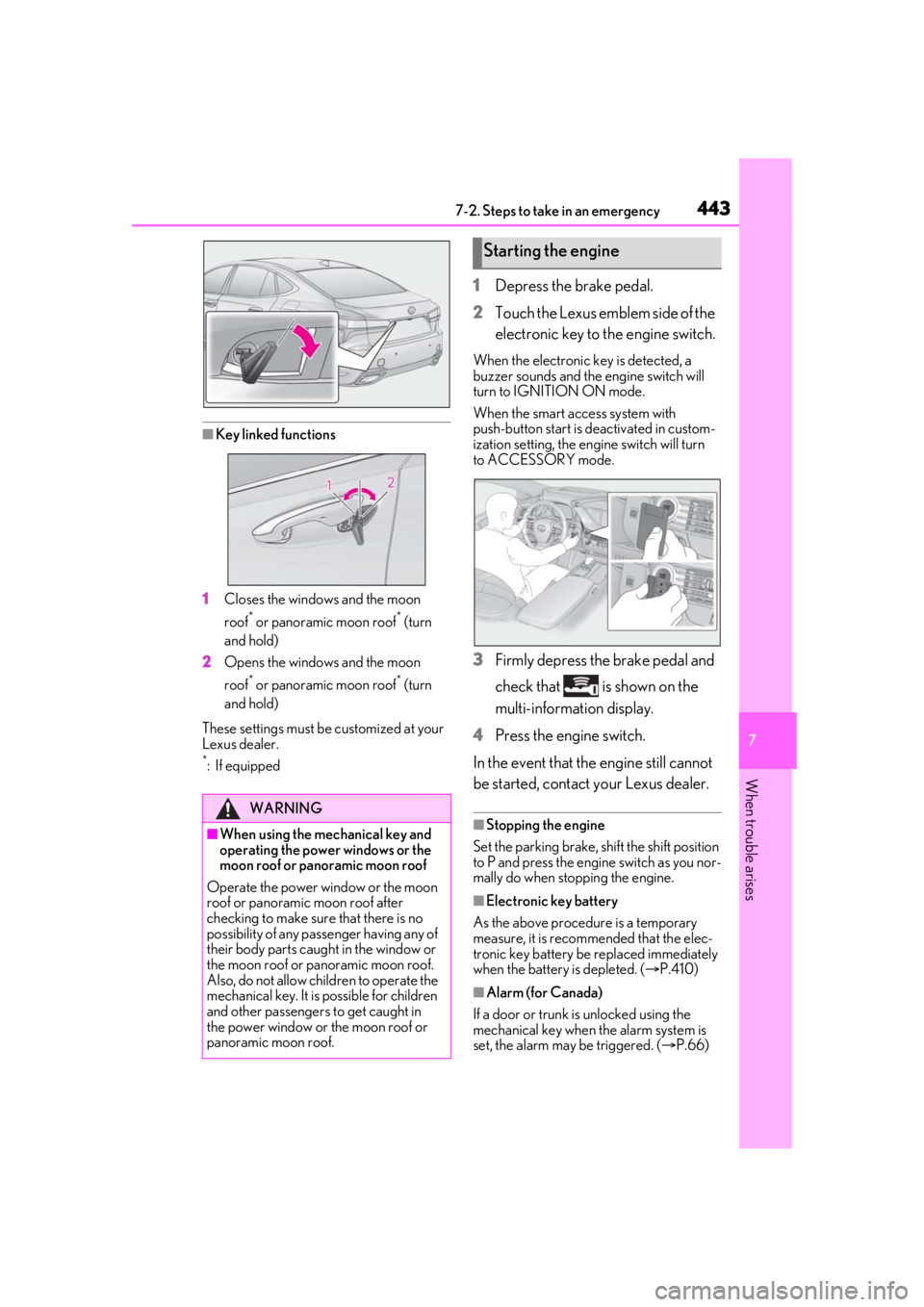
■Key linked functions
1 Closes the windows and the moon
roof
* or panoramic moon roof* (turn
and hold)
2 Opens the windows and the moon
roof
* or panoramic moon roof* (turn
and hold)
These settings must be customized at your
Lexus dealer.
*:If equipped
1 Depress the brake pedal.
2 Touch the Lexus emblem side of the
electronic key to the engine switch.
When the electronic key is detected, a
buzzer sounds and the engine switch will
turn to IGNITION ON mode.
When the smart access system with
push-button start is deactivated in custom-
ization setting, the engine switch will turn
to ACCESSORY mode.
3 Firmly depress the brake pedal and
check that is shown on the
multi-information display.
4 Press the engine switch.
In the event that the engine still cannot
be started, contact your Lexus dealer.
■Stopping the engine
Set the parking brake, shift the shift position
to P and press the engine switch as you nor-
mally do when stopping the engine.
■Electronic key battery
As the above procedure is a temporary
measure, it is recommended that the elec-
tronic key battery be replaced immediately
when the battery is depleted. ( P.410)
■Alarm (for Canada)
If a door or trunk is unlocked using the
mechanical key when the alarm system is
set, the alarm may be triggered. ( P.66)
WARNING
■When using the mechanical key and
operating the power windows or the
moon roof or panoramic moon roof
Operate the power window or the moon
roof or panoramic moon roof after
checking to make sure that there is no
possibility of any passe nger having any of
their body parts caught in the window or
the moon roof or panoramic moon roof.
Also, do not allow ch ildren to operate the
mechanical key. It is possible for children
and other passengers to get caught in
the power window or the moon roof or
panoramic moon roof.
Starting the engine
Page 448 of 520
4487-2. Steps to take in an emergency
●Use a battery with a handle. If a battery
without a handle is used, removal is more
difficult.
●After replacing, firmly attach the follow-
ing items to the exhaust hole of the bat-
tery.
• Use the exhaust hose that was attached to the battery before replacing and con-
firm that it is firmly connected to the hole
section of the vehicle.
• Use the exhaust hole plug included with
the battery replaced or the one installed
on the battery prior to the replacement.
(Depending on the battery to be
replaced, the exhaust hole may be
plugged.)
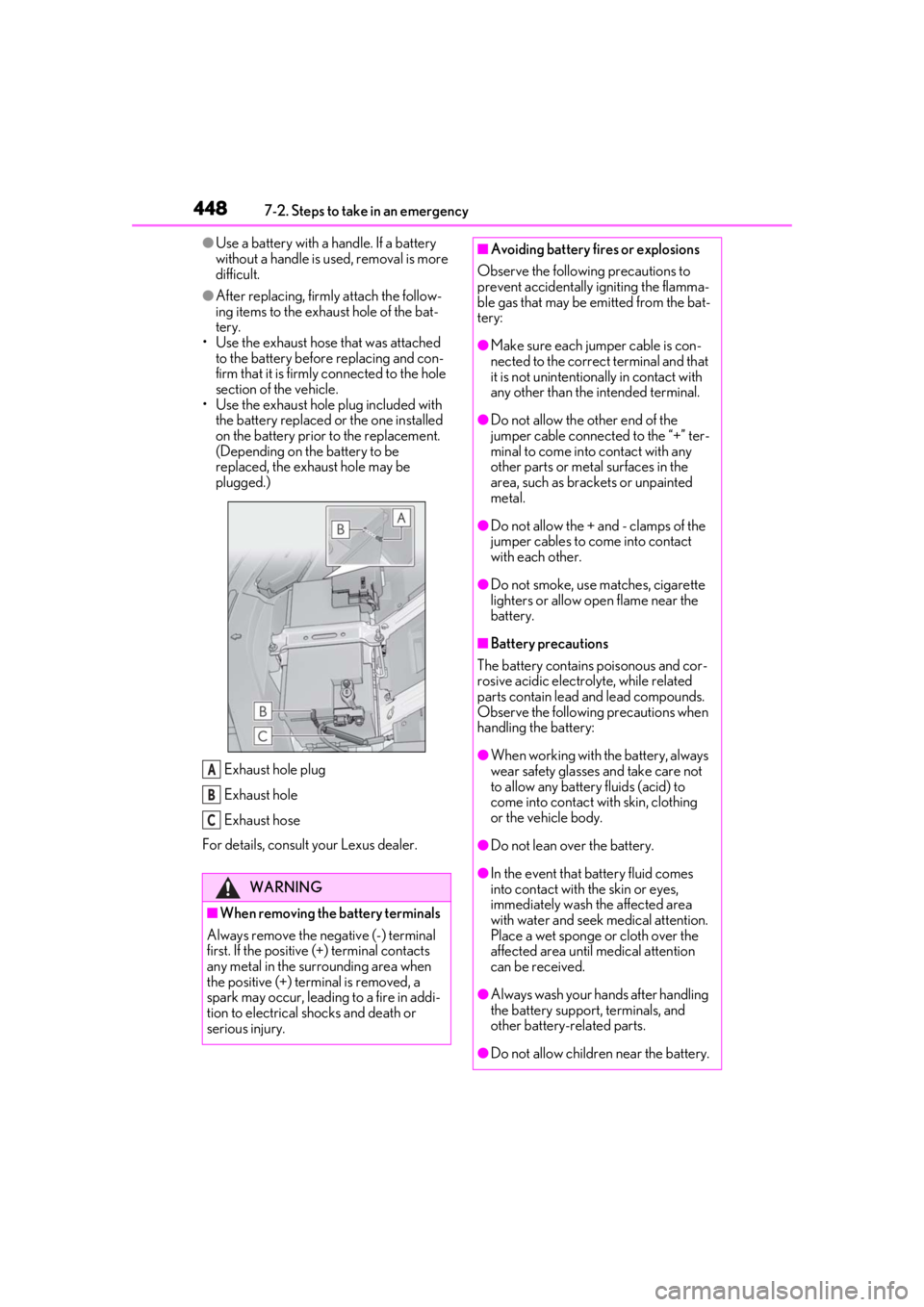
Exhaust hole plug
Exhaust hole
Exhaust hose
For details, consult your Lexus dealer.
WARNING
■When removing the battery terminals
Always remove the negative (-) terminal
first. If the positive (+) terminal contacts
any metal in the surrounding area when
the positive (+) terminal is removed, a
spark may occur, leading to a fire in addi-
tion to electrical shocks and death or
serious injury.
A
B
C
■Avoiding battery fires or explosions
Observe the following precautions to
prevent accidentally igniting the flamma-
ble gas that may be emitted from the bat-
tery:
●Make sure each jumper cable is con-
nected to the correct terminal and that
it is not unintentionally in contact with
any other than the intended terminal.
●Do not allow the other end of the
jumper cable connected to the “+” ter-
minal to come into contact with any
other parts or meta l surfaces in the
area, such as brackets or unpainted
metal.
●Do not allow the + and - clamps of the
jumper cables to come into contact
with each other.
●Do not smoke, use matches, cigarette
lighters or allow open flame near the
battery.
■Battery precautions
The battery contains poisonous and cor-
rosive acidic electrol yte, while related
parts contain lead and lead compounds.
Observe the following precautions when
handling the battery:
●When working with the battery, always
wear safety glasses and take care not
to allow any battery fluids (acid) to
come into contact with skin, clothing
or the vehicle body.
●Do not lean over the battery.
●In the event that battery fluid comes
into contact with the skin or eyes,
immediately wash the affected area
with water and seek medical attention.
Place a wet sponge or cloth over the
affected area until medical attention
can be received.
●Always wash your ha nds after handling
the battery support, terminals, and
other battery-related parts.
●Do not allow children near the battery.
Page 452 of 520
4527-2. Steps to take in an emergency
1Stop the engine. Set the parking
brake and shift the shift position to
P.
2 Remove the mud, snow or sand
from around the rear wheels.
3 Place wood, stones or some other
material under the rear wheels to
help provide traction.
4 Restart the engine.
5 Shift the shift position to D or R and
release the parking brake. Then,
while exercising caution, depress
the accelerator pedal.
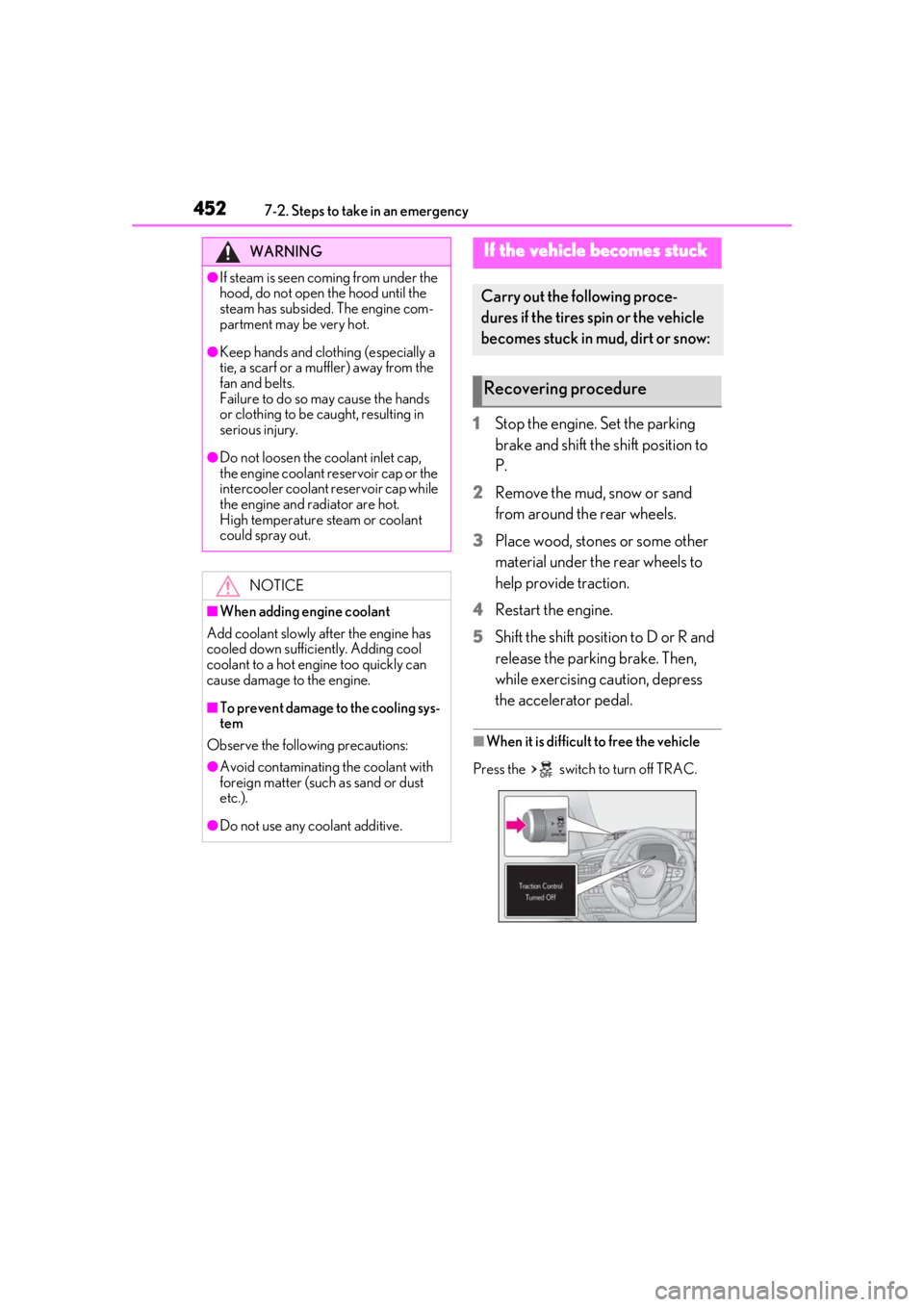
■When it is difficult to free the vehicle
Press the switch to turn off TRAC.
WARNING
●If steam is seen coming from under the
hood, do not open the hood until the
steam has subsided. The engine com-
partment may be very hot.
●Keep hands and clothing (especially a
tie, a scarf or a muffler) away from the
fan and belts.
Failure to do so may cause the hands
or clothing to be caught, resulting in
serious injury.
●Do not loosen the coolant inlet cap,
the engine coolant reservoir cap or the
intercooler coolant reservoir cap while
the engine and radiator are hot.
High temperature steam or coolant
could spray out.
NOTICE
■When adding engine coolant
Add coolant slowly after the engine has
cooled down sufficiently. Adding cool
coolant to a hot engine too quickly can
cause damage to the engine.
■To prevent damage to the cooling sys-
tem
Observe the following precautions:
●Avoid contaminating the coolant with
foreign matter (such as sand or dust
etc.).
●Do not use any coolant additive.
If the vehicle becomes stuck
Carry out the following proce-
dures if the tires spin or the vehicle
becomes stuck in mud, dirt or snow:
Recovering procedure
Page 459 of 520

4598-1. Specifications
8
Vehicle specifications
containers to help you select the oil you
should use.
Cooling system
Capacity (Reference)
Engine
2WD models: 11.2 qt. (10.6 L, 9.3 Imp. qt.)
AWD models: 11.1 qt. (10.5 L, 9.2 Imp. qt.)
Intercooler
4.5 qt. (4.3 L, 3.8 Imp. qt.)
Coolant type
Use either of the following:
“Toyota Super Long Life Coolant”
Similar high-quality ethylene glycol-based non-silicate,
non-amine, non-nitrite, and non-borate coolant with
long-life hybrid orga nic acid technology
Do not use plain water alone.
Ignition system (spark plug)
MakeDENSO EC22HPR-D7
Gap0.028 in. (0.7 mm)
NOTICE
■Iridium-tipped spark plugs
Use only iridium-tipped spark plugs. Do not adjust the spark plug gap.
Page 461 of 520
4618-1. Specifications
8
Vehicle specifications
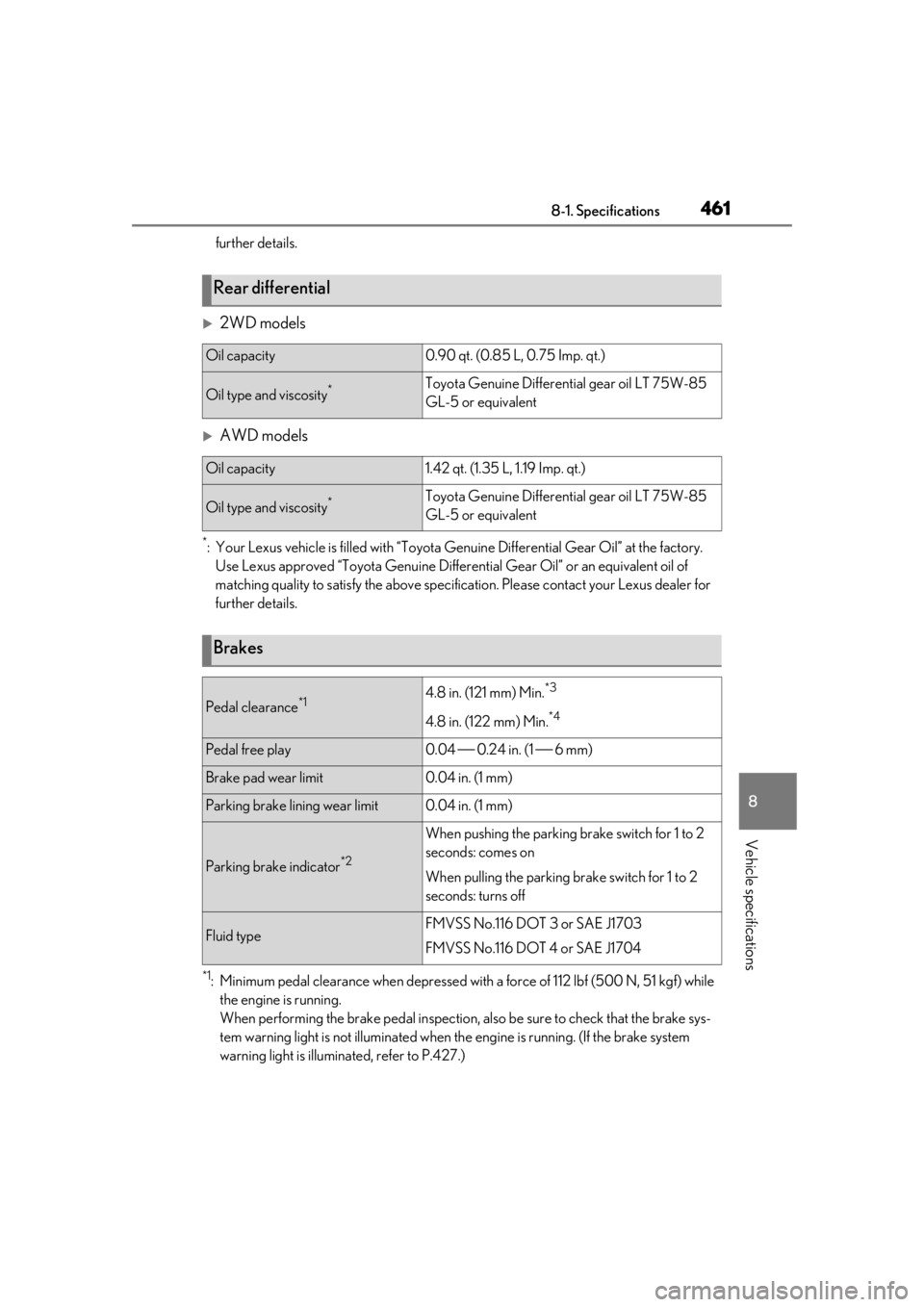
further details.
2WD models
AWD models
*: Your Lexus vehicle is filled with “Toyota Genuine Differential Gear Oil” at the factory.
Use Lexus approved “Toyota Ge nuine Differential Gear Oil” or an equivalent oil of
matching quality to satisfy th e above specification. Please contact your Lexus dealer for
further details.
*1: Minimum pedal clearance when depressed with a force of 112 lbf (500 N, 51 kgf) while
the engine is running.
When performing the brake pedal inspection, also be sure to check that the brake sys-
tem warning light is not illuminated when th e engine is running. (If the brake system
warning light is illuminated, refer to P.427.)
Rear differential
Oil capacity0.90 qt. (0.85 L, 0.75 Imp. qt.)
Oil type and viscosity*Toyota Genuine Differential gear oil LT 75W-85
GL-5 or equivalent
Oil capacity1.42 qt. (1.35 L, 1.19 Imp. qt.)
Oil type and viscosity*Toyota Genuine Differential gear oil LT 75W-85
GL-5 or equivalent
Brakes
Pedal clearance*14.8 in. (121 mm) Min.*3
4.8 in. (122 mm) Min.*4
Pedal free play0.04 0.24 in. (1 6 mm)
Brake pad wear limit0.04 in. (1 mm)
Parking brake lining wear limit0.04 in. (1 mm)
Parking brake indicator*2
When pushing the parking brake switch for 1 to 2
seconds: comes on
When pulling the parking brake switch for 1 to 2
seconds: turns off
Fluid typeFMVSS No.116 DOT 3 or SAE J1703
FMVSS No.116 DOT 4 or SAE J1704
Page 470 of 520
4708-1. Specifications
■Traction AA, A, B, C
The traction grades, from highest to
lowest, are AA, A, B and C, and they
represent the tire’s ability to stop on
wet pavement as measured under con-
trolled conditions on specified govern-
ment test surfaces of asphalt and
concrete.
A tire marked C may have poor traction
performance.
Warning: The traction grade assigned to
this tire is based on braking (straight
ahead) traction tests and does not include
cornering (turning) traction.
■Temperature A, B, C
The temperature grades are A (the
highest), B, and C, representing the
tire’s resistance to the generation of
heat and its ability to dissipate heat when tested under controlled condi-
tions on a specified indoor laboratory
test wheel.
Sustained high temperature can cause the
material of the tire to degenerate and
reduce tire life, and excessive temperature
can lead to sudd
en tire failure.
Grade C corresponds to a level of perfor-
mance which all passenger car tires must
meet under the Fede ral Motor Vehicle
Safety Standard No. 109.
Grades B and A represent higher levels of
performance on the laboratory test wheel
than the minimum required by law.
Warning: The temperature grades of a tire
assume that it is properly inflated and not
overloaded.
Excessive speed, unde rinflation, or exces-
sive loading, either separately or in combi-
nation, can cause heat buildup and
possible tire failure.
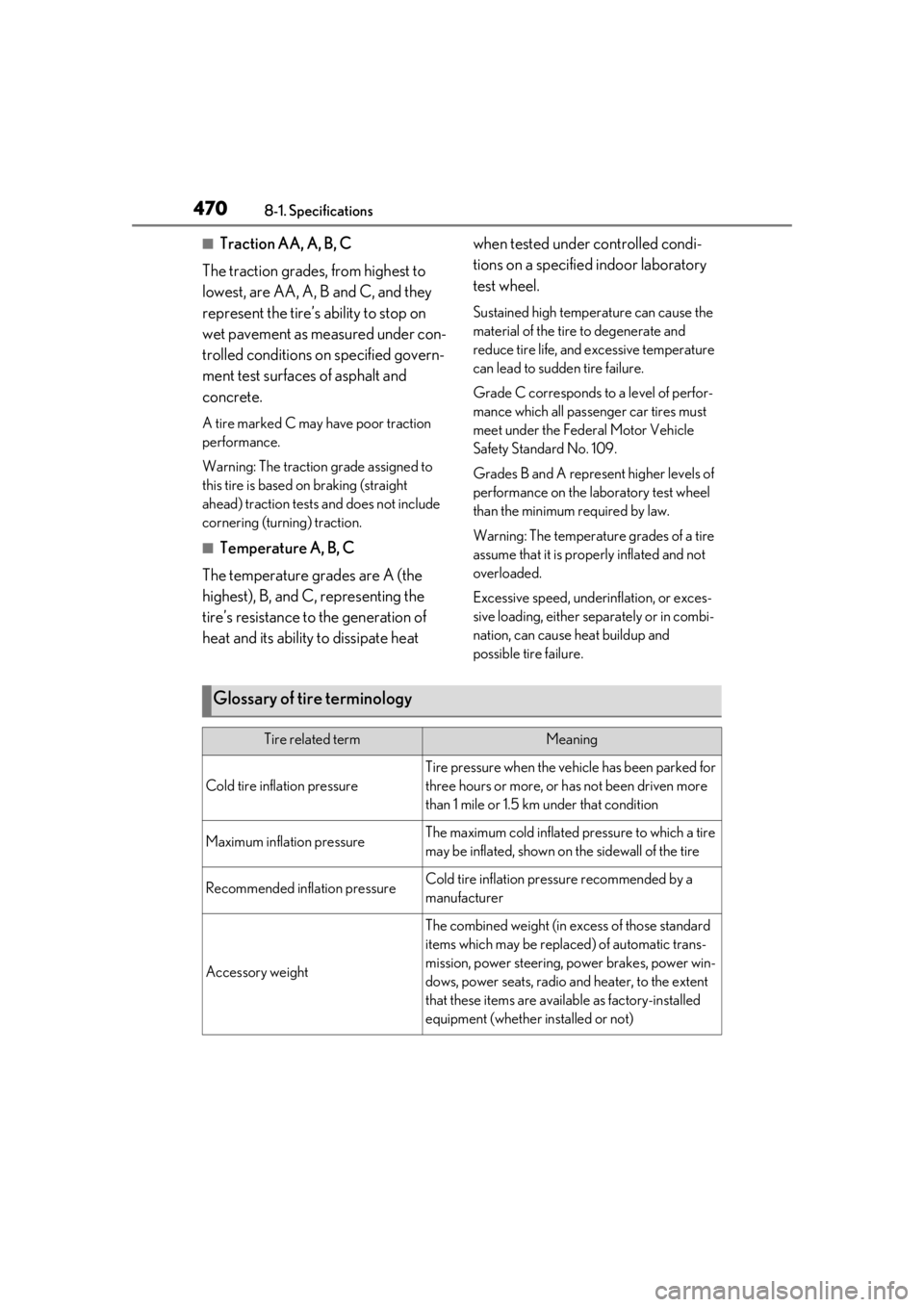
Glossary of tire terminology
Tire related termMeaning
Cold tire inflation pressure
Tire pressure when the vehicle has been parked for
three hours or more, or has not been driven more
than 1 mile or 1.5 km under that condition
Maximum inflation pressureThe maximum cold inflated pressure to which a tire
may be inflated, shown on the sidewall of the tire
Recommended inflation pressureCold tire inflation pressure recommended by a
manufacturer
Accessory weight
The combined weight (in excess of those standard
items which may be replaced) of automatic trans-
mission, power steering, power brakes, power win-
dows, power seats, radio and heater, to the extent
that these items are available as factory-installed
equipment (whether installed or not)
Page 476 of 520
4768-2. Customization
8-2.Customization
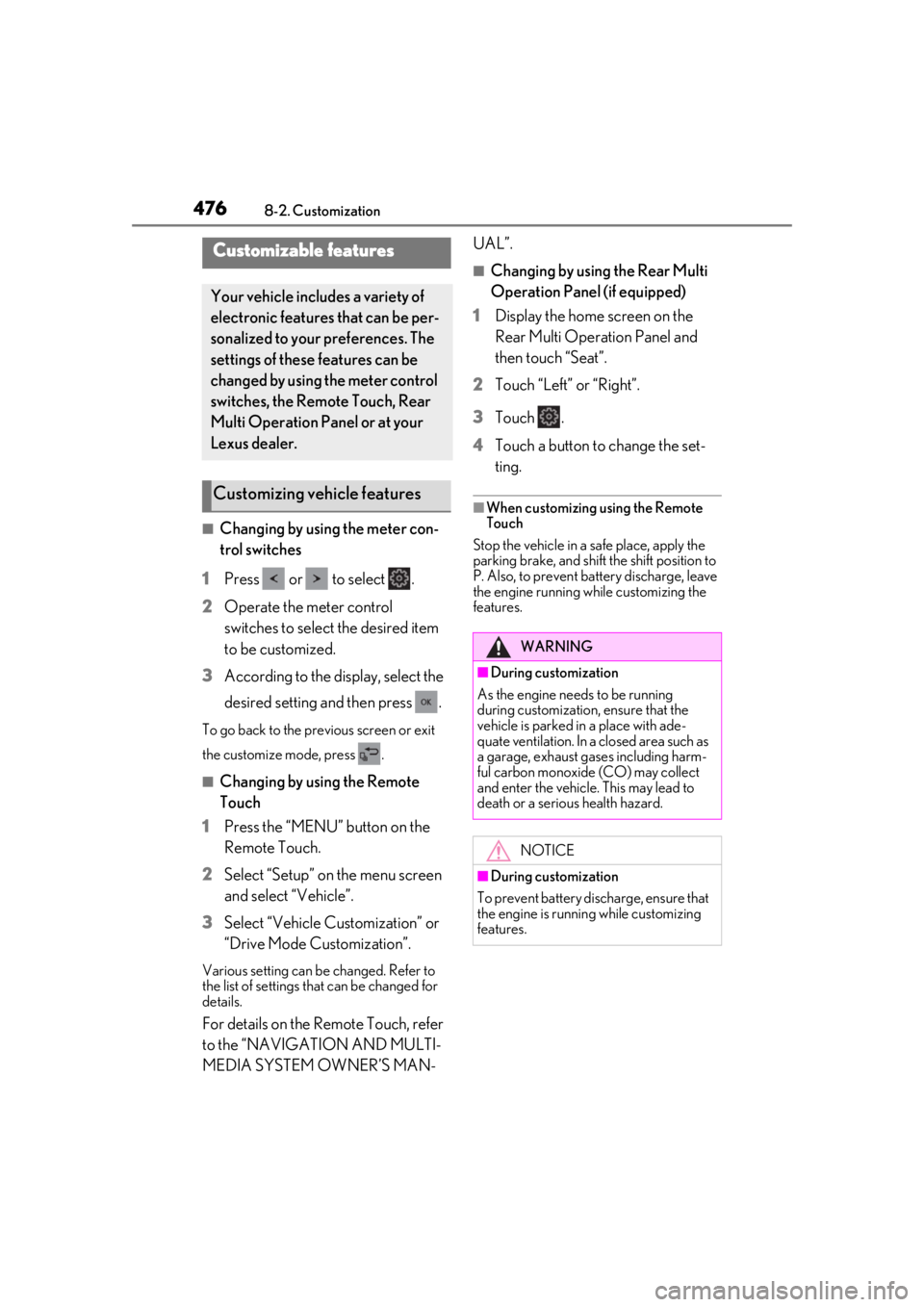
■Changing by using the meter con-
trol switches
1 Press or to select .
2 Operate the meter control
switches to select the desired item
to be customized.
3 According to the display, select the
desired setting and then press .
To go back to the previous screen or exit
the customize mode, press .
■Changing by using the Remote
Touch
1 Press the “MENU” button on the
Remote Touch.
2 Select “Setup” on the menu screen
and select “Vehicle”.
3 Select “Vehicle Customization” or
“Drive Mode Customization”.
Various setting can be changed. Refer to
the list of settings that can be changed for
details.
For details on the Remote Touch, refer
to the “NAVIGATION AND MULTI-
MEDIA SYSTEM OWNER’S MAN- UAL”.
■Changing by using the Rear Multi
Operation Panel (if equipped)
1 Display the home screen on the
Rear Multi Operation Panel and
then touch “Seat”.
2 Touch “Left” or “Right”.
3 Touch .
4 Touch a button to change the set-
ting.
■When customizing using the Remote
Touch
Stop the vehicle in a safe place, apply the
parking brake, and shift the shift position to
P. Also, to prevent battery discharge, leave
the engine running while customizing the
features.
Customizable features
Your vehicle includes a variety of
electronic features that can be per-
sonalized to your preferences. The
settings of these features can be
changed by using the meter control
switches, the Remote Touch, Rear
Multi Operation Panel or at your
Lexus dealer.
Customizing vehicle features
WARNING
■During customization
As the engine needs to be running
during customization, ensure that the
vehicle is parked in a place with ade-
quate ventilation. In a closed area such as
a garage, exhaust gases including harm-
ful carbon monoxide (CO) may collect
and enter the vehicle. This may lead to
death or a serious health hazard.
NOTICE
■During customization
To prevent battery discharge, ensure that
the engine is running while customizing
features.
Page 486 of 520
4868-2. Customization
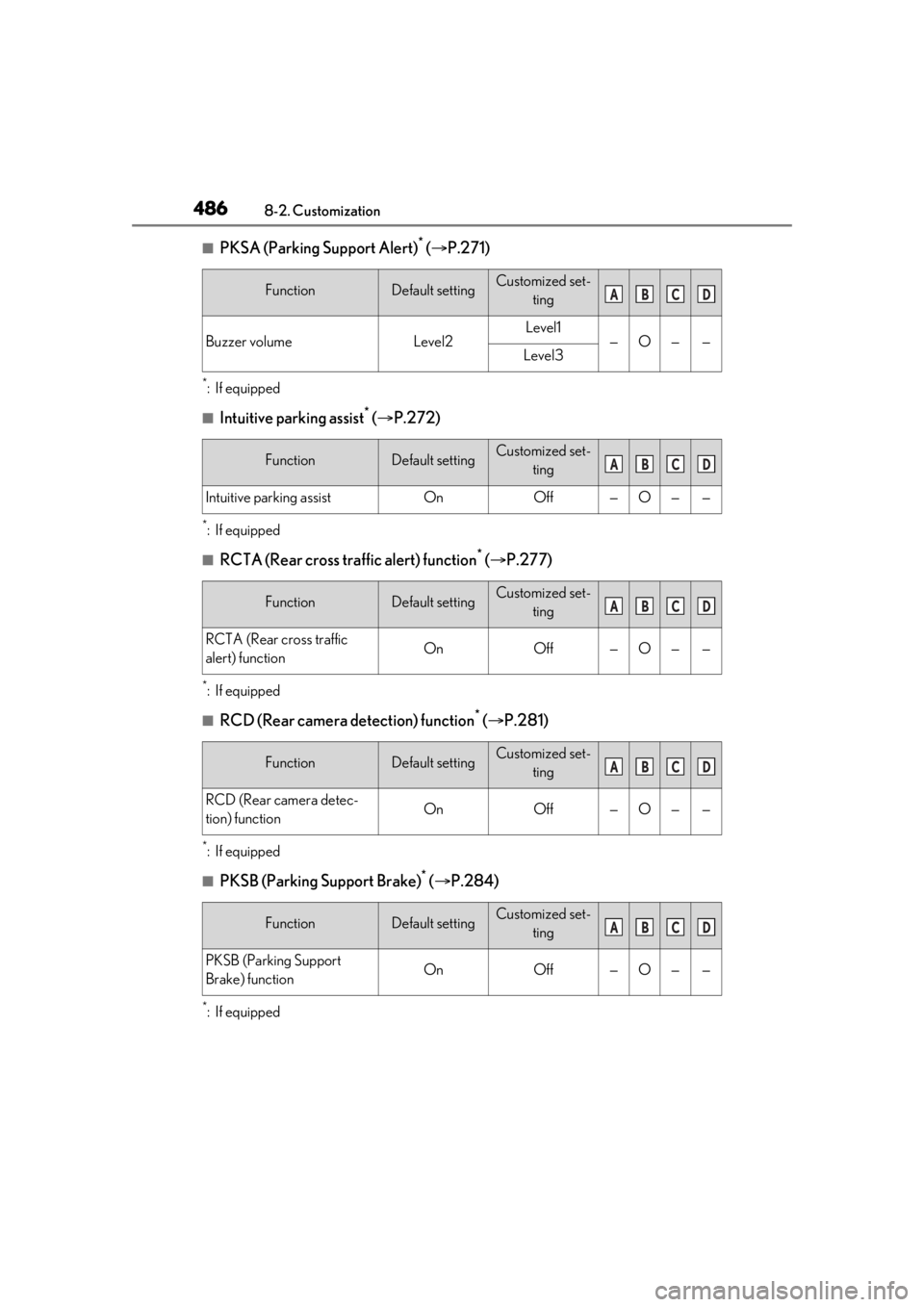
■PKSA (Parking Support Alert)* ( P.271)
*:If equipped
■Intuitive parking assist* ( P.272)
*:If equipped
■RCTA (Rear cross traffic alert) function* ( P.277)
*:If equipped
■RCD (Rear camera detection) function* ( P.281)
*:If equipped
■PKSB (Parking Support Brake)* ( P.284)
*:If equipped
FunctionDefault settingCustomized set-
ting
Buzzer volumeLevel2Level1—O——Level3
FunctionDefault settingCustomized set-ting
Intuitive parking assistOnOff—O——
FunctionDefault settingCustomized set-ting
RCTA (Rear cross traffic
alert) functionOnOff—O——
FunctionDefault settingCustomized set-ting
RCD (Rear camera detec-
tion) functionOnOff—O——
FunctionDefault settingCustomized set-ting
PKSB (Parking Support
Brake) functionOnOff—O——
ABCD
ABCD
ABCD
ABCD
ABCD
Page 490 of 520
4908-3. Initialization
8-3.Initialization
*:If equipped
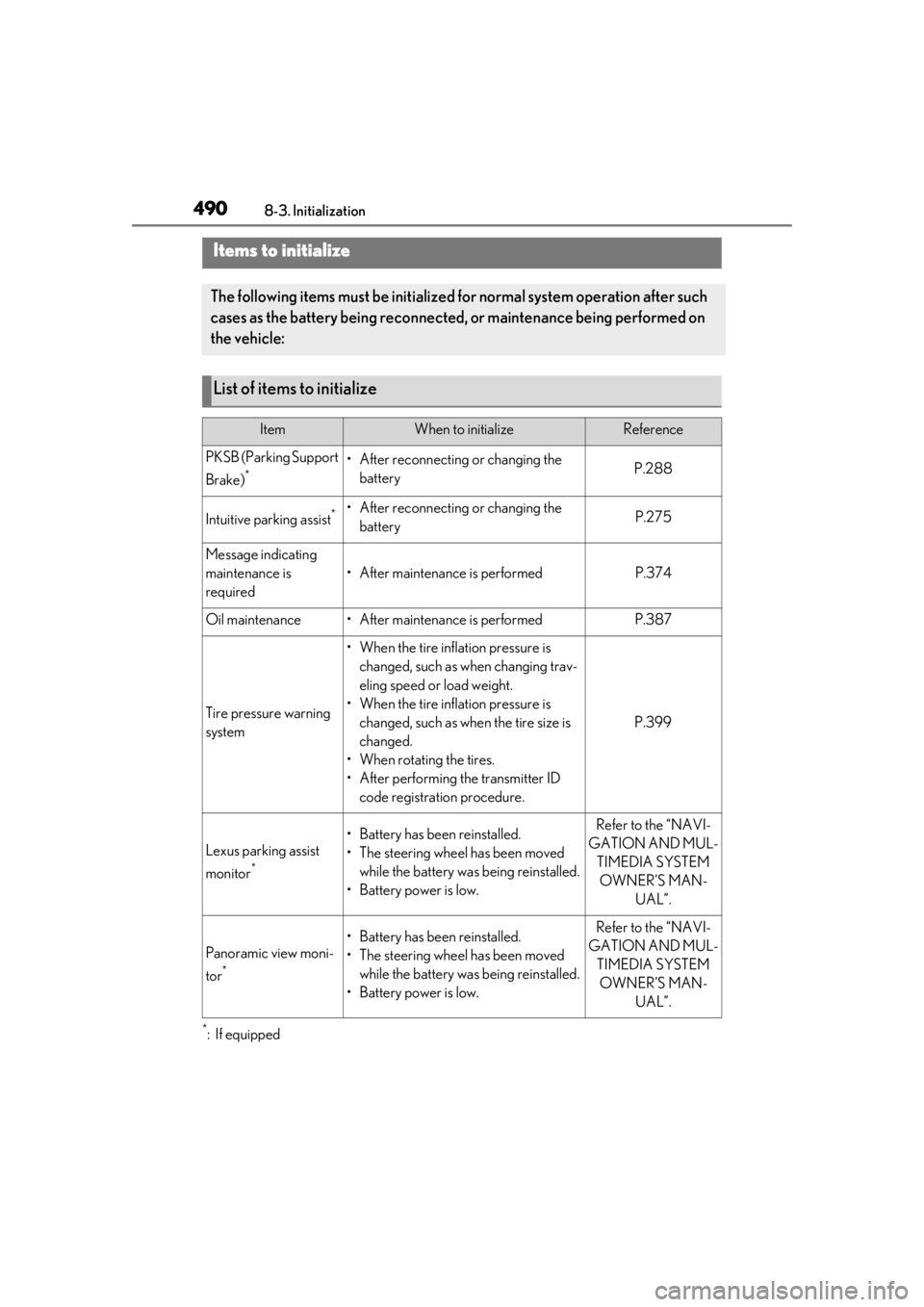
Items to initialize
The following items must be initialized for normal system operation after such
cases as the battery being reconnected, or maintenance being performed on
the vehicle:
List of items to initialize
ItemWhen to initializeReference
PKSB (Parking Support
Brake)
*• After reconnecting or changing the batteryP.288
Intuitive parking assist*• After reconnecting or changing the batteryP.275
Message indicating
maintenance is
required
• After maintenance is performedP.374
Oil maintenance• After maintenance is performedP.387
Tire pressure warning
system
• When the tire inflation pressure is changed, such as when changing trav-
eling speed or load weight.
• When the tire inflation pressure is changed, such as when the tire size is
changed.
• When rotating the tires.
• After performing the transmitter ID code registration procedure.
P.399
Lexus parking assist
monitor
*
• Battery has been reinstalled.
• The steering wheel has been moved while the battery was being reinstalled.
• Battery power is low.Refer to the “NAVI-
GATION AND MUL- TIMEDIA SYSTEM OWNER’S MAN- UAL”.
Panoramic view moni-
tor
*
• Battery has been reinstalled.
• The steering wheel has been moved while the battery was being reinstalled.
• Battery power is low.Refer to the “NAVI-
GATION AND MUL- TIMEDIA SYSTEM OWNER’S MAN- UAL”.