park LEXUS LS500 2021 Manual PDF
[x] Cancel search | Manufacturer: LEXUS, Model Year: 2021, Model line: LS500, Model: LEXUS LS500 2021Pages: 520, PDF Size: 9.81 MB
Page 294 of 520
2944-5. Using the driving support systems
that an emergency brake operation is
necessary to avoid a collision with an
approaching vehicle.
■The Parking Support Brake function
(rear-crossing vehicles) will stop operat-
ing when
The function will stop operating if any of the
following conditions are met:
●Engine output restriction control
• The Parking Support Brake is disabled.
• The collision becomes avoidable with normal brake operation.
• A vehicle is no longer approaching from the right or left at the rear of the vehicle.
●Brake control
• The Parking Support Brake is disabled.
• Approximately 2 seconds have elapsed
since the vehicle was stopped by brake
control.
• The brake pedal is depressed after the vehicle is stopped by brake control.
• A vehicle is no longer approaching from
the right or left at the rear of the vehicle.
■Re-enabling the Parking Support Brake
function (rear-crossing vehicles)
P.287
■Detection area of the Parking Support
Brake function (rear-crossing vehicles)
The detection area of the Parking Support
Brake function (rear-crossing vehicles) dif-
fers from the detection area of the RCTA
function ( P.279). Therefore, even if the
RCTA function detects a vehicle and pro-
vides an alert, the Parking Support Brake
function (rear-crossing vehicles) may not
start operating.
■Conditions under which the Parking
Support Brake function (rear-crossing
vehicles) will not detect a vehicle
The Parking Support Brake function
(rear-crossing vehicles) is not designed to
detect the following types of vehicles and/or
objects:
●Vehicles approaching from directly
behind
●Vehicles backing up in a parking space
next to your vehicle
●Vehicles that the sensors cannot detect due to obstructions
●Vehicles which suddenly accelerate or
decelerate near your vehicle
●Guardrails, walls, signs, parked vehicles
and similar stationary objects
●Small motorcycles, bicycles, pedestrians,
etc.
●Vehicles moving away from your vehicle
●Vehicles approaching from the parking
spaces next to your vehicle
●Objects which are extremely close to a
radar sensor
●Vehicles which are approaching from the
right or left at the rear of the vehicle at a
traveling speed of less than approxi-
mately 5 mph (8 km/h)
●Vehicles which are approaching from the
right or left at the rear of the vehicle at a
traveling speed of
more than approxi-
mately 15 mph (24 km/h)
■PKSB buzzer
If the Parking Support Brake is enabled and
brake control is performed, a buzzer will
sound to notify the driver.
■Situations in which the system may
operate even though there is no possi-
bility of a collision
In some situations such as the following, the
Parking Support Brake function
(rear-crossing vehicles) may operate even
though there is no possibility of a collision.
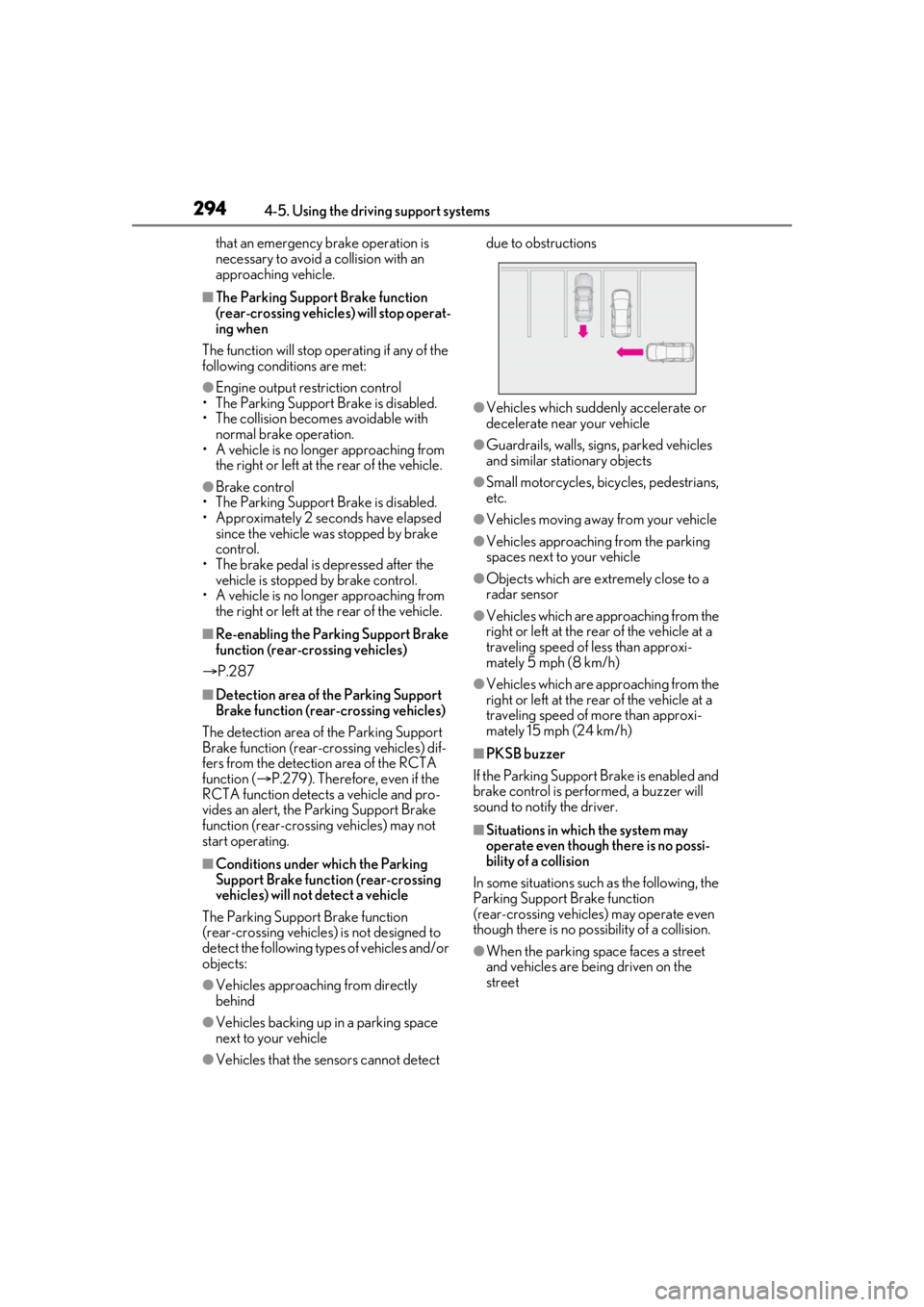
●When the parking space faces a street
and vehicles are being driven on the
street
Page 295 of 520
2954-5. Using the driving support systems
4
Driving
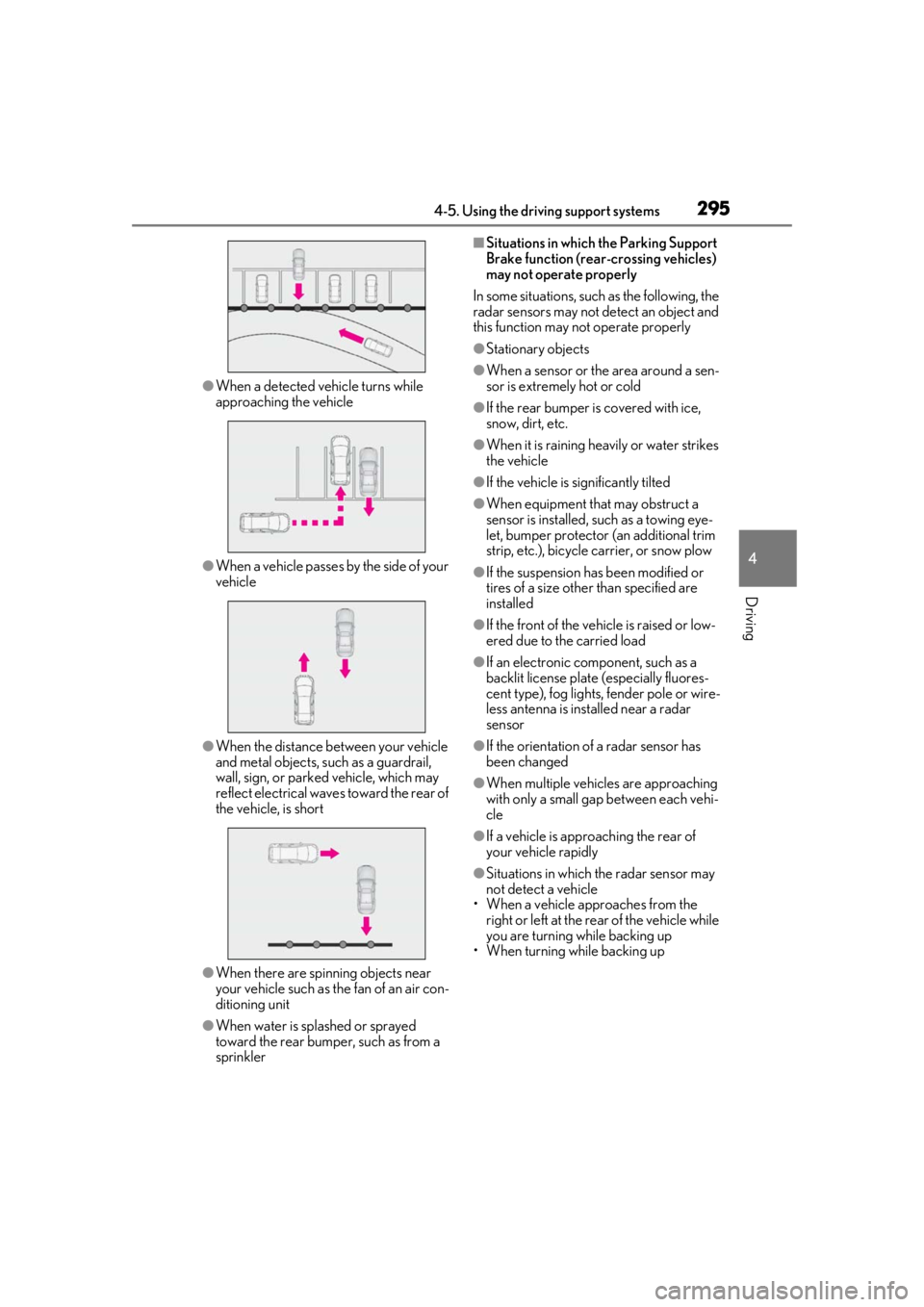
●When a detected vehicle turns while
approaching the vehicle
●When a vehicle passes by the side of your
vehicle
●When the distance between your vehicle
and metal objects, such as a guardrail,
wall, sign, or parked vehicle, which may
reflect electrical waves toward the rear of
the vehicle, is short
●When there are spinning objects near
your vehicle such as the fan of an air con-
ditioning unit
●When water is splashed or sprayed
toward the rear bumper, such as from a
sprinkler
■Situations in which the Parking Support
Brake function (rear-crossing vehicles)
may not operate properly
In some situations, such as the following, the
radar sensors may not detect an object and
this function may not operate properly
●Stationary objects
●When a sensor or the area around a sen-
sor is extremely hot or cold
●If the rear bumper is covered with ice,
snow, dirt, etc.
●When it is raining he avily or water strikes
the vehicle
●If the vehicle is significantly tilted
●When equipment that may obstruct a
sensor is installed, such as a towing eye-
let, bumper protector (an additional trim
strip, etc.), bicycle carrier, or snow plow
●If the suspension has been modified or
tires of a size othe r than specified are
installed
●If the front of the vehicle is raised or low-
ered due to the carried load
●If an electronic component, such as a
backlit license plate (especially fluores-
cent type), fog lights, fender pole or wire-
less antenna is installed near a radar
sensor
●If the orientation of a radar sensor has
been changed
●When multiple vehicl es are approaching
with only a small gap between each vehi-
cle
●If a vehicle is approaching the rear of
your vehicle rapidly
●Situations in which the radar sensor may
not detect a vehicle
• When a vehicle approaches from the right or left at the rear of the vehicle while
you are turning while backing up
• When turning while backing up
Page 296 of 520
2964-5. Using the driving support systems
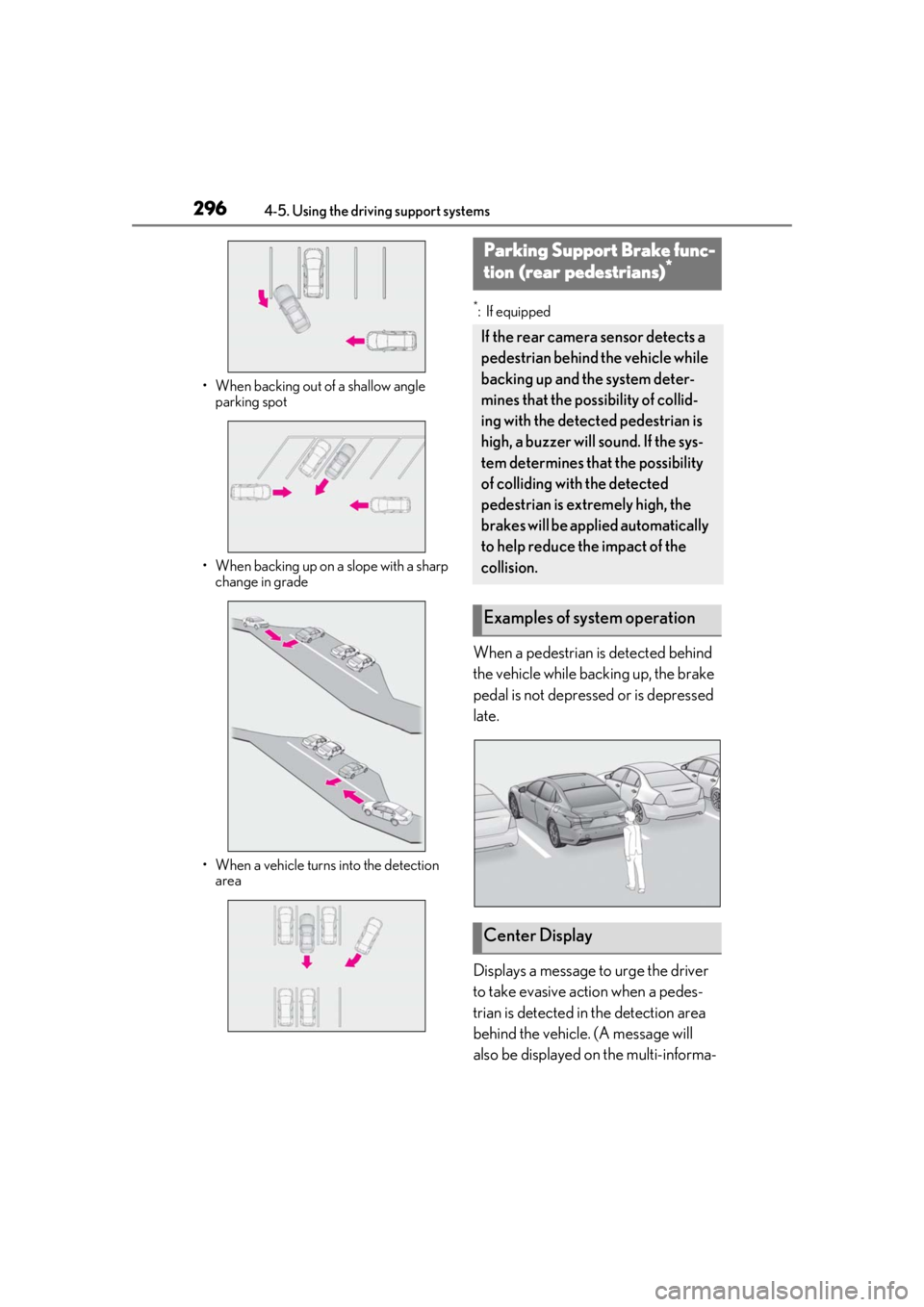
• When backing out of a shallow angle parking spot
• When backing up on a slope with a sharp change in grade
• When a vehicle turns into the detection area
*: If equipped
When a pedestrian is detected behind
the vehicle while backing up, the brake
pedal is not depressed or is depressed
late.
Displays a message to urge the driver
to take evasive action when a pedes-
trian is detected in the detection area
behind the vehicle. (A message will
also be displayed on the multi-informa-
Parking Support Brake func-
tion (rear pedestrians)*
If the rear camera sensor detects a
pedestrian behind the vehicle while
backing up and the system deter-
mines that the possibility of collid-
ing with the detected pedestrian is
high, a buzzer will sound. If the sys-
tem determines that the possibility
of colliding with the detected
pedestrian is extremely high, the
brakes will be applied automatically
to help reduce the impact of the
collision.
Examples of system operation
Center Display
Page 297 of 520
![LEXUS LS500 2021 Manual PDF 2974-5. Using the driving support systems
4
Driving
tion display and head-up display [if
equipped].)Pedestrian detection icon
Brake reminder■Parking Support Brake function (rear
pedestrians) will](/img/36/58935/w960_58935-296.png "LEXUS LS500 2021 Manual PDF 2974-5. Using the driving support systems
4
Driving
tion display and head-up display [if
equipped].)Pedestrian detection icon
Brake reminder■Parking Support Brake function (rear
pedestrians) will")
2974-5. Using the driving support systems
4
Driving
tion display and head-up display [if
equipped].)Pedestrian detection icon
Brake reminder■Parking Support Brake function (rear
pedestrians) will operate when
The function will operate when the PKSB
OFF indicator is not illuminated ( P.72)
and all of the following conditions are met:
●Engine output restriction control
• The Parking Support Brake is enabled.
• The vehicle speed is 9 mph (15 km/h) or less.
• The shift position is in R.
• The rear camera sensor detects a pedes- trian behind the vehicle while backing up
and the system determines that the possi-
bility of colliding with the detected
pedestrian is high.
●Brake control
• Engine output restriction control is oper-
ating.
• The Parking Support Brake determines that an emergency brake operation is
necessary to avoid a collision with a
pedestrians.
■The Parking Support Brake function
(rear pedestrians) will stop operating
when
The function will stop operating if any of the
following conditions are met:
●Engine output restriction control
• The Parking Support Brake is disabled.
• The collision becomes avoidable with normal brake operation.
• The pedestrian is no longer detected behind your vehicle.
●Brake control
• The Parking Support Brake is disabled.
• Approximately 2 seconds have elapsed since the vehicle was stopped by brake
control.
• The brake pedal is depressed after the vehicle is stopped by brake control.
• The pedestrian is no longer detected behind your vehicle.
■Re-enabling the Parking Support Brake
function (rear pedestrians)
P.287
■Detection area of the Parking Support
Brake function (rear pedestrians)
The detection area of the Parking Support
WARNING
■If the Parking Support Brake function
(rear pedestrians) operates unneces-
sarily
Depress the brake pedal immediately
after the Parking Support Brake function
(rear pedestrians) operates. (Operation
of the function is canceled by depressing
the brake pedal.)
■Correct use of the Parking Support
Brake function (rear pedestrians)
Do not overly rely on the Parking Sup-
port Brake function (rear pedestrians).
Depending on the road conditions, vehi-
cle conditions and weather, this function
may not operate correctly. As the detec-
tion performance of the rear camera is
limited, always drive safely, taking care to
observe your surroundings.
Additionally, if a warning message is dis-
played on the center display indicating
that the Parking Support Brake function
(rear pedestrians) is unavailable, the
function cannot be used. Even if these
warnings are not output, the driver is
always responsible for paying attention
to the vehicle’s surro undings and driving
safely.
A
B
Page 298 of 520

2984-5. Using the driving support systems
Brake function (rear pedestrians) differs
from the detection area of the RCD func-
tion (P.282). Therefore, even if the RCD
function detects a pedestrian and provides
an alert, the Parking Support Brake function
(rear pedestrians) may not start operating.
■Situations in which the system may not
operate properly
●Some pedestrians, such as the following,
may not be detected by the Parking Sup-
port Brake function (rear pedestrians),
preventing the function from operating
properly:
• Pedestrians who are bending forward or squatting
• Pedestrians who are lying down
• Pedestrians who are running
• Pedestrians who suddenly enter the detection area
• People riding a bicycle, skateboard, or other light vehicle
• Pedestrians wearing oversized clothing such as a rain coat, long skirt, etc., making
their silhouette obscure
• Pedestrians whose body is partially hid- den by an object, such as a cart or
umbrella
• Pedestrians which are obscured by dark- ness, such as at night
●In some situations, such as the following,
pedestrians may not be detected by the
Parking Support Brake function (rear
pedestrians), preventing the function
from operating properly:
• When backing up in inclement weather
(rain, snow, fog, etc.)
• When the rear camera is obscured (dirt, snow, ice, etc. are attached) or scratched
• When a very bright light, such as the sun, or the headlights of another vehicle,
shines directly into the rear camera
• When backing up in a place where the surrounding brightness changes sud-
denly, such as at the entrance or exit of a
garage or underground parking lot
• When backing up in a dim environment such as during dusk or in an underground
parking lot
●Even though there are no pedestrians in
the detection area, some objects, such as
the following, may be detected, possibly
causing the Parking Support Brake func- tion (rear pedestrians) to operate.
• Three dimensional objects, such as a pole, traffic cone, fence, or parked vehi-
cle
• Moving objects, such as a car or motor- cycle
• Objects moving toward your vehicle when backing up, such as flags or pud-
dles (or airborne matter, such as smoke,
steam, rain, or snow)
• Cobblestone or gravel roads, tram rails, road repairs, white lines, pedestrian
crossings, puddles or fallen leaves on the
road
• Metal covers (gratings), such as those
used for drainage ditches
• Objects reflected in a puddle or on a wet road surface
• The roadside or bumps on the road
•Shadows on the road
●In some situations, such as the following,
the Parking Support Brake function (rear
pedestrians) may operate even though
there are no pedestrians in the detection
area.
• When backing up toward the roadside or
a bump on the road
• If the vehicle is signif icantly tilted, such as
when carrying a heavy load
• When backing up toward an incline/decline
• If the suspension has been modified or
tires of a size othe r than specified are
installed
• If the rear of the vehicle is raised or low-
ered due to the carried load
• If an electronic component, such as a backlit license plate or rear fog light, is
installed near the rear camera
• If a bumper protector, such as an addi- tional trim strip, is installed to the rear
bumper
• If the orientation of the rear camera has been changed
• If a towing eyelet is in stalled to the rear of
the vehicle
• When water is flowing over the rear cam- era lens
• When the rear camera is obscured (dirt,
snow, ice, etc. are at tached) or scratched
• If there is a flashing light in the detection
area, such as the emergency flashers of
another vehicle
Page 301 of 520
3014-5. Using the driving support systems
4
Driving
*:If equipped
■Situations in which the vehicle height
control may not operate properly
●In the following situations, the vehicle
height may change slowly or may not
change to the correct height:
• When the vehicle comes into contact with snow, ice, stone, etc.
• When the ambient temperature is low
• When the accumulator tank pressure is low
●In the following situations, the vehicle
height may not change:
• If the hood or trunk is not fully closed
• If the brake pedal depressed and the
vehicle is stopped
• When the vehicle is on a significantly
uneven or undulating road
• When the vehicle is on a slanted road or a slope
■Operating sound of the air suspension
compressor and valves
In the following situations the air suspension
compressor and valves may operate and a
sound may be heard, but this does not indi-
cate a malfunction.
●When passengers enter or exit the vehi-
cle or cargo is loaded or unloaded, caus- ing the vehicle height to change
●When the height of the vehicle is
changed using the vehicle height adjust-
ment switch
●When the doors are opened/closed
●When the doors are locked/unlocked
■When the accumulator
tank pressure is
low
When the accumulator tank pressure is low,
the air suspension compressor and valves
may operate repeatedly even though the
vehicle height is not being changed. This
does not indicate a malfunction.
■When “Air Suspension System Malfunc-
tion Visit Your Dealer” is displayed on
the multi-information display
The system may not operate properly. Have
the vehicle inspected by your Lexus dealer.
■Customization
Some functions can be customized.
( P.476)
Electronically modulated air
suspension*
The height of the vehicle when driv-
ing can be selected using the vehi-
cle height adjustment switch. The
selected height level will be main-
tained regardless of the number of
passengers or weight of cargo.
Additionally, setti ngs of the follow-
ing functions can be changed:
Enabling/Disabling controls of
access mode
Temporarily disabling vehicle
height control
WARNING
■Precautions for the electronically
modulated air suspension
●Even if the engine is not running, the
vehicle height may change through
vehicle height control. Be sure to keep
your hands and feet away from the
area underneath the vehicle and
between the tires and vehicle body.
Otherwise part of your body may get
caught, possibly causing an injury.
●In situations such as the following,
make sure to disable all functions of
the vehicle height control of the elec-
tronically modulated air suspension.
Otherwise, the vehicle height may
change and part or your body may be
caught under the vehicle, possibly
causing injury.
• When the vehicle is parked on a curb
• If any of the wheels is not touching the ground
Page 302 of 520
3024-5. Using the driving support systems
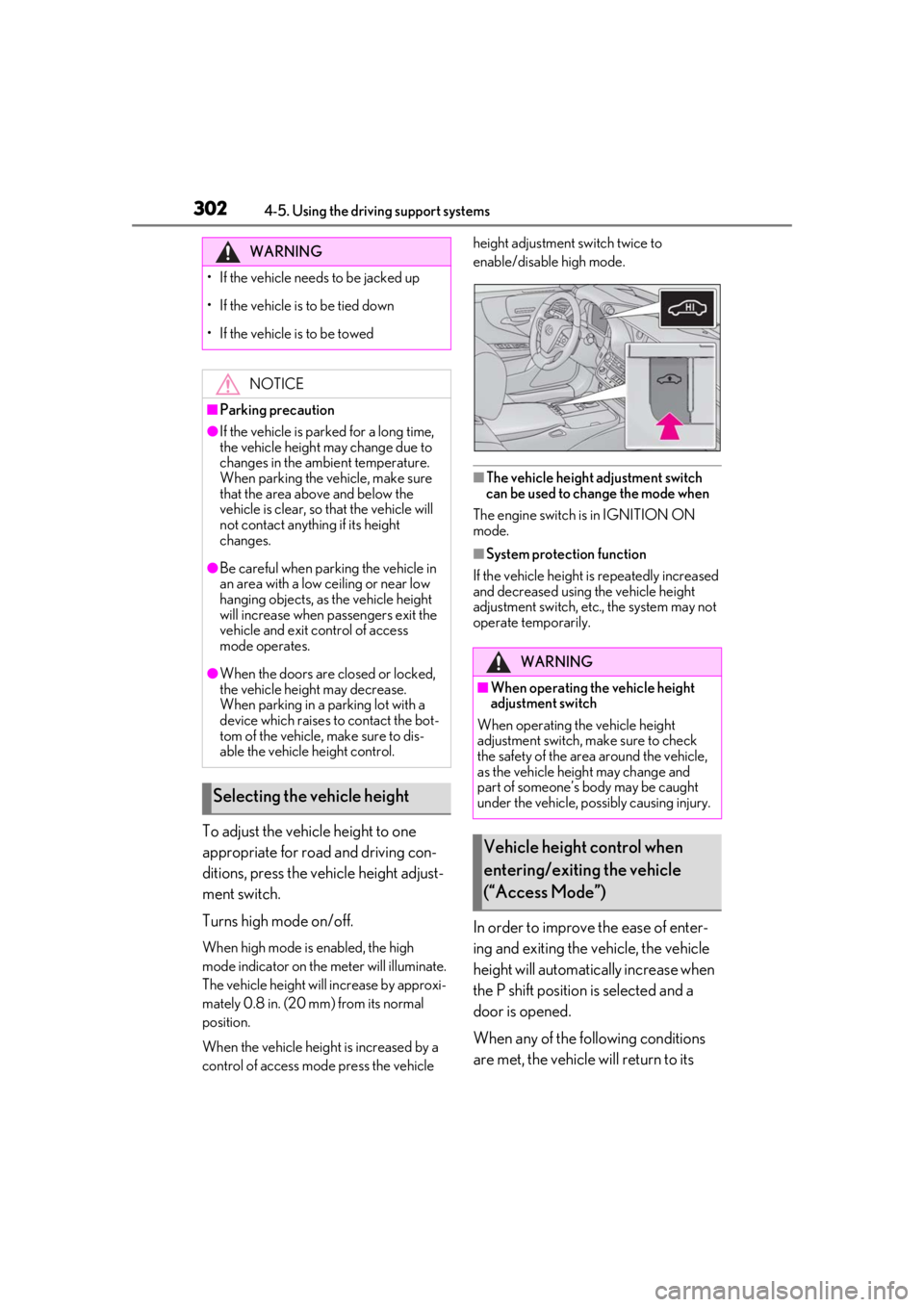
To adjust the vehicle height to one
appropriate for road and driving con-
ditions, press the vehicle height adjust-
ment switch.
Turns high mode on/off.
When high mode is enabled, the high
mode indicator on the meter will illuminate.
The vehicle height will increase by approxi-
mately 0.8 in. (20 mm) from its normal
position.
When the vehicle height is increased by a
control of access mo de press the vehicle height adjustment switch twice to
enable/disable high mode.
■The vehicle height adjustment switch
can be used to change the mode when
The engine switch is in IGNITION ON
mode.
■System protection function
If the vehicle height is repeatedly increased
and decreased using the vehicle height
adjustment switch, etc., the system may not
operate temporarily.
In order to improve the ease of enter-
ing and exiting the vehicle, the vehicle
height will automatically increase when
the P shift position is selected and a
door is opened.
When any of the following conditions
are met, the vehicle will return to its
WARNING
• If the vehicle needs to be jacked up
• If the vehicle is to be tied down
• If the vehicle is to be towed
NOTICE
■Parking precaution
●If the vehicle is parked for a long time,
the vehicle height may change due to
changes in the ambient temperature.
When parking the vehicle, make sure
that the area above and below the
vehicle is clear, so that the vehicle will
not contact anything if its height
changes.
●Be careful when parking the vehicle in
an area with a low ceiling or near low
hanging objects, as the vehicle height
will increase when passengers exit the
vehicle and exit control of access
mode operates.
●When the doors are closed or locked,
the vehicle height may decrease.
When parking in a parking lot with a
device which raises to contact the bot-
tom of the vehicle, make sure to dis-
able the vehicle height control.
Selecting the vehicle height
WARNING
■When operating the vehicle height
adjustment switch
When operating the vehicle height
adjustment switch, make sure to check
the safety of the area around the vehicle,
as the vehicle height may change and
part of someone’s body may be caught
under the vehicle, possibly causing injury.
Vehicle height control when
entering/exiting the vehicle
(“Access Mode”)
Page 303 of 520
3034-5. Using the driving support systems
4
Driving
previous height:
A certain amount of time has
elapsed since the doors were closed
The vehicle speed reaches approxi-
mately 3 mph (5 km/h)
The doors are locked using the
smart access system with push-but-
ton start or wireless remote control
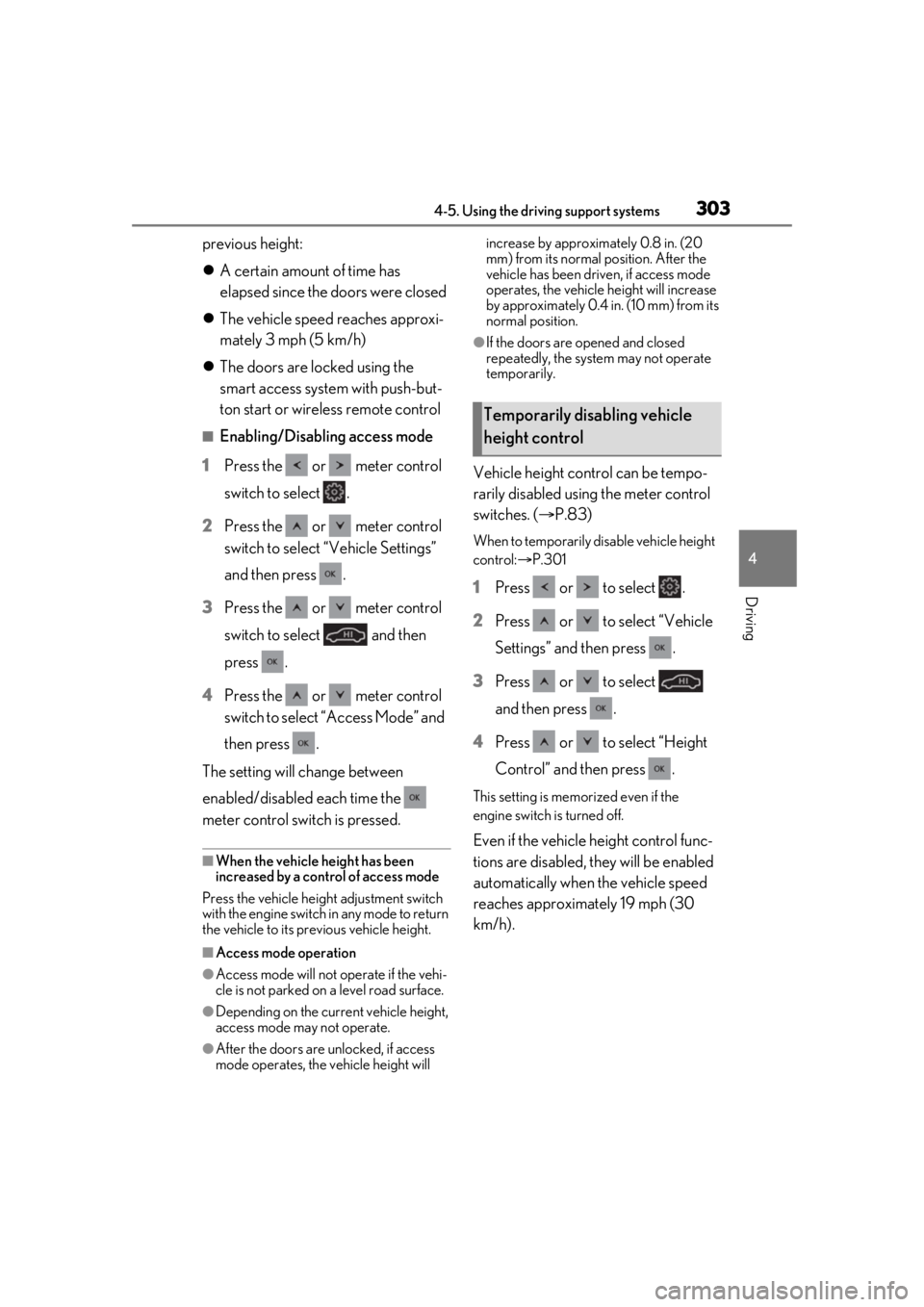
■Enabling/Disabling access mode
1 Press the or meter control
switch to select .
2 Press the or meter control
switch to select “Vehicle Settings”
and then press .
3 Press the or meter control
switch to select and then
press .
4 Press the or meter control
switch to select “Access Mode” and
then press .
The setting will change between
enabled/disabled each time the
meter control switch is pressed.
■When the vehicle height has been
increased by a control of access mode
Press the vehicle height adjustment switch
with the engine switch in any mode to return
the vehicle to its previous vehicle height.
■Access mode operation
●Access mode will not operate if the vehi-
cle is not parked on a level road surface.
●Depending on the current vehicle height,
access mode may not operate.
●After the doors are unlocked, if access
mode operates, the vehicle height will increase by approximately 0.8 in. (20
mm) from its normal position. After the
vehicle has been driven, if access mode
operates, the vehicle height will increase
by approximately 0.4 in. (10 mm) from its
normal position.
●If the doors are opened and closed
repeatedly, the system may not operate
temporarily.
Vehicle height control can be tempo-
rarily disabled using the meter control
switches. (
P.83)
When to temporarily disable vehicle height
control: P.301
1Press or to select .
2 Press or to select “Vehicle
Settings” and then press .
3 Press or to select
and then press .
4 Press or to select “Height
Control” and then press .
This setting is memorized even if the
engine switch is turned off.
Even if the vehicle height control func-
tions are disabled, they will be enabled
automatically when the vehicle speed
reaches approximately 19 mph (30
km/h).
Temporarily disabling vehicle
height control
Page 306 of 520
3064-5. Using the driving support systems
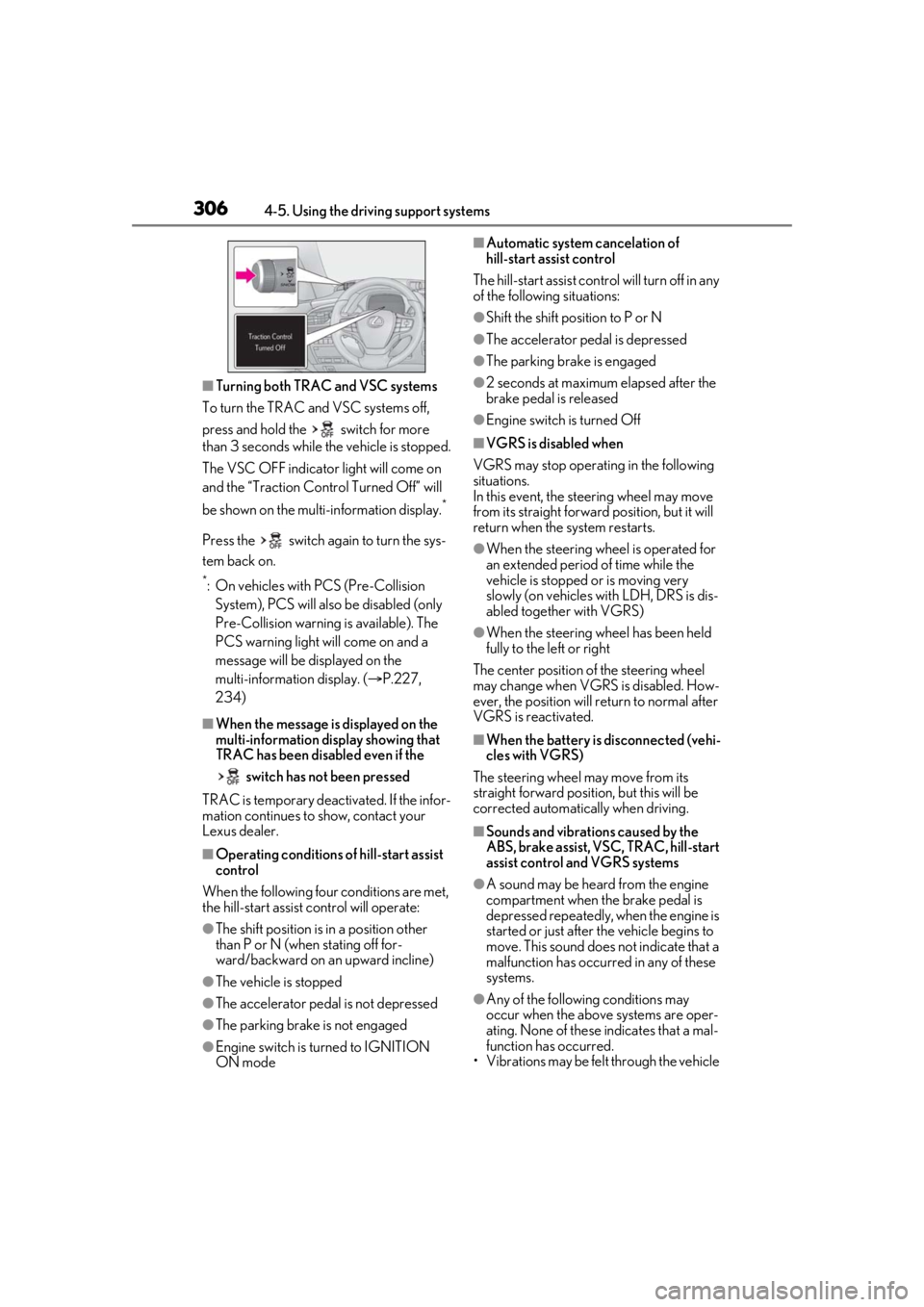
■Turning both TRAC and VSC systems
To turn the TRAC and VSC systems off,
press and hold the switch for more
than 3 seconds while the vehicle is stopped.
The VSC OFF indicator light will come on
and the “Traction Cont rol Turned Off” will
be shown on the mult i-information display.
*
Press the switch again to turn the sys-
tem back on.
*: On vehicles with PCS (Pre-Collision
System), PCS will also be disabled (only
Pre-Collision warning is available). The
PCS warning light will come on and a
message will be displayed on the
multi-information display. ( P.227,
234)
■When the message is displayed on the
multi-information display showing that
TRAC has been disabled even if the
switch has not been pressed
TRAC is temporary deactivated. If the infor-
mation continues to show, contact your
Lexus dealer.
■Operating conditions of hill-start assist
control
When the following four conditions are met,
the hill-start assist control will operate:
●The shift position is in a position other
than P or N (when stating off for-
ward/backward on an upward incline)
●The vehicle is stopped
●The accelerator pedal is not depressed
●The parking brake is not engaged
●Engine switch is turned to IGNITION
ON mode
■Automatic system cancelation of
hill-start assist control
The hill-start assist control will turn off in any
of the following situations:
●Shift the shift position to P or N
●The accelerator pedal is depressed
●The parking brake is engaged
●2 seconds at maximum elapsed after the
brake pedal is released
●Engine switch is turned Off
■VGRS is disabled when
VGRS may stop operat ing in the following
situations.
In this event, the steering wheel may move
from its straight forward position, but it will
return when the system restarts.
●When the steering wheel is operated for
an extended period of time while the
vehicle is stopped or is moving very
slowly (on vehicles with LDH, DRS is dis-
abled together with VGRS)
●When the steering wheel has been held
fully to the left or right
The center position of the steering wheel
may change when VGRS is disabled. How-
ever, the position will return to normal after
VGRS is reactivated.
■When the battery is disconnected (vehi-
cles with VGRS)
The steering wheel may move from its
straight forward position, but this will be
corrected automatically when driving.
■Sounds and vibrations caused by the
ABS, brake assist, VSC, TRAC, hill-start
assist control and VGRS systems
●A sound may be heard from the engine
compartment when the brake pedal is
depressed repeatedly, when the engine is
started or just after the vehicle begins to
move. This sound does not indicate that a
malfunction has occurred in any of these
systems.
●Any of the following conditions may
occur when the above systems are oper-
ating. None of these indicates that a mal-
function has occurred.
• Vibrations may be felt through the vehicle
Page 308 of 520
3084-5. Using the driving support systems
WARNING
●When driving on dirt, gravel or
snow-covered roads
●When driving with tire chains
●When driving over bumps in the road
●When driving over roads with potholes
or uneven surfaces
■TRAC/VSC may not operate effec-
tively when
Directional control and power may not
be achievable while driving on slippery
road surfaces, even if the TRAC/VSC
system is operating. Drive the vehicle
carefully in conditions where stability and
power may be lost.
■Hill-start assist control does not oper-
ate effectively when
●Do not overly rely on hill-start assist
control. Hill-start assist control may
not operate effectively on steep
inclines and roads covered with ice.
●Unlike the parking brake, hill-start
assist control is not intended to hold
the vehicle stationary for an extended
period of time. Do not attempt to use
hill-start assist control to hold the vehi-
cle on an incline, as doing so may lead
to an accident.
■When the TRAC/VSC is activated
(vehicles without Lexus Safety Sys-
tem + A)
The slip indicator light flashes. Always
drive carefully. Re ckless driving may
cause an accident. Exercise particular
care when the indicator light flashes.
■When the TRAC/ABS/VSC is acti-
vated (vehicles with Lexus Safety Sys-
tem + A)
The slip indicator light flashes. Always
drive carefully. Re ckless driving may
cause an accident. Exercise particular
care when the indicator light flashes.
■When the TRAC/VSC systems are
turned off
Be especially careful and drive at a speed
appropriate to the road conditions. As
these are the systems to help ensure
vehicle stability and driving force, do not
turn the TRAC/VSC systems off unless
necessary.
■Replacing tires
Make sure that all ti res are of the speci-
fied size, brand, tread pattern and total
load capacity. In addition, make sure that
the tires are inflated to the recom-
mended tire inflation pressure level.
The ABS, TRAC and VSC systems will
not function correctly if different tires are
installed on the vehicle.
Contact your Lexus dealer for further
information when replacing tires or
wheels.
■Handling of tires and the suspension
Using tires with any kind of problem or
modifying the suspensi on will affect the
driving assist systems, and may cause a
system to malfunction.
■Secondary Collision Brake
Do not rely solely upon the Secondary
Collision Brake. This system is designed
to help reduce the possibility of further
damage due to a secondary collision,
however, that effect changes according
to various conditions. Overly relying on
the system may result in death or serious
injury.