light LEXUS LX570 2015 Owners Manual
[x] Cancel search | Manufacturer: LEXUS, Model Year: 2015, Model line: LX570, Model: LEXUS LX570 2015Pages: 960, PDF Size: 11.33 MB
Page 296 of 960
2962-4. Using other driving systems
LX570_OM_OM60L96U_(U) Things you should know
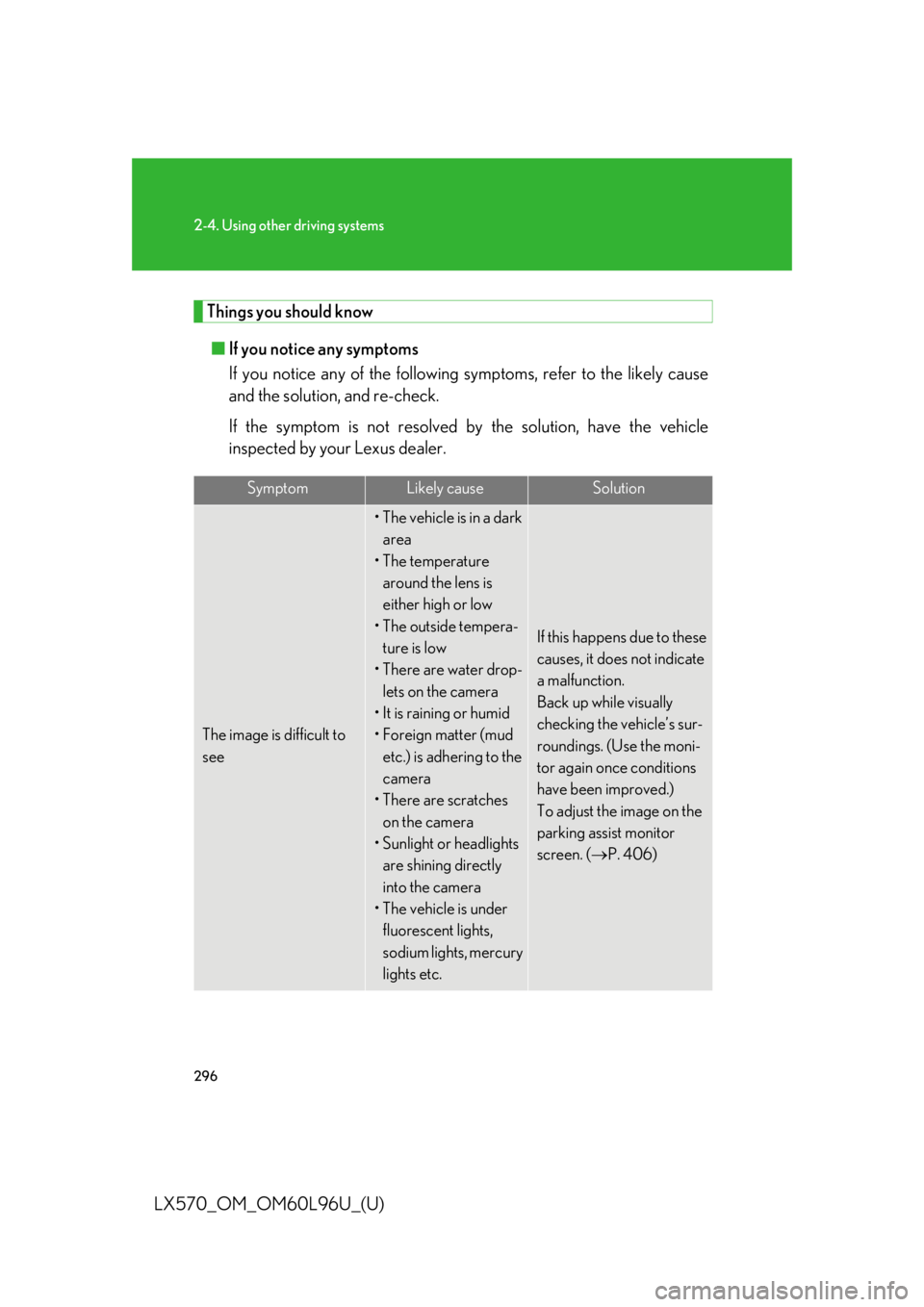
■ If you notice any symptoms
If you notice any of the following symptoms, refer to the likely cause
and the solution, and re-check.
If the symptom is not resolved by the solution, have the vehicle
inspected by your Lexus dealer. Symptom Likely cause Solution
The image is difficult to
see • The vehicle is in a dark
area
• The temperature
around the lens is
either high or low
• The outside tempera-
ture is low
• There are water drop-
lets on the camera
• It is raining or humid
•Foreign matter (mud
etc.) is adhering to the
camera
• There are scratches
on the camera
• Sunlight or headlights
are shining directly
into the camera
• The vehicle is under
fluorescent lights,
sodium lights, mercury
lights etc. If this happens due to these
causes, it does not indicate
a malfunction.
Back up while visually
checking the vehicle’s sur-
roundings. (Use the moni-
tor again once conditions
have been improved.)
To adjust the image on the
parking assist monitor
screen. ( P. 406)
Page 297 of 960

2972-4. Using other driving systems
2
When driving
LX570_OM_OM60L96U_(U) The image is blurry Dirt or foreign matter
(such as water droplets,
snow, mud etc.) is
adhering to the camera. Flush the camera with a
large quantity of water.
After that, rinse the cam-
era lens with water and
wipe it clean with a soft and
wet cloth.
A vertical white streak is
on the screen When a bright spot
(such as sunlight
reflecting off the body
of another vehicle) is
received by the camera,
a vertical streak may be
left above and below
the bright spot (smear
effect). If this happens due to these
causes, it does not indicate
a malfunction.
Back up while visually
checking the vehicle’s sur-
roundings. (Use the moni-
tor again once conditions
have been improved.)
The image is out of align-
ment The camera or sur-
rounding area has
received a strong
impact. Have the vehicle inspected
by your Lexus dealer.
The guide lines are very
far out of alignment The camera position is
out of alignment. Have the vehicle inspected
by your Lexus dealer.
The estimated course
lines move even though
the steering wheel is
straight There is a malfunction in
the signals being output
by the steering sensor. Have the vehicle inspected
by your Lexus dealer.Symptom Likely cause Solution
Page 314 of 960

3142-4. Using other driving systems
LX570_OM_OM60L96U_(U) ■
The wide view front & side monitor can be operated when ●
The “ENGINE START STOP” switch is in IGNITION ON mode.●
The vehicle speed is less than approximately 6 mph (10 km/h).■
Automatic system cancelation
In the following situations, the system is canceled automatically. ●
When the vehicle speed exceeds approximately 7 mph (12 km/h). ●
When the shift lever is in “R”.■
When the outside rear view mirrors have been folded
The side monitor screen can be displayed even if the outside rear view mirrors have
been folded. In this case, there will be a slight difference between the image dis-
played when the outside rear view mirrors are extended and when the outside rear
view mirrors have been folded.
If the side monitor is displayed while the outside rear view mirrors are folded, you
cannot check the area near the front edge of the vehicle as the base of the outside
rear view mirrors wi ll be in the way.■
When switched to from the Lexus parking assist monitor
If the wide view front & side monitor is
switched to from the Lexus parking assist
monitor, the icon display area will flash to
inform the driver that the currently displayed
area is the front or side. The icon display area
will continue to flash until the screen is turned
off.
Page 316 of 960
3162-4. Using other driving systems
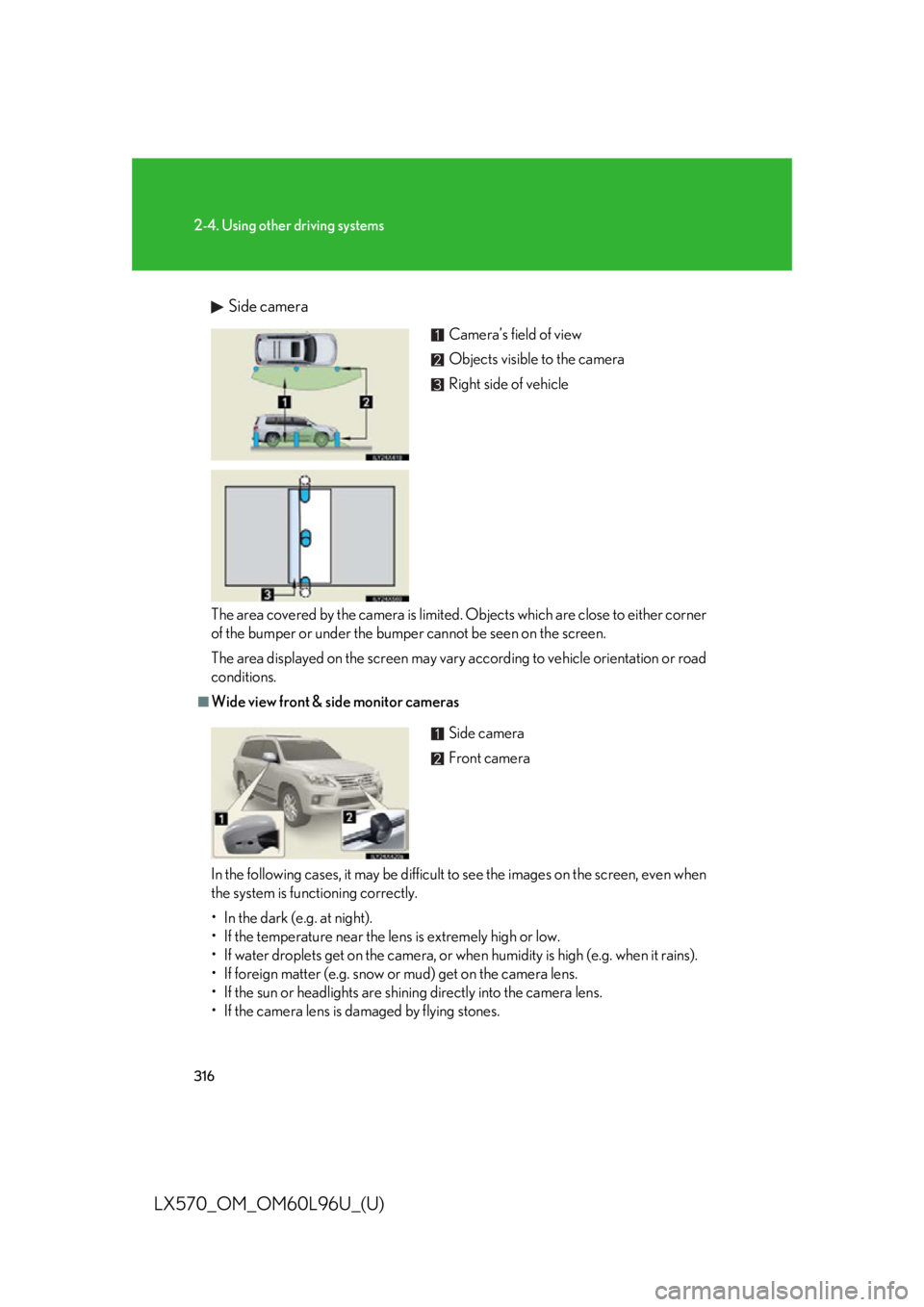
LX570_OM_OM60L96U_(U) Side camera
The area covered by the camera is limited . Objects which are close to either corner
of the bumper or under the bumper cannot be seen on the screen.
The area displayed on the screen may vary according to vehicle orientation or road
conditions. ■
Wide view front & side monitor cameras
In the following cases, it may be difficult to see the images on the screen, even when
the system is functioning correctly.
• In the dark (e.g. at night).
• If the temperature near the lens is extremely high or low.
• If water droplets get on the camera, or when humidity is high (e.g. when it rains).
• If foreign matter (e.g. snow or mud) get on the camera lens.
• If the sun or headlights are shining directly into the camera lens.
• If the camera lens is damaged by flying stones. Camera’s field of view
Objects visible to the camera
Right side of vehicle
Side camera
Front camera
Page 317 of 960
3172-4. Using other driving systems
2
When driving
LX570_OM_OM60L96U_(U) ■
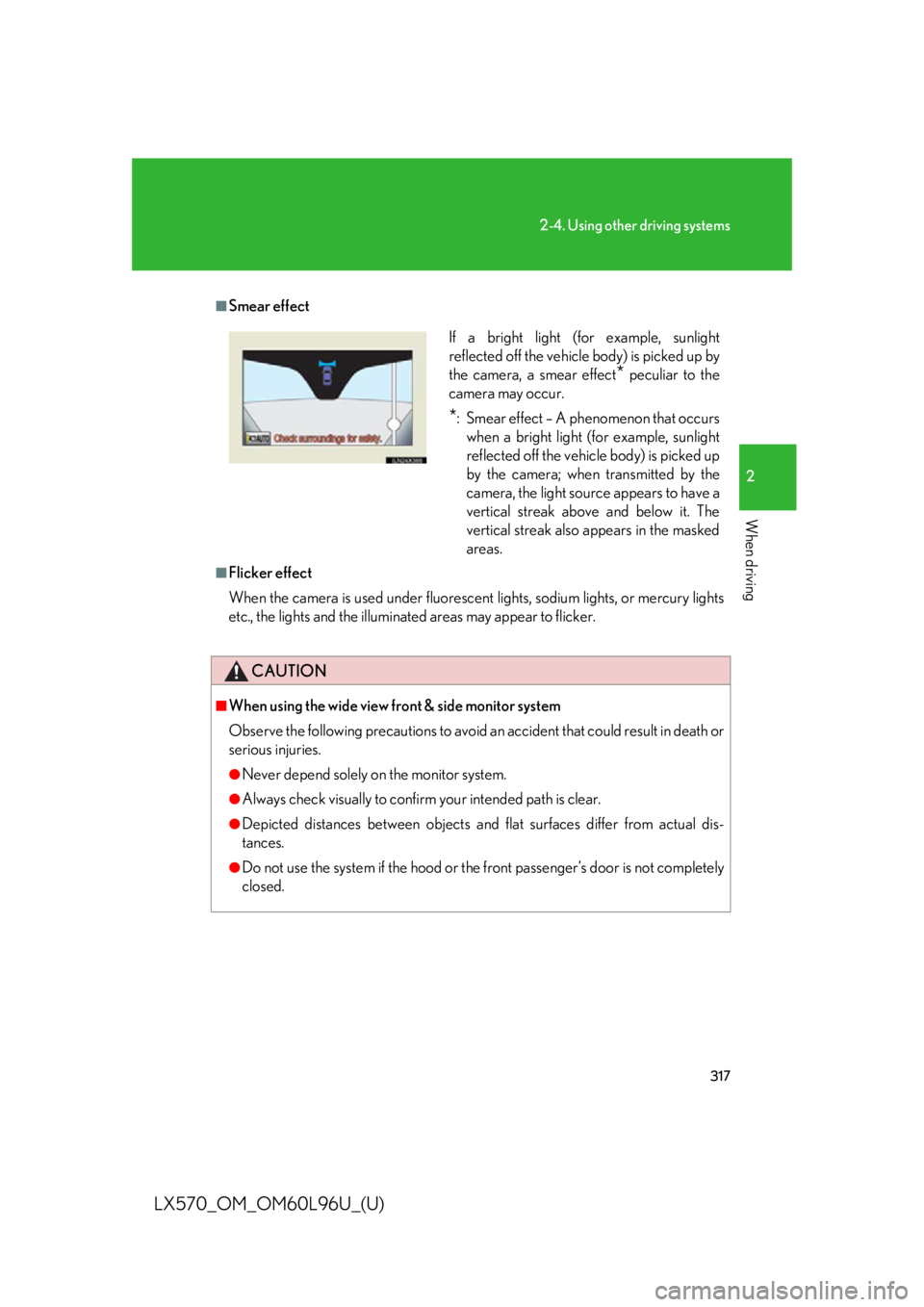
Smear effect
■
Flicker effect
When the camera is used under fluorescen t lights, sodium lights, or mercury lights
etc., the lights and the illuminated areas may appear to flicker.
CAUTION■
When using the wide view front & side monitor system
Observe the following precautions to avoid an accident that could result in death or
serious injuries. ●
Never depend solely on the monitor system. ●
Always check visually to confir m your intended path is clear.●
Depicted distances between objects and flat surfaces differ from actual dis-
tances. ●
Do not use the system if the hood or th e front passenger’s door is not completely
closed. If a bright light (for example, sunlight
reflected off the vehicle body) is picked up by
the camera, a smear effect
* peculiar to the
camera may occur.
* : Smear effect – A phenomenon that occurs
when a bright light (for example, sunlight
reflected off the vehicle body) is picked up
by the camera; when transmitted by the
camera, the light source appears to have a
vertical streak above and below it. The
vertical streak also appears in the masked
areas.
Page 318 of 960
3182-4. Using other driving systems
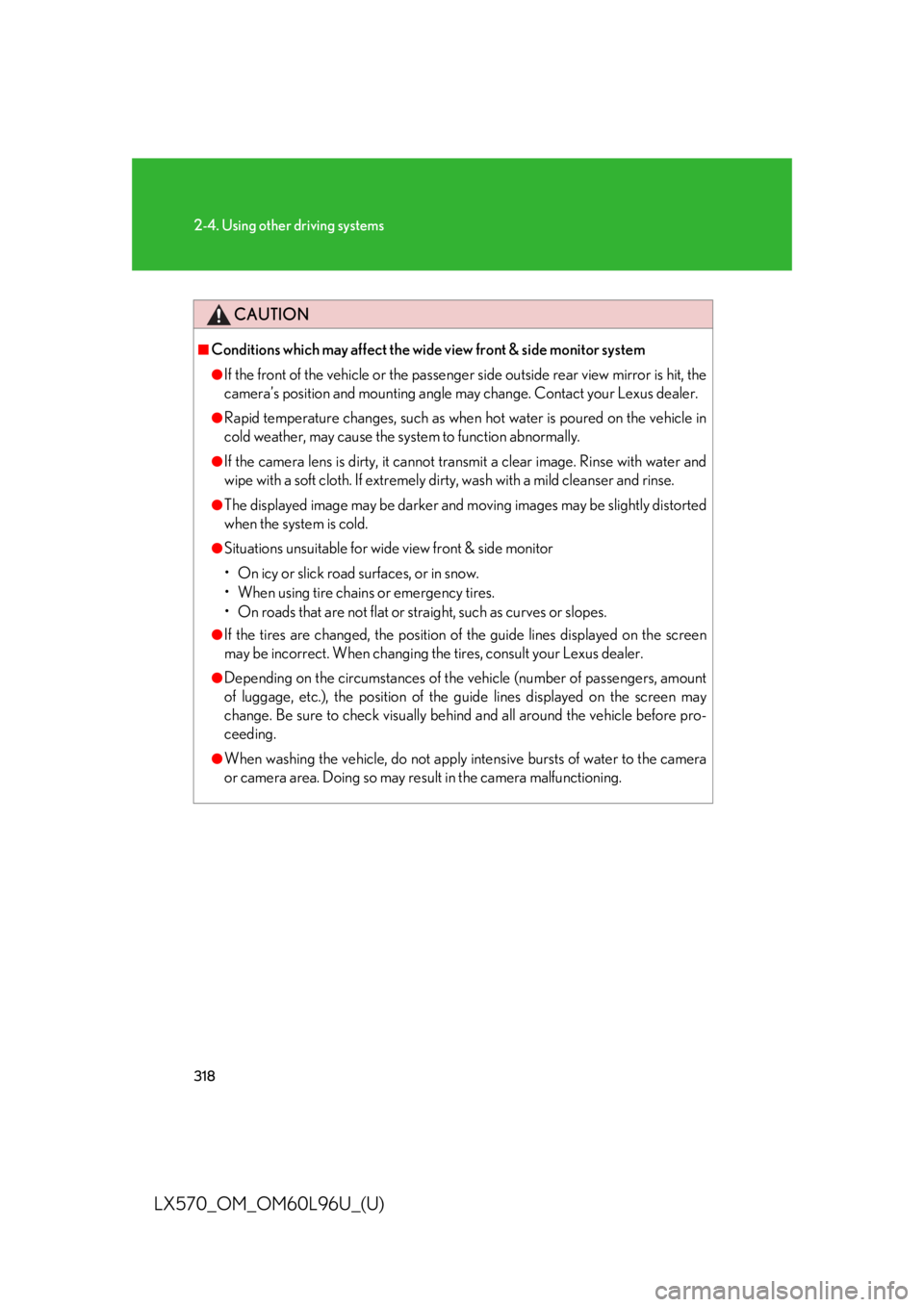
LX570_OM_OM60L96U_(U) CAUTION■
Conditions which may affect the wide view front & side monitor system ●
If the front of the vehicle or the passenger side outside rear view mirror is hit, the
camera’s position and mounting angle may change. Contact your Lexus dealer. ●
Rapid temperature changes, such as when hot water is poured on the vehicle in
cold weather, may cause the system to function abnormally. ●
If the camera lens is dirty, it cannot tr ansmit a clear image. Rinse with water and
wipe with a soft cloth. If extremely dirty, wash with a mild cleanser and rinse. ●
The displayed image may be darker and mo ving images may be slightly distorted
when the system is cold. ●
Situations unsuitable for wide view front & side monitor
• On icy or slick road surfaces, or in snow.
• When using tire chains or emergency tires.
• On roads that are not flat or stra ight, such as curves or slopes.●
If the tires are changed, th e position of the guide li nes displayed on the screen
may be incorrect. When changing the tires, consult your Lexus dealer. ●
Depending on the circumstances of the vehicle (number of passengers, amount
of luggage, etc.), the position of the guide lines displayed on the screen may
change. Be sure to check visually behind and all around the vehicle before pro-
ceeding. ●
When washing the vehicle, do not apply intensive bursts of water to the camera
or camera area. Doing so may resu lt in the camera malfunctioning.
Page 323 of 960

3232-4. Using other driving systems
2
When driving
LX570_OM_OM60L96U_(U) Conditions for changing the vehicle height mode
Some modes may not be selectable depending on the vehicle speed
when the four-wheel drive control sw itch is in the “H4” position. Refer to
the following table.
Easy access mode
You can select this mode for easy
access and easy loading of the
vehicle.
If the “ENGINE START STOP” switch is turned to OFF within 30 seconds after
the vehicle stops while this mode is on, the vehicle height is lowered automati-
cally.
When the vehicle begins to lower a beep will sound twice, and while the vehicle
is lowering the indicator light will flash to alert the driver and surrounding peo-
ple that the vehicle is lowering. Low mode Normal mode High mode
Under 7 mph (12 km/h) Yes Yes Yes
7 mph (12 km/h) to
18 mph (30 km/h) No Yes Yes
18 mph (30 km/h) or over No Yes No
Page 324 of 960

3242-4. Using other driving systems
LX570_OM_OM60L96U_(U) The indicator light stops blinking, and come s on continuously to indicate that the
shift is completed.
Easy access mode is available if the following conditions have been met:
● The vehicle height mode is in normal mode.
● The vehicle is stopped on a flat surface.
● The shift lever is in “P”.
● The side door and the back door are not opened from the vehicle stopped to
the “ENGINE START STOP” switch is turned to off.
The following method will cancel the ve hicle lowering operation and raise the
vehicle again:
● Press the height co ntrol OFF switch.
● Push the height select switch to “ ”.
Disabling the height control
When the height control OFF
switch is pressed with the vehicle
stopped. The height control “OFF” indicator
will appear on the multi-informa-
tion display, and the vehicle height
will be fixed in the current mode.
Push the switch again to turn the
system back on.
Page 326 of 960

3262-4. Using other driving systems
LX570_OM_OM60L96U_(U) ■
Extra high mode
If the vehicle becomes stuck or the Craw l Control system requests the vehicle
height be raised, extra high mode may be automatically selected when the vehicle
height is in high mode with the four-wheel drive control switch in the “L4” position.
The vehicle height is raised to 0.8 in. (20 mm) higher than the high mode height, or
slightly higher. ●
Extra high mode will change back to high mode when:
• The vehicle speed exceeds 6 mph (10 km/h)
• The four-wheel drive control switch is shifted to “H4”. ●
If you pull the height select switch to “ ” when in extra high mode, normal mode
is selected. ●
Extra high mode cannot be manually selected.■
Turning off the height control ●
The system will rema in off until the height contro l OFF switch is pushed again,
even if the “ENGINE START STOP” switch is turned off. ●
Even if the system is turned off, the sy stem automatically modulated if the vehi-
cle speed exceeds following.
• 18 mph (30 km/h) with high or low mode
• 50 mph (80 km/h) with normal mode
Page 330 of 960
3302-4. Using other driving systems
LX570_OM_OM60L96U_(U) NOTICE■
When parking in areas with limited overhead height
After leaving the vehicle or unloading the luggage, the vehicle height may be
slightly higher than normal. Take care when overhead height is limited. ■
To avoid damage to the vehicle ●
Normal mode will be switched to automatically even if the vehicle is started off in
low mode. Take care when overhead height is limited. ●
Do not select the low mode when driving on bumpy roads, as the underbody of
the vehicle may contact the road surface. ●
When traveling on bumpy roads or throug h water, or when towing, turn off easy
access mode.■
Avoid rapid changes to the vehicle height
As the pump may overheat. Leave at a few seconds between selections when
changing the vehicle height mode.