wheel LEXUS LX570 2015 Owners Manual
[x] Cancel search | Manufacturer: LEXUS, Model Year: 2015, Model line: LX570, Model: LEXUS LX570 2015Pages: 960, PDF Size: 11.33 MB
Page 394 of 960

3942-5. Driving information
LX570_OM_OM60L96U_(U) ● Avoid jerky starts or sudden acceleration.
● Avoid jerky steering and sharp turn s, and slow down before making a
turn.
● Note that when making a turn, the trailer wheels will be closer than the
vehicle wheels to the inside of th e turn. Compensate by making a
wider than normal turning radius.
● Slow down before making a turn, in crosswinds, on wet or slippery sur-
faces, etc.
Increasing vehicle speed can destabilize the trailer.
● Take care when passing other vehi cles. Passing requires considerable
distance. After passing a vehicle, do not forget the length of your
trailer, and be sure you have plenty of room before changing lanes.
● To maintain engine braking efficie ncy and charging system perfor-
mance when using engine braking, do not put the transmission in “D”.
If in the S mode, the transmission shift range position must be in 5 or
lower.
● Instability happens more frequently when descending steep or long
downhill grades. Before descending , slow down and downshift. Do not
make sudden downshifts while desc ending steep or long downhill
grades.
● Avoid holding the brake pedal down too long or applying the brakes
too frequently. This could cause the brakes to overheat and result in
reduced braking efficiency.
● Due to the added load of the trail er, your vehicle’ s engine may over-
heat on hot days (at temperatures over 85°F [30°C]) when driving up
a long or steep grade. If the engine coolant temperature gauge indi-
cates overheating, immediately turn off the air conditioning (if in use),
pull your vehicle off the road and stop in a safe spot. ( P. 878)
Page 395 of 960

3952-5. Driving information
2
When driving
LX570_OM_OM60L96U_(U) ● Always place wheel blocks under bo th the vehicle’s and the trailer’s
wheels when parking. Apply the pa rking brake firmly, and put the
transmission in “P”. Avoid parking on a slope, but if unavoidable, do so
only after performing the following:
Apply the brakes and keep them applied.
Have someone place wheel blocks under both the vehicle’s and
trailer’s wheels.
When the wheel blocks are in pl ace, release the brakes slowly
until the blocks absorb the load.
Apply the parking brake firmly.
Shift into “P” and turn off the engine.
● When restarting after parking on a slope:
With the transmission in “P”, start the engine. Be sure to keep the
brake pedal pressed.
Shift into “D” or “R” (if reversing).
Release the parking brake and brake pedal, and slowly pull or
back away from the wheel blocks. Stop and apply the brakes.
Have someone retrieve the blocks. STEP 1
STEP 2
STEP 3
STEP 4
STEP 5
STEP 1
STEP 2
STEP 3
STEP 4
Page 397 of 960

3972-5. Driving information
2
When driving
LX570_OM_OM60L96U_(U) ■
AVS (adaptive variable suspension system)
The suspension can be switched for improvement in driveability. ( P. 331)■
Break-in schedule
If your vehicle is new or equipped with any new power train components (such as
an engine, transmission, diff erential or wheel bearing), Lexus recommends that you
do not tow a trailer until the vehicle has been driven for over 500 miles (800 km).
After the vehicle has been driven for ov er 500 miles (800 km), you can start tow-
ing. However, for the next 500 miles (800 km), drive the vehicle at a speed of less
than 50 mph (80 km/h) when towing a trai ler, and avoid full throttle acceleration.■
Maintenance ●
If you tow a trailer, your vehicle will require more frequent maintenance due to
the additional load. (See “Owner’s Gu ide”, “Warranty and Services Guide”,
“Owner’s Manual Supplement” or “Warranty Booklet”.) ●
Retighten the fixing bolts of the towing ball and bracket after approximately
600 miles (1000 km) of trailer towing.■
If trailer sway occurs
One or more factors (crosswinds, passing vehicles, rough roads, etc.) can
adversely affect handling of your ve hicle and trailer, causing instability.●
If trailer swaying occurs:
• Firmly grip the steering wh eel. Steer straight ahead.
Do not try to control trailer swaying by turning the steering wheel.
• Begin releasing the accelerator pedal immediately but very gradually to
reduce speed.
Do not increase speed. Do not apply vehicle brakes.
If you make no extreme correction with the steering or brakes, your vehicle and
trailer should stabilize. (if enabled, Traile r Sway Control can also help to stabilize
the vehicle and trailer.)
Page 398 of 960

3982-5. Driving information
LX570_OM_OM60L96U_(U) ●
After the trailer swaying has stopped:
• Stop in a safe place. Get all occupants out of the vehicle.
• Check the tires of the vehicle and the trailer.
• Check the load in the trailer.
Make sure the load has not shifted.
Make sure the tongue weight is appropriate, if possible.
• Check the load in the vehicle.
Make sure the vehicle is not overloaded after occupants get in.
If you cannot find any problems, the sp eed at which trailer swaying occurred is
beyond the limit of your partic ular vehicle-trailer combination.
Drive at a lower speed to prevent instability. Remember that swaying of the towing
vehicle-trailer increase s as speed increases.
CAUTION■
Trailer towing precautions ●
To tow a trailer safely, use extreme care and drive the vehicle in accordance with
the trailer’s characteristics and operating conditions. Failure to do so could cause
an accident resulting in death or seriou s injury. Vehicle stab ility and braking per-
formance are affected by trailer stability, brake setting and performance, and the
hitch. Your vehicle will handle d ifferently when towing a trailer.●
Set the vehicle height to the “LO” mode and turn off the 4-Wheel AHC when
you connect a trailer, otherwise the vehicle height may change due to the auto-
matic leveling function, and you may catch part of your body in the vehicle, result-
ing in an accident. ( P. 320)
Page 401 of 960
4012-5. Driving information
2
When driving
LX570_OM_OM60L96U_(U) Dinghy towing
NOTICE■
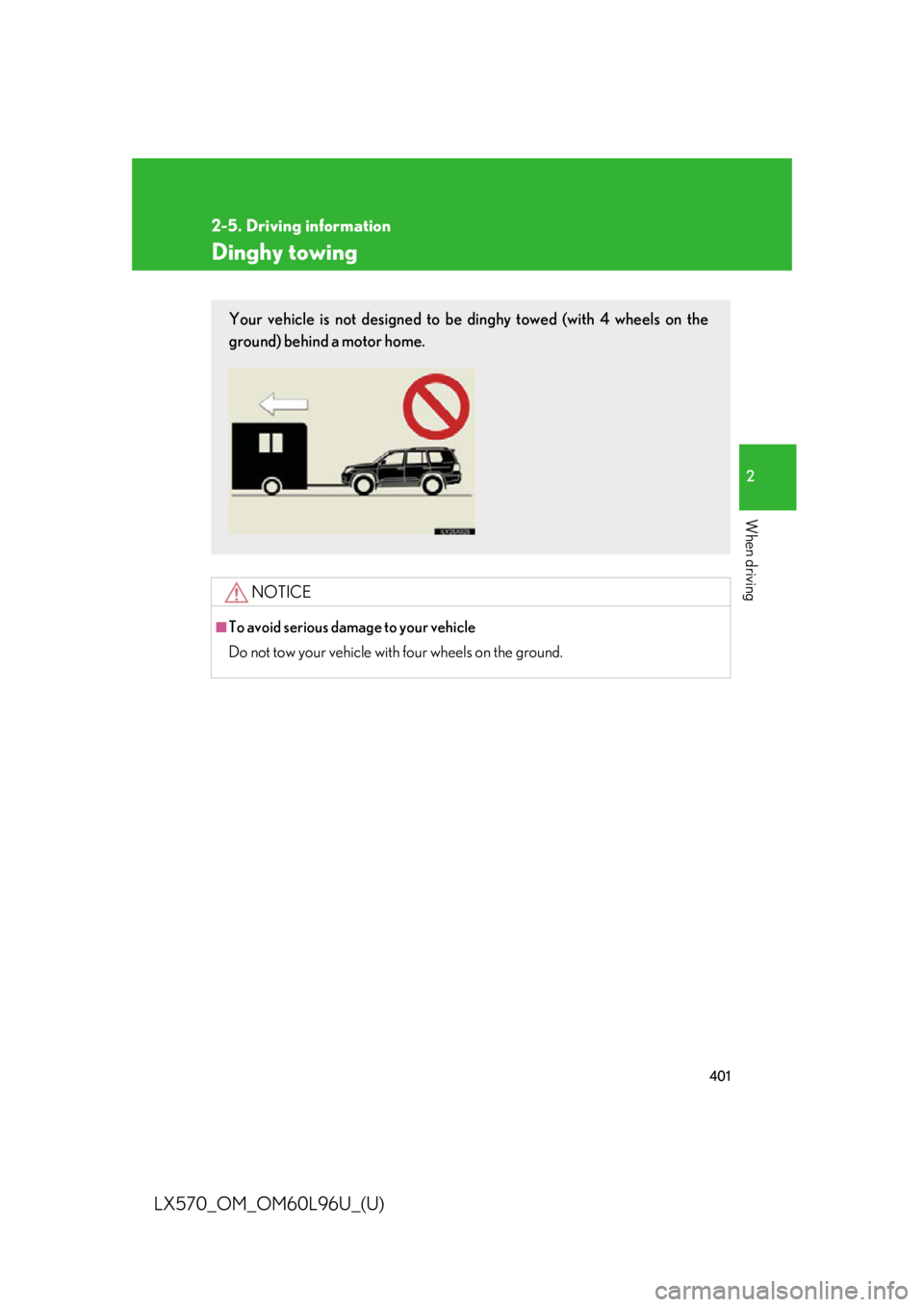
To avoid serious dama ge to your vehicle
Do not tow your vehicle with four wheels on the ground.Your vehicle is not designed to be dinghy towed (with 4 wheels on the
ground) behind a motor home.
Page 402 of 960
402
LX570_OM_OM60L96U_(U) 3-1. Using the touch screen
Touch screen .......................... 404
Set up screen ........................... 412
Information screen................ 429
Voice command system ....... 431
Mobile Assistant .................... 442
3-2. Using the air conditioning
system and defogger
Front air conditioning
system .................................... 444
Rear air conditioning
system .................................... 456
Rear window and outside
rear view mirror
defoggers .............................. 460
Windshield wiper de-icer ..... 461 3-3. Using the audio system
Audio system type.................. 462
Using the radio........................ 487
Using the CD/
DVD player ........................... 507
Playing an audio CD and
MP3/WMA discs .............. 509
Playing DVD video ................. 515
CD/DVD player and DVD
video disc information........ 529
Listening to Bluetooth ®
audio......................................... 541
Listening to a
USB memory ....................... 552
Listening to an iPod ............... 562
Optimal use of the audio/
video system ......................... 572
Using the AUX port .............. 574
Using the steering wheel
audio switches ...................... 576
3-4. Using the rear seat
entertainment system
Rear seat entertainment
system features .................... 579
Using the radio........................ 587
Using the radio (internet
radio broadcast) ................. 589
Playing an audio CD/
CD text .................................. 590Interior features
3
Page 403 of 960
Interior features
3
403
LX570_OM_OM60L96U_(U) Playing WMA/
MP3 discs ............................... 591
Playing a Bluetooth ®
audio........................................ 593
Playing a USB memory......... 596
Playing iPod ............................ 598
Playing DVD video ............... 600
DVD player and DVD
video disc information ....... 609
Using the video mode ............. 611
3-5. Using the hands-free system
(for cellular phone)
Hands-free system
(for cellular phone) .............. 616
Using a Bluetooth ®
phone ...................................... 625
Setting the hands-free
system (for cellular
phone)..................................... 648
Setting the Bluetooth ®
........ 673
3-6. Using the interior lights
Interior lights list ..................... 686
• Interior lights ............................ 687
• Personal lights ........................ 688
• Luggage compartment
light.............................................. 689 3-7. Using the storage features
List of storage features ........ 690
• Glove box .................................. 691
• Console box............................. 692
• Overhead console ................ 693
• Cup holders ............................. 694
• Bottle holders .......................... 696
• Card holder.............................. 697
• Auxiliary boxes ....................... 697
3-8. Other interior features
Cool box ................................... 699
Sun visors .................................. 701
Vanity mirrors ......................... 702
Ashtrays.................................... 703
Cigarette lighter.................... 704
Power outlets .......................... 705
Heated steering wheel ........ 707
Seat heaters and
ventilators ............................. 709
Armrest ..................................... 712
Assist grips ................................ 713
Floor mats ................................. 714
Luggage compartment
features .................................... 716
Garage door opener ............. 718
Safety Connect ...................... 726
Page 430 of 960
4303-1. Using the touch screen
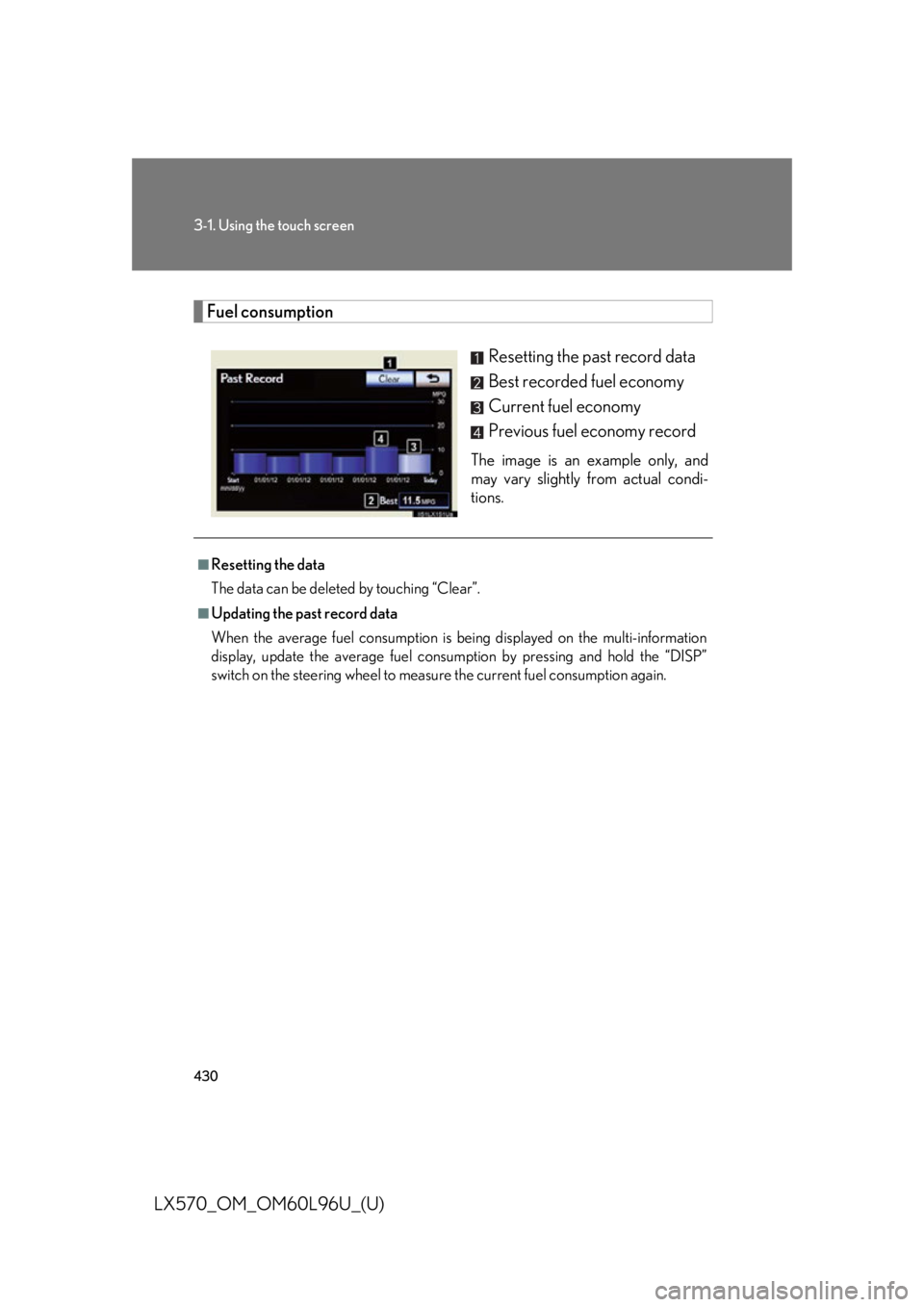
LX570_OM_OM60L96U_(U) Fuel consumption
Resetting the past record data
Best recorded fuel economy
Current fuel economy
Previous fuel economy record The image is an example only, and
may vary slightly from actual condi-
tions.■
Resetting the data
The data can be deleted by touching “Clear”. ■
Updating the past record data
When the average fuel consumption is being displayed on the multi-information
display, update the average fuel consum ption by pressing and hold the “DISP”
switch on the steering wheel to measure the current fuel consumption again.
Page 442 of 960

4423-1. Using the touch screen
LX570_OM_OM60L96U_(U) Mobile Assistant
Press and hold the off hook switch
until you hear the beeps that indi-
cate the system is listening.
The Mobile Assistant can be used
only when the neighboring screen
is displayed. To cancel the Mobile Assistant,
touch “Cancel”, or press and hold
the off hook switch.
To restart the Mobile Assistant for
additional commands, press the off
hook switch. Mobile Assistant can
only be restarted after the system
responds to a voice command.
After some phone and music com-
mands, the Mobile Assistant fea-
ture will automatically end to
complete the requested action.The Mobile Assistant feature on this sy stem allows the activation of Apple’s
Siri ®
Eyes Free mode via the steering wheel switches. To operate the
Mobile Assistant, a compatible cellul ar phone must be registered and con-
nected to this system via Bluetooth ®
. ( P. 625)
For details of the navigation syst em, refer to the “Navigation System
Owner’s Manual”. STEP 1
STEP 2
Page 443 of 960
4433-1. Using the touch screen
3
Interior features
LX570_OM_OM60L96U_(U) ■
Adjusting the volume
The volume of the Mobile Assistant can be adjusted using the “PWR/VOL” knob
or steering wheel volume switches. The Mobile Assistant and phone call volumes
are synchronized. ■
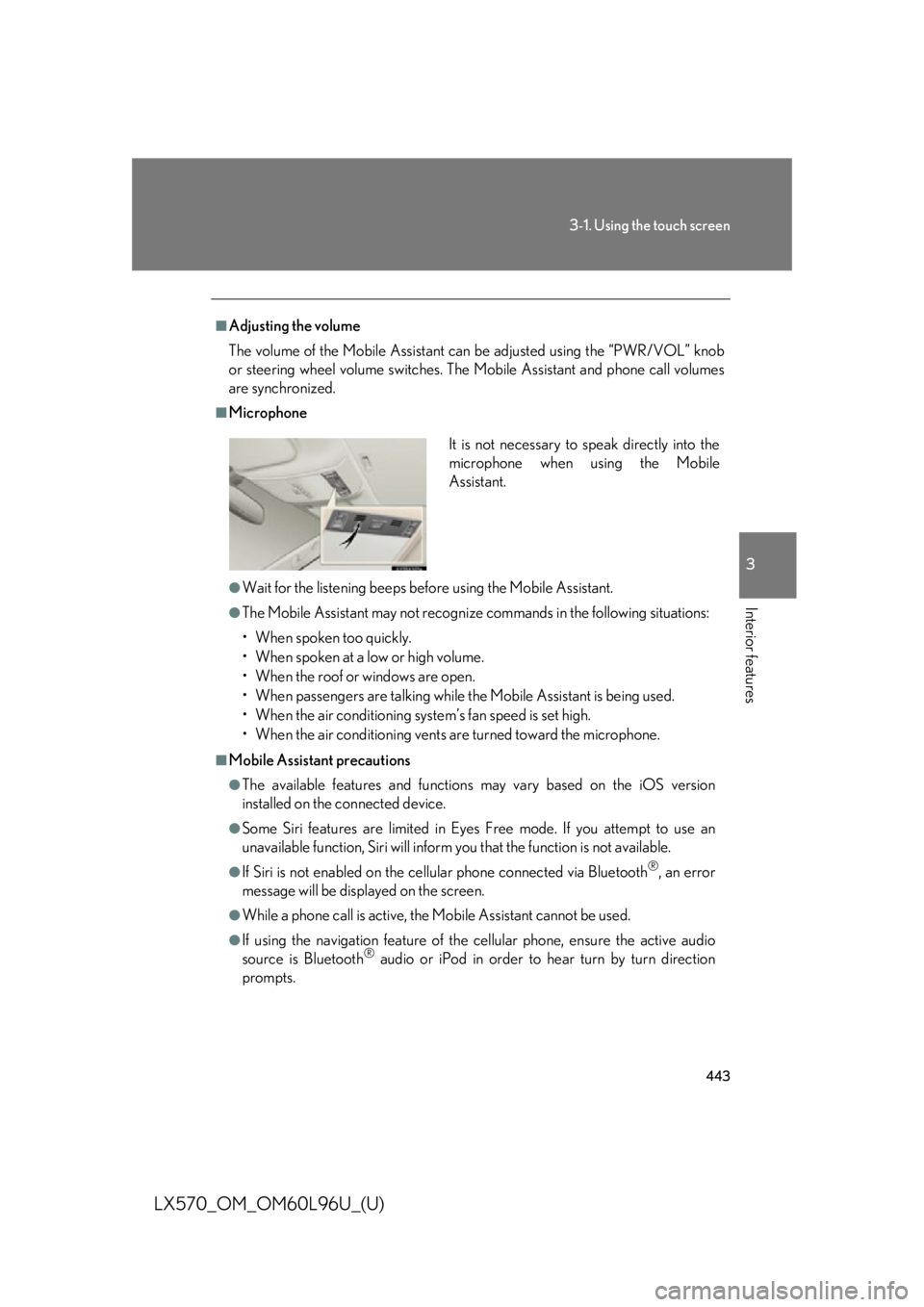
Microphone
●
Wait for the listening beeps befo re using the Mobile Assistant.●
The Mobile Assistant may not recognize commands in the following situations:
• When spoken too quickly.
• When spoken at a low or high volume.
• When the roof or windows are open.
• When passengers ar e talking while the Mobile Assistant is being used.
• When the air conditioning syst em’s fan speed is set high.
• When the air conditioning vents ar e turned toward the microphone.■
Mobile Assistant precautions ●
The available features and functions may vary based on the iOS version
installed on the connected device.●
Some Siri features are limited in Eyes Free mode. If you attempt to use an
unavailable function, Siri will inform you that the function is not available. ●
If Siri is not enabled on the cellular phone connected via Bluetooth ®
, an error
message will be displayed on the screen. ●
While a phone call is active, the Mobile Assistant cannot be used. ●
If using the navigation feature of the cellular phone, ensure the active audio
source is Bluetooth ®
audio or iPod in order to hear turn by turn direction
prompts. It is not necessary to speak directly into the
microphone when using the Mobile
Assistant.