reset LEXUS LX570 2015 User Guide
[x] Cancel search | Manufacturer: LEXUS, Model Year: 2015, Model line: LX570, Model: LEXUS LX570 2015Pages: 960, PDF Size: 11.33 MB
Page 488 of 960
4883-3. Using the audio system
LX570_OM_OM60L96U_(U) Selecting a station (excluding XM ®
Satellite Radio)
■ Seek tuning
Press and hold “ ” or “ ” on the “PRST•TRACK” button.
■ Manual tuning
Turn the “TUNE•SCROLL” knob.
■ Preset stations
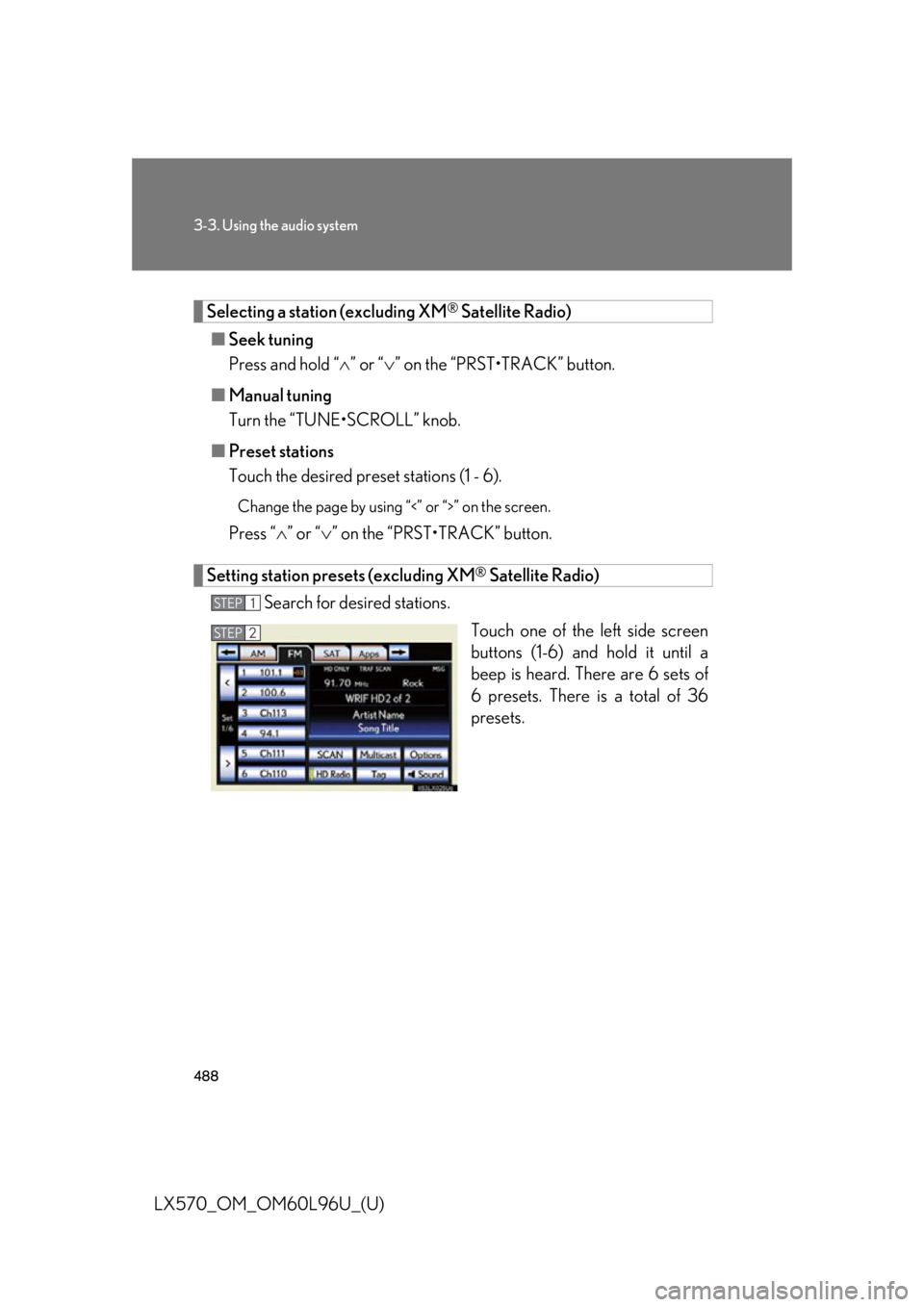
Touch the desired preset stations (1 - 6). Change the page by using “<” or “>” on the screen.
Press “ ” or “ ” on the “PRST•TRACK” button.
Setting station presets (excluding XM ®
Satellite Radio)
Search for desired stations.
Touch one of the left side screen
buttons (1-6) and hold it until a
beep is heard. There are 6 sets of
6 presets. There is a total of 36
presets.STEP 1
STEP 2
Page 497 of 960

4973-3. Using the audio system
3
Interior features
LX570_OM_OM60L96U_(U) Experience Cause Action
Audio mute delay
when selecting an
HD2/HD3 multicast
channel preset. The digital multicast
content is not available
until HD Radio™
broadcast can be
decoded and make the
audio available. This
takes up to 7 seconds. This is normal behavior,
wait for the audio to
become available.
Text information does
not match the present
song audio. Data service issue at
the radio broadcaster. Broadcaster should be
notified. Complete the
form: www.ibiquity.com/
automotive/
report_radio_station_
experiences.
No text information
shown for the present
selected frequency. Data service issue by
the radio broadcaster. Broadcaster should be
notified. Complete the
form: www.ibiquity.com/
automotive/
report_radio_station_
experiences.
Page 498 of 960
4983-3. Using the audio system
LX570_OM_OM60L96U_(U) XM ®
Satellite Radio
■ Receiving XM ®
Satellite Radio
Press the “AUDIO” button.
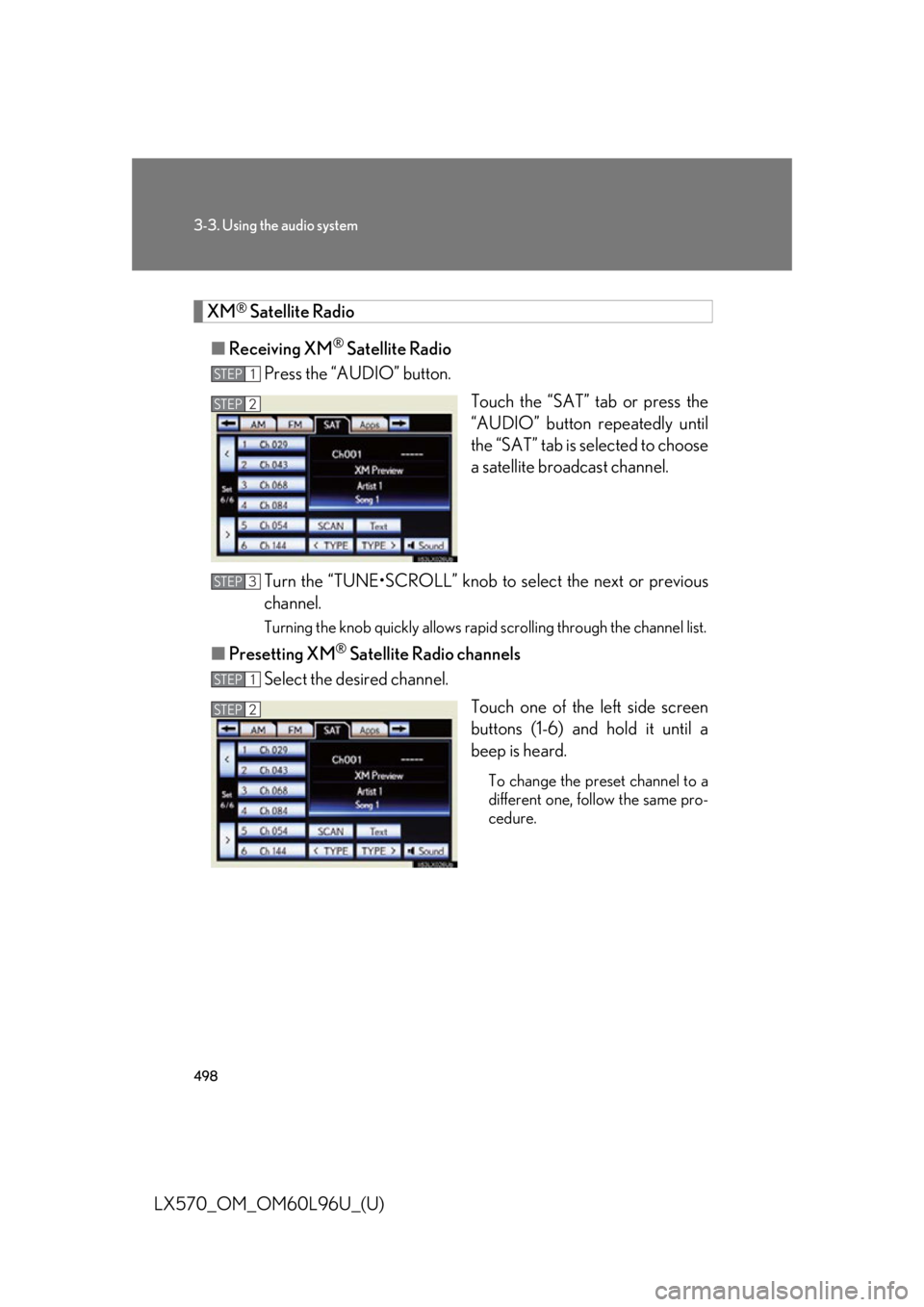
Touch the “SAT” tab or press the
“AUDIO” button repeatedly until
the “SAT” tab is selected to choose
a satellite broadcast channel.
Turn the “TUNE•SCROLL” knob to select the next or previous
channel. Turning the knob quickly allows rapid scrolling through the channel list.
■ Presetting XM ®
Satellite Radio channels
Select the desired channel.
Touch one of the left side screen
buttons (1-6) and hold it until a
beep is heard. To change the preset channel to a
different one, follow the same pro-
cedure.STEP 1
STEP 2STEP 2
STEP 3
STEP 1
STEP 2STEP 2
Page 501 of 960
5013-3. Using the audio system
3
Interior features
LX570_OM_OM60L96U_(U) Silencing the sound
Press .
Press the button again to turn the system back on. ■
If you touch
The display returns to the previous screen. ■
When the battery is disconnected
All preset stations are erased. ■
Reception sensitivity ●
Cargo loaded on the roof luggage ca rrier, especially metal objects, may
adversely affect the reception of XM ®
Satellite Radio.●
Maintaining perfect radio reception at all times is difficult due to the continually
changing position of the antenna, differ ences in signal stre ngth and surrounding
objects, such as trains, transmitters, etc. ●
The radio antenna is mounted inside the rear quarter window. To maintain clear
radio reception, do not attach metallic window tinting or other metallic objects
to the antenna wire mounted inside the rear quarter window.
Page 513 of 960
5133-3. Using the audio system
3
Interior features
LX570_OM_OM60L96U_(U) Random playback
Audio CD
Touch “RAND” on the screen. “RAND” appears on the screen.
To cancel, touch “RAND” again.
MP3/WMA disc
■ Playing files from a particular folder in random order
Each time “RAND” is touched, the mode changes as follows:
random (1 folder random) folder random (1 disc random) off
■ Playing all the files on a disc in random order
Touch “RAND” repeatedly until “F LD.RAND” appears on the screen.To cancel, touch “RAND” again.
When a file is skipped or the system is inoperative, touch “RAND” to reset.
Page 577 of 960
5773-3. Using the audio system
3
Interior features
LX570_OM_OM60L96U_(U) Turning on the power
Press the “MODE” switch when the audio system is turned off.
Changing the audio source
Press the “MODE” switch to select an audio mode.
Each press changes the mode sequenti ally if the desired mode is ready to
use.
Adjusting the volume
Press the “+” switch to increase the volume and the “-” sw itch to decrease
the volume.
Silencing a sound or pause the current operation
Press and hold the “MODE” switch. To cancel, press and hold
the “MODE” switch again.
Selecting the preset station/channel (radio)
Press the “MODE” switch to select the radio mode.
Press the “ ” or “ ” switch to select.
Seeking a radio station/channel
Press the “MODE” switch to select the radio mode.
Press and hold the “ ” or “ ” switch until you hear a beep.To cancel, press either switch. STEP 1
STEP 2
STEP 1
STEP 2
Page 587 of 960
5873-4. Using the rear seat entertainment system
3
Interior features
LX570_OM_OM60L96U_(U) Using the radio
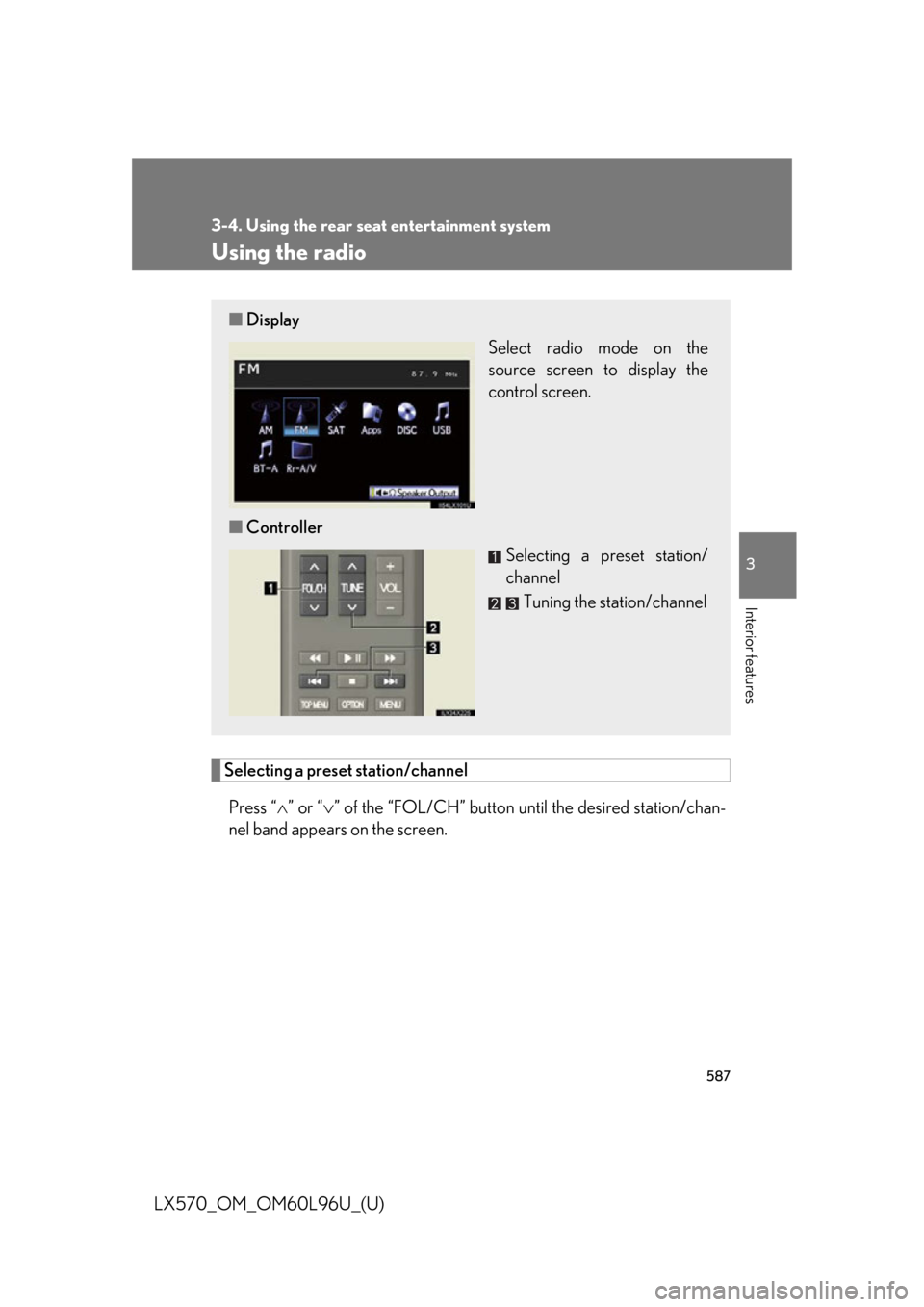
Selecting a preset station/channel
Press “ ” or “ ” of the “FOL/CH” button until the desired station/chan-
nel band appears on the screen.■ Display
Select radio mode on the
source screen to display the
control screen.
■ Controller
Selecting a preset station/
channel
Tuning the station/channel
Page 743 of 960

7414-2. Maintenance
4
Maintenance and care
LX570_OM_OM60L96U_(U) ■
Repair and replacement
It is recommended that genuine Lexus part s be used for repair to ensure perfor-
mance of each system. If no n-Lexus parts are used in replacement or if a repair
shop other than a Lexus dealer performs repairs, confirm the warranty coverage.■
Resetting the message indicating main tenance is required (U.S.A. only)
After the required maintena nce is performed according to the maintenance sched-
ule, please reset the message.
To reset the data, follow th e procedures described below:
Switch the display to the trip meter A when the engine is running.
( P. 192)
Turn the “ENGINE START STOP” switch OFF.
While pressing the trip meter reset button, set the “ENGINE START
STOP” switch to IGNITION ON mo de (but do not start the engine
because otherwise the reset mode will be canceled). Continue to press
and hold the button until the multi-in formation display indicates that the
reset is complete.■
Allow inspection and repairs to be performed by a Lexus dealer●
Lexus technicians are well-trained specialists and are kept up to date with the
latest service information. They are well informed about the operations of all
systems on your vehicle. ●
Keep a copy of the repair order. It proves that the maintenance that has been
performed is under warranty coverage. If any problem should arise while your
vehicle is under warranty, your Lexus dealer will promptly take care of it.STEP 1
STEP 2
STEP 3
Page 770 of 960

7684-3. Do-it-yourself maintenance
LX570_OM_OM60L96U_(U) ■ How to initialize the tire pressure warning system
Park the vehicle in safe plac e and turn the “ENGINE START
STOP” switch to OFF. While the vehicle is moving, initialization is not performed.
Adjust the tire inflation pressure to the specified cold tire inflation
pressure level. ( P. 895)Make sure to adjust the tire pressure to the specified cold tire inflation
pressure level. The tire pressure warning system will operate based on
this pressure level.
Turn the “ENGINE START STOP ” switch to IGNITION ON
mode.
Push and hold the tire pressure
warning reset switch until the tire
pressure warning light blinks
slowly 3 times and a message
appears on the multi-information
display.
Wait for a few minutes with th e IGNITION ON mode, and then
turn the “ENGINE START STOP” switch to OFF.
Registering ID codes
The tire pressure warning valve and tra nsmitter is equipped with a unique
ID code. When replacing a tire pre ssure warning valve and transmitter, it
is necessary to register the ID code of tire pressure warning valve and
transmitter. Have the ID code registered by your Lexus dealer.STEP 1
STEP 2
STEP 3
STEP 4
STEP 5
Page 773 of 960

7714-3. Do-it-yourself maintenance
4
Maintenance and care
LX570_OM_OM60L96U_(U) ■
Initializing the tire pressure warning system
Initialize the tire pressure warning system with the tire inflation pressure adjusted to
the specified level. ■
If you push the tire pressure warning reset switch accidentally
If initialization is performed, adjust the ti re inflation pressure to the specified level
and initialize the tire pre ssure warning system again.■
The initialization operation ●
Make sure to carry out initialization afte r adjusting the tire inflation pressure.
Also, make sure the tires are cold before carrying out initialization or tire infla-
tion pressure adjustment. ●
If you have accidentally turned the “ENGINE START STOP” switch off during
initialization, it is not necessary to pre ss the reset switch again as initialization
will restart automatically when the “ENGINE START STOP” switch has been
turned to IGNITION ON mode for the next time. ●
If you accidentally press the reset switch when initialization is not necessary,
adjust the tire inflation pressure to th e specified level when the tires are cold,
and conduct initialization again.■
When the initialization of the tire pressure warning system has failed
Initialization can be completed in a few minutes. However, in the following cases,
the settings have not been recorded and the system will not operate properly. If
repeated attempts to record tire inflation pressure se ttings are unsu ccessful, have
the vehicle inspected by your Lexus dealer. ●
When operating the tire pressure warnin g reset switch, the tire pressure warn-
ing light does not blink 3 times and the setting message does not appear on the
multi-information display. ●
After carrying out the initialization proc edure, the tire pressure warning light
blinks for 1 minute then stays on after driving for about 20 minutes.■
Routine tire inflation pressure checks
The tire pressure warning sy stem does not replace rout ine tire inflation pressure
checks. Make sure to check tire inflation pressure as part of your routine of daily
vehicle checks.