audio LEXUS LX570 2016 Owners Manual
[x] Cancel search | Manufacturer: LEXUS, Model Year: 2016, Model line: LX570, Model: LEXUS LX570 2016Pages: 632, PDF Size: 10.34 MB
Page 6 of 632

TABLE OF CONTENTS
6
LX570_OM_OM60N01U_(U) 8-1. Specifications
Maintenance data
(fuel, oil level, etc.) .................. 562
Fuel information............................ 571
Tire information............................ 574
8-2. Customization
Customizable features ............585
8-3. Initialization
Items to initialize ......................... 598
Reporting safety defects
for U.S. owners.....................................600
Seat belt instructions
for Canadian owners
(in French) ............................................... 601
SRS airbag instructions
for Canadian owners
(in French) .............................................. 603 What to do if...
(Troubleshooting) ................................. 612
Alphabetical index .................................. 6168
Vehicle specifications
9
For owners Index
For vehicles with a navigation system or a multimedia system, refer to the
“NAVIGATION SYSTEM OWNER’S MANUAL” for information regarding
the equipment listed below.
• Navigation system
• Audio/video system
• Rear seat entertainment system
• Hands-free system (for cellular phone)
Page 17 of 632

17Pictorial index
LX570_OM_OM60N01U_(U) Multi-information display . . . . . . . . . . . . . . . . . . . . . . . . . . . . . . . . . . . . . . . . . . . . . P. 91 Display . . . . . . . . . . . . . . . . . . . . . . . . . . . . . . . . . . . . . . . . . . . . . . . . . . . . . . . . . . . . . . . . . . . P. 91
When the warning messages are displayed . . . . . . . . . . . . . . . . . . . . . . . . . . . . .P. 532
Parking brake . . . . . . . . . . . . . . . . . . . . . . . . . . . . . . . . . . . . . . . . . . . . . . . . . . . . . . . . . P . 217Applying/releasing. . . . . . . . . . . . . . . . . . . . . . . . . . . . . . . . . . . . . . . . . . . . . . . . . . . . . . P . 217
Precautions against winter season . . . . . . . . . . . . . . . . . . . . . . . . . . . . . . . . . . . . . P. 385
Warning buzzer/message . . . . . . . . . . . . . . . . . . . . . . . . . . . . . . . . . . . . . . . . . .P. 219, 532
Turn signal lever. . . . . . . . . . . . . . . . . . . . . . . . . . . . . . . . . . . . . . . . . . . . . . . . . . . . . . .P . 216
Headlight switch . . . . . . . . . . . . . . . . . . . . . . . . . . . . . . . . . . . . . . . . . . . . . . . . . . . . . P. 220 Headlights/parking lights/tail lights/daytime ru nning lights . . . . . . . . . . . . . .P. 220
Fog lights . . . . . . . . . . . . . . . . . . . . . . . . . . . . . . . . . . . . . . . . . . . . . . . . . . . . . . . . . . . . . . .P. 229
Windshield wiper and washer switch. . . . . . . . . . . . . . . . . . . . . . . . . . . . . . . . P. 231
Rear window wiper and washer switch. . . . . . . . . . . . . . . . . . . . . . . . . . . . . . P. 235 Usage . . . . . . . . . . . . . . . . . . . . . . . . . . . . . . . . . . . . . . . . . . . . . . . . . . . . . . . . . . . . . P. 231, 235
Adding washer fluid . . . . . . . . . . . . . . . . . . . . . . . . . . . . . . . . . . . . . . . . . . . . . . . . . . . P. 48 5
Warning messages . . . . . . . . . . . . . . . . . . . . . . . . . . . . . . . . . . . . . . . . . . . . . . . . . . . . .P. 53 2
Emergency flasher switch . . . . . . . . . . . . . . . . . . . . . . . . . . . . . . . . . . . . . . . . . . . .P. 514
Fuel filler door opener . . . . . . . . . . . . . . . . . . . . . . . . . . . . . . . . . . . . . . . . . . . . . . . P. 240
Hood lock release lever . . . . . . . . . . . . . . . . . . . . . . . . . . . . . . . . . . . . . . . . . . . . . P. 472
Tilt and telescopic steering control switch . . . . . . . . . . . . . . . . . . . . . . . . . . P. 158Adjustment . . . . . . . . . . . . . . . . . . . . . . . . . . . . . . . . . . . . . . . . . . . . . . . . . . . . . . . . . . . . . P. 158
Driving position memory . . . . . . . . . . . . . . . . . . . . . . . . . . . . . . . . . . . . . . . . . . . . . . . . P. 151
Front air conditioning system . . . . . . . . . . . . . . . . . . . . . . . . . . . . . . . . . . . . . . . P. 401 Usage . . . . . . . . . . . . . . . . . . . . . . . . . . . . . . . . . . . . . . . . . . . . . . . . . . . . . . . . . . . . . . . . . . P. 401
Rear window defogger . . . . . . . . . . . . . . . . . . . . . . . . . . . . . . . . . . . . . . . . . . . . . . . . .P. 407
Audio system
*Hands-free system
*
* : Refer to “NAVIGATION SYSTEM OWNER’S MANUAL”.4
5
6
7
8
9
10
11
12
13
Page 20 of 632
20 Pictorial index
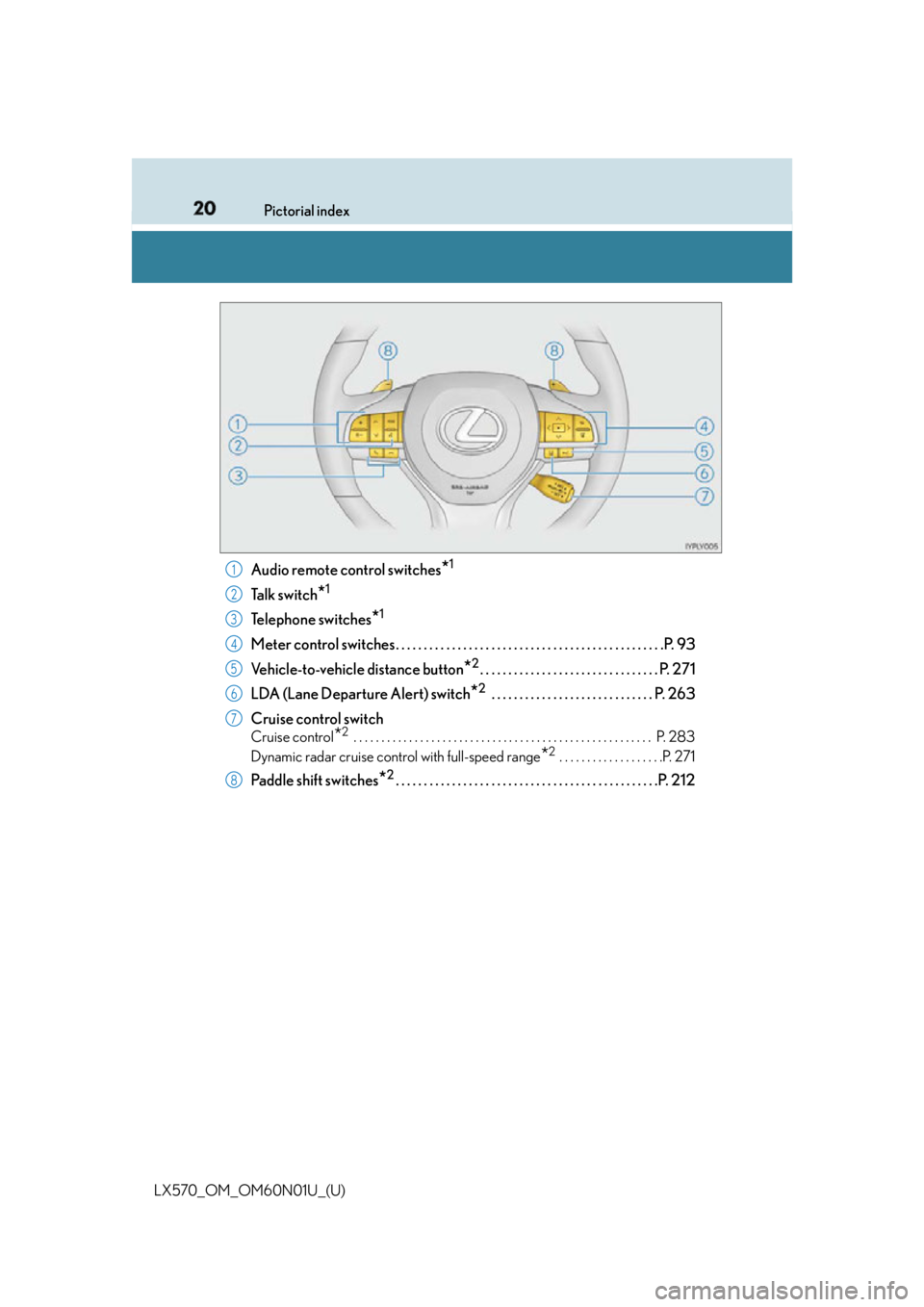
LX570_OM_OM60N01U_(U) Audio remote control switches
* 1
Ta l k s w i t c h
* 1
Telephone switches
* 1
Meter control switches. . . . . . . . . . . . . . . . . . . . . . . . . . . . . . . . . . . . . . . . . . . . . . . .P. 93
Vehicle-to-vehicle distance button
* 2
. . . . . . . . . . . . . . . . . . . . . . . . . . . . . . . . P. 271
LDA (Lane Departure Alert) switch
* 2
. . . . . . . . . . . . . . . . . . . . . . . . . . . . . P. 263
Cruise control switch Cruise control
* 2
. . . . . . . . . . . . . . . . . . . . . . . . . . . . . . . . . . . . . . . . . . . . . . . . . . . . . . P. 283
Dynamic radar cruise control with full-speed range
* 2
. . . . . . . . . . . . . . . . . . .P. 271
Paddle shift switches
* 2
. . . . . . . . . . . . . . . . . . . . . . . . . . . . . . . . . . . . . . . . . . . . . . .P. 2121
2
3
4
5
6
7
8
Page 91 of 632
91
LX570_OM_OM60N01U_(U) 2. Instrument cluster
2
Instrument cluster
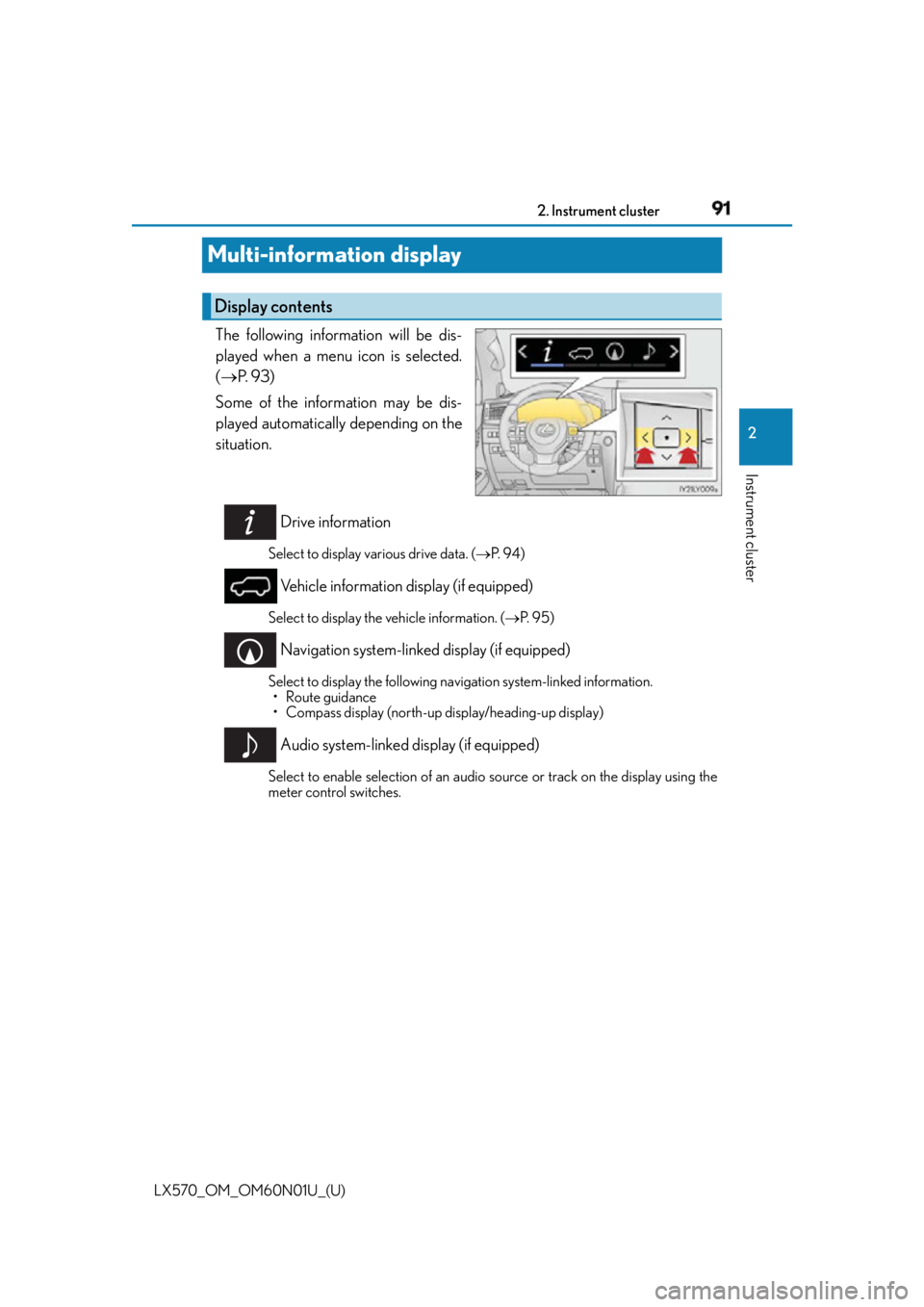
Multi-information display The following information will be dis-
played when a menu icon is selected.
( P. 9 3 )
Some of the information may be dis-
played automatically depending on the
situation.
Drive information Select to display various drive data. ( P. 9 4 )
Vehicle information display (if equipped) Select to display the vehicle information. ( P. 9 5 )
Navigation system-linked display (if equipped) Select to display the following na vigation system-linked information.
• Route guidance
• Compass display (north-up display/heading-up display)
Audio system-linked display (if equipped) Select to enable selection of an audio source or track on the display using the
meter control switches.Display contents
Page 100 of 632
100
LX570_OM_OM60N01U_(U) 2. Instrument cluster
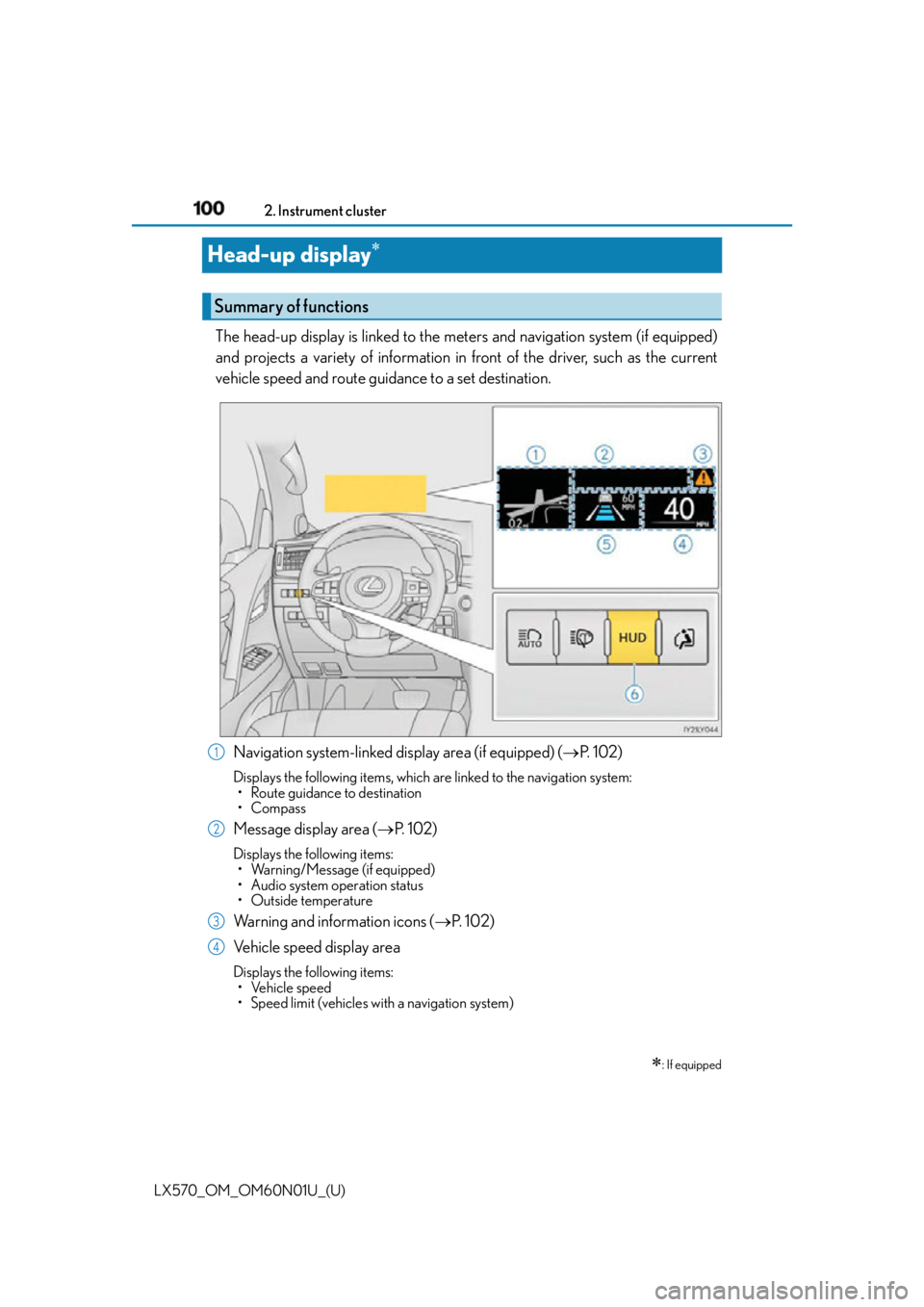
Head-up display The head-up display is linked to the meters and navigation system (if equipped)
and projects a variety of information in front of the driver, such as the current
vehicle speed and route guidance to a set destination.
Navigation system-linked display area (if equipped) ( P. 1 0 2 )Displays the following items, which ar e linked to the navigation system:
• Route guidance to destination
•Compass
Message display area ( P. 1 0 2 )Displays the following items:
• Warning/Message (if equipped)
• Audio system operation status
•Outside temperature
Warning and information icons ( P. 1 0 2 )
Vehicle speed display area Displays the following items:
• Vehicle speed
• Speed limit (vehicles wi th a navigation system)
: If equippedSummary of functions
1
2
3
4
Page 101 of 632
LX570_OM_OM60N01U_(U) 1012. Instrument cluster
2
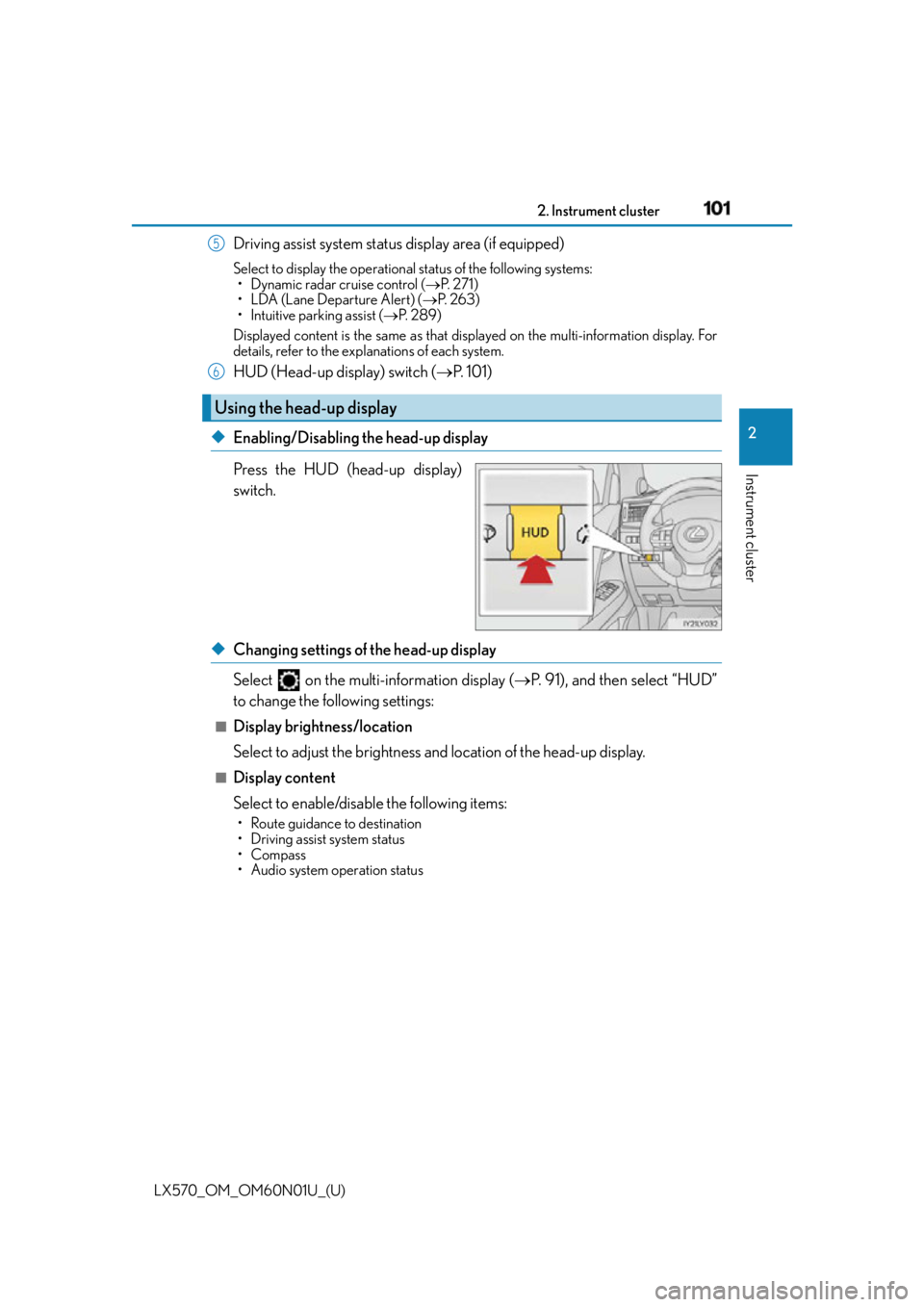
Instrument cluster Driving assist system status display area (if equipped) Select to display the operational status of the following systems:
• Dynamic radar cruise control ( P. 2 7 1 )
• LDA (Lane Departure Alert) ( P. 2 6 3 )
• Intuitive parking assist ( P. 2 8 9 )
Displayed content is the same as that disp layed on the multi-information display. For
details, refer to the explanations of each system.
HUD (Head-up display) switch ( P. 1 0 1 )
◆ Enabling/Disabling the head-up display
Press the HUD (head-up display)
switch.
◆ Changing settings of the head-up display
Select on the multi-information display ( P. 91), and then select “HUD”
to change the following settings: ■
Display brightness/location
Select to adjust the brightness and location of the head-up display. ■
Display content
Select to enable/disable the following items: • Route guidance to destination
• Driving assist system status
•Compass
• Audio system operation statusUsing the head-up display 5
6
Page 102 of 632
102
LX570_OM_OM60N01U_(U) 2. Instrument cluster
Displays the following multi-in formation display linked icons:
: Master warning icon
Displayed when a warning message is displayed on the multi-information
display. ( P. 5 3 2 )
: Information icon
Displayed when a suggestion/advice po p-up display is displayed on the
multi-information display. ( P. 9 1 )
Displays the following items in the appropriate situation: ■
Warning/Message (if equipped)
Displays the following system warning/messages: • Pre-collision warning (pre-collision system)
• Notification message (Dynamic radar cruise control)■
Audio system operation status
Displayed when the audio system is operated. ■
Outside temperature
Displayed in the following situations: • When the engine switch is turned to IGNITION ON mode
• When the low outside temperature indicator is flashing
Displayed content is the same as that di splayed on the multi-information display.
( P. 8 8 )
Displays the following items which are linked to the navigation system: ■
Route guidance to destination
Displayed when the navigation system is performing route guidance. When
approaching an intersection, an arrow will be displayed to indicate the sug-
gested direction of travel. ■
Compass
Displays the direction of travel.Warning and information icons
Message display area
Navigation system-linked display area (if equipped)
Page 113 of 632

LX570_OM_OM60N01U_(U) 1133-1. Key information
3
Operation of each component ■
Replacing the key battery
P. 5 0 3 ■
Confirmation of the registered key number
The number of keys already registered to the vehicle can be confirmed. Ask your Lexus
dealer.
NOTICE ■
To prevent key damage ●
Do not drop the keys, subject them to strong shocks or bend them. ●
Do not expose the keys to high temp eratures for long periods of time.●
Do not get the keys wet or wash them in an ultrasonic washer etc. ●
Do not attach metallic or magnetic materials to the keys or place the keys close to
such materials. ●
Do not disassemble the keys. ●
Do not place the keys near objects that pr oduce magnetic fields, such as TVs, audio
systems and induction cookers. ●
Do not place the keys near medical electrical equipment such as low-frequency ther-
apy equipment or microwave therapy equipm ent, and do not receive medical atten-
tion with the keys on your person.
Page 135 of 632

LX570_OM_OM60N01U_(U) 1353-2. Opening, closing and locking the doors
3
Operation of each component ●
When carrying the electronic key together with the following devices that emit radio
waves
• Another vehicle’s electronic key or a wireless key that emits radio waves
• Personal computers or person al digital assistants (PDAs)
• Digital audio players
• Portable game systems ●
If window tint with a metallic content or me tallic objects are attached to the rear win-
dow ●
When the electronic key is placed near a battery charger or electronic devices ■
Note for the entry function ●
Even when the electronic key is within the effective range (detection areas), the system
may not operate properly in the following cases:
• The electronic key is too close to the window or outside door handle, near the
ground, or in a high place when the doors are locked or unlocked.
• The electronic key is on the instrument panel or floor, or in the door pockets or glove
box when the engine is started or engine switch modes are changed. ●
Do not leave the electronic key on top of th e instrument panel or near the door pockets
when exiting the vehicle. Depending on the radio wave reception conditions, it may be
detected by the antenna outside the cabin and the doors will become lockable from the
outside, possibly trapping the el ectronic key inside the vehicle.●
As long as the electronic key is within the effective range, the doors may be locked or
unlocked by anyone. However, only the door s detecting the electronic key can be used
to unlock the vehicle. ●
Even if the electronic key is not inside the vehicle, it may be possible to start the engine
if the electronic key is near the window. ●
The doors may unlock or lock if a large amou nt of water splashes on the door handle,
such as in the rain or in a car wash, when th e electronic key is within the effective range.
(The doors will automatically be locked after approximately 60 seconds if the doors
are not opened and closed.) ●
Touching the door lock or unlock sensor while wearing gloves may prevent lock or
unlock operation. ●
If the wireless remote control is used to lo ck the doors when the electronic key is near
the vehicle, there is a possibility that the door may not be unlocked by the entry func-
tion. (Use the wireless remote control to unlock the doors.) ●
When the lock operation is performed using the lock sensor, recognition signals will be
shown up to two consecutive times. After this, no recognition signals will be given.●
If the door handle becomes wet while the el ectronic key is within the effective range,
the door may lock and unlock repeatedly. In this case, follow the following correction
procedures to wash the vehicle.
• Place the electronic key in a location 6 ft. (2 m) or more away from the vehicle. (Take
care to ensure that the key is not stolen.)
• Set electronic key to battery-saving mode to disable the smart access system with
push-button start. ( P. 1 3 4 )
Page 206 of 632
206
LX570_OM_OM60N01U_(U) 4-2. Driving procedures
Stop the vehicle.
Shift the shift lever to P.
Set the parking brake. ( P. 2 1 8 )If the parking brake is in automatic mode, the parking brake is set automatically when
shifting the shift lever to P. ( P. 2 1 7 )
Press the engine switch.
Release the brake pedal and check that th e display on the instrument cluster is
off.
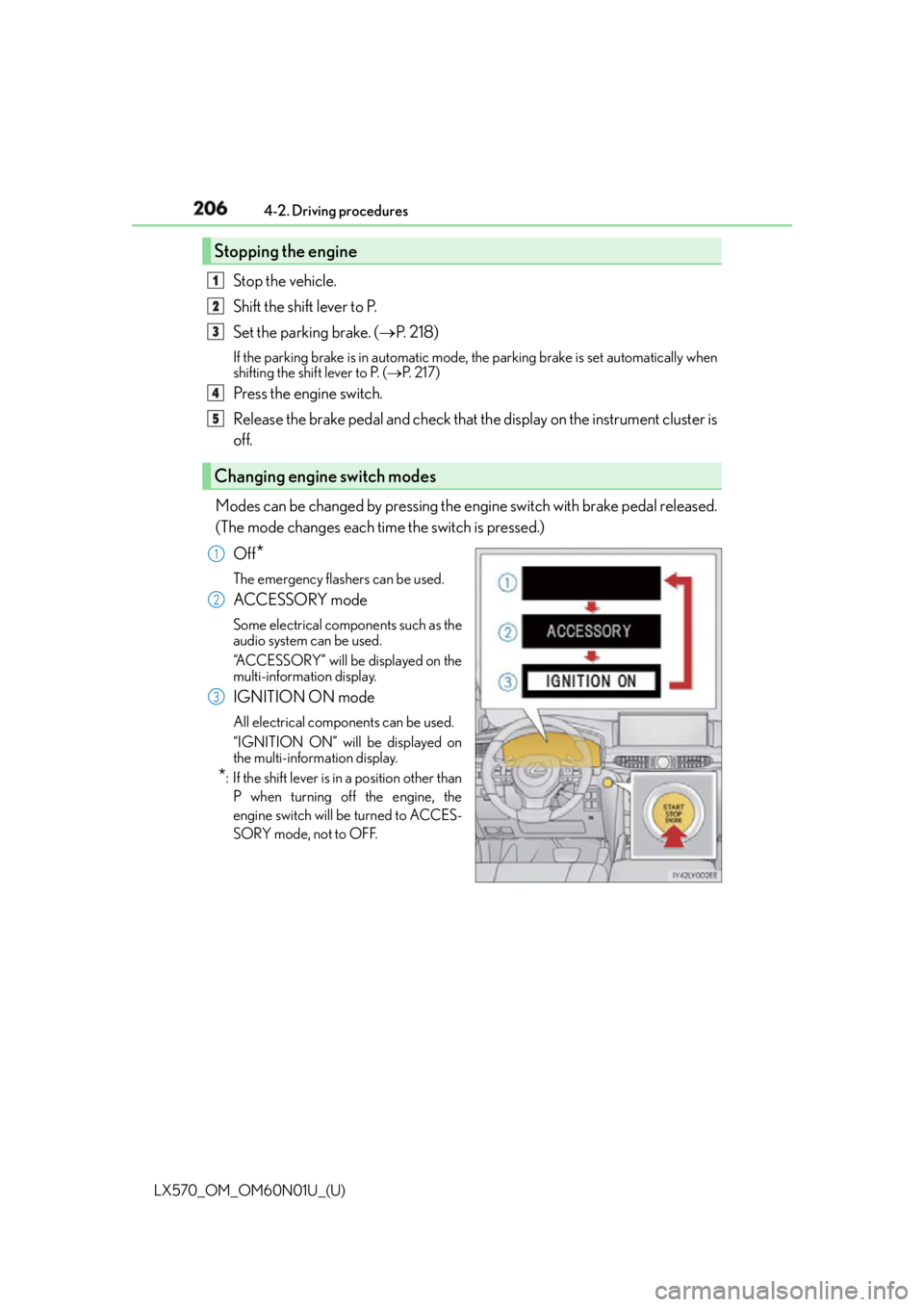
Modes can be changed by pressing the engine switch with brake pedal released.
(The mode changes each time the switch is pressed.)
Off
* The emergency flashers can be used.
ACCESSORY mode Some electrical components such as the
audio system can be used.
“ACCESSORY” will be displayed on the
multi-information display.
IGNITION ON mode All electrical components can be used.
“IGNITION ON” will be displayed on
the multi-information display.
* : If the shift lever is in a position other than
P when turning off the engine, the
engine switch will be turned to ACCES-
SORY mode, not to OFF.Stopping the engine
Changing engine switch modes 1
2
3
4
5
1
2
3